
Claude Fleet
One local page showing every Claude Code session running on your machine, so you stop cycling through terminals to find the one waiting on you. It also tells you where your sessions are quietly overwriting each other's memory.
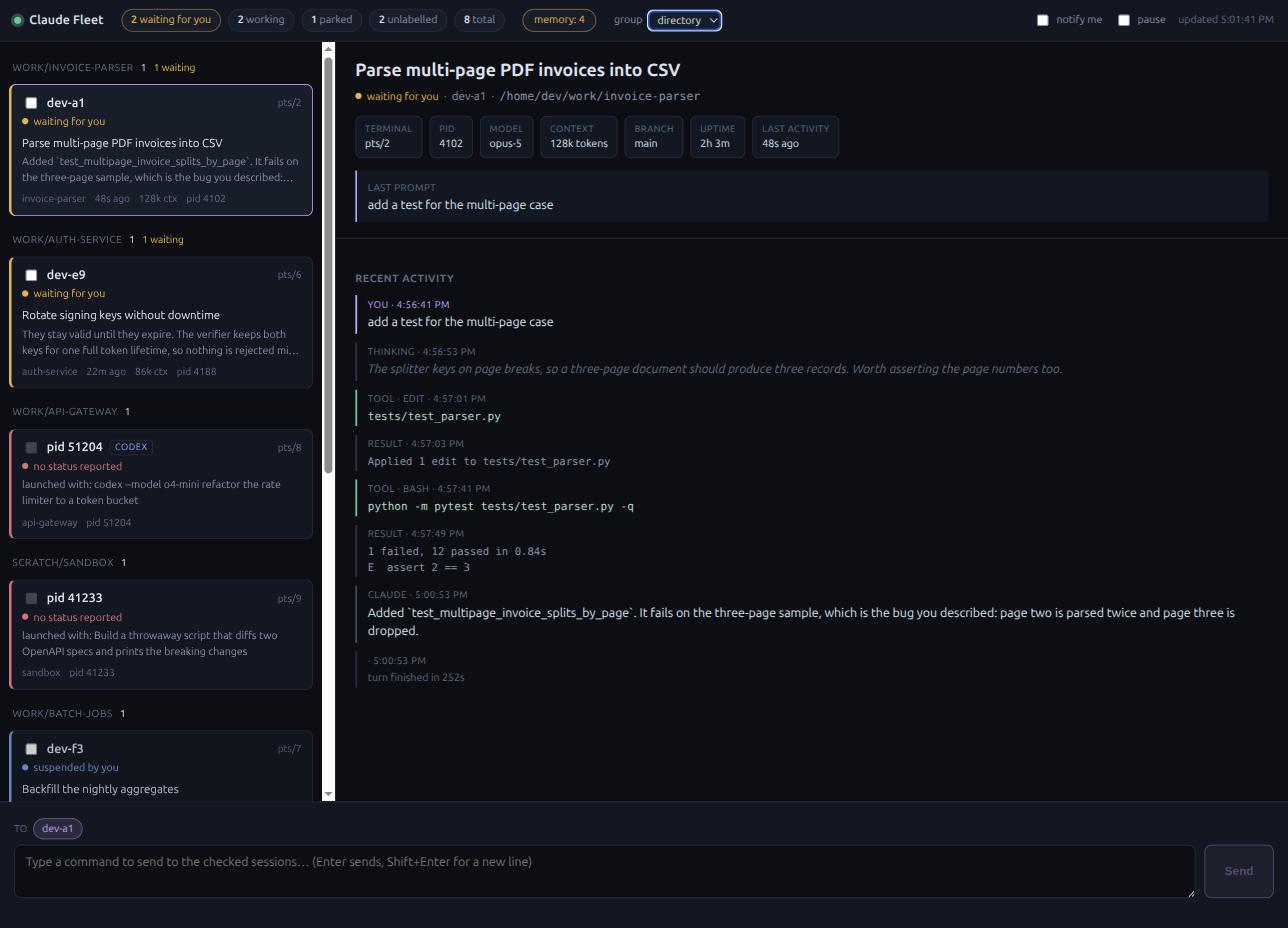
Screenshots show --demo data. Nothing real appears in them.
Python standard library only. No dependencies, no build step, no network calls.
Install and run
uvx claude-fleet                 # no install
pipx install claude-fleet        # or keep it around
claude-fleet
Try it before you trust it:
claude-fleet --demo # a fabricated fleet, reads nothing on your machine
It prints a URL carrying a one-time key. Open that URL.
Claude Fleet: http://127.0.0.1:8799/?t=Wc3l...
  read-only; --enable-send to allow sending. Tested against Claude Code 2.1.266.
What it shows
Sessions sort so the ones needing you come first.
| bucket | meaning |
|---|---|
| waiting for you | the turn finished and it is sitting at the prompt |
| working | mid-turn. "silent for Nm" usually means a permission prompt is blocking it |
| parked | someone dropped that session to a shell |
| suspended | you froze it from the dashboard; nothing is running |
| unlabelled | a live agent process that never registered a status, typically a session another session started, and every Codex session |
Each card names the terminal the session lives in, so once you know which one wants you, you know which tab to switch to. Click a card to replay its recent turns: your prompts, the replies, thinking, tool calls and truncated tool output.
Tick notify me for a browser notification the moment a session starts waiting.
Grouping. The group control in the header arranges the rail by directory, by agent
or by state. A group holding a session that wants you sorts above one that is only
working. The choice sticks across reloads.
More than one agent. Claude Code sessions get the full treatment. Codex sessions are detected at the process level only: directory, terminal, uptime and launch command. Codex stores its sessions in a format this has never been able to read, because it was not installed on the machine where it was built, so there are no Codex titles, transcripts or token counts yet. Everything else works.
Suspend and resume. With --enable-control, the detail pane gets a button that
freezes a session with SIGSTOP and wakes it with SIGCONT. Two honest caveats: a
session frozen during an API call may fail that call when it wakes, and a command it
already launched keeps running, because the signal goes to the agent and not to its
children. The pid is always taken from the dashboard's own session list and never from
the request, so the endpoint cannot be used to signal arbitrary processes. Not available
on Windows, which has no SIGSTOP.
Memory conflicts
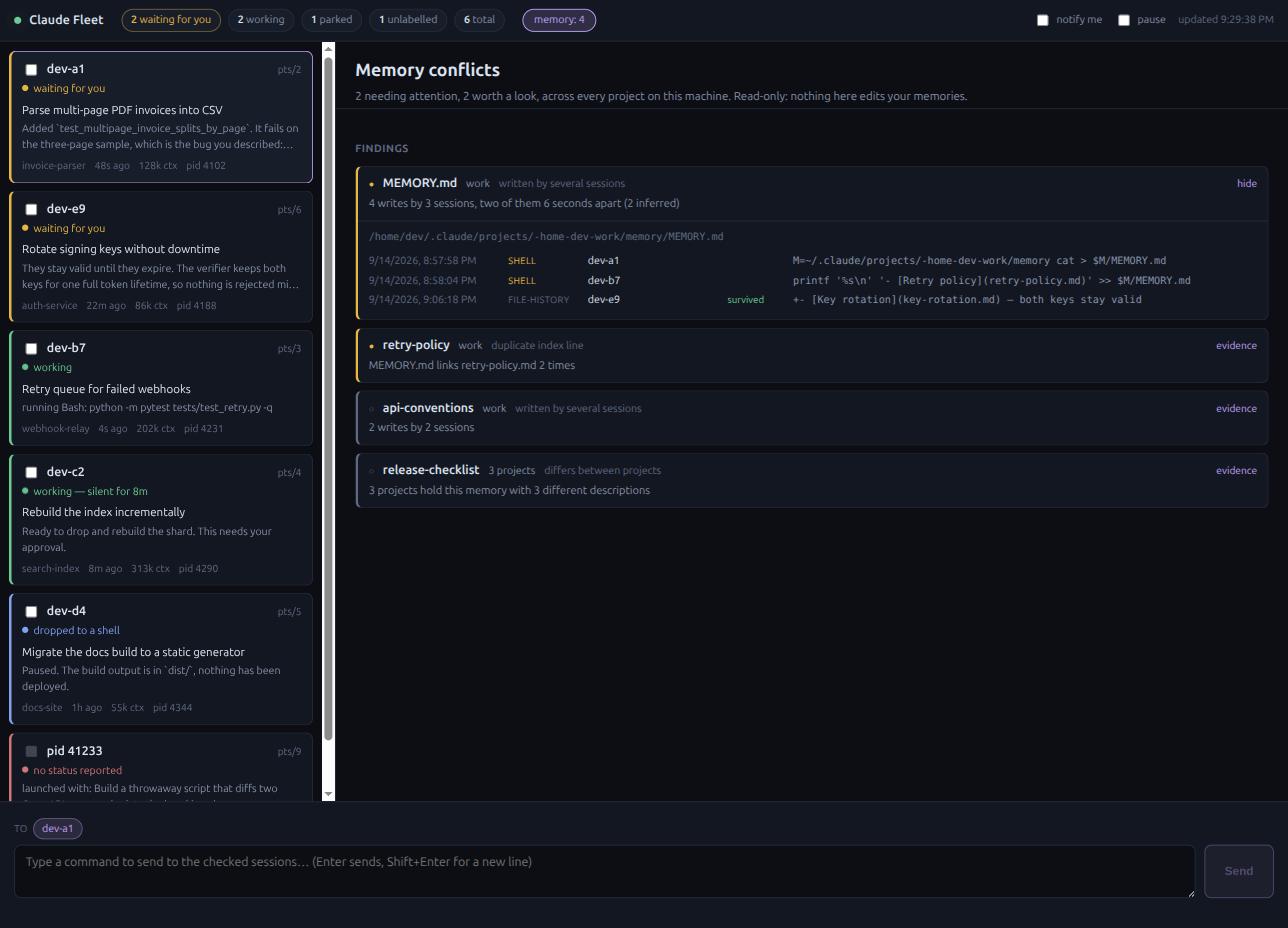
Claude Code keys a session's memory folder to the directory the session started in.
Run several sessions from one parent directory and they share a memory folder, where a
save rewrites the whole file with no locking. The last writer wins and the others are
lost silently. The memory: pill counts what it finds.
| finding | meaning |
|---|---|
| written by several sessions | one memory file, or one MEMORY.md, has more than one author |
| duplicate index line | a MEMORY.md links the same file twice |
| broken index link | a MEMORY.md links a file that is gone |
| missing from the index | a memory file no MEMORY.md line points at |
| differs between projects | the same memory name says different things in different projects |
Expanding a finding lists every write with its time, the session behind it, and whether
that version survived. Rows are labelled by evidence quality: file-history is exact,
shell is inferred from the session's own transcript, observed means the watcher saw
a change nothing else explains. The panel never writes inside a memory directory, and a
test asserts it.
Sending commands
Off by default. Start with --enable-send to turn the composer on.
Tick the checkbox on any card to add it as a recipient, or leave them all clear to address the session you are viewing. Enter sends, Shift+Enter starts a new line.
Delivery goes through Claude Code's own peer messaging. Each send spawns a one-shot
claude -p that calls SendMessage, which takes a few seconds and costs one small
Claude call. The recipient sees a short-lived relay session as the sender and starts
acting on the message immediately.
Starting a session
Off until you nominate where sessions may be started:
claude-fleet --launch-root ~/work --enable-control
The + new session button then opens a panel: pick a directory, optionally give it an
opening prompt, and it runs claude --bg there. The session starts detached and appears
in the rail on the next refresh. Attach from any terminal with the claude attach <id>
command the panel hands you.
The directory is resolved before it is checked, so .. and symlinks cannot escape a
root. A directory outside every root is refused and nothing is spawned.
Codex cannot be launched, for the same reason its transcripts cannot be read: it has never run on the machine this was built on.
This has not been run against the real claude binary. The endpoint, the allowlist
and the exact command are tested against a stub that records its argv and working
directory. Whether claude --bg starts cleanly in a directory Claude Code has not seen
before, where it may ask you to trust the folder, is unverified. The request times out
rather than hanging if that happens.
Security
The dashboard is single-user and local, and it is guarded as such.
- Every route requires the per-run token, compared with
secrets.compare_digest. - Cross-site requests are refused by
Origin, so no page you browse can drive it. - A non-loopback
Hostis refused, which blocks DNS rebinding. - The cookie it sets is
SameSite=Strict.
Two things to know if you share the machine with other people. The token is printed on
startup, so redirecting that output into a log file leaves it there. And a relayed
message is passed to claude -p as a command line argument, which means its text is
visible in ps to any other user while the send is in flight. Neither matters on a
single-user machine; on a shared one, avoid --enable-send.
Sending stays off unless you ask for it. Anyone who can already run code as your user
can read ~/.claude directly, so the dashboard adds no exposure beyond that.
Compatibility
Tested against Claude Code 2.1.266. The suite runs on Linux, macOS and Windows in CI across Python 3.10 to 3.12.
Be precise about what that proves. Linux is used daily by the author. macOS passes CI and
the code paths are exercised there, but no one has yet watched it against a real fleet.
Windows passes CI only. The runner has no Claude Code sessions on it, so the parsers
are tested and the dashboard has never been seen listing a real Windows session. Windows
also has no controlling terminal, so cards show no terminal to switch to, no way to read
another process's working directory, and no SIGSTOP, so suspend returns 501 there.
Reports from any platform are welcome.
This reads files Claude Code does not document: the session registry, transcripts and file-history backups. A Claude Code upgrade may change them and break this tool. It degrades rather than crashing when a file looks unfamiliar, but expect to update it.
Where the data comes from
~/.claude/sessions/<pid>.json— live registry: pid, session id, cwd, name, status~/.claude/projects/<slug>/<session-id>.jsonl— transcripts~/.claude/file-history/<session-id>/<sha256 of path>@vN— past versions of edited filesps, and/procon Linux orlsofon macOS — liveness, terminal, uptime
Only the tail of each transcript is parsed for the list, so files of tens of megabytes stay cheap to poll.
Endpoints
| route | purpose |
|---|---|
GET /api/sessions |
every live session with status and summary |
GET /api/session/<id> |
recent events for one session |
GET /api/memory |
memory conflict findings across all projects |
GET /api/outbox |
recent sends and their state |
POST /api/send |
{"targets": ["<session-id>"], "text": "…"} |
POST /api/suspend |
{"session_id": "…"}, needs --enable-control |
POST /api/resume |
{"session_id": "…"}, needs --enable-control |
POST /api/launch |
{"agent": "claude", "cwd": "…", "prompt": "…"}, needs --launch-root |
--demo serves fabricated payloads on all of these, starts no watchers, and refuses
to send.
Development
git clone https://github.com/harry329/claude-fleet && cd claude-fleet
python -m unittest discover -s tests -v
python -m claude_fleet --port 8799
Work here is spec driven. Each change starts as specs/NNN-slug.md, and the tests are
its acceptance criteria, one test per criterion. See specs/README.md.
Licence
MIT.
1 maintainer

Metadata
1 maintainer
Release files for claude-fleet 0.3.0
For a detailed explanation of source distributions (sdists) and built distributions (wheels), please see the package formats documentation.
Source distribution (sdist)
| File | Size | Uploaded | Provenance | |
|---|---|---|---|---|
| claude_fleet-0.3.0.tar.gz | 59.9 kB | With provenance | Details |
Built distribution (wheel)
| File | Interpreter | ABI | Platform | Reset |
|---|---|---|---|---|
| claude_fleet-0.3.0-py3-none-any.whl | Python 3 | none | any | Details |
Total release size: 102.9 kB
Release files / claude_fleet-0.3.0.tar.gz
| Download URL | claude_fleet-0.3.0.tar.gz |
|---|---|
| Size | 59.9 kB |
| Tags | Source |
|
SHA-256 checksum How to use checksums |
f749be9e7fe46b0fb1fee320ab45ce62535a57c013d6c2e231f82eb314e00781
|
|
BLAKE2b-256 checksum How to use checksums |
b76c7d43485b0a736dca272aa3700aa8bd44df263a00355f4048fd1c4633e812
|
| Upload date | |
|
Uploaded using Trusted Publishing? What is trusted publishing? |
Yes |
| Uploaded via |
twine/7.0.0 CPython/3.13.14
|
Provenance
Provenance describes where a file came from. On PyPI, provenance is shared via attestations, which provide a verifiable record of the build or publishing details. View details, limitations and caveats.


PyPI Publish Attestation
PyPI verified that this artifact, at this checksum, originated from the publisher listed below.
Signed by GitHub Actions, verified by PyPI on Sep 16, 2026.
Transparency logRelease files / claude_fleet-0.3.0-py3-none-any.whl
| Download URL | claude_fleet-0.3.0-py3-none-any.whl |
|---|---|
| Size | 43.0 kB |
| Tags | Python 3 |
|
SHA-256 checksum How to use checksums |
0a9293e1bba7072b6117582f99c59149a77e117bfc48476711f71fa71d9aa954
|
|
BLAKE2b-256 checksum How to use checksums |
f51401aff2aad253f1fd818724becc096c34e6c006bad12b990da2ee86c503a3
|
| Upload date | |
|
Uploaded using Trusted Publishing? What is trusted publishing? |
Yes |
| Uploaded via |
twine/7.0.0 CPython/3.13.14
|
Provenance
Provenance describes where a file came from. On PyPI, provenance is shared via attestations, which provide a verifiable record of the build or publishing details. View details, limitations and caveats.
PyPI Publish Attestation
PyPI verified that this artifact, at this checksum, originated from the publisher listed below.
Signed by GitHub Actions, verified by PyPI on Sep 16, 2026.
Transparency logSecurity for claude-fleet 0.3.0
Provenance
Provenance describes where a file came from. On PyPI, provenance is shared via attestations, which provide a verifiable record of the build or publishing details. View details, limitations and caveats.
Full provenance
All 2 files in this release have been uploaded with provenance metadata.
Attestation for claude_fleet-0.3.0.tar.gz
PyPI Publish Attestation
PyPI verified that this artifact, at this checksum, originated from the publisher listed below.
Signed by GitHub Actions, verified by PyPI on Sep 16, 2026.
Transparency logA note on package security
PyPI is a repository for distributing packages, not a service for auditing them. While third-party security researchers and our staff do their best to detect and remove malicious packages, PyPI cannot guarantee the quality, security or suitability of any given package.














