

An MCP server for Claude Desktop. Claude decides what needs the heavy lifting, hands it over with the right brief and files, and relays the answer back into the same chat.
Persistent sessions, real file attachments, background jobs that survive restarts, a live dashboard, and cost tracking.





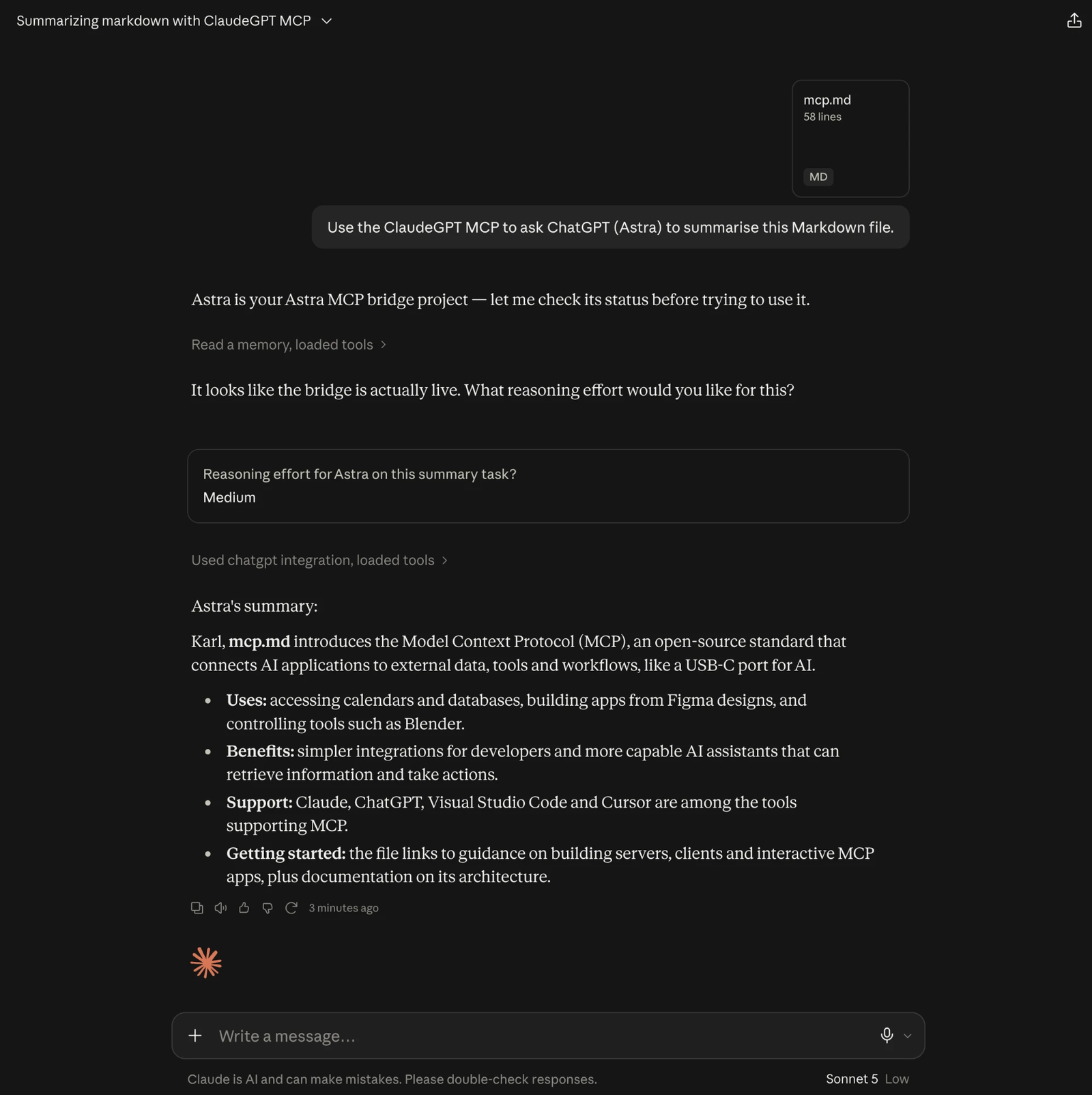
Claude stays in charge. It holds your files, skills and memory, decides what needs heavy lifting, hands that work to GPT-6 Astra with the right brief and attachments, and relays the answer. You say things like:
"Hand ~/Downloads/board-pack.pdf to ChatGPT and ask it for a summary with the key figures."
"Give the deck and the brand guidelines to ChatGPT and have it rewrite the narrative."
"Is ChatGPT done?"
Claude calls the bridge's tools; the model works in the background on OpenAI's side; short answers come straight back into the chat, long ones land on disk with a preview, and charts appear as images.
Why
- Overflow. When Claude credits run low on a heavy day, the same chat can delegate to another frontier model without copy-pasting between apps.
- Cheap orchestrator, expensive engine. Run a lighter Claude model for the conversation and still get frontier-quality output on the delegated parts.
- Whole documents, not pasted text. Decks, spreadsheets, PDFs and images reach the model as files. The tools refuse pasted contents, so nothing gets lost in extraction.
- No timeouts, no lost work. Every tool call returns in seconds. Jobs run on OpenAI's side in background mode with a stored cursor, so a restart of Claude Desktop, or of your Mac, resumes rather than restarts.
- Watch it think. The dashboard streams reasoning summaries, web searches, code execution and output as they happen.
Quick start
macOS only for now. You need uv, an OpenAI API key (a project key with a monthly budget is wise) and, for pptx and docx attachments, LibreOffice.
uv tool install claude-gpt      # from PyPI (pipx install claude-gpt works too)
claude-gpt set-key              # prompts for the key; stored privately, never echoed
claude-gpt setup --register     # checks the key and LibreOffice, registers in Claude Desktop
Restart Claude Desktop and the seven chatgpt_* tools appear. Optional: brew install --cask libreoffice.
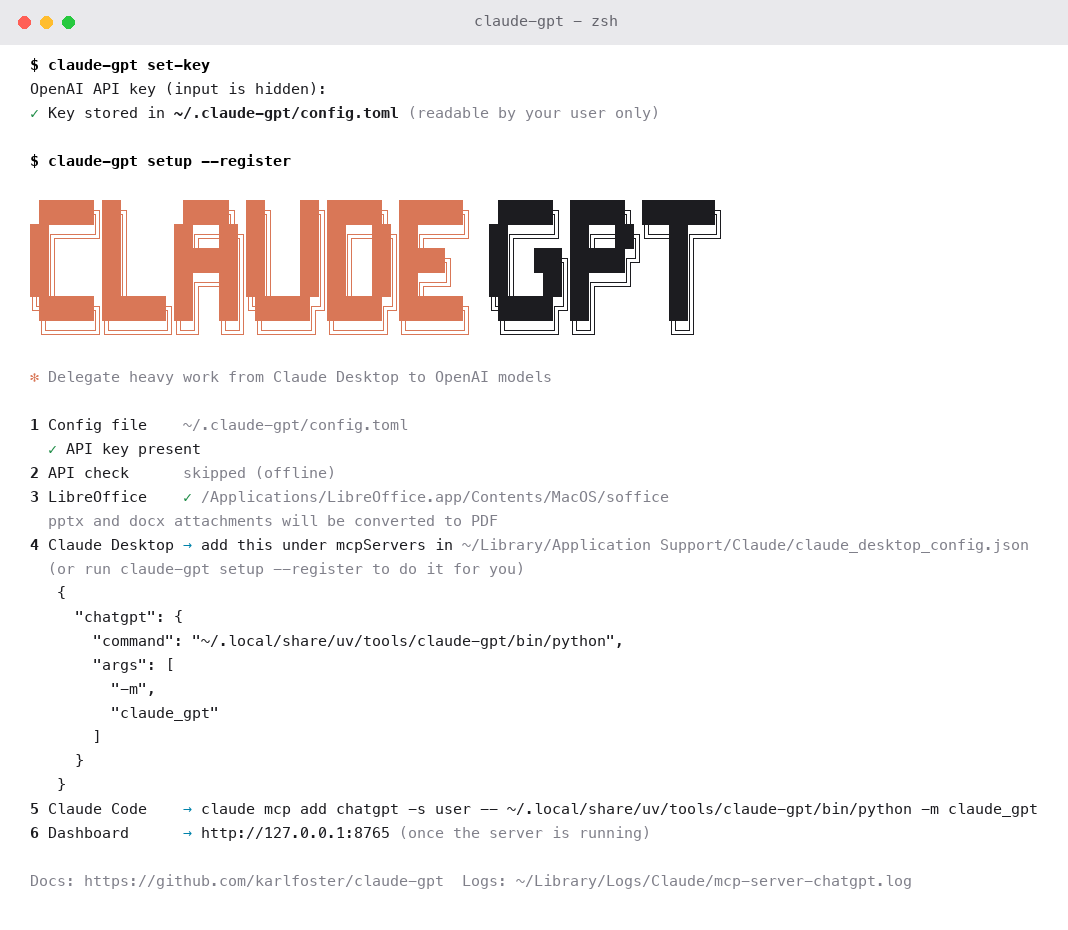
Upgrade later with uv tool upgrade claude-gpt. Working from a clone instead? uv sync then uv run claude-gpt setup --register. The design notes explain why registration points at the interpreter rather than uv run.
What you can do
| Ask Claude | What happens |
|---|---|
| "Hand this PDF to ChatGPT for a summary" | A session starts, the file is uploaded whole, the summary comes back inline |
| "Attach the 20,000-row workbook and ask for revenue by month with a chart" | The sheet is previewed as tables and uploaded for Python; the chart returns as an image and a file |
| "Research the Gulf basketball market with web search" | Searches stream on the dashboard; a 1,200-word briefing lands on disk with a preview |
| "Send the changed files back for a second look" | The same session continues with the earlier context cached |
| "Fork the session, focusing on pricing" | A summary seeds a fresh session and the old one is archived |
| "Cancel that" or "close the session" | Immediate, from Claude or from the dashboard |
Before the first call of a session Claude asks which reasoning level you want (low, medium, high, xhigh or max) and reports the level used in every reply. Change it on any turn.
Tools
Seven MCP tools, all returning within seconds, all answering with plain JSON that any Claude model can follow:
chatgpt_start creates a session with a brief and attachments · chatgpt_send sends a turn · chatgpt_status collects the result, waiting up to 45 seconds · chatgpt_list shows sessions, spend and the dashboard URL · chatgpt_fork carries a summary into a fresh session · chatgpt_cancel stops a job · chatgpt_close archives a session.
Attachments
| Type | What the model receives |
|---|---|
| The file itself | |
| pptx, docx | Converted to PDF with LibreOffice, plus the speaker notes as text |
| xlsx, xlsm, csv, tsv | Each sheet as a capped Markdown table; over the cap, the whole file is uploaded for Python analysis |
| png, jpg, gif, webp, heic | Resized and sent inline as an image |
| md, txt, json, yaml, xml, html and source code | Sent as fenced text, truncated only past 200,000 characters |
Files are deduplicated by content hash across sessions, and the same file is never attached twice to one conversation. In a Cowork session, where Claude works inside a sandbox, upload paths such as /mnt/user-data/uploads/deck.pptx are matched to the copy on your Mac by name, and every response says which file was used.
Dashboard
http://127.0.0.1:8765 while the server runs. Home shows every session with status, turns and spend, plus today's and the last 30 days' totals. A session page lists its brief, attached files and jobs, with close and fork buttons. A job page streams the activity live and renders the result as Markdown when it finishes, with generated files and image previews. It recovers after a browser refresh mid-job.


Models, costs and budgets
GPT-6 Astra is the default; Sol, Terra and Luna are a model: "sol" away per session. Costs are computed per job from an editable price table (checked against OpenAI's pricing page on 4 September 2026), rolled up per session and per day, and shown in every status reply and on the dashboard. A session budget ($25) and a daily budget ($100) refuse new jobs when exceeded; Claude can override per call when you say so.
Configuration
Precedence: environment variables, then ~/.claude-gpt/config.toml, then a project .env, then defaults. The first run writes a private config.toml with every setting commented out; claude-gpt set-key fills in the key.
| Setting | Default | Purpose |
|---|---|---|
CLAUDE_GPT_MODEL |
astra |
Model alias or ID for new sessions |
CLAUDE_GPT_DEFAULT_REASONING_EFFORT |
high |
Default reasoning level |
CLAUDE_GPT_DEFAULT_WEB_SEARCH |
false |
Web search on by default |
CLAUDE_GPT_DEFAULT_CODE_INTERPRETER |
true |
Code interpreter on by default |
CLAUDE_GPT_INLINE_MAX_WORDS |
700 |
Longer results go to disk |
CLAUDE_GPT_SESSION_BUDGET_USD |
25 |
Per-session guardrail |
CLAUDE_GPT_DAILY_BUDGET_USD |
100 |
Daily guardrail across sessions |
CLAUDE_GPT_OUTPUT_ROOT |
~/ClaudeGPT |
Where results are written |
Every setting is listed in .env.example and config.example.toml.
Commands
| Command | What it does |
|---|---|
claude-gpt |
Serve MCP over stdio (what Claude Desktop launches) |
claude-gpt set-key [--from-env] |
Store the OpenAI API key privately |
claude-gpt setup [--register] |
Check the key online, check LibreOffice, register in Claude Desktop |
claude-gpt check-config |
Validate the configuration and show where each value came from |
claude-gpt purge-uploads |
Delete every cached OpenAI file upload |
claude-gpt prune --days 30 |
Delete old per-job event logs |
Security and privacy
- Attachments are uploaded to OpenAI under your API key and are subject to OpenAI's data policies; background mode stores response data on their side for a limited time.
- The key lives in
~/.claude-gpt/config.toml, readable only by your user, and is redacted from logs. The state directory and database are private to your user. - The dashboard binds to 127.0.0.1 only. File reads are confined to your home folder by default (
CLAUDE_GPT_ALLOWED_ROOTS), symlinks are resolved before the check, and the model gets no tool that acts on your Mac.
Under the hood
Python 3.12, the official MCP SDK over stdio, the OpenAI Responses API with Conversations for server-side state and background streaming with a resumable cursor, SQLite in WAL mode for the registry, JSONL event logs per job, and aiohttp for the dashboard. Two copies of the server can share one registry safely: Claude Desktop starts a second copy for its Cowork and Code sessions, so every state change is an atomic, conditional write and one active job per session is a database invariant. The design notes cover the reasoning, the recovery model and the verification history.
uv sync && uv run pytest # 102 tests, no network calls
Licence
MIT. Built by Karl Foster with Claude.
Claude GPT is an independent project. It is not affiliated with, endorsed by or sponsored by Anthropic or OpenAI. Claude is a trademark of Anthropic, PBC. ChatGPT and OpenAI are trademarks of OpenAI, and the GPT model names are theirs. The bridge calls OpenAI with your own API key, under your own account and OpenAI's terms.
1 maintainer

Metadata
1 maintainer
Release files for claude-gpt 0.1.5
For a detailed explanation of source distributions (sdists) and built distributions (wheels), please see the package formats documentation.
Source distribution (sdist)
| File | Size | Uploaded | Provenance | Actions |
|---|---|---|---|---|
| claude_gpt-0.1.5.tar.gz | 215.4 kB | With provenance | Details for claude_gpt-0.1.5.tar.gz |
Built distribution (wheel)
| File | Interpreter | ABI | Platform | Actions Reset |
|---|---|---|---|---|
| claude_gpt-0.1.5-py3-none-any.whl | Python 3 | none | any | Details for claude_gpt-0.1.5-py3-none-any.whl |
Total release size: 319.1 kB
Release files / claude_gpt-0.1.5.tar.gz
| Download URL | claude_gpt-0.1.5.tar.gz |
|---|---|
| Size | 215.4 kB |
| Tags | Source |
|
SHA-256 checksum How to use checksums |
c238e49a744017dd54a2124632b5546053d94a9c063720e2dafbefd1b8cf9a07
|
|
BLAKE2b-256 checksum How to use checksums |
6d237255c3b866fd5806d6ae3b7ebcd70a242788a2d746e4f9bee6dd4eb86c85
|
| Upload date | |
|
Uploaded using Trusted Publishing? What is trusted publishing? |
Yes |
| Uploaded via |
twine/7.0.0 CPython/3.13.14
|
Provenance
Provenance describes where a file came from. On PyPI, provenance is shared via attestations, which provide a verifiable record of the build or publishing details. View details, limitations and caveats.


PyPI Publish Attestation
PyPI verified that this artifact, at this checksum, originated from the publisher listed below.
Signed by GitHub Actions, verified by PyPI on Sep 7, 2026.
Transparency logRelease files / claude_gpt-0.1.5-py3-none-any.whl
| Download URL | claude_gpt-0.1.5-py3-none-any.whl |
|---|---|
| Size | 103.7 kB |
| Tags | Python 3 |
|
SHA-256 checksum How to use checksums |
d4dee90e3f390157f21c02ba6512dea7ac50dd37febc8daa7eb3d8249793dbeb
|
|
BLAKE2b-256 checksum How to use checksums |
eca0fc11b656f2dcde4a9d014fa101dd2cf9114f52ade91cc88e5d71790db019
|
| Upload date | |
|
Uploaded using Trusted Publishing? What is trusted publishing? |
Yes |
| Uploaded via |
twine/7.0.0 CPython/3.13.14
|
Provenance
Provenance describes where a file came from. On PyPI, provenance is shared via attestations, which provide a verifiable record of the build or publishing details. View details, limitations and caveats.
PyPI Publish Attestation
PyPI verified that this artifact, at this checksum, originated from the publisher listed below.
Signed by GitHub Actions, verified by PyPI on Sep 7, 2026.
Transparency logSecurity for claude-gpt 0.1.5
Provenance
Provenance describes where a file came from. On PyPI, provenance is shared via attestations, which provide a verifiable record of the build or publishing details. View details, limitations and caveats.
Full provenance
All 2 files in this release have been uploaded with provenance metadata.
Attestation for claude_gpt-0.1.5.tar.gz
PyPI Publish Attestation
PyPI verified that this artifact, at this checksum, originated from the publisher listed below.
Signed by GitHub Actions, verified by PyPI on Sep 7, 2026.
Transparency logA note on package security
PyPI is a repository for distributing packages, not a service for auditing them. While third-party security researchers and our staff do their best to detect and remove malicious packages, PyPI cannot guarantee the quality, security or suitability of any given package.
To learn more about protecting yourself from malicious actors, visit our package security documentation.













