
Claude Logging
Automatically keep logs of "claude code" sessions, and convert them to HTML.
Features
- Automatically log
claudesessions in~/.claude/logs - Convert logged session into HTML files
- Strips control characters and preserves text formatting
- Converts terminal output to styled HTML
- Supports syntax highlighting, bold text, and colors
- Includes line numbering and theme toggling in the HTML output
NOTE: this tool has largely been written by claude itself. The quality of the code is a direct consequence of it.
Installation
The easiest way is to run it without need of installation through uxv:
uvx claude-logging
This will start a normal claude session, but will record the log in ~/.claude/logs.
For automatic logging of every invocation of claude, you can put an alias
in your ~/.bashrc or equivalent:
alias claude="uxv claude-logging"
If you prefer a more classical installation method, you can use pip:
pip install claude-logging
Claude config
For best result, I suggest to enable "verbose output" in claude, so that the full content of the files and the external commands are displayed to the terminal and thus stored in the log. At the claude prompt, type /settings and select this:
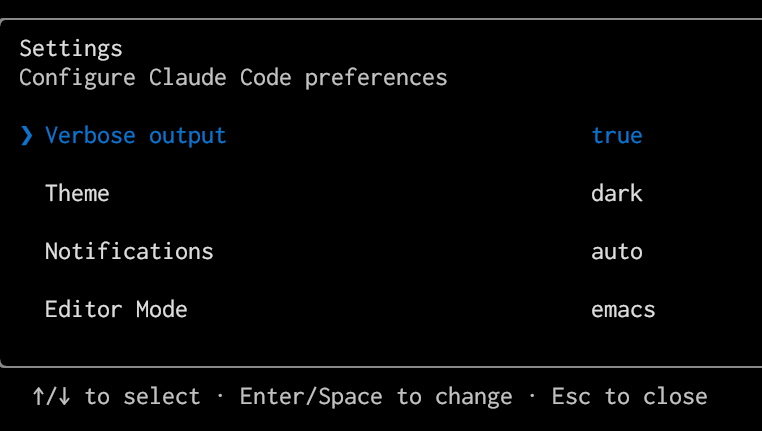
Usage
Default Mode: Record Claude Sessions
When you run the command claude-logging, it will:
- Create a log directory at
~/.claude/logs/if it doesn't exist - Generate a unique log filename based on your current directory and timestamp
- Run the
claudecommand with all provided arguments - Record the entire session to the log file
All the arguments are directly passed to the underyling claude program.
HTML Conversion Mode
Convert existing log files to HTML:
# Convert a log file to HTML
claude-logging dump ~/.claude/logs/my.log

# Bulk convert multiple files
claude-logging dump ~/.claude/logs/my*.log

# Output to a specific file
claude-logging dump ~/.claude/logs/my.log -o my.html

# Use stdin/stdout
cat logfile.log | claude-logging dump - > output.html
Example logs
These are some of the sessions in which I used claude to write claude-logging:
-
create ansi2html.py, which converts a terminal dump into a HTML page with proper colors and permalinks
-
write the pytermdump C extension and setup CI to build/publish wheels
You can click on a line or shift-click on a range of lines to generate a permalink to a specific part of the log. For example, this is when I asked claude not to build windows wheels.
How it works
Unfortunately claude doesn't seem to offer a way to get a structured log of
the conversation, so the only possible way is to get a dump of the terminal.
This is doable using the script program in linux, which records all
characters sent to a TTY:
script --flush --quiet --return --command "claude $*" "$LOG_FILE"
However, the resulting file is not directly usable, because claude is a rich
terminal application and it constantly redraws parts of the screen. The raw
log includes all characters ever sent to the TTY, including the ones which
are responsible to erase one or more lines, and the ones which are responsible
to redraw.
For example, for each key pressed by the user, claude erases and redraws the
whole input box. If you inspect a raw log files using less -R you can see it
clearly. This is part of the log generated by typing hello in the input box:
╭──────────────────────────────────────────────────────────────────────────────╮
│ >                                                                            │
╰──────────────────────────────────────────────────────────────────────────────╯
  ! for bash mode · / for commands                              \⏎ for newline


╭──────────────────────────────────────────────────────────────────────────────╮
│ > Try "how do I log an error?"                                               │
╰──────────────────────────────────────────────────────────────────────────────╯
  ! for bash mode · / for commands                              \⏎ for newline


╭──────────────────────────────────────────────────────────────────────────────╮
│ > h                                                                          │
╰──────────────────────────────────────────────────────────────────────────────╯
  ! for bash mode · / for commands                              \⏎ for newline


╭──────────────────────────────────────────────────────────────────────────────╮
│ > he                                                                         │
╰──────────────────────────────────────────────────────────────────────────────╯
  ! for bash mode · / for commands                              \⏎ for newline


╭──────────────────────────────────────────────────────────────────────────────╮
│ > hel                                                                        │
╰──────────────────────────────────────────────────────────────────────────────╯
  ! for bash mode · / for commands                              \⏎ for newline


╭──────────────────────────────────────────────────────────────────────────────╮
│ > hell                                                                       │
╰──────────────────────────────────────────────────────────────────────────────╯
  ! for bash mode · / for commands                              \⏎ for newline


╭──────────────────────────────────────────────────────────────────────────────╮
│ > hello                                                                      │
╰──────────────────────────────────────────────────────────────────────────────╯
  ! for bash mode · / for commands                              \⏎ for newline
The solution is to "replay" all the commands sent to the terminal, in order to get the final state of the screen. For doing that we need to write a basic version of a terminal emulator: fortunately, we just need to support a handful number of ANSI escape sequences. This is the job of termdump.c and pytermdump.c
The core logic is in termdump.c, which takes a raw log file and produces the
"final state" of the terminal. Ironically, claude itself was not able to
produce a working version of termdump.c,
which was written by chatgpt.
Once we have the "dumped" version of the screen, we can convert it into HTML using ansi2html.py.
License
MIT License
1 maintainer

Metadata
1 maintainer
Release files for claude-logging 0.4.1
For a detailed explanation of source distributions (sdists) and built distributions (wheels), please see the package formats documentation.
Source distribution (sdist)
| File | Size | Uploaded | |
|---|---|---|---|
| claude_logging-0.4.1.tar.gz | 16.7 kB | Details |
Built distributions (wheels)
| File | Interpreter | ABI | Platform | Reset |
|---|---|---|---|---|
| claude_logging-0.4.1-cp38-abi3-musllinux_1_2_x86_64.whl | CPython 3.8 | abi3 | Linux musl 1.2+ x86-64 | Details |
| claude_logging-0.4.1-cp38-abi3-manylinux_2_17_x86_64.manylinux2014_x86_64.whl | CPython 3.8 | abi3 | Linux glibc 2.17+ x86-64 | Details |
Total release size: 75.5 kB
Release files / claude_logging-0.4.1.tar.gz
| Download URL | claude_logging-0.4.1.tar.gz |
|---|---|
| Size | 16.7 kB |
| Tags | Source |
|
SHA-256 checksum How to use checksums |
67df148432b65f1a62b189cdbb684eae5853e81fcce71019f058b814815a6a33
|
|
BLAKE2b-256 checksum How to use checksums |
977b9ae09b7d2b79bc0c5bc8c1d2f5bf17fd16fd2e0dbad07f07e6390a19e2d1
|
| Upload date | |
|
Uploaded using Trusted Publishing? What is trusted publishing? |
Yes |
| Uploaded via |
twine/6.1.0 CPython/3.12.9
|
Provenance
Provenance describes where a file came from. On PyPI, provenance is shared via attestations, which provide a verifiable record of the build or publishing details. View details, limitations and caveats.


PyPI Publish Attestation
PyPI verified that this artifact, at this checksum, originated from the publisher listed below.
Signed by GitHub Actions, verified by PyPI on Mar 12, 2025.
Transparency logRelease files / claude_logging-0.4.1-cp38-abi3-musllinux_1_2_x86_64.whl
| Download URL | claude_logging-0.4.1-cp38-abi3-musllinux_1_2_x86_64.whl |
|---|---|
| Size | 28.4 kB |
| Tags | CPython 3.8 Linux musl 1.2+ x86-64 abi3 |
|
SHA-256 checksum How to use checksums |
10c6bc71da288086cb6d20f5f92f56c159ff8d55ac3164019b5d60c00cb211bb
|
|
BLAKE2b-256 checksum How to use checksums |
1e336a4771e89b0534f676a90277f87d23a13c38495e884cdd95688485e8e446
|
| Upload date | |
|
Uploaded using Trusted Publishing? What is trusted publishing? |
Yes |
| Uploaded via |
twine/6.1.0 CPython/3.12.9
|
Provenance
Provenance describes where a file came from. On PyPI, provenance is shared via attestations, which provide a verifiable record of the build or publishing details. View details, limitations and caveats.
PyPI Publish Attestation
PyPI verified that this artifact, at this checksum, originated from the publisher listed below.
Signed by GitHub Actions, verified by PyPI on Mar 12, 2025.
Transparency logRelease files / claude_logging-0.4.1-cp38-abi3-manylinux_2_17_x86_64.manylinux2014_x86_64.whl
| Download URL | claude_logging-0.4.1-cp38-abi3-manylinux_2_17_x86_64.manylinux2014_x86_64.whl |
|---|---|
| Size | 30.4 kB |
| Tags | CPython 3.8 Linux glibc 2.17+ x86-64 abi3 |
|
SHA-256 checksum How to use checksums |
4dcdaa419ef41c72556380d305eb3966c0776feb3749b2e2078134be5fae5ca3
|
|
BLAKE2b-256 checksum How to use checksums |
a0433fe3ab1993286c154d6558d7802dbaa32ee792bae5cab72385f331d8c017
|
| Upload date | |
|
Uploaded using Trusted Publishing? What is trusted publishing? |
Yes |
| Uploaded via |
twine/6.1.0 CPython/3.12.9
|
Provenance
Provenance describes where a file came from. On PyPI, provenance is shared via attestations, which provide a verifiable record of the build or publishing details. View details, limitations and caveats.
PyPI Publish Attestation
PyPI verified that this artifact, at this checksum, originated from the publisher listed below.
Signed by GitHub Actions, verified by PyPI on Mar 12, 2025.
Transparency log













