
Claude OpenRouter
Use OpenRouter models in Claude Code without giving up your native login or connectors.



Claude OpenRouter is a small, dependency-free CLI. It indexes OpenRouter's live
model catalog, gives you a searchable multi-select picker, and launches Claude
Code with those favorites in its native /model menu. There is no local proxy,
background service, or replacement harness. Your normal claude command stays
native; clor claude adds OpenRouter for that session.
Install
curl -LsSf https://xhluca.github.io/claude-openrouter/install.sh | sh
The installer prompts for your OpenRouter key without echoing it, fetches the current catalog, and opens the model picker immediately. It installs for the current user on Linux or macOS. If a credential already exists, setup shows its path and asks whether to reuse it before offering a masked replacement prompt.
Or use uv:
uv tool install claude-openrouter
clor setup
For a one-off setup without installing the package first:
uvx claude-openrouter setup
pipx install claude-openrouter works too. The full command is
claude-openrouter; clor is the shorthand. Claude Code 2.1.242 or newer is
required for the multi-model picker.
Upgrade the installation in place at any time:
clor update
The updater uses the manager that owns the current installation and reports
the installed version before and after. clor upgrade is an alias.
Quick start
Refresh the local catalog:
clor index
fetch is an alias for index. index is the canonical name because the
result is a persistent local catalog used by selection and search.
Search refreshes the index first. Plain terms are case-insensitive substring
globs; *, ?, and bracket expressions use shell-style matching:
clor search claude
clor search 'anthropic/*' '*coder*'
clor search --regex '^(anthropic|google)/.*(sonnet|gemini)'
Select one exact model, several exact models, or open the interactive picker:
clor select anthropic/claude-sonnet-4.6
clor select --model openai/gpt-5.4
clor select --models anthropic/claude-opus-4.6 google/gemini-3.1-pro-preview
clor select
The positional value is shorthand for --model. Each non-interactive call
replaces the saved favorite set. In the picker, type a search and press Down or
Enter to browse its results. Press Enter or Space to select and deselect; press
Up past the first result or Esc to focus the search again. Press s while
browsing results, or Shift-S/Ctrl-S while typing a search, to save.
Launch the OpenRouter session, then switch normally:
clor claude
> /model
The selected rows are Claude Code's native picker rows, and model requests use
the OpenRouter key stored by this tool. Arguments pass through, so commands such
as clor claude --continue and clor claude --resume SESSION_ID work too.
When you are logged in through claude.ai, clor claude keeps that native
authentication active for Claude.ai connectors while routing model requests to
OpenRouter. The old external-auth warning is therefore absent. Without a native
login, OpenRouter still works through Claude Code's API-token mode, but Claude.ai
connectors are unavailable; manually configured MCP servers continue to work.
Commands
| Command | Purpose |
|---|---|
clor index |
Fetch and cache the current OpenRouter model catalog |
clor fetch |
Alias for index |
clor search QUERY... |
Refresh, then search names, IDs, and descriptions |
clor setup |
Run the install-time key and model setup again |
clor select [MODEL] |
Replace /model favorites exactly |
clor config |
Replace and validate the stored OpenRouter key |
clor claude [ARGS...] |
Launch Claude Code with OpenRouter favorites |
clor update |
Install the latest release and report the version change |
clor reset |
Restore the original Claude settings and delete tool data |
clor uninstall |
Reset the integration and remove a curl/uv installation |
Every catalog command also accepts --json where useful. API keys are never
accepted as command-line arguments; automation can pipe one to setup --key-stdin or config --key-stdin.
What it changes
OpenRouter API → local model index → selected favorites → Claude Code /model
- Stores the key at
~/.config/claude-openrouter/credentialwith mode0600. - Stores launch-only picker settings at
~/.config/claude-openrouter/claude-settings.json; the key is not copied into that file or~/.claude/settings.json. - Leaves Claude Code's global settings and ordinary
claudesessions alone. - In a
clor claudechild process, sets OpenRouter's Anthropic-compatible API base and supplies the OpenRouter authorization header at runtime. - Preserves a detected native Claude.ai login for connectors. If no native login exists, it automatically falls back to API-token authentication.
- Automatically restores global settings created by claude-openrouter 0.1.x the next time setup, selection, or launch runs.
Claude Code applies one endpoint and authentication method to an entire
process, not to individual /model rows. Consequently, one picker cannot mix
native-billed and OpenRouter-routed rows: use claude for the native session
and clor claude for the OpenRouter session.
Claude Code is optimized for Anthropic models. OpenRouter can accept other model IDs through its Anthropic-compatible endpoint, but models differ in tool use, thinking blocks, context handling, and Claude Code compatibility. Prefer models that OpenRouter documents as suitable for agentic tool use.
Reset and uninstall
Restore the pre-install Claude settings while keeping the command:
clor reset
Restore settings, remove the credential and index, and uninstall a curl/uv tool installation:
clor uninstall
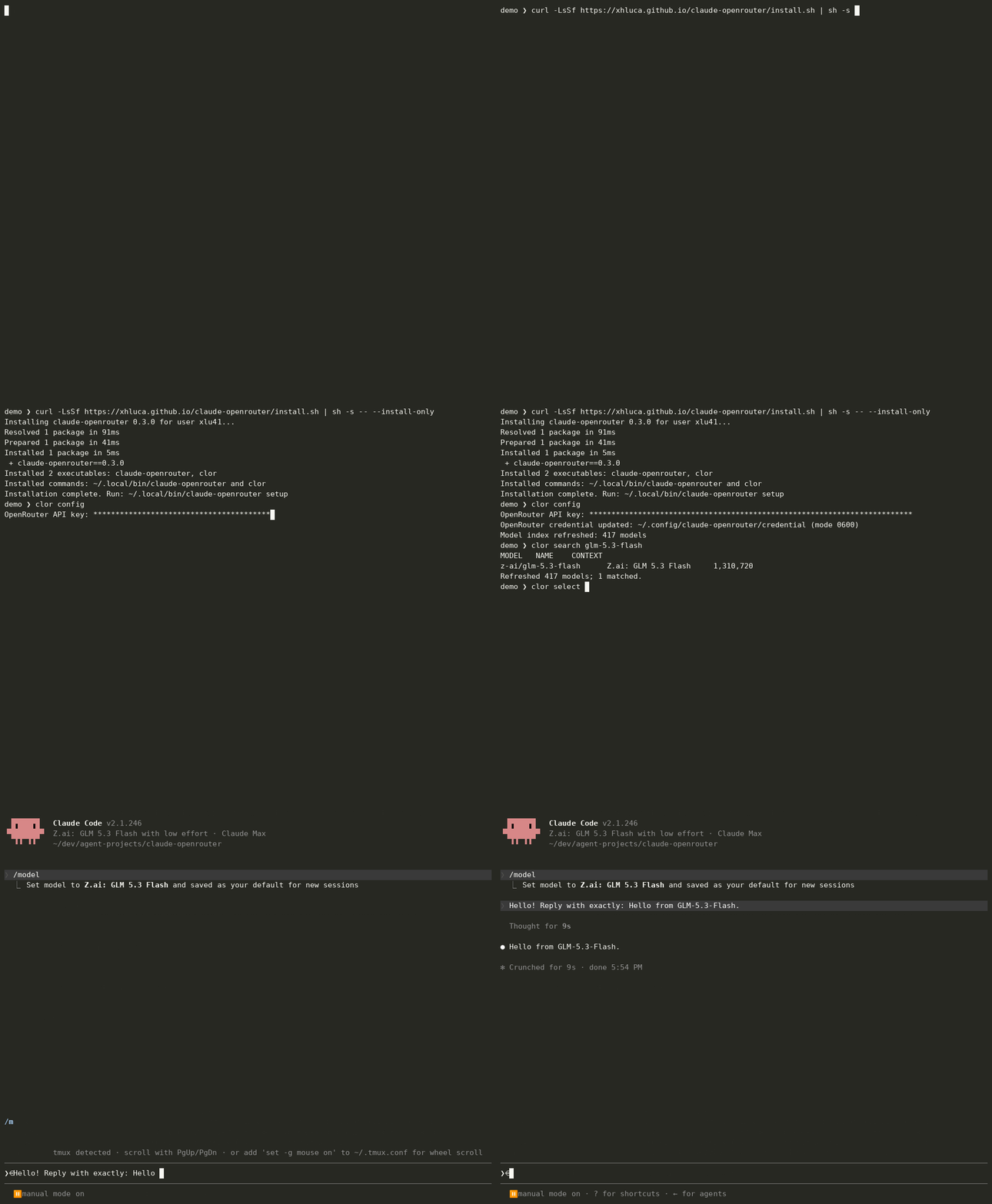
Demo
The animation above is rendered in real time from an end-to-end asciinema
capture: the public curl installer, progressively masked key entry, a live
OpenRouter search for z-ai/glm-5.3-flash, exact selection, Claude Code's
native /model picker launched through clor claude, and a real model response.
The scripts verify the saved assistant turn and reject any cast containing the
credential before publishing it. The only textual post-processing replaces the
randomized temporary demo path with ~.
Watch the MP4 or reproduce the capture.
Development
git clone https://github.com/xhluca/claude-openrouter.git
cd claude-openrouter
uv run --with pytest pytest
uv run --with ruff ruff check .
License
Acknowledgements
Claude Code Router (CCR)
helped establish the broader Claude Code routing space. CCR is a full,
self-contained routing and UI-based management system spanning providers,
profiles, routing rules, and more. Claude OpenRouter is intentionally narrower:
it is a simple connection from Claude Code to OpenRouter, installs with one
small Bash command (or uv/uvx), and does not aim to cover CCR's full
management spectrum.
1 maintainer

Download files
Download the file for your platform. If you're not sure which to choose, learn more about installing packages.
Source Distribution
Built Distribution
Filter files by name, interpreter, ABI, and platform.
If you're not sure about the file name format, learn more about wheel file names.
Copy a direct link to the current filters
File details
Details for the file claude_openrouter-0.2.0.tar.gz.
File metadata
- Download URL: claude_openrouter-0.2.0.tar.gz
- Upload date:
- Size: 961.5 kB
- Tags: Source
- Uploaded using Trusted Publishing? No
- Uploaded via:
twine/7.0.0 CPython/3.13.14
File hashes
| Algorithm | Hash digest | |
|---|---|---|
| SHA256 |
f3ab86878a99e0f0e7ab54e81189c3e36051576e9e82c293e8b2a59cebd014f5
|
|
| MD5 |
ac55fb9df274efebd5aa19fc272f9f56
|
|
| BLAKE2b-256 |
9921788b6b599431e57dac87a709a132ef6f0eca95c25de03b7d8deba3ea7d59
|
File details
Details for the file claude_openrouter-0.2.0-py3-none-any.whl.
File metadata
- Download URL: claude_openrouter-0.2.0-py3-none-any.whl
- Upload date:
- Size: 24.9 kB
- Tags: Python 3
- Uploaded using Trusted Publishing? No
- Uploaded via:
twine/7.0.0 CPython/3.13.14
File hashes
| Algorithm | Hash digest | |
|---|---|---|
| SHA256 |
67fa13fd909710dc19b91fbb5e8a1ff83ff245144a3e53122e0a61e572eff996
|
|
| MD5 |
455ed87f4fa0357adf6b264aed01db8c
|
|
| BLAKE2b-256 |
0ebf1d899f89ddc24edadd98a1182a18cfcf469decfa91f23248d7cb80742e49
|







