
claude-real-video




▶ The 60-second pixel film — sound on (mp4 on GitHub) · an AI agent searches "how can an LLM truly understand video?", finds a key, and unlocks vision.
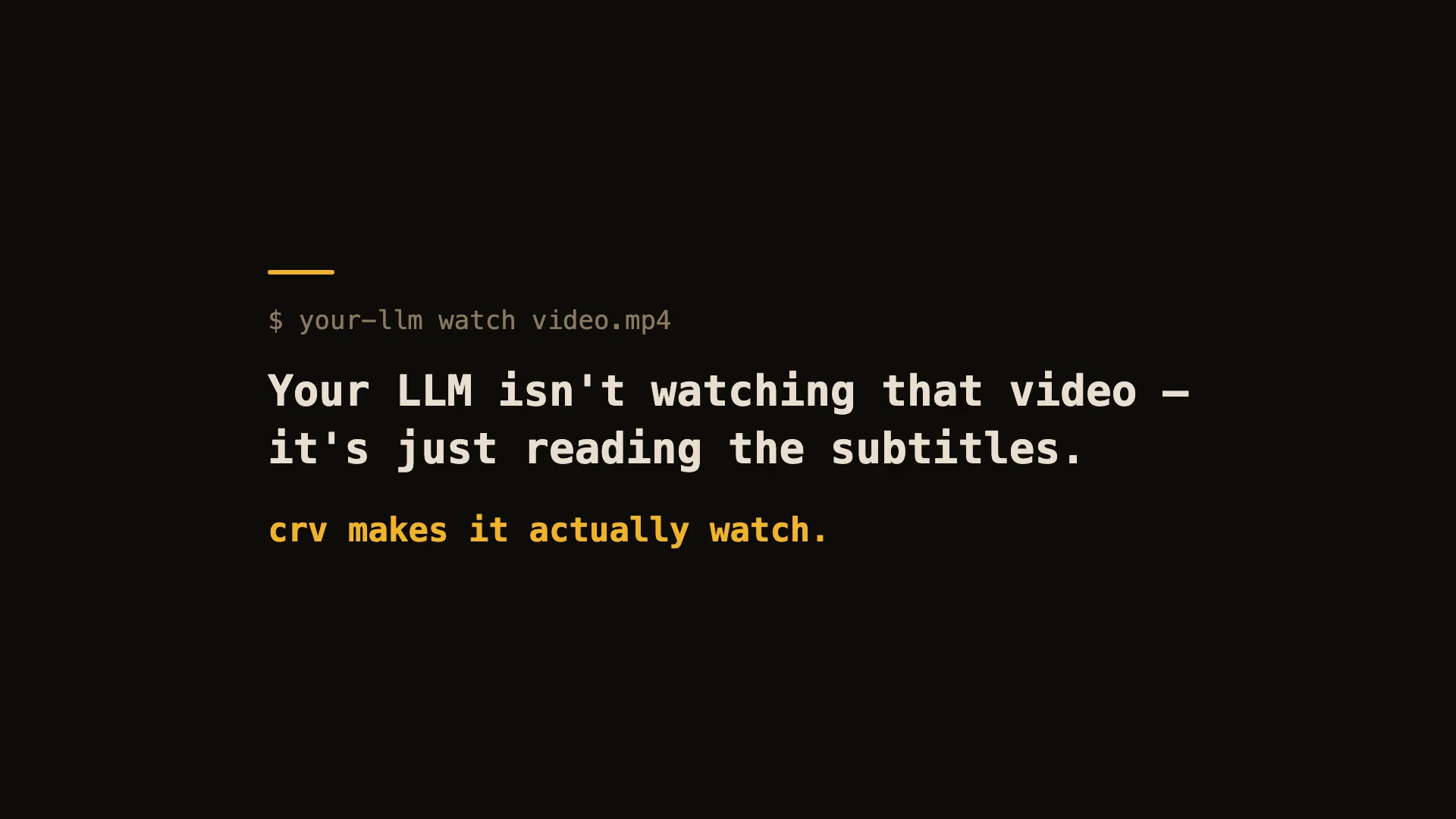
60-second real demo — real install, real run, real viewer.
Let Claude — or any LLM — actually watch a video.
pip install "claude-real-video[whisper]"
npx skills add HUANGCHIHHUNGLeo/claude-real-video   # one command, installs the skill into Claude Code, Cursor, Codex, Copilot, Gemini CLI & 50+ agent hosts
Claude Code plugin marketplace (enable auto-update in /plugin → Marketplaces if you want it):
/plugin marketplace add HUANGCHIHHUNGLeo/claude-real-video
/plugin install claude-real-video@claude-real-video
Then paste a video link into your agent and ask about it. (CLI-only use? crv "<url>" works with just the pip install.)
Naming: crv is the short name for claude-real-video (the PyPI package). The paid add-on, crv Pro, is sold on Capafy under the listing name "llm-real-video Pro".
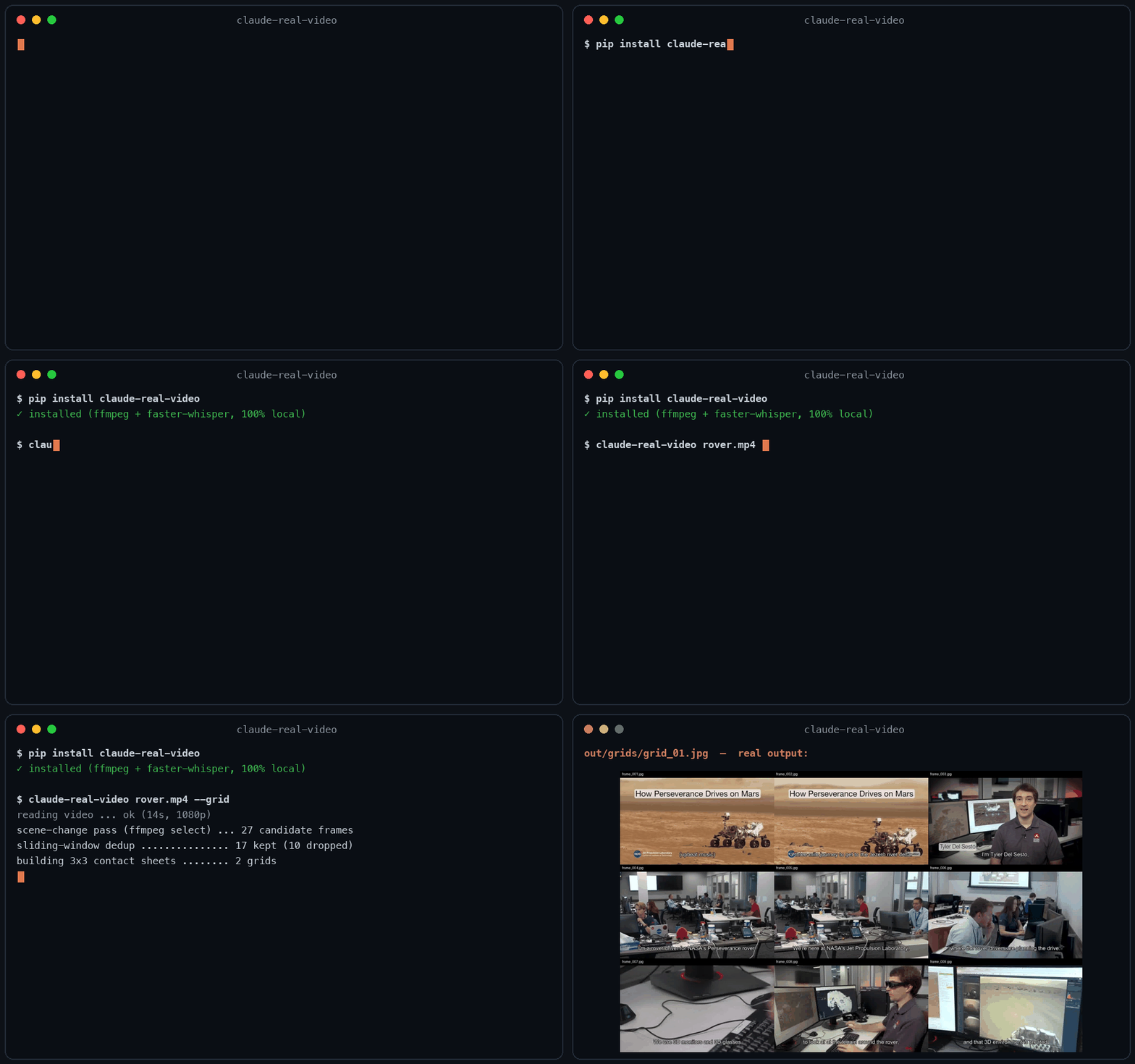
▶ New: the 40-second film — my AI agent learned to watch videos (and stopped working)
Same 58-second clip: fixed 1 fps sampling = 58 frames. crv keeps the 26 that actually differ — and
--gridpacks them into 3 contact sheets. Fewer tokens, nothing missed.
This free version lets your AI see the video. crv Pro lets it understand it — how it was shot (cut rhythm, camera moves) plus a timestamped timeline of what frames can't show: gestures, expressions, voice pitch shifts, emotion, sound events. One-time price $29 — get it on Capafy or buy with card via Lemon Squeezy.
On Codex CLI? Real Video for Codex is a self-contained build for it. You ask Codex about a video, it runs one command, then reads a
SUMMARY.mdwith chapters, a timecoded transcript and the text that was on screen, which this free edition leaves out. So it can quote the config block on the slide at 12:40, not only what the speaker said about it, and it answers you inhh:mm:ss. Download, frames, transcription and text recognition all run on your machine, and the tool itself needs no API key and no account. Ships with the Codex skill and acrv-easy doctorself-check. Python 3.10 to 3.14, macOS or Windows 11 native. One-time $9.90: get it on Capafy or buy with card via Lemon Squeezy.
Most AI tools don't really see a video. Paste a YouTube link into ChatGPT and it reads the transcript, not the picture. Claude won't take a video file at all. Even Gemini, which can read video natively, has to send it up to Google and samples frames at a fixed interval (1 fps by default), so fast cuts slip past.
claude-real-video does it differently, and the processing runs locally: point it at a URL or a
file, and it pulls the frames that actually matter (every scene change, not a
fixed quota), throws away the near-duplicates, transcribes the audio, and hands
you a clean folder any LLM can read. All the processing happens on your own machine — what gets sent anywhere is only the frames/text you choose to paste into an LLM afterwards.
crv "https://www.youtube.com/watch?v=..."
# → crv-out/frames/*.jpg  +  frames.json (per-frame timestamps)  +  transcript.txt/.json  +  MANIFEST.txt
Then drop the frames + MANIFEST.txt into Claude / ChatGPT / Gemini and ask away.
No terminal needed — run crv-web and a local page opens (Traditional Chinese / Simplified Chinese / English): paste a YouTube or Reels link or a file path, click Analyze, open the result viewer. Video analysis and output generation run on your machine — the source video never gets uploaded. (If you then paste the extracted frames or transcript into a cloud LLM, that data goes to that provider.)
Want to eyeball what the model will see first? Add --viewer — it writes a local viewer.html (video + keyframe grid + transcript) you can double-click open. No network, no extra installs.
Only part of a video matters (a 10-minute screen share inside a 90-minute call): --from 28:00 --to 43:00. ffmpeg seeks instead of decoding the whole file, Whisper only hears the window, and the frame budget is spent inside it — but every timestamp crv reports is still a source timecode you can quote to a colleague.
The meaning is small text (a terminal, a spreadsheet, an IDE): --frame-width 1600. Frame selection is the hard part and crv already does it; at 640px on a 1920-wide screen recording the right moment gets found and then the detail that made it worth finding is thrown away.
Slow-changing content (animation tutorials, gradual morphs, slow pans): add --adaptive — frames are picked against their rolling neighbourhood instead of a fixed threshold, so a 2-3s squash-and-stretch that never spikes any single frame still gets captured.
Text-heavy content (lecture slides, screen recordings, talking-head explainers): add --text-anchors — extra frames are forced at subtitle-cue timestamps, so each spoken segment gets a matching visual even when the scene barely changes. Needs a sidecar .srt/.vtt or an embedded subtitle track — captions burned into the pixels can't be detected. At most one forced frame per second; scene detection is untouched.
Multi-speaker content (interviews, podcasts, meetings): add --speakers — every transcript line gets a speaker label ([SPEAKER_00], [SPEAKER_01], …) so the model can follow who said what. Runs a local diarization model (45 MB, downloads once, no account or token needed). Install with pip install "claude-real-video[speakers]".
Not doing LLM work? It also works as a general-purpose video keyframe extractor — scene-change detection + dedup, no ML models to download.
Using Claude Code — or any coding agent? One command installs the skill (works with Claude Code, Cursor, Codex, Copilot, Gemini CLI and other agentskills.io-compatible hosts):
pip install "claude-real-video[whisper]"
npx skills add HUANGCHIHHUNGLeo/claude-real-video
Then just paste a video link into your agent and ask about it.
Manual install (clone + copy)
git clone https://github.com/HUANGCHIHHUNGLeo/claude-real-video.git
mkdir -p ~/.claude/skills && cp -r claude-real-video/skills/claude-real-video ~/.claude/skills/
Tell it why you're watching, and keep what it finds:
crv "https://youtu.be/..." --why "find the pricing strategy" --kb ~/notes
--why makes the analysis focus on what you care about instead of a generic summary;
--kb saves the result as a dated note in your own notes folder, so it doesn't die in crv-out.
New in 0.10.x — analyse only the part that matters:
crv long-meeting.mp4 --from 28:00 --to 43:00
--from / --to cut a window out of a long video: ffmpeg seeks instead of decoding
the whole file, the transcript and frame budget follow the window, and every reported
timestamp is still a source timecode you can quote back to the original.
Measured numbers
Real run on a 3-minute 640x360 video (benchmark/jfk-rice.mp4), Mac mini M4, local CPU, frames + dedup only (--no-transcribe). Image tokens estimated with Anthropic's (width x height) / 750 — 307 tokens/frame at 640x360.
| Mode | Frames kept | Wall time | Est. image tokens |
|---|---|---|---|
| default (scene-change + 1s floor) | 170 (from 180 extracted) | 23.5 s | ~52k |
--max-frames 80 |
80 | 23.4 s | ~25k |
--adaptive (catches slow morphs) |
270 | 36.8 s | ~83k |
Dedup v0.7.16 — small-subject fast action no longer disappears. A percentage comparator is structurally blind to a subject that covers <1% of the frame (it can never change 8% of the pixels). Found in a user's 2,181-video batch run; fixed with a third "action channel". Synthetic repro — static 1280x720 shot, a 40x90 px subject (0.4% of frame) moves fast only in the last 10 of 65 frames:
| Frames kept | Action frames survived | |
|---|---|---|
| v0.7.15 | 2 | 1 / 10 |
| v0.7.16 | 11 | 10 / 10 — full trajectory |
Why not just sample frames?
Most "let an LLM watch a video" scripts (and Gemini's own pipeline) grab frames
at a fixed interval — e.g. one per second. That over-samples a static
screencast and under-samples a fast-cut reel. claude-real-video is smarter:
| fixed-interval sampling | claude-real-video | |
|---|---|---|
| Frame selection | every N seconds | scene-change detection + density floor |
| Repeated shots (A-B-A cuts) | sent again every time | sliding-window dedup sends each shot once |
| Static slide (10 min) | ~600 near-identical frames | collapses to 1 (dedup) |
| Fast-cut reel | misses frames between samples | catches each visual change |
| Audio | often ignored | Whisper transcript w/ language detect |
| Where the processing happens | often in someone's cloud | on your machine (you choose what to share with an LLM afterwards) |
| Input | usually local file only | URL (yt-dlp) or local file |
You feed the model fewer, more meaningful frames — cheaper context, better understanding.
Install
pip install "claude-real-video[whisper]"   # recommended: frames + dedup + audio transcription
pip install claude-real-video              # core only (frames + dedup)
pip extras never install themselves — without [whisper] there is no speech-to-text
(videos that ship their own subtitles still get a transcript).
System requirement: ffmpeg
ffmpeg / ffprobe are used for frame extraction and audio, and aren't
pip-installable. Install them once:
| OS | command |
|---|---|
| macOS | brew install ffmpeg |
| Linux | sudo apt install ffmpeg (or your distro's package manager) |
| Windows | winget install Gyan.FFmpeg — or choco install ffmpeg — or download a build and add its bin\ folder to your PATH |
Verify it's on your PATH:
ffmpeg -version
Transcription uses the whisper CLI (installed by the [whisper] extra, or
pip install openai-whisper). Whisper also relies on ffmpeg.
Faster + hallucination-proof transcripts (recommended): install the [fast]
extra and crv automatically switches to
faster-whisper — same models, same
output files, several times faster, and gated by Silero VAD (voice-activity
detection): music-only or silent audio yields an honest "no speech" note instead
of whisper's classic invented caption. No new flags to learn:
pip install 'claude-real-video[fast]'
If both are installed, faster-whisper wins; if it ever fails, crv falls back
to the whisper CLI on its own.
Apple Silicon (M1–M4): GPU transcription. Install the [mlx] extra and crv
runs Whisper on the Mac's GPU through
mlx-whisper —
a 21-minute talk that takes ~6 minutes on faster-whisper finishes in about a
minute on an M4, with the same transcript. The Silero VAD gate still runs
first, so music or silence never turns into invented captions; if the gate or
mlx cannot run, crv drops back to faster-whisper, then the CLI. Contributed by
@blazejp83 (#28).
pip install 'claude-real-video[mlx]'
Works on macOS, Windows, and Linux — Python 3.10+.
Usage
# A YouTube / Instagram / TikTok / ... link
crv "https://www.instagram.com/reel/XXXX/"

# A local file, English transcript, output to ./out
crv lecture.mp4 -o out --lang en

# Frames only, no transcription
crv clip.mp4 --no-transcribe

# A login-gated video (your own / authorised use): pass a Netscape cookie file
crv "https://..." --cookies cookies.txt
python -m claude_real_video ... works as an alias for crv too.
Options
| flag | default | meaning |
|---|---|---|
-o, --out |
crv-out |
output directory |
--overwrite |
off | replace a previous analysis living in the output directory (without this, a non-empty output dir is refused to avoid mixing videos) |
--scene |
0.30 |
scene-change sensitivity (lower = more frames) |
--fps-floor |
1.0 |
at least one frame every N seconds |
--from / --to |
whole file | analyse only part of a video (90, 1:30, 0:01:30.5). Reported timestamps stay source timecodes — a window shifts the analysis, not the clock — and the frame budget plus the transcript follow the window instead of the whole file |
--frame-width |
640 |
width of extracted frames, aspect kept. Raise it when the meaning is small text (terminals, spreadsheets, dense dashboards); larger frames multiply output size and model cost |
--max-frames |
auto: clamp(150, window×1.5, 600) |
hard cap on total frames (explicit value always wins) |
--adaptive |
off | adaptive scene detection: catches slow morphs (2-3s squash/stretch, gradual pans) a fixed threshold misses, by comparing each frame against its rolling neighbourhood |
--text-anchors |
off | force extra frames at subtitle-cue timestamps (sidecar .srt/.vtt or embedded track) — for videos where meaning changes faster than pixels; at most one forced frame per second |
--speakers |
off | label every transcript line with the speaker ([SPEAKER_00] …) via local diarization — needs pip install "claude-real-video[speakers]", 45 MB model downloads once |
--lang |
auto |
Whisper language (en, zh, auto, ...) |
--whisper-model |
base |
Whisper model for transcription (tiny/base/small/medium/large/turbo — base is fast; want sharper transcripts? --whisper-model turbo is one flag away: a pruned large-v3 — much faster than large with a minor quality trade-off, one-time 1.6GB download, ~6GB memory) |
--dedup-threshold |
8 |
% of pixels that must change for a frame to count as new; higher = fewer frames (the settled-local detector's gate scales with it too) |
--dedup-window |
4 |
compare against the last N kept frames — a shot the model already saw doesn't come back after a cutaway (1 = consecutive-only) |
--report |
off | keep dropped frames in ./dropped + write report.html visualising every keep/drop decision |
--no-transcribe |
off | skip audio |
--keep-audio |
off | also save the full soundtrack (audio.m4a) so audio models can hear it |
--viewer |
off | also write viewer.html — browse the video, keyframes and transcript in one local page (double-click to open) |
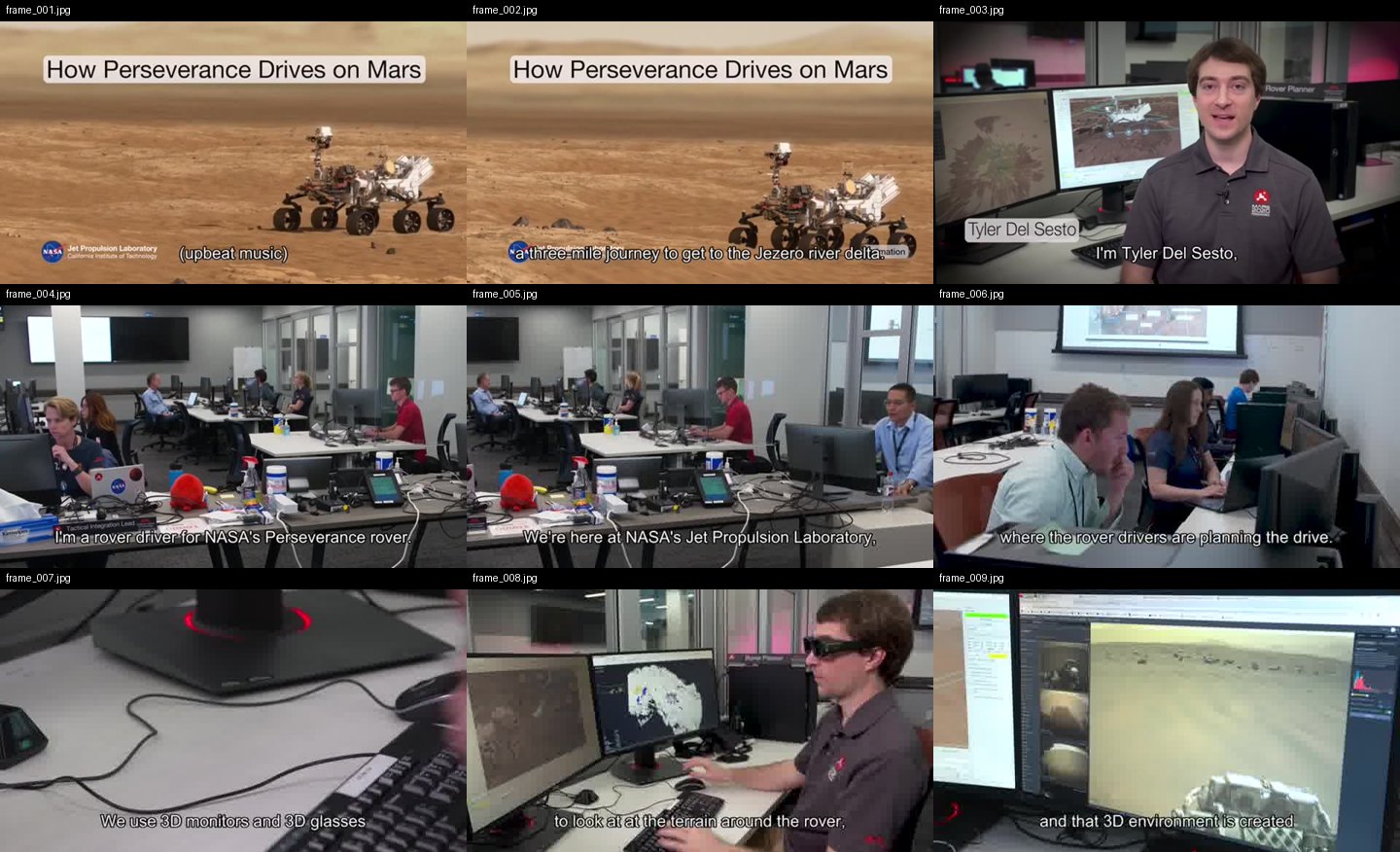
--grid |
off | also tile the kept frames into 3x3 contact sheets (./grids) — consecutive frames side by side help the model follow motion and progression |
--why |
– | why you're watching, e.g. --why "find the pricing strategy" — written into MANIFEST.txt so the model analyses with that lens instead of a generic summary |
--kb |
– | also save the analysis as a dated markdown note into this folder (your Obsidian vault, notes dir, ...) — so it joins your knowledge base instead of dying in crv-out |
--cookies |
– | Netscape cookie file for login-gated sources |
--cookies-from-browser |
– | read login cookies straight from your own browser — chrome, safari, firefox or edge (your own account only) |
What --grid output looks like
One contact sheet = nine consecutive keyframes, in order, filenames on each cell — the model reads a sequence, not scattered stills:
Memory — ask across everything you've watched
Every analysis is indexed locally (transcript lines + on-screen text, with timestamps), so a question can span your whole library instead of one output folder:
crv-ask "pricing strategy"   # → which video, which second, the exact line
crv-ask 定價                  # CJK works — trigram FTS with a substring fallback
crv-ask --list               # everything you've watched, newest first
crv-ask --stats              # where the index lives, how big it is
crv-ask --prune 200          # keep the newest 200 videos, reclaim the space
Re-running the same source with the same options doesn't re-process — crv says
"already watched" and points at the existing analysis (0.04s vs several seconds
measured). Different options, or --overwrite, re-analyse as usual.
Everything stays local: one SQLite file at ~/.crv/memory.db (override with
CRV_MEMORY_DB), user-only permissions, no embeddings, no network. The first time
anything is indexed, crv prints one line saying so. Don't want it at all?
CRV_NO_MEMORY=1.
MCP server (Claude Desktop / Cursor / any MCP client)
crv also ships as an MCP server, so MCP clients can ask for a video to be
watched directly — same local pipeline, zero cloud. Five tools: watch_video,
get_frames, search_memory (ask across every watched video), list_watched
(check before re-watching), and get_transcript (words only — no frames, so a
long talk doesn't cost image tokens).
pip install 'claude-real-video[mcp]'
Claude Code:
claude mcp add crv -- crv-mcp
Claude Desktop — add to claude_desktop_config.json:
{ "mcpServers": { "crv": { "command": "crv-mcp" } } }
Tools: watch_video(source, max_frames, language, transcribe) returns the
timestamped transcript plus the first batch of keyframes as images;
get_frames(source, start_index, count) pages through the rest. Analyses are
cached under ~/.cache/crv-mcp, so follow-up questions about the same video
are instant.
mcp-name: io.github.HUANGCHIHHUNGLeo/claude-real-video
Verified end-to-end on Claude Code (the model described a test video's frames correctly through the tool). Claude Desktop and Cursor speak the same MCP stdio protocol — config above; open an issue if anything misbehaves.
Use it from Python
from claude_real_video import process

r = process("https://youtu.be/...", "out", lang="en")
print(r.frame_count, r.transcript_path)
How it works
- Fetch —
yt-dlpfor URLs (optional cookies), or copy a local file. - Extract — one chronological
ffmpeg selectpass grabs every scene change plus a density floor (at least one frame every--fps-floorseconds), so fast cuts and slow screencasts are both covered. - Dedup — three channels against a sliding window of the last
--dedup-windowkept frames, so an A-B-A cutaway doesn't re-send a shot the model has already seen. A global channel measures real pixel difference (downscaled RGB, not a perceptual hash — hashes go blind on flat colours and equal-luma hue changes);--dedup-thresholdis the % of it that must change. A settled-local channel (v0.7.4) catches what the global one can't see: thin pen strokes, caption/text-card swaps and small UI updates that average out to ~0% globally. It looks, on a finer signature, for a region that differs strongly from every recent kept frame (with 1px shift tolerance, so film grain and frame jitter don't trigger) and is no longer changing — a settled new state, not motion mid-flight — with a cooldown so continuous motion that pauses every second (a waving flag, drifting smoke) can't keep re-firing. The final frame is evaluated even if still in motion (so a video's closing state is never lost), but it must clear both contrast gates like any other frame.--reportwritesreport.htmlshowing every keep/drop decision with its diff % (settled-local keeps are labelled), for tuning. - Text — if the video already has subtitles (a sidecar
.srt/.vttnext to a local file, or an embedded subtitle track), those are used as the transcript — faster and more accurate than re-transcribing. Only when there are no subtitles does it fall back to Whisper on the audio (skipped cleanly if there's no audio). - Audio (optional,
--keep-audio) — save the full original soundtrack (audio.m4a: music + speech + effects, copied losslessly when possible). The transcript only has the words; the audio file lets a model that can listen (Gemini, GPT-4o, …) actually hear the music and tone. - Timestamps — every kept frame's source-video time survives the whole
pipeline (extraction → dedup →
--max-framesthinning → renaming) and is written toframes.json(file/timestamp_sec/timestamp/selection_reason). Cite visual evidence asframe_012 @ 00:03:41, align frames withtranscript.jsonsegments, or feed the map to a video-RAG pipeline. Inviewer.html, click any keyframe → "play video from here". - Manifest —
MANIFEST.txtsummarises everything for the model.
So the model can see (key frames), read (transcript) and — with --keep-audio —
hear (full soundtrack) the video. The transcript is plain text any model can read;
the tool doesn't burn subtitles into the video — burning is a presentation choice,
not something needed to make a video AI-readable.
Notes
- Only download content you have the right to. The
--cookiesoption is for your own, authorised access — don't ship credentials in a repo. - Use one output folder per video. Re-running into a folder that already holds
an analysis is refused (so two videos never mix); pass
--overwriteto replace it.
crv Pro — understand how a video was shot
The free tool gives your AI keyframes and a transcript — enough to know what a video is about. crv Pro adds everything else: how it's shot, how it's cut, how it's spoken, what it feels like. All computed on your machine, written as plain text any LLM can read.
- Camera & pacing (
--motion) — every shot auto-labelled: static, pan, tilt, zoom, handheld. Full shot table: per-shot duration, cuts per minute, pacing across open/middle/close. High-motion shots get 0.2s-apart burst frames. - Sound & emotion (
--senses) — voice emotion, tone curves and audio events (laughter, SFX, ambience) timestamped segment by segment. Vocals and music auto-separated: emotion reads the clean voice, music gets its own BPM + energy track. No-dialogue footage (MVs, film) falls back to reading mood from color and light. - Interactive viewer (
--viewer) — one self-contained web page per analysis: the video, a clickable event timeline that jumps to the second, a transcript that highlights along with playback. EN / 繁中 / 简中. - Two reports, one flag (
--ai-report) — with your own API key: one report on how it's shot, one on what it says. - Breakdown report (
--breakdown) — hook analysis, pacing curve, camera language, and a rubric your own LLM completes into a full teardown. - Memory across your library (
crv-pro-ask) — search everything Pro has watched by what the camera and the voice did:--camera zoom(every zoom you've ever watched),--track emotion --label angry,--rhythm(cuts/min ranked). The freecrv-asksearches words; these search measurements the free edition never takes.
One-time price $29:
- Buy on Capafy (instant download, license key included): https://capafy.ai/agent/llm-real-video-pro-let-any-llm-watch-videos/5451082151
- Buy with credit card (Lemon Squeezy checkout, instant download): https://leoaido.lemonsqueezy.com/checkout/buy/ff552000-adc0-49f1-8eec-5e8ada1905a1
- Product page & demo: https://leoaido.com/crv-pro/
Following the build? I'm documenting the road from open-source tool to first paying customer, in public — @LeoAidoAI on X.
FAQ
What is the best tool to let an LLM watch or analyze a video?
It depends on what "watch" means for you. If you just want one answer about one clip and don't mind uploading it, a hosted multimodal model (e.g. Gemini) is the shortest path. If you want any LLM — Claude, GPT, Gemini or a local model — to analyze video reproducibly and locally, you want a preprocessing pipeline: scene-aware keyframes + a timestamped transcript, handed to the model as evidence it can cite. That pipeline is exactly what claude-real-video does, in one command, with nothing leaving your machine. Uniform frame sampling (1 fps) either misses cuts or floods the context window; scene-aware extraction keeps the frames that carry information.
How can I make Claude understand a video?
Claude cannot ingest video files directly. The working approach:
pip install "claude-real-video[fast]"
npx skills add HUANGCHIHHUNGLeo/claude-real-video   # or install via the Claude Code plugin marketplace
Then in Claude Code: Analyze this video: /path/to/video.mp4. The skill extracts scene-aware keyframes, a timestamped transcript (transcript.json), a frame→timestamp map (frames.json) and a MANIFEST.txt that tells the model how to read the folder — so Claude can cite frame_012 @ 00:03:41 instead of guessing.
What is claude-real-video?
An MIT-licensed Python CLI (crv) that turns a video into what an LLM can actually read: scene-aware keyframes (with real source timestamps that survive dedup and renaming), sliding-window deduplication so small-subject motion isn't thrown away, and local Whisper transcription with optional speaker labels. Works with YouTube URLs or local files, runs 100% locally. It exists because subtitles alone are not watching — models that only read the transcript hallucinate everything visual.
Who makes this
Built by Leo Huang — a one-person company running on AI. I post what actually breaks and what works while building tools like this: https://x.com/LeoAidoAI
License
MIT
1 maintainer

Metadata
1 maintainer
Release files for claude-real-video 0.10.7
For a detailed explanation of source distributions (sdists) and built distributions (wheels), please see the package formats documentation.
Source distribution (sdist)
| File | Size | Uploaded | |
|---|---|---|---|
| claude_real_video-0.10.7.tar.gz | 100.8 kB | Details |
Built distribution (wheel)
| File | Interpreter | ABI | Platform | Reset |
|---|---|---|---|---|
| claude_real_video-0.10.7-py3-none-any.whl | Python 3 | none | any | Details |
Total release size: 177.3 kB
Release files / claude_real_video-0.10.7.tar.gz
| Download URL | claude_real_video-0.10.7.tar.gz |
|---|---|
| Size | 100.8 kB |
| Tags | Source |
|
SHA-256 checksum How to use checksums |
748e8832cc332c2f9ee615b0df78c08d6c87e684fe9091bea1740bdeedc0a72a
|
|
BLAKE2b-256 checksum How to use checksums |
5e80bcb47756920fefb80f2d4fde7d75eb27b2755531a7415e4d90470ac5ceca
|
| Upload date | |
|
Uploaded using Trusted Publishing? What is trusted publishing? |
No |
| Uploaded via |
twine/6.2.0 CPython/3.14.7
|
Release files / claude_real_video-0.10.7-py3-none-any.whl
| Download URL | claude_real_video-0.10.7-py3-none-any.whl |
|---|---|
| Size | 76.5 kB |
| Tags | Python 3 |
|
SHA-256 checksum How to use checksums |
44654741dd041c93e357331114e7f83e09af994c69016c0f1d632ed2bb0418c4
|
|
BLAKE2b-256 checksum How to use checksums |
08ac9d12fcb771ea9143a81038081600299c49b38668d79e3e56bf21e01e39f9
|
| Upload date | |
|
Uploaded using Trusted Publishing? What is trusted publishing? |
No |
| Uploaded via |
twine/6.2.0 CPython/3.14.7
|














