
claude-recents
Quick — you have seven Claude sessions running. What is each one doing right now? …Exactly. Stop keeping that in your head. That's what this app is for.
The only ADHD cure you'll ever need.
A macOS menu bar app that shows what every one of your Claude Code sessions is doing — right now, across all your machines.
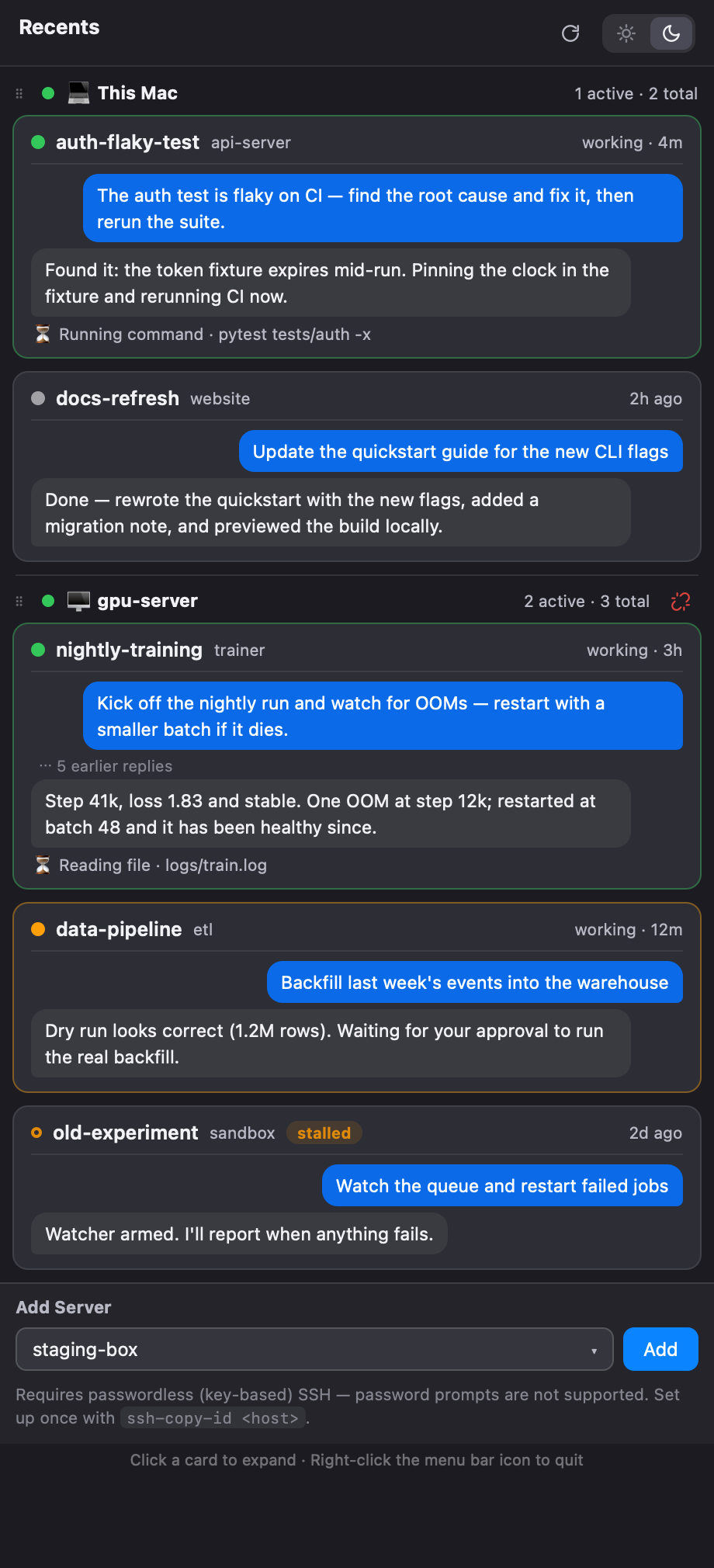
If you run more than a couple of Claude Code sessions at once (a few locally, a few on remote GPU boxes over SSH), you know the feeling: which session was doing what again? claude-recents puts a ✳ icon in your menu bar with a live count of working sessions, and one click opens a panel where every session shows its latest request, the latest reply, and what it is doing at this exact moment.
Features
- Live session list — every running Claude Code session on this Mac, plus any remote servers you add. Sessions are grouped by machine, sorted by your most recent request.
- Chat-style cards — each session shows your latest request and Claude's latest reply as chat bubbles, with line breaks preserved. Click a card to expand the full text. If replies piled up while you were away (autonomous loops, long goals), a small "⋯ N earlier replies" marker tells you so without flooding the card.
- What it's doing right now — working sessions show a live activity line ("Running command · pytest tests/auth -x", "Editing file · …") and a status: 🟢 working, 🟠 waiting for your approval, ⚪ idle.
- Remote servers over SSH — add any host from your
~/.ssh/configin two clicks. Nothing is installed on the server: each poll pipes a small script throughsshand parses your Claude sessions there. Per-server connection status (connected / connecting / failed) is always visible. - Multi-account aware — sessions from other Claude accounts (separate
CLAUDE_CONFIG_DIRprofiles, claude-swap profiles) are picked up automatically and badged with their account. - Stays out of your way — flat, native-feeling UI with light/dark themes, drag-to-reorder server sections, collapsible groups for stale sessions ("Last week", "Older"). Menu bar icon shows
✳ working/totalat a glance. - Private by design — everything is read locally (or over your own SSH connections). Nothing is sent anywhere.
Install
Requires macOS 12+ and Python 3.12+.
uv tool install claude-recents      # recommended
# or: pipx install claude-recents
# or: pip install claude-recents

claude-recents                       # ✳ appears in your menu bar
Start at login (optional)
Right-click the ✳ menu bar icon → Start at Login. That's it — the app writes its own LaunchAgent (~/Library/LaunchAgents/com.kiddj.claude-recents.plist) and starts automatically from your next login. Toggle it again to turn it off.
Tip: if you launch the app from a tmux daemon or SSH shell, the process will run but the icon won't appear — menu bar items require the GUI login session. Launching normally (or via Start at Login) guarantees the right context.
Usage
- Click the ✳ icon → the panel opens. Click again (or click outside) to close.
- Click a card → expands the full request/reply and the session's working directory.
- Click a server header → collapse/expand that machine's sessions.
- Drag a server header → reorder machines (a blue insertion line shows where it will land).
- Add Server (bottom of the panel) → pick a host from your
~/.ssh/configand press Add. - Unlink icon on a server header → "Disconnect / Cancel" to remove that server.
- ↻ Refresh (header) → re-poll every server immediately, even mid-connection.
- ☀ / ☾ → light/dark theme (defaults to following the system).
- Right-click the menu bar icon → quit.
Adding remote servers
Remote monitoring needs passwordless (key-based) SSH — the app polls with ssh -o BatchMode=yes, so password prompts cannot work. Set it up once per server:
ssh-copy-id my-server
The server needs python3 on its PATH (any modern Linux does) and, of course, Claude Code sessions running on it. If authentication fails, the panel shows exactly that with the fix inline.
Session states
| Marker | State | Meaning |
|---|---|---|
| 🟢 solid green, pulsing | working | Claude is thinking, running tools, or writing a reply right now |
| 🟠 solid orange, pulsing | waiting | Claude is waiting for your decision (e.g. a permission prompt) |
🟠 hollow orange ring, static + stalled badge |
stalled | the status flag says "working", but nothing has happened for hours — see below |
| ⚪ gray | idle | the reply is finished; Claude is waiting for your next message |
The menu bar count (✳ 3) counts working + waiting sessions only.
About "stalled" (a heuristic, explained honestly)
Status flags come from Claude Code itself, and they can get stuck: if a session loses its connection mid-turn (dropped SSH, a killed remote-control link during a shell call), the claude process stays perfectly healthy — event loop running, shell child alive — but it waits forever for an event that will never arrive, and never writes the "back to idle" transition. From the outside, every process-level signal (state, CPU, TTY, child processes) looks identical to a genuinely working session; we tested them all. The only observable difference is that a stuck session stops producing transcript output.
So claude-recents marks a session as stalled when its flag claims active but there has been no observable activity for 3+ hours. In measured practice the two populations are far apart — really-working sessions emit events every few seconds-to-minutes (even day-long autonomous loops), while stuck ones sit silent for days — so misclassification is unlikely. A quiet foreground command running longer than 3 hours would be the one false-positive case.
Stalled sessions consume no tokens (no API calls — their transcripts prove it) but do hold server memory. Killing the process is safe: the conversation stays on disk and claude --resume picks it up again.
How it works
Claude Code keeps per-session state on disk. claude-recents reads it — nothing more:
| What you see | Where it comes from |
|---|---|
| Live sessions, working/idle/waiting | ~/.claude/sessions/*.json (+ process liveness check) |
| Your latest request, latest reply, current tool activity | session transcripts in ~/.claude/projects/… |
| Account badges | ~/.claude.json |
| Remote sessions | the same files on the server, fetched via ssh <host> python3 - (a self-contained script; parsing happens server-side, only compact results travel back) |
Refresh is every 2 seconds locally; remote hosts are polled every 10s while the panel is open and every 60s in the background. If a server becomes unreachable, the panel keeps the last received data, shows the connection error inline, and marks the section with how old the data is (e.g. · 5m old) — it catches up automatically (or instantly via the refresh button) once the network is back.
Note: the per-session state files are an undocumented Claude Code internal (verified against v2.1.x). A future Claude Code update could change them; the parser is written defensively, but if things break, please open an issue with your Claude Code version.
Configuration
Everything you change in the UI (servers, section order, collapsed state, theme) is persisted to ~/.config/claude-recents/config.json. You can also edit it directly:
{
  "ssh_hosts": ["gpu-server", "staging-box"],   // remote machines to monitor
  "host_order": ["gpu-server", ""],             // section order ("" = This Mac)
  "host_collapsed": [],                          // collapsed sections
  "theme": "auto",                               // "auto" | "light" | "dark"
  "extra_config_dirs": ["~/.claude-work"],       // extra CLAUDE_CONFIG_DIR profiles
  "panel_width": 460,                            // optional, defaults shown
  "panel_height": 900                            // optional, defaults to screen height
}
Privacy
- All data is read from your local disk or over SSH connections you configured.
- The app makes no network requests of its own — no telemetry, no accounts, no cloud.
- Requests/replies are displayed, never stored anywhere new.
Limitations
- macOS only (menu bar app built on PyObjC).
- Shows sessions on machines you can reach — there is no public Anthropic API for listing a Claude account's cloud/web sessions, so those can't appear.
- Session titles come from Claude Code's local session name, which can differ from the title shown in the Claude mobile/desktop apps (that one is generated server-side and not available locally).
Development
git clone https://github.com/kiddj/claude-recents
cd claude-recents
python3 -m venv .venv && .venv/bin/pip install pyobjc-framework-Cocoa pyobjc-framework-WebKit
PYTHONPATH=src .venv/bin/python -m claude_recents.app
To build the standalone .app bundle (no Python required on the target machine), see README.ko.md for the py2app recipe and the post-build privacy scrub steps.
License
MIT © 2026 kiddj
1 maintainer

Download files
Download the file for your platform. If you're not sure which to choose, learn more about installing packages.
Source Distribution
Built Distribution
Filter files by name, interpreter, ABI, and platform.
If you're not sure about the file name format, learn more about wheel file names.
Copy a direct link to the current filters
File details
Details for the file claude_recents-0.1.7.tar.gz.
File metadata
- Download URL: claude_recents-0.1.7.tar.gz
- Upload date:
- Size: 32.0 kB
- Tags: Source
- Uploaded using Trusted Publishing? No
- Uploaded via:
twine/7.0.0 CPython/3.13.1
File hashes
| Algorithm | Hash digest | |
|---|---|---|
| SHA256 |
07c8748ba56d604361bd33370db78be56cd0cef548e956137d744129043853bd
|
|
| MD5 |
96ed81bd352b4877e17796383fb6859e
|
|
| BLAKE2b-256 |
f0dc190c35fef77e7395255a150d36e7321c9c1e71c3e8df09e0ddbc7479d719
|
File details
Details for the file claude_recents-0.1.7-py3-none-any.whl.
File metadata
- Download URL: claude_recents-0.1.7-py3-none-any.whl
- Upload date:
- Size: 37.2 kB
- Tags: Python 3
- Uploaded using Trusted Publishing? No
- Uploaded via:
twine/7.0.0 CPython/3.13.1
File hashes
| Algorithm | Hash digest | |
|---|---|---|
| SHA256 |
c910f126876238e78712ff8a1ef09fd165ee712c7d4afc13365af31f22f12f4b
|
|
| MD5 |
9f341d2a3aa45bfd8838707404b99942
|
|
| BLAKE2b-256 |
f2d40be1c59072ac9724f3427a1e57068eadbe23f93fe3c1814d0a31abf0ae9e
|














