
mcp-gateway
The MCP server that the Claude app talks to. It runs on an always-on host (the
gateway host), is published to the internet through a Cloudflare Tunnel, and is added
to the Claude account as a custom connector, which signs in with OAuth. Every tool call
is checked against the connector's access token and forwarded over the LAN to
agent-bridge, which drives herdr on an agent host. One gateway
serves several agent hosts (see Agent hosts).
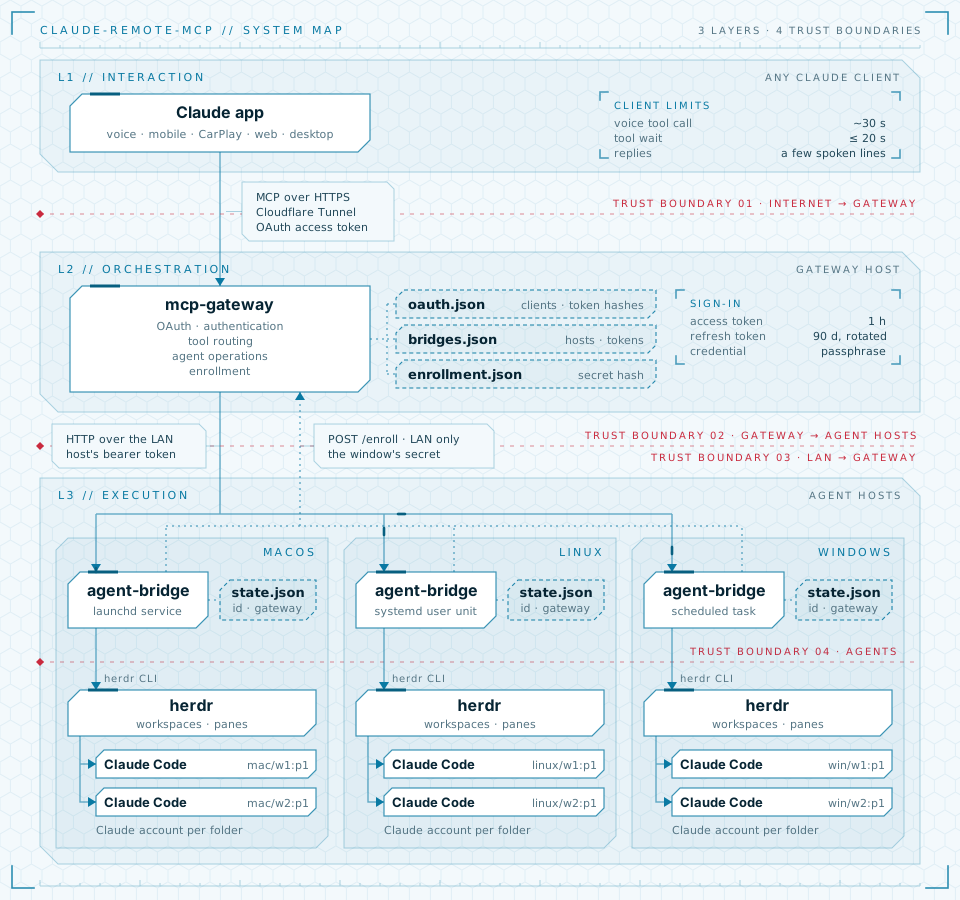
The gateway host and the agent host can be the same machine; then agent-bridge listens
on 127.0.0.1 and nothing goes over the LAN.
Built on the MCP Python SDK 2.x (MCPServer, Streamable HTTP, stateless, JSON
responses). Tool results are short plain text meant to be read aloud: one line per
agent, the last few output lines. A refusal from agent-bridge comes back as a tool error
with agent-bridge's message unchanged, after the SDK's Error executing tool <name>:
prefix; invalid arguments (e.g. a malformed agent id, or a prompt over 20 000 characters
or with a NUL character) come back the same way as one sentence.
System requirements
| OS | anything that runs Python 3.11+; tested on Linux and macOS, Windows should work but is untested. mcp-gateway setup needs a Debian-based Linux with systemd (e.g. Debian 12+, Ubuntu 22.04+); elsewhere, install by hand. |
| Hardware | very light: one small Python process plus cloudflared. A single-board computer, a small home server, a VPS (if it can reach agent-bridge, e.g. over a VPN) or the agent host itself is enough. 64-bit recommended. |
| Software | uv (installs Python 3.11+ itself if needed); cloudflared for the tunnel |
| Network | outbound HTTPS to Cloudflare; a route to agent-bridge's URL; agent hosts on the LAN reach port 8766 to enroll and, afterwards, to report their address, rename and unenroll. No port needs to be open to the internet. |
| Accounts | a Cloudflare account with a domain whose DNS is on Cloudflare (Free plan is fine); a Claude plan with custom connectors (all plans have them; Free allows one, and on Team and Enterprise an Owner adds it) |
| Always on | yes: the connector only works while this host is up |
Tools
| Tool | Does |
|---|---|
list_agents |
one line per agent: id · name · status · folder (the project agent-bridge reports, e.g. webapp; the full path outside every project) · account (when agent-bridge knows it). Optional filters: host, platform (macos, linux or windows, as each host reports it; one that can't say is named), project (that folder and those below it, as listed or by full path) and account; filtering by account names any host that has no such account or whose agent-bridge doesn't report accounts, and counts agents not known to be on any account (an unnamed config, or one it couldn't read). An agent that ended its turn with a question shows waiting for an answer and, on the next line, the question. With several hosts, agents are grouped by host, and hosts with no agents, that didn't answer within 8 s, or that need an update are named; one host down never fails the call, unless it is the only one asked (host, or the only host set up) |
agent_details |
the same line for one agent |
read_output |
last N meaningful terminal lines (default 20, at most 60; the same for lines on the waiting tools) |
send_prompt |
prompt, wait up to wait_seconds (default and most 20, see below), return status + output; flags blocked, a question the agent ended its turn with, still-working, and a prompt typed but not yet started on (not to be sent again). A blocked agent refuses prompts until its question is answered. If agent-bridge doesn't answer in time, it says the prompt may have been sent instead of failing, so it isn't sent twice |
wait_for_agent |
keep waiting for an agent still working (e.g. after send_prompt ran out of time); same result format |
answer_agent |
key presses for a blocked agent's question, e.g. ["1"], ["Enter"]; with wait_seconds also waits for the result. Marked destructive, so Claude asks first |
start_agent |
new agent in a project: one folder name in agent-bridge's allowed roots, or an absolute path. The gateway passes it on as it is; agent-bridge resolves and checks it. Optional host; without it and with several hosts, the gateway asks each (GET /projects/{name}) and starts on the one that has the project, or answers which hosts do. An absolute path needs host when there are several. Optional name: any words, made into a slug (by default the folder's name). Optional account (e.g. work) picks the Claude login; by default agent-bridge uses the one set up for the folder, and the reply names it. remote_control (default true) starts it with Claude Code's Remote Control, named like the agent at start (a later rename doesn't reach it); the reply says when it ended up off (the organization's policy, or an agent-bridge too old for it) or on though not asked (AGENT_BRIDGE_CLAUDE_ARGS). If agent-bridge takes over 25 s, it says the agent may still be starting instead of failing |
rename_agent |
new name for an agent and its herdr workspace, any words; agent-bridge turns it into a slug (Webapp fix! → webapp-fix, -2 if another agent has it) and the reply says the name it got |
stop_agent |
close an agent's pane (marked destructive, so Claude asks first) |
The server's instructions tell Claude the user is probably driving: short, speakable answers, no code read aloud, and no approvals without asking.
Waits are capped at 20 s because claude.ai gives up on a tool call long before its
docs' 240 s. Through the connector in Claude Code a 55 s wait comes back and a 60 s one
fails with The operation timed out; in voice mode a prompt that took 30 s came back as
MCP tool call failed, though it had been typed. Nothing is sent before a tool returns,
so a longer wait would end in a generic failure after the prompt was typed. For longer
work Claude calls wait_for_agent again. agent-bridge's answer gets wait_seconds + 5 s
before mcp-gateway gives up on it.
Voice mode also asks you to approve each tool call, reading ones included, and gives up after 30 s with approval timed out after 30s; not executed. To use it hands-free, set the tools to Always allow in the connector's settings in claude.ai.
Configuration
Read from the environment (with the setup script: /etc/mcp-gateway/env), or from a
.env file in the working directory (the environment wins). An empty variable counts as
unset. An invalid setting stops startup with one line per problem, naming the variable.
| Variable | |
|---|---|
MCP_GATEWAY_OAUTH_PASSPHRASE |
required, 16+ chars; typed on the sign-in page when the connector is added |
MCP_GATEWAY_STATE_DIR |
required; where the gateway keeps its state, all mode 600: signed-in clients and token hashes (oauth.json), agent hosts (bridges.json) and the enrollment window (enrollment.json), e.g. /var/lib/mcp-gateway. The running gateway locks it (oauth.lock); see One process |
MCP_GATEWAY_TOKEN |
optional, 32+ chars; the static token from before OAuth, still accepted as Authorization: Bearer … while set. Leave it unset unless a connector added with request headers still uses it |
MCP_GATEWAY_PUBLIC_HOST |
required; the tunnel hostname, e.g. mcp.example.com (/mcp requests with any other Host are refused). The OAuth issuer is https://<host> and the connector URL https://<host>/mcp |
MCP_GATEWAY_BRIDGE_URL, MCP_GATEWAY_BRIDGE_TOKEN |
legacy, both or neither; see Agent hosts |
MCP_GATEWAY_PORT |
optional, CLI only, and read from the environment only, not from .env; the port mcp-gateway enroll puts in the enrollment string (default 8766; the setup script's wrapper sets it to PORT) |
MCP_GATEWAY_PROJECTS_ROOT |
optional; only for an agent-bridge without GET /info, which can't look up project names: where start_agent finds them, as a path on the agent host, e.g. /home/me/projects. Unset, such a host takes absolute paths only |
Agent hosts
The gateway keeps its agent-bridges in bridges.json in MCP_GATEWAY_STATE_DIR (mode
600): for each, its id, name, URL and token, what it last answered to GET /info, and
when it enrolled. The gateway asks /info on tool calls, on a bridge's address report
at every start, at its own start (every host) and on bridges list, and saves the answer
only when it changed. last_seen is always null, kept for older gateways. Agent hosts usually add
themselves (enrollment); they can also be managed by hand on the gateway
host:
sudo mcp-gateway bridges add http://192.168.1.20:8765   # asks for its AGENT_BRIDGE_TOKEN
sudo mcp-gateway bridges list
sudo mcp-gateway bridges rename mac studio
sudo mcp-gateway bridges remove studio
add takes the name and everything else from the bridge's /info, and refuses a
bridge without it (--name picks another name). It takes the token from an exported
AGENT_BRIDGE_TOKEN when set (sudo --preserve-env=AGENT_BRIDGE_TOKEN), and otherwise
asks for it. list asks every host's /info first (5 s at most), so it shows each
host's current version, or why it didn't answer. The
running gateway picks up each change before its next request.
- Agent ids carry their host, e.g.
mac/w1:p1. While only one host is set up, bare ids (w1:p1) are shown and accepted. - Versions: the gateway calls bridges at its own API version (2) and one behind. Any
other shows in
list_agentsas needing an update and isn't called. - Upgrading from one bridge: if
MCP_GATEWAY_BRIDGE_URLand_TOKENare set and there is nobridges.jsonyet, the first start imports them as one host, named by its/info(hostif it doesn't answer or its name can't name a host; one that refuses, e.g. a wrong token, isn't imported). The setup script then drops them from the env file.
Enrollment
sudo mcp-gateway enroll # --address and --port if the defaults are wrong
opens a 30-minute window for any number of agent hosts and prints the string they
enroll with, crm1@<LAN address>:8766#<secret>, once the gateway answers at that
address (the setup script's listens on IPv4 only). On each agent host,
agent-bridge enroll '<string>' sends its id, address, token and name; the gateway calls that address's /info, checks it answers with the same id, and
adds the host (or replaces its record, if it enrolled before; any other host recorded at
that address is dropped, as is one at an address a bridge later reports). Each enrollment is logged
as a warning.
- The secret is 96 random bits, kept only as a hash with its expiry in
enrollment.json(mode 600). A newenrollreplaces it. Three wrong strings from one address lock that address out of the window; ten in all close it. - Names are the agent host's
AGENT_BRIDGE_NAME. One that another host has is refused (409), andagent-bridge enrollexits with 3: set anotherAGENT_BRIDGE_NAMEand run it again. - Afterwards each agent-bridge sends its address on every start
(
PUT /bridges/{id}/address), renames itself when its setup is given a new name (PUT /bridges/{id}/name,409for a taken name) and removes itself on uninstall (DELETE /bridges/{id}), all with its own token. On each address report the gateway asks/infothere and records the answer. A new address is kept only once its/infoanswers with the same id. An unchanged one is kept even if/infodoesn't answer. - Who may call these routes: only callers on a private, loopback or link-local
address, with no
CF-Connecting-IPorCF-Rayheader (anything the tunnel forwards has one); everyone else gets404. The tunnel doesn't publish them either. Bridge addresses must be IP addresses in the same ranges, so the gateway calls nothing else.
Security
What stands between the internet and an agent:
-
Cloudflare Tunnel. The gateway host opens an outbound connection; no port is opened on the router. Cloudflare terminates TLS.
-
Ingress rule. The tunnel only forwards
/mcpand the OAuth sign-in's paths (see OAuth sign-in); every other path (including/healthz) gets a 404 from cloudflared on the gateway host and never reaches mcp-gateway. -
OAuth access token. mcp-gateway refuses any
/mcprequest withoutAuthorization: Bearer <token>, where the token is an unexpired access token it issued (orMCP_GATEWAY_TOKEN, while set; constant-time compare). The wordBearermay be in any case. The 401 carriesWWW-Authenticate: Bearer resource_metadata="https://<host>/.well-known/oauth-protected-resource/mcp", from which claude.ai starts the sign-in, and each refusal is logged with the request's headers, secrets redacted. -
Host and Origin check. Only
MCP_GATEWAY_PUBLIC_HOST(andlocalhostor127.0.0.1with a port) is accepted asHoston/mcp, and onlyhttps://claude.aiorhttps://claude.comasOrigin(a request without one is fine). This is DNS-rebinding protection from the SDK. A refused Origin with a valid token is logged as an error: if it is the Claude app, every call fails until that Origin is added toALLOWED_ORIGINSinsrc/mcp_gateway/server.py.GET /mcpanswers405: the server is stateless and never pushes anything on a GET stream, so clients use POST only, as the MCP spec allows. -
agent-bridge's own limits. A separate token, a project-folder allowlist, an agent limit (
AGENT_BRIDGE_MAX_AGENTS, 10 by default), and folder trust only under its trust root, never in the default Claude config. -
Optional: Cloudflare Access with a service token in front of the hostname (see below).
mcp-gateway listens on every interface, so agent hosts can enroll, but
only the enrollment routes answer callers other than this host: /mcp, the sign-in and
everything else answer 404 to all but loopback, where cloudflared (or a reverse proxy
installed by hand) calls from.
OAuth sign-in
mcp-gateway is its own OAuth authorization server, for one user with one passphrase. When the connector is added, claude.ai:
- gets the
401from/mcpand reads/.well-known/oauth-protected-resource/mcp, then/.well-known/oauth-authorization-server; - registers itself at
/register(dynamic client registration, as a public client); - opens
/authorize, which forwards to the sign-in page/login. It names the client and the site the browser returns to (claude.ai), and asks forMCP_GATEWAY_OAUTH_PASSPHRASE; - trades the code for tokens at
/token(PKCE, S256) and calls/mcpwith them.
| Access token | 1 hour; claude.ai refreshes it by itself |
| Refresh token | 90 days; replaced on every refresh (the old one stops working) |
| Callback | only https://claude.ai/api/mcp/auth_callback can be registered, so a sign-in can't hand a code to anyone else. Claude Code's loopback callback isn't accepted |
| Wrong passphrases | logged with the source address; a sign-in link dies after 5, and an address with 10 within 15 minutes is refused until they age out, so one stranger guessing doesn't lock you out. The address is Cloudflare's CF-Connecting-IP when the request comes from the local cloudflared, the last X-Forwarded-For entry from another reverse proxy on this host, else the peer's; IPv6 counts by /64. Changing addresses doesn't buy more: 100 from all sources together stop every sign-in for those 15 minutes (tokens already issued keep working) |
| Phishing | someone could send you a sign-in link they started. The code can only go to claude.ai, where it only completes the sign-in that claude.ai itself started (its state), and the page says to continue only while you are connecting in Claude |
| Storage | MCP_GATEWAY_STATE_DIR/oauth.json: the clients that signed in and SHA-256 hashes of their tokens, never the tokens. A registration that never signs in is kept in memory only (at most 100). Written to a new temporary file, synced to disk and renamed over the old one, so a crash leaves either the old file or the new one; on Linux, so does a power cut. Checked whole at startup: a damaged file stops the gateway with a message naming the file, the bad fields and the client ids involved (not secret), never field values or token hashes |
| Failed saves | A sign-in or refresh whose save fails (e.g. a full disk) fails and changes nothing: a refresh can be retried with the same refresh token, a sign-in is started again. A revocation whose save fails still revokes at once, and oauth.json, which still lists the revoked tokens, is deleted (that needs no space): a restart before the next successful save signs every client out instead of bringing them back, and that save writes the file again. When a revocation can't be made safe on disk (the file can't be deleted, or the folder won't sync, so a power cut could undo it), an error in the log says so and what to do in that case; the usual fix, once the disk can be written, is to stop mcp-gateway, delete oauth.json and start it again, but on a read-only disk stopping it only loses the revocation. Until a save is fully on disk, every save that isn't is logged as an error too, also after a restart if the state folder won't sync then |
| Revocation | /revoke ends a token and its pair |
| Restart | tokens survive it, except after a revocation that couldn't be saved (see Failed saves); a sign-in page or code that was open is lost (sign in again) |
To sign every connector out, stop the service, delete oauth.json and start it again, in
that order: a running gateway writes the file back from memory on its next save.
Changing the passphrase only affects the next sign-in.
One process
mcp-gateway must run as a single process. It reads oauth.json once, at startup, and
keeps registrations that haven't signed in yet, sign-ins in progress, authorization
codes and the wrong-passphrase counts in memory. A second process would refuse the
tokens the first one issued, overwrite the first one's tokens in oauth.json on its
next save, break sign-ins started in the first, and allow each one its own guesses.
The setup script's service runs one. When installing by hand, don't pass uvicorn
--workers and don't start a second instance on the same MCP_GATEWAY_STATE_DIR: the
running gateway locks the folder, and a second process there stops at startup with
Another mcp-gateway process is using …. With --workers, uvicorn then stops all of
them and exits with status 0, so a service manager sees a clean stop, not a failure
(systemd's Restart=on-failure doesn't restart it); the message is in the log. The lock
can't catch instances on separate hosts. Running more than one process would first need
the tokens, that state and the wrong-passphrase counts in a shared store with atomic
updates.
Install with mcp-gateway setup
mcp-gateway is published to PyPI as claude-remote-mcp-gateway; its command is
mcp-gateway. mcp-gateway setup runs the setup script the package ships,
deploy/setup.sh, with sudo. It does the whole setup:
it installs cloudflared, installs this version of mcp-gateway as a systemd service,
creates and runs the Cloudflare Tunnel, and generates the sign-in passphrase.
Before you start
- A Debian-based Linux with systemd (see System requirements).
It coexists with other services: mcp-gateway uses port 8766 (the script stops if
something else has it), and the tunnel runs as its own
cloudflared-claude-remoteservice next to any other cloudflared setup. A firewall on the host must let the LAN reach port 8766 for agent hosts to enroll and, afterwards, to report their address, rename and unenroll. - A domain whose DNS is on Cloudflare (any plan, including Free). The MCP server gets a
subdomain of it, e.g.
mcp.example.com. - Fixed LAN addresses for the gateway host and the agent hosts (DHCP reservations on the router). Agent hosts are set up afterwards, with the string this script prints.
Run it
As your own user, not with sudo (it asks for your password):
curl -LsSf https://astral.sh/uv/install.sh | sh   # if uv isn't installed; then open a new shell
uv tool install claude-remote-mcp-gateway
PUBLIC_HOST=mcp.example.com mcp-gateway setup
PUBLIC_HOST is the only question; left out, it is asked for, and on later runs it
comes from /etc/mcp-gateway/env instead (see Update and rotate).
AGENT_BRIDGE_URL optionally adds an agent-bridge set up by hand with
mcp-gateway bridges add, which asks for its token without showing it, or takes it
from an exported AGENT_BRIDGE_TOKEN. setup passes these variables on through sudo.
AGENT_BRIDGE_TOKEN without AGENT_BRIDGE_URL fails the run (except to give a legacy
MCP_GATEWAY_BRIDGE_URL a new token at its import), and so does a new token for a URL
that is already a host, or an AGENT_BRIDGE_URL other than a legacy one not yet imported:
change a host's URL or token with sudo mcp-gateway bridges remove <name>, then
bridges add <url>.
Keep tokens out of the command itself: there they end up in your shell history and, while
the script runs, in the process list that other users on the host can read. Optional variables: PROJECTS_ROOT (only for
an agent-bridge without /info, see
Configuration), TUNNEL_NAME (default claude-remote), PORT (default 8766),
MCP_GATEWAY_OAUTH_PASSPHRASE, ROTATE_PASSPHRASE=1, MCP_GATEWAY_TOKEN and
REMOVE_TOKEN=1.
The script generates the sign-in passphrase (MCP_GATEWAY_OAUTH_PASSPHRASE, 96 random
bits as six groups of four hex digits) itself. To choose your own instead, read it
without echoing and export it:
read -rsp 'Passphrase: ' MCP_GATEWAY_OAUTH_PASSPHRASE && export MCP_GATEWAY_OAUTH_PASSPHRASE && echo
PUBLIC_HOST=mcp.example.com mcp-gateway setup
It must be 16+ characters from letters, digits, spaces and . _ ~ + / = : , ! ? @ # % ^ & * ( ) -.
The script makes no static token. One already in /etc/mcp-gateway/env is kept, so a
connector added with request headers keeps working until it is replaced (see
Move a connector to OAuth); MCP_GATEWAY_TOKEN passed the
same way sets one.
On the first run cloudflared tunnel login prints a URL. Open it in any browser, log in
to Cloudflare and pick the zone (domain) that contains PUBLIC_HOST: example.com for
mcp.example.com. The script waits until you do. The DNS record is created in the zone
picked here; in any other zone the name comes out wrong (e.g.
mcp.example.com.other.org). If that happened, delete that record in the dashboard,
delete /etc/cloudflared/cert.pem and re-run to log in again. A cert left in
/root/.cloudflared/ by an earlier cloudflared tunnel login is used instead of logging
in.
At the end it checks that mcp-gateway is up, lists the agent hosts, and checks that the tunnel answers 401 on /mcp without a token, serves the OAuth metadata, and
answers 404 elsewhere, /enroll included (waiting up to 30 s each for the service and
the tunnel to come up). If all pass, it prints the connector settings and opens an
enrollment window, printing the string for the agent hosts' setups; if
any fails, it lists the failed checks and exits with status 1. Either way it says where
the passphrase is: when it makes a new one, it prints it once saved and again at the end. DNS for a new hostname can take a few minutes; if only
the tunnel checks fail, try again shortly:
curl -i -X POST https://mcp.example.com/mcp should answer 401.
What it creates
| Path | |
|---|---|
/opt/mcp-gateway/ |
the service's own install of the version setup ran from: venv/ with the same packages as the tool, and python/ if uv downloaded Python. Owned by root, so the service can run the code but not change it; the tool's environment in your home folder is out of the service's reach (ProtectHome=yes) |
/etc/mcp-gateway/env |
configuration, passphrase and tokens (root:mcp-gateway, mode 640) |
/var/lib/mcp-gateway/ |
oauth.json: signed-in clients and token hashes, and oauth.lock; bridges.json: the agent hosts, and bridges.lock; enrollment.json: the gateway's id and the enrollment window, and enrollment.lock (systemd StateDirectory, owned by mcp-gateway, mode 700) |
/usr/local/bin/mcp-gateway |
runs mcp-gateway enroll, bridges … and --version from /opt/mcp-gateway as the mcp-gateway user on its state folder; setup stays the tool's |
/etc/systemd/system/mcp-gateway.service |
runs as the mcp-gateway system user on 0.0.0.0:8766, sandboxed |
/usr/local/bin/uv, /usr/local/bin/uvx |
root's uv, only if it had none (updated on later runs) |
/etc/apt/sources.list.d/cloudflared.list, /usr/share/keyrings/cloudflare-main.gpg |
Cloudflare's apt repository and its key, only if cloudflared wasn't installed |
/etc/cloudflared/cert.pem |
Cloudflare account cert from tunnel login; only needed to manage tunnels, root-only |
/etc/cloudflared/claude-remote.json |
the tunnel's credentials (owned by the cloudflared user) |
/etc/cloudflared/claude-remote.yml |
tunnel config with the ingress rules |
/etc/systemd/system/cloudflared-claude-remote.service |
runs the tunnel as the cloudflared system user |
Update and rotate
- Upgrade:
uv tool upgrade claude-remote-mcp-gateway, thenmcp-gateway setup, passingPORTandTUNNEL_NAMEagain if you changed them (they aren't kept). The service moves to the tool's version only with that re-run;sudo mcp-gateway --versionprints the one it runs. setup takesPUBLIC_HOSTand, if set,PROJECTS_ROOTfrom/etc/mcp-gateway/envand lists the ones it keeps, keeps the passphrase, the OAuth tokens, the static token if there is one and the agent hosts, and reuses the tunnel. An agent-bridge set up beforebridges.jsonis imported as a host and dropped from the env file (see Agent hosts). Once agent-bridge hasGET /info, a keptPROJECTS_ROOTdoes nothing: project names resolve under the first ofAGENT_BRIDGE_ALLOWED_ROOTSthat has the folder, so check those hold the projects you mean. - Move an install from a checkout (one set up with
mcp-gateway/deploy/setup.sh):uv tool install claude-remote-mcp-gateway, then~/.local/bin/mcp-gateway setupwith its full path: until this run,mcp-gatewaymay be the old install's/usr/local/bin/mcp-gateway, which has nosetup(invalid choice: 'setup'). It keeps the same settings, state and tunnel, and once the gateway answers from/opt/mcp-gateway, removes/opt/claude-remote-mcp. The checkout isn't used after that. - Run a build that isn't released: install it as a tool from a path, a wheel or a git
URL, e.g.
uv tool install --reinstall ./mcp-gatewayin a checkout, thenmcp-gateway setup: the service gets it from the same place. An editable install (--editable) is refused, as its code stays in your home folder. Back to the release:uv tool install --reinstall claude-remote-mcp-gateway, thenmcp-gateway setup. - If
mcp-gateway setupsays to run it from the tool,/usr/local/bincomes before~/.local/binin yourPATH: run~/.local/bin/mcp-gateway setup. - Change the passphrase: re-run with
ROTATE_PASSPHRASE=1(it prints the new one), or withMCP_GATEWAY_OAUTH_PASSPHRASEas above. Connectors already signed in stay signed in; to sign them out too,sudo systemctl stop mcp-gateway && sudo rm -f /var/lib/mcp-gateway/oauth.json && sudo systemctl start mcp-gateway. - Stop accepting the static token: re-run with
REMOVE_TOKEN=1. - Change an agent-bridge's URL or token: an enrolled bridge sends a new address
itself when it starts; after a new token, enroll it again (
sudo mcp-gateway enroll, thenagent-bridge enroll '<string>'on the agent host). One added by hand:sudo mcp-gateway bridges remove <name>, thensudo mcp-gateway bridges add <url>. - Change the projects folder: re-run with
PROJECTS_ROOT. - Change the hostname: re-run with the new
PUBLIC_HOST. It gets a new DNS record; delete the old one in the Cloudflare dashboard, and re-add the connector in claude.ai with the new URL. - Logs:
journalctl -u mcp-gateway -u cloudflared-claude-remote -f. mcp-gateway's lines start with their level (WARNING:,ERROR:) and reach the journal with that priority, sojournalctl -u mcp-gateway -p errlists only its errors.
Stop, restart, uninstall
The MCP server and the tunnel are two services. Stopping the tunnel alone is enough to take the connector offline; claude.ai then gets an error from Cloudflare.
# Status
systemctl status mcp-gateway cloudflared-claude-remote

# Take it offline: stop the tunnel (and the server); they start again at boot
sudo systemctl stop cloudflared-claude-remote mcp-gateway

# Keep it offline across reboots too
sudo systemctl disable --now cloudflared-claude-remote mcp-gateway

# Back online
sudo systemctl enable --now mcp-gateway cloudflared-claude-remote

# Restart, e.g. after editing /etc/mcp-gateway/env by hand
sudo systemctl restart mcp-gateway cloudflared-claude-remote
Uninstall everything the script set up:
# 1. Stop and remove both services
sudo systemctl disable --now cloudflared-claude-remote mcp-gateway
sudo rm /etc/systemd/system/mcp-gateway.service /etc/systemd/system/cloudflared-claude-remote.service
sudo systemctl daemon-reload

# 2. Delete the tunnel at Cloudflare (it must have no running connections, hence step 1)
sudo TUNNEL_ORIGIN_CERT=/etc/cloudflared/cert.pem cloudflared tunnel cleanup claude-remote
sudo TUNNEL_ORIGIN_CERT=/etc/cloudflared/cert.pem cloudflared tunnel delete claude-remote

# 3. Remove the code, configuration, tokens (also the agent-bridges' tokens in
#    bridges.json) and tunnel credentials
sudo rm -rf /opt/mcp-gateway /etc/mcp-gateway /var/lib/mcp-gateway
sudo rm -f /usr/local/bin/mcp-gateway /etc/cloudflared/claude-remote.json /etc/cloudflared/claude-remote.yml

# 4. Remove the service user and the tool
sudo userdel mcp-gateway
uv tool uninstall claude-remote-mcp-gateway
Then:
- DNS:
tunnel deleteleaves the hostname's CNAME behind. Delete it in the Cloudflare dashboard (your domain → DNS → Records → themcprecord). A reinstall stops at it otherwise; it prints the--overwrite-dnscommand that points it at the new tunnel instead. - Agent hosts: a reinstalled gateway has none. Enroll each again:
sudo mcp-gateway enroll, thenagent-bridge enroll '<string>'on each host. - claude.ai: remove the custom connector (Customize → Connectors; on Team and Enterprise, an Owner removes it in Organization settings → Connectors).
- Cloudflare Access, if you set it up: delete the application and the service token in Zero Trust.
- Only if nothing else on the host uses them: the Cloudflare login cert, the
cloudflareduser, cloudflared itself, and uv with root's uv cache. The script reuses acloudflareduser that already exists, so check first that no other service runs as it:ps -u cloudflaredandgrep -rl '^User=cloudflared' /etc/systemd/systemshould find nothing.sudo rm -f /etc/cloudflared/cert.pem sudo rmdir /etc/cloudflared /root/.cloudflared # only removed if empty sudo userdel cloudflared sudo apt-get remove cloudflared sudo rm /etc/apt/sources.list.d/cloudflared.list /usr/share/keyrings/cloudflare-main.gpg sudo rm -rf /root/.cache/uv sudo rm /usr/local/bin/uv /usr/local/bin/uvx
Treat the cert like a password while it exists: it can create tunnels and DNS records in that zone.
Install by hand
On any other system (another Linux, macOS, Windows), or to use a different tunnel or reverse proxy:
- Install uv, and the package
into a virtual environment in a folder
<dir>the server's user can read (e.g./opt/mcp-gateway, created as root), with its Python there too: uv would otherwise use or download one in your home folder.UV_PYTHON_INSTALL_DIR=<dir>/python uv venv --managed-python --python 3.11 <dir>/venv && uv pip install --python <dir>/venv claude-remote-mcp-gateway. Its commands are in<dir>/venv/bin/(<dir>\venv\Scripts\on Windows). - Set the configuration variables and start the server, on every
interface for agent hosts to enroll (
--host 127.0.0.1if they are all added by hand):<dir>/venv/bin/uvicorn mcp_gateway.server:main --factory --host 0.0.0.0 --port 8766 --no-server-header --no-proxy-headers
Keep it running with your system's service manager (systemd, launchd, NSSM, …), as one process: no--workers. On Windows nothing stops a second one. Keep--no-proxy-headers: without it uvicorn takes the caller from the proxy'sX-Forwarded-For, and the gateway answers 404 to whatever doesn't come from 127.0.0.1. - Publish over HTTPS at
MCP_GATEWAY_PUBLIC_HOSTonly/mcpand the OAuth paths:/authorize,/login,/token,/register,/revoke,/.well-known/oauth-authorization-serverand/.well-known/oauth-protected-resource/mcp. Use a Cloudflare Tunnel set up by hand, or any reverse proxy on the same host (mcp-gateway serves those paths to loopback only) that terminates TLS, with a request timeout of at least 30 s (wait_secondsgoes up to 20 s, plus up to 5 s for agent-bridge's answer). Don't publish/healthzor anything else. mcp-gateway needs a writableMCP_GATEWAY_STATE_DIR. - As the user the server runs as, open an enrollment window for the agent hosts:
<dir>/venv/bin/mcp-gateway --state-dir <state dir> enroll, or add them with… bridges add <url>.
Cloudflare Tunnel
The script uses a locally managed tunnel: its configuration lives in a file on the gateway host, not in the Cloudflare dashboard. These are the steps it runs, if you'd rather do it by hand:
# 1. Authorize cloudflared for your Cloudflare account and zone (writes ~/.cloudflared/cert.pem)
cloudflared tunnel login

# 2. Create the tunnel and its credentials file
cloudflared tunnel create --credentials-file /etc/cloudflared/claude-remote.json claude-remote

# 3. Point the hostname at the tunnel (creates a proxied CNAME to <tunnel-id>.cfargotunnel.com)
cloudflared tunnel route dns claude-remote mcp.example.com
/etc/cloudflared/claude-remote.yml:
tunnel: <tunnel id from `cloudflared tunnel list`>
credentials-file: /etc/cloudflared/claude-remote.json
ingress:
  - hostname: mcp.example.com
    # only the MCP endpoint and the OAuth sign-in
    path: ^/(mcp|authorize|login|token|register|revoke|\.well-known/oauth-(authorization-server|protected-resource/mcp))$
    service: http://127.0.0.1:8766
  - service: http_status:404
# 4. Check the rules, then run it (the script wraps this in a systemd unit)
cloudflared tunnel --config /etc/cloudflared/claude-remote.yml ingress validate
cloudflared tunnel --config /etc/cloudflared/claude-remote.yml ingress rule https://mcp.example.com/mcp
cloudflared --no-autoupdate tunnel --config /etc/cloudflared/claude-remote.yml run
Updates to cloudflared arrive through apt (sudo apt upgrade), which is why the
service runs with --no-autoupdate. In the dashboard the tunnel shows up under
Networking → Tunnels (or Zero Trust → Networks → Connectors), where its connection
status is visible.
Optional: Cloudflare Access with a service token
Access can sit in front of the hostname as a second gate, checked by Cloudflare before a request ever reaches the gateway host. claude.ai can't complete an Access login page, so use a service token and have the connector send it as headers.
This doesn't fit the OAuth sign-in well: /authorize and /login open in your browser,
which has no service token, so those two paths need an Access Bypass policy, and the
connector still needs request headers (below) for the rest. With OAuth on, leave Access
off unless you need it.
- Zero Trust → Access controls → Service credentials → Service Tokens → Create Service Token. Copy the Client ID and Client Secret.
- Zero Trust → Access controls → Applications → Create new application →
Self-hosted and private, public hostname
mcp.example.com, with one policy: action Service Auth, include Service Token = the token from step 1. - In the claude.ai connector, add two more request headers:
CF-Access-Client-IdandCF-Access-Client-Secret.
Two catches, both from claude.ai's request headers, a beta only some accounts have: custom header names like these are only sent once Anthropic has approved them (ask Claude support; until then the connector can't be saved with them), and a connector takes at most four headers. Without approval, leave Access off; the OAuth token and the ingress rule still apply.
Add the connector in claude.ai
claude.ai → Customize → Connectors → Add → Add custom connector:
| Field | Value |
|---|---|
| Name | any, e.g. claude-remote |
| URL | https://mcp.example.com/mcp |
| Authentication | where the dialog asks, Sign in now (not No sign-in, which hides the OAuth client) |
| OAuth client | Register automatically (dynamic client registration), or, where the dialog shows a client ID and secret under advanced settings, leave them empty: claude.ai registers itself. The gateway doesn't take Claude's published identity |
Then click Add, then Connect. A page from your gateway asks for the passphrase
(MCP_GATEWAY_OAUTH_PASSPHRASE); after Allow you are back in claude.ai, connected.
claude.ai keeps the connector signed in by refreshing its token; if it was signed out
(e.g. after 90 days unused, or oauth.json was deleted, by hand or after a revocation
that couldn't be saved; see Failed saves), it asks you to connect again.
See Claude's connector docs.
Move a connector to OAuth
A connector added before OAuth sends the static token as a request header, which can't be edited. To move it over:
- Update the gateway (re-run the setup script; it keeps the static token, so the old connector keeps working meanwhile, and prints the passphrase).
- In claude.ai, remove the old connector and add it again as above, signing in with the passphrase.
- Re-run the setup script with
REMOVE_TOKEN=1, so the static token stops working.
Connectors added on claude.ai are available in the Claude apps on the same account, including the mobile app (and with it, on iPhone, CarPlay).
Development
uv sync --all-packages
uv run --package claude-remote-mcp-gateway pytest mcp-gateway

# Local run against an agent-bridge on this machine
uv run --package claude-remote-mcp-gateway mcp-gateway --state-dir /tmp/mcp-gateway-state bridges add http://127.0.0.1:8765
MCP_GATEWAY_OAUTH_PASSPHRASE=$(openssl rand -hex 12) MCP_GATEWAY_STATE_DIR=/tmp/mcp-gateway-state \
MCP_GATEWAY_TOKEN=$(openssl rand -hex 32) MCP_GATEWAY_PUBLIC_HOST=localhost \
  uv run --package claude-remote-mcp-gateway uvicorn mcp_gateway.server:main --factory --host 127.0.0.1 --port 8766
Tests drive the real MCP app over JSON-RPC with a fake agent-bridge behind
httpx.MockTransport; test_oauth.py goes through the whole sign-in the way claude.ai
does. src/mcp_gateway/deploy/setup.sh is checked with shellcheck.
Releasing mcp-gateway
Its version is independent of agent-bridge's. To release:
- Set the version, e.g.
uv version --package claude-remote-mcp-gateway 0.2.0, and merge that to main. - Tag that commit on main and push the tag:
git tag mcp-gateway-v0.2.0 && git push origin mcp-gateway-v0.2.0. - The release workflow runs CI, checks
that the tag is the version in
pyproject.toml, builds the wheel and sdist and checks that the wheel prints that version. Publishing waits for an approval in thepypienvironment: approve it in the run; it then publishes to PyPI and creates the GitHub Release.
1 maintainer

Metadata
1 maintainer
Release files for claude-remote-mcp-gateway 0.1.4
For a detailed explanation of source distributions (sdists) and built distributions (wheels), please see the package formats documentation.
Source distribution (sdist)
| File | Size | Uploaded | Provenance | Actions |
|---|---|---|---|---|
| claude_remote_mcp_gateway-0.1.4.tar.gz | 128.3 kB | With provenance | Details for claude_remote_mcp_gateway-0.1.4.tar.gz |
Built distribution (wheel)
| File | Interpreter | ABI | Platform | Actions Reset |
|---|---|---|---|---|
| claude_remote_mcp_gateway-0.1.4-py3-none-any.whl | Python 3 | none | any | Details for claude_remote_mcp_gateway-0.1.4-py3-none-any.whl |
Total release size: 205.9 kB
Release files / claude_remote_mcp_gateway-0.1.4.tar.gz
| Download URL | claude_remote_mcp_gateway-0.1.4.tar.gz |
|---|---|
| Size | 128.3 kB |
| Tags | Source |
|
SHA-256 checksum How to use checksums |
efbccdccd6461b9ba1903c0eacdf07b7c7511fd85beb1e00b3a0b87ee9f87db4
|
|
BLAKE2b-256 checksum How to use checksums |
ca58de911fc4db68bc9b4645f3eb37ba73b7bf7cfcec46b97b8a5b6617b12523
|
| Upload date | |
|
Uploaded using Trusted Publishing? What is trusted publishing? |
Yes |
| Uploaded via |
twine/7.0.0 CPython/3.13.16
|
Provenance
Provenance describes where a file came from. On PyPI, provenance is shared via attestations, which provide a verifiable record of the build or publishing details. View details, limitations and caveats.


PyPI Publish Attestation
PyPI verified that this artifact, at this checksum, originated from the publisher listed below.
Signed by GitHub Actions, verified by PyPI on Nov 19, 2026.
Transparency logRelease files / claude_remote_mcp_gateway-0.1.4-py3-none-any.whl
| Download URL | claude_remote_mcp_gateway-0.1.4-py3-none-any.whl |
|---|---|
| Size | 77.6 kB |
| Tags | Python 3 |
|
SHA-256 checksum How to use checksums |
e986dbb37823d41cfd864524639291335cded4acf83cd901169607d967830176
|
|
BLAKE2b-256 checksum How to use checksums |
e777b1465e0409d174c79884051f6203133c99ccff95932885fc10cf75135954
|
| Upload date | |
|
Uploaded using Trusted Publishing? What is trusted publishing? |
Yes |
| Uploaded via |
twine/7.0.0 CPython/3.13.16
|
Provenance
Provenance describes where a file came from. On PyPI, provenance is shared via attestations, which provide a verifiable record of the build or publishing details. View details, limitations and caveats.
PyPI Publish Attestation
PyPI verified that this artifact, at this checksum, originated from the publisher listed below.
Signed by GitHub Actions, verified by PyPI on Nov 19, 2026.
Transparency logSecurity for claude-remote-mcp-gateway 0.1.4
Provenance
Provenance describes where a file came from. On PyPI, provenance is shared via attestations, which provide a verifiable record of the build or publishing details. View details, limitations and caveats.
Full provenance
Both files in this release have been uploaded with provenance metadata.
Attestation for claude_remote_mcp_gateway-0.1.4.tar.gz
PyPI Publish Attestation
PyPI verified that this artifact, at this checksum, originated from the publisher listed below.
Signed by GitHub Actions, verified by PyPI on Nov 19, 2026.
Transparency logA note on package security
PyPI is a repository for distributing packages, not a service for auditing them. While third-party security researchers and our staff do their best to detect and remove malicious packages, PyPI cannot guarantee the quality, security or suitability of any given package.
To learn more about protecting yourself from malicious actors, visit our package security documentation.














