
claude-repath




Rewire Claude Code's local state when your project folder moves.
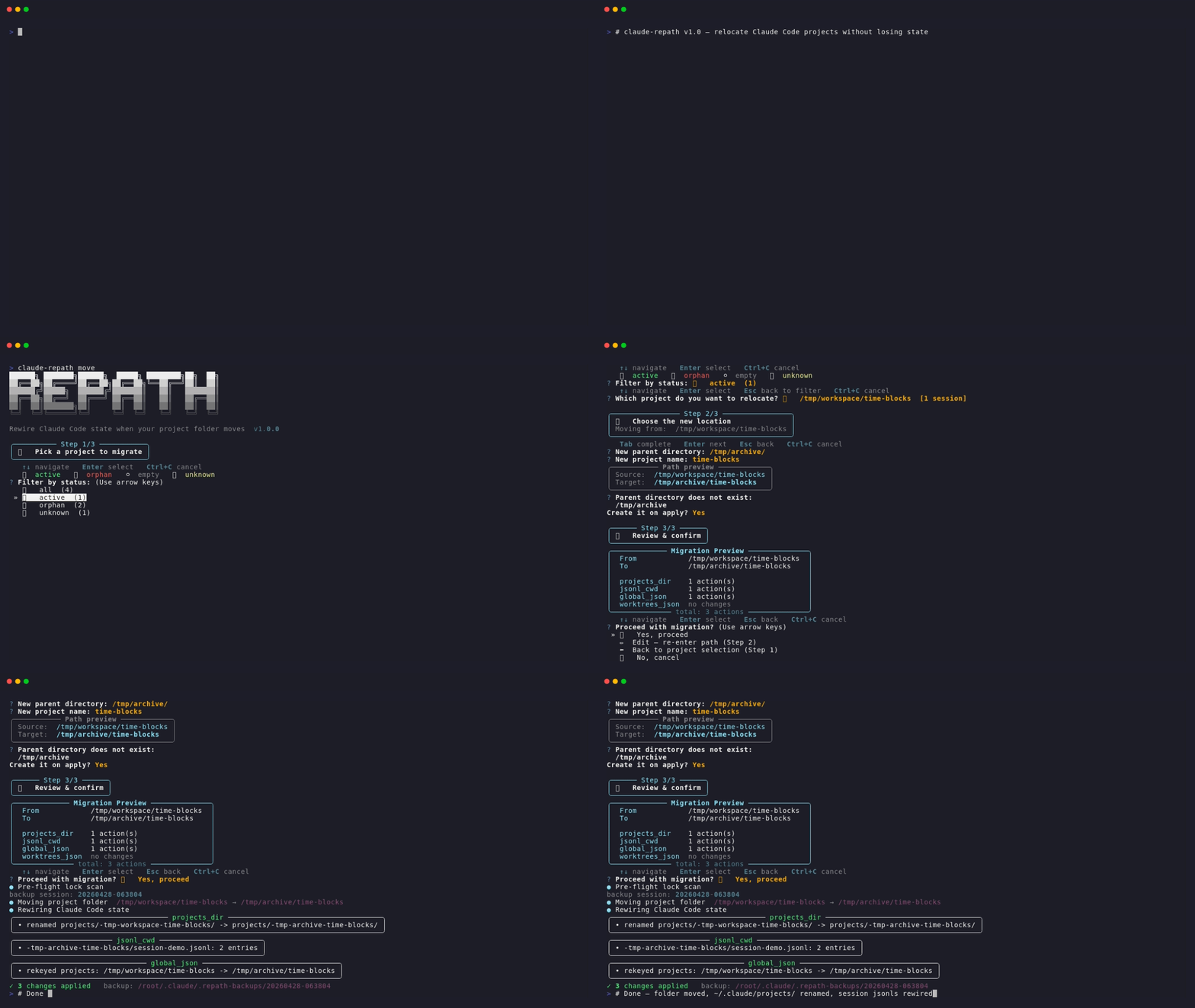
When you move or rename a project directory, Claude Code loses track of its sessions, memory, todos, and worktrees — because the absolute path is hardcoded in four different places. claude-repath patches all of them in one shot.
Why this exists
Claude Code stores per-project state under ~/.claude/projects/<encoded-cwd>/, where the folder name is derived from the project's absolute path. Moving the project folder breaks:
~/.claude/projects/<encoded>/— the encoded folder name no longer matches~/.claude/projects/<encoded>/*.jsonl— each session file has"cwd"hardcoded inside~/.claude.json— theprojectskey is indexed by absolute path- Git worktree sub-projects — each has its own encoded folder AND internal
cwdfields
Anthropic has no official migration command (as of 2026-04), and existing community tools cover at most 6 of the needed layers. claude-repath aims to handle all of them, with special care for Windows paths and worktrees.
Install
Pick whichever matches your workflow — they're all equivalent:
| Method | Command | When to use |
|---|---|---|
| uvx (zero-install) | uvx --from claude-repath claude-repath <subcommand> |
Try or use without installing — uv caches it transparently |
| pipx (global CLI) | pipx install claude-repath |
Daily use, isolated from system Python |
| pip (in a venv) | pip install claude-repath |
Already inside a project venv |
💡 First time? Run
uvx --from claude-repath claude-repath --version— no commitment, just see if it works on your box. Upgrade later withuvx --refresh ….
Install as a Claude Code plugin (optional)
In addition to the CLI, this repo ships a Claude Code plugin so your AI assistant can recognize symptoms — "I moved my project and Claude forgot everything", "sessions gone after rename", "~/.claude/projects has the old folder name" — and suggest claude-repath automatically, without you having to remember the tool's name.
From inside Claude Code:
/plugin marketplace add xPeiPeix/claude-repath
/plugin install claude-repath@claude-repath-marketplace
Or, from any terminal (uses the open skills.sh ecosystem — Claude Code, Cursor, Codex, and ~40 more agents):
npx skills add xPeiPeix/claude-repath
The plugin only ships a skill (a ~200-line guidance document). It does not bundle the CLI — you still install that via uvx/pipx/pip above, or let the skill guide Claude to run it via uvx on first use.
Quick start
# INTERACTIVE mode — pick from a list, no path typing needed
claude-repath move

# Explicit mode — preview changes first (ALWAYS recommended)
claude-repath move D:\dev_code\time-blocks D:\dev_code\Life\time-blocks --dry-run

# Actually perform the migration (auto-backs-up first)
claude-repath move D:\dev_code\time-blocks D:\dev_code\Life\time-blocks

# Broader scan — also rewrite cross-project references (use with care)
claude-repath move <old> <new> --scope broad

# Override pre-flight lock check (still bounded by OS-level runtime locks
# — see --force note in Safety section). v0.4.1+ uses atomic os.rename, so
# a runtime lock now fails loudly with the source directory intact; previously
# shutil.move could half-succeed on Windows.
claude-repath move <old> <new> --force

# If you already moved the folder manually, just rewire state
claude-repath rewire D:\dev_code\time-blocks D:\dev_code\Life\time-blocks

# Health check a project's Claude Code state
claude-repath doctor D:\dev_code\time-blocks

# List all projects Claude Code knows about
claude-repath list

# Roll back a previous migration
claude-repath rollback 20260419-155331
What gets migrated
Legend: ✅ fully handled · ⚠️ physically moved but needs manual rebuild · 🔍 diagnosed but not migrated
| # | Layer | Status |
|---|---|---|
| 1 | Physical project folder (mv) |
✅ |
| 2 | ~/.claude/projects/<encoded>/ directory name |
✅ |
| 3 | .jsonl session files — inline "cwd" fields |
✅ |
| 4 | ~/.claude.json — projects key |
✅ |
| 5 | Worktree-derived project folders (auto-discovered) | ✅ |
| 6 | ~/.claude/git-worktrees.json (if present) |
✅ |
| 7 | Python .venv/ / venv/ — rebuild after move (why & how) |
⚠️ |
| 8 | node_modules/ — rebuild after move (why & how) |
⚠️ |
| 9 | Chromium Local Storage/leveldb entries (Desktop app) |
🔍 |
⚠️ rows:
movephysically relocates these directories, but their internal binaries/shims embed absolute paths and stop working until you rebuild with the original package manager.claude-repathdetects them pre-flight and prints a non-blocking warning — see Known limitations for the exact rebuild commands.
Safety
- Pre-flight lock check (v0.4+): scans every running process via
psutilfor any that have acwdinside the target directory or a file open under it, and hard-refuses the migration with exit code 1 if any are found. Reports PID, process name, and specific lock reason (shellcd, IDE, editor, etc.). Overridable with--force/-f. - Atomic physical move (v0.4.1+): even when the pre-flight check misses a lock (elevated processes invisible to
psutil, TOCTOU races, transient AV-scanner or Windows-Search-indexer locks), the physical folder move uses a bareos.renameinstead ofshutil.move— no silentcopytree + rmtreedowngrade. Result: onWinError 32/5the move fails loudly with exit code 1 and the source directory is guaranteed intact for retry; the previous half-migration failure mode (target complete, source half-deleted) is now impossible. Cross-volume moves fall back torobocopy /MOVE(Windows) orshutil.move(Unix). - Dry-run by default logic: destructive commands require either
--dry-runpreview first or explicit confirmation. Dry-run also previews the pre-flight lock report without blocking. - Auto-backup: every mutation is snapshotted to
~/.claude/.repath-backups/<timestamp>/. - Running-Claude warning: soft heads-up if any
claudeCLI process is detected holding state files (complements the hard pre-flight check above). - Rollback:
claude-repath rollback <timestamp>restores a previous snapshot.
Known limitations
Some directories inside a project embed absolute paths at creation time,
and no amount of careful copying fixes that — they must be rebuilt after the
move. claude-repath move detects the most common offenders and prints a
warning (non-blocking) so you know what to rebuild:
| Directory | Why it breaks | How to rebuild |
|---|---|---|
Python .venv/ / venv/ |
Windows Scripts/*.exe trampolines hard-code the path to python.exe; Unix scripts use #!/abs/path shebangs |
uv sync / pip install -e . / poetry install — whichever your project uses |
node_modules/ |
.bin/*.cmd shims (Windows) and pnpm symlinks may contain absolute paths |
npm ci / pnpm install / yarn install |
claude-repath does not run the rebuild for you — every package manager
has its own command and auto-running any of them without your consent can
clobber lockfiles, pull unexpected versions, or take a long time with no
progress feedback. The warning tells you what needs attention; you run the
right command.
Other directories with similar issues (target/ for Rust debug builds,
vendor/bundle/ for Ruby Bundler, etc.) are currently not detected —
flag them via a GitHub issue if you hit problems.
Platform support
| OS | CLI state (~/.claude/) |
Desktop state (Local Storage/leveldb) |
|---|---|---|
| Windows 11 (Git Bash / PowerShell / cmd) | ✅ auto-migrated | 🔍 diagnosed |
| macOS | ✅ auto-migrated | 🔍 diagnosed |
| Linux | ✅ auto-migrated | 🔍 diagnosed |
Windows paths with drive letters (D:\...) and backslashes are first-class — they were the primary motivation for writing this tool. The path matcher accepts both \ and / separators and automatically aligns with ~/.claude.json's forward-slash-stored keys.
About Claude Code Desktop
Claude Code Desktop stores additional session state in Chromium's Local Storage LevelDB:
- Windows:
%LOCALAPPDATA%\claude\Local Storage\leveldb\ - macOS:
~/Library/Application Support/claude/Local Storage/leveldb/ - Linux:
~/.config/claude/Local Storage/leveldb/
claude-repath doctor reports whether this directory exists on your machine but does not migrate it automatically — Desktop's Chromium leveldb format is intentionally out of scope (the schema is private to Anthropic and shifts between Desktop releases, so any auto-migration would be brittle to maintain). If you use Desktop exclusively and move a project, the Desktop UI's "recent projects" list may show a stale path. Remedy: open the new folder via Desktop's File menu to re-register it.
Comparison to existing tools
At the time of writing (April 2026) there is no official Anthropic
migration command. A handful of community tools exist — claude-repath
is designed to close their gaps:
| Tool | Layers covered | Windows | Worktrees | ~/.claude.json |
Separator tolerance |
|---|---|---|---|---|---|
| arak-git/claude-code-project-mover-py | 6 | ✅ | partial | ✅ | partial |
| justinstimatze/claude-mv | 9 | ❌ | ❌ | ✅ | ❌ |
| lovstudio/cc-mv (npm) | 4 | ? | ❌ | ❌ | ❌ |
| skydiver/claude-code-project-mover | 2 | ❌ | ❌ | ❌ | ❌ |
| claude-repath | 6 + rollback | ✅ | ✅ auto | ✅ | ✅ both |
Development
# Clone & enter
git clone https://github.com/xPeiPeix/claude-repath.git
cd claude-repath

# Install with uv (creates .venv, installs typer + dev deps)
uv sync --all-groups

# Run tests
uv run pytest

# Lint
uv run ruff check

# Run CLI locally
uv run claude-repath --help
Layout:
src/claude_repath/
├── cli.py              # typer app (move/rewire/doctor/list/rollback)
├── migrate.py          # orchestrator
├── tui.py              # wizard picker + project discovery
├── locks.py            # pre-flight psutil lock detection (v0.4+)
├── encoder.py          # path → folder-name encoding
├── backup.py           # manifest-based backup & LIFO rollback
├── platform_paths.py   # per-OS Desktop state paths (Win/macOS/Linux)
├── utils.py            # shared path rewrite helpers
└── layers/
    ├── projects_dir.py    # ~/.claude/projects/<encoded>/ renaming
    ├── jsonl_cwd.py       # .jsonl cwd field rewriting
    ├── global_json.py     # ~/.claude.json projects key
    └── worktrees_json.py  # ~/.claude/git-worktrees.json
Roadmap
- v1.0.0 (current) — Interactive pickers for
rollback/doctor+ shell-completion auto-install. Both commands previously hard-required a positional argument (rollback <timestamp>meant copy-pasting an encoded folder name fromlist-backups;doctor <path>required typing the absolute project path). v1.0.0 makes the argument optional and a no-args invocation launches a TUI picker matchingmove's v0.3.0 wizard style.rollback's picker lists every backup directory under~/.claude/.repath-backups/newest-first, each annotated with a humanized date (2026-04-27 15:30:12) parsed from theYYYYMMDD-HHMMSSdirectory name plus the manifest's entry count (or[unreadable]for corrupted manifests so one bad backup never aborts the picker).doctor's picker reusespick_project(status filter → orphan detection → conflict markers) but suppresses theStep 1/3wizard banner and filters out<unknown: ...>placeholder rows so the synthetic string never reachesMigrationContextas if it were a real path.add_completion=Trueflipped on the typer app exposesclaude-repath --install-completion(auto-detects bash / zsh / fish / PowerShell and writes the script into the appropriate rc file) and--show-completion(dumps the script to stdout for manual inspection).pick_projectgains keyword-onlywizard_step/title/prompt/exclude_unknownparameters so non-wizard callers opt out of the step banner without forking the picker._read_manifest_entry_counthardens against three previously-unhandled corruption modes: non-dict JSON root (json.loads("[]")returns a list,data.get("entries")was raisingAttributeError), missingentrieskey, and non-UTF-8 bytes (Path.read_text(encoding="utf-8")raisesUnicodeDecodeError, aValueErrorsubclass not in the original(OSError, JSONDecodeError)tuple). Newtests/test_cli.pyadds 8 typer-CliRunner smoke tests pinning theArgument(None, ...)change against future regressions — particularly the v0.5.1 "PyPI code right but--versionwrong" footgun, now caught bytest_version_matches_init. - v0.9.2 — Pre-flight lock scan no longer "looks hung" on Windows.
find_locks_on_pathsparallelizes the per-process inspection viaThreadPoolExecutor(max_workers = min(32, cpu_count * 4)); psutil'sproc.cwd()/proc.open_files()release the GIL on every syscall so plain threads fan out cleanly, compressing 200+ processes × per-handle type-query latency from "10–60 s perceived hang" into single-digit seconds.cli.pyadditionally emits a permanent● Pre-flight lock scanstage marker plus aconsole.statusspinner before the scan so the phase is visible in scrollback (matching v0.9.1's● Moving project folder/● Rewiring Claude Code statemarkers)._inspect_processnow catchespsutil.ZombieProcess(Linux/macOS unreaped children) andOSErrorat every entry point, including the leadingproc.infoaccess — a single transient/procread failure no longer aborts the whole batch viapool.map.pool.shutdown(wait=True, cancel_futures=True)keeps Ctrl+C latency bounded by the slowest in-flightopen_files()call instead of the full process queue. Step 2's Esc-at-name now calls a new_erase_prev_lines(2)helper before re-entering the parent prompt, so repeated Esc cycles overwrite the prior questionary transcript rows in place instead of stacking a growing column. The helper writes tosys.stderr(matching prompt_toolkit's default) and on Windows gates emission onWT_SESSION/TERM_PROGRAM/TERMenv-var hints or an explicitGetConsoleModecheck for theENABLE_VIRTUAL_TERMINAL_PROCESSINGbit — legacycmd.exewithout VT processing is silently skipped instead of rendering literal?[F?[2Kgarbage.TERM=dumb/unknownhonored as opt-out. - v0.9.1 — Single-confirmation migration flow. Step 2's trailing "Confirm the new location?" action menu was collapsed into Step 3's Proceed menu — both previously confirmed the same decision (one over a path, one over the same path plus a plan-count breakdown), which felt like redundant friction.
prompt_new_pathnow returns as soon as parent + name are filled (plus the parent-creation confirm when the parent is missing), and the Step 3 menu absorbs the displaced navigation: ✅ Yes, proceed / ✏️ Edit — re-enter path (Step 2) / ⬅️ Back to project selection (Step 1) / ❌ No, cancel. Also adds explicit stage markers during migration (● Moving project folder/● Rewiring Claude Code stateprinted before each phase) — Rich'sconsole.statusspinner is live-redrawn and leaves no scrollback trace, so on larger moves users saw a silent gap and suspected a hang. The●lines stay visible both during and after execution._step_bannergains a leading blank line for steps > 1 so the Step 3 Panel doesn't abut the tail of Step 2's path-preview output. - v0.9.0 — Interactive picker now disambiguates duplicate-
cwdrows. When two project folders under~/.claude/projects/record the samecwdvalue (classic case: a WSL-launched session at/mnt/d/dev_codeencodes as-mnt-d-dev-code/but its.jsonlentries carryD:\dev_code\xfrom a later--add-dir/ cwd switch, colliding with the nativeD--dev-code-x/folder), previously-identical picker rows now gain a dim-yellow⚠ from: <folder>suffix so you can tell which~/.claude/projects/<encoded>/each row lives in. Collision detection scopes to the currently-visible filter bucket — a row visible in isolation stays clean. - v0.8.2 — Esc still took ~1 s despite v0.8.1 zeroing
timeoutlen. Root cause: prompt_toolkit has two escape-timers onApplication; v0.8.1 only loweredtimeoutlen(multi-key binding wait) but leftttimeoutlen(terminal escape-sequence detection) at the 500 ms default, and the single-Esc path actually hits the latter. Settingttimeoutlen = 0.01too makes Esc fire on keydown (~10 ms). Localized via temporary debug instrumentation (CLAUDE_REPATH_DEBUG=1hook), removed post-fix. - v0.8.1 — Hotfix pass over v0.8.0: Esc now fires faster (was stuck behind prompt_toolkit's 500 ms escape-timeout despite the
eager=Truebinding — needed to zero outApplication.timeoutlentoo); crash at Step 1a when the filter prompt returned an empty string (KeyError: '') fixed by routing it through the same_ask_with_backtranslator; Step-2 banner no longer stacks vertically every time the user cycles through the Edit option (moved the_step_banner+_help_barcalls out of the inner while loop). - v0.8.0 — Esc = Back shortcut throughout the wizard. Esc at Step 1b's project list returns to the status filter. Esc at Step 2's parent input jumps to Step 1; Esc at the name input loops back to parent (retaining it). Esc at any action menu is equivalent to choosing its "Back" item. Cross-platform — prompt_toolkit's Escape recognition works identically on Windows / macOS / Linux. The help bar in every step now shows
Esc backfor discoverability. - v0.7.0 — Interactive wizard gains status filter + bidirectional navigation. Step 1 now opens with a status-bucket menu (🟢 active / 🔴 orphan / ⚪ empty / ❓ unknown / 📋 all, each with counts), so machines with dozens of projects don't force you to paginate through everything to find one. Step 2 adds a live Source→Target path preview plus an action menu — Continue / ✏️ Edit (re-enter with defaults retained) / ⬅️ Back to Step 1 / ❌ Cancel. Step 3 similarly gains a Back option so you can hop back to Step 2 if the plan preview reveals a surprise, instead of Ctrl+C-ing out and restarting. Cursor defaults to
activefor daily-use flow. - v0.6.0 — Pre-flight lock check is now project-scoped instead of global. Previously every migration panel-warned on every
claude.exerunning on the box (10+ unrelated PIDs on multi-project machines, all noise). The check now scans the source project folder plus~/.claude/projects/<encoded-source>/— catching only Claude Code sessions actually operating on this project, and closing a prior blind spot where a session actively writing the source project's.jsonlstate could be stepped on mid-migration. Unrelated Claude Code windows are correctly ignored. New public APIfind_locks_on_paths(paths)inclaude_repath.locks; the old globaldetect_claude_processes()and_warn_running_claude()soft-warning are removed. - v0.5.0 — Interactive TUI picker visual overhaul: grayscale
REPATHASCII splash banner (figletansi_shadow, per-line#f0f0f0→#404040truecolor gradient), wizard-step icons (📋 pick / 📍 locate / 🚀 confirm), and per-row project-status icons with colored session counts. New 🔴 orphan detection surfaces projects whose resolvedcwdno longer exists on disk — the primary migration candidate — so you can see at a glance which projects actually needclaude-repath. Sort precedenceactive > orphan > empty > unknownkeeps daily-driver projects at the top, orphans visible just below. New dependency:pyfiglet>=1.0. - v0.4.2 — Pre-flight warning for path-sensitive subdirectories (
.venv/venvwithpyvenv.cfg,node_modules). Non-blocking heads-up beforemove: lists what will need rebuilding at the new location and the per-ecosystem rebuild command, but does not auto-rebuild (auto-running random package managers is risky). Newenv_warn.pymodule, new Known limitations section in the README, SKILL.md Edge cases entry so the Claude Code agent can warn users before they runmove. - v0.4.1 — Atomic
os.renamereplacesshutil.movefor the physical folder move;EXDEVcross-volume fallback usesrobocopy /MOVEon Windows. Eliminates the Windows half-migration failure mode (source half-deleted + target complete) that the v0.4 pre-flight check could only prevent, not recover from. NewPhysicalMoveErrorwith actionable recovery message.--forcehelp text clarifies it cannot bypass OS-level runtime locks. - v0.4 — Pre-flight lock check (psutil-based scan of running processes for
cwd/open_filesunder the target path, hard-refusing unless--forceis passed); Claude Code plugin distribution (installable as a single-plugin marketplace, ships a skill that lets Claude recognize rename symptoms and recommend the tool automatically); TUI picker sorts<unknown>and zero-session projects to the bottom. - v0.3 — Wizard-style TUI with three-step flow (pick / locate / preview), two-stage path input (parent directory + project name) with Tab-completion, per-layer change counts in a Rich preview panel, and a live spinner during apply.
- v0.2 — Interactive TUI picker,
--scope narrow|broadflag, Desktop Local Storage diagnostic, cross-platform path handling (Win/macOS/Linux).
License
MIT
1 maintainer

Download files
Download the file for your platform. If you're not sure which to choose, learn more about installing packages.
Source Distribution
Built Distribution
Filter files by name, interpreter, ABI, and platform.
If you're not sure about the file name format, learn more about wheel file names.
Copy a direct link to the current filters
File details
Details for the file claude_repath-1.0.0.tar.gz.
File metadata
- Download URL: claude_repath-1.0.0.tar.gz
- Upload date:
- Size: 42.6 kB
- Tags: Source
- Uploaded using Trusted Publishing? Yes
- Uploaded via:
twine/6.1.0 CPython/3.13.12
File hashes
| Algorithm | Hash digest | |
|---|---|---|
| SHA256 |
ce1d5459b5baca272c27ab5aafefb1cf03abccf814db9df5862dcd01cc1199cd
|
|
| MD5 |
9fa960602a08b8cb2353fd5462160093
|
|
| BLAKE2b-256 |
d2148fa22a3c5c9d2099421b330e1a4d35661613de2e6199f7e7fb0d7ad3cddf
|
Provenance
The following attestation bundles were made for claude_repath-1.0.0.tar.gz:
Publisher:
publish.yml on xPeiPeix/claude-repath
-
Statement:
-
Statement type:
https://in-toto.io/Statement/v1 -
Predicate type:
https://docs.pypi.org/attestations/publish/v1 -
Subject name:
claude_repath-1.0.0.tar.gz -
Subject digest:
ce1d5459b5baca272c27ab5aafefb1cf03abccf814db9df5862dcd01cc1199cd - Sigstore transparency entry: 1394318168
- Sigstore integration time:
-
Permalink:
xPeiPeix/claude-repath@cb5aeef21dab6f1e8b9928d9be6964cc07aa793a -
Branch / Tag:
refs/tags/v1.0.0 - Owner: https://github.com/xPeiPeix
-
Access:
public
-
Token Issuer:
https://token.actions.githubusercontent.com -
Runner Environment:
github-hosted -
Publication workflow:
publish.yml@cb5aeef21dab6f1e8b9928d9be6964cc07aa793a -
Trigger Event:
release
-
Statement type:
File details
Details for the file claude_repath-1.0.0-py3-none-any.whl.
File metadata
- Download URL: claude_repath-1.0.0-py3-none-any.whl
- Upload date:
- Size: 49.9 kB
- Tags: Python 3
- Uploaded using Trusted Publishing? Yes
- Uploaded via:
twine/6.1.0 CPython/3.13.12
File hashes
| Algorithm | Hash digest | |
|---|---|---|
| SHA256 |
8626b1aa062f5a2ad4e6f77935e92a9c47edc8e0152f8b9b0c94f2afb47e9370
|
|
| MD5 |
0327c50a2538342f0cd331d61256307b
|
|
| BLAKE2b-256 |
e3e323a7d4223ff5eec9cbf2483548d48796725591cb35045d75efc6a1753c99
|
Provenance
The following attestation bundles were made for claude_repath-1.0.0-py3-none-any.whl:
Publisher:
publish.yml on xPeiPeix/claude-repath
-
Statement:
-
Statement type:
https://in-toto.io/Statement/v1 -
Predicate type:
https://docs.pypi.org/attestations/publish/v1 -
Subject name:
claude_repath-1.0.0-py3-none-any.whl -
Subject digest:
8626b1aa062f5a2ad4e6f77935e92a9c47edc8e0152f8b9b0c94f2afb47e9370 - Sigstore transparency entry: 1394318185
- Sigstore integration time:
-
Permalink:
xPeiPeix/claude-repath@cb5aeef21dab6f1e8b9928d9be6964cc07aa793a -
Branch / Tag:
refs/tags/v1.0.0 - Owner: https://github.com/xPeiPeix
-
Access:
public
-
Token Issuer:
https://token.actions.githubusercontent.com -
Runner Environment:
github-hosted -
Publication workflow:
publish.yml@cb5aeef21dab6f1e8b9928d9be6964cc07aa793a -
Trigger Event:
release
-
Statement type:














