
Manage a local registry of Claude login snapshots for CLI selection and Python SDK usage.
Verified details
These details have been verified by PyPIProject links
GitHub Statistics
Maintainers

Project description
claude-select 🔐


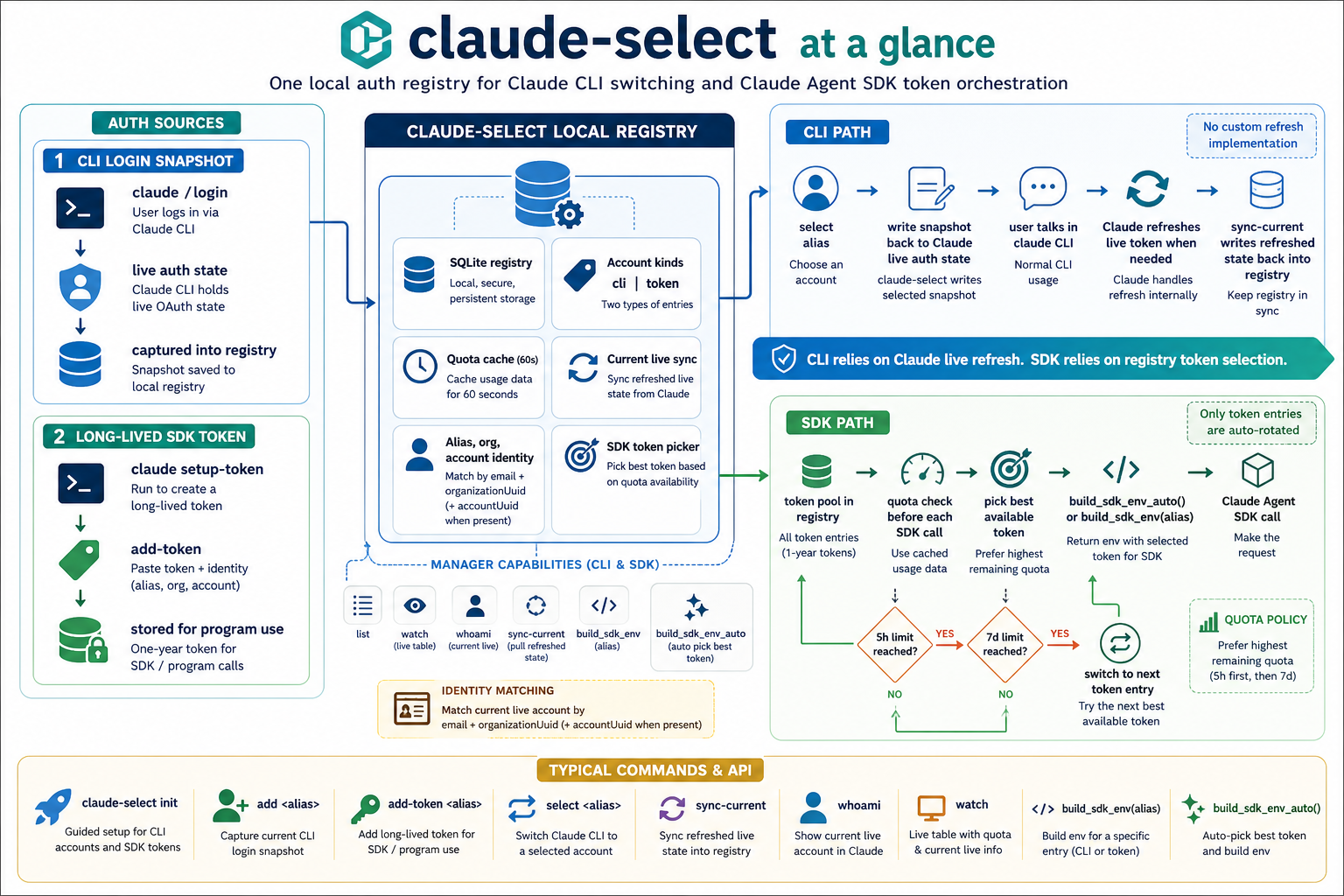
claude-select is a local Claude auth registry and selector for people who use multiple Claude accounts on one machine.
It captures the current Claude CLI login state, stores each account as a snapshot in a local SQLite registry, shows expiry status in a table, and lets you:
- select one stored account back into Claude's live auth state for CLI use
- store long-lived tokens for SDK/program use
- read one stored entry from Python and build
envfor Claude Agent SDK use
It does not auto-refresh OAuth tokens. It trusts the captured expiresAt value and asks the user to log in again when an account is near expiry or expired.
Install 🚀
pip install claude-select
How Users Get Started 👇
1. Capture your accounts
Run the guided bootstrap:
claude-select init
By default, claude-select launches claude in the current terminal for each account capture.
For each account:
- choose an alias such as
workorpersonal claude-selectlaunchesclaude- inside the
claudeCLI session, run/loginand finish authorization - exit
claudeand return toclaude-select - press Enter so
claude-selectcan capture the current login snapshot - look for a success block that confirms the account was saved and shows the current registry
You can add another account later:
claude-select add work
claude-select add personal
If you do not want claude-select to launch claude for you, use:
claude-select add work --no-launch
In that mode, claude-select will print guidance and wait while you run claude and /login yourself.
After CLI account capture, init can also walk you through claude setup-token so you can add a long-lived token for SDK/program usage.
What init looks like
$ claude-select init
Claude account bootstrap
Add accounts one by one. Complete /login for each account before capture.

Alias (blank to finish): work
Launching `claude` in this terminal.
Inside Claude, run `/login` and finish account authorization.
When login is complete, exit Claude to return here.
Press Enter after login is complete...
Captured work <a@company.com> [Team A].
Status: healthy
Expires in: 7h 57m

Current registry:
Alias  Kind  Email            Organization  Status   Expires In  Last Selected
-----  ----  ---------------  ------------  -------  ----------  -------------
work   cli   a@company.com    Team A        healthy  7h 57m      -
Add another account? [Y/n] y

Alias (blank to finish): personal
Launching `claude` in this terminal.
Inside Claude, run `/login` and finish account authorization.
When login is complete, exit Claude to return here.
Press Enter after login is complete...
Captured personal <b@gmail.com> [Personal].
Status: healthy
Expires in: 7h 59m

Current registry:
Alias     Kind  Email            Organization  Status   Expires In  Last Selected
--------  ----  ---------------  ------------  -------  ----------  -------------
personal  cli   b@gmail.com      Personal      healthy  7h 59m      -
work      cli   a@company.com    Team A        healthy  7h 57m      -
Add another account? [Y/n] n
What add looks like
$ claude-select add work
Launching `claude` in this terminal.
Inside Claude, run `/login` and finish account authorization.
When login is complete, exit Claude to return here.
Press Enter after login is complete...
Captured work <a@company.com> [Team A].
Status: healthy
Expires in: 7h 57m

Current registry:
Alias  Kind  Email            Organization  Status   Expires In  Last Selected
-----  ----  ---------------  ------------  -------  ----------  -------------
work   cli   a@company.com    Team A        healthy  7h 57m      -
What add-token looks like
$ claude-select add-token work-sdk
Launching `claude setup-token` in this terminal.
Complete authorization. When the token is printed, copy it and return here.
Paste the long-lived token: ********
Email: a@company.com
Organization (optional): Team A
Organization ID (optional):
Account UUID (optional):
Captured [token] work-sdk <a@company.com> [Team A].
Status: healthy
Expires in: 8759h 59m

Current registry:
Alias     Kind   Email            Organization  Status   Expires In   Last Selected
--------  -----  ---------------  ------------  -------  -----------  -------------
work-sdk  token  a@company.com    Team A        healthy  8759h 59m    -
2. See what is stored
claude-select list
claude-select list --usage
claude-select whoami
claude-select watch
Example table:
Alias     Kind   Email             Organization    Status          Expires In  Last Selected
--------  -----  ----------------  --------------  --------------  ----------  -------------
personal  cli    a@example.com     Personal        healthy         18h 12m     2h ago
work      cli    b@company.com     Team A          expiring_soon   1h 05m      -
work-sdk  token  b@company.com     Team A          healthy         8759h 59m   -
3. Select an account for Claude CLI
claude-select select work
This reads the stored snapshot from the local registry and writes it back into Claude's current live auth backend:
- macOS: Keychain + Claude config
- Linux / Windows: Claude credentials file + Claude config
Example:
$ claude-select select work
Selected work <a@company.com> [Team A].
Updated Claude live auth state:
  - config: /Users/you/.claude.json
  - credentials store: macOS Keychain
Current CLI alias: work

$ claude-select whoami
Current Claude live account
  matched alias: work
  email: a@company.com
  organization: Team A
  expires in: 7h 54m
  5h quota left: 76.0%
  5h resets in: 3h 12m
  7d quota left: 59.0%
  7d resets in: 2d 4h
4. Use an account in Python
from claude_select import AuthManager
from claude_code_sdk import ClaudeAgentOptions, query

manager = AuthManager()
env = manager.build_sdk_env("work")
auto_env = manager.build_sdk_env_auto()

options = ClaudeAgentOptions(env=env)

async for message in query(prompt="analyze this repo", options=options):
    print(message)
The Python side reads from the same local registry, but it does not mutate Claude's live auth state.
If you store multiple long-lived token entries with add-token, you can let claude-select auto-pick the best SDK token before each call:
from claude_select import AuthManager

manager = AuthManager()
env = manager.build_sdk_env_auto()
build_sdk_env_auto() only considers token entries, checks their cached 5h / 7d quota state, and chooses the best available token before returning an env mapping.
Full Python SDK guide:
CLI Commands 🧰
claude-select init
claude-select add <alias>
claude-select add-token <alias>
claude-select relogin <alias>
claude-select list
claude-select watch
claude-select select [alias]
claude-select sync-current
claude-select remove <alias>
claude-select export-env <alias> --json
claude-select current
claude-select whoami
Command behavior:
init: guided multi-account bootstrapadd: launchclaudein the current terminal by default, then capture the current login into the registryadd-token: launchclaude setup-tokenin the current terminal by default, then store a long-lived token for SDK/program userelogin: launchclaudein the current terminal by default, then overwrite one stored alias after the user logs in againlist: show the current registry table and do a light sync of the current live account firstlist --usage: fetch and display 5h / 7d quota information for each stored aliaswatch: keep a live Rich-powered view of the current Claude live account plus the local registry and quota data, with periodic live-state syncselect: write one stored snapshot back into Claude's live auth statesync-current: read Claude's current live auth state and sync any refreshed token data back into the matching registry entryremove: delete one stored accountexport-env: print SDK env vars for one aliascurrent: show the last alias selected for CLI usewhoami: show Claude's current live auth state, matched alias, and current quota summary after a light sync
Python API 🐍
Minimal usage:
from claude_select import AuthManager

manager = AuthManager()

accounts = manager.list_accounts()
accounts_with_usage = manager.list_accounts(include_usage=True)
details = manager.get_account("work")
env = manager.build_sdk_env("work")
sdk_env = manager.build_sdk_env("work-sdk")
auto_env = manager.build_sdk_env_auto()
auth_payload = manager.export_sdk_auth("work")
live_quota = manager.get_live_quota()
account_quota = manager.get_account_quota("work")
all_quotas = manager.list_account_quotas()
Current public surface:
class AuthManager:
    def list_accounts(self) -> list[dict]: ...
    def get_account(self, alias: str): ...
    def capture_current_account(self, alias: str, overwrite: bool = True) -> dict: ...
    def relogin_account(self, alias: str) -> dict: ...
    def remove_account(self, alias: str) -> None: ...
    def select_account(self, alias: str) -> dict: ...
    def build_sdk_env(self, alias: str, base_env: dict[str, str] | None = None) -> dict[str, str]: ...
    def pick_sdk_account(self, preferred_alias: str | None = None) -> dict: ...
    def build_sdk_env_auto(self, preferred_alias: str | None = None, base_env: dict[str, str] | None = None) -> dict[str, str]: ...
    def export_sdk_auth(self, alias: str) -> dict: ...
    def get_live_quota(self) -> dict: ...
    def get_account_quota(self, alias: str) -> dict: ...
    def list_account_quotas(self) -> list[dict]: ...
    def current_alias(self) -> str | None: ...
    def render_table(self) -> str: ...
Top-level helper:
from claude_select import build_sdk_env

env = build_sdk_env("work")
Top-level auto-selection helper:
from claude_select import build_sdk_env_auto

env = build_sdk_env_auto()
Quota responses are cached locally for 60 seconds. watch, whoami, and repeated SDK calls reuse that cache instead of hitting the remote usage endpoint on every refresh.
How Expiry Works ⏳
claude-select does not refresh tokens automatically.
It only reads the stored expiresAt timestamp and derives status from it:
healthy: more than 6 hours remainexpiring_soon: 6 hours or less remainexpired: already expiredunknown: noexpiresAtvalue was captured
When an account is expired:
selectfailsbuild_sdk_env()fails- the user should log in again and run:
claude-select relogin <alias>
Storage Model 🗃️
The registry is stored locally in SQLite:
- macOS / Linux default:
~/.config/claude-select/registry.db
- custom XDG config root:
$XDG_CONFIG_HOME/claude-select/registry.db
Each stored account contains:
- alias
- organization name / id
- account uuid
- captured time
- expiry time
- last selected time
- stored Claude
oauthAccount - stored Claude
claudeAiOauthcredentials payload
Claude's own live state remains separate:
- global Claude config
- Claude credentials file or macOS Keychain
The registry is the source of truth. select copies one stored snapshot back into Claude's live state.
Current Limitations ⚠️
- This project currently centers on captured Claude OAuth snapshots.
- It does not auto-refresh tokens.
- It relies on the structure of Claude's current local auth state.
- Expiry monitoring is local-only; it does not call a remote validation API.
- Selecting an account updates the local machine's active Claude login state.
Development 🛠️
Install dev dependencies:
pip install -e .[dev]
Run checks:
ruff check .
ruff format --check .
mypy
pytest
python -m build
python -m twine check dist/*
License 📄
MIT
Project details
Verified details
These details have been verified by PyPIProject links
GitHub Statistics
Maintainers
Release history Release notifications | RSS feed


Download files
Download the file for your platform. If you're not sure which to choose, learn more about installing packages.
Source Distribution
Built Distribution
Filter files by name, interpreter, ABI, and platform.
If you're not sure about the file name format, learn more about wheel file names.
Copy a direct link to the current filters
File details
Details for the file claude_select-0.3.0.tar.gz.
File metadata
- Download URL: claude_select-0.3.0.tar.gz
- Upload date:
- Size: 35.0 kB
- Tags: Source
- Uploaded using Trusted Publishing? Yes
- Uploaded via: twine/6.1.0 CPython/3.13.12
File hashes
| Algorithm | Hash digest | |
|---|---|---|
| SHA256 |
e51d65c4ef8638cef26eb6073c1235240ae5ec2eb5b0721a8bcce5f8d7dd3bf9
|
|
| MD5 |
110314cc4c02b2033562daf5d8dce812
|
|
| BLAKE2b-256 |
52178f160cd064bf068277aa328312a4ce201d878a68e1ea3849171329a26c88
|
Provenance
The following attestation bundles were made for claude_select-0.3.0.tar.gz:
Publisher:
publish.yml on Nomia/claude-select
-
Statement:
-
Statement type:
https://in-toto.io/Statement/v1 -
Predicate type:
https://docs.pypi.org/attestations/publish/v1 -
Subject name:
claude_select-0.3.0.tar.gz -
Subject digest:
e51d65c4ef8638cef26eb6073c1235240ae5ec2eb5b0721a8bcce5f8d7dd3bf9 - Sigstore transparency entry: 1516473775
- Sigstore integration time:
-
Permalink:
Nomia/claude-select@9ed2f6342ae4d88835e5526fcc7fa448a521f33c -
Branch / Tag:
refs/tags/v0.3.0 - Owner: https://github.com/Nomia
-
Access:
public
-
Token Issuer:
https://token.actions.githubusercontent.com -
Runner Environment:
github-hosted -
Publication workflow:
publish.yml@9ed2f6342ae4d88835e5526fcc7fa448a521f33c -
Trigger Event:
release
-
Statement type:
File details
Details for the file claude_select-0.3.0-py3-none-any.whl.
File metadata
- Download URL: claude_select-0.3.0-py3-none-any.whl
- Upload date:
- Size: 28.6 kB
- Tags: Python 3
- Uploaded using Trusted Publishing? Yes
- Uploaded via: twine/6.1.0 CPython/3.13.12
File hashes
| Algorithm | Hash digest | |
|---|---|---|
| SHA256 |
2458002b28b003e4e624b76a23e578c8d81becb58a1fb63ac476b4de3eec4f51
|
|
| MD5 |
1ba9923036983e981919a9da4b50dc83
|
|
| BLAKE2b-256 |
b1f3d10f983d80c7883a8eb62c246cdca3bc57c8a0ab93d983b6343c76005d84
|
Provenance
The following attestation bundles were made for claude_select-0.3.0-py3-none-any.whl:
Publisher:
publish.yml on Nomia/claude-select
-
Statement:
-
Statement type:
https://in-toto.io/Statement/v1 -
Predicate type:
https://docs.pypi.org/attestations/publish/v1 -
Subject name:
claude_select-0.3.0-py3-none-any.whl -
Subject digest:
2458002b28b003e4e624b76a23e578c8d81becb58a1fb63ac476b4de3eec4f51 - Sigstore transparency entry: 1516473889
- Sigstore integration time:
-
Permalink:
Nomia/claude-select@9ed2f6342ae4d88835e5526fcc7fa448a521f33c -
Branch / Tag:
refs/tags/v0.3.0 - Owner: https://github.com/Nomia
-
Access:
public
-
Token Issuer:
https://token.actions.githubusercontent.com -
Runner Environment:
github-hosted -
Publication workflow:
publish.yml@9ed2f6342ae4d88835e5526fcc7fa448a521f33c -
Trigger Event:
release
-
Statement type:






