
claude-spillway



A quota-aware failover proxy for Claude Code.
claude-spillway sits between Claude Code and Anthropic's API. It forwards
requests to Anthropic as normal, but watches the rate-limit headers on every
response. When your quota (the rolling 5-hour / 7-day usage window on a
Claude Pro/Max/Team subscription, or the classic request/token limits on an
API key) runs low, it automatically "spills over" POST /v1/messages traffic
to Ollama Cloud instead — and switches back to
Anthropic once quota recovers.
It was built to solve a very specific problem: you're paying for both a Claude subscription and Ollama Cloud, and you'd rather burn through your (often cheaper, more relaxed) Ollama quota automatically instead of getting hard-blocked by Anthropic rate limits mid-session.
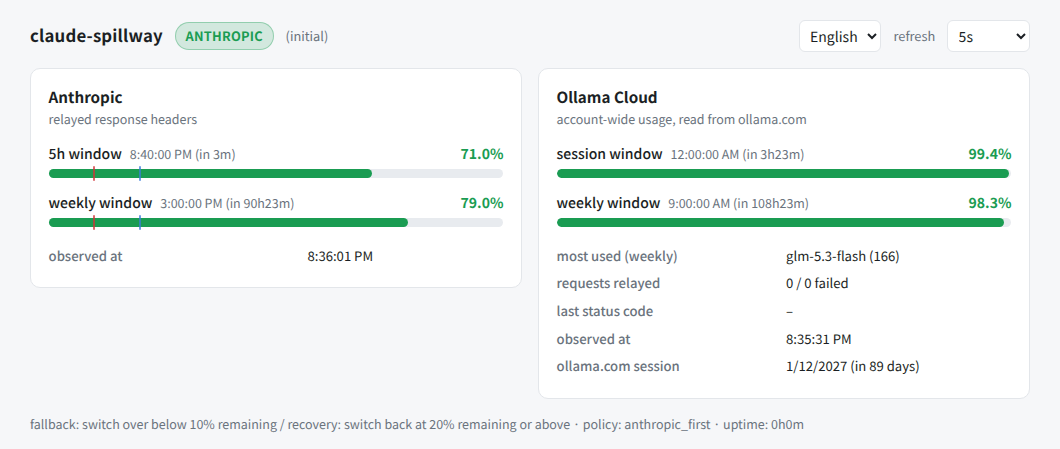
Both backends at a glance, in the browser: how much of each window is left,
how long until it resets, and markers for the thresholds the proxy switches
on. The proxy serves the page itself at http://127.0.0.1:8787/_spillway/,
so there is nothing extra to run, and monitor prints the address. It is
available in English and Japanese, switchable from the page.
How it works
Claude Code --ANTHROPIC_BASE_URL--> claude-spillway --> Anthropic API
                                          |
                                          '--(quota low)--> Ollama Cloud
                                                             (Anthropic-
                                                              compatible
                                                              /v1/messages)
- Every response from Anthropic carries rate-limit headers
(
anthropic-ratelimit-unified-5h-utilization,anthropic-ratelimit-unified-7d-utilizationfor subscription plans, oranthropic-ratelimit-{requests,tokens}-{limit,remaining}for API-key billing). claude-spillway parses these on every call — no extra API calls needed to know your usage. - When the worst remaining ratio across all known signals drops below
fallback_threshold_pct(default 10%), subsequentPOST /v1/messagescalls are routed to Ollama Cloud instead, with the model name rewritten per yourmodel_mappingconfig. - Requests to Anthropic don't need credentials configured in
claude-spillway: whatever
Authorization/x-api-keyheader Claude Code sends is forwarded as-is. Only Ollama Cloud needs an API key in the config (Ollama's Anthropic-compatible endpoint only acceptsAuthorization: Bearer, notx-api-key— see ollama/ollama#16922). - A background probe reads your quota from the OAuth usage endpoint — the one
Claude Code itself reads for
/usage— which consumes no quota and also reports when each window resets. Once the remaining ratio climbs back aboverecovery_threshold_pct(default 20%, intentionally higher than the fallback threshold to avoid flapping), traffic switches back to Anthropic. That endpoint is OAuth-only and is not part of the published API, so when it is unavailable the proxy falls back to the rate-limit headers of relayed traffic — and, only while in fallback where no traffic is flowing, to a minimal/v1/messagesrequest that does cost a little quota.
Why only /v1/messages fails over
Only the actual inference call (POST /v1/messages) is subject to
failover. Auxiliary endpoints such as /v1/messages/count_tokens or model
listing always go to Anthropic, never to Ollama. This is deliberate: Ollama
Cloud's Anthropic-compatibility shim is known to hang and even restart the
server when it receives requests to endpoints it doesn't support
(ollama/ollama#13949),
which would be far worse than just missing a token count.
A note on Ollama Cloud quota visibility
Ollama Cloud still publishes no documented quota API
(ollama/ollama#15663,
#16448), and its inference
responses carry no rate-limit headers at all. Until 2026-10 the undocumented
GET /api/usage returned the session and weekly utilization for an API key, but
it now returns request counts only. The quota (%) and exact reset times are
only shown on the account's settings page (https://ollama.com/settings, Usage
tab), which needs a signed-in browser session.
To read it, sign in once with ollama-login. It drives your installed Chrome
through Playwright (an optional extra), so install with the login extra:
uv tool install 'claude-spillway[login]'   # or: pip install 'claude-spillway[login]'
claude-spillway ollama-login
A browser window opens for you to sign in (nothing about the sign-in itself is
automated). Once signed in, the session cookie is saved with its expiry to
~/.config/claude-spillway/ollama-session.json (mode 0600), and the browser
profile is kept, so later runs export the cookie headlessly while that profile
is still signed in. The proxy re-reads the file, so no restart is needed.
- The dashboard and TUI show when the session expires (about 90 days after
sign-in): amber under 14 days left, red once expired. Run
ollama-loginagain then. - Signing in needs a screen. Over SSH, point
DISPLAY(andXAUTHORITY) at the desktop session, or run it on a machine with a screen and copy the file. --headedalways opens the window;--channel chromiumuses Playwright's own browser (playwright install chromium) when Chrome is not installed.- Instead of the file,
ollama.session_cookiecan hold the cookie value directly. It wins over the file, but its expiry is then unknown.
The page is read every ollama.usage_page_interval_seconds (default 120s), not
on every probe. The page is not an API, so a redesign degrades to "no data"
rather than an error.
Without a cookie, Ollama's quota stays unknown and routing behaves as if Ollama
had headroom (the ollama_min_remaining_pct guard cannot engage).
About Ollama's reset times (estimated)
The settings page reports exact reset times. Only when a reading comes without
them (the old /api/usage shape) does the monitor fall back to an estimate:
utilization cannot fall until a window resets, so the first observed rise marks
the start of a fresh window, and "that rise + the window's maximum length" (5h
for session, 7d for weekly) is the latest the reset could have been. The
estimate is an upper bound, not the truth, so it is prefixed with a ~.
Estimates are display-only. Routing decisions never read them -
burn_rate_balance uses the measured resets when it has them, and otherwise
treats a window with an unknown reset as freshly started.
The status endpoint and TUI still also report self-tracked counters (requests relayed, failures, last status code) covering only the traffic that passed through this proxy.
Choosing a backend
With both sides' quota visible, routing.policy decides between them while
neither is critical:
anthropic_first(default) — stay on Anthropic until it runs low, then fail over. The original behaviour.weekly_balance— while both short windows are comfortable (balance_session_floor_pct), prefer whichever side has more of its weekly window left, switching only once the other side is ahead bybalance_margin_pctso two near-equal backends don't oscillate.burn_rate_balance— compare, per window, how much is left relative to how long the window still has to run (remaining / (time to reset / window length)), take the tightest window per backend, and prefer the side whose tightest reading is better. A reset time we don't know (Ollama without a session cookie) is assumed to be a window that just started — the most generous reading — so the unknown never manufactures urgency.anthropic_priority_weight(default 1.1) leans the comparison toward the Claude subscription you are already paying for; at parity it wins, and it needs to be ~9% worse before traffic moves to Ollama. Use it as a safety valve when one side is burning quota faster than its reset will allow.
Two guards apply under every policy:
- Ollama exhaustion. Never fail over into an Ollama account that is itself
nearly out (
ollama_min_remaining_pct) — that trades one dead end for another. - Reverse failover. Ollama Cloud can get slow or fail outright when a model
is busy. After
ollama_failure_thresholdconsecutive failures, traffic goes back to Anthropic provided its 5-hour window still hasreverse_failover_min_5h_pctleft to serve with, and Ollama is left alone forreverse_failover_cooldown_seconds.
A hard guard outranks both: if Anthropic drops below
quota.fallback_threshold_pct, traffic fails over regardless of policy.
Using an Ollama model on purpose
Failover routes by quota. You can also route by name: ask Claude Code for a model that only exists on Ollama Cloud, and the proxy sends it straight there, whatever your Anthropic quota looks like.
This works because of how Claude Code validates a model name: it does not
consult a list, it sends an actual one-token POST /v1/messages and sees what
comes back. That request goes through ANTHROPIC_BASE_URL, which is this proxy.
Relaying glm-5.3-flash:cloud to Anthropic can only produce a 404, which is
exactly the Model '...' not found Claude Code reports. Answering it from
Ollama instead makes the name work.
The proxy learns which names those are from Ollama's own listing
(GET /api/tags, a read that is not counted as a request), refreshed hourly.
Names beginning with claude, and Claude Code's aliases (opus, sonnet, …),
are never diverted whatever the listing or your config says.
Putting them in /model
To get them into the /model list rather than having to type the name:
claude-spillway models                         # what Ollama Cloud serves right now
claude-spillway models --sync-picker           # add them to /model, subject to the config filters
claude-spillway models --sync-picker --pick    # choose which ones, interactively
Twenty rows at once is a lot to look at, and most models are ones you will
never open. --pick shows a checkbox list you toggle by row number (a =
all, n = none, Enter = confirm, q = cancel). The list starts from what
the settings file already holds, so re-running it keeps your earlier choice —
this tool keeps no state of its own, the settings file is the memory. For the
scripted (non-TTY) case, --include / --exclude take fnmatch patterns,
repeatable or comma-separated, and override the config file's filters.
--sync-picker writes the modelPicker key of ~/.claude/settings.json (the
path, filters and labels all come from direct_models.picker in your config).
Nothing else in that file is touched, and the previous contents are kept beside
it. Restart Claude Code and the rows are there.
What happens after you pick one is Claude Code's own doing, not this proxy's:
Claude Code saves the choice into the model key of the same file and restores
it on the next launch.
Each row carries behavesAs (default claude-sonnet-5), which is not optional
in practice — Claude Code does not offer a row at all for a model its release
has no catalog entry for, and without it you get a warning on every launch and a
context window assumed to be 200k. If a model serves more, list it under
picker.extended_context and the row is written as …:cloud[1m]; the proxy
strips the marker again before the request leaves for Ollama.
Two things worth knowing
- Token counting. Claude Code asks Anthropic to count tokens for whichever
model is selected, and Anthropic 404s on a name it does not know — which would
leave the context meter blind. For a direct-routed model the request is
relayed with the model swapped for
count_tokens_stand_in, giving an approximate count from a different tokenizer rather than none. Ollama is never asked; its shim is unstable for that endpoint. - Quota routing is untouched. A direct request never moves the backend mode,
never counts toward the reverse failover, and is not blocked by
ollama_min_remaining_pct. You named that model, so the proxy does not second-guess you — and a busy model you pinned must not reroute everything else. Its counters are reported separately, underdirect_models.
Set direct_models.enabled: false to turn all of this off and route purely by
quota.
Installation
Requires Python 3.11+ and uv.
uv tool install claude-spillway
Or run it without installing:
uvx --from claude-spillway claude-spillway serve
To work on it instead, clone the repository:
git clone https://github.com/akivajp/claude-spillway.git
cd claude-spillway
uv sync
Quick start
-
Put the example config in the location
servereads by default, and set your Ollama Cloud API key (get one at https://ollama.com/settings/keys):mkdir -p ~/.config/claude-spillway curl -o ~/.config/claude-spillway/config.yaml \ https://raw.githubusercontent.com/akivajp/claude-spillway/main/config.example.yaml export OLLAMA_API_KEY=your-ollama-cloud-api-key
-
Start the proxy:
claude-spillway serve -
Point Claude Code at it and launch as usual:
export ANTHROPIC_BASE_URL=http://127.0.0.1:8787
claude
-
(Optional) In another terminal, watch quota status live:
claude-spillway monitorclaude-spillway never holds Anthropic credentials of its own — it borrows the one Claude Code sends. So
monitorshows a "waiting" message until at least one real request has passed through. After that it keeps polling on its own and stays live even while you are idle, because reading the usage endpoint costs no quota. -
(Optional) Or watch the same thing in a browser, at http://127.0.0.1:8787/_spillway/. Both
serveandmonitorprint the address, so there is nothing to memorise.The page is served by the proxy itself, so it needs no separate process and loads nothing from the network. It shows both backends side by side with their remaining quota, reset countdowns and the thresholds it switches on, and refreshes on its own. It turns red the moment the proxy stops answering, which is worth knowing quickly: while
ANTHROPIC_BASE_URLpoints here, Claude Code cannot reach Anthropic either.
You can try the whole flow without any real credentials using the bundled
fake upstream servers — see
scripts/manual_smoketest/.
To keep it running in the background instead of starting it by hand, install it as a systemd user service — one script does the whole thing:
./scripts/install-service.sh
See docs/service.md for what it sets up, and how to upgrade or remove it.
Running on Windows with WSL2? See docs/wsl-windows.md for wiring up both the Windows-side and the WSL-side Claude Code extension.
Configuration
See config.example.yaml for the full reference.
When -c is omitted, the config file is looked up in this order:
- the path in the
CLAUDE_SPILLWAY_CONFIGenvironment variable ~/.config/claude-spillway/config.yaml(honours$XDG_CONFIG_HOME; on Windows,%APPDATA%\claude-spillway\config.yaml)
If neither exists, claude-spillway starts on its built-in defaults. Key fields:
| Field | Default | Description |
|---|---|---|
listen.host / listen.port |
127.0.0.1 / 8787 |
Where claude-spillway listens |
anthropic.base_url |
https://api.anthropic.com |
Anthropic API endpoint |
ollama.base_url |
https://ollama.com |
Ollama Cloud endpoint |
ollama.api_key |
— | Ollama Cloud API key (supports ${ENV_VAR}) |
ollama.session_file |
<config dir>/ollama-session.json |
Where ollama-login saves the ollama.com session (re-read on every fetch) |
ollama.session_cookie |
— | __Secure-session cookie value, given directly; wins over session_file |
ollama.usage_page_interval_seconds |
120.0 |
How often the ollama.com settings page is read |
quota.fallback_threshold_pct |
10.0 |
Remaining % below which we fail over |
quota.recovery_threshold_pct |
20.0 |
Remaining % above which we switch back |
quota.probe_interval_seconds |
60.0 |
How often the background probe refreshes the quota reading |
quota.use_usage_endpoint |
true |
Read quota from the OAuth usage endpoint (consumes no quota) |
routing.policy |
anthropic_first |
anthropic_first, weekly_balance or burn_rate_balance |
routing.anthropic_priority_weight |
1.1 |
burn_rate_balance: how much to favour Anthropic |
routing.ollama_min_remaining_pct |
5.0 |
Never fail over once Ollama is this low |
routing.ollama_failure_threshold |
5 |
Consecutive Ollama failures that send traffic back |
model_mapping.rules / model_mapping.default |
— | Anthropic model name -> Ollama model name |
direct_models.enabled |
true |
Route a request by model name when only Ollama serves it |
direct_models.discover |
true |
Learn those names from Ollama's own listing |
direct_models.extra |
[] |
Names to treat as direct on top of the discovered ones |
direct_models.count_tokens_stand_in |
claude-sonnet-5 |
Model substituted when counting tokens for a direct-routed one |
direct_models.picker.settings_path |
~/.claude/settings.json |
Settings file models --sync-picker updates |
direct_models.picker.behaves_as |
claude-sonnet-5 |
Known model whose client-side handling Claude Code applies to these rows |
direct_models.picker.extended_context |
[] |
Patterns whose rows claim a 1M-token context |
CLI flags on claude-spillway serve (--host, --port,
--fallback-threshold-pct, --recovery-threshold-pct, --log-level)
override the config file. Run claude-spillway --help /
claude-spillway serve --help / claude-spillway models --help /
claude-spillway monitor --help for details.
Interface language
CLI help text and the monitor TUI are shown in English by default, and in
Japanese when the environment locale asks for it (LC_ALL, LC_MESSAGES,
LANG or LANGUAGE starting with ja). Set CLAUDE_SPILLWAY_LANG to
override the detection explicitly:
CLAUDE_SPILLWAY_LANG=en claude-spillway monitor  # force English
CLAUDE_SPILLWAY_LANG=ja claude-spillway monitor  # force Japanese
Log records emitted through logging are always in English, so they stay
easy to grep and to search for online.
Development
uv run pytest      # unit + integration tests (no network access needed)
uv run ruff check . # lint
Tests exercise the full request/response path (including the mode switch
and hysteresis logic) against httpx.MockTransport, so they run offline and
don't touch real Anthropic/Ollama quota.
Status
Early-stage, built for personal use and shared in case it's useful to others. Not affiliated with Anthropic or Ollama.
Support
If claude-spillway saves you from hitting a rate limit mid-session, you can buy me a coffee.

License
1 maintainer

Metadata
1 maintainer
Release files for claude-spillway 0.9.0
For a detailed explanation of source distributions (sdists) and built distributions (wheels), please see the package formats documentation.
Source distribution (sdist)
| File | Size | Uploaded | Provenance | |
|---|---|---|---|---|
| claude_spillway-0.9.0.tar.gz | 105.7 kB | Without provenance | Details |
Built distribution (wheel)
| File | Interpreter | ABI | Platform | Reset |
|---|---|---|---|---|
| claude_spillway-0.9.0-py3-none-any.whl | Python 3 | none | any | Details |
Total release size: 216.1 kB
Release files / claude_spillway-0.9.0.tar.gz
| Download URL | claude_spillway-0.9.0.tar.gz |
|---|---|
| Size | 105.7 kB |
| Tags | Source |
|
SHA-256 checksum How to use checksums |
c15f38742dfa0513093989943c410ed48113d013114a42e373e619503b2ab882
|
|
BLAKE2b-256 checksum How to use checksums |
5b8e850e28b577d9eea729ef557ddac415160f929ab9e7571b31dfd8a73276b4
|
| Upload date | |
|
Uploaded using Trusted Publishing? What is trusted publishing? |
Yes |
| Uploaded via |
uv/0.13.1 {"installer":{"name":"uv","version":"0.13.1","subcommand":["publish"]},"python":null,"implementation":{"name":null,"version":null},"distro":{"name":"Ubuntu","version":"24.04","id":"noble","libc":null},"system":{"name":null,"release":null},"cpu":null,"openssl_version":null,"setuptools_version":null,"rustc_version":null,"ci":true}
|
Release files / claude_spillway-0.9.0-py3-none-any.whl
| Download URL | claude_spillway-0.9.0-py3-none-any.whl |
|---|---|
| Size | 110.4 kB |
| Tags | Python 3 |
|
SHA-256 checksum How to use checksums |
70bcaa84f6d89ae16d2328592f92319d744b4a8a929060481839e1e3e131744e
|
|
BLAKE2b-256 checksum How to use checksums |
17791d2c502b452e5aa1f0620893d75ab25ebb52fe4c90492e985bf83048dee6
|
| Upload date | |
|
Uploaded using Trusted Publishing? What is trusted publishing? |
Yes |
| Uploaded via |
uv/0.13.1 {"installer":{"name":"uv","version":"0.13.1","subcommand":["publish"]},"python":null,"implementation":{"name":null,"version":null},"distro":{"name":"Ubuntu","version":"24.04","id":"noble","libc":null},"system":{"name":null,"release":null},"cpu":null,"openssl_version":null,"setuptools_version":null,"rustc_version":null,"ci":true}
|
Security for claude-spillway 0.9.0
Provenance
Provenance describes where a file came from. On PyPI, provenance is shared via attestations, which provide a verifiable record of the build or publishing details. View details, limitations and caveats.
No provenance found
None of the files in this release were uploaded with provenance metadata.
A note on package security
PyPI is a repository for distributing packages, not a service for auditing them. While third-party security researchers and our staff do their best to detect and remove malicious packages, PyPI cannot guarantee the quality, security or suitability of any given package.














