
🎭 Claude Theater
Watch your Claude Code conversations and subagents work — a live office, in real time.





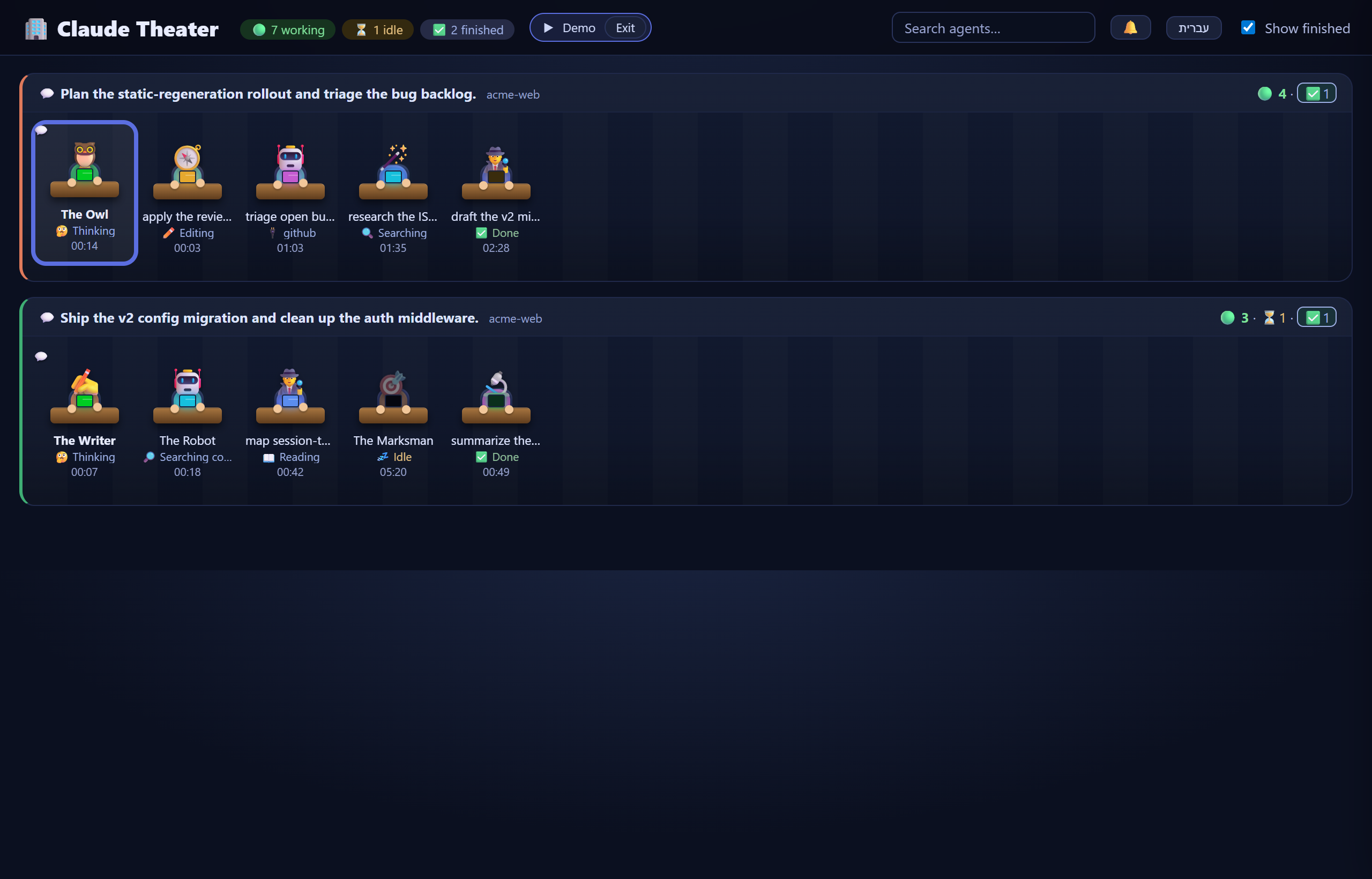
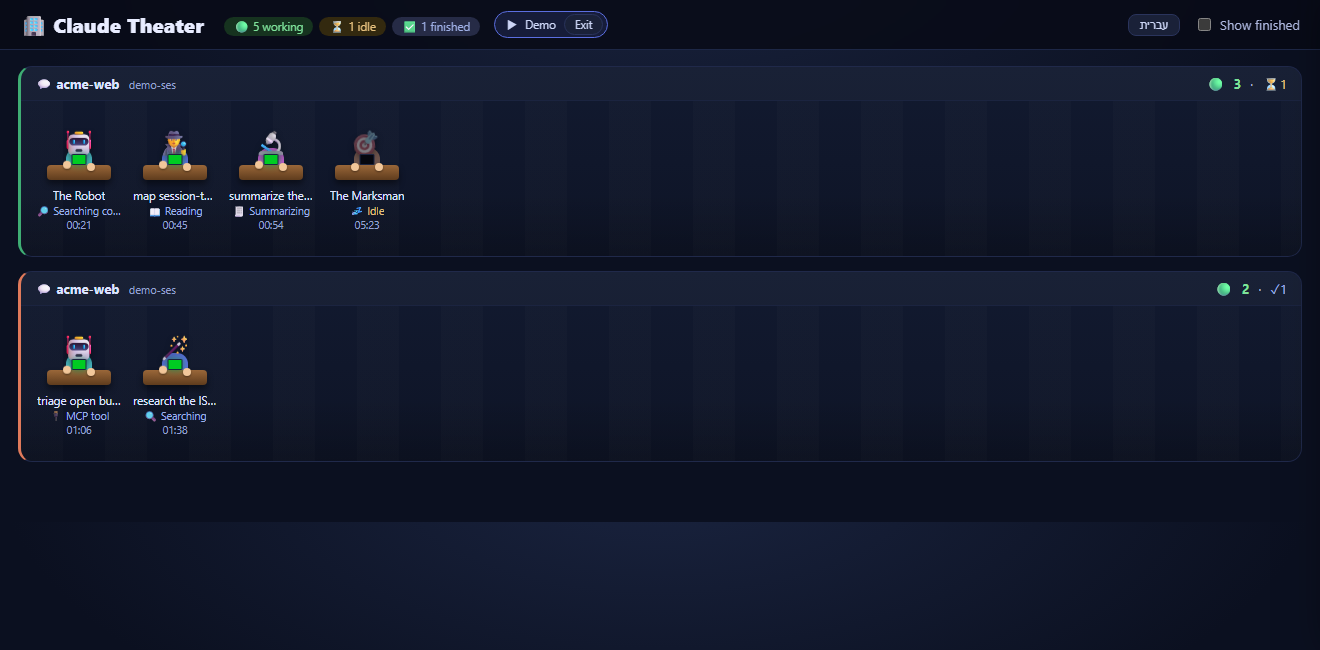
The demo office (claude-theater --demo): conversations and subagents at work, each agent walks in, sits, head-bobs while it types, then confetti on finish. A community visualizer for Claude Code — not affiliated with Anthropic.
Try it now, no Claude Code session required — pipx run claude-theater --demo
spins up the office above with synthetic agents.
Why? When you fan out a handful of subagents, the terminal becomes a wall of interleaved JSON. Claude Theater turns it into a glance — who's working, who's stuck, who just finished — without reading a single log line.
Safe by design: it runs entirely on your machine. Binds to 127.0.0.1, sends
nothing anywhere (no telemetry), only reads the journals, and the whole thing is
one auditable standard-library file with zero dependencies. (more)
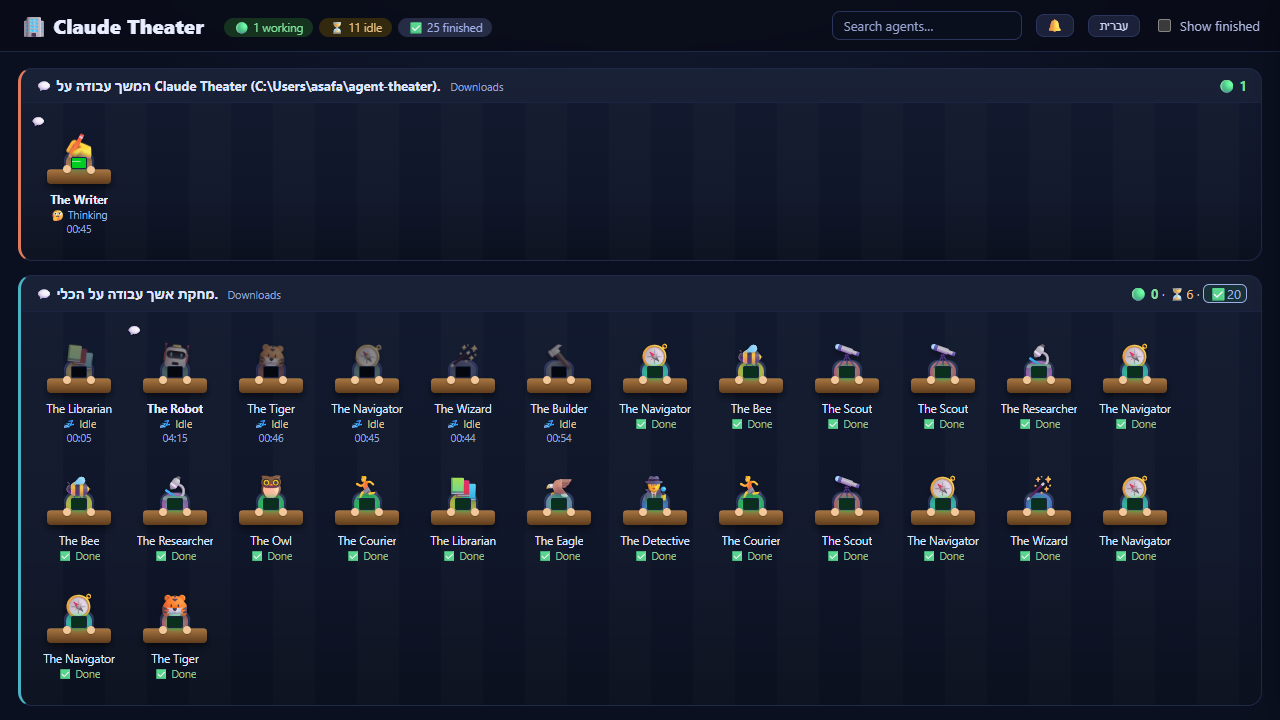
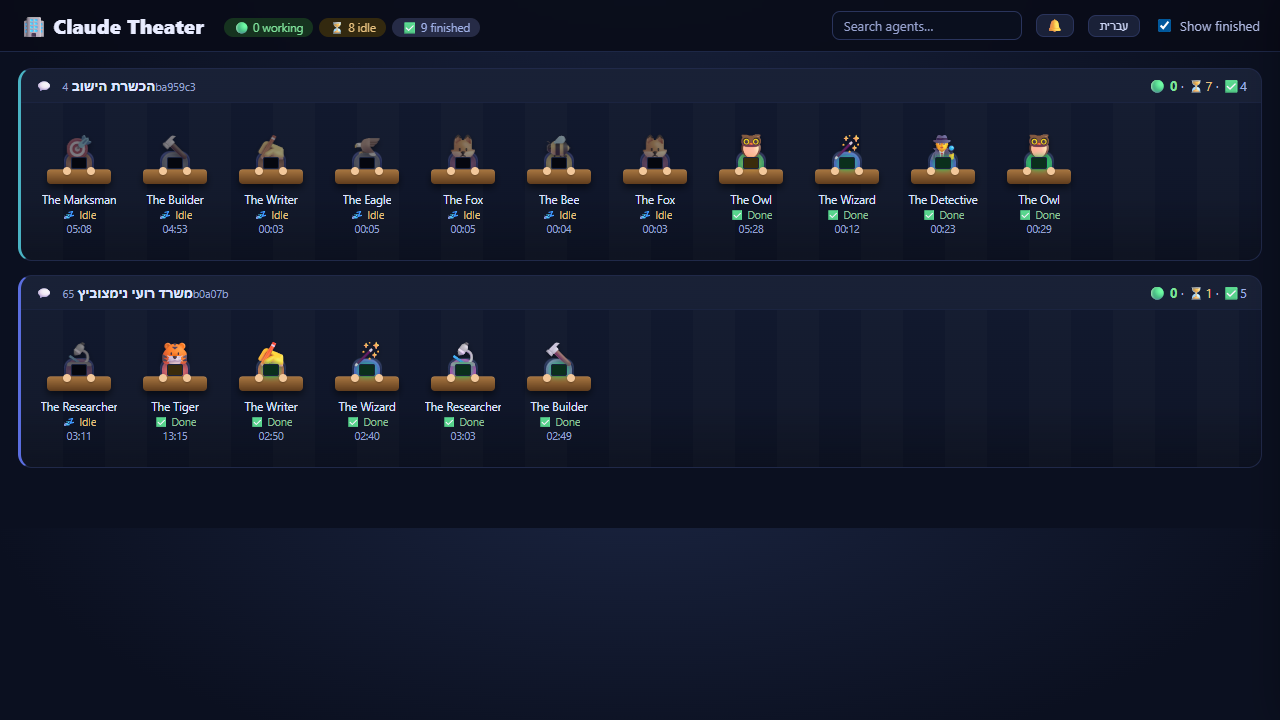
Claude Theater reads the journals Claude Code writes for your conversations and the subagents they spawn, and renders them as a live office: every conversation is a room (titled by its subject), and inside it the conversation itself plus each subagent is a little character at a desk — avatar, name, the tool it's using right now, and a timer. Click any character to read its full task and result. When an agent finishes: confetti, a chime, and it quietly steps off the floor — and each room has its own show-finished toggle, so you control the history per conversation.
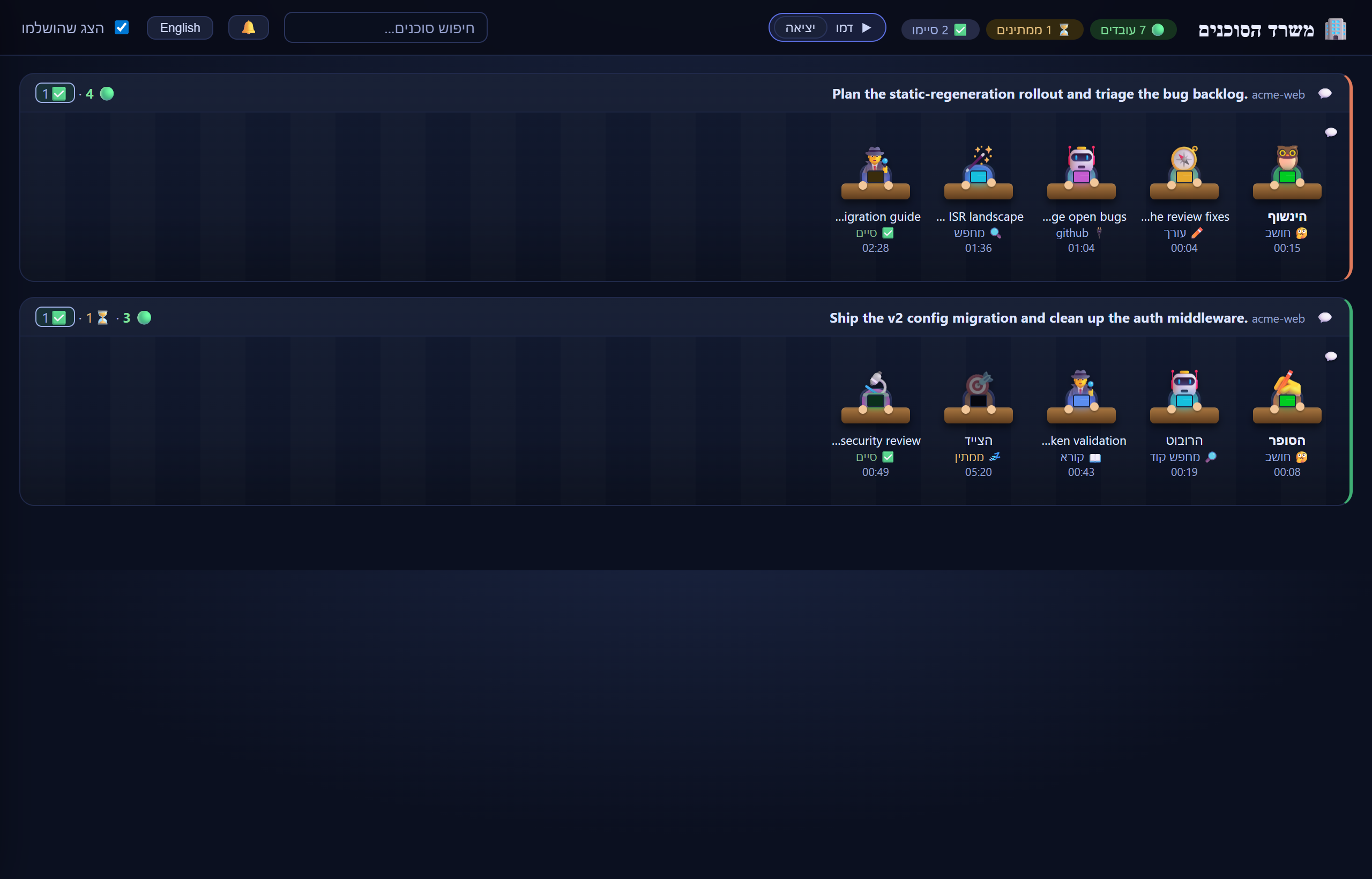
The UI is bilingual — English by default, Hebrew one click away (the choice
is remembered, and the layout flips to RTL). Adding another language is a single
edit to the I18N table in claude_theater.py; the server stays language-neutral.
Screenshots
Your real sessions — every conversation is a room; the conversation itself and each subagent is a character at a desk (avatar, name, the tool it's using now, a timer).
Bilingual — English ⇄ Hebrew (RTL). One click flips the whole office; the choice is remembered and the layout switches to RTL.
| English | Hebrew (RTL) |
|---|---|
 |
 |
Try it with no session — claude-theater --demo spins up the office with synthetic agents.
Quick start
Zero install — run it straight from PyPI with pipx:
pipx run claude-theater          # watches your real Claude Code sessions
pipx run claude-theater --demo   # a synthetic, populated office — no sessions needed
New here? Start with --demo to look around before pointing it at your own work.
Or install it:
pipx install claude-theater   # or: pip install claude-theater
claude-theater                # add --demo for the synthetic office
Or run from a clone (pure standard library, nothing to install):
python -m claude_theater
Then open http://localhost:7333. The server opens your browser for you — pass
--no-browser to skip that (handy on a headless box or inside an editor panel).
On Windows, from a clone, you can also just run start.cmd.
Requires Python 3.9+. The non-demo mode reads the journals a Claude Code install writes under
~/.claude/projects/;--demoneeds nothing but Python.
VS Code extension
Prefer it inside your editor? The vscode-extension/ folder packages Claude
Theater as a VS Code extension: it starts the server in the background (toggle it
from a status-bar button) and opens the office in an interactive panel — no
separate terminal. The server is bundled into the extension, so it works without
a separate install, and it auto-starts when VS Code launches.
Install the prebuilt .vsix (easiest) — download
claude-theater-<version>.vsix from the
latest release,
then in VS Code run Extensions: Install from VSIX…, or from a terminal:
code --install-extension claude-theater-<version>.vsix
Or build it from source (needs Node.js):
git clone https://github.com/asafabram-ship-it/claude-theater
cd claude-theater/vscode-extension
npx @vscode/vsce package        # produces claude-theater-<version>.vsix
code --install-extension claude-theater-*.vsix
Auto-start with Claude Code
The VS Code extension already starts the server on launch. If you use the CLI,
the recommended one-time setup is a SessionStart hook in your
~/.claude/settings.json, so the office comes up by itself whenever you begin a
Claude Code session. Each user adds it once. (Heads-up: this leaves an
unauthenticated loopback endpoint running in the background — see Privacy.)
macOS / Linux / Git Bash
{
  "hooks": {
    "SessionStart": [
      { "hooks": [ { "type": "command",
        "command": "curl -sf http://127.0.0.1:7333/ -o /dev/null || (claude-theater --no-browser &)" } ] }
    ]
  }
}
Windows (PowerShell)
{
  "hooks": {
    "SessionStart": [
      { "hooks": [ { "type": "command",
        "command": "powershell -NoProfile -Command \"if(-not(Get-NetTCPConnection -LocalPort 7333 -State Listen -ErrorAction SilentlyContinue)){Start-Process -WindowStyle Hidden -FilePath claude-theater -ArgumentList '--no-browser'}\"" } ] }
    ]
  }
}
Both check the port first, so they stay idempotent. (Requires claude-theater
on your PATH, e.g. via pipx install claude-theater.)
How it works
- Polls the journals Claude Code already writes — both the session files (your
conversations) and
**/subagents/agent-*.jsonl(the subagents they spawn). Claude Theater only reads them; it never starts or controls agents. - A single adapter,
parse_agent_event(line) -> Event, is the only code that touches the raw journal format. Everything else consumes the stableEvent, so a Claude Code format change is absorbed in one place. - Degrades, never crashes: corrupt lines are skipped (and counted), unknown keys are ignored, and an agent missing fields still shows up instead of vanishing.
- A non-blocking version banner appears when a journal comes from a Claude Code version this build hasn't been tested against — output may be partial, but the office keeps running.
Privacy
Your journals contain real conversation content, so Claude Theater is built to keep them on your machine:
- Binds to
127.0.0.1only — never reachable from the network, with a loopbackHostallowlist that blocks DNS-rebinding. - Never transmits anything anywhere. No telemetry, no remote calls.
- Read-only — it opens journals to read, never to write.
- A strict
Content-Security-PolicyandX-Content-Type-Options: nosniff, and cross-origin headers sent only to avscode-webview://origin, so an ordinary web page can't read your agents. - The committed
fixtures/are 100% synthetic — no real prompts or results.
The local endpoint is unauthenticated: any process running as you on this machine can read it — the same trust boundary as the journal files themselves. The auto-start hook above leaves that endpoint up in the background.
Development
python -m unittest discover -s tests # golden parser tests, zero dependencies
The tests run synthetic journal fixtures through the adapter and fail loudly if the format drifts. Contributing a journal sample from a new Claude Code build is the most valuable contribution — scrub every prompt and result first.
Compatibility
Tested against Claude Code 2.1.x. Newer builds will trigger the version banner; please open a format-drift report with a scrubbed sample so we can add a fixture and an adapter case.
License
MIT © 2026 Asaf Abramzon. "Claude" is a trademark of Anthropic; this is an independent, community project for Claude Code.
1 maintainer

Release files for claude-theater 0.4.0
For a detailed explanation of source distributions (sdists) and built distributions (wheels), please see the package formats documentation.
Source distribution (sdist)
| File | Size | Uploaded | |
|---|---|---|---|
| claude_theater-0.4.0.tar.gz | 3.3 MB | Details |
Built distribution (wheel)
| File | Interpreter | ABI | Platform | Reset |
|---|---|---|---|---|
| claude_theater-0.4.0-py3-none-any.whl | Python 3 | none | any | Details |
Total release size: 3.4 MB
Release files / claude_theater-0.4.0.tar.gz
| Download URL | claude_theater-0.4.0.tar.gz |
|---|---|
| Size | 3.3 MB |
| Tags | Source |
|
SHA-256 checksum How to use checksums |
feda42b4e1794a7b1ce593a4d544d84d757647aa84f60bcd1422d4621c76cc18
|
|
BLAKE2b-256 checksum How to use checksums |
ad219bd2d545d7f0d601142f41f1cf4beda1c91f4c093ab5e01d35182c766433
|
| Upload date | |
|
Uploaded using Trusted Publishing? What is trusted publishing? |
Yes |
| Uploaded via |
twine/6.1.0 CPython/3.13.13
|
Provenance
Provenance describes where a file came from. On PyPI, provenance is shared via attestations, which provide a verifiable record of the build or publishing details. View details, limitations and caveats.


PyPI Publish Attestation
PyPI verified that this artifact, at this checksum, originated from the publisher listed below.
Signed by GitHub Actions, verified by PyPI on Jul 25, 2026.
Transparency logRelease files / claude_theater-0.4.0-py3-none-any.whl
| Download URL | claude_theater-0.4.0-py3-none-any.whl |
|---|---|
| Size | 45.3 kB |
| Tags | Python 3 |
|
SHA-256 checksum How to use checksums |
49cc9ca2381a78f18b1b9fed4b968c80fcf62b99b7b72a66393a255f143ac6da
|
|
BLAKE2b-256 checksum How to use checksums |
e2ecd94f563739159f4e84e4880943ca0a4dab043535fd8edc2bb26120475285
|
| Upload date | |
|
Uploaded using Trusted Publishing? What is trusted publishing? |
Yes |
| Uploaded via |
twine/6.1.0 CPython/3.13.13
|
Provenance
Provenance describes where a file came from. On PyPI, provenance is shared via attestations, which provide a verifiable record of the build or publishing details. View details, limitations and caveats.
PyPI Publish Attestation
PyPI verified that this artifact, at this checksum, originated from the publisher listed below.
Signed by GitHub Actions, verified by PyPI on Jul 25, 2026.
Transparency log













