
macOS menu bar app showing Claude API usage limits
Verified details
These details have been verified by PyPIProject links
GitHub Statistics
Maintainers

Project description
Claude Usage Bar
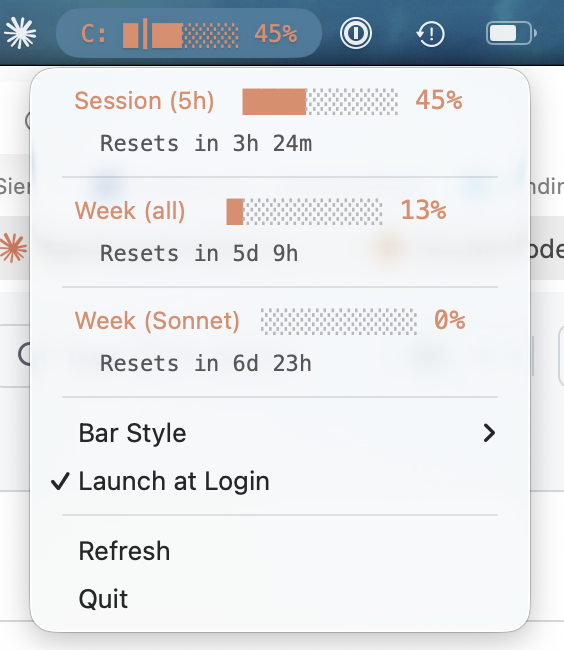
See your Claude Pro/Max usage at a glance — right in your macOS menu bar.
Getting started
Install and run:
pip install claude-usage-bar
claude-usage-bar &
To keep it running across restarts, click the menu bar icon and enable Launch at Login.
Requirements
- macOS
- Python 3.10+
- Claude Code installed and logged in
How it works
Claude Usage Bar periodically checks your current usage against the Anthropic API and displays a progress bar, so you always know where you stand against your plan's limits. Authentication is handled through your existing Claude Code login.
Debugging
Set CLAUDE_USAGE_LOG for verbose output when running from Terminal:
CLAUDE_USAGE_LOG=DEBUG claude-usage-bar
Contributing
Contributions are welcome — feedback and bug reports are greatly appreciated. open an issue to discuss bugs or ideas.
Local development
uv venv --python 3.12   # or: python3 -m venv .venv (if you don't have uv)
source .venv/bin/activate

# Install the package and its dependencies in editable mode,
# so local source changes take effect without reinstalling
uv pip install -e .        # or: pip install -e .

# Run the app
python -m claude_usage

# Run tests
uv pip install pytest      # or: pip install pytest
python -m pytest tests/
Security Notes
claude-usage-bar does read your auth credentials from your keychain, but only uses them to fetch usage data. You can read the code or ask claude what it's doing.
License
Project details
Verified details
These details have been verified by PyPIProject links
GitHub Statistics
Maintainers
Release history Release notifications | RSS feed


Download files
Download the file for your platform. If you're not sure which to choose, learn more about installing packages.
Source Distribution
Built Distribution
Filter files by name, interpreter, ABI, and platform.
If you're not sure about the file name format, learn more about wheel file names.
Copy a direct link to the current filters
File details
Details for the file claude_usage_bar-0.2.2.tar.gz.
File metadata
- Download URL: claude_usage_bar-0.2.2.tar.gz
- Upload date:
- Size: 26.3 kB
- Tags: Source
- Uploaded using Trusted Publishing? Yes
- Uploaded via: twine/6.1.0 CPython/3.13.12
File hashes
| Algorithm | Hash digest | |
|---|---|---|
| SHA256 |
cefcf2504b3b98600579e758f19cf900e382fe647de56ff277860d2b739a453c
|
|
| MD5 |
55052610bfaba6435dc0e4bc6e2b55b6
|
|
| BLAKE2b-256 |
bd92a61bd245b98eb9734ce39c9885da110cfde3eed04de4cf1122b6621675af
|
Provenance
The following attestation bundles were made for claude_usage_bar-0.2.2.tar.gz:
Publisher:
publish.yml on dlichtenberg/claude_usage_bar
-
Statement:
-
Statement type:
https://in-toto.io/Statement/v1 -
Predicate type:
https://docs.pypi.org/attestations/publish/v1 -
Subject name:
claude_usage_bar-0.2.2.tar.gz -
Subject digest:
cefcf2504b3b98600579e758f19cf900e382fe647de56ff277860d2b739a453c - Sigstore transparency entry: 1423792545
- Sigstore integration time:
-
Permalink:
dlichtenberg/claude_usage_bar@123888b164348676f66053423005c4960b595e40 -
Branch / Tag:
refs/tags/v0.2.2 - Owner: https://github.com/dlichtenberg
-
Access:
public
-
Token Issuer:
https://token.actions.githubusercontent.com -
Runner Environment:
github-hosted -
Publication workflow:
publish.yml@123888b164348676f66053423005c4960b595e40 -
Trigger Event:
release
-
Statement type:
File details
Details for the file claude_usage_bar-0.2.2-py3-none-any.whl.
File metadata
- Download URL: claude_usage_bar-0.2.2-py3-none-any.whl
- Upload date:
- Size: 20.1 kB
- Tags: Python 3
- Uploaded using Trusted Publishing? Yes
- Uploaded via: twine/6.1.0 CPython/3.13.12
File hashes
| Algorithm | Hash digest | |
|---|---|---|
| SHA256 |
add0aeeb85b0b32d1613a07ef7bb08427b7f8ab15313fbd18abf32f2fd7481ec
|
|
| MD5 |
e303179749ec5e449fde84ca97bb689d
|
|
| BLAKE2b-256 |
49afd85256e734de344964712084a4094f66b3e1157b09f66183789fccdf4189
|
Provenance
The following attestation bundles were made for claude_usage_bar-0.2.2-py3-none-any.whl:
Publisher:
publish.yml on dlichtenberg/claude_usage_bar
-
Statement:
-
Statement type:
https://in-toto.io/Statement/v1 -
Predicate type:
https://docs.pypi.org/attestations/publish/v1 -
Subject name:
claude_usage_bar-0.2.2-py3-none-any.whl -
Subject digest:
add0aeeb85b0b32d1613a07ef7bb08427b7f8ab15313fbd18abf32f2fd7481ec - Sigstore transparency entry: 1423792624
- Sigstore integration time:
-
Permalink:
dlichtenberg/claude_usage_bar@123888b164348676f66053423005c4960b595e40 -
Branch / Tag:
refs/tags/v0.2.2 - Owner: https://github.com/dlichtenberg
-
Access:
public
-
Token Issuer:
https://token.actions.githubusercontent.com -
Runner Environment:
github-hosted -
Publication workflow:
publish.yml@123888b164348676f66053423005c4960b595e40 -
Trigger Event:
release
-
Statement type:






