
📊 claude-usage
Your Claude subscription limits — right from your terminal.





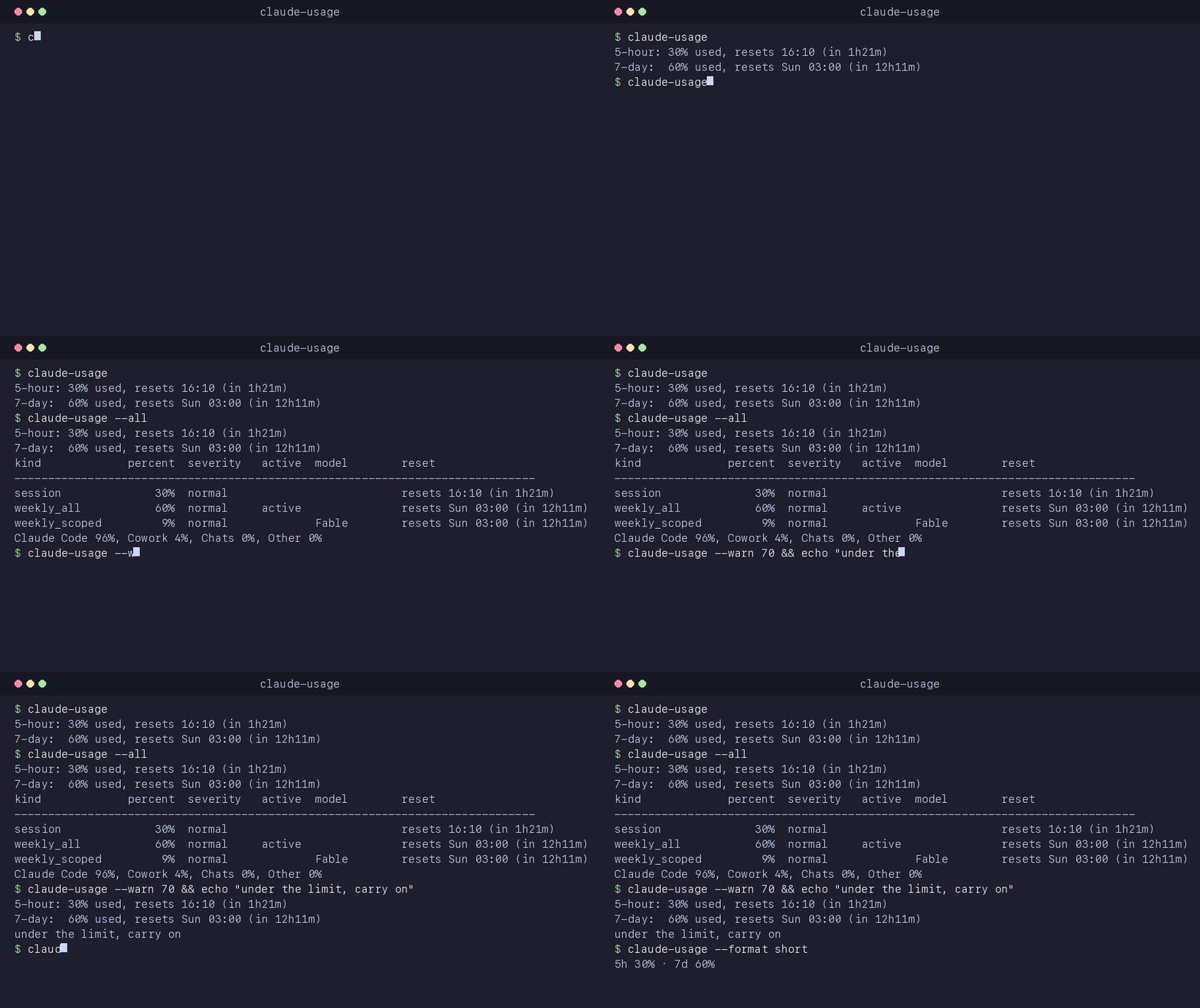
Claude Code shows your subscription limits only in the interactive /usage
screen. claude-usage gives you the same two numbers from the shell — for
scripts, hooks, and AI agents deciding when to back off. It uses the Claude Code
login already on your machine. No API key to manage, nothing to configure.
Install claude-usage-limits from PyPI; the command is claude-usage.
$ claude-usage
5-hour: 25% used, resets 16:10 (in 1h39m)
7-day:  59% used, resets Sun 03:00 (in 12h29m)
✨ Features
- Two windows, one command — 5-hour and 7-day percent used and local reset times.
- 🚦 Thresholds for scripts —
--warn [N]and--warn-7d [N]exit 1 at or above N%. - 📊 Extra detail —
--allshows per-model limits, the active window, and the weekly surface split. - 📟 Status line — a compact model and usage line that also feeds the documented fallback source.
- 🧾 Plain, JSON, or short — readable in a terminal and easy to use from scripts.
- 🌍 Cross-platform — macOS, Linux, and Windows; Python 3.9+.
- 🔋 Zero dependencies — pure Python standard library.
- 🔒 Local & private — reads your existing login; no telemetry or third-party calls.
🚀 Quickstart
pip install claude-usage-limits
claude-usage
Sign in with claude on this machine first. Any running Claude Code session keeps
its access token fresh.
🧑💻 Usage
| Command | What it does |
|---|---|
claude-usage |
Two usage windows and their reset times |
claude-usage --json |
Raw JSON of whichever source answered; alias for --format json |
claude-usage --warn [N] |
Exit 1 at or above N% of the 5-hour window (default 70) |
claude-usage --warn-7d [N] |
Exit 1 at or above N% of the 7-day window (default 70) |
claude-usage --all |
Add per-limit details and weekly surface breakdown in plain format |
claude-usage --format {plain,json,short} |
Choose output format (default plain) |
claude-usage --statusline |
Read Claude Code status-line JSON on stdin, cache it, print one compact line (hidden from help) |
claude-usage -v, --verbose |
Print only credential and usage source notes to stderr |
claude-usage -V, --version |
Print the version |
claude-usage -h, --help |
Show help |
Flags combine: claude-usage --format short --warn 70 --warn-7d 90.
--json and --format set the same option; the last one wins. --all adds detail
only in plain format, keeping JSON machine-readable and short output on one line.
📊 Example: --all
5-hour: 30% used, resets 16:10 (in 1h21m)
7-day:  60% used, resets Sun 03:00 (in 12h11m)
kind             percent  severity   active  model        reset
------------------------------------------------------------------------------
session              30%  normal                          resets 16:10 (in 1h21m)
weekly_all           60%  normal     active               resets Sun 03:00 (in 12h11m)
weekly_scoped         9%  normal             Fable        resets Sun 03:00 (in 12h11m)
Claude Code 96%, Cowork 4%, Chats 0%, Other 0%
Detail fields depend on the account and endpoint response. With a status-line
answer, this prints (details not available from the status-line source) instead.
🤖 Using it from scripts and agents
claude-usage --warn 70 || echo "back off"
claude-usage --warn 70 --warn-7d 90 --format short
claude-usage --json
The usual output is always printed. Exit codes: 0 for success, 1 when
either threshold trips or no source answers, 2 for an argument error.
The threshold is inclusive: --warn exits 1 at 70%, including exactly 70%.
A missing window counts as zero for threshold checks. JSON is the raw payload,
so its shape depends on the source; plain and short output normalize both.
📟 Claude Code status line
Set statusLine in ~/.claude/settings.json (merge this field into your existing
settings):
{
  "statusLine": {"type": "command", "command": "claude-usage --statusline"}
}
Claude Code pipes its documented status JSON to the command on each repaint:
Fable 5.1 · 5h 25% · 7d 59%
Missing parts are omitted. This mode never looks up credentials or makes a network
call. It also writes last-statusline.json, feeding the documented fallback when
the endpoint is unavailable. Invalid input produces no output and exits 0.
claude-usage --format short gives the same compact format from the normal source
order; endpoint answers usually have no model, so show 5h 23% · 7d 59%.
🤔 How it works
Sources are tried in this order:
last-usage.jsonif less than 5 minutes old.- One live
GET https://api.anthropic.com/api/oauth/usage, saved on success. last-usage.jsonif less than 60 minutes old.last-statusline.jsonif less than 60 minutes old and it hasrate_limits.
Both caches live in ~/.claude, or CLAUDE_CONFIG_DIR when set. Cache writes are
atomic. Cached answers at least a minute old show their source and age, e.g.
(from the endpoint, 3 min ago); status-line answers always show their age.
If every source fails, the distinct reasons appear once each on stderr.
The endpoint returns HTTP 429 on back-to-back calls, sometimes blocking for minutes. Five-minute reuse avoids repeating requests; there are no retries or polling, and the single request times out after 15 seconds.
🔍 Where credentials live (per OS)
Resolution is local-only, in this order:
CLAUDE_CODE_OAUTH_TOKENenvironment override, used as-is.- macOS Keychain service
Claude Code-credentials, read withsecurity find-generic-password -s "Claude Code-credentials" -w. - The credentials file, including on macOS when the keychain is unavailable (for example, a locked keychain over SSH).
| OS | Credentials file |
|---|---|
| macOS / Linux | ~/.claude/.credentials.json |
| Windows | %USERPROFILE%\.claude\.credentials.json |
CLAUDE_CONFIG_DIR changes the credentials file directory and both cache paths.
The token is claudeAiOauth.accessToken; expiresAt is milliseconds since epoch.
An expired token is refused: open claude so it refreshes.
For the protocol and a recipe to rebuild the tool, see docs/HOW_THIS_WAS_BUILT.md.
🔒 Privacy & security
- Reads existing credentials only; never refreshes or writes credentials.
- Sends the token only to
api.anthropic.com, with the usage request. - Writes only the two local usage caches; never modifies Claude Code settings.
- Never prints secrets or headers, including with
-v. - No telemetry. No third-party calls.
⚠️ Good to know
- The OAuth usage endpoint is undocumented and rate limited; it may change or disappear. The documented status-line path is the fallback.
- Status-line
rate_limitsfor subscription windows is Pro/Max only, appears after the first API response, and drops individual windows after they reset. It updates only while a Claude Code session is active and repainting. - The observed endpoint response came from a Max account. Fields on other plans may differ; an API key is not a Claude Code OAuth login.
- Any running
claudekeeps the access token fresh. This tool deliberately does not implement the undocumented refresh flow. - Use
/feedbackin Claude Code to ask Anthropic for an officialclaude usagecommand.
🛠️ Install options
pip install claude-usage-limits       # from PyPI
pipx install claude-usage-limits      # isolated command installation
pip install .                  # from a local clone
Requires Python 3.9+. The PyPI distribution is claude-usage-limits; the command and
GitHub repo are claude-usage, and the import package is claude_usage.
The PyPI names claude-usage, claude-usage-cli, and claude-code-usage belong to
unrelated projects.
🤝 Contributing
Issues and PRs are welcome. After installing the local project with pip install -e .,
run the tests with:
pip install pytest && pytest -q
Tests use temporary config directories and mocked HTTP; they never contact the endpoint or read your real credentials.
📄 License
MIT — do whatever you like.
1 maintainer

Metadata
1 maintainer
Release files for claude-usage-limits 0.1.0
For a detailed explanation of source distributions (sdists) and built distributions (wheels), please see the package formats documentation.
Source distribution (sdist)
| File | Size | Uploaded | Provenance | |
|---|---|---|---|---|
| claude_usage_limits-0.1.0.tar.gz | 19.5 kB | Without provenance | Details |
Built distribution (wheel)
| File | Interpreter | ABI | Platform | Reset |
|---|---|---|---|---|
| claude_usage_limits-0.1.0-py3-none-any.whl | Python 3 | none | any | Details |
Total release size: 32.2 kB
Release files / claude_usage_limits-0.1.0.tar.gz
| Download URL | claude_usage_limits-0.1.0.tar.gz |
|---|---|
| Size | 19.5 kB |
| Tags | Source |
|
SHA-256 checksum How to use checksums |
c75febcf588555f1b073da8efaaa33656bd9448c9d31e9c4e0492cafc155a8ee
|
|
BLAKE2b-256 checksum How to use checksums |
56225c0c31ed0e797c176f60af65ff017e32b0a57b6300c5d45c7248a8f994d9
|
| Upload date | |
|
Uploaded using Trusted Publishing? What is trusted publishing? |
No |
| Uploaded via |
twine/7.0.0 CPython/3.15.0
|
Release files / claude_usage_limits-0.1.0-py3-none-any.whl
| Download URL | claude_usage_limits-0.1.0-py3-none-any.whl |
|---|---|
| Size | 12.7 kB |
| Tags | Python 3 |
|
SHA-256 checksum How to use checksums |
2d44b25b3bb50c360f2a5ce74541ee9f459b91be5accf4492e2611abec65f0bf
|
|
BLAKE2b-256 checksum How to use checksums |
c3748ed2be295468fb17f22c8b8d6bf46a8441c055d226b9c6c863c78a774c59
|
| Upload date | |
|
Uploaded using Trusted Publishing? What is trusted publishing? |
No |
| Uploaded via |
twine/7.0.0 CPython/3.15.0
|
Security for claude-usage-limits 0.1.0
Provenance
Provenance describes where a file came from. On PyPI, provenance is shared via attestations, which provide a verifiable record of the build or publishing details. View details, limitations and caveats.
No provenance found
None of the files in this release were uploaded with provenance metadata.
A note on package security
PyPI is a repository for distributing packages, not a service for auditing them. While third-party security researchers and our staff do their best to detect and remove malicious packages, PyPI cannot guarantee the quality, security or suitability of any given package.
To learn more about protecting yourself from malicious actors, visit our package security documentation.













