
Statusline + notification hook + cross-window tray watcher for Claude Code.
Verified details
These details have been verified by PyPIProject links
GitHub Statistics
Maintainers

Project description
claude-code-statusline




Statusline + notification hook + external watcher for Claude Code.
Tells you at a glance which of your parallel Claude Code windows is busy, idle, or waiting for permission — and surfaces toast notifications when one needs your attention.
Why
When you run several Claude Code sessions in parallel terminals, it's easy to lose track of which one is thinking, which one finished, and which is blocked on a permission prompt. The default TUI doesn't surface that across windows. This adds:
- A persistent statusline at the bottom of each Claude Code window with project name, busy indicator, model, context %, rate-limit usage, and elapsed-since-last-activity.
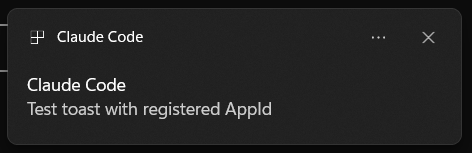
- A notification hook that fires distinct sounds and Windows toasts (with project name in the title) when a window wants you.
What it looks like

| Segment | Meaning |
|---|---|
project-name |
session_name if set, else cwd basename. Truncates with … to fit terminal width. |
● / ● THINKING / ● STUCK / ● WAITING |
Session classification. Green ● = busy (fresh). Yellow ● THINKING = busy + silent ≥60s. Red ● STUCK = silent ≥180s. Red ● WAITING = permission prompt pending. Hidden = idle. See Status colors for full details. |
Opus 4.7 1M |
Model display name; 1M suffix when 1M context is enabled. |
13% (131k) |
Context used: percent + token count. Dim → yellow ≥60 → bold yellow ≥80 → red ≥90. |
5h:19% 7d:48% |
Rate-limit usage (5-hour / 7-day). Dim → yellow → red as it climbs. |
last 12:34:56 |
Local wall-clock time of the last transcript event. Dim if <30s old at last paint → yellow <2min → red ≥2min. Frozen between Claude Code repaints by design — comparing a stale wall clock to your own is self-evidently stale, whereas a frozen "Ns" counter would lie. Run watcher.py for real-time ticking. |
Status colors
Both the statusline ● and the tray icon share the same colors and thresholds.
| Color | Statusline | Tray | Trigger | What to do |
|---|---|---|---|---|
| Green | ● |
green dot / count | Session is busy and the last non-thinking transcript entry is <60s old |
Nothing — Claude is healthily working |
| Yellow | ● THINKING |
yellow dot / count | Busy, last non-thinking entry is ≥60s old | Wait — likely a long thinking block or a slow tool call. Heads-up, not yet a problem |
| Red | ● STUCK |
red dot / count | Busy + silent ≥180s | Probably hung — consider interrupting |
| Red | ● WAITING |
red dot / count | status=waiting (permission prompt pending) |
Approve/deny the dialog in the Claude Code window |
| Gray | (hidden) | gray dot / 0-count | No sessions, or all sessions are idle |
Nothing |
Thresholds: SLOW_THRESHOLD=60s (yellow) and STUCK_THRESHOLD=180s (red), defined once in watcher.py and mirrored in statusline.py so the two surfaces never disagree.
"Last non-thinking entry": both surfaces walk the transcript JSONL backwards and skip subtype=="thinking" rows, so extended-thinking writes don't mask a session that's been silently reasoning. Falls back to file mtime if no parseable non-thinking entry exists (brand-new turn).
Where each color is computed:
- Statusline
●—statusline.py:render_status, computed only when Claude Code repaints (events only; therefreshIntervaltimer does not fire during silent stretches). - Tray icon —
watcher.py:overall_severity, computed every 300ms by the background poll loop, showing the loudest severity across all your Claude Code windows.
The notification hook adds:
- Permission prompt → warning beep + toast titled
[project] Permission needed - Idle prompt (turn ended, awaiting input) → chime + toast titled
[project] Awaiting your input - Elicitation dialog → asterisk beep + toast titled
[project] Question
The external watcher (watcher.py) is the answer to "is anything actually stuck?" — Claude Code refreshes the in-TUI statusline sparsely during silent work, so the dot can lie. Run the watcher in a separate terminal and it polls every session on its own schedule, flips sessions from ● BUSY → ⌛ THINK → ⚠ STUCK as transcripts stay silent, and beeps when a session escalates to STUCK or WAIT:
Claude Code Watcher · 2026-05-20 11:45:12
──────────────────────────────────────────────────────────────────────────────
    PID  STATE       PROJECT                           ELAPSED
──────────────────────────────────────────────────────────────────────────────
  25632  ● BUSY      Add progress indicator                 3s
  28104  ⌛ THINK     Other Project                       1m22s
  31840  ⚠ STUCK     Doing Hard Thing                    4m05s
  19200  ▶ WAIT      Yet Another                         12s
──────────────────────────────────────────────────────────────────────────────
Run with:
python watcher.py                 # default 300ms poll
python watcher.py --no-sound      # silent
python watcher.py --interval 1.0  # slower poll
Tray-icon mode (no extra terminal pane)
If you don't want the watcher TUI eating a terminal pane, run it headless with a system tray icon driven by the same classification logic:
pip install "claude-watcher[tray]"
claude-watcher --tray
Or from a checkout (no install), using the same venv:
.venv/Scripts/python -m claude_watcher.watcher --tray   # Windows
.venv/bin/python    -m claude_watcher.watcher --tray    # macOS / Linux
The tray icon is a single colored circle whose color = the loudest severity across all your sessions (see Status colors).
Tooltip lists each session's classification. When a terminal window is the OS foreground, the most-recently-active session is sorted to the top with a ▶ marker — proxy for "the session you're probably looking at" (we can't read which tab inside Windows Terminal is active without UI Automation).
Right-click menu — Open action (opens the info window), session-summary entries (read-only, no action — present for visual reference with normal-color text), and Quit.
Info window — double-click the tray icon (or pick Open from the menu) to pop a small borderless light-themed window listing all sessions. Each session shows:
- Top row — colored dot, project name, status word; the focused session is bolded with
▶. - Detail row (muted, monospace) —
cpu N%(claude.exe CPU;—until psutil has two samples),age Xm Ys(transcript-mtime age, skipping thinking entries), andrunning: <tool>if anassistant/tool_useis still waiting on itstool_result. The CPU + tool combo disambiguates the silent-but-busy case: high CPU = thinking hard; near-zero with a tool name = blocked on that tool; near-zero with no tool = likely stuck on the API.
Auto-refreshes every ~700ms while open; closes on focus-loss or Esc. Rendered by a child process so it doesn't block the tray. CPU% requires the optional psutil dep (uv pip install psutil).
Toast on escalation — when a session crosses into ⚠ STUCK or ▶ WAIT, the watcher fires a desktop toast ([project] STUCK or [project] WAIT) in addition to the audible beep. Same backend per platform: WinRT on Windows, osascript on macOS, notify-send on Linux.
Beeps on STUCK/WAIT escalations (use --no-sound to silence).
Autostart on login
Register the tray watcher to launch automatically:
Windows: writes HKCU\Software\Microsoft\Windows\CurrentVersion\Run\ClaudeCodeWatcher pointing at a VBScript wrapper that invokes pythonw.exe -m claude_watcher.watcher --tray with a hidden window (uv-built venvs ship pythonw.exe as a trampoline shim that flashes a console without the wrapper).
claude-watcher --install-autostart
macOS: writes ~/Library/LaunchAgents/com.anthropic.claude-code-watcher.plist and launchctl loads it immediately, so the watcher starts now and at every login. The watcher hides itself from the Dock via NSApplicationActivationPolicyAccessory; only the menu-bar icon shows.
claude-watcher --install-autostart
First time the watcher fires a toast, macOS will prompt you to allow notifications for the Python interpreter (System Settings → Notifications). Grant it once.
Linux: writes ~/.config/autostart/claude-code-watcher.desktop (XDG autostart). Most desktop environments honor it on next login.
claude-watcher --install-autostart
To remove on any platform: claude-watcher --uninstall-autostart.
Auto-start when Claude opens (alternative to OS-login)
If you'd rather the tray only run while you're actually using Claude — not idle in the background between reboots — register a Claude Code SessionStart hook instead. The hook fires when you open a Claude session; a tiny launcher (claude_watcher.launch_watcher) checks via psutil whether a tray watcher is already alive and spawns one only if not. Subsequent session opens are no-ops.
claude-watcher --register-claude-hook
This adds an entry under hooks.SessionStart in ~/.claude/settings.json (with a .bak of the previous file). On Windows a small VBScript wrapper (~/.claude/_claude_watcher_hook.vbs) is generated so the launcher invocation is fully hidden; on macOS/Linux the command runs python -m claude_watcher.launch_watcher directly. Idempotent — re-running detects the existing entry and does nothing.
| OS-login autostart | SessionStart hook | |
|---|---|---|
| Trigger | At every login | First Claude session after a reboot |
| Watcher running when no Claude windows open | Yes (~30 MB RAM idle) | No |
| Startup latency on first Claude open | None (already running) | ~300 ms (pystray spin-up) |
| Setup command | --install-autostart |
--register-claude-hook |
Pick one. To remove the hook: claude-watcher --unregister-claude-hook.
Configurable thresholds
Override the classification thresholds via env vars (same vars read by claude_watcher.statusline so the two surfaces never disagree):
| Env var | Default | Effect |
|---|---|---|
CLAUDE_WATCHER_SLOW_SECONDS |
60 |
Age at which a busy session flips to ⌛ THINK (yellow) |
CLAUDE_WATCHER_STUCK_SECONDS |
180 |
Age at which it flips to ⚠ STUCK (red) |
Manual launch (without autostart)
Windows — use pythonw.exe (no console window):
pythonw -m claude_watcher.watcher --tray
macOS — claude-watcher --tray works but you'll see a Dock icon while it runs. Either use --install-autostart (which hides the Dock icon) or nohup to detach from the terminal:
nohup claude-watcher --tray > /dev/null 2>&1 &
Linux — same nohup pattern as macOS, or use systemctl --user for a real service.
Requirements
- Statusline + watcher: any OS with Python 3.10+ and Claude Code.
- Notification hook: cross-platform via auto-detected backend.
- Windows 10/11 — toasts via WinRT (needs the bundled AppId registration); sounds via
winsound.MessageBeep. - macOS — toasts via
osascript display notification; sounds viaafplayagainst/System/Library/Sounds/. - Linux — toasts via
notify-send(installlibnotify); sounds viapaplay(PulseAudio) oraplay(ALSA), falling back to terminal bell.
- Windows 10/11 — toasts via WinRT (needs the bundled AppId registration); sounds via
Install
Via pip (recommended)
pip install "claude-watcher[tray]"          # tray extras pull pystray + pillow + psutil
claude-statusline --help                    # entry-point script for the statusline
claude-watcher --tray                       # entry-point script for the tray watcher
Then point Claude Code's statusLine.command at claude-statusline instead of python ~/.claude/statusline.py. To set up auto-start, run claude-watcher --install-autostart (OS-login) or claude-watcher --register-claude-hook (start on Claude session open) — see Autostart on login for the OS-specific details.
Automated (Windows, git checkout, legacy)
git clone https://github.com/EranDaniel98/claude-code-statusline.git
cd claude-code-statusline
.\scripts\install.ps1
# or .\scripts\install.ps1 -DryRun  to preview without writing anything
The script:
- Copies
statusline.pyandhooks/notify.pyinto~/.claude/(backing up any existing files). - Registers the
Anthropic.ClaudeCodeAppId so Windows actually displays toasts (Windows silently drops toasts from unregistered AppIds). - Deep-merges
settings.example.jsoninto~/.claude/settings.jsonwith a.bakof your old file. Existing unrelated settings (other hooks, custom rules) are preserved.
Restart any open Claude Code window after install.
Manual (any platform)
-
Copy files into
~/.claude/:Windows (PowerShell):
Copy-Item statusline.py "$env:USERPROFILE\.claude\statusline.py"
New-Item -ItemType Directory -Force -Path "$env:USERPROFILE\.claude\hooks" | Out-Null
Copy-Item hooks\notify.py "$env:USERPROFILE\.claude\hooks\notify.py"
macOS / Linux:
mkdir -p ~/.claude/hooks
cp statusline.py ~/.claude/statusline.py
cp hooks/notify.py ~/.claude/hooks/notify.py
-
(Windows only) Register the toast AppId:
.\scripts\register-app-id.ps1
-
Merge
settings.example.jsoninto~/.claude/settings.json(the included helper does a deep-merge with backup, on any OS):python scripts/merge_settings.py settings.example.json
-
Restart any open Claude Code window.
Verify
From the repo root (no install required):
python tests/test_statusline.py    # state matrix; should print "9/9 passed"
python tests/test_watcher.py       # watcher logic; should print "7/7 passed"
python tests/test_notify.py        # fires 3 toasts + 3 sounds (manual confirm)
python tests/test_colors.py        # renders the dot/WAIT states
Then open a Claude Code window and confirm:
- Green
●appears between project name and model while Claude is responding. - Dot disappears within ~1s after the response finishes.
See tests/CHECKLIST.md for cross-window scenarios.
Environment variables
| Variable | Effect |
|---|---|
CLAUDE_QUIET=1 |
Silence the notification hook (no sounds, no toasts). |
CLAUDE_STATUSLINE_DEBUG=1 |
Dump the raw statusline payload to ~/.claude/statusline-payload.json. |
CLAUDE_SESSIONS_DIR=<path> |
Override the sessions dir read by the statusline + watcher (default ~/.claude/sessions). Useful for tests and isolated environments. |
COLUMNS=N |
Force terminal width (otherwise autodetected via CONOUT$ on Windows). |
Troubleshooting
Toasts don't appear (sounds work). The Anthropic.ClaudeCode AppId isn't registered. Run .\scripts\register-app-id.ps1. After registration, "Claude Code" appears in Settings → System → Notifications → Notifications from apps and other senders — make sure it's toggled on, and that Focus / Do not disturb is off.
Sounds all sound identical. Windows' default sound scheme maps Asterisk / Default Beep / Critical Stop to the same .wav. Customize the events in Sound Control Panel → Sounds if you want distinct audio cues.
Dot never appears. Verify Python is on PATH and the statusLine command in settings.json points to the right path. Run python ~/.claude/statusline.py < ~/.claude/statusline-payload.json (after setting CLAUDE_STATUSLINE_DEBUG=1 once to generate the payload) to see direct output.
Project name truncated even on a wide terminal. Terminal width detection isn't picking up your console. Set COLUMNS=120 (or whatever your width is) in your shell profile.
Known limitations
- Sparse refresh during silent work. Claude Code doesn't fire statusline refreshes on the
refreshIntervaltimer reliably during long thinking turns or long tool calls — repaints fire on state events (start/end of turn, permission prompts). The dot accurately reflects state at the last paint, not in real time. Runwatcher.pyin a separate terminal to get reliable real-time "stuck" detection; it polls on its own schedule and doesn't depend on Claude Code's repaint cadence. - Toast latency on Windows.
hooks/notify.pyspawns a fresh PowerShell per notification (~300ms startup). Fire-and-forget viaPopenso it doesn't block, but the toast itself appears ~300ms after the event. A persistent helper would be cleaner — future work.
Design notes
- Statusline reads stdin payload Claude Code provides on every render: session id, transcript path, cwd, model, context window, rate limits.
- Busy state comes from
~/.claude/sessions/<PID>.json— Claude Code'sstatusfield there is the authoritative liveness signal (idle/busy/waiting). - Last activity is the timestamp of the last non-thinking JSONL entry, rendered as local wall-clock time. Extended-thinking blocks land in the JSONL and update file mtime, so naive
getmtimewould hide a session that's been silently reasoning for minutes. The statusline (andwatcher.py's classification, by the same logic) walks the tail of the JSONL backwards, skipssubtype=="thinking"entries, and uses the previous entry's timestamp. Falls back to file mtime when no parseable non-thinking entries exist. Color buckets (dim/yellow/red) still classify freshness at the last paint. - Toast AppId is registered in
HKCU:\SOFTWARE\Classes\AppUserModelId\Anthropic.ClaudeCode— Microsoft's documented way to register a standalone notifier without needing a Start Menu shortcut. - Notification backends are platform-detected.
hooks/notify.pydefines aNotificationBackendABC withWindowsBackend/MacOSBackend/LinuxBackendimplementations selected viasys.platform. Adding a new platform is one new class. - The watcher polls externally, free of Claude Code's repaint quirks. It scans
~/.claude/sessions/*.jsonplus the matching transcript JSONLs in~/.claude/projects/<encoded-cwd>/, classifies each session, and beeps when severity escalates (debounced — won't beep continuously while a session sits in WAIT).
License
MIT — see LICENSE.
Project details
Verified details
These details have been verified by PyPIProject links
GitHub Statistics
Maintainers
Release history Release notifications | RSS feed


Download files
Download the file for your platform. If you're not sure which to choose, learn more about installing packages.
Source Distribution
Built Distribution
Filter files by name, interpreter, ABI, and platform.
If you're not sure about the file name format, learn more about wheel file names.
Copy a direct link to the current filters
File details
Details for the file claude_watcher-0.4.1.tar.gz.
File metadata
- Download URL: claude_watcher-0.4.1.tar.gz
- Upload date:
- Size: 41.5 kB
- Tags: Source
- Uploaded using Trusted Publishing? Yes
- Uploaded via: twine/6.1.0 CPython/3.13.12
File hashes
| Algorithm | Hash digest | |
|---|---|---|
| SHA256 |
4e64c303df7b98d42e9f94db38f0dde63b00daaaa87dda8b351cb37251f89425
|
|
| MD5 |
cee66f6eaef566ce7bb19e6c9e4666b4
|
|
| BLAKE2b-256 |
1378db9a351f8bd3d823f162889720dc858db7b4f08bf14d67240c84c2a410b6
|
Provenance
The following attestation bundles were made for claude_watcher-0.4.1.tar.gz:
Publisher:
publish.yml on EranDaniel98/claude-code-statusline
-
Statement:
-
Statement type:
https://in-toto.io/Statement/v1 -
Predicate type:
https://docs.pypi.org/attestations/publish/v1 -
Subject name:
claude_watcher-0.4.1.tar.gz -
Subject digest:
4e64c303df7b98d42e9f94db38f0dde63b00daaaa87dda8b351cb37251f89425 - Sigstore transparency entry: 1605043379
- Sigstore integration time:
-
Permalink:
EranDaniel98/claude-code-statusline@63c6cf0219551a8358b4a3ef7d676d3ada697a86 -
Branch / Tag:
refs/tags/v0.4.1 - Owner: https://github.com/EranDaniel98
-
Access:
public
-
Token Issuer:
https://token.actions.githubusercontent.com -
Runner Environment:
github-hosted -
Publication workflow:
publish.yml@63c6cf0219551a8358b4a3ef7d676d3ada697a86 -
Trigger Event:
push
-
Statement type:
File details
Details for the file claude_watcher-0.4.1-py3-none-any.whl.
File metadata
- Download URL: claude_watcher-0.4.1-py3-none-any.whl
- Upload date:
- Size: 32.1 kB
- Tags: Python 3
- Uploaded using Trusted Publishing? Yes
- Uploaded via: twine/6.1.0 CPython/3.13.12
File hashes
| Algorithm | Hash digest | |
|---|---|---|
| SHA256 |
cc6ba5cb953ee53eca004004df6ac62393b66b84b67a6472105d2f8f68daf08e
|
|
| MD5 |
071fee7ce63cc243a052e3ef144d487e
|
|
| BLAKE2b-256 |
5fd7ef5ae6f6f0970c68725d25a32735576eb5515631cdb22f6158526fc609f7
|
Provenance
The following attestation bundles were made for claude_watcher-0.4.1-py3-none-any.whl:
Publisher:
publish.yml on EranDaniel98/claude-code-statusline
-
Statement:
-
Statement type:
https://in-toto.io/Statement/v1 -
Predicate type:
https://docs.pypi.org/attestations/publish/v1 -
Subject name:
claude_watcher-0.4.1-py3-none-any.whl -
Subject digest:
cc6ba5cb953ee53eca004004df6ac62393b66b84b67a6472105d2f8f68daf08e - Sigstore transparency entry: 1605043535
- Sigstore integration time:
-
Permalink:
EranDaniel98/claude-code-statusline@63c6cf0219551a8358b4a3ef7d676d3ada697a86 -
Branch / Tag:
refs/tags/v0.4.1 - Owner: https://github.com/EranDaniel98
-
Access:
public
-
Token Issuer:
https://token.actions.githubusercontent.com -
Runner Environment:
github-hosted -
Publication workflow:
publish.yml@63c6cf0219551a8358b4a3ef7d676d3ada697a86 -
Trigger Event:
push
-
Statement type:






