
Claude Webdesk
Your Claude Code workspace. In a browser.
Run tasks on your server, drop in screenshots, pick up past conversations, and bring the results home.


简体中文 · Quick start · Deployment · Plugins · Contributing
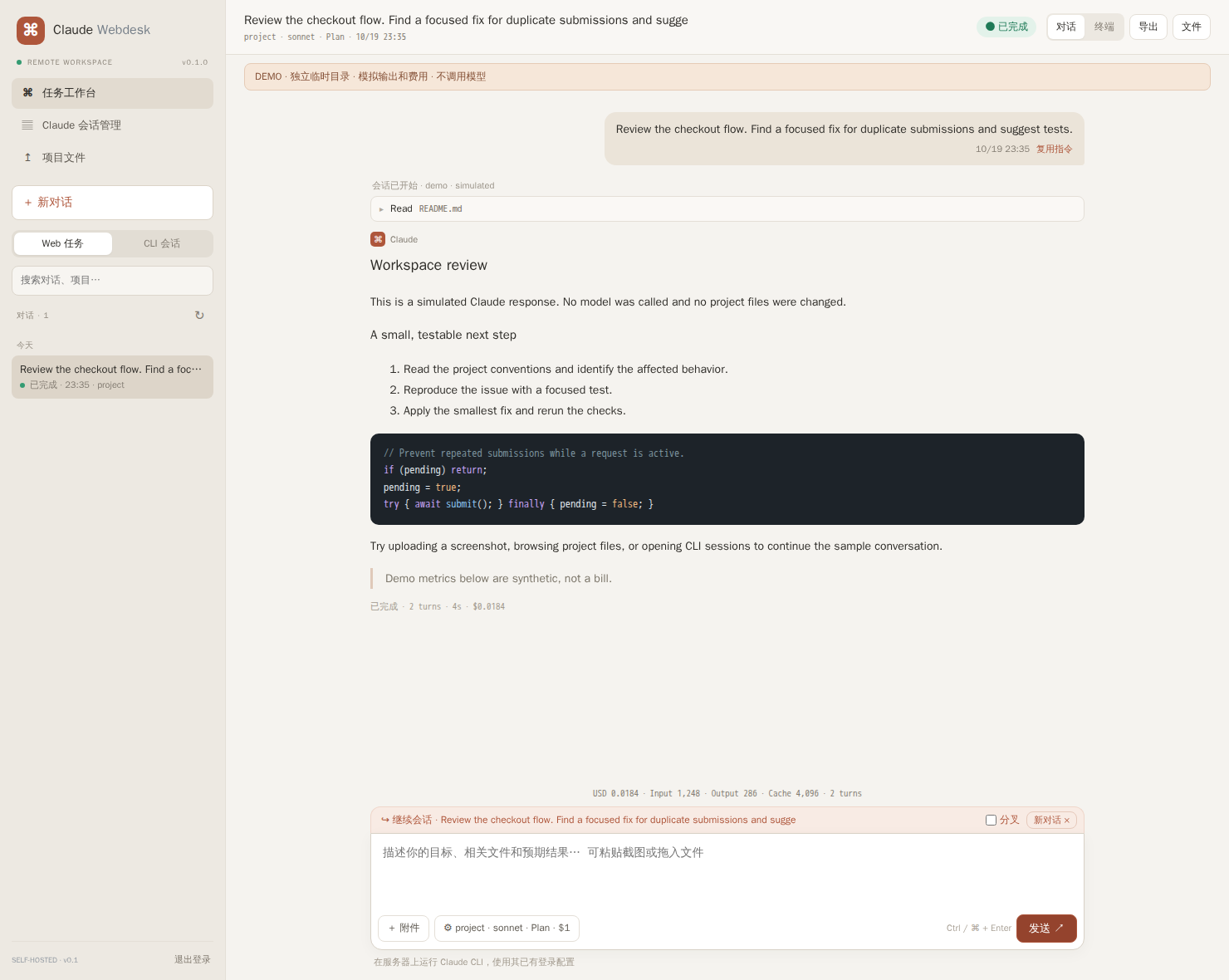
Try it before connecting Claude
npx claude-webdesk demo
# or: uvx claude-webdesk demo
Open the login link printed in your terminal. The demo uses a separate temporary workspace, synthetic sessions and simulated output. No Claude installation, API key, or model calls. Uploads and task records stay in that temporary directory; its path is printed for cleanup. Node.js 22+ is required with either installation method.
Why a webdesk?
Your agent is running on a VPS. Your screenshot is on your laptop. Yesterday's conversation is buried in terminal history. The generated report is still on the server.
Claude Webdesk brings that workflow into one authenticated, self-hosted page:
| What you need | What you get |
|---|---|
| Send a task from another device | Prompt presets, model/effort selection, live Markdown and raw output |
| Close a tab without losing a task | Server-side execution, persisted task history and reconnecting SSE |
| Show Claude a screenshot | Paste an image, drag a file or use the upload button; its server path is added to your prompt |
| Take the result home | Browse the startup project directory, reference paths and download artifacts |
| Pick up earlier work | Search native Claude sessions, resume in the original directory, or fork into a new session |
| Understand the run | CLI-reported USD, input/output/cache tokens, turn count and optional budget cap |
| Keep useful conversations | Full-text search, HTML/Markdown/JSON export, recoverable deletion and multi-session handoffs |
| Add your own tools | Local page/API plugins behind the same login and port |
No hosted account. No database. No frontend CDN. The Node server has no production npm dependencies; browser libraries ship bundled. The full history plugin uses Python's standard library. The initial interface is primarily Chinese; documentation is available in English and Chinese.
Quick start
On the machine where Claude Code is installed and authenticated:
npx claude-webdesk --cwd /absolute/path/to/project
Default address: http://127.0.0.1:8090. A random access token and a login link are printed on startup. Use an SSH tunnel from your laptop when running on a remote server:
ssh -N -L 8090:127.0.0.1:8090 user@your-server
Open http://127.0.0.1:8090 locally and enter the token. To keep a stable access token across restarts:
export CLAUDE_WEBDESK_TOKEN="$(openssl rand -hex 32)"
npx claude-webdesk --cwd /srv/my-project
Requirements: Node.js 22+, Linux/macOS, installed and authenticated Claude Code. Full session management additionally requires Python 3.10+. CLI flags were checked against Claude Code 2.1.296; run claude-webdesk doctor to detect missing capabilities on other versions. Linux is the tested platform; macOS process handling and Windows are not verified. The desktop and 390px mobile browser flows are tested with Chromium.
Install permanently
npm install -g claude-webdesk
claude-webdesk doctor
claude-webdesk --cwd /srv/my-project

# Python/uv distribution (still requires Node.js 22+)
uv tool install claude-webdesk
# or: pip install claude-webdesk
Choose one installation channel. The Python package includes the same built Node app; it does not download npm packages at startup or install Claude Code for you.
Continue a conversation
Open CLI sessions in the sidebar or the full session manager. Choose a conversation, enter your next instruction and run. Check Fork session to preserve the original thread and explore a new direction. Resume uses the original project's directory; that directory must still exist and be inside --workspace-root, if configured.
Permissions and spending
- Plan is the default Claude permission mode for planning and analysis.
- Accept edits lets Claude approve file edits. Commands still follow its permission rules.
- Don't ask uses only already-allowed tools.
Webdesk passes --permission-prompts none: actions requiring an unanswered approval are denied, and returned permission denials appear in the result. There is no permission-bypass switch or interactive approval UI. These modes are not an operating-system sandbox. Existing Claude settings, hooks and tools run as your OS user. Use trusted projects and plugins; isolate the service at the OS/container level when needed.
The budget input maps to Claude's --max-budget-usd; enforcement and reporting belong to the CLI. Cost estimates are CLI-reported API values, not your subscription invoice. Failed/unsupported runs may have no usage metrics.
Configuration
Run claude-webdesk --help for all flags; see config.example.json.
| Option | Default | Purpose |
|---|---|---|
--port |
8090 |
HTTP port |
--host |
127.0.0.1 |
Listen address |
--cwd |
Current directory | Default task directory and fixed file browser root |
--workspace-root |
Unrestricted | Validate task and additional directory real paths |
--claude-home |
$CLAUDE_CONFIG_DIR or ~/.claude |
Claude configuration and native sessions |
--claude-bin |
claude |
Claude executable |
--data-dir |
~/.local/share/claude-webdesk |
Web task records |
--plugins-dir |
~/.config/claude-webdesk/plugins |
Local plugins |
--config |
None | JSON configuration |
--origin |
None | Expected HTTPS browser origin behind a proxy |
--secure-cookie |
Off | Secure cookies for HTTPS deployments |
Precedence: CLI flags > CLAUDE_WEBDESK_TOKEN > JSON configuration > defaults. Additional flags include --token (16+ characters) and --disable-plugins. Use environment/config for persistent tokens rather than command-line arguments. Changing the task directory does not change the file browser's root. Uploads go into webdesk-uploads/ within that root and have unique names; each file is limited to 25 MiB. Dotfiles, private key extensions, symlinks and dependency folders are excluded from sharing. Downloads are attachments. For large directory transfers and resumable downloads, use remote-fileshare.
Self-hosting and boundaries
Use an SSH tunnel or an HTTPS reverse proxy. Deployment examples include Caddy and a user systemd service. This is a single-user workbench, not a multi-tenant service. A holder of its token can launch Claude tasks and access project files and conversation history. Login cookies are HttpOnly/SameSite=Strict; cross-origin requests are rejected and failed logins are rate-limited. Login links use a URL fragment so the token is not sent in HTTP query logs.
One task runs at a time. Closing a browser tab keeps it running; stopping the server interrupts it. Tasks do not automatically restart. Web logs have per-task retention caps (4M raw characters, 2M answer characters, 8 MB/20,000 events), but total stored history is not automatically pruned. Native session scans are not indexed yet. Raw output can include tool results; protect exports as private data.
Develop
git clone https://github.com/chao5go/claude-webdesk.git
cd claude-webdesk
npm ci
npm run build
npm run demo

npm run check
npm test
npm run test:python
npx playwright install chromium
npm run test:browser
npm run test:package
Tests use isolated fixtures and simulated Claude output, never your private transcripts or paid models. Automated tests do not establish real-model compatibility beyond checked CLI flags. Architecture · Release process · Roadmap
Built from practical tools
This project builds on codex-webdesk's authenticated task/plugin architecture and the author's local Claude history viewer. remote-fileshare inspired the screenshot-to-agent and artifact-download workflow. They remain useful standalone tools.
If this saves you a trip back to SSH, a star helps other developers find it. Useful bug reports and real workflow examples help even more. See CONTRIBUTING.md.
MIT licensed. Independent community project, not affiliated with or endorsed by Anthropic. Claude and Claude Code are Anthropic trademarks. CLI integration: official reference and programmatic use.
1 maintainer

Metadata
1 maintainer
Release files for claude-webdesk 0.1.0
For a detailed explanation of source distributions (sdists) and built distributions (wheels), please see the package formats documentation.
Source distribution (sdist)
| File | Size | Uploaded | Provenance | Actions |
|---|---|---|---|---|
| claude_webdesk-0.1.0.tar.gz | 245.1 kB | Without provenance | Details for claude_webdesk-0.1.0.tar.gz |
Built distribution (wheel)
| File | Interpreter | ABI | Platform | Actions Reset |
|---|---|---|---|---|
| claude_webdesk-0.1.0-py3-none-any.whl | Python 3 | none | any | Details for claude_webdesk-0.1.0-py3-none-any.whl |
Total release size: 500.4 kB
Release files / claude_webdesk-0.1.0.tar.gz
| Download URL | claude_webdesk-0.1.0.tar.gz |
|---|---|
| Size | 245.1 kB |
| Tags | Source |
|
SHA-256 checksum How to use checksums |
ed22eef9989493a294df2a4e410098a38cda366f303df62af527a55b95868fd4
|
|
BLAKE2b-256 checksum How to use checksums |
1f7f7d7e75eb3d06d6f4efa2be5873e3be1e68b9a56b3e658c6a320e283a334c
|
| Upload date | |
|
Uploaded using Trusted Publishing? What is trusted publishing? |
No |
| Uploaded via |
uv/0.13.0 {"installer":{"name":"uv","version":"0.13.0","subcommand":["publish"]},"python":null,"implementation":{"name":null,"version":null},"distro":{"name":"Ubuntu","version":"24.04","id":"noble","libc":null},"system":{"name":null,"release":null},"cpu":null,"openssl_version":null,"setuptools_version":null,"rustc_version":null,"ci":true}
|
Release files / claude_webdesk-0.1.0-py3-none-any.whl
| Download URL | claude_webdesk-0.1.0-py3-none-any.whl |
|---|---|
| Size | 255.3 kB |
| Tags | Python 3 |
|
SHA-256 checksum How to use checksums |
887bc221c6f7fc01ac8fe12a5efba489d22044a99616719f07186a2380cd7adf
|
|
BLAKE2b-256 checksum How to use checksums |
6ff06808bdc64352e6565b6f630bd7d67312e16c31876c1648839e18ae18be55
|
| Upload date | |
|
Uploaded using Trusted Publishing? What is trusted publishing? |
No |
| Uploaded via |
uv/0.13.0 {"installer":{"name":"uv","version":"0.13.0","subcommand":["publish"]},"python":null,"implementation":{"name":null,"version":null},"distro":{"name":"Ubuntu","version":"24.04","id":"noble","libc":null},"system":{"name":null,"release":null},"cpu":null,"openssl_version":null,"setuptools_version":null,"rustc_version":null,"ci":true}
|
Security for claude-webdesk 0.1.0
Provenance
Provenance describes where a file came from. On PyPI, provenance is shared via attestations, which provide a verifiable record of the build or publishing details. View details, limitations and caveats.
No provenance found
None of the files in this release were uploaded with provenance metadata.
A note on package security
PyPI is a repository for distributing packages, not a service for auditing them. While third-party security researchers and our staff do their best to detect and remove malicious packages, PyPI cannot guarantee the quality, security or suitability of any given package.
To learn more about protecting yourself from malicious actors, visit our package security documentation.













