
claudectl
The workspace layer for Claude Code.
Your projects stop being a stream of chats and start being workspaces —
with memory, history, and per-project launch control.






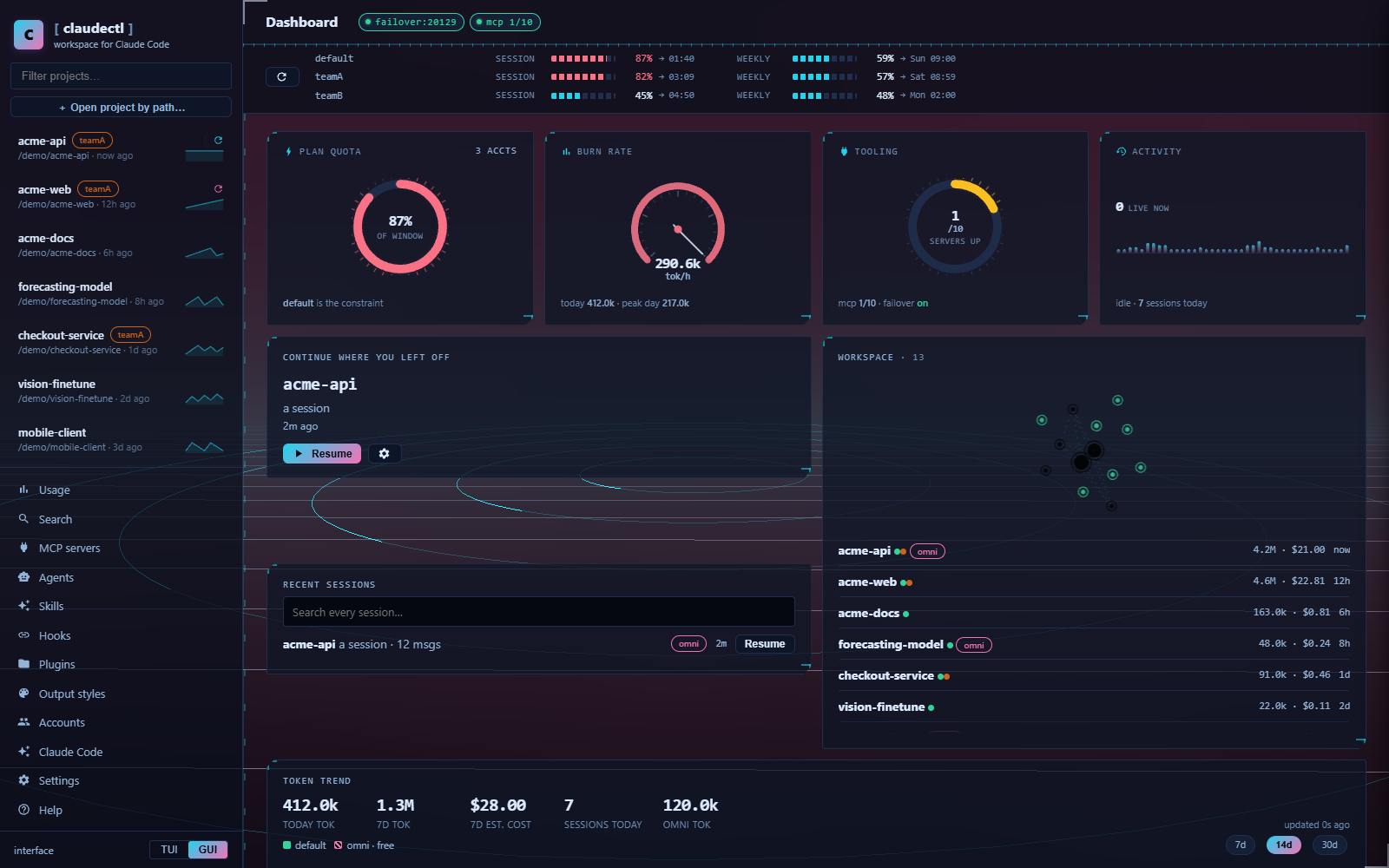
What problem does this solve?
Claude Code is excellent inside a session and forgetful between them. Every new
session starts from nothing, your old sessions are hard to find, and the only
way to give the agent context is a CLAUDE.md that grows until it costs more
than it's worth.
claudectl sits in front of Claude Code and fixes that. Pick a project, see every session you've ever had in it, and launch with the model, effort, permissions and context you meant. Underneath, it maintains a semantic memory of the codebase and injects only the part relevant to what you just asked.
It is a terminal UI and a desktop GUI over the same engine — use whichever you prefer, they do the same things.
Quickstart
Note — claudectl is not on PyPI yet, so
pip install claudectlwill not work. Clone and run; there is nothing to build and no dependencies to install.
git clone https://github.com/babarmuhammad/claudectl.git
cd claudectl
python claude-sessions.py          # terminal UI
python claude-sessions.py --gui    # desktop GUI
Requires Python 3.10+ and the
Claude Code CLI (auto-detected on
PATH or at ~/.local/bin/). No API key — it uses the Claude Code auth you
already have. No third-party packages.
On Windows you can double-click Open Repo cmd.bat instead.
Or use it from inside a session
claudectl also ships as a Claude Code plugin — three commands and eight skills, without leaving the session:
/plugin marketplace add babarmuhammad/claudectl
/plugin install claudectl@claudectl
/claudectl:recall <topic> |
This project's relevant memory, scored locally — no model call |
/claudectl:status |
Memory age, repos and worktrees, health checks |
/claudectl:review |
Review the current diff against this project's learned conventions |
What it looks like
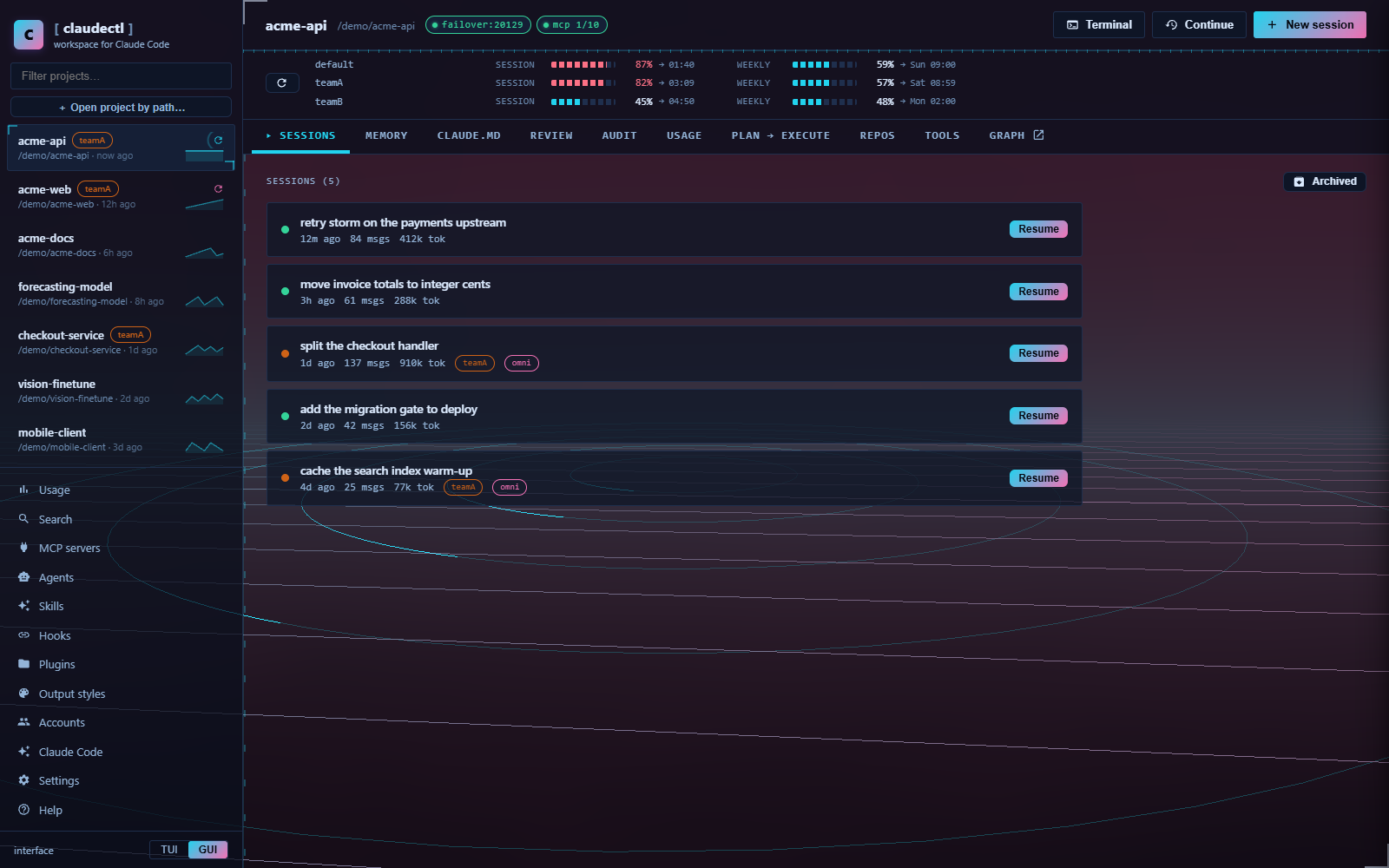 Every session, every project. Search, tag, fork, resume, archive, export — across multiple Claude accounts at once. |
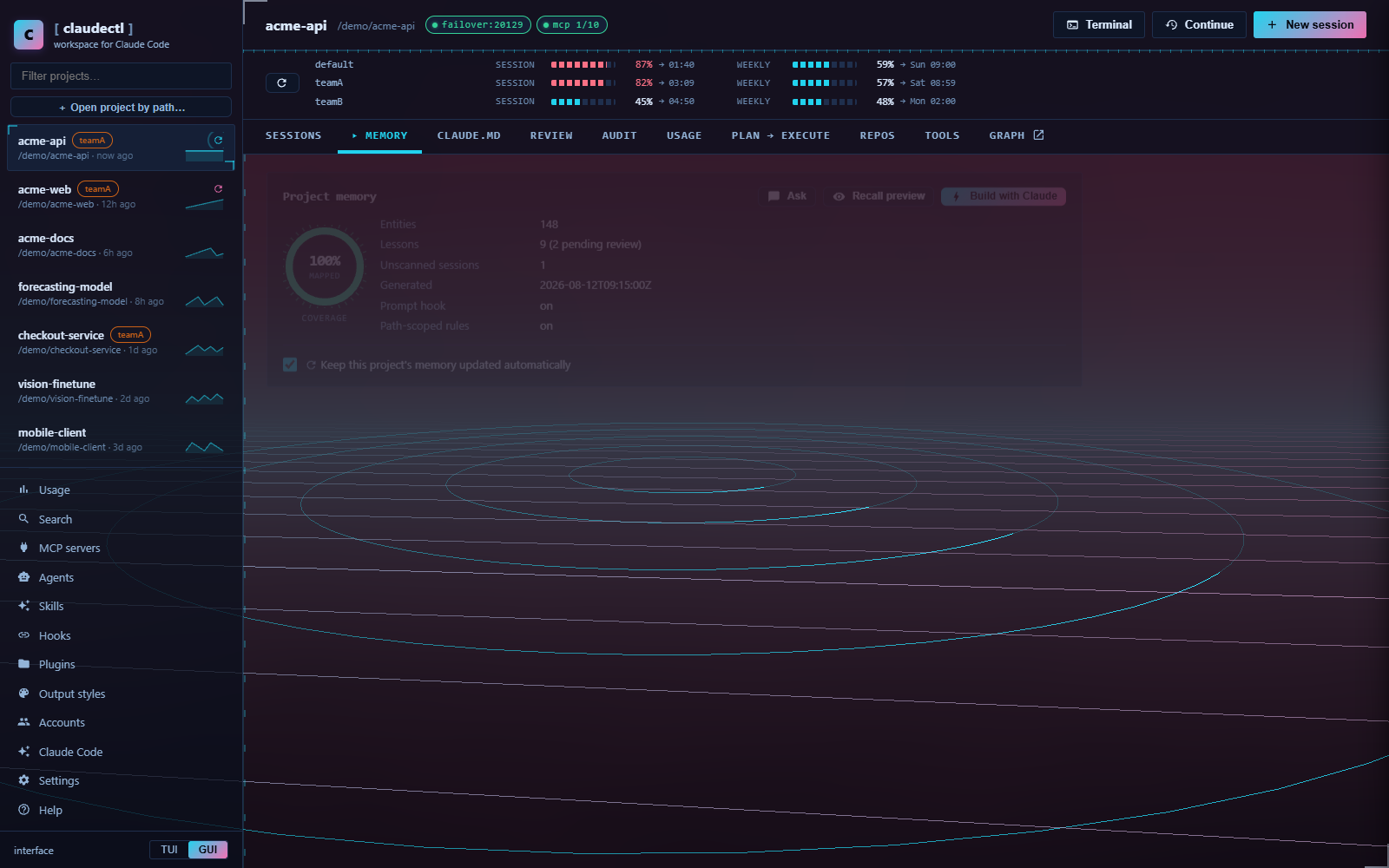 Memory Claude built about your code. Entities, relations and lessons, with the token cost of every block shown before you spend it. |
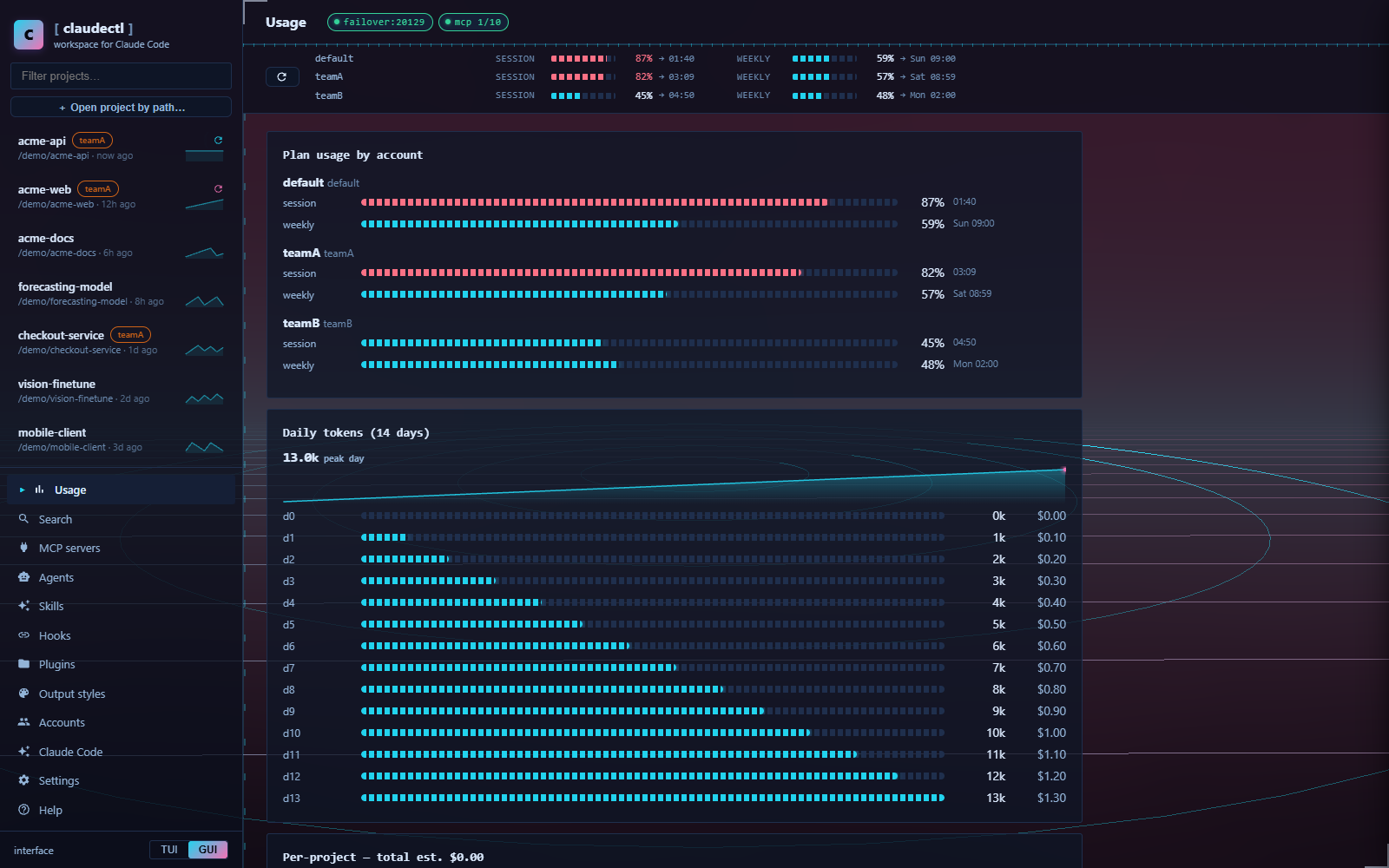 Where the tokens went. Per day, per project, per account, per model — read from your own transcripts, not an API. |
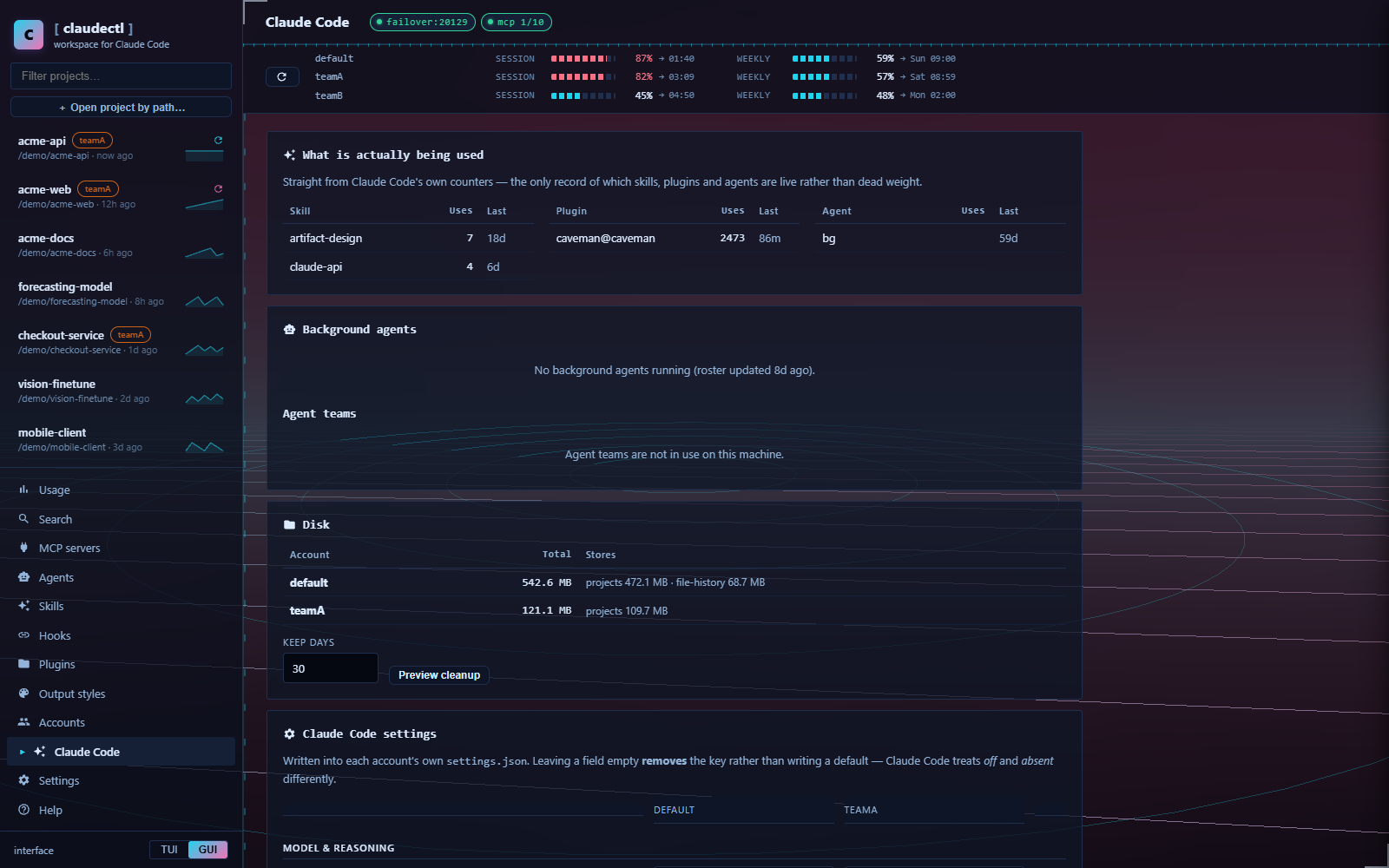 Claude Code itself, made visible. Which skills and plugins you actually use, what is on disk, and a typed editor for every account's settings. |
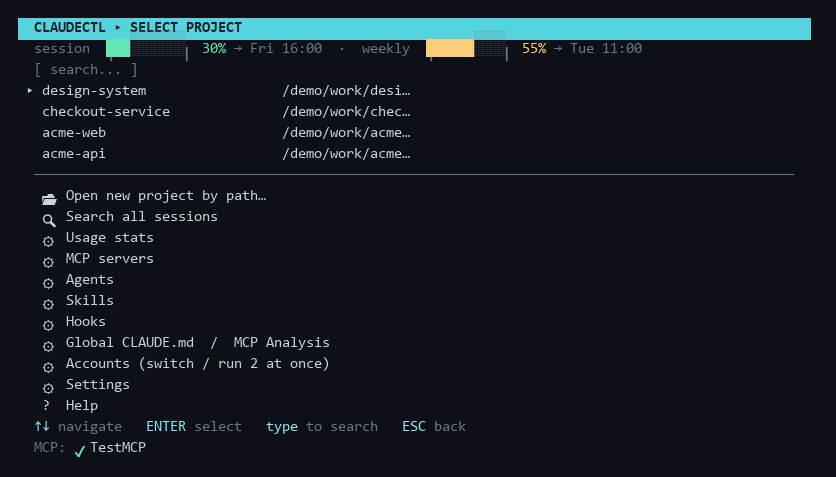
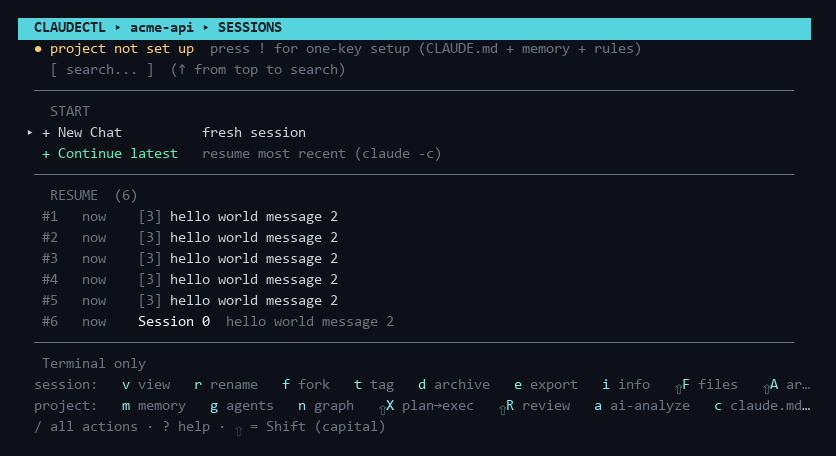
The terminal UI is the same tool, keyboard-first:
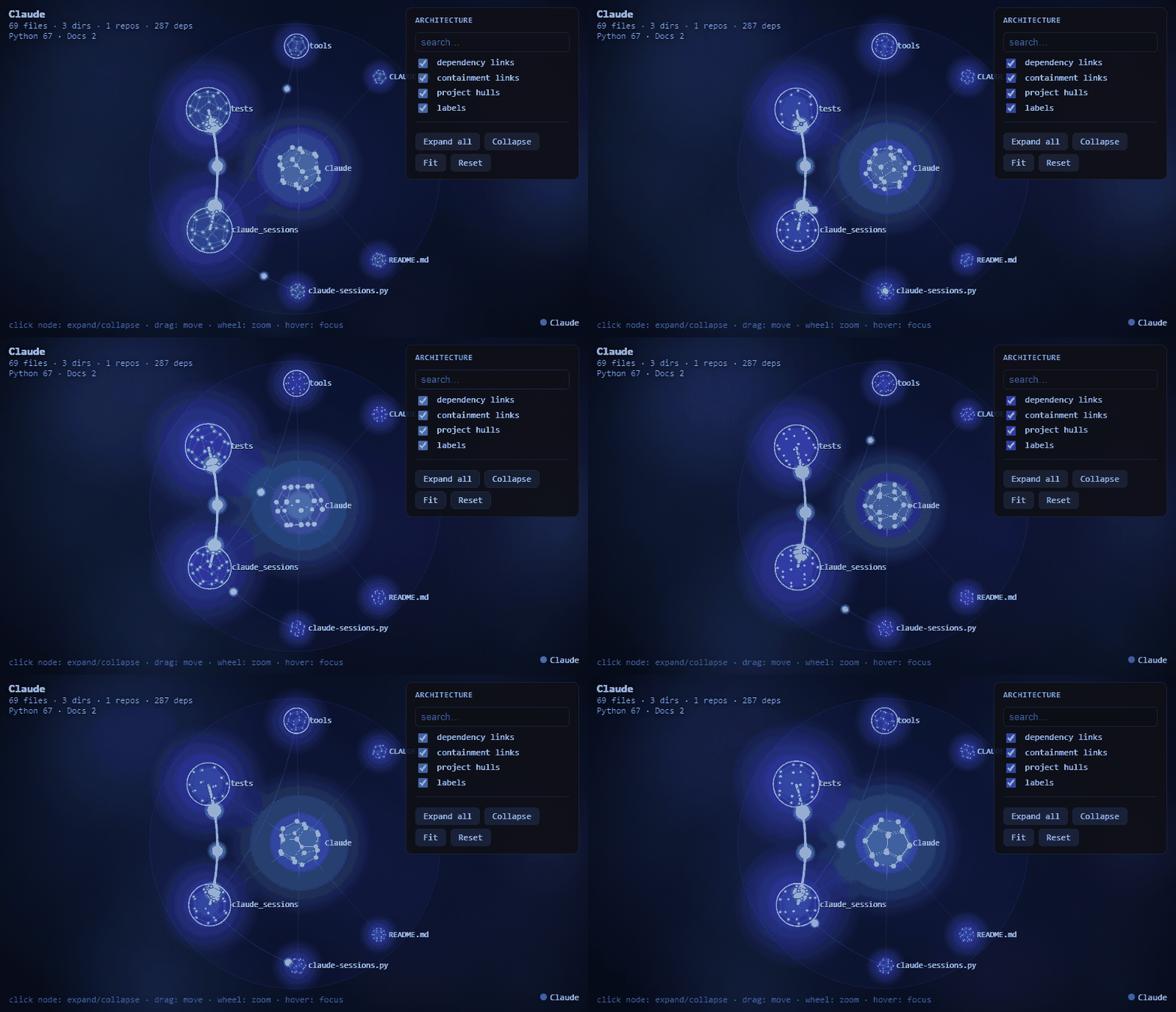
The architecture graph — every module and its dependencies,
expandable down to single files (Python · C/C++ · C# · JS/TS).
29 palettes, 7 skins, 4 themed worlds — click to see two of them
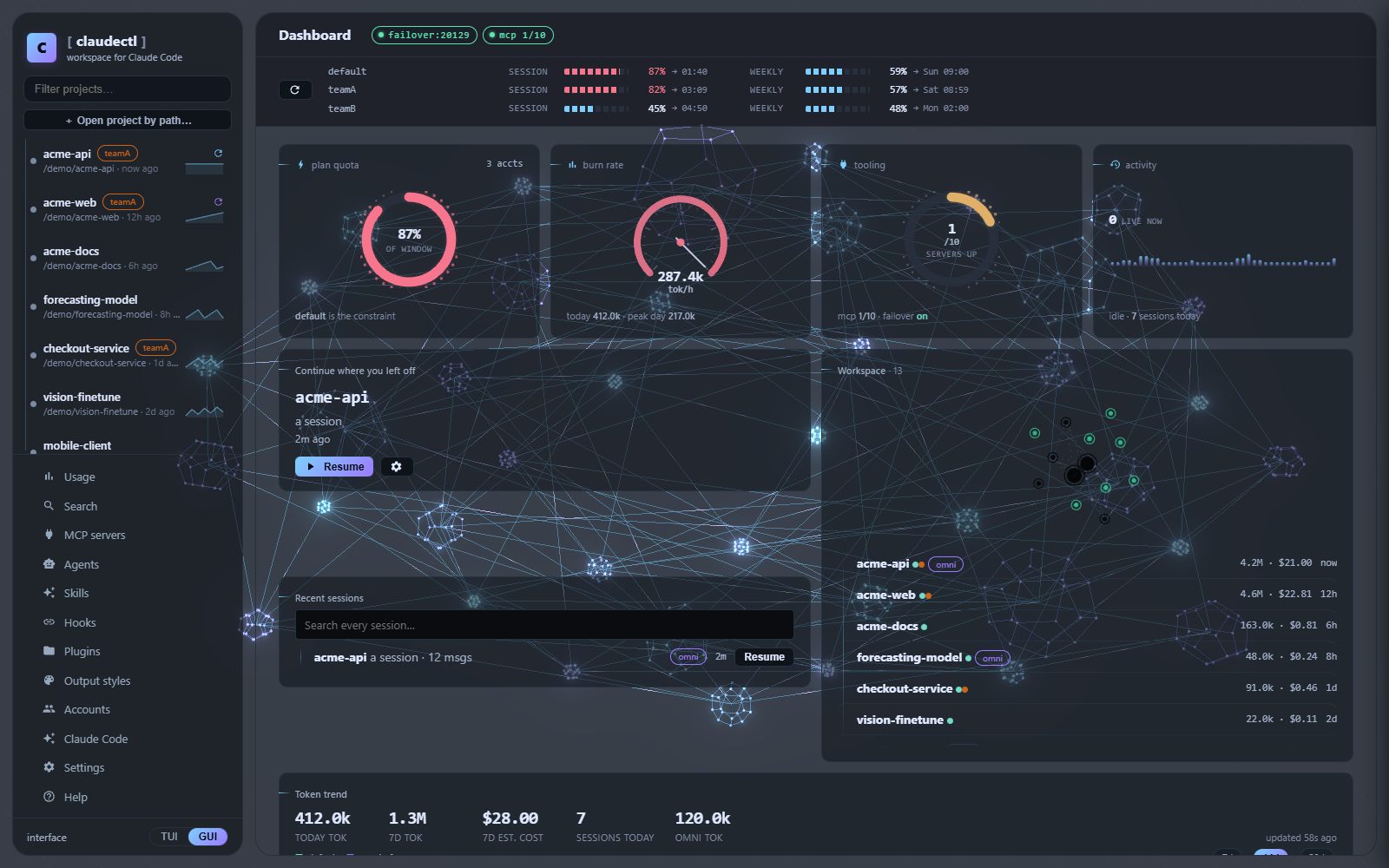
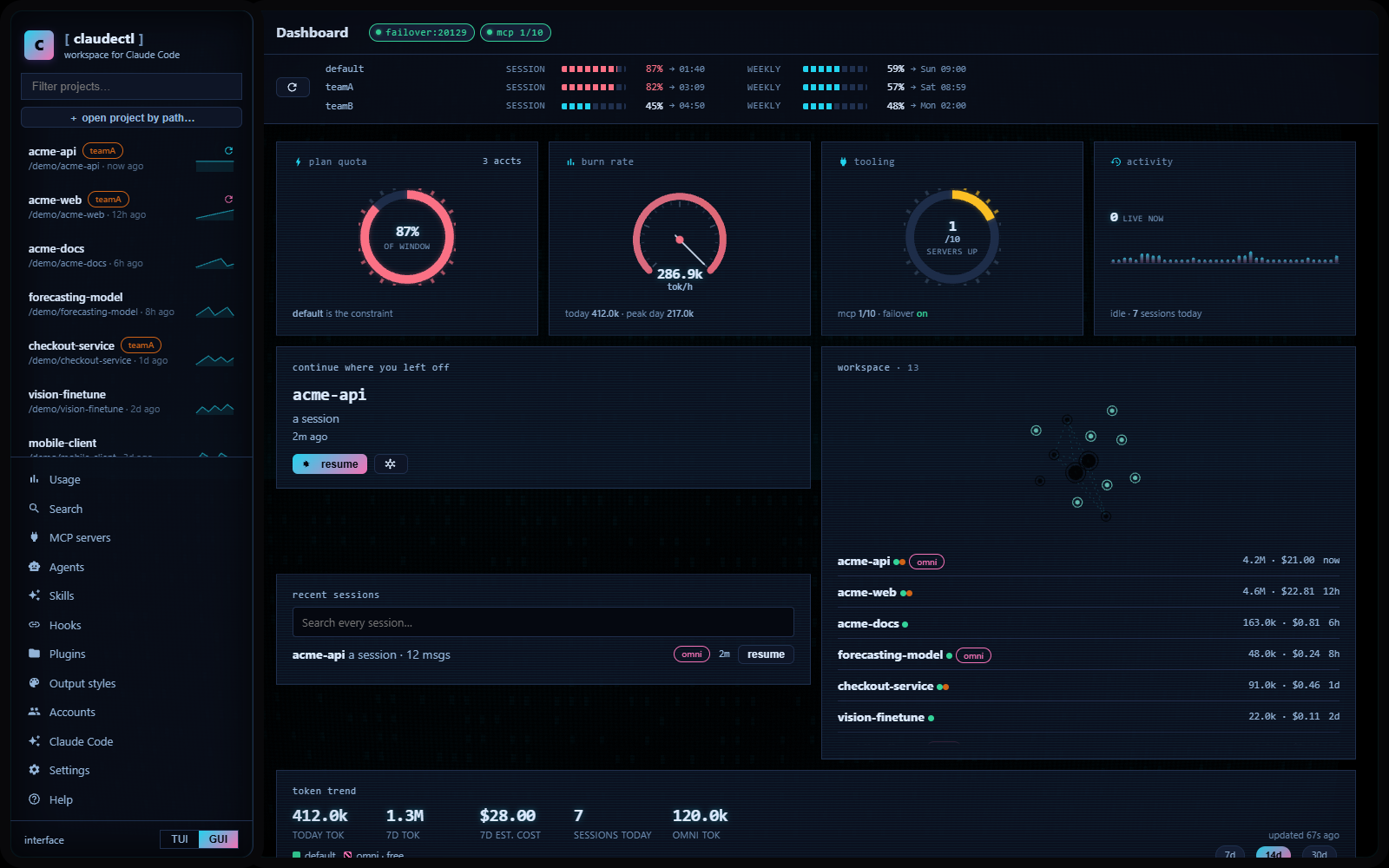
A skin changes the shape of the app, not just its colours — corner treatment, type scale, density, chassis and background scene.
Why claudectl
- 🧠 Intelligent memory, not a memory dump — task-scoped, token-budgeted injection at the launcher: a micro-index always on (≤250 tok), per-module detail loaded only when Claude touches those files, and an optional per-prompt hook that injects just the subgraph relevant to what you asked.
- 📚 It learns from every session — durable lessons (fixes, decisions, preferences) distilled from transcripts, human-reviewed, injected when relevant, decayed when stale.
- 🕸️ See your architecture — an animated, expandable dependency graph that opens at the project level and drills down to single files.
- 🩺 Auto-solves common Claude Code pain — pre-launch health checks, context-loss insurance after
/compact, permission-fatigue killer, token-burn advisor, daily usage tracking. - 🤖 Adaptive agents — the right subagents suggested (or auto-applied) per project from local signals.
- 📦 Workspace, not chats — browse, search, tag, fork, resume and archive every Claude Code session across every project and account.
- ⚡ Zero runtime dependencies — pure Python standard library; uses your existing Claude Code auth.
How claudectl saves tokens
Without claudectl, a big project either starves the agent (no context) or floods it (a huge CLAUDE.md loaded every message). claudectl spends the minimum tokens for the maximum relevant context:
- Flat always-on cost — the CLAUDE.md block is a ≤250-token index, not a full dump; it does not grow as the codebase grows (consolidation + rollups keep it bounded).
- On-demand detail — per-module knowledge lives in path-scoped
.claude/rules/(loads only when Claude touches those files) and inclaudectl recall, so nothing is paid for until it's relevant. - Task-scoped injection — the optional prompt hook injects only the subgraph your prompt actually needs (budgeted, default ≤600 tok), instead of everything.
- No stale weight — superseded facts are invalidated, not carried; dead entities are evicted; only current, useful knowledge is ever sent.
- Cheaper model for the grunt work — Plan→Execute runs the expensive model once for the plan and a cheap one for execution; the token-burn advisor nudges you off Opus for routine work.
Contents
| Features | everything it does, grouped |
| Install | full setup, GUI shell options, desktop shortcut |
| Usage | screens, key bindings, command line |
| Reference | file layout, per-project files, session encoding |
| Troubleshooting | when something is not where you expect |
Features
Session management
- Session browser — every Claude Code project and session, sorted by recency
- Quick-resume — ★/☆ shortcuts on the main screen jump straight back into recent sessions across all projects
- Search — type to filter sessions live; 🔍 Search all sessions finds and resumes any session across every project
- Transcript viewer & export — read any session in a pager (
v) with full-text search inside the conversation (/,n/pto jump between matches) and a message-position counter; export to markdown (e) - Session info — per-session tokens, est. cost, models, git branch, duration (
i) - Archive — move sessions to a restorable
archived/folder instead of deleting (d, toggle view withA) - Rename / Fork / Continue — rename (
r), fork (f), or continue the latest session (claude -c) - Tags — tag sessions (
t); tags show inline and are searchable - Changed files — list the files a session edited/created, derived from its tool calls (
F)
MCP servers
- Full management — add, remove, and inspect MCP servers via
claude mcp(scopes local/user/project, transports stdio/http/sse, env vars and headers) - Three states, all visible — ✔ connected,
!needs authentication, ✘ failed to connect or timed out. A server that cannot connect is the one you most need to see, so it is listed with its error rather than omitted - Status footer — connected servers shown live on the main screen
- Tool documentation — analyze any server's tools and write the docs into the global
~/.claude/CLAUDE.md
Agents (subagents)
- Agent library — a category-organized store at
~/.claude/claudectl-agents/<category>/(not auto-loaded by Claude, so sessions stay lean). Roll your own or bulk-install the awesome-claude-code-subagents catalog (154 agents across 10 categories) — see Installing the agent library. - Per-project selection (
gin the sessions menu) — pick agents from a category checklist (optional, default none). The chosen agents are copied into<project>/.claude/agents/where Claude auto-discovers them, so they apply to every launch of that project and the selection auto-restores next time. claudectl only manages the files it placed (tracked in.claudectl-managed.json) — your own project agents are never touched. - Scaffold — create an agent into a chosen or new category: pick tools (multi-select) and model, edit the body
- AI-generated — Claude analyzes the project and authors a focused subagent (role, when-to-use, tool subset, system prompt); you review before it's written
- Lead agent — also set a single
--agent(from~/.claude/agents/) in launch options - Why copy, not
--agents— inline--agentsJSON rides the command line (Windows ~32KB cap); a handful of real, multi-KB agents overruns it (WinError 206). Copying into.claude/agents/has no size limit and matches how Claude Code natively loads project subagents.
Project memory
- Scaffold CLAUDE.md (
c) — build project context mechanically from git repos, recent commits, READMEs, and prior session topics - AI CLAUDE.md generation (
a) — Claude deep-analyzes the codebase and writes/updates a comprehensive CLAUDE.md; reviewed before writing - System prompts (
s) — AI-generate or hand-edit a per-project system prompt injected on every launch - Memory map (
M) — see which CLAUDE.md files load for a project (user / project / .claude / local) and their@imports; open any in your editor
Architecture graph (n → o)
An interactive, whole-project dependency graph rendered as a self-contained HTML (no CDN), opened in your browser.
- Expandable hierarchy — opens at the workspace root + its repos (sized by importance); click a node to drill in (repo → module → file) with a smooth opening animation. The complete tree is embedded, so any size is explorable via progressive disclosure; small projects auto-expand fully.
- Real dependencies, multi-language — edges come from actual imports: Python
import(AST) + C/C++#include+ C#using→namespace + JS/TSimport/require. Edges lift to the visible level: collapsed shows repo↔repo bundles, expanded reveals module- and file-level links. - Reads as architecture — each project sits in its own contained bubble (never overlaps others), nodes sized by importance (file count + dependency degree), colored per project, animated rotating dodecahedra with flowing connection particles on a neural-network-style canvas.
- Controls — search (expands the path to matches), filters (dependency / containment / hulls / labels), Fit / Reset / Expand-all / Collapse; zoom-aware labels; hover highlights neighbors. Built graph is cached (
.claudectl/connections-cache.json) so reopening is instant;rforces a rebuild.
The animation at the top of this README is captured from the real HTML view (
docs/graph-real.gif, regenerate withpy tools/capture_graph_gif.py). The graph is a self-contained interactive HTML you open in the browser.
Intelligent project memory (m)
The feature that makes claudectl unique: task-scoped, token-budgeted memory injection at the launcher. Claude remembers the whole project while paying the fewest possible tokens — three injection surfaces, zero duplication:
| Surface | What Claude sees | Cost |
|---|---|---|
| CLAUDE.md micro-index | repo one-liners + module names + recall pointer | ≤250 tok, every session |
.claude/rules/claudectl-mem-*.md |
per-module entities & relations, globs:-scoped |
0 until Claude touches those files |
UserPromptSubmit hook (opt-in) |
the subgraph relevant to your current prompt, budget-cut | ≤600 tok/prompt, <1s local |
- Whole-project extraction —
claude.exesummarizes every repo and module (incrementally by file hash), merged with the real dependency graph (cross-module edges + importance rank) from the connections engine. Stored in.claudectl/memory/graph.json. - Bounded & self-consolidating — the graph stays lean as the project grows: duplicate entities merge across modules, and a global importance cap (
memory_max_entities, default 500) evicts the least-connected. So the always-on token cost stays flat while accuracy rises — the memory gets leaner and sharper the more you build, not heavier. - Temporal facts (Graphiti-style) — when the code changes and a fact is superseded (you migrated Flask→FastAPI), the old fact is invalidated with a timestamp, not deleted — kept as history, never injected. Memory tracks what's true now and what changed, instead of drifting stale.
- Reinforcement + rollups — entities recalled often gain weight and survive consolidation; dead knowledge fades (access-based, like a forgetting curve). Per-repo rollup summaries (GraphRAG-style, built locally — no extra Claude call) give an accurate one-line repo overview and cheap global answers. Plus Obsidian-style unlinked-mention edges enrich retrieval for free.
- Recall engine — local scoring (IDF keyword + path match + dependency rank + graph expansion), no embeddings, deterministic, <0.5s on 500 entities. On-demand CLI:
claudectl recall "<topic>"— Claude itself can call it mid-session via Bash. - Session learning — after each session claudectl distills durable lessons (error→fix pairs, decisions, preferences) from the transcript. High-confidence lessons auto-approve (
memory_lessons_autoapprove); the rest wait in the⇧Lreview screen. Approved lessons boost recall and decay if unused. The project literally gets smarter the more you use it. - Cross-project conventions — preferences/corrections that recur across your repos (or you pin) are promoted to a small block in your user-level
~/.claude/CLAUDE.md, so a convention learned once ("this machine uses PowerShell 5.1", "prefer pytest") is remembered in every project. No competitor spans projects. - Auto-refresh — memory refreshes incrementally on project open (
memory_auto_refresh, capped so a big rebuild never runs silently). Zero user action. The update runs in a detached background worker that survives launching a session, saves after every step (an interruption never loses progress), and shows live progress in the sessions menu — so you can open a chat immediately instead of waiting for the scan to finish. - Memory hub (
min the sessions menu) — one screen for everything: status, build, ask, injection preview with live "what would my prompt inject?" probe, lessons, work suggestions (s— next-steps from lessons + graph + health, local), since-last-session diff (d— git + session-log), per-surface toggles. - Ask the project — grounded Q&A over the graph, answered by Claude with only the relevant subgraph as context.
- (Graph memory inspired by cognee; retrieval budgeting inspired by Aider's repo-map; both reimplemented from scratch — pure stdlib.)
Project health & auto-fixes (w)
Launcher-side mitigations for the most common Claude Code problems (2026 field research):
- Pre-launch health card — CLAUDE.md over-budget (loads every session!), missing
--add-dir/PATH entries, non-UTF-8 CLAUDE.md, stale memory, MCP failures, session-window burn ≥70% (suggests cheaper model/effort for routine work). - Context-loss insurance — after every session a 5-line summary (goal + files touched) is appended to
.claudectl/session-log.md, so the next session can recall what happened even after/compactwiped the context. Local, free. - Permission fatigue killer —
Pin the workspace screen scans your history for repeatedly-used Bash commands and proposespermissions.allowrules for the project settings.json (diff-previewed, you approve).
Multiple Claude accounts (⚙ Accounts)
Run two (or more) accounts with almost no friction — claudectl owns the config dir (CLAUDE_CONFIG_DIR), which is what decides the account:
- Named accounts — add an account (name + config dir; claudectl creates it and can open
/loginright away), rename it, switch the active one, or open it in a new terminal with one key so both accounts run at the same time. - Per-launch account — the launch-options screen has an Account field: pick which account this specific session starts under, without changing your default.
- All accounts in the usage bar — the plan-usage banner shows one bar per account (labeled by email/name) and updates dynamically, so you see every account's session/weekly limits at a glance. A single account stays a single compact bar.
- One row per project, not per account — if the same folder has sessions under two accounts, the project list shows a single row (default account primary, tagged
[+other-account]) instead of a duplicate. Opening it merges every account's sessions into one list, foreign-account sessions marked inline ([account-name]); rename/archive/delete/fork/view all act on that session's own account, and resuming one launches under the right account automatically. - Inject context across accounts (
⇧Kin the sessions menu) — start a new session seeded with the transcript of any prior session for this project, including ones from a different account. - Account-accurate memory — the memory graph lives under the project's real path (shared by every account), and the features that feed it now read every account's sessions: lesson extraction, the CLAUDE.md session-topics block, per-project usage stats, workspace freshness counts, and the recent-sessions quick-resume list. A project used under two accounts is one merged row in the usage dashboard, not two.
Plan→Execute — two models, one task (⇧X in the TUI; its own Plan → Execute project tab in the GUI)
Plan with an accurate model, execute with a cheaper — or completely free — one, for the same result. claudectl plans the task headlessly with plan_model (default Opus 5, effort picked per task), shows you the plan to approve/reject, saves it to .claudectl/plan-latest.md, then launches a real, full interactive claude session — same account, agents, skills, system prompt, and --add-dir roots this project already has — on exec_model (default Sonnet 5), seeded to read and execute that plan. Expensive reasoning happens once; the build runs on the cheap tier.
Free execution via OmniRoute — point the execute half at a local OmniRoute proxy instead of your Anthropic account, and it runs on OmniRoute's aggregated free-tier providers. Left on Auto (the default), OmniRoute itself scores every currently-healthy free model per request (health/quota/cost/latency/task-fit) and transparently falls back to the next-best one if the current one is rate-limited or exhausted — no manual model juggling, and claudectl auto-starts OmniRoute in the background the moment you run a task through it, so there's no terminal to babysit.
Setup (one-time): connecting at least one provider happens in OmniRoute's own dashboard — claudectl never touches that credential. The CLI commands for adding providers are broken on Windows (confirmed upstream), so the dashboard is the only reliable path.
- Install OmniRoute:
npm install -g omniroute(PowerShell: run on its own line, or;-chain — no&&). - Set a dashboard password once:
omniroute setup --password <yours>. - Start it (
omniroute, or let claudectl auto-start it on first use) and openhttp://localhost:20128→ log in → Providers → Add Provider, or go straight to Free tiers. Several are genuinely zero-signup (Pollinations, Puter, NVIDIA, OpenCode, FriendliAI, Coze, and more) — connect one or two. (Note: OmniRoute's marketing claims ~90 free providers; what's actually reachable without a real signup is a smaller genuinely-keyless subset — worth checking the current list yourself in the dashboard. The CLIomniroute providers addcommands crash on this platform — dashboard only for now.) - In claudectl's GUI Settings → Free execution — OmniRoute: leave the base URL at
http://localhost:20128, click Refresh — the status dot shows provider(s) active once step 3 is done. The built-in connection self-check can report false negatives (confirmed: reports working no-auth connections as broken); use Send a live test for the real answer. Leave Execute model on Auto, Save. - Open a project's Plan → Execute tab, describe a task, pick Execute via → OmniRoute, approve the plan. First run starts OmniRoute for you if it isn't already running.
Troubleshooting:
- Status dot shows "not running" — OmniRoute auto-starts on first Plan→Execute run; click Start now on the Settings page to start it immediately, or run
omniroutein a terminal. - "0 providers connected" — open the dashboard at
http://localhost:20128, log in (password from step 2), and add a provider under Providers. No providers = no free model to route to. - Live test fails — use Send a live test on the Settings page; if it fails, the connection is genuinely broken. Try a different free provider in the dashboard (some providers are rate-limited or have exhausted daily quotas).
- Self-check says connected but live test fails — OmniRoute's own per-connection self-check can be wrong (confirmed). The live test is authoritative.
Nobody else orchestrates this from the launcher.
OmniRoute standalone session — claudectl also supports launching a standalone interactive claude session through OmniRoute, not just the Plan→Execute execute half. When you open a project in the TUI and pick a model from the OMNIROUTE menu (appears only when OmniRoute is reachable on a configured base URL), your session runs entirely on OmniRoute's free/cheap tier, with full access to every Claude Code feature:
- Agents & subagents — all work.
CLAUDE_CODE_SUBAGENT_MODEL=claude-sonnet-5is automatically set, so subagents always run on a capable model (Sonnet 5) even when the main session uses a free-tier model that may lacktool_useor have a small context window. - Skills — load on demand, unchanged. Skills are client-side SKILL.md files discovered from
.claude/skills/; the Sonnet 5 subagent model handles them correctly. - Per-project memory, hooks, MCP servers — all client-side, model-agnostic. They load from
CLAUDE_CONFIG_DIRand the project's.claude/as usual, unchanged. - Plan→Execute — the plan-execute modal in the GUI has an Execute via toggle (Anthropic / OmniRoute). Selecting OmniRoute routes the execute half through OmniRoute (same agent/skill/memory guarantees). The Plan→Execute TUI path automatically picks OmniRoute when
omniroute_exec_modelis configured.
Caveats:
- Anthropic usage tracking won't reflect OmniRoute spend (cost tracking is separate).
- Free-tier models often have small context windows (<16K tokens). Use the TUI's context-warning on
CLAUDE.md+ rules + plan over ~8K tokens. - Some free models lack
tool_use, which degrades agents, skills, and MCP tool calls. The Sonnet 5 subagent override covers the common case, but the main model's own capabilities remain the free model's. CLAUDE_CODE_DISABLE_NONESSENTIAL_TRAFFIC=1is set automatically to block telemetry that free models might reject or that unnecessary calls to the Anthropic API may fail on.
Adaptive agent selection (g)
The agents screen opens with a "Suggested for this project" section — library agents ranked against the project's languages (from the dependency graph), memory entities, and name. Local scoring, instant, free. Setting agents_auto: 'auto' applies suggestions automatically on first open (your manual picks are never touched).
Token economy — shrink the per-turn cost
CLAUDE.md and memory files ride in the model's context on every message, so their size is a permanent per-turn tax. claudectl makes that cost visible and cuts it:
- Context weight audit (
⇧W) — one screen estimating the tokens auto-loaded on every turn for this project: CLAUDE.md broken into its blocks (manual / autogen / session topics / memory digest), the global~/.claude/CLAUDE.md,.claude/rules/*(marked lazy when glob-scoped, so they cost nothing until a matching file is touched),system-prompt.txt, SessionStart hook injections, and MCP servers — with a running always-on total and inline warnings (CLAUDE.md over 200 lines, an unbounded session-topics block, a global CLAUDE.md that loads in every project). - Prune the unbounded bits (
pin the audit) — the CLAUDE.md session-topics log used to grow forever; it's now capped to the most recent N entries (claude_md_sessions_cap, default 10) and the autogen commit list is configurable (claude_md_commits). Prune rebuilds them in place without touching your manual prose or the memory block. - Compress CLAUDE.md with AI (
⇧C) — rewrites the hand-written part into a lean lookup-table style (targets under 500 tokens), shows a before→after token count and a git-style diff to approve, keeps aCLAUDE.md.bak, and preserves the machine-maintained blocks verbatim. - Launch economy controls — the launch-options screen adds a Think cap (
MAX_THINKING_TOKENS) and Subagents model (CLAUDE_CODE_SUBAGENT_MODEL) field, plus aneeconomy preset (Sonnet · 8k thinking cap · Haiku subagents) in one key. Set defaults in Settings or per project. - Deny heavy reads (
din the audit) — scans the project and writespermissions.denyrules (node_modules/**,dist/**, lockfiles, …) into the project's.claude/settings.jsonso a stray read can't pull thousands of tokens of generated content into context. Merges without clobbering existing settings. - Token-saver hooks —
concise-output(a SessionStart rule: no narration, no re-printed code) andfilter-test-output(rewritespytest/npm test/go testcommands to pipe through a failures-only filter before the output hits context) join the hooks manager alongside the existing code-minimization hook. - Compact instructions — scaffolded/AI-generated CLAUDE.md now includes a
# Compact instructionssection that steers Claude Code's auto-compaction toward what matters; the audit offers to add one (i) if it's missing.
Daily token tracking (⚙ Usage stats → d)
Per-day table of the last 14 days — tokens in/out/cache, est. cost, sessions, bar chart, today highlighted, live plan-window % alongside. Optional daily_token_alert badge on the main screen when today's tokens cross your threshold.
Workspace provenance & freshness
- Provenance manifest —
<project>/.claudectl/workspace-manifest.jsonrecords where generated context came from: repo HEAD, source-file hashes (CLAUDE.md/README/configs), sessions analyzed (count + range), CLAUDE.md files, MCP server snapshots + tool counts, and last-run timestamps for scaffold / AI-analyze / launch. Updated automatically after those operations (best-effort — never blocks them). - Freshness check —
claudectl workspace status(run inside a repo) orwin the sessions menu shows 🟢 Fresh / 🟡 Stale / 🔴 Invalid per component and an overall freshness score. Detects when the repo HEAD moved, README changed, or new sessions accrued since the memory was generated, plus asafe_to_launchflag. Status is read-only — viewing never mutates the manifest. - Change diffs — when AI-regenerating CLAUDE.md (
a) or a system prompt (s), the approval step shows a git-style colored diff (old → new) so you decide before writing (ftoggles to the full proposed text; ENTER approve, ESC reject). The previous version is snapshotted under.claudectl/snapshots/, so the workspace screen (w) lists recent changes with+/−counts and re-opens the last diff onc(CLAUDE.md) /s(system prompt).
Hooks
- 19 ready-made templates — one-key install, toggle, or remove (edits
settings.jsonsafely). Formatting (Prettier, Ruff, ESLint, gofmt), safety guardrails that block dangerous tools (rm -rf,git reset --hard, force-push, sudo, curl; reading.env; writing secrets — exit-code-2 blocks), audit/notify (log Bash commands, beep on finish / when input is needed), context injection (git status at session start; a compact code-minimization rule that curbs over-engineering — inspired by Ponytail), and token savers (concise-outputtrims narration and re-printed code;filter-test-outputpipes test runs through a failures-only filter before the output enters context). Guards/blocks run as bundled Python (shell-agnostic); formatters no-op when the tool is absent. - AI-generate a hook — describe what you want in plain language; Claude returns a validated hook spec (event + matcher + command) you preview and confirm before it's saved.
- Remove broken/legacy hooks — one action purges hook commands that error under a bash hook shell.
Model failover — retry a dead model instead of hanging (⚙ Settings → Failover)
Claude Code sends every turn as a fresh request and, when one fails, retries the same request against the same model with backoff. So a model deregistered upstream, or a tool schema the backing provider rejects, makes a session look frozen forever — nothing ever tries a different model, because Claude Code has no such concept.
claudectl's failover proxy sits between claude.exe and the OmniRoute upstream.
It forwards bytes verbatim and, when a turn errors before any response body byte
has reached the client, rewrites the request's model and tries the next
candidate. Request-level retry is per-turn failover, because every turn is its
own request. The routing log is the point — the original complaint was not "a
model died", it was "I could not see that a model died" — so it runs in its own
console window unless you hide it.
Configure the fallback list, port and log visibility in ⚙ Settings → Failover (GUI: Settings → Failover), or drive it directly:
claudectl --failover-serve [port]   # run the proxy in the foreground
claudectl --failover-stop           # terminate the daemon named in the lock file
It runs as a detached child so closing claudectl does not leave every live session
with connection-refused, binds 127.0.0.1 only, and requires the configured
OmniRoute key — claudectl hands that to the session as ANTHROPIC_AUTH_TOKEN, so
no extra setup is needed. Requests carrying browser fetch metadata are refused
outright: the proxy spends your upstream quota, so a web page must not be able to
reach it.
Status line (claudectl statusline)
Renders the Claude Code status line: model, cwd, git branch and worktree, context
pressure, and the 5-hour / 7-day rate-limit windows. Install it from ⚙ Settings,
or point statusLine in settings.json at:
"<python>" -m claude_sessions statusline
It runs on every conversation turn, so it is built to be cheap: the
subcommand is dispatched before the TUI or the usage poller is imported, the
branch is read straight from .git/HEAD, and repo state comes from a disk cache
that never spawns git. The rate-limit and context numbers come from the payload
Claude Code already sends — no network call is ever made.
Checkpoints (sessions menu)
Read-only view of Claude Code's own file-history store: the whole-file snapshots
it takes before edits, paired with the files the session actually touched. The
store is undocumented, so claudectl never decodes the snapshot names — it hashes
the paths the session edited and looks those up, which means a change to the
scheme surfaces as "cannot read the store" rather than as filenames paired at
random. Restoring is left to Claude Code's own /rewind; claudectl only reads.
Usage analytics
- Usage stats dashboard — tokens (in/out/cache) and estimated cost per project and per session, parsed from local transcripts; cached for instant reopening
- Plan usage — daily/weekly limit bars with reset times shown on the main screen
Per-project launch control
- Effort / model / permissions / agent — reasoning effort, model override,
--permission-mode, and--agentbefore each launch; effort/model/permission remembered per project - New-session options — name the session (
-n) and launch in a git worktree (-w) - Extra PATH entries / Add directories — per-project PATH dirs and
--add-dircontext roots
Desktop GUI (claudectl --gui)
Everything above, as a native desktop app — full feature parity with the TUI, served locally (loopback-only, works offline). No Python dependencies; the browser bundle vendors three.js and anime.js (both MIT, served from /vendor/, never a CDN):
- Shells — PyQt6 native window if installed, else an Edge app-mode window, else the browser (
gui_shellsetting: auto / qt / edge / browser). The bottom-left toggle (orui_mode) picks which interface starts by default;--tui/--guialways override. - Projects & sessions — sidebar with live filter and quick-resume; per-session resume / fork / rename / tag / archive / restore / delete / export markdown / transcript with session info / changed files.
- Launch modal — effort, model, permission mode, account, thinking cap, subagent model, session name, worktree — as one-click chips, prefilled from your defaults. Sessions open in a real new console window.
- Project tabs — Memory (build / ask / recall preview / lessons review / workspace status, with live scan progress), CLAUDE.md (view / scaffold / AI analyze / AI compress / prune / edit + memory files map + system prompt), Audit (context weight + deny rules), Usage, Plan → Execute (plan model + effort, execute via Anthropic or free OmniRoute, full explanation inline), Tools (inject context from any session/account, project agents picker mirroring the TUI's category multi-select with suggestions, extra PATH entries,
--add-dirdirectories), and the architecture Graph. - Managers — MCP servers, agent library + AI-generate, hooks + AI-generate, accounts — same operations as the TUI, with the same diff-approval gate for AI-written files (jobs run server-side, you approve a git-style diff before anything is written).
- Usage banner — one live bar-row per account (session/weekly/model windows with reset times), auto-refreshes every minute, refresh button for an immediate re-fetch.
- Themes — all 17 TUI palettes restyle the whole app (backgrounds, panels, text — derived from each theme's hue); pick in Settings with live preview before saving. Icons are inline Material SVG — no CDN, no emoji.
GUI enhancements (latest)
- Stacked toasts — multiple simultaneous notifications (errors, success, info) stack instead of overwriting; each auto-dismisses after 3.5 seconds.
- Job cancel — running background jobs (plan generation, memory build, review) show a Cancel button;
cancelledflag is cooperative (checked at loop top, no thread kill). - Persistent preferences — theme and account selection saved to
localStorage, restored across page reloads. - Editable Plan → Execute — generated plan appears in a monospace textarea for inline editing before approval; "Re-plan" button sends feedback to regenerate; "Per-step approval" checkbox gates execution step by step.
- Plan persistence — every generated plan is auto-saved to
last_plan.json;save_plan()/load_plan()helpers for programmatic access. - Skills / Worklog / Review / Model-routing panels — all already integrated: Skills manager, worklog toggle + entry history, one-click code review (working diff or staged-only), and OmniRoute free-tier configuration — all surfaced with zero extra deps.
- Error surfacing — job failures show the error message in a red toast instead of a generic "Failed".
Quality of life
- Themes (17) — switch palette in Settings (live preview, cursor stays on the selection): default, ocean, forest, mono, ember (red), plus Catppuccin Mocha, Catppuccin Latte, Tokyo Night, Dracula, Nord, Gruvbox, Rosé Pine, Kanagawa, Everforest, Ayu, Monokai Pro, Solarized
- AI session titles — unnamed sessions show their AI-generated transcript title
- Settings screen (⚙) — editor, claude.exe path, config dir / account (
CLAUDE_CONFIG_DIR), theme, and default launch options (~/.claude/claudectl.json) - Confirm dialogs & multi-select — modern yes/no and checkbox pickers throughout; command keys accent-colored on every screen
- Help screen — press
?for a keyboard reference
Install
Requirements
- Python 3.10+
- Windows, macOS or Linux
- Claude Code CLI installed (auto-detected at
~/.local/bin/or on PATH; overridable in Settings) - Any text editor — Notepad++ / VS Code /
$EDITORare auto-detected (overridable in Settings)
Setup
Clone and run
git clone https://github.com/babarmuhammad/claudectl.git
cd claudectl
python claude-sessions.py
There is nothing to build and no dependencies to install. On Windows you can
double-click Open Repo cmd.bat instead of using a terminal.
Installing it as a command
claudectl is not published on PyPI yet — pip install claudectl and
pipx install claudectl both fail with a 404. To get a claudectl command on
your PATH today, install this checkout:
pip install -e .        # or: pipx install .
claudectl
That gives you claudectl, claudectl --gui, claudectl review,
claudectl recall "<topic>" and claudectl statusline from anywhere.
Inside a Claude Code session
claudectl also ships as a Claude Code plugin, which puts its three most useful commands and its eight skills inside the session itself:
/plugin marketplace add babarmuhammad/claudectl
/plugin install claudectl@claudectl
/claudectl:recall <topic> |
This project's task-relevant memory, scored locally — no model call |
/claudectl:status |
Memory age, repositories and worktrees, health checks |
/claudectl:review |
Review the current diff against this project's own learned conventions |
The commands shell out to the claudectl CLI, so install that too; the skills
work on their own. The plugin deliberately ships no hooks — claudectl's own
hook manager owns those, and two owners for one settings.json entry means the
recall hook runs twice per prompt.
GUI setup
The desktop GUI needs no extra dependencies for the Edge/browser shells. For the native window install PyQt6 (optional):
pip install PyQt6 PyQt6-WebEngine
Start it with:
python claude-sessions.py --gui   # from the checkout
claudectl --gui                   # after `pip install -e .`
gui_shell in Settings picks the window: auto (Qt → Edge app window → browser), qt, edge, or browser. The bottom-left TUI/GUI toggle (or the ui_mode setting) selects which interface starts by default; --tui / --gui always override.
Desktop shortcut with the GUI icon — the GUI has its own icon (claudectl-gui.ico, regenerate with py tools/make_gui_icon.py). pythonw.exe runs it without a console window:
$shell = New-Object -ComObject WScript.Shell
$lnk = $shell.CreateShortcut("$env:USERPROFILE\Desktop\claudectl GUI.lnk")
$lnk.TargetPath       = "$env:LOCALAPPDATA\Programs\Python\Python310\pythonw.exe"
$lnk.Arguments        = "`"$PWD\claude-sessions.py`" --gui"
$lnk.WorkingDirectory = "$PWD"
$lnk.IconLocation     = "$PWD\claudectl-gui.ico, 0"
$lnk.Save()
Optional: Desktop shortcut & taskbar pin
Desktop shortcut — right-click Open Repo cmd.bat → Send to → Desktop (create shortcut).
Pin to taskbar (Windows 11) — Windows 11 can't pin .bat shortcuts directly; the shortcut must point to cmd.exe. Run this once in PowerShell from the repo folder:
$shell = New-Object -ComObject WScript.Shell
$lnk = $shell.CreateShortcut("$env:USERPROFILE\Desktop\Open Repo Claude.lnk")
$lnk.TargetPath       = "C:\Windows\System32\cmd.exe"
$lnk.Arguments        = "/c `"$PWD\Open Repo cmd.bat`""
$lnk.WorkingDirectory = "$PWD"
$lnk.IconLocation     = "$PWD\claudectl.ico, 0"
$lnk.Save()
Then right-click the Desktop shortcut → Pin to taskbar.
Elevated shortcut, no repeated UAC prompt — if claude.exe or your project paths need admin rights, a plain "Run as administrator" shortcut checkbox triggers a UAC prompt on every launch. To elevate once and skip the prompt afterward, register a Scheduled Task that already runs at highest privilege, then point the shortcut at schtasks /run:
# 1) register the task (one-time)
$action    = New-ScheduledTaskAction -Execute "C:\Users\<you>\AppData\Local\Microsoft\WindowsApps\wt.exe" -Argument '-d "<repo>" powershell -Command "& ''<repo>\Open Repo cmd.bat''"' -WorkingDirectory "<repo>"
$principal = New-ScheduledTaskPrincipal -UserId $env:USERNAME -RunLevel Highest -LogonType Interactive
$settings  = New-ScheduledTaskSettingsSet -AllowStartIfOnBatteries -DontStopIfGoingOnBatteries -StartWhenAvailable
Register-ScheduledTask -TaskName "ClaudeCtl" -Action $action -Principal $principal -Settings $settings -Force

# 2) point the shortcut at the task instead of launching directly
$shell = New-Object -ComObject WScript.Shell
$lnk = $shell.CreateShortcut("$env:USERPROFILE\Desktop\claudectl.lnk")
$lnk.TargetPath       = "C:\Windows\System32\schtasks.exe"
$lnk.Arguments        = '/run /tn "ClaudeCtl"'
$lnk.WorkingDirectory = "<repo>"
$lnk.IconLocation     = "<repo>\claudectl.ico, 0"
$lnk.Save()
Leave the shortcut's own "Run as administrator" checkbox unticked — schtasks.exe itself doesn't need to be elevated, only the task it triggers. Launching via wt.exe (instead of cmd.exe/powershell.exe directly) also avoids the legacy-conhost fallback that elevated console apps can trigger, which otherwise makes the TUI render with broken colors/box-drawing under UAC.
Installing the agent library
The ⚙ Agents screen reads ~/.claude/claudectl-agents/<category>/*.md. To bulk-install the awesome-claude-code-subagents catalog (154 agents, mirrored by category), run this PowerShell snippet once:
The agent catalog is created and maintained by VoltAgent — awesome-claude-code-subagents. claudectl only mirrors it into the library; all credit for the agents goes to the original authors. Please refer to that repository for its license and contribution terms.
$repo = 'https://api.github.com/repos/VoltAgent/awesome-claude-code-subagents/contents/categories'
$raw  = 'https://raw.githubusercontent.com/VoltAgent/awesome-claude-code-subagents/main/categories'
$lib  = "$env:USERPROFILE\.claude\claudectl-agents"
foreach ($cat in (Invoke-RestMethod $repo | Where-Object { $_.type -eq 'dir' }).name) {
    $dir = Join-Path $lib $cat
    New-Item -ItemType Directory -Force $dir | Out-Null
    foreach ($f in (Invoke-RestMethod "$repo/$cat") | Where-Object { $_.name -like '*.md' -and $_.name -ne 'README.md' }) {
        Invoke-WebRequest "$raw/$cat/$($f.name)" -OutFile (Join-Path $dir $f.name)
    }
    Write-Host "$cat done"
}
Install a single agent directly into the library (e.g. into 09-meta-orchestration):
curl -sL https://raw.githubusercontent.com/VoltAgent/awesome-claude-code-subagents/main/categories/09-meta-orchestration/agent-installer.md \
  -o "$USERPROFILE/.claude/claudectl-agents/09-meta-orchestration/agent-installer.md"
These land in the library (not ~/.claude/agents/), so they don't bloat every Claude session — claudectl copies only the ones you select for a project into that project's .claude/agents/ (g in the sessions menu).
Usage
Main screen
On launch, claudectl shows all projects Claude Code has ever opened, sorted by most recently used.
- Quick-resume items appear at the top (★ = most recent session, ☆ = older sessions). These are the 5 most recently used sessions across all projects; selecting one resumes that exact session without navigating into the project's list.
- All other projects follow, sorted by recency — type to filter live
- The MCP status footer shows connected MCP servers once the background check completes
- Bottom menu: 🔍 Search all sessions, ⚙ Usage stats, ⚙ MCP servers, ⚙ Agents, ⚙ Hooks, ⚙ Global CLAUDE.md, ⚙ Settings, ? Help
Built-in screens
🔍 Search all sessions — indexes session names, AI titles, and previews across every project (cached — instant after the first scan). Type to filter, ENTER resumes the selected session directly, no matter which project it belongs to.
⚙ Usage stats — per-project table of sessions, messages, tokens (in / out / cache) and estimated API-equivalent cost, parsed from local transcripts. ENTER drills into per-session rows. Costs are estimates at published API rates — useful as a value/consumption gauge if you're on a subscription plan. First scan shows progress and can be stopped with ESC (partial results); later opens are instant thanks to a persistent cache.
⚙ Global CLAUDE.md / MCP Analysis — lists all connected MCP servers; select one to run Claude with a prompt that calls the MCP's tools/list endpoint and formats the result as markdown, written into ~/.claude/CLAUDE.md inside a per-server sentinel block (cleanly re-updatable). You can also open the global CLAUDE.md directly in your editor from this menu. See Global CLAUDE.md.
Key bindings
Main screen (project list)
| Key | Action |
|---|---|
| ↑ / ↓ | Navigate |
| ENTER | Select project / resume / open menu item |
| Type text | Filter projects live |
| ESC | Clear filter, then exit |
Sessions screen (session list for a project)
| Key | Action |
|---|---|
| ↑ / ↓ | Navigate |
| ENTER | Select / confirm |
| ESC | Back / cancel (clears filter first if active) |
| r | Rename session |
| d | Archive or delete session |
| f | Fork session |
| v | View transcript |
| e | Export transcript to markdown |
| i | Session info (tokens, cost, models, branch) |
| F | Changed files (from session tool calls) |
| t | Tag session |
| u | Project usage stats |
| m | Memory hub (build · ask · preview injection · lessons · toggles) |
| L | Lessons review (approve / pin / evict session learnings) |
| / | Action palette — every action, type-to-filter |
| ! | One-key project setup (first open: CLAUDE.md + memory + rules) |
| M | Memory map (CLAUDE.md hierarchy) |
| A | Toggle archived sessions view |
| c | Scaffold CLAUDE.md (git + sessions) |
| a | AI-generate CLAUDE.md (Claude CLI) |
| s | Edit / generate system prompt |
| g | Pick project agents (library checklist → .claude/agents/) |
| n | Architecture graph + project memory screen (then o open graph · m build memory · a ask · r rebuild) |
| w | Workspace status (provenance & freshness) |
| ⇧K | New chat seeded with context from another session (any account) |
| ⇧W | Context weight audit — token cost of everything auto-loaded per turn |
| ⇧C | Compress CLAUDE.md with AI (cut per-turn tokens) |
| p | Manage extra PATH entries |
| x | Manage --add-dir directories |
| ? | Help / keyboard reference |
| BACKSPACE | Delete last filter character |
| Type text | Filter sessions live by name or preview |
Transcript viewer (v)
| Key | Action |
|---|---|
| ↑ / ↓ | Scroll line by line |
| ← / → / SPACE | Page up / down |
| / | Search inside the conversation |
| n / p | Jump to next / previous match (wraps) |
| i | Toggle session info header (tokens, cost, models, branch) |
| e | Export to markdown |
| ESC | Clear search, then exit |
The footer shows your position as msg N/M — counting conversation messages, not raw lines.
Launch options screen
| Key | Action |
|---|---|
| ↑ / ↓ | Switch fields (Effort / Model / Permissions / Lead agent / Account / Think cap / Subagents / Worktree / Name) |
| ← / → | Cycle values; edit Name/Worktree |
| e | Economy preset (Sonnet · 8k thinking cap · Haiku subagents) |
| ENTER | Launch with selected options |
| ESC | Back to main menu (no launch) |
Worktree & Name appear only for new sessions; Lead agent appears when ~/.claude/agents/ has agents; Account appears when you've added extra accounts. Think cap sets MAX_THINKING_TOKENS and Subagents sets CLAUDE_CODE_SUBAGENT_MODEL for the launched session. Project agents picked with g are shown read-only here.
Multi-select / confirm
- Checkbox pickers (MCP tools, agent tools):
SPACEtoggle,aall,nnone,vview (agent.md, where available),ENTERconfirm,ESCcancel. - Confirm dialogs:
←→choose,ENTERconfirm,ESC/y/n.
Command line
| Command | What it does |
|---|---|
claudectl |
Open the TUI (or the GUI, if ui_mode is set to gui) |
claudectl --gui / --tui |
Force one interface for this run, ignoring the setting |
claudectl workspace status |
Freshness report for the repo in the current directory |
claudectl recall "<topic>" |
Print the task-relevant subgraph of this project's memory |
claudectl review [--staged|--branch] |
Review the working diff, staged diff, or the whole branch |
claudectl statusline |
Render one status line from the JSON payload on stdin |
claudectl --failover-serve [port] |
Run the model-failover proxy in the foreground |
claudectl --failover-stop |
Terminate the failover daemon named in the lock file |
python -m claude_sessions <same args> works identically and is what the
installed status line and the background memory worker use.
Reference
Per-project files
Each project gets a folder at ~/.claude/projects/<encoded-name>/. claudectl reads and writes several files there:
| File | Purpose |
|---|---|
<session-id>.jsonl |
Claude Code session transcript (managed by Claude Code) |
<session-id>.name |
Custom display name you set with r |
extra-paths.txt |
Additional PATH directories added when launching Claude |
add-dirs.txt |
Directories passed via --add-dir on every launch |
system-prompt.txt |
System prompt injected via --system-prompt-file on every launch |
tags.json |
Per-session tags (sid → [tags]) |
session-agents.json |
Selected agent refs, keyed by __project__ (project-level picks) |
archived/ |
Archived sessions (restorable from the A view) |
In the project's working directory (not the encoded folder), claudectl also maintains:
| File | Purpose |
|---|---|
.claude/agents/*.md |
Selected library agents, copied here so Claude auto-discovers them |
.claude/agents/.claudectl-managed.json |
Filenames claudectl placed (so it never removes your own agents) |
.claudectl/workspace-manifest.json |
Provenance & freshness manifest (repo HEAD, hashes, sessions, MCP, timestamps) |
.claudectl/memory/graph.json |
Claude-extracted semantic memory (entities, relations, per-repo/module summaries) |
.claudectl/connections-cache.json |
Cached architecture graph (rebuilt when the file signature changes) |
.claudectl/connections-graph.html |
The rendered interactive architecture graph (opened in the browser) |
.claudectl/snapshots/ |
Previous versions of generated files (for the w change diffs) |
The agent library lives at ~/.claude/claudectl-agents/<category>/*.md (account-wide, not auto-loaded); selecting agents for a project copies them into that project's .claude/agents/. A single lead agent can also come from ~/.claude/agents/. Hooks and MCP servers are stored in settings.json / managed via claude mcp.
Workspace status
claudectl tracks the provenance and freshness of the context it generates. After scaffold, AI-analyze, or launch, it writes <project>/.claudectl/workspace-manifest.json (falling back to the encoded ~/.claude/projects/<encoded>/.claudectl/ folder if the working dir is read-only). The manifest is schema-versioned and forward-compatible — old files load, unknown keys survive round-trips.
View it from inside a repo:
$ claudectl workspace status
  Workspace Status
  ────────────────
  Repo HEAD         5f39fcb  (main)
  Sessions analyzed 20
  MCP servers       3
  CLAUDE.md status  🟢 Fresh
  MCP docs status   🟢 Fresh
  Repo changed      No
  Safe to launch    Yes

  Workspace freshness score: 96%  ▕███████████████████░▏
…or press w in the sessions menu for the same view as a TUI screen (r refreshes, ESC exits). Indicators: 🟢 Fresh · 🟡 Stale · 🔴 Invalid. A component goes stale when the repo HEAD moved, README/source hashes changed, or new sessions accrued since the memory was generated; invalid means a missing-after-generation CLAUDE.md or a corrupt manifest. safe_to_launch is false only when an invalid check is present. The freshness score is the weighted fraction of applicable checks that are fresh. Viewing status is read-only — it never rewrites the manifest.
CLAUDE.md auto-generation
c — Scaffold (fast, mechanical) builds CLAUDE.md from:
- Git repos found up to 2 levels deep in the project and any linked extra paths
- Last 7 commits from each repo (
git log --oneline -7) - First 15 lines of each repo's README
- All session topics (accumulated, never discarded)
On an existing file, only the <!-- AUTOGEN:START -->…<!-- AUTOGEN:END --> and <!-- SESSIONS:START -->…<!-- SESSIONS:END --> blocks are replaced. Everything outside those blocks is preserved exactly.
a — AI analyze (slower, comprehensive) runs claude.exe -p with a rich prompt containing the full directory tree, git history, READMEs, extra paths, and session history. Claude writes the entire CLAUDE.md. You review it in a pager and approve or reject before any file is written.
On an existing file, the current content is passed as ground truth with instructions to update only facts that have clearly changed. After generation the <!-- AUTOGEN:START/END --> and <!-- SESSIONS:START/END --> blocks are injected mechanically, and <!-- AI:ANALYZED --> is inserted on line 2 so future runs enter update mode rather than fresh mode.
Global CLAUDE.md
~/.claude/CLAUDE.md is loaded by Claude Code in every session across all projects. claudectl uses it to store MCP tool documentation. Each MCP server gets its own sentinel-delimited section:
<!-- MCP:Notion:START -->
## MCP: Notion
… tool listing …
<!-- MCP:Notion:END -->
Re-running the analysis for the same server updates only that section; other content is untouched. Access via: main screen → ⚙ Global CLAUDE.md / MCP Analysis.
Session encoding
Claude Code encodes project paths as folder names under ~/.claude/projects/ by replacing path separators with -- and certain special characters with -. For example:
D:\Projects\my-app → D--Projects-my-app
The encoding is lossy, so find_actual_path() in paths.py does not try to
decode it. It reads the real path out of the cwd field that every transcript
line already records, and only falls back to walking the filesystem and matching
encoded components (handling _, +, -, # in directory names) when a
project folder has no transcript to read. That ordering is what makes UNC paths
work: \\server\share\Project encodes to --server-share-Project, which no
amount of splitting on -- can turn back into a drive letter.
File layout
.\claudectl\
├── claude-sessions.py      # launcher stub: applies theme, --launch, crash handler
├── Open Repo cmd.bat       # bat launcher (runs TUI, then py --launch)
├── pyproject.toml
├── README.md
├── tools\                  # dev utilities: GUI smoke/screenshot audits, graph renders, icons
├── tests\                  # pytest suite (Windows-only, no network, no real claude.exe)
└── claude_sessions\        # package
    │
    │  # entry points
    ├── main.py             # run() — subcommand dispatch, project discovery, launch flow
    ├── cli.py              # console-script target; dispatches statusline before importing main
    ├── __main__.py         # `python -m claude_sessions`; same early statusline dispatch
    │
    │  # core
    ├── config.py           # constants, paths, settings, write_atomic, theme application
    ├── paths.py            # encode_component, find_actual_path, resolve_dir
    ├── sessions.py         # session parsing + persistence helpers
    ├── render.py           # frame-diff renderer, layout + hint helpers
    ├── themes.py           # PALETTES / SKINS / WORLDS — single source of truth for colour
    │
    │  # TUI screens
    ├── ui.py               # menu, pager, multiselect, confirm, launch options, settings
    ├── session_menu.py     # per-project sessions menu
    ├── search.py           # cross-project session search
    ├── transcript.py       # transcript viewer + markdown export
    ├── stats.py            # usage stats dashboard
    ├── usage.py            # plan usage limit bars (OAuth poll)
    ├── brief.py            # "since last session" digest
    ├── checkpoints.py      # read-only view of Claude Code's file-history store
    │
    │  # Claude Code integration
    ├── mcp.py              # MCP manager + background status poll
    ├── agents.py           # agent library, per-project selection, scaffold/AI
    ├── skills.py           # skills manager + bundled starter templates
    ├── skillscan.py        # static risk scan of a skill before installing it
    ├── hooks.py            # hooks template / toggle / remove
    ├── plugins.py          # plugin marketplaces + installs (shells out to `claude`)
    ├── outputstyles.py     # output-style browse / save / select
    ├── statusline.py       # `claudectl statusline` — renders the Claude Code status line
    ├── accounts.py         # multiple CLAUDE_CONFIG_DIR accounts
    ├── denygen.py          # generated permissions.deny rules for heavy paths
    ├── health.py           # project health checks + auto-fixes
    ├── *_hook.py           # the hook scripts themselves (guard, recall, worklog, …)
    │
    │  # memory & context
    ├── memory.py           # Claude-powered semantic memory (ECL + ask)
    ├── memhub.py           # cross-project memory index
    ├── memrules.py         # per-module .claude/rules generation
    ├── lessons.py          # durable lessons distilled from transcripts
    ├── recall.py           # `claudectl recall "<topic>"` — task-relevant subgraph
    ├── worklog.py          # recent-work ring buffer per project
    ├── conventions.py      # inferred repo conventions
    ├── context_inject.py   # cross-session context hand-off
    ├── ctxaudit.py         # context weight audit
    ├── claude_md.py        # scaffold + AI CLAUDE.md, autogen/sessions blocks
    ├── system_prompt.py    # edit / AI-generate the per-project system prompt
    │
    │  # git & repos
    ├── repos.py            # repo discovery, cached state, _git (the one git door)
    ├── worktrees.py        # linked-worktree board
    ├── workspace.py        # provenance manifest + freshness status
    ├── review.py           # `claudectl review` — diff review
    ├── diffview.py         # git-style diffs + the approval gate for generated files
    ├── connections.py      # project architecture graph (standalone HTML)
    │
    │  # model routing
    ├── plan_execute.py     # Plan→Execute: plan with one model, execute with another
    ├── omniroute.py        # OmniRoute free-tier client (model catalog, health)
    ├── failover.py         # local proxy: retry a dead model instead of hanging
    │
    │  # GUI
    ├── gui.py              # loopback HTTP server, _guard(), launch endpoint
    ├── gui_api.py          # GUI job layer — TUI flows headless + diff-approval gates
    ├── gui_html.py         # page assembly + the /vendor/ allowlist
    ├── gui_qt.py           # optional PyQt6 native window shell
    ├── web\                # the SPA: app.js, app.css, stage.js, motion.js, instruments.js
    └── skills_templates\   # bundled starter SKILL.md files
Troubleshooting
| Symptom | Fix |
|---|---|
| "claude.exe not found" screen on startup | Install Claude Code, or set the path in ⚙ Settings |
| Generated files don't open in an editor | Set your editor path in ⚙ Settings (auto-detects Notepad++, VS Code, falls back to Notepad) |
| Window closes instantly with an error | Check %TEMP%\claudectl_crash.log — the crash handler writes the traceback there |
| Projects missing from the list | The project folder was moved/deleted, or the path can't be decoded — see Session encoding |
| Wrong account / want a second account | Set Config dir in ⚙ Settings to that account's CLAUDE_CONFIG_DIR (e.g. ~/.claude-work). Drives both session browsing and the env handed to claude at launch. Blank = default ~/.claude. Restart claudectl to apply. One config dir active at a time. |
| Settings location | ~/.claude/claudectl.json — safe to edit by hand or delete to reset (always read from ~/.claude, independent of Config dir) |
| Usage stats look stale | Delete ~/.claude/claudectl-stats-cache.json — it rebuilds on the next scan |
Token-saving & workflow features
- Economy model routing — claudectl's own internal Claude calls (memory extraction, lessons, CLAUDE.md / agent / hook / skill generation) default to Haiku to cut cost, while your actual coding sessions keep whatever model you choose. Change it in ⚙ Settings → Economy model (
extract_model). - Skills manager — browse, install, scaffold, and AI-generate Claude Code skills (
.claude/skills/<name>/SKILL.md) that load on demand instead of bloatingCLAUDE.md. Ships with cited starter templates (see Credits). TUI: ⚙ Skills; GUI: the Skills tab. - Code review —
claudectl review [--staged] [--branch <base>]reviews your working diff against yourCLAUDE.mdrules + learned memory lessons and reports confidence-scored findings (only ≥80% shown). Also on the project Review tab (GUI) and the⇧Rkey in the session menu. - Recent-work memory — opt-in per project (Memory tab /
⇧Win the hub). Records a token-free one-line summary + files touched at the end of each session and injects a compact digest on the nextSessionStart, so Claude knows what the last few sessions did.
Credits & Inspiration
claudectl is built on ideas from the wider Claude Code ecosystem. With thanks:
- microsoft/markitdown — document→markdown token-efficiency thinking (doc ingestion is on the roadmap).
- anthropics/claude-code
code-reviewplugin — the confidence-scoring + high-threshold + CLAUDE.md-compliance review pattern behindclaudectl review. - thedotmack/claude-mem — the session-observation → summary →
SessionStartinjection pattern behind Recent-work memory. - anthropics/claude-plugins-official — the Skills (
SKILL.md) extension model and plugin structure. - diegosouzapw/OmniRoute (MIT) — self-hosted free-tier model proxy; originally the inspiration for Economy model routing, now also the backend behind Settings → Free execution, which routes the execute half of Plan → Execute to OmniRoute's free tier while planning stays on your real Anthropic account.
- olsenbrands/fable-foreman (MIT, Jordan Olsen) — the Claude Code skill + worker/verifier subagent pattern for delegating execution to cheaper models under a frontier model's plan. Installable from ⚙ Skills → Install from GitHub.
- claudemarketplaces.com — skill/plugin discovery; the
cavemantoken-compression skill inspired the bundledtoken-economystarter.
Bundled starter skills under claude_sessions/skills_templates/ are original write-ups inspired by patterns in these community collections, each credited in-file:
alirezarezvani/claude-skills,
ComposioHQ/awesome-claude-skills,
obra/superpowers,
khalilbenaz/claude-skills-collection.
They follow Conventional Commits and Keep a Changelog where relevant.
1 maintainer

Download files
Download the file for your platform. If you're not sure which to choose, learn more about installing packages.
Source Distribution
Built Distribution
Filter files by name, interpreter, ABI, and platform.
If you're not sure about the file name format, learn more about wheel file names.
Copy a direct link to the current filters
File details
Details for the file claudectl-1.6.0.tar.gz.
File metadata
- Download URL: claudectl-1.6.0.tar.gz
- Upload date:
- Size: 945.5 kB
- Tags: Source
- Uploaded using Trusted Publishing? Yes
- Uploaded via: twine/7.0.0 CPython/3.13.14
File hashes
| Algorithm | Hash digest | |
|---|---|---|
| SHA256 |
75a8ad2ddf7f57f4b685e77751ec2428ddf58a9d43701e1bfaced9f4002b6b98
|
|
| MD5 |
db1f3e86acfb39024c3263fa456b755a
|
|
| BLAKE2b-256 |
b8702df9a2dfa6743c240359536a51cbc4779237b8be0e062d1a46c40cc9b919
|
Provenance
The following attestation bundles were made for claudectl-1.6.0.tar.gz:
Publisher:
release.yml on babarmuhammad/claudectl
-
Statement:
-
Statement type:
https://in-toto.io/Statement/v1 -
Predicate type:
https://docs.pypi.org/attestations/publish/v1 -
Subject name:
claudectl-1.6.0.tar.gz -
Subject digest:
75a8ad2ddf7f57f4b685e77751ec2428ddf58a9d43701e1bfaced9f4002b6b98 - Sigstore transparency entry: 2455437776
- Sigstore integration time:
-
Permalink:
babarmuhammad/claudectl@ca61ce85fc177e0d671a66ed7135238a2cd50975 -
Branch / Tag:
refs/tags/v1.6.0 - Owner: https://github.com/babarmuhammad
-
Access:
public
-
Token Issuer:
https://token.actions.githubusercontent.com -
Runner Environment:
github-hosted -
Publication workflow:
release.yml@ca61ce85fc177e0d671a66ed7135238a2cd50975 -
Trigger Event:
push
-
Statement type:
File details
Details for the file claudectl-1.6.0-py3-none-any.whl.
File metadata
- Download URL: claudectl-1.6.0-py3-none-any.whl
- Upload date:
- Size: 765.7 kB
- Tags: Python 3
- Uploaded using Trusted Publishing? Yes
- Uploaded via: twine/7.0.0 CPython/3.13.14
File hashes
| Algorithm | Hash digest | |
|---|---|---|
| SHA256 |
11a257e16b3fde03044f36ae8a3b877cb358feb4c573b8166f51c6ed305e25b8
|
|
| MD5 |
82f96998e5099a800da15abefe7ac131
|
|
| BLAKE2b-256 |
733a6ab024da74da5b368ad5fab10e7dc3d6b021cc51c409e3a488b70f0719f7
|
Provenance
The following attestation bundles were made for claudectl-1.6.0-py3-none-any.whl:
Publisher:
release.yml on babarmuhammad/claudectl
-
Statement:
-
Statement type:
https://in-toto.io/Statement/v1 -
Predicate type:
https://docs.pypi.org/attestations/publish/v1 -
Subject name:
claudectl-1.6.0-py3-none-any.whl -
Subject digest:
11a257e16b3fde03044f36ae8a3b877cb358feb4c573b8166f51c6ed305e25b8 - Sigstore transparency entry: 2455437819
- Sigstore integration time:
-
Permalink:
babarmuhammad/claudectl@ca61ce85fc177e0d671a66ed7135238a2cd50975 -
Branch / Tag:
refs/tags/v1.6.0 - Owner: https://github.com/babarmuhammad
-
Access:
public
-
Token Issuer:
https://token.actions.githubusercontent.com -
Runner Environment:
github-hosted -
Publication workflow:
release.yml@ca61ce85fc177e0d671a66ed7135238a2cd50975 -
Trigger Event:
push
-
Statement type:







