
ClaudeGlass
Are you using Claude Code well, or just burning tokens?
ClaudeGlass reads the transcripts Claude Code already keeps on your machine and shows where your tokens went: which sessions, subagents, cache rebuilds, CLAUDE.md files and habits cost the most, and the one change that would save the most next. Every suggestion comes with the evidence from your own sessions, what it trades away, and how to undo it.
It runs on your computer: no telemetry, no API key, no account, and no runtime dependencies. Only the optional metrics capture asks Claude anything, through your own Claude Code login.





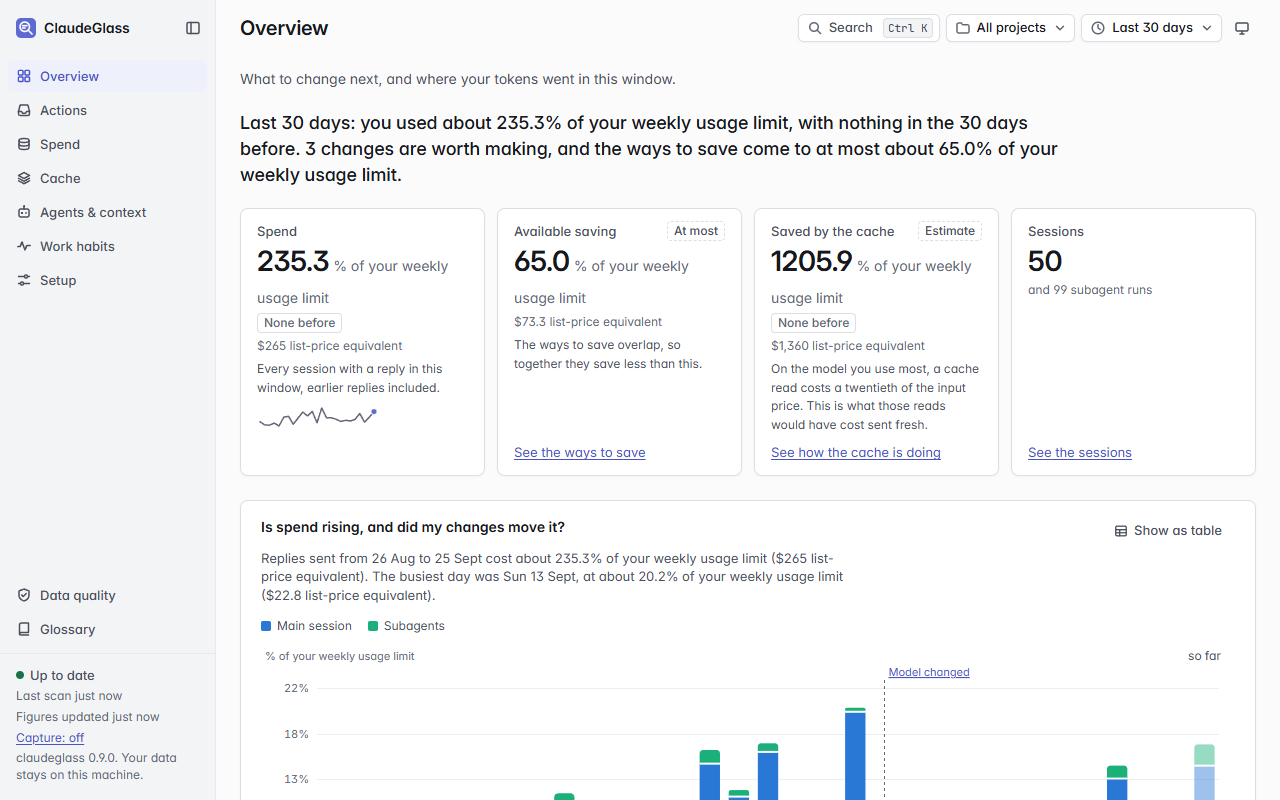
The Overview page. Synthetic data, 30-day window, subscription billing.
Try it in a minute. check reads your history and prints what to
change. It sets nothing up and changes nothing:
python -m pip install claudeglass
python -m claudeglass check --all-projects
With uv, uvx claudeglass check --all-projects
does the same without installing anything.
What it finds · Quick start · What each page answers · Privacy · Documentation
What it finds
The questions people ask after a month of heavy Claude Code use, answered from your own sessions:
- "Which sessions were expensive, and why?" Every session and subagent run is priced, and the expensive ones say what drove the cost: a long context, a cache rebuild, a large tool output, or thinking.
- "Am I on the right model?" It finds agents on Opus or Sonnet doing work a cheaper model finishes just as well, and checks whether cheaper runs had to be redone by a larger model. It also names the agents that wrote code on Opus or Fable only because nothing set their model.
- "Why did my cache miss?" Each prompt-cache rebuild is dated and explained: a pause longer than the cache lifetime, a conversation summary, or a change early in the context.
- "What am I paying for on every reply?" CLAUDE.md files, skills and tool definitions go out with every request. It prices each one and says what to trim, move or hide, and what MCP tool search saves by keeping unused tool definitions out, server by server. An MCP server Claude never uses is named, with how to turn it off for its kind.
- "Do my hooks work?" Each hook you set up is checked against your sessions: how often it failed and when it last did, the calls it blocked, and what the context it adds costs. A hook that has stopped failing drops out of the fix.
- "Are my habits costing me?" Work habits turns each of your requests, and everything Claude did for it, into habits worth changing, with a rough saving for each. How you prompt counts the prompting habits that cost extra replies, such as small requests sent one at a time or the same request sent again, and what each cost. Turn on coaching notes and you're told the moment you send one.
- "Did my change work?" It records your settings as each session starts, and compares the sessions before a change with those after it: Your changes shows each one's effect on the measures it should move, such as tokens per session for a model change, how sure it is, and what it saved so far.
Amounts follow how you pay: a share of your usage limits on a Pro or Max plan, dollars on pay-per-token billing.
Nothing changes by itself. Every recommendation is a prompt you give
Claude or a command you run, and every command has a --dry-run.
Who it's for
- Developers who use Claude Code all day and keep reaching their Pro or Max usage limits.
- Engineers on API billing who want a smaller bill without worse work.
- Team leads who want to see how a team uses Claude Code without collecting anyone's sessions: see For team leads.
Quick start
About five minutes. You need Claude Code, already used for a while so
there are sessions to look at, and Python 3.11 or newer. The commands
below are for Windows PowerShell. On macOS or Linux, type them in
Terminal with python3 in place of python.
Install it anywhere: it doesn't go into a repository. Claude Code keeps
a transcript of every session, for every repository, in one folder
(%USERPROFILE%\.claude\projects on Windows, ~/.claude/projects
elsewhere), and ClaudeGlass reads that folder, so the dashboard shows
all your repositories at once. Also run Claude Code inside WSL? Install
it on Windows; see
Using Claude Code in WSL too.
1. Check Python
python --version
It should print Python 3.11 or higher. If python isn't recognized,
or the version is older, install Python from
python.org. Tick Add python.exe
to PATH in the installer, then open a new PowerShell window.
2. Install
python -m pip install claudeglass
python -m claudeglass --version
The second line should print claudeglass 0.11.0 or later. Prefer an
isolated install? pipx install claudeglass or
uv tool install claudeglass work too.
3. Set up
python -m claudeglass init
It asks up to four questions:
- How you pay for Claude Code.
1for a Pro, Max, Team or Enterprise plan,2for an API key. Amounts then show as a share of your usage limits, or in dollars. - Connect to Claude Code. It adds a small hook to your Claude Code
settings.jsonthat records which settings each session ran with, and, unless you have one already, a status line that logs your usage-limit readings. The dashboard uses them to show what changed and what that did. Neither adds tokens. - Start the dashboard when you log on. Say yes. It starts straight away, and again every time you log on.
- Sharper tips, optional and off unless you say yes. Claude ends
each reply with a short tag, such as
[cg: task=bugfix brief=clear], so the tips fit how you work. This turns on metrics capture at its Essentials level: about 186 tokens when a session starts and 14 per reply, plus a Claude Haiku call of about $0.002 after each subagent run. It switches itself off after 14 days. It also adds the/cg-feedbackskill, for rating a piece of work when it's done.
Then it lists every change and asks once: Go ahead? [Y/n/d]. Type
d to see the exact settings.json change first, or n to change
nothing. It backs settings.json up before changing it, and ends with a
checklist of what's set up; python -m claudeglass status shows it
again any time. init --advanced also asks about projects to leave out,
the time zone, WSL folders, where changes are written, and the full
metrics capture choices.
4. Open the dashboard
Go to http://127.0.0.1:8765 in your browser. On the first start, a banner shows its progress while it reads your history. That takes seconds to a few minutes, and figures fill in as it goes.
Start with the Overview. It answers three questions: is anything wrong, did your changes work, and where do your tokens go. Then open Actions › Checks, which answers one question per way of saving, such as "Is each agent on the cheapest model that does the job?". The dashboard only runs on your machine; nobody else can open it. It's made for a desktop browser window.
Other ways to install
No PyPI access, no pip, a local copy, or the latest code
| Route | Command | Needs |
|---|---|---|
| From PyPI | python -m pip install claudeglass |
pip and network |
| Latest code from GitHub | python -m pip install git+https://github.com/PaulMorrisDev/claudeglass |
pip, git and network |
| From GitHub, without git | python -m pip install https://github.com/PaulMorrisDev/claudeglass/archive/refs/heads/main.zip |
pip and network |
| From a local copy | python -m pip install <folder>, or pipx install <folder> |
pip |
| Single file | Download claudeglass.pyz from the latest release, then run python claudeglass.pyz wherever this page says python -m claudeglass |
Python only |
The package has no runtime Python dependencies. rich is an optional
extra for nicer terminal output. The dashboard's d3 and fonts ship
inside the package, pinned by sha256.
docs/first-run.md walks through each route on a
locked-down work machine.
Coming from claude-token-lens
ClaudeGlass was called claude-token-lens up to version 0.8.0. 0.9.0 is a fresh install, not an upgrade: remove the old tool first, then follow the quick start above.
python -m claude_token_lens uninstall --dry-run
python -m claude_token_lens uninstall
python -m pip uninstall claude-token-lens
The first command shows what the second removes: its hooks and status
line in settings.json (backed up first), its skills and its logon
task. Setting changes you made through it stay as they are. To keep your
history, move %USERPROFILE%\.claude\token-lens to
%USERPROFILE%\.claude\claudeglass before you run init.
What each page answers
The sidebar opens with the three pages that answer what people come with: the Overview, Your changes and Actions. Under Details are the pages with the evidence behind them, and Data quality and the Glossary sit at its foot. A page with more than one part shows its segments beside its title.
| Page | The question it answers |
|---|---|
| Overview | Is anything wrong, did my changes work, and where do my tokens go? |
| Your changes | Did each change I made work, by how much, and how sure is that? |
| Actions › Recommendations | What exactly should I change, where, and what is the trade-off? |
| Actions › Checks | For each way of saving (models, effort, summaries, cache, tools, skills, CLAUDE.md, tool output, hooks, MCP tool search, habits), whether any agent is struggling, and whether the figures match Claude Code's own: is there anything to do, and what exactly? |
| Spend › Usage | How is my usage spread over days, models, projects and five-hour blocks? |
| Spend › Savings | What would shorter tool output, earlier summaries, cheaper models or fewer wasted replies save? |
| Spend › Sessions | Which sessions cost the most? Pick one to see why it was expensive. |
| Cache › Rebuilds | When did Claude Code rebuild the prompt cache, and what caused it? |
| Cache › Lifetime (TTL) | Would a 1-hour cache lifetime have paid for itself? |
| Agents & context › Subagents | What do my subagents cost, what are they given when they start, what do they send back, and would splitting long runs save? |
| Agents & context › Quality | Is my subagents' work going well (failed tool calls, runs that don't finish, runs a larger model had to redo, per model and effort), and how do I split the work? |
| Agents & context › Context | What does each CLAUDE.md file and skill cost, who is it sent to, and what can be trimmed, moved or hidden? |
| Agents & context › Hooks | Does each hook I set up work, when did a failing one last fail, and what do its failures, blocked calls and added context cost? |
| Work habits | What habits are costing tokens, which prompting habits cost extra replies, which tips did Claude pass on, and what would /cg-feedback and brief templates add? |
| Setup › Settings | What are my settings, which layer set each one, and how does this window compare with my baseline? |
| Setup › Profiles | Make a profile from a goal with an estimate of what it saves, compare it with my settings, and see the best setup for each kind of task. |
| Setup › Capture | What does metrics capture cost so far, what would each level or metric add, is it set up, and which live coaching is on? |
| Data quality | What did this tool install, what should I expect, could every transcript be read and priced, and does its cost match Claude Code's own record? |
| Glossary › Terms | What does a term on the dashboard mean? |
| Glossary › How costs work | How is each kind of token priced, and how does each change save me money? |
The window picker at the top right sets the time every page covers. Pick the last hour, today or the last 24 hours to see the effect of a change straight away. Pick 7 to 90 days or all time for the long view, or since my last change. The project picker beside it narrows every page to one project. The theme button switches between your system's theme, light and dark. Setup › Capture and Glossary › Terms don't depend on the window, and say so.
Every view has its own address, such as #/spend/usage?w=30, so Back,
Forward, bookmarks and shared links work, with the window and project
kept. Search (Ctrl+K) finds pages, tables, recommendations, checks,
glossary terms, recent sessions and projects. It also runs commands,
such as setting the window or copying a prompt. Press ? for the
keyboard shortcuts.
Every figure a recommendation rests on links to the table row it came from. A table that feeds a recommendation says so ("Feeds 2 actions"). Show as table on any chart gives the same figures as a grid.
Amounts follow your billing mode. On a Pro or Max plan, amounts are a share of your usage limits once the status line has logged enough usage-limit readings. Until then they're list-price equivalents: what the tokens would cost at Anthropic's published prices. On pay-per-token billing, amounts are what you pay.
Acting on a recommendation
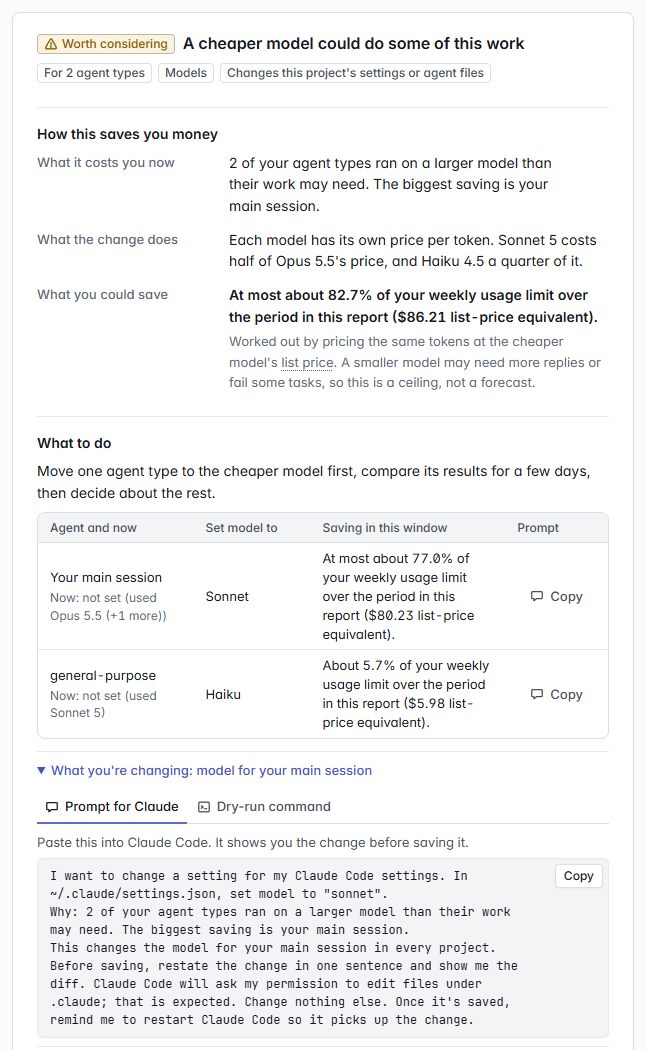
A recommendation on the Actions page. Synthetic data.
Each recommendation card explains the change before offering it. It says what the setting controls, its value now and after, which file it's written to and who that affects. Then it gives the expected effect, the trade-off, and how to undo it. There are two ways to make the change:
-
Ask Claude to do it. Copy the prompt into Claude Code. It names the file, the setting and the value, and says why. It asks Claude to restate the change and show you the diff before saving. Claude Code asks your permission before editing files under
.claude; that's expected. -
Or run the command. For a plain setting, the card shows a command such as:
python -m claudeglass apply --set effortLevel=medium --scope user --dry-run
--dry-runexplains the change and prints the diff without writing anything. Run it again without--dry-runto make the change: it shows the diff again and asks before it writes. The file is backed up first, and the output ends with theapply --revert <TS>command that undoes it. A revert won't run if the file was edited after the change, so it can't throw away your later edits. Add--ignore-changesto revert anyway.
The dashboard never changes a setting itself; there's no Apply button. Its commands use the form that runs on your machine.
Then restart Claude Code. It reads some settings, such as the model and
effort level, only when a session starts, so a restart is the way to be
sure. claude --continue picks your last conversation back up. Every
card, apply and apply --revert remind you, and each prompt asks
Claude to remind you once it has saved.
Profiles on Setup › Profiles work the same way for several settings
at once. Each gives you a prompt, an apply <profile> --dry-run
command, or a one-session trial (apply <profile> --launch) that leaves
your settings files alone. See
docs/profiles.md.
Updating
python -m claudeglass update
That one command:
- installs the newest version for this Python;
- restarts the dashboard on it, and checks that the dashboard answering on port 8765 is the new one. On Windows, if an older copy started by hand still holds the port, it names it and offers to stop it;
- brings the hooks and status line this tool added to Claude Code's
settings.jsonup to date, metrics capture's included. It shows each change and asks first, and backs upsettings.jsonbefore any change; - brings the
/cg-feedbackand/cg-briefskills it added up to date, and renames them from their earlier names (/tl-feedbackor/cl-feedback,/tl-briefor/cl-brief), asking first; - finds copies installed for other Pythons, and offers to remove the ones nothing uses any more.
On Windows, if only an administrator can write to Python's Scripts
folder, pip would fail part way through. update checks first, and
asks you to run it again from a terminal opened as administrator.
Add --dry-run to see what it would do, or --yes to answer yes to
every question. On macOS, restart the dashboard afterwards with
launchctl kickstart -k gui/$(id -u)/com.claudeglass.
update is the only command that downloads anything: pip fetches the
new version from GitHub. The foot of the dashboard's sidebar shows the
version that is running. After an update the dashboard may read your
history again once, so the first page load can be slow.
CHANGELOG.md lists what changed.
Uninstalling
Look at what would be removed first:
python -m claudeglass uninstall --revert-changes --delete-data --dry-run
Then run the same command without --dry-run. It stops the dashboard,
removes its logon task, its hooks, status line and skills, undoes any
setting changes you made through this tool, and deletes its data,
asking before each step. Leave out --revert-changes to keep your
setting changes, or --delete-data to keep your history. Finally:
python -m pip uninstall claudeglass
If something goes wrong
Run python -m claudeglass status first: it says what's done, what's
off and what needs attention, with the command that fixes each.
Troubleshooting covers the rest,
including an old dashboard that won't go away,
an update that doesn't take
and missing WSL sessions.
What it does to Claude Code, and how to undo it
- It uses no Claude tokens unless you turn on metrics capture or coaching notes. Otherwise it only reads files Claude Code has already written. Both are off by default, and both are described below.
- It changes nothing on its own.
init,captureandupdateshow each change to Claude Code'ssettings.jsonand ask first, and back the file up before changing it. The dashboard never changes it. - Settings change only when you say so, through a prompt you give
Claude or
python -m claudeglass apply.applybacks the file up first and prints the command that undoes it. Flags such as--yesandinit --connectsay yes for you, so leave them off to be asked. - Cheaper isn't free. A cheaper model, lower effort or an earlier summary can make Claude less thorough. Each change says what it trades away. Try one change at a time. After a few sessions, check the Your changes page.
What it adds
| What | Added by | Tokens |
|---|---|---|
A SessionStart hook (snapshot-config.py) that records your settings as each session starts. It runs in the background. |
init, when you connect |
None |
| A status line that logs your usage-limit readings, if you have none. Claude Code runs it only in a terminal, not in the desktop app. | init, when you connect |
None |
The capture hook (capture-hook.py) on SessionEnd, Stop, StopFailure, Notification and PermissionRequest; also on SessionStart and SubagentStop from Essentials up, and PostToolUse at Deep. |
Metrics capture | See its levels |
| The same hook on UserPromptSubmit, and on PostToolUse after shell, read, search, web and MCP tools and an approved plan. | Coaching notes | About 50 to 120 tokens a note, only when a hint applies |
The /cg-feedback skill, for rating a piece of work when it's done. |
init's sharper tips, capture feedback on, or the Deep level |
Its name and description, listed at each session start |
The /cg-brief skill, which checks a request against its checklist. |
capture brief on |
Its name and description, listed at each session start |
To see everything it installed, run python -m claudeglass changes
or open the Data quality page; both say how to undo each item.
python -m claudeglass capture remove takes capture's and coaching's
entries out of settings.json. To remove it completely, see
Uninstalling.
Metrics capture
Metrics capture is opt-in, and off by default. Each level adds to the one before it:
| Level | What it adds | Note when a session starts | Tag on each reply | Claude Haiku per subagent run |
|---|---|---|---|---|
| Off | Nothing. | – | – | – |
| Free | Signals from hooks, logged to a local file. | – | – | – |
| Essentials | A tag on each piece of work: what kind it was, how clear the request was, how hard and how big. Haiku judges whether each subagent run finished, and why one was run again. | ~186 tokens | ~14 tokens | ~$0.002 |
| Standard | What the request lacked, planning, skills and research, and Haiku's view of each subagent's model and brief. | ~304 tokens | ~24 tokens | ~$0.002 |
| Deep | How much earlier context was needed, how the change was checked, and a ~56-token rating note after a large tool output. It also turns on /cg-feedback and its reminders. |
~412 tokens | ~30 tokens | ~$0.002 |
The note is written to the prompt cache once, then read from it on each
later reply. Capture switches itself off 14 days after you turn it on:
--for sets another length, and --no-limit removes the limit.
[capture] sample in config.toml runs it in only a share of
sessions. Setup › Capture replays your last 14 days against each
level before you pick one, and measures the real cost once it's on.
Scripts that run claude -p or the Agent SDK get nothing added.
Who writes the tags. By default, Claude writes the tag at the end of
its reply. python -m claudeglass capture tagger haiku has Claude Haiku
write it after each turn instead, for about $0.002 a turn. Claude's
replies then carry no tag, and at Essentials and Standard its
session-start note goes too. Either way, Haiku judges each finished
subagent run, and the subagent itself is asked for nothing.
docs/capture.md
lists every metric, what it costs and what it feeds.
Live coaching
Live coaching has its own switches, on Setup › Capture or with
capture enable and capture disable. All three are off by default,
and they work at any capture level, Off included:
- Coaching notes (
coaching_notes). When a hint applies, such as a large tool output, an expired cache or several small requests in a row, the hook adds a short note and Claude passes the tip on. For the six prompting habits, you also see a one-line notice the moment you send the message. They're made for the desktop app, where the status line doesn't show. - Coaching line (
coaching_line). The same kind of hint in the status line, in a terminal. It costs no tokens. - Brief templates (
capture brief on). Checklists per kind of task on Work habits, and the/cg-briefskill, which checks a request against its checklist and asks once for anything missing.
For example, python -m claudeglass capture enable coaching_notes
turns on coaching notes. See
docs/coaching.md.
Privacy
- What it reads. The transcripts in
~/.claude/projects. Through the SessionStart hook, it also reads your Claude Code settings, and the names and sizes of your CLAUDE.md files, skills and plugins. It keeps environment variable names, never their values, apart from a few numeric limits. With coaching notes on, the hook reads each message you send, and your recent ones, for their length, timing and shared words. Nothing about your words is kept. - What it keeps. Counts, token totals, costs and short labels such
as tool and model names, in
~/.claude/claudeglass. Never message text, tool output, file contents, full paths or full commands. A test checks every field it reads from a transcript. - What goes online. ClaudeGlass itself sends nothing, except
update, which runs pip to download the new version from GitHub. There's no telemetry and no update check. The dashboard listens only on 127.0.0.1, so other machines can't open it unless you pass--allow-remote. It loads nothing from the internet, and a test fails if its server opens an outbound connection. Metrics capture is the exception: it asks Claude Haiku, as the next point says. - What metrics capture and coaching notes send. Both are off by
default.
- Their notes go into your Claude Code sessions, so they reach Anthropic with the rest of the session. Claude's tags come back in its replies, and this tool reads them from your transcripts.
- From Essentials up, the capture hook sends Claude Haiku a short excerpt of each finished subagent run, through your own Claude Code login. The excerpt holds the run's brief, the end of its report, the files it changed and the first line of its shell commands, each cut to a set length. Haiku judges every run this way, whoever writes the tags.
- With
tagger = "haiku", the hook also sends Haiku an excerpt of each turn, mainly your message and the end of Claude's reply, and Haiku writes the tag. - Only Haiku's answer is kept, in a local file: a few words from a fixed list, with its cost and token counts. The excerpt isn't kept.
SECURITY.md is the full checklist for a security
review, with the tests that back each point.
What it can't measure
- Your bill. There's no API to read back what a Claude Code session
cost. Amounts come from the prices in
pricing.toml, which you can edit. The tool never fetches prices. Where Claude Code writes down its own cost figure for a session, Actions › Checks compares the two. - Dollars on a plan. On Pro or Max you don't pay per token, so amounts are a share of your usage limits. Until the status line has logged enough readings, they're list-price equivalents. Those are good for comparing setups, but they aren't an invoice.
- Usage limits outside a terminal. Usage-limit readings come from the status line, and Claude Code runs it only in a terminal session.
- Anything in an undocumented format, for certain. Claude Code's docs call the transcript format internal, and it changes between versions. The parser skips what it doesn't know rather than failing. It is tested against transcripts from Claude Code 2.1 (2.1.260 to 2.1.283), on Windows and Linux with Python 3.11 and 3.12.
- Quality, fully. A what-if estimate can't see whether a cheaper setting makes Claude less thorough. The quality signals on Agents & context › Quality help you check after a change.
docs/reference.md
has the detail.
For team leads
- Exports.
exportwrites CSV or JSON for a BI tool or an OpenTelemetry collector. By default it's aggregate-only, with project names hashed. Seedocs/exports.md. - Team comparison.
export --aggregate,importandteam-reportcompare several people's machines without collecting anyone's sessions. Nobody is included unless they export and hand over the file. Seedocs/team.md. - Monthly reports.
monthly-report, orserve --monthly-report DIRwhile the dashboard runs, writes a one-month finance summary as Markdown and HTML. - Confidential projects.
exclude_projectsinconfig.tomlkeeps a project out of everything; its transcripts are never read. See Settings for teams and enterprise.
Documentation
| I want to… | Read |
|---|---|
| install on a locked-down work machine | docs/first-run.md |
| fix something that isn't working | docs/first-run.md |
| look up a command or a flag | docs/cli.md, or python -m claudeglass <command> --help |
| understand how the cache and the numbers work | docs/concepts.md |
| see what each report section works out | docs/sections-reference.md |
| know what it reads, and how the hook and status line work | docs/reference.md |
| run the dashboard as a service, or in Docker | docs/deploy.md |
answer init's questions, or read a baseline |
docs/onboarding.md |
| try or apply a profile | docs/profiles.md |
| turn on metrics capture | docs/capture.md |
| get hints during a session in the desktop app | docs/coaching.md |
| check whether my hooks work, and what they cost | docs/hooks.md |
| compare two setups, or check against an Admin API export | docs/compare.md |
| export numbers, or compare a team | docs/exports.md, docs/team.md |
| check what it reads, stores and sends | SECURITY.md |
| build on the JSON API or the dashboard | docs/api.md, docs/ui.md |
| see what changed | CHANGELOG.md |
Glossary
The dashboard's Glossary page uses the same words, term for term.
All 40 terms
- Session: One conversation with Claude Code, from start to exit. Resuming it continues the same session.
- Main session: The conversation you type into, as opposed to the subagents it starts.
- Subagent: A separate Claude that your session starts for one task, such as a search or a review. It has its own context and reports back when done.
- Transcript: The log file Claude Code writes for a session or a subagent run. Everything here is read from these files on your machine.
- Reply: One response from Claude, including any tool calls it makes. Every reply is billed for the whole context it reads.
- Token: The unit models read and write, roughly three quarters of a word. Prices are per million tokens.
- Context: Everything Claude reads on a reply: system prompt, tools, CLAUDE.md files and the conversation so far.
- Startup context: What Claude reads before your first message, or before a subagent's task: system prompt, tool list, CLAUDE.md files, skills and more.
- Prompt cache: A copy of the start of the context kept on Anthropic's side, so the next reply can re-read it cheaply instead of paying full price.
- Cache read: Re-reading context from the prompt cache, for a small part of the normal input price: a tenth or a twentieth, depending on the model.
- Cache write: Putting context into the prompt cache. Costs more than normal input: 1.25 times for a 5-minute lifetime, 2 times for 1 hour.
- Cache rebuild: Writing context to the cache again because the cached copy expired or something early in the conversation changed.
- Cache lifetime (TTL): How long the prompt cache stays warm after a reply: 5 minutes or 1 hour. On a Pro or Max plan within its usage limits, the main session gets 1 hour by default. Otherwise, and for subagents, the default is 5 minutes. A pause longer than this means a rebuild.
- Conversation summary: When the context gets too large, Claude Code replaces the conversation so far with a summary. Also called compaction.
- List price: Anthropic's published price per token. On a Pro or Max plan you don't pay this; it is shown to compare costs.
- Usage limits: On a Pro or Max plan, the share of your five-hour and weekly allowance you have used.
- Billing mode: How amounts are shown. On a Pro or Max plan, as a share of your usage limits when there are enough readings, otherwise as a list-price equivalent. On pay-per-token billing, as money.
- Effort level: How hard Claude thinks before replying. Thinking is billed as output, the most expensive token type.
- Scorecard: Five areas rated 1 (very poor) to 5 (excellent), each from one number in your data.
- Recommendation: A change worth making, with what it changes, the trade-off, a prompt you can give Claude and a command you can run.
- Profile: A named group of settings you can compare with yours, try for one session, or apply.
- Scope: Where a change is written: your user settings (every project), this project on your machine only, or this project for everyone.
- Managed setting: A setting your organisation's policy controls. Only your administrator can change it.
- Snapshot: A record of your Claude Code settings at one moment, taken so changes can be compared over time.
- Window: The stretch of time the numbers cover, picked at the top of the dashboard. It can be the last hour, today, the last 24 hours, 7, 30 or 90 days, all time, or since your last change. The 7, 30 and 90 day windows are whole local days, today included, from midnight. A session counts, in full, when it was last active in the window; since your last change, when it started after the change.
- Change point: A moment your settings changed: an apply, its undo, or a change the settings snapshot saw. A model, effort or CLAUDE.md size change that held for 3 sessions in a row is one too. The dashboard compares the sessions before it with those after it.
- Quick action: One question about a way to spend less, answered from your own sessions with the evidence and a fix you can copy. The dashboard lists them on the Actions page, under Checks.
- What-if estimate: What a change would have saved over the window, worked out from your own sessions. It is an estimate: cheaper settings can change how Claude works, which the estimate can't see.
- CLAUDE.md: Instruction files Claude reads at the start of every session, and of most subagents: yours, each project's, and rule files. Every line is paid for on every reply that re-reads it.
- Skill: A packaged set of instructions Claude can load when a task needs it. Its name and description are listed to Claude at the start of every session, used or not.
- Quality signal: A sign of whether the work went well, not only what it cost: tool calls that failed, agent runs that didn't finish, your corrections. Compared across models and efforts, and before and after each change you make.
- Metrics capture: An opt-in feature, off by default: a one-line tag, written by Claude or Claude Haiku, saying what the work was and how it went. It costs tokens while it's on.
init's last questions andclaudeglass captureturn it on, change what it asks for, or turn it off. - Capture level: How much metrics capture asks for:
off,free,essentials,standardordeep, each adding more of it. Set atinitor withclaudeglass capture level. - Tag: The one-line, closed-vocabulary note metrics capture keeps about a piece of work, such as
[cg: task=bugfix brief=clear]. Claude adds it to its reply, or Claude Haiku writes it about a turn or a finished subagent run. Only words from a fixed list are kept; nothing written in anyone's own words is. - Prompt cycle: One message of yours and everything Claude did to answer it, subagents at any depth included. The unit metrics capture and the Work habits page measure by.
- Work habits: The page (and report section) that turns prompt cycles into habits worth trying, with a rough saving for each. Each shows where its evidence came from: reported by Claude, inferred from the transcript, or your own feedback.
- Feedback skill:
/cg-feedback, a skill you can add and run after a piece of work. It asks whether the work delivered, what slowed it, whether it was worth the tokens, and what would have helped. Works at any capture level, even off; pickingdeepturns it on, with its reminders. - Brief templates: Checklists per kind of task on the Work habits page, built from what your own requests tend to lack. Turned on, it also adds a
/cg-briefskill that checks a request against its checklist and asks once for anything missing before Claude starts. - Sampling: Running metrics capture in only a share of sessions (100, 50, 25 or 10 percent,
[capture] sample) to spend fewer tokens on it. Picked at random, per session. - Time-box: The date metrics capture switches itself back off. By default it's 14 days after you turn a level on, whether at
init, withcapture onorlevel, or on the Capture page. So turning it on never means it runs unattended forever.--foror--capture-forsets another length, and--no-limitor--capture-no-limitturns the limit off. You can also say so when asked.
Related tools
- ccusage: daily and monthly cost tables across several coding tools. ClaudeGlass covers only Claude Code, and goes deeper there. It splits the 5-minute and 1-hour cache, explains cache rebuilds, prices each subagent type and makes recommendations that know your settings.
- token-dashboard: the closest relative, with stdlib Python, SQLite and a web page. It removes duplicate replies by message id, prices each prompt and gives tips. ClaudeGlass adds a cache lifetime (TTL) simulation, the cause of each cache rebuild, costs per subagent type and before-and-after comparisons of your settings.
- cache-ttl-analyzer: replays the main conversation under a 5-minute and a 1-hour cache lifetime. ClaudeGlass does the same for each subagent type, and adds the wasted-write and near-miss measures.
- Claude-Code-Usage-Monitor: watches your live usage against the five-hour window. ClaudeGlass works alongside it: it explains why a session cost what it did, rather than watching the live burn rate.
Contributing
python -m pip install -e .[test]
python -m pytest -q
Use conventional commits (feat(parse): ..., docs(readme): ...), one
focused change per commit. tests/helpers.py has
the fixture builders the tests use, such as turn_line and
write_jsonl; start there before writing a fixture by hand. Dashboard
copy follows docs/writing-help.md. Report a
security issue as SECURITY.md
describes.
Licence
MIT. See LICENSE.
1 maintainer

Metadata
1 maintainer
Release files for claudeglass 0.14.0
For a detailed explanation of source distributions (sdists) and built distributions (wheels), please see the package formats documentation.
Source distribution (sdist)
| File | Size | Uploaded | |
|---|---|---|---|
| claudeglass-0.14.0.tar.gz | 3.1 MB | Details |
Built distribution (wheel)
| File | Interpreter | ABI | Platform | Reset |
|---|---|---|---|---|
| claudeglass-0.14.0-py3-none-any.whl | Python 3 | none | any | Details |
Total release size: 5.4 MB
Release files / claudeglass-0.14.0.tar.gz
| Download URL | claudeglass-0.14.0.tar.gz |
|---|---|
| Size | 3.1 MB |
| Tags | Source |
|
SHA-256 checksum How to use checksums |
209b5ae540448c1f8b87338fdbc62799ff442365fa28b31b45c475160266a88d
|
|
BLAKE2b-256 checksum How to use checksums |
b8c7b5f99fde2a50c98b39b987b6f3df7e02579c9cd336cc1340ec3c4e26ea78
|
| Upload date | |
|
Uploaded using Trusted Publishing? What is trusted publishing? |
Yes |
| Uploaded via |
twine/7.0.0 CPython/3.13.14
|
Provenance
Provenance describes where a file came from. On PyPI, provenance is shared via attestations, which provide a verifiable record of the build or publishing details. View details, limitations and caveats.


PyPI Publish Attestation
PyPI verified that this artifact, at this checksum, originated from the publisher listed below.
Signed by GitHub Actions, verified by PyPI on Oct 2, 2026.
Transparency logRelease files / claudeglass-0.14.0-py3-none-any.whl
| Download URL | claudeglass-0.14.0-py3-none-any.whl |
|---|---|
| Size | 2.3 MB |
| Tags | Python 3 |
|
SHA-256 checksum How to use checksums |
7216091407697ff83b0bc0223f169af6e037a4380f3340bae841e8ee360eaf28
|
|
BLAKE2b-256 checksum How to use checksums |
0884cb38b96b4245058f63467d9c13a09b4bf4ed0387bf0d49e94e79c9077fad
|
| Upload date | |
|
Uploaded using Trusted Publishing? What is trusted publishing? |
Yes |
| Uploaded via |
twine/7.0.0 CPython/3.13.14
|
Provenance
Provenance describes where a file came from. On PyPI, provenance is shared via attestations, which provide a verifiable record of the build or publishing details. View details, limitations and caveats.
PyPI Publish Attestation
PyPI verified that this artifact, at this checksum, originated from the publisher listed below.
Signed by GitHub Actions, verified by PyPI on Oct 2, 2026.
Transparency log













