
claudown
Zero-token guard for Claude's 5-hour usage limit. When your rolling 5-hour usage crosses a threshold you choose, claudown stops Claude Code from spending more and shuts down your computer. On Claude Code on the web, where a shutdown can't reach your laptop, it sends a webhook to a listener on your laptop instead.
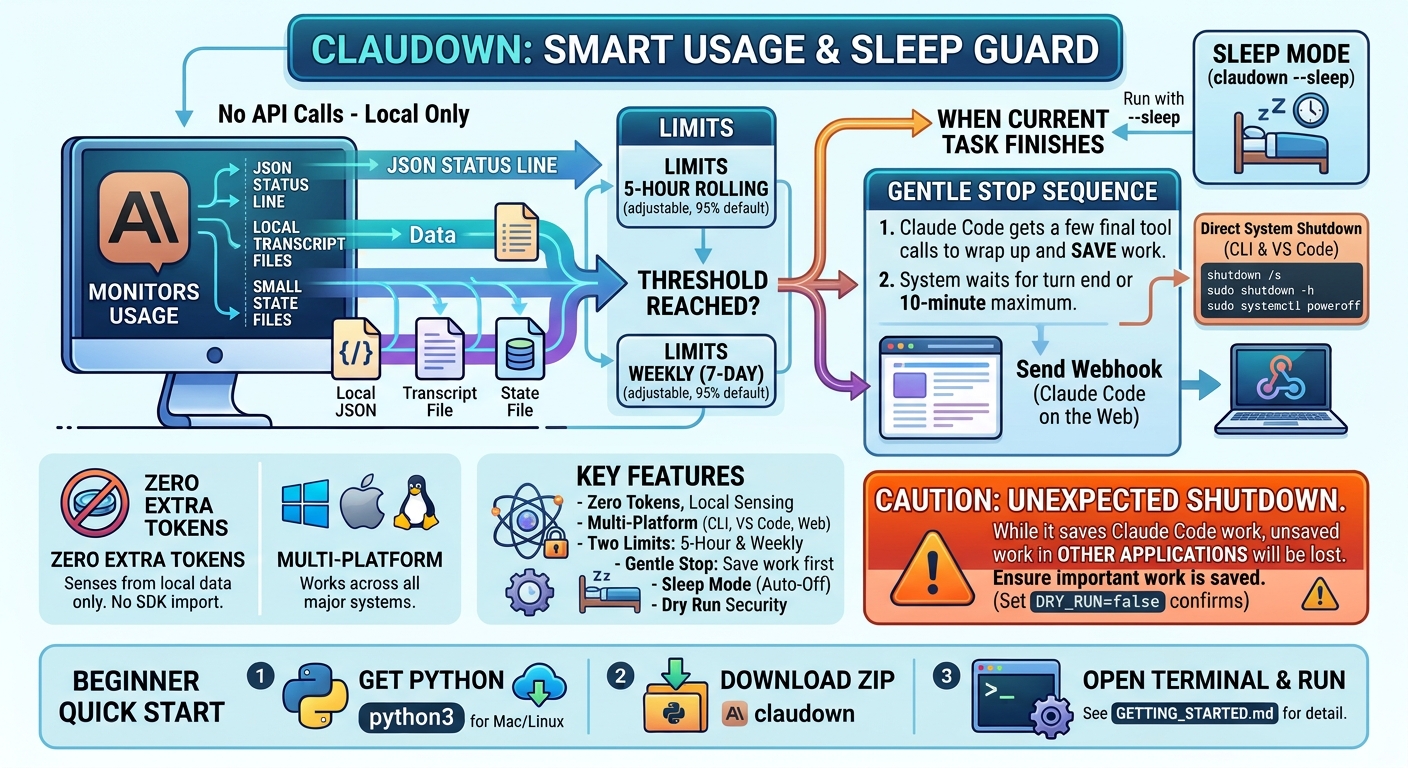
New to this? Jump to the Beginner quick start below: three short recipes, no settings to change. For more detail, read GETTING_STARTED.md.
Core principle: never spend tokens to detect a token limit. claudown senses usage only from local data: the JSON Claude Code already pipes to its status line, local transcript files and small state files. It acts only through local hooks. It never imports the Anthropic SDK and never calls the Anthropic API. The single exception is the web surface: a cloud VM can't power off your laptop, so it sends one webhook to a URL you configure.
- Standard library only: Python 3.8+, no dependencies.
- Three surfaces: the Claude Code CLI, the VS Code extension, and Claude Code on the web.
- Fires once per window: an atomic lock means the action runs once per 5-hour window, however many hooks fire. It keeps blocking tool calls until the window resets.
Beginner quick start
Pick the recipe that matches how you use Claude. Each one keeps the default settings: it acts at 95 % of your 5-hour allowance and starts in practice mode, where it only writes down what it would do and never turns anything off.
You need, once
- Python.
- Windows: install it from python.org/downloads and tick "Add python.exe to PATH" on the first screen.
- Mac and Linux: it's already installed.
- claudown. ⬇ Download claudown (ZIP) and unzip it, for example into Documents. On Windows, right-click the file and choose Extract All…. You get a folder named
claudown-main. Use theclaudown-mainfolder that containsREADME.mdand ascriptsfolder (Windows sometimes puts oneclaudown-maininside another). - A terminal opened in that folder. A terminal is a window where you paste a line and press Enter.
- Windows: open the
claudown-mainfolder, click the address bar at the top, typecmdand press Enter. - Mac: open Terminal, type
cd(with a space after it), drag the folder into the window, and press Enter. - VS Code: use File → Open Folder…, then Terminal → New Terminal.
- Windows: open the
On Mac and Linux, type python3 wherever these recipes say python.
Recipe 1: Claude Code in a terminal
| Step | Do this |
|---|---|
| 1. Install | Paste python scripts/claudown_setup.py and press Enter. |
| 2. Restart | Close Claude Code and open it again. The bottom line now shows claudown ▸ 5h …%. |
| 3. Practise | Use Claude as normal. Check what claudown would do with python scripts/shutdown_orchestrator.py --test. |
| 4. Switch it on | Save your work, then paste python scripts/claudown_setup.py --arm. From now on it really turns the computer off at 95 %. |
Recipe 2: Claude Code in VS Code
| Step | Do this |
|---|---|
| 1. Install | Same as recipe 1: python scripts/claudown_setup.py. |
| 2. One tick | In VS Code, open Settings (Ctrl+, or Cmd+,), search for Claude Code: Use Terminal and tick it. The VS Code chat panel can't show usage numbers; this setting fixes that. |
| 3. Restart | Close and reopen VS Code. Claude Code now shows claudown ▸ 5h …% at the bottom. |
| 4. Switch it on | When you're happy: python scripts/claudown_setup.py --arm. |
If you'd rather keep the chat panel, skip step 2. claudown still stops Claude when you actually hit the limit; see GETTING_STARTED.md, part 2A for how to make it act earlier.
Recipe 3: Claude Code on the web (in your browser)
A website can't turn off your laptop by itself, so a small helper on your laptop waits for a message from the web.
| Step | Do this |
|---|---|
| 1. Add it to your project | python scripts/claudown_setup.py --project "PATH-TO-YOUR-PROJECT", then save and upload (commit and push) the project as usual. |
| 2. Choose a password | Make up one of 16 or more letters and numbers, for example blue-river-42-lamp-sky. |
| 3. Start the helper on your laptop | python scripts/local_webhook_listener.py --token "YOUR-PASSWORD". Leave the window open. |
| 4. Give it a web address | Install cloudflared, then in a second window run cloudflared tunnel --url http://localhost:8383. Copy the https://….trycloudflare.com address it prints. |
| 5. Tell the web where to send the message | In your Claude Code on the web environment settings, add WEBHOOK_URL = that address and WEBHOOK_TOKEN = your password, and allow *.trycloudflare.com in network access. Picture of where to paste them. |
| 6. Switch it on | Web: run python scripts/claudown_setup.py --project "PATH-TO-YOUR-PROJECT" --arm, then commit and push again. Laptop: stop the helper (Ctrl+C) and start it again with --arm at the end of the line from step 3. |
Three things worth knowing
- Emergency stop: create an empty file named
claudown.disabledin the.claudefolder inside your user folder. Delete it to turn claudown back on. - Uninstall:
python scripts/claudown_setup.py --uninstallputs your settings back. - Mac/Linux shutdown asks for a password? See part 4 of the guide. It's a one-time fix. Even without it, claudown still stops Claude at the limit.
Everything below this point is the technical reference.
Which mechanism each surface supports
| Surface | Sensor (zero tokens) | Gate | Action | Backstop |
|---|---|---|---|---|
| CLI (primary, full support) | statusLine → statusline_sensor.py (exact %) |
PreToolUse hook |
local shutdown | StopFailure / rate_limit |
| VS Code extension | statusLine is not run by the panel → vscode_transcript_sensor.py reads local transcripts |
same PreToolUse hook (hooks do run) |
local shutdown | same |
| Claude Code on the web | statusLine/transcripts inside the cloud VM, polled by web_limit_watcher.py |
same hook, inside the VM | webhook POST → local_webhook_listener.py on your laptop → local shutdown |
same, inside the VM |
 CLI ──statusLine JSON──▶ statusline_sensor.py ──writes──▶ ~/.claude/claudown_state.json
                                                                  │
 VS Code panel (no statusLine) ──▶ vscode_transcript_sensor.py ◀──┤ (gate falls back automatically
                                    reads ~/.claude/projects/*.jsonl   when the sensor is silent)
                                                                  ▼
 Any surface ──PreToolUse / UserPromptSubmit──▶ pretooluse_gate.py ── pct ≥ threshold? ──▶ block (exit 2)
                                                                            │
                                                     shutdown_orchestrator.trigger() (once per window)
                                                        ├─ local machine: shutdown command
                                                        └─ cloud VM:      webhook ──▶ local_webhook_listener.py ──▶ shutdown
 Any surface ──StopFailure (matcher "rate_limit")──▶ shutdown_orchestrator.py   BACKSTOP (after the fact)
| File | Runs as | What it does |
|---|---|---|
scripts/statusline_sensor.py (+ .sh wrapper) |
statusLine command |
Copies rate_limits.five_hour.used_percentage and resets_at into ~/.claude/claudown_state.json. Prints claudown ▸ 5h 42% / gate 95% · resets 15:30 · DRY RUN. |
scripts/pretooluse_gate.py |
PreToolUse + UserPromptSubmit hook |
At or above the threshold it blocks the call (exit code 2) and fires the action once. |
scripts/shutdown_orchestrator.py |
library + StopFailure hook |
Cross-platform shutdown or webhook, once per window, respects DRY_RUN. As the backstop it fires if the limit is actually hit. |
scripts/vscode_transcript_sensor.py |
called by the gate; --watch timer |
Estimates usage from local .jsonl transcripts. If it can't, it logs a clear warning and reports unknown. It never guesses. |
scripts/web_limit_watcher.py |
SessionStart hook in a web session |
Background poller inside the cloud VM. At the threshold it POSTs session_id, timestamp and usage_pct to WEBHOOK_URL. It never shuts down. |
scripts/local_webhook_listener.py |
you run it on your laptop | Receives that webhook (shared-secret token required) and runs the local shutdown. |
scripts/cli_computer_use_shutdown.py |
optional, you run it | Checks whether the CLI's built-in computer-use server can be used on this Mac and, if so, lets you opt in. See below. |
scripts/claudown_setup.py / setup.sh |
installer | Copies scripts to ~/.claude/claudown/, merges settings.json (with a backup), and keeps your existing status line. |
vscode_bridge_extension/ |
optional VS Code extension | Status bar reading plus a one-click switch to terminal mode. |
The status line runs locally and costs no API tokens. Per the Claude Code docs, rate_limits is present only for claude.ai Pro, Max and Ultra subscribers, and only after the first API response in a session.
Surface 1: Claude Code CLI (primary)
git clone https://github.com/PacifAIst/claudown.git
cd claudown
python3 scripts/claudown_setup.py      # or ./setup.sh   (Windows: python scripts\claudown_setup.py)
That installs to ~/.claude/claudown/, merges ~/.claude/settings.json (backed up to settings.json.bak.<timestamp>), and stays in DRY RUN. Start a new Claude Code session; the claudown ▸ 5h …% status line should appear. Then:
python3 ~/.claude/claudown/shutdown_orchestrator.py --status   # what claudown sees right now
python3 ~/.claude/claudown/shutdown_orchestrator.py --test     # prints the exact shutdown command
tail -f ~/.claude/claudown.log
python3 scripts/claudown_setup.py --arm [--threshold 90]       # arm it (DRY_RUN=false)
python3 scripts/claudown_setup.py --uninstall                  # remove it
The installer writes hook commands with the absolute path of the Python that ran it, using forward slashes (and 8.3 short paths if there are spaces), so they work whether Claude Code runs hooks through Git Bash or PowerShell on Windows. To configure by hand instead, start from settings/settings.json.example.
Shutdown permissions (macOS / Linux)
Hooks have no terminal, so sudo can't ask for a password. claudown runs sudo -n (non-interactive) and, if that fails, tries a fallback that needs no sudo:
| OS | First try | Fallback |
|---|---|---|
| Windows | shutdown /s /t 0 |
none needed |
| macOS | sudo -n shutdown -h now |
osascript -e 'tell application "System Events" to shut down' (may show an Automation prompt the first time) |
| Linux | sudo -n systemctl poweroff |
systemctl poweroff (works without sudo for the active desktop user on most polkit setups) |
To allow the canonical command without a password, add a narrow sudoers rule with sudo visudo -f /etc/sudoers.d/claudown:
yourname ALL=(root) NOPASSWD: /sbin/shutdown -h now          # macOS
yourname ALL=(root) NOPASSWD: /usr/bin/systemctl poweroff    # Linux
If every command fails, claudown logs all shutdown commands failed and exits cleanly. The gate still blocks tool calls, so your tokens are protected even if the machine stays on. SHUTDOWN_COMMAND replaces the built-in commands, for example systemctl suspend, pmset sleepnow, or rundll32.exe powrprof.dll,SetSuspendState 0,1,0.
Optional: computer-use shutdown (macOS only)
The Claude Code CLI includes a built-in computer-use MCP server (docs). Its constraints:
- macOS only. It isn't available in the CLI on Linux or Windows.
- claude.ai Pro, Max or Ultra plan only. It isn't available on Team or Enterprise plans, with an API key, or through Bedrock or Vertex.
- You enable it yourself in an interactive session with
/mcp. It requires Claude Code v2.1.85+ and doesn't work withclaude -p.
Because a script can't enable or drive it, cli_computer_use_shutdown.py doesn't start Claude. --check reports eligibility (macOS, claude --version, and whether the sensor has ever received subscriber rate-limit data). --enable opts you in only if the check passes. After that, when the armed gate blocks, its message also asks Claude to shut the Mac down with the computer-use tool. That costs a few tokens, so it's off by default. It's never the primary path: the shutdown command always runs first, and if computer-use isn't in /mcp, nothing changes.
Backstop
The StopFailure hook with matcher: "rate_limit" fires after the limit is hit. It's a last-resort safety net. Primary detection is predictive: the sensor plus the gate.
Surface 2: VS Code extension
The native VS Code panel doesn't run statusLine, so a solution that relies on it fails silently there. Hooks do run (~/.claude/settings.json is shared between the CLI and the extension), so the same gate protects you in VS Code. Only the sensor changes:
- Automatic transcript sensor. If the state file hasn't been updated for
SENSOR_STALE_SECONDS(900 s), the gate callsvscode_transcript_sensor.py. It reads~/.claude/projects/**/*.jsonland:- rebuilds the current 5-hour block,
- reports 100 % if a "usage limit reached" error appears in that block,
- otherwise estimates
weighted tokens / TOKEN_BUDGET_5H.
- Calibrate once. Use Claude Code in a terminal until the status line shows at least 5 %, then run:
python3 ~/.claude/claudown/vscode_transcript_sensor.py --calibrate --write
- No data, no guessing. Without a budget, the sensor logs
WARNING … Not guessing(at most once an hour), and the gate fails open. It will still catch a limit that was actually hit. - Exact sensor in VS Code: enable Claude Code's Use Terminal setting (
claudeCode.useTerminal). Terminal mode runsstatusLine. - Optional bridge:
vscode_bridge_extension/is a small community-workaround extension. It runs the transcript sensor on a timer, shows the reading in VS Code's status bar, and has a one-click switch to terminal mode. It's optional and isn't the default path.
Surface 3: Claude Code on the web
Web sessions run in a cloud VM. A shutdown inside the VM would only stop the VM, not your laptop. That's also true for Computer Use in the cloud: Claude might see the limit on screen, but it can't power off your local machine. Don't expect it to.
So on the web claudown detects the limit inside the VM, at zero tokens, and sends one HTTP POST to a webhook you control:
- Install into the repository you work on:
python3 scripts/claudown_setup.py --project /path/to/your-repo
cd /path/to/your-repo && git add .claude && git commit -m "Add claudown" && git push
This adds aSessionStarthook that startsweb_limit_watcher.py, plus the same gate and backstop (paths use$CLAUDE_PROJECT_DIR,ACTION=notify). Seesettings/settings.web.json.example. - On your laptop, run the listener and expose it through a tunnel you control:
python3 scripts/local_webhook_listener.py --token "<16+ random characters>"   # 127.0.0.1:8383
cloudflared tunnel --url http://localhost:8383        # or Tailscale Funnel, etc.
- In the cloud environment's settings (not in the repo), set
WEBHOOK_URLto the tunnel's https URL andWEBHOOK_TOKENto the same secret. Also allow that domain in the environment's network access settings.
Payload (JSON): session_id, timestamp (ISO 8601 UTC), usage_pct, threshold, reason, source, resets_at, host. The token travels only in the X-Claudown-Token / Authorization: Bearer headers, never in the body. The listener binds to 127.0.0.1, uses a constant-time token comparison, accepts bodies up to 16 KB, and respects the laptop's own DRY_RUN. Add --arm to the listener command to make it really shut down.
Configuration
Set values in the "env" block of settings.json or in ~/.claude/claudown/config.json. Precedence: environment, then config.json, then defaults.
| Variable | Default | Meaning |
|---|---|---|
SHUTDOWN_THRESHOLD |
95 |
Percent of the 5-hour window at which the gate acts. |
DRY_RUN |
true |
Logs instead of executing. Armed only when it's false. |
ACTION |
auto |
auto (shutdown locally, notify on the web), shutdown, notify, both, none (block only). |
BLOCK_TOOLS |
true |
Block tool calls and prompts at the threshold. |
BACKSTOP_ENABLED |
true |
Act on StopFailure / rate_limit. |
SHUTDOWN_DELAY_SECONDS |
0 |
Grace period. A desktop notification is shown first. |
SHUTDOWN_COMMAND |
(empty) | Replaces the built-in OS commands. |
WEBHOOK_URL |
(empty) | Where the web watcher POSTs. |
WEBHOOK_TOKEN |
(empty) | Shared secret, sent as a header and checked by the listener. |
WEBHOOK_FORMAT |
json |
json, or text (ntfy-style endpoints). |
WEB_POLL_SECONDS |
30 |
Web watcher polling interval. |
SENSOR_STALE_SECONDS |
900 |
Status line data older than this switches the gate to the transcript sensor. |
TOKEN_BUDGET_5H |
(empty) | Transcript sensor: weighted tokens that count as 100 %. Set it with --calibrate --write. |
CACHE_READ_WEIGHT |
0.1 |
Transcript sensor: weight of cache-read tokens. |
STATUSLINE_CHAIN_COMMAND |
(empty) | Your previous status line, shown above claudown's. |
COMPUTER_USE_SHUTDOWN |
false |
Optional macOS computer-use request (see above). |
Emergency off switch: create the file ~/.claude/claudown.disabled to turn off the gate and backstop immediately. Delete it to turn them back on.
Files: ~/.claude/claudown_state.json (readings), ~/.claude/claudown_trigger.json (once-per-window lock), ~/.claude/claudown.log (everything claudown did). CLAUDE_CONFIG_DIR is honoured.
Install from PyPI
Once published (see PUBLISHING.md):
pip install claudown
claudown-setup            # same installer as scripts/claudown_setup.py
claudown --status
Console commands: claudown (orchestrator), claudown-gate, claudown-setup, claudown-sensor, claudown-vscode-sensor, claudown-web-watcher, claudown-listener.
Safety design
- Dry run by default. Any
DRY_RUNvalue other than an explicit false value (false,0,no,off) is a dry run. - Once per window. The lock is created with
O_CREAT | O_EXCL, so concurrent hooks can't double-fire. It expires at the window'sresets_at.--resetclears it. - Ignores old readings. A reading whose
resets_athas passed counts as 0 %. - Fails open on unknowns, fails safe on errors. A crash in the gate allows the call; a crash in the sensor still prints a status line; a failed shutdown is logged and the script exits 0.
- Network is isolated. The only network code is a lazy
urllib.requestimport inside the webhook sender.
Testing
python3 -m pip install -r requirements.txt
python3 -m pytest -q
tests/test_dry_run_no_api_calls.py runs every script as a real subprocess with an isolated CLAUDE_CONFIG_DIR. A sitecustomize.py makes any socket connection fail the suite. The tests cover:
- the zero-network/zero-SDK import rules,
- gate thresholds, idempotency and fail-open behaviour,
- the backstop,
- armed mode, using a harmless override command, plus graceful failure,
- the web watcher only notifying and never shutting down,
- the webhook payload and listener token checks,
- computer-use gating off macOS,
- transcript estimation, calibration and the no-guess warning,
- the installer's merge, chaining, idempotency, uninstall and project mode,
- package imports and the
pyproject.tomlentry points.
Troubleshooting
See GETTING_STARTED.md → Troubleshooting for the plain-language version.
| Symptom | Fix |
|---|---|
No claudown ▸ status line in the CLI |
Start a new session. Run claude --debug. Re-run the installer with the Python you want to use. |
waiting for data |
rate_limits appears only for Pro/Max/Ultra, after the first response. API-key users have no 5-hour data, so use TOKEN_BUDGET_5H or rely on the backstop. |
| VS Code: gate never fires | That's expected without a budget. Calibrate, enable Use Terminal, or install the bridge. --status shows unknown:no-budget. |
DRY_RUN: would execute but nothing happened |
That's correct. Arm it with --arm. |
all shutdown commands failed |
Add the sudoers rule, or set SHUTDOWN_COMMAND. |
| Blocked but want to keep working | Create ~/.claude/claudown.disabled. |
| Fired once and never again | That's intended (once per window). shutdown_orchestrator.py --reset clears it. |
computer-use missing from /mcp |
You need macOS, a Pro/Max/Ultra plan, a claude.ai login and v2.1.85+. claudown keeps using the hook path. |
| Web webhook never arrives | Check WEBHOOK_URL, the environment's network allow list, the tunnel, and the token. DRY_RUN=true only logs. |
License
Apache License 2.0. Part of the PacifAIst open-source tools.
claudown is an independent project and isn't affiliated with or endorsed by Anthropic. "Claude" and "Claude Code" are trademarks of Anthropic.
Made with ❤️ for the Local AI Community by PacifAIst
1 maintainer

Metadata
1 maintainer
Release files for claudown 0.1.0
For a detailed explanation of source distributions (sdists) and built distributions (wheels), please see the package formats documentation.
Source distribution (sdist)
| File | Size | Uploaded | Provenance | Actions |
|---|---|---|---|---|
| claudown-0.1.0.tar.gz | 43.7 kB | Without provenance | Details for claudown-0.1.0.tar.gz |
Built distribution (wheel)
| File | Interpreter | ABI | Platform | Actions Reset |
|---|---|---|---|---|
| claudown-0.1.0-py3-none-any.whl | Python 3 | none | any | Details for claudown-0.1.0-py3-none-any.whl |
Total release size: 88.2 kB
Release files / claudown-0.1.0.tar.gz
| Download URL | claudown-0.1.0.tar.gz |
|---|---|
| Size | 43.7 kB |
| Tags | Source |
|
SHA-256 checksum How to use checksums |
fef1ecbf38262b3d19c81a213eac56ea8b329658f39a99e82d84b1520f360773
|
|
BLAKE2b-256 checksum How to use checksums |
4bc1b58e1fdcde2dfa66b00d800d55d1ff682f9502ec7989e053aca81061f93d
|
| Upload date | |
|
Uploaded using Trusted Publishing? What is trusted publishing? |
No |
| Uploaded via |
twine/7.0.0 CPython/3.14.3
|
Release files / claudown-0.1.0-py3-none-any.whl
| Download URL | claudown-0.1.0-py3-none-any.whl |
|---|---|
| Size | 44.4 kB |
| Tags | Python 3 |
|
SHA-256 checksum How to use checksums |
998c9c3942d474ba94adee13166a29e53ab75781e668c8a688d153a02a132f8f
|
|
BLAKE2b-256 checksum How to use checksums |
cd6541c5711fcf32d2e3386965033d0e5c7cb7647b1385b96c1878d2adc3b155
|
| Upload date | |
|
Uploaded using Trusted Publishing? What is trusted publishing? |
No |
| Uploaded via |
twine/7.0.0 CPython/3.14.3
|
Security for claudown 0.1.0
Provenance
Provenance describes where a file came from. On PyPI, provenance is shared via attestations, which provide a verifiable record of the build or publishing details. View details, limitations and caveats.
No provenance found
None of the files in this release were uploaded with provenance metadata.
A note on package security
PyPI is a repository for distributing packages, not a service for auditing them. While third-party security researchers and our staff do their best to detect and remove malicious packages, PyPI cannot guarantee the quality, security or suitability of any given package.
To learn more about protecting yourself from malicious actors, visit our package security documentation.














