
CLaude AnyWhere - Remote control for Claude Code from your phone

Project description

Claw (CLaude AnyWhere)
CLaude AnyWhere — Control Claude Code from anywhere
📱 Phone · 💻 Laptop · 📟 Tablet · ⌚ Watch — if it has a browser, you're in control


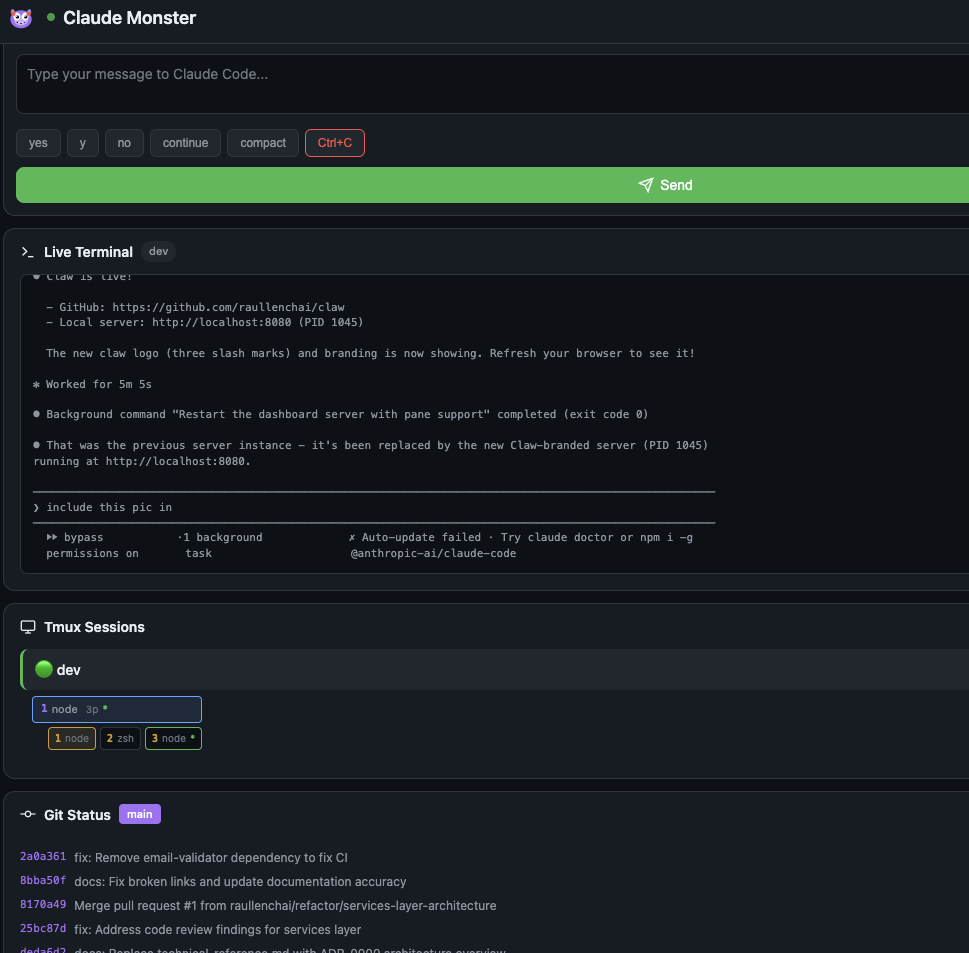
Why Claw?
Running a long Claude Code session? Need to step away from your desk? Claw lets you monitor and control Claude Code from any device with a browser.
- 👀 See what Claude is doing in real-time from any screen
- ⚡ Send quick responses (yes/no/continue) with one tap
- 🛑 Interrupt with Ctrl+C when things go sideways
- 🖥️ Monitor everything — sessions, windows, panes, git status, system stats
Quick Start
python3 claw.py --share
Open the URL on your phone. That's it.
No dependencies beyond Python 3 standard library.
Features
| Feature | Description |
|---|---|
| Live Terminal | Real-time tmux pane content with auto-scroll |
| Quick Actions | One-tap buttons: yes no continue /compact Ctrl+C |
| Session Switching | Switch between tmux sessions, windows, and panes |
| Git Status | Current branch, changed files, recent commits |
| System Stats | CPU, memory, load averages |
| Process Monitor | Claude-related processes with CPU/memory usage |
| Mobile-First | Designed for phones with pull-to-refresh |
| Auto-Refresh | Configurable refresh interval (default: 5s) |
Installation
Option 1: Direct Download
curl -O https://raw.githubusercontent.com/raullenchai/claw/main/claw.py
python3 claw.py
Option 2: Clone Repository
git clone https://github.com/raullenchai/claw.git
cd claw
python3 claw.py
Option 3: Add to PATH (recommended)
# Download
curl -o ~/.local/bin/claw https://raw.githubusercontent.com/raullenchai/claw/main/claw.py
chmod +x ~/.local/bin/claw

# Now run from anywhere
claw
Usage
usage: claw.py [-h] [-p PORT] [-b BIND] [-r REFRESH] [-d DIR] [-s]

Claw - Remote control for Claude Code sessions

options:
  -h, --help            show this help message and exit
  -p PORT, --port PORT  Port to run on (default: 8080)
  -b BIND, --bind BIND  Address to bind to (default: 127.0.0.1)
  -r REFRESH, --refresh REFRESH
                        Refresh interval in seconds (default: 5)
  -d DIR, --dir DIR     Add a work directory to monitor
  -s, --share           Share via public URL (uses Cloudflare Tunnel)
Examples
# Default (localhost only, port 8080, 5s refresh)
claw

# 🌐 Access from ANYWHERE (phone while away from home!)
claw --share

# Allow local network access (for phone/tablet on same WiFi)
claw -b 0.0.0.0

# Custom port with network access
claw -p 3000 -b 0.0.0.0

# Faster refresh
claw -r 2

# Monitor specific directory
claw -d ~/projects/myapp
Accessing Claw from Your Phone
Choose the method that fits your situation:
Method 1: Same WiFi Network (Simplest)
If your phone and computer are on the same WiFi:
claw -b 0.0.0.0
Then open http://<your-computer-ip>:8080 on your phone.
Find your computer's IP:
# macOS
ipconfig getifaddr en0

# Linux
hostname -I | awk '{print $1}'
Example: http://192.168.1.42:8080 or http://10.0.0.15:8080
Method 2: Access from Anywhere (No Account Needed)
Perfect for checking Claude from a coffee shop, car, or anywhere outside your home:
claw --share
    ╱╱╱   Claw - CLaude AnyWhere

  ✓  Tunnel ready!
  →  Public: https://random-words.trycloudflare.com  ← Use this!

  🔐 Authentication Required
  →  Username: any (or leave blank)
  →  Password: xK7mN2pQ9rT4
- ✅ Works through any firewall/NAT
- ✅ No signup required
- ✅ Completely free
- ✅ Password-protected (auto-generated)
- ⚠️ URL and password change each time you restart
First run downloads cloudflared (~25MB) automatically.
Method 3: Permanent URL (Cloudflare Account)
Want the same URL every time? Set up a free Cloudflare account:
One-time setup:
# 1. Install cloudflared (if not auto-installed)
brew install cloudflared   # macOS
# or download from https://developers.cloudflare.com/cloudflare-one/connections/connect-networks/downloads/

# 2. Login to Cloudflare (opens browser)
cloudflared tunnel login

# 3. Create your tunnel
cloudflared tunnel create claw

# 4. Connect your domain (you need a domain on Cloudflare)
cloudflared tunnel route dns claw claw.yourdomain.com
Daily use:
# Start Claw
claw &

# Start tunnel (in another terminal or add to your startup)
cloudflared tunnel run --url http://localhost:8080 claw
Now https://claw.yourdomain.com always works!
Requirements:
- Free Cloudflare account (sign up)
- A domain name (~$10/year, or use one you already have)
Method 4: Tailscale (Best for Teams)
If you use Tailscale, just run:
claw -b 0.0.0.0
Access via your Tailscale IP: http://100.x.x.x:8080
Quick Comparison
| Method | Setup | URL | Best For |
|---|---|---|---|
| Same WiFi | None | 192.168.x.x:8080 |
Home use |
--share |
None | Random URL | Quick remote access |
| Cloudflare | 5 min | claw.yourdomain.com |
Daily remote use |
| Tailscale | Install app | 100.x.x.x:8080 |
Teams/multiple devices |
API Reference
GET Endpoints
| Endpoint | Description |
|---|---|
/ |
Main dashboard (HTML) |
/api/data |
All dashboard data (JSON) |
/api/pane?session=NAME&window=IDX&pane=IDX |
Tmux pane content |
/api/git?dir=NAME |
Git info for directory |
POST Endpoints
| Endpoint | Body | Description |
|---|---|---|
/api/send |
{"session": "name", "window": "1", "pane": "0", "text": "yes", "enter": true} |
Send text to pane |
/api/control |
{"session": "name", "window": "1", "pane": "0", "key": "C-c"} |
Send control key |
Security
Safe by default:
- Binds to
localhostonly — your computer only --sharerequires password authentication (auto-generated)--shareuses HTTPS (encrypted via Cloudflare)- Input validation prevents command injection
- Control keys are whitelisted
- Content Security Policy headers prevent XSS
When using --share:
- A random password is generated and displayed at startup
- You must enter this password when accessing from your phone
- The password changes each time you restart Claw
When using -b 0.0.0.0 (local network access):
- No authentication required (trusted network)
- Anyone on your WiFi can access Claw
- Fine for home networks, be careful on public WiFi
For extra security on local network:
# SSH tunnel (if you have a server)
ssh -L 8080:localhost:8080 your-server
# Then access http://localhost:8080 on your phone via SSH app
Requirements
- Python 3.8+ (standard library only, no pip install needed)
- tmux (for session management)
- git (optional, for repository info)
Platform Support
| Platform | Basic Usage | --share |
System Stats |
|---|---|---|---|
| macOS (Intel/Apple Silicon) | ✅ | ✅ | ✅ |
| Linux (x64/ARM) | ✅ | ✅ | ✅ |
| Windows (x64/x86) | ✅ | ✅ | ✅ |
| WSL | ✅ | ✅ | ✅ |
Note: Windows requires tmux via WSL or similar. Native Windows terminal monitoring is not supported.
Troubleshooting
Port already in use
# Find process using port
lsof -i :8080

# Use different port
claw -p 8081
No tmux sessions showing
# Verify tmux is running
tmux list-sessions

# Start a new session
tmux new -s dev
Can't access from phone
- Check firewall settings
- Verify both devices are on same network
- Try using your computer's IP directly (not
localhost) - Check if VPN is interfering
Architecture
┌─────────────────────────────────────────────────────────┐
│                    Mobile Browser                        │
│  ┌─────────────────────────────────────────────────┐    │
│  │  Stats │ Input Panel │ Terminal │ Sessions │ Git │   │
│  └─────────────────────────────────────────────────┘    │
└─────────────────────┬───────────────────────────────────┘
                      │ HTTP/JSON
┌─────────────────────▼───────────────────────────────────┐
│                    claw.py                               │
│  ┌──────────────┐ ┌──────────────┐ ┌──────────────┐     │
│  │ DataCollector│ │CommandSender │ │ HTTPHandler  │     │
│  └──────┬───────┘ └──────┬───────┘ └──────────────┘     │
└─────────┼────────────────┼──────────────────────────────┘
          │                │
    ┌─────▼─────┐    ┌─────▼─────┐
    │   tmux    │    │   tmux    │
    │ capture   │    │ send-keys │
    └───────────┘    └───────────┘
Contributing
Contributions are welcome! Please read our Contributing Guide and Code of Conduct.
# Fork the repo, then:
git clone https://github.com/YOUR_USERNAME/claw.git
cd claw
python3 claw.py  # Test your changes
License
MIT License - see LICENSE for details.
Acknowledgments
Built for use with Claude Code by Anthropic.
Made with 🦞 by developers who got tired of walking back to their desks
Release history Release notifications | RSS feed

Download files
Download the file for your platform. If you're not sure which to choose, learn more about installing packages.
Source Distribution
Built Distribution
Filter files by name, interpreter, ABI, and platform.
If you're not sure about the file name format, learn more about wheel file names.
Copy a direct link to the current filters
File details
Details for the file claw_cli-1.0.0.tar.gz.
File metadata
- Download URL: claw_cli-1.0.0.tar.gz
- Upload date:
- Size: 24.2 kB
- Tags: Source
- Uploaded using Trusted Publishing? No
- Uploaded via: twine/6.2.0 CPython/3.13.2
File hashes
| Algorithm | Hash digest | |
|---|---|---|
| SHA256 |
56eb843bd1706abd43664f7042b4f04cd6439e37ff851cf044773f8667f590fd
|
|
| MD5 |
1d5b76582f62c24df65a79e5a53ab62a
|
|
| BLAKE2b-256 |
75eb6f6dd7245a1541ba4ac45c41508f4c02b1a04c70c0f9a304f78e395ea418
|
File details
Details for the file claw_cli-1.0.0-py3-none-any.whl.
File metadata
- Download URL: claw_cli-1.0.0-py3-none-any.whl
- Upload date:
- Size: 36.2 kB
- Tags: Python 3
- Uploaded using Trusted Publishing? No
- Uploaded via: twine/6.2.0 CPython/3.13.2
File hashes
| Algorithm | Hash digest | |
|---|---|---|
| SHA256 |
e9898f1d1d4ea0743323246e1dd71f3012ecb401f238fc7044f5d3fe8c5eb384
|
|
| MD5 |
272c2683835fcffc116e4c441740da4d
|
|
| BLAKE2b-256 |
9940a2f1cd483e148c5c317683b1f8fe9cf39483af4f9480b7094c83a1a50053
|






