











More badges · featured in 37 curated lists











































ClawBench: Can AI Agents Complete Everyday Online Tasks?
ClawBench is an open-source benchmark that evaluates AI browser agents on everyday online tasks — booking travel, ordering food, applying for jobs, managing email — across live websites. V1 lives in test-cases/v1/, V2 in test-cases/v2/. It measures end-to-end task success with a 5-layer recording pipeline and an agentic evaluator that compares each run against human references. See the live leaderboard for scores by corpus, harness, and scoring rubric.

We asked frontier AI agents to do what people do every day --
order food, book travel, apply for jobs, write reviews, manage projects.
In the historical V1 paper evaluation, the strongest evaluated agent completed about 1 in 3 tasks.
V1: 152 everyday tasks · 143 live sites | V2: 129 tasks · 63 live sites | 281 total across 163 live websites · 15 life categories
The paper reports 153 (V1) and 130 (V2); two ASPCA tasks were removed after publication, so the shipping corpus is 152 and 129.
Built by NAIL Group · Sister project: HarnessBench — fixes the base model, varies the harness · Runs on any Chrome.
 中文
中文 What are you looking for?
|
🏆 See scores |
🚀 Run it on your model |
📊 Browse 281 tasks |
📄 Read the paper |
|
🎬 Re-grade old runs |
📦 Download the data |
🌱 Add a task / model |
❓ Have a question |
 Quick start
git clone https://github.com/TIGER-AI-Lab/ClawBench.git && cd ClawBench && ./run.sh
Clone → configure → run. Root uv package. Docker-isolated harnesses.
Driving a coding agent instead? Point it at AGENTS.md and prompt away.
Install
uv tool install clawbench-eval
pipx install clawbench-eval and python -m pip install clawbench-eval work too. The installed commands are clawbench, clawbench-run, clawbench-batch, clawbench-rescore, clawbench-analyze, clawbench-reproduce, and clawbench-harbor-adapt.
For more granular control — modifying the driver, the bundled test cases, or the container build — clone the repo and use the root uv package entrypoint instead:
git clone https://github.com/TIGER-AI-Lab/ClawBench.git && cd ClawBench && ./run.sh
Prerequisites: Python 3.11+, uv, and a container engine — Docker or Podman. ClawBench auto-detects whichever is installed; force one with export CONTAINER_ENGINE=docker or export CONTAINER_ENGINE=podman.
Install Docker or Podman (macOS / Linux / Windows)
macOS
# Option A — Docker Desktop (easiest, includes GUI)
brew install --cask docker
open -a Docker                 # launch and wait for the whale icon to settle

# Option B — Podman (rootless, no daemon, CLI only)
brew install podman
podman machine init            # one-time: downloads the Linux VM image
podman machine start           # must be running before any podman command
macOS Podman needs a VM.
brew install podmanalone is not enough — Podman on macOS runs containers inside a small Linux VM, so you mustpodman machine init && podman machine startonce after install orpodman infowill fail withCannot connect to Podman.
Linux (Ubuntu / Debian)
# Option A — Podman (rootless by default, recommended)
sudo apt update && sudo apt install -y podman

# Option B — Docker
sudo apt install -y docker.io
sudo usermod -aG docker $USER  # log out / back in so your shell picks up the group
Rootful Docker ownership note: with classic
sudo-docker, files extracted from containers land owned byrooton the host. ClawBench's driver detects this after each run and chownstest-output/back to your user automatically — but if you run other container tooling alongside, rootless Podman (or rootless Docker) avoids the issue entirely.
Windows
# Option A — Docker Desktop (WSL2 backend)
winget install Docker.DockerDesktop
# then launch Docker Desktop from the Start menu and wait for it to be ready

# Option B — Podman
winget install RedHat.Podman
podman machine init
podman machine start
Run the
uv run …commands below from PowerShell, WSL2, or Git Bash. Like macOS, Windows Podman requirespodman machine init && podman machine startbefore its first use.
1. Configure models
One-time setup. If you installed from PyPI, run clawbench from the directory where you want results and editable config to live — on first launch it creates local templates under models/:
clawbench
$EDITOR models/models.yaml
From a source checkout:
cp models/models.example.yaml models/models.yaml
$EDITOR models/models.yaml
Scoring needs a judge. Add an API key for deepseek-v4-pro — the judge used for every published leaderboard row — before running any judged batch:
deepseek-v4-pro:
  api_key: "sk-..."
  base_url: <api_base_url>
  api_type: openai-completions
PurelyMail credentials for disposable run emails are provided in the committed .env. You only need to edit .env to use your own PurelyMail account or to enable optional HuggingFace upload.
2. Run your first task
One task against one model:
uv run clawbench-run test-cases/v1/001-daily-life-food-uber-eats claude-sonnet-4-6
Once the container starts, the script prints a noVNC URL (e.g. http://localhost:6080/vnc.html) — open it to watch the agent operate in real time. If port 6080 is taken, an alternative is chosen automatically. Results land in ./test-output/<model>/<harness>-<case>-<model>-<timestamp>/ with the full five-layer recording.
A whole corpus:
clawbench-batch --models your-model --cases-suite v2 --all-cases
your-model is a key you configured in step 1; --cases-suite v2 runs the full V2 corpus (swap in v1-lite for the 20-task subset). Add --max-concurrent N to run tasks in parallel (default 2 locally, 1 with Kernel or Browserbase) and --harness <name> to pick an agent. Each task is intercepted and scored by the deepseek-v4-pro judge from step 1 — pass --no-judge to skip scoring. A batch-summary.json plus per-run recordings land under ./test-output/.
Analyze a completed batch's Stage-1/Stage-2 rates, failure taxonomy, per-category results, and self-report gap:
clawbench-analyze --runs-dir test-output/batch-<timestamp> --out report.md
By hand, to produce a human reference run:
uv run clawbench-run test-cases/v1/001-daily-life-food-uber-eats --human
Open the noVNC URL, complete the task yourself, then close the tab. You can also leave the session open and let an external browser agent drive it while ClawBench records and intercepts.
3. Pick a harness
The harness is the agent scaffold that drives the browser; the model is a separate axis. Default is openclaw. Select one with --harness <name> on clawbench-run or clawbench-batch.
| Harness | --harness |
How it drives the browser | Use it when |
|---|---|---|---|
| OpenClaw | openclaw (default) |
Playwright MCP bridge | You want the reference configuration used by V1 results |
| Hermes Agent | hermes |
Native browser tools over CDP | You want the configuration behind most V2 leaderboard rows |
| opencode | opencode |
Playwright MCP bridge | Comparing coding-agent scaffolds |
| Claude Code | claude-code |
Playwright MCP bridge | Comparing coding-agent scaffolds |
| Claude Code + Claude in Chrome | claude-code-chrome-extension |
Chrome extension via a local bridge (Microsoft Edge) | Testing the extension stack; any LiteLLM-routed provider works |
| OpenAI Codex CLI | codex |
Playwright MCP bridge | Comparing coding-agent scaffolds |
| claw-code | claw-code |
Playwright MCP bridge | Comparing coding-agent scaffolds |
| browser-use | browser-use |
Native browser framework, routed via LiteLLM | Comparing a purpose-built web agent |
| Pi | pi |
Pinned pi-browser-harness tools over CDP | Read-only tool allowlist, no shell |
| — | random-click |
Random clicks, no model | Establishing a floor baseline |
| — | null |
Does nothing | Measuring harness/recording overhead |
Full registry: src/clawbench/runtime/harnesses/harnesses.yaml.
4. Other browser runtimes and frameworks
| I want to… | Where |
|---|---|
| Use a managed remote browser instead of a local container | docs/browser-runtimes.md — Kernel and Browserbase setup, options, and recordings |
| Run V2 through the Harbor framework (and run it fast) | docs/harbor.md — conversion, judge wiring, concurrency, troubleshooting |
| See every CLI command and flag | docs/cli.md |
Develop from source — clone + ./run.sh for contributors
Prefer the repo checkout if you want to modify the driver, the bundled V1/V2 test cases, or the container build itself.
git clone https://github.com/TIGER-AI-Lab/ClawBench.git && cd ClawBench
cp models/models.example.yaml models/models.yaml   # edit: add your model API keys
# .env is already provided for PurelyMail; edit only for your own creds or HF upload
./run.sh                                           # interactive TUI
uv run clawbench-run \
  test-cases/v1/001-daily-life-food-uber-eats claude-sonnet-4-6   # single run
uv run clawbench-run \
  test-cases/v1/001-daily-life-food-uber-eats --human             # human mode
This path gives you live-reload on src/, src/clawbench/runtime/chrome-extension/, and all suites under test-cases/ — useful when iterating on the harness itself.
 How it works
   You pick a task            ClawBench spins up           Agent drives the         Interceptor captures
   from V1 or V2              an isolated Docker           browser: navigates,      every action across
   everyday scenarios         container + Chromium         fills forms, clicks      all 5 layers of data

   ┌──────────────┐           ┌──────────────┐           ┌──────────────┐           ┌──────────────┐
   │  "Book a pet │    ──►    │   Container  │    ──►    │   AI Agent   │    ──►    │   5 layers   │
   │   sitter on  │           │  + Chromium  │           │  browses the │           │  intercepted │
   │   Rover"     │           │  + Agent     │           │   live site  │           │  & recorded  │
   └──────────────┘           └──────────────┘           └──────────────┘           └──────────────┘


Container internals
┌─────────────────────────────────────────────────┐
│  Container (Docker / Podman)                    │
│                                                 │
│  ┌──────────┐  CDP Fetch/Runtime/Page events    │
│  │ Chromium ├─────────────────────────────┐     │
│  │ :9222 CDP│                             │     │
│  └──────────┘                             │     │
│                                           │     │
│  ┌──────────┐            ┌────────────────▼─┐   │
│  │  Xvfb    │◄──ffmpeg──►│  FastAPI Server  │   │
│  │ :99      │  x11grab   │  :7878           │   │
│  └──────────┘            └──────────────────┘   │
│                                  │              │
│                          ┌───────▼─────────┐    │
│                          │     /data       │    │
│                          │  actions.jsonl  │    │
│                          │  requests.jsonl │    │
│                          │  screenshots/   │    │
│                          │  recording.mp4  │    │
│                          └─────────────────┘    │
└─────────────────────────────────────────────────┘
Datasets
ClawBench ships three Hugging Face datasets — task definitions plus full execution traces for V1 and V2. All open, downloadable in one command.
| Dataset | What's in it | Get it |
|---|---|---|
| NAIL-Group/ClawBench (mirrored at TIGER-Lab/ClawBench) | Task definitions, rubrics, and metadata for V1 and V2 — what to attempt and how it's judged. | hf download --repo-type dataset NAIL-Group/ClawBench |
| NAIL-Group/ClawBenchV1Trace | One directory per V1 model run: recording.mp4, requests.jsonl, actions.jsonl, agent-messages.jsonl, interception.json, run-meta.json. |
hf download --repo-type dataset NAIL-Group/ClawBenchV1Trace |
| TIGER-Lab/ClawBenchV2Trace | Same 5-layer bundle for V2 runs. Rolling — new models added as they're evaluated. | hf download --repo-type dataset TIGER-Lab/ClawBenchV2Trace |
Build with the traces: See the Trace Cookbook for download recipes, data schemas, and research directions.
The trace datasets are large; use
hf download --include "<pattern>"to pull a single model or a single task.
🏆 Live leaderboard:
claw-bench.com/leaderboard(V2 default, two-stage scoring — interception + LLM judge). Full scoring formula ineval/scoring.md. Add your run: PR toleaderboard/results.csv.
 News
News
- [2026.08.20] — 🏆 Our paper has been accepted to EMNLP 2026 Findings.
- [2026.08.20] - Added Kernel as a supported remote browser runtime. Thanks to @rgarcia.
- [2026.08.18] — Added WebBrain as a supported harness. Thanks to @alectimison-maker.
- [2026.08.16] — Released RewardHarness, our self-evolving agentic reward framework: 47.4% on EditReward-Bench from just 100 preference demos, with no reward-model training. Details →
- [2026.08.03] — Added Browserbase as a remote browser runtime. Details →
- [2026.07.30] — v0.8.0: Gemini-as-judge, random-click baseline harness, EdgeBench/SForge adapter, remote-browser CDP support. Details →
- [2026.07.25] — 🏆 Our paper has been accepted by COLM 2026 WAB.
Earlier updates: docs/news.md · full change history: CHANGELOG.md
✨ Awesome Works using ClawBench
Authors from Google DeepMind, Stanford, UC Berkeley, Google, Microsoft Research, Harvard, ETH Zürich, Oxford, Northwestern, ByteDance Seed, and HKUST build on ClawBench — and Li Auto's Mach-Mind-4-Flash technical report evaluates on it.
😊 Google DeepMind, University of Oxford & Columbia University, The Recipe for Intelligence in Natural and Artificial Systems (DOI)
😊 Stanford, UC Berkeley, Microsoft Research & UCSB, Auditing Agent Harness Safety (Code, Project)
😊 Google, Agentic Coding Needs Proactivity, Not Just Autonomy (Google Research Blog)
😊 Harvard Kempner Institute, Massachusetts General Hospital & CUHK, NeuroClaw Technical Report (Code, Project)
😊 ETH Zürich & Handshake AI Research, Verifying Agents in Rubric-Graded Environments (Code, Workshop)
😊 University of Oxford, NUS & Peking University, OpenClaw Research: A Systematic Survey of Large Language Model Agents in Open Deployment (Project, Resources)
😊 Northwestern University, A Survey of the OpenClaw Ecosystem: From Platform Extensibility to Constraint Design (Project & Resources)
😊 UC Davis & UT Dallas, Toward Trustworthy Computer-Use Agents: Risk Propagation, Evaluation Gaps, and Human Governance (Code & Project, Resources)
9 more works
😊 ByteDance Seed & HKUST, Training Long-Context Vision-Language Models Effectively with Generalization Beyond 128K Context (Models)
😊 Tencent Hunyuan & Fudan University, TurnOPD: Making On-Policy Distillation Turn-Aware for Efficient Long-Horizon Agent Training
😊 Unipat AI, VibeSearchBench: Benchmarking Long-horizon Proactive Search in the Wild (Code, Project)
😊 Tsinghua University & CUHK, WildClawBench: A Benchmark for Real-World, Long-Horizon Agent Evaluation (Code, Project)
😊 NUS, HKUST, Tsinghua University & Peking University, Towards Long-Horizon Agents: A Survey (Project, Resources)
😊 HKU MMLab, UniClawBench: A Universal Benchmark for Proactive Agents on Real-World Tasks (Code, Project)
😊 Tsinghua University & SJTU, MacAgentBench: Benchmarking AI Agents on Real-World macOS Desktop (Code, Project)
😊 Peking University & CUHK, π-Bench: Evaluating Proactive Personal Assistant Agents in Long-Horizon Workflows (Code, Project)
😊 SJTU, AcademiClaw: When Students Set Challenges for AI Agents (Code, Project)
If we missed your work, please open an issue or submit a pull request.
 Results
ClawBench leaderboard · by corpus × harness · live at claw-bench.com
V2 (Hermes) · 8 models · ds-v4-pro judge, lenient + strict
| Rank | Model | Harness | Intercepted | Reward (lenient) | Reward (strict) | Pass / Total |
|---|---|---|---|---|---|---|
| 1 | claude-opus-4-7 | hermes | 54.6% | 44.6% | 24.6% | 58 / 130 |
| 2 | gpt-5.5 | hermes | 45.4% | 35.4% | 18.5% | 46 / 130 |
| 3 | glm-5.1 | hermes | 48.5% | 34.6% | 17.7% | 45 / 130 |
| 4 | deepseek-v4-pro | hermes | 43.9% | 33.9% | 12.3% | 44 / 130 |
| 5 | openrouter-owl-alpha | hermes | 14.6% | 0.0% | 0.0% | 0 / 130 |
| 6 | z-ai/glm-4.5-air:free | hermes | 4.6% | 2.3% | 0.8% | 3 / 130 |
| 7 | deepseek-v4-flash:free | hermes | 3.1% | 2.3% | 0.0% | 3 / 129 |
| 8 | minimax-m2.5:free | hermes | 2.3% | 1.5% | 0.0% | 2 / 130 |
Intercepted = final HTTP request matched the task's URL/method (Stage 1, deterministic). Reward (lenient) = additionally judged by deepseek/deepseek-v4-pro to fulfill the instruction under the "no contradiction → match" rubric (Stage 2). Reward (strict) = same judge, strict rubric ("ambiguous → mismatch"). Ranked by Intercepted; Reward as tiebreak. Totals reflect the corpus size at run time.
V2 (OpenClaw) · 1 model
| Rank | Model | Harness | Intercepted | Reward (lenient) | Reward (strict) | Pass / Total |
|---|---|---|---|---|---|---|
| 1 | glm-5.1 | openclaw | 0.0% | 0.0% | 0.0% | 0 / 130 |
V1 (Hermes) · 6 frontier models, original paper rubric
| Rank | Model | Harness | Pass Rate | Pass / Total |
|---|---|---|---|---|
| 1 | claude-opus-4-6 | hermes | 61.4% | 94 / 153 |
| 2 | claude-sonnet-4-6 | hermes | 56.9% | 87 / 153 |
| 3 | claude-haiku-4-5-20251001 | hermes | 30.1% | 46 / 153 |
| 4 | gpt-5.4-2026-03-05 | hermes | 25.5% | 39 / 153 |
| 5 | gpt-5.4-mini-2026-03-17 | hermes | 24.8% | 38 / 153 |
| 6 | kimi-k2.5 | hermes | 17.6% | 27 / 153 |
V1 Pass Rate is from the original paper rubric (Claude Code agentic-eval subagent comparing each run against human reference trajectories under eval/agentic_eval.md). The two-stage Reward (interception + deepseek/deepseek-v4-pro lenient judge) for V1 will appear here once V1 trace bundles are re-judged.
V1 per-category breakdown (Sonnet 4.6 vs 6-model comparison)
| Rank | Model | Overall | Daily | Finance | Work | Dev | Academic | Travel | Social | Pets |
|---|---|---|---|---|---|---|---|---|---|---|
| 1 | Claude Sonnet 4.6 | 33.3 | 44.2 | 50.0 | 19.0 | 11.1 | 50.0 | 23.1 | 38.9 | 18.2 |
| 2 | GLM-5 | 24.2 | 30.8 | 16.7 | 38.1 | 16.7 | 28.6 | 0.0 | 16.7 | 18.2 |
| 3 | Gemini 3 Flash | 19.0 | 15.4 | 33.3 | 23.8 | 22.2 | 28.6 | 30.8 | 11.1 | 0.0 |
| 4 | Claude Haiku 4.5 | 18.3 | 15.4 | 22.2 | 19.0 | 27.8 | 21.4 | 7.7 | 16.7 | 18.2 |
| 5 | GPT-5.4 | 6.5 | 9.6 | 0.0 | 0.0 | 11.1 | 7.1 | 7.7 | 0.0 | 9.1 |
| 6 | Gemini 3.1 Flash Lite | 3.3 | 1.9 | 0.0 | 0.0 | 5.6 | 14.3 | 0.0 | 0.0 | 9.1 |
Task categories · V1: 15 categories, 152 tasks
| Category | Tasks | Example Platforms |
|---|---|---|
| Daily Life | 21 | Uber Eats, DoorDash, Instacart, Zillow, Craigslist |
| Entertainment & Hobbies | 15 | Ticketmaster, AMC Theatres, Topgolf, Crunchyroll |
| Creation & Initialization | 13 | Squarespace, Wix, Webflow, Ghost, Substack |
| Rating & Voting | 10 | Trustpilot, G2, Goodreads, RateMyProfessors |
| Travel | 9 | Booking.com, Expedia, Airbnb, TripAdvisor |
| Education & Learning | 9 | Coursera, Udemy, Khan Academy, Duolingo |
| Office & Secretary | 9 | Google Calendar, Slack, Notion, Trello |
| Beauty & Personal Care | 9 | Sephora, Ulta, Glossier |
| Job Search & HR | 8 | LinkedIn, Greenhouse, Lever, Workday |
| Pet & Animal Care | 7 | Chewy, Petco, Rover |
| Personal Management | 6 | Mint, YNAB, Todoist |
| Shopping & Commerce | 6 | Amazon, eBay, Etsy, Target |
| Nonprofit & Charity | 6 | GoFundMe, DonorsChoose |
| Academia & Research | 5 | Google Scholar, Semantic Scholar, OpenReview |
| Finance & Investment | 4 | Robinhood, Fidelity, Coinbase |
| Others | 15 | Automation, Dev & Tech, Government, Home Services, Automotive |
Codex and Claude Code runs on V2, and the V1 OpenClaw aggregate, are still in flight — they land on the live leaderboard first.
 Reproduce the leaderboard
Our scores are stable: two independent runs of the same model under the same judge (
deepseek/deepseek-v4-pro, lenient rubric) reproduce Intercepted and Reward within ±2 pp on the V2 corpus.
There are two ways to verify this on your own machine.
Path A — Re-run the agent, then score
Confirms the full pipeline (your agent + our judge) lines up with our leaderboard row.
clawbench-batch --models deepseek/deepseek-v4-flash --cases-suite v2 \
  --all-cases --harness hermes --no-judge --output-dir ./my-run
clawbench-rescore ./my-run --judge-model deepseek-v4-pro --rubric both
Path B — Skip the run, re-judge our published traces
Confirms just the judge matches ours (cheap, no agent compute, useful for sanity-checking your judge config).
hf download --repo-type dataset TIGER-Lab/ClawBenchV2Trace \
  --include "batch-aligned-*/deepseek-v4-flash-free/**" --local-dir ./reproduce
clawbench-rescore ./reproduce --judge-model deepseek-v4-pro --rubric both
One-shot equivalent of Path B for any model in the leaderboard:
clawbench-reproduce --model deepseek-v4-flash --tolerance 2.0
Pass criterion
For deepseek-v4-flash:free × hermes × v2, the published row is Intercepted 3.1% / Reward-lenient 2.3% / Reward-strict 0.0% (3 / 129). Path A or B counts as reproduced when all three metrics land within ±2 pp. Larger gaps usually mean a different judge model, a different rubric prompt, or a harness configuration drift — diff your eval_results/<batch>/summary.json against the published row to localize the cause.
 ClawBench-Lite
New here? Run this first. test-cases/v1-lite/ is a 20-task curated subset of V1, selected for household-name sites, real-world relevance, difficulty, and category diversity. It matches the 20-tasks-per-source convention of browser-use/benchmark and gives you a credible signal at a fraction of the full-benchmark cost.
Tier distribution: flagship 9 / core 8 / wildcard 3 — spanning daily life (OpenTable, DoorDash, Instacart, TaskRabbit), entertainment (Eventbrite, Goodreads, Fandango), creation (Asana, Mailchimp, Squarespace), travel (Airbnb), education (LeetCode), dev-tech (GitHub), academia (Overleaf), personal management (1Password), and more. All Lite tasks are judged by eval/agentic_eval.md regardless of url_pattern shape.
Run it with --cases-suite v1-lite, or inspect the link-backed task files in test-cases/v1-lite/.
 Example walkthrough
Curious what one task actually looks like, start to finish? Here's task 001 end to end. Each run also produces a full MP4 session recording — see the project page for V1 task recordings.
The task — from test-cases/v1/001-daily-life-food-uber-eats/task.json:
{
  "instruction": "On Uber Eats, order delivery: one Pad Thai, deliver to home address, note \"no peanuts\"",
  "time_limit": 30,
  "eval_schema": {
    "url_pattern": "__PLACEHOLDER_WILL_NOT_MATCH__",
    "method": "POST"
  }
}
The agent gets this instruction verbatim, plus read-only access to /my-info/alex_green_personal_info.json (the dummy user's name, home address, phone, date of birth) and a disposable email account for any sign-in prompt. It has 30 minutes to reach a POST request — any longer and the container is killed.
What the agent does (the happy path):
- Navigates to
ubereats.com - Reads the dummy user's home address from
/my-info/alex_green_personal_info.jsonand enters it in the delivery-address box - Searches for "Pad Thai" in the food search
- Picks a restaurant that has Pad Thai available for delivery to that address
- Opens the item detail page, finds the customization or special-instructions field, enters "no peanuts"
- Adds one to cart, opens the cart, and handles any sign-in prompt using the disposable email credentials
- Reaches checkout, taps Place Order
What the interceptor catches — that final Place Order tap fires a POST request. ClawBench's request interceptor sits in front of the browser and captures the outbound request before it reaches Uber Eats's servers, so the dummy user is never actually charged. At the exact moment of interception, all five recording layers (MP4 video, PNG screenshots, HTTP traffic, browser actions, agent messages) are frozen into /data/.
How the judge decides PASS / FAIL — task 001's url_pattern is the intentional sentinel __PLACEHOLDER_WILL_NOT_MATCH__, which means no request path can mechanically match. The verdict comes from the agentic judge in eval/agentic_eval.md, which replays the five-layer recording against a human reference run and checks four things:
- Did the agent actually reach the final checkout step?
- Is the cart exactly one Pad Thai (not two, not a combo)?
- Is the delivery address the user's home address from
alex_green_personal_info.json? - Does the order carry the "no peanuts" note in the instructions field?
All four must hold for a PASS. Miss any one and it's a FAIL with evidence from the recording pinned to the failing criterion. This per-task rubric is what makes ClawBench judge-sensitive rather than URL-regex-sensitive — see eval/README.md for the full rubric format and eval/agentic_eval.md for the judge prompt.
 Evaluation
Evaluation is a post-session step — first run agents to collect trajectories, then evaluate them against human reference runs.
 1. Run agents (root uv package)   2. Evaluate (eval/)
 ─────────────────────────         ────────────────────────────────
 ./run.sh / clawbench-batch ──►    Claude Code subagents compare
 produces test-output/             agent vs human trajectories
   with 5-layer recordings         under eval/agentic_eval.md rubric
The evaluator compares each agent trajectory against a human reference trajectory across all five recording layers (video, screenshots, HTTP traffic, browser actions, agent messages), then outputs PASS/FAIL with evidence-backed justification.
See eval/README.md for the full evaluation guide and Claude Code prompt template.
To export a rescored batch as an OpenEval / EvalPort ResultSet, run uv run python scripts/export_openeval.py with your batch directory, run ID, and start timestamp. See export instructions for an example and available options.
 CLI
CLI
./run.sh                                                                   # interactive TUI
uv run clawbench-run <case-dir> <model>                                    # one task
uv run clawbench-run <case-dir> --human                                    # human reference run
uv run clawbench-batch --models <model> --cases-suite v2 --all-cases       # a whole corpus
Every command, flag, and suite selector: docs/cli.md.
V1 tasks are in test-cases/v1/ (152 tasks), V2 in test-cases/v2/ (129), Lite in test-cases/v1-lite/ (20), and converted Claw-Eval tasks in test-cases/claw-eval/ (19). All suites use test-cases/task.schema.json. For test case authoring, see CONTRIBUTING.md; for output structure and evaluation guidance, see eval/README.md.
How ClawBench compares
| Benchmark | Domain | Environment | Task count | ClawBench difference |
|---|---|---|---|---|
| WebArena | Synthetic web apps | Self-hosted replicas | 812 | Live consumer sites, not admin UIs on hosted replicas |
| GAIA | General assistants | Closed-book text + tools | 466 | Browser-centric; end-to-end task execution |
| SWE-bench | Software engineering | GitHub repos | 2,294 | Non-code; everyday consumer workflows |
| BrowserGym | Web agents | Headless sandbox | — | Cloud-parity; records real user journeys |
| Mind2Web | Web navigation | Static traces | 2,350 | Dynamic live websites, not replayed traces |
| Online-Mind2Web | Live web navigation | Real websites | 300 | 4× more tasks (V1+V2: 281 vs 300 — comparable), with full 5-layer recordings |
| VisualWebArena | Visual web tasks | Self-hosted (3 sites) | 910 | Real websites with full visual layer (vs 3 hosted apps) |
| WebVoyager | Real-website nav | Real websites (15) | 643 | Interception-graded vs LLM-judge-only, 143 sites covered |
| TheAgentCompany | Office workflows | Self-hosted (6 platforms) | 175 | Consumer everyday tasks instead of enterprise sandbox |
ClawBench's niche: live consumer websites, everyday tasks, end-to-end recording. If you want a controlled sandbox or replayed traces, the projects above are excellent. If you want to know whether your agent can actually order food or book a flight today, this is the benchmark for that.
FAQ
What it is
What is ClawBench?
An open-source benchmark for AI browser agents — the systems (GPT-based, Claude-based, or open) that drive a real web browser to complete a user's task. V1 measures whether the agent actually finishes 152 everyday online tasks across 143 live websites; V2 adds a 129-task corpus in test-cases/v2/. It measures completion, not whether the agent produces the right-looking text.
What kinds of tasks does it cover?
Fifteen life categories: food delivery, travel booking, job applications, shopping, housing search, email and calendar management, academic research, software development, learning platforms, and more. Every task is something a normal person might do in a normal week, on a real website.
Are ~150 tasks enough for evaluation?
Yes for a V1 benchmark signal: the tasks span 143 live websites and 15 life categories, and each full run is expensive because it uses isolated containers, real websites, five-layer recording, and post-session judgment against human references. V2 adds another 129 tasks. For cheaper iteration, start with the 20-task test-cases/v1-lite/ subset.
What's the current top score?
The live leaderboard reports scores by corpus, harness, and scoring rubric. The 33.3% result quoted above belongs to the historical V1 paper evaluation; it is not a current overall maximum. Compare results using the same corpus revision, metric, and denominator.
How does ClawBench relate to HarnessBench?
Same scoring pipeline, orthogonal axis. ClawBench fixes the harness and varies the model; HarnessBench fixes the model and varies the harness. They share the V1 corpus, the five-layer recording, and the agentic evaluator — so numbers are directly comparable.
Running it
What data does each run produce?
Each session records five layers of synchronized data under /data/:
| Layer | File | Description |
|---|---|---|
| Session replay | recording.mp4 or run-meta.json recording URL |
Local/Kernel H.264 video or Browserbase Session Inspector replay |
| Action screenshots | screenshots/*.png |
Throttled timestamped PNGs captured after browser actions |
| Browser actions | actions.jsonl |
Every DOM event (click, keydown, input, pageLoad, scroll, etc.) |
| HTTP traffic | requests.jsonl |
Every HTTP request with headers, body, and query params |
| Agent messages | agent-messages.jsonl |
Full agent conversation transcript (thinking, text, tool calls) |
For the Pi harness, agent-messages.jsonl is filtered Pi JSON mode output, including message_start/message_end events, tool_execution_* events, tool-call content blocks, and thinking blocks when the selected model emits reasoning. Streaming message_update fragments, including *_delta rows, are omitted because complete assistant messages are already preserved in message_end events.
Harness diagnostic logs such as Pi's agent.log and proxy.log are not copied into the final data/ directory. The interceptor result is saved to interception.json.
What is the synthetic user profile?
Each container gets a /my-info/ directory with a dummy user identity (Alex Green): personal info JSON, email credentials, and a resume PDF. The email is a fresh disposable PurelyMail address generated per run. The agent reads these files when it needs to fill forms, register accounts, etc.
Source templates: src/clawbench/runtime/shared/alex_green_personal_info.json (profile) and src/clawbench/runner/run_support/resume_template.json (resume).
How do account login, registration, and initial task state work?
Each run receives that synthetic profile plus a fresh disposable address. If a task requires sign-up, the agent normally starts from scratch and registers during the run. If a task needs starting files or workspace context, those live under the task's extra_info/ directory and are mounted for the agent at runtime.
What tools can the agent use?
All supported harnesses run inside the same container recording and interception environment. CLI/MCP harnesses expose the browser tool plus a restricted set of read-only shell commands (ls, cat, find, grep, head, tail, jq, wc, etc.); commands that could bypass the browser (curl, python, node, wget) are blocked. Hermes and Pi use native browser/file tools attached to the same ClawBench Chrome CDP endpoint. The Pi harness intentionally allowlists only read-only file tools and browser interaction tools; bash, write, edit, browser_http_get, and browser_run_script are not enabled. The agent instruction also explicitly requires browser-only task completion.
Can I use Podman instead of Docker?
Yes. Set export CONTAINER_ENGINE=podman. The framework auto-detects whichever is available. Podman works without root privileges. (Harbor runs are the exception — they use Harbor's Docker provider.)
Is ClawBench tightly coupled to OpenClaw? Can it evaluate CLI agents?
No, and yes. OpenClaw is the default harness, but harnesses are interchangeable — see the table in Quick start and the registry at src/clawbench/runtime/harnesses/harnesses.yaml. CLI and coding-agent harnesses drive the same instrumented Chromium session using native tools or MCPs.
Scoring and safety
How is a task judged successful?
Each task runs in an isolated browser container with a five-layer recording. For the original V1 results, an evaluator compares the agent trajectory against human reference runs and assigns PASS/FAIL with evidence from the recording. For V2 and newer leaderboard rows, scoring is two-stage: first, the request interceptor checks whether the final blocked HTTP request matches the task's URL/method schema; second, an LLM judge checks whether the captured request payload fulfills the natural-language instruction.
How does the request interceptor work — and is this safe to run against live websites?
The interceptor blocks critical, irreversible HTTP requests (checkout, form submit, email send) to prevent real-world side effects. It connects to Chrome via CDP's Fetch domain and matches requests against the eval schema (url_pattern regex + method + optional body/params). When triggered, it saves the blocked request to interception.json, kills the agent, and stops recording. Tasks that need to simulate an irreversible action (e.g. "add to cart and checkout") terminate at the last reversible step; you can relax the interceptor per-task if your research requires it.
The interceptor does not validate task completion — that is handled separately post-session. For tasks behind payment walls (the agent has no valid credit card), the eval schema uses a placeholder pattern that never matches, so the session runs until timeout.
Which harness are the published model results based on?
The repo default is openclaw, but leaderboard rows include their harness explicitly. V1 results used OpenClaw; newer runs may use Hermes or other supported harnesses. Use the harness column when comparing models, because model and harness changes are separate experimental axes.
What happens when live websites change?
Live-site change is part of the benchmark's target: ClawBench measures whether agents can handle production websites rather than frozen snapshots. That also means some runs can be affected by layout changes, availability, anti-bot systems, or alternate flows. Reproducibility comes from publishing task definitions, eval schemas, run metadata, and five-layer traces; repeated runs over time are still useful for measuring site drift.
Do CAPTCHA or bot checks dominate failures?
If an agent encounters a CAPTCHA, it must attempt it. We have seen cases where frontier models are able to solve some CAPTCHAs. CAPTCHA failures can reflect model behavior, browser-control stack limits, or site defenses. The trace datasets make these failures inspectable.
Contributing and coverage
How do I add a new test case?
See CONTRIBUTING.md. In short: create a directory under the target corpus (test-cases/v1/ or test-cases/v2/) with a task.json conforming to test-cases/task.schema.json, define the eval schema, test with human mode, and submit a PR. Harness definitions live in src/clawbench/runtime/harnesses/harnesses.yaml.
How do I reproduce a published score?
See Reproduce the leaderboard for the two verification paths and the pass criterion.
Will newer models be added?
Yes. New model runs can be submitted or requested through the contribution flow and issues. Public rows are added as complete or clearly marked partial runs, depending on what has finished.
Contributing
We welcome contributions -- especially new test cases. If you've ever ordered groceries, booked an appointment, or filed a form online, you already know how to write one. Most PRs are a single JSON file and land in under a day.
Quick wins:
- Add a new test case (~30 min, no container expertise needed)
- Add a new category of 10+ tasks → co-author invitation on the next paper revision
- Submit a new model to the public leaderboard
- Browse good first issues
See CONTRIBUTING.md for the full guide and contributor recognition policy.
Community
Come hang out with researchers, builders, and contributors working on real-world browser agents.

Questions & bugs Fastest route to a maintainer |

中文社区 研究者、开发者、贡献者交流 |

Dataset & leaderboard talk On the Hub, next to the data |
Citation
If you use ClawBench in your research, please cite:
@misc{zhang2026clawbenchaiagentscomplete,
  title         = {ClawBench: Can AI Agents Complete Everyday Online Tasks?},
  author        = {Yuxuan Zhang and Yubo Wang and Yipeng Zhu and Penghui Du and Junwen Miao and Xuan Lu and Wendong Xu and Yunzhuo Hao and Songcheng Cai and Xiaochen Wang and Huaisong Zhang and Xian Wu and Yi Lu and Minyi Lei and Kai Zou and Huifeng Yin and Ping Nie and Liang Chen and Dongfu Jiang and Wenhu Chen and Kelsey R. Allen},
  year          = {2026},
  eprint        = {2604.08523},
  archivePrefix = {arXiv},
  primaryClass  = {cs.CL},
  url           = {https://arxiv.org/abs/2604.08523}
}
Contact
Questions, suggestions, or research collaboration? Reach the maintainer:
- Yuxuan Zhang —
reacher[at]cs.ubc.ca(UBC, NAIL Group) · Homepage ↗ - For bug reports or feature requests, please open a GitHub issue — it's faster than email and gets seen by all maintainers.
Core Contributors
 Yuxuan Zhang |
 Yubo Wang |
 Perry Zhu |
 Penghui Du |
 Junwen Miao |
Advisors
 Kelsey R. Allen |
 Wenhu Chen |
 Dongfu Jiang |
 Liang Chen |
Support ClawBench
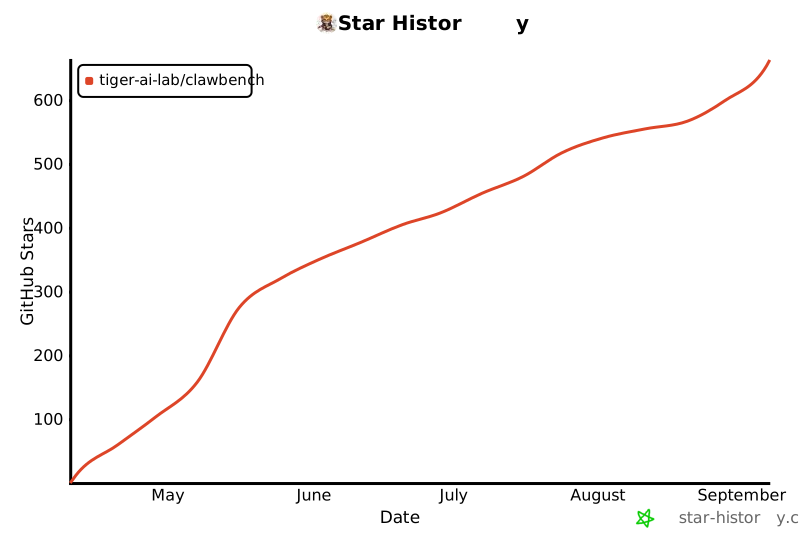
If ClawBench is useful for your research or product work, the single most helpful thing you can do is star the repo — it surfaces the benchmark to other AI-agent researchers and helps us justify continued dataset curation.

Open to contributions — new test cases, bug fixes, or evaluation submissions for a model we haven't scored yet. See CONTRIBUTING.md.

Star History
Star History
License & Acknowledgments
Apache 2.0 -- see LICENSE.
The converted Claw-Eval suite in test-cases/claw-eval/ is derived from claw-eval/claw-eval and the claw-eval/Claw-Eval dataset, which are released under the MIT License. Third-party package notices are in NOTICE.
Built with OpenClaw, opencode, Claude Code, the Claude in Chrome extension, OpenAI Codex CLI, browser-use, claw-code, Hermes Agent, Pi with pi-browser-harness, and WebBrain (selectable harnesses), Microsoft Playwright MCP (browser control bridge for the opencode, claude-code, codex, and claw-code harnesses), LiteLLM (API translation proxy for the claude-code, claude-code-chrome-extension, codex, browser-use, claw-code, and pi harnesses), noVNC (MPL 2.0), and websockify (LGPL 3.0).


Release files for clawbench-eval 0.11.0
For a detailed explanation of source distributions (sdists) and built distributions (wheels), please see the package formats documentation.
Source distribution (sdist)
| File | Size | Uploaded | |
|---|---|---|---|
| clawbench_eval-0.11.0.tar.gz | 2.8 MB | Details |
Built distribution (wheel)
| File | Interpreter | ABI | Platform | Reset |
|---|---|---|---|---|
| clawbench_eval-0.11.0-py3-none-any.whl | Python 3 | none | any | Details |
Total release size: 5.9 MB
Release files / clawbench_eval-0.11.0.tar.gz
| Download URL | clawbench_eval-0.11.0.tar.gz |
|---|---|
| Size | 2.8 MB |
| Tags | Source |
|
SHA-256 checksum How to use checksums |
b913afbe314c4f2cf3dae4224ccd89c186787d0e601199dce0774c4b34941633
|
|
BLAKE2b-256 checksum How to use checksums |
77788a62adb67568a18e9f5ec7a29183b60640a03192742504282cdbb19af923
|
| Upload date | |
|
Uploaded using Trusted Publishing? What is trusted publishing? |
Yes |
| Uploaded via |
twine/7.0.0 CPython/3.13.14
|
Provenance
Provenance describes where a file came from. On PyPI, provenance is shared via attestations, which provide a verifiable record of the build or publishing details. View details, limitations and caveats.


PyPI Publish Attestation
PyPI verified that this artifact, at this checksum, originated from the publisher listed below.
Signed by GitHub Actions, verified by PyPI on Oct 5, 2026.
Transparency logRelease files / clawbench_eval-0.11.0-py3-none-any.whl
| Download URL | clawbench_eval-0.11.0-py3-none-any.whl |
|---|---|
| Size | 3.1 MB |
| Tags | Python 3 |
|
SHA-256 checksum How to use checksums |
8b540bf8e47832aeac3f8811da9428a9f5e421e5d4f01d37f2eebebecc7942e4
|
|
BLAKE2b-256 checksum How to use checksums |
f88941cdbf712144e3e748a7cba0be2120d02f5c2ad0087d3fe0a616d4b36545
|
| Upload date | |
|
Uploaded using Trusted Publishing? What is trusted publishing? |
Yes |
| Uploaded via |
twine/7.0.0 CPython/3.13.14
|
Provenance
Provenance describes where a file came from. On PyPI, provenance is shared via attestations, which provide a verifiable record of the build or publishing details. View details, limitations and caveats.
PyPI Publish Attestation
PyPI verified that this artifact, at this checksum, originated from the publisher listed below.
Signed by GitHub Actions, verified by PyPI on Oct 5, 2026.
Transparency log













