
ClawMetry - Real-time observability dashboard for OpenClaw AI agents

Project description
🦞 ClawMetry


See your agent think. The Grafana for your personal AI agent.
Real-time observability dashboard for OpenClaw AI agents. One file. Zero config. Just run it.
Previously published as
openclaw-dashboard- same project, better name.
🎬 Demo
🌟 Star this repo if you find it useful!
⚡ Quick Start (30 seconds)
pip install clawmetry
clawmetry
🎉 Opens at http://localhost:8900 - auto-detects your OpenClaw workspace.
Alternative: run from source
curl -O https://raw.githubusercontent.com/vivekchand/clawmetry/main/dashboard.py
pip install flask
python3 dashboard.py
📸 Screenshots
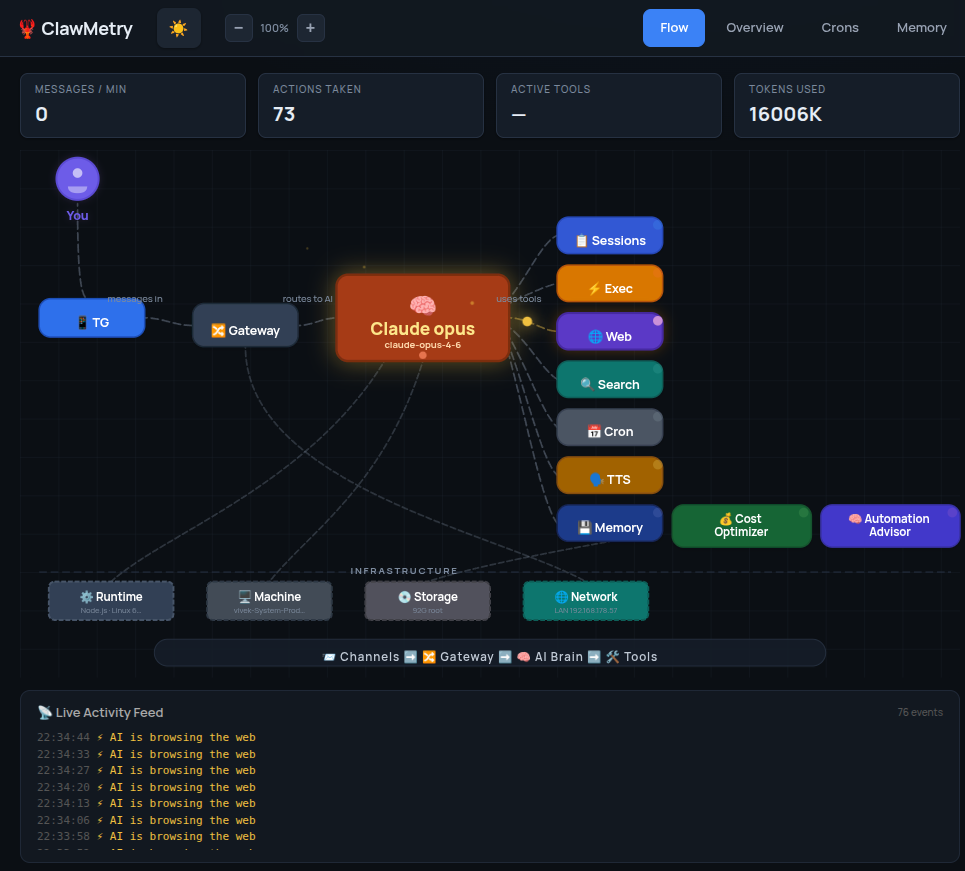
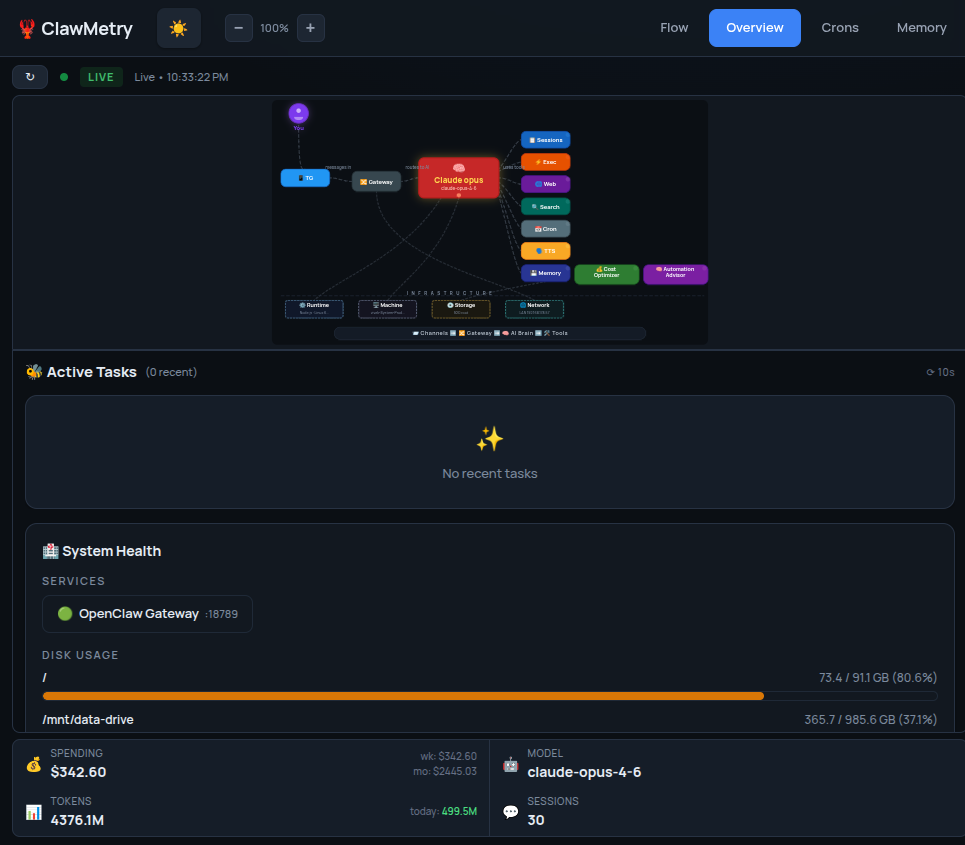
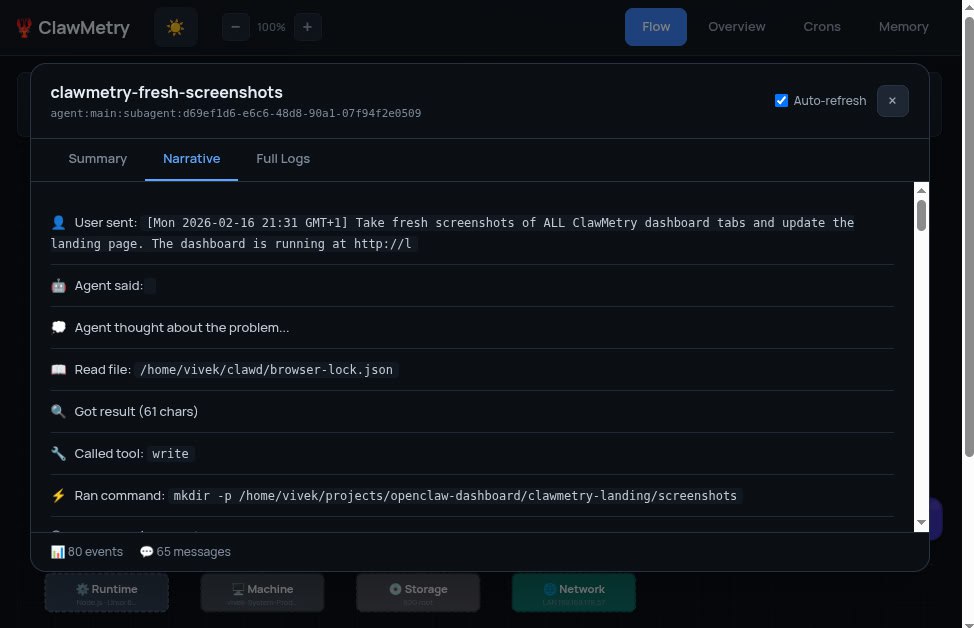
| Flow | Overview | Sub-Agent |
|---|---|---|
 |
 |
 |
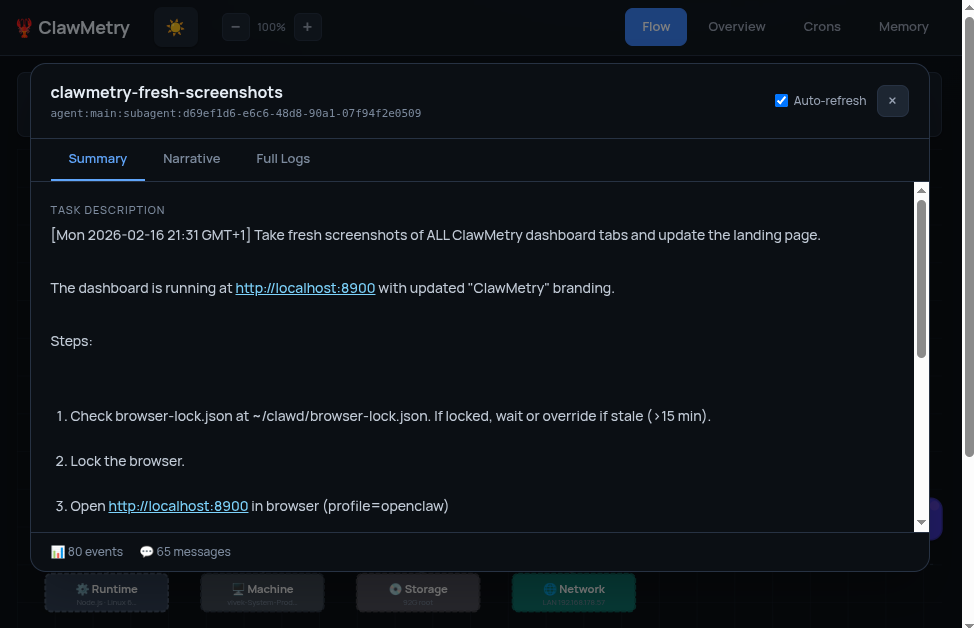
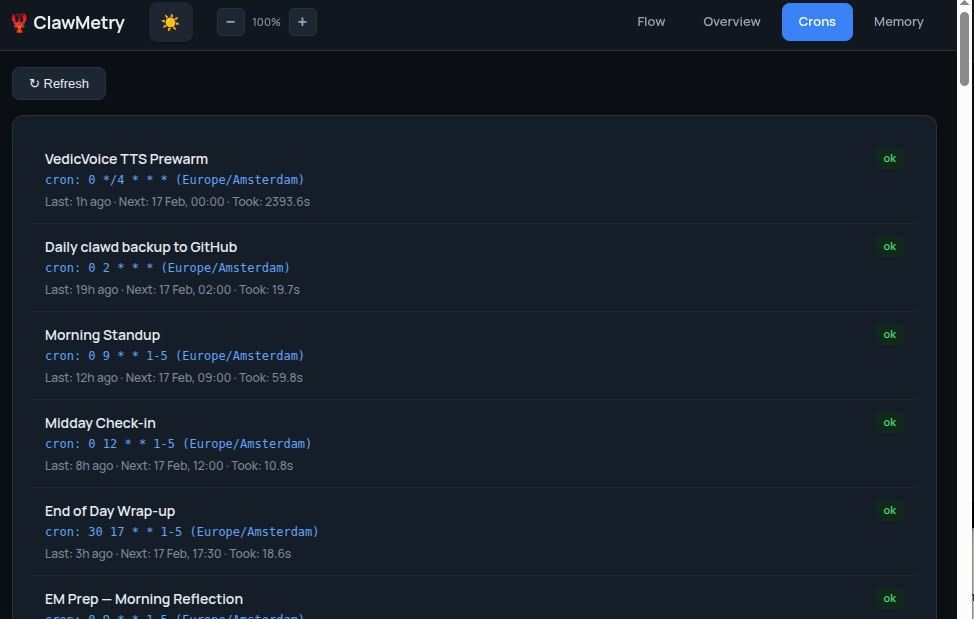
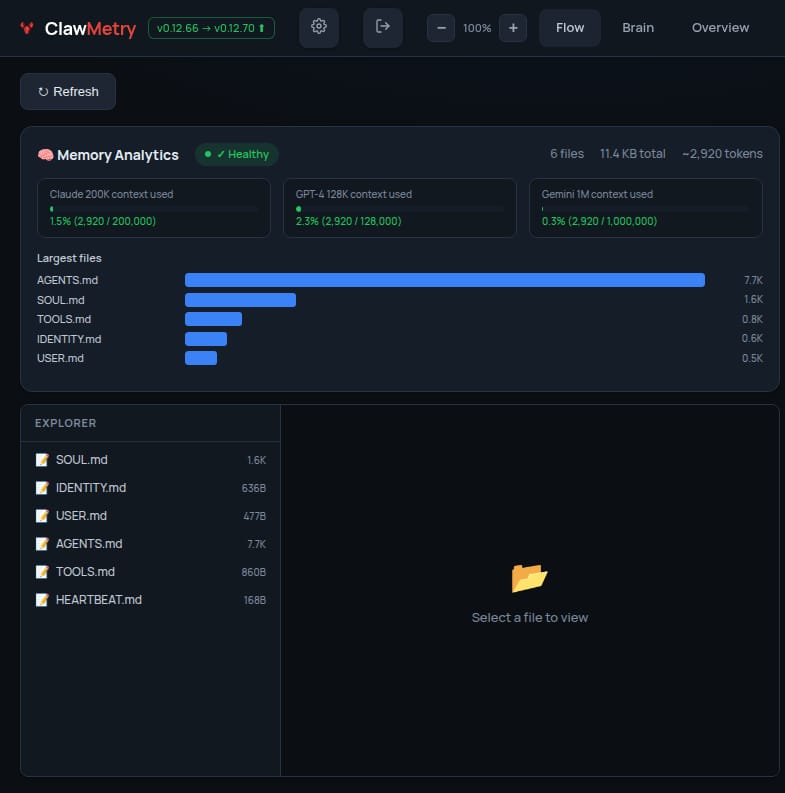
| Summary | Crons | Memory |
|---|---|---|
 |
 |
 |
✨ Features
| Tab | What it shows |
|---|---|
| 🌊 Flow | Real-time animated SVG - data flow from You → Channels → Gateway → Brain → Tools → Infrastructure |
| Overview | Model, sessions, crons, tokens, memory, ❤️ health checks (auto-refresh via SSE), 🔥 activity heatmap (GitHub-style) |
| 📊 Usage | Token/cost tracking - bar charts, daily/weekly/monthly totals, model breakdown. With OTLP: real token counts & actual cost |
| Sessions | Active agent sessions with model, channel, token usage, last activity |
| Crons | Scheduled jobs with status, schedule, last/next run, duration |
| Logs | Color-coded JSON logs with real-time SSE streaming |
| Memory | Clickable file browser for SOUL.md, MEMORY.md, AGENTS.md, daily notes |
| 📜 Transcripts | Session transcript viewer - chat-bubble UI with color-coded roles |
🌊 Flow Visualization
The star feature - a live animated architecture diagram that lights up as your agent processes messages:
- 🟣 Purple - your message entering through a channel
- 🔵 Blue - request flowing to the brain
- 🟡 Yellow - tool calls (exec, browser, search, cron, tts, memory)
- 🟢 Green - response flowing back
- 🔴 Red - errors
- 🔵 Cyan - infrastructure activity
📡 Built-in OpenTelemetry Collector
No Grafana or Prometheus needed. Point OpenClaw at the dashboard:
diagnostics:
  otel:
    endpoint: http://localhost:8900
Install OTLP support: pip install clawmetry[otel]
🤔 Why ClawMetry?
| ClawMetry | Langfuse | AgentOps | |
|---|---|---|---|
| Install | pip install clawmetry |
Docker + Postgres | SDK + cloud account |
| Config | Zero. Auto-detects everything. | Database URLs, API keys | API keys, SDK init |
| Focus | Personal AI agent | Enterprise LLM apps | Enterprise agent monitoring |
| Memory browser | ✅ SOUL.md, MEMORY.md, daily notes | ❌ | ❌ |
| Single file | ✅ One Python file | ❌ Multi-service | ❌ Cloud service |
| Built-in OTel | ✅ OTLP/HTTP receiver | ❌ | ❌ |
⚙️ Configuration
CLI
clawmetry --port 9000              # Custom port (default: 8900)
clawmetry --host 127.0.0.1         # Bind to localhost only
clawmetry --workspace ~/mybot      # Custom workspace path
clawmetry --log-dir /var/log       # Custom log directory
clawmetry --sessions-dir ~/data    # Custom sessions directory
clawmetry --metrics-file ~/m.json  # Custom metrics persistence path
clawmetry --name "Alice"           # Your name in Flow visualization
clawmetry --no-debug               # Disable auto-reload
Environment Variables
| Variable | Description | Default |
|---|---|---|
OPENCLAW_HOME |
Agent workspace directory | Auto-detected |
OPENCLAW_WORKSPACE |
Alternative to OPENCLAW_HOME | Auto-detected |
OPENCLAW_SESSIONS_DIR |
Sessions directory (.jsonl transcripts) | Auto-detected |
OPENCLAW_LOG_DIR |
Log directory | /tmp/moltbot |
OPENCLAW_METRICS_FILE |
Metrics persistence file path | {workspace}/.clawmetry-metrics.json |
OPENCLAW_USER |
Your name in Flow tab | You |
OPENCLAW_SSE_MAX_SECONDS |
Max duration per SSE stream | 300 |
Auto-Detection
No config needed - the dashboard searches for your workspace, logs, sessions, and crons automatically.
📦 Installation
pip (recommended)
pip install clawmetry
clawmetry
From source
git clone https://github.com/vivekchand/clawmetry.git
cd clawmetry
pip install -r requirements.txt
python3 dashboard.py
One-liner
curl -sSL https://raw.githubusercontent.com/vivekchand/clawmetry/main/install.sh | bash
🔧 Requirements
- Python 3.8+
- Flask (only required dependency)
- opentelemetry-proto + protobuf (optional -
pip install clawmetry[otel]) - OpenClaw/Moltbot running on the same machine
- Linux/macOS
☁️ Cloud Deployment
See the Cloud Testing Guide for SSH tunnels, reverse proxy, Docker, and OTLP-only mode.
📄 License
MIT
🦞 See your agent think
Built by @vivekchand · LinkedIn · Part of the OpenClaw ecosystem
Release history Release notifications | RSS feed


Download files
Download the file for your platform. If you're not sure which to choose, learn more about installing packages.
Source Distribution
Built Distribution
Filter files by name, interpreter, ABI, and platform.
If you're not sure about the file name format, learn more about wheel file names.
Copy a direct link to the current filters
File details
Details for the file clawmetry-0.8.3.tar.gz.
File metadata
- Download URL: clawmetry-0.8.3.tar.gz
- Upload date:
- Size: 105.8 kB
- Tags: Source
- Uploaded using Trusted Publishing? No
- Uploaded via: twine/6.2.0 CPython/3.10.12
File hashes
| Algorithm | Hash digest | |
|---|---|---|
| SHA256 |
cac85ed7658aab281c677cb1b43844a3c184d1509d4eda6225e9c711c5409ace
|
|
| MD5 |
b19de3f87168b83133633b6ea67715f7
|
|
| BLAKE2b-256 |
6f1bf22091370a65451e551a5e3c6eb8a9cd9078390ac7d14dca7b10ffe7b2d2
|
File details
Details for the file clawmetry-0.8.3-py3-none-any.whl.
File metadata
- Download URL: clawmetry-0.8.3-py3-none-any.whl
- Upload date:
- Size: 106.6 kB
- Tags: Python 3
- Uploaded using Trusted Publishing? No
- Uploaded via: twine/6.2.0 CPython/3.10.12
File hashes
| Algorithm | Hash digest | |
|---|---|---|
| SHA256 |
80261df757704961caea41bc320aecd6917615614f8aa3356685fafebd6fe878
|
|
| MD5 |
c7b2c46f433319c8917121a880065c63
|
|
| BLAKE2b-256 |
a411c5d55b36622c98ce2795fe37d974ccbcfae008427204b7f6edc2032e8150
|






