
clean_loop_timer
Easy-to-use timer for profiling complex loops in dataset generation and neural network training
Installing
Install:
pip install clean_loop_timer
Usage
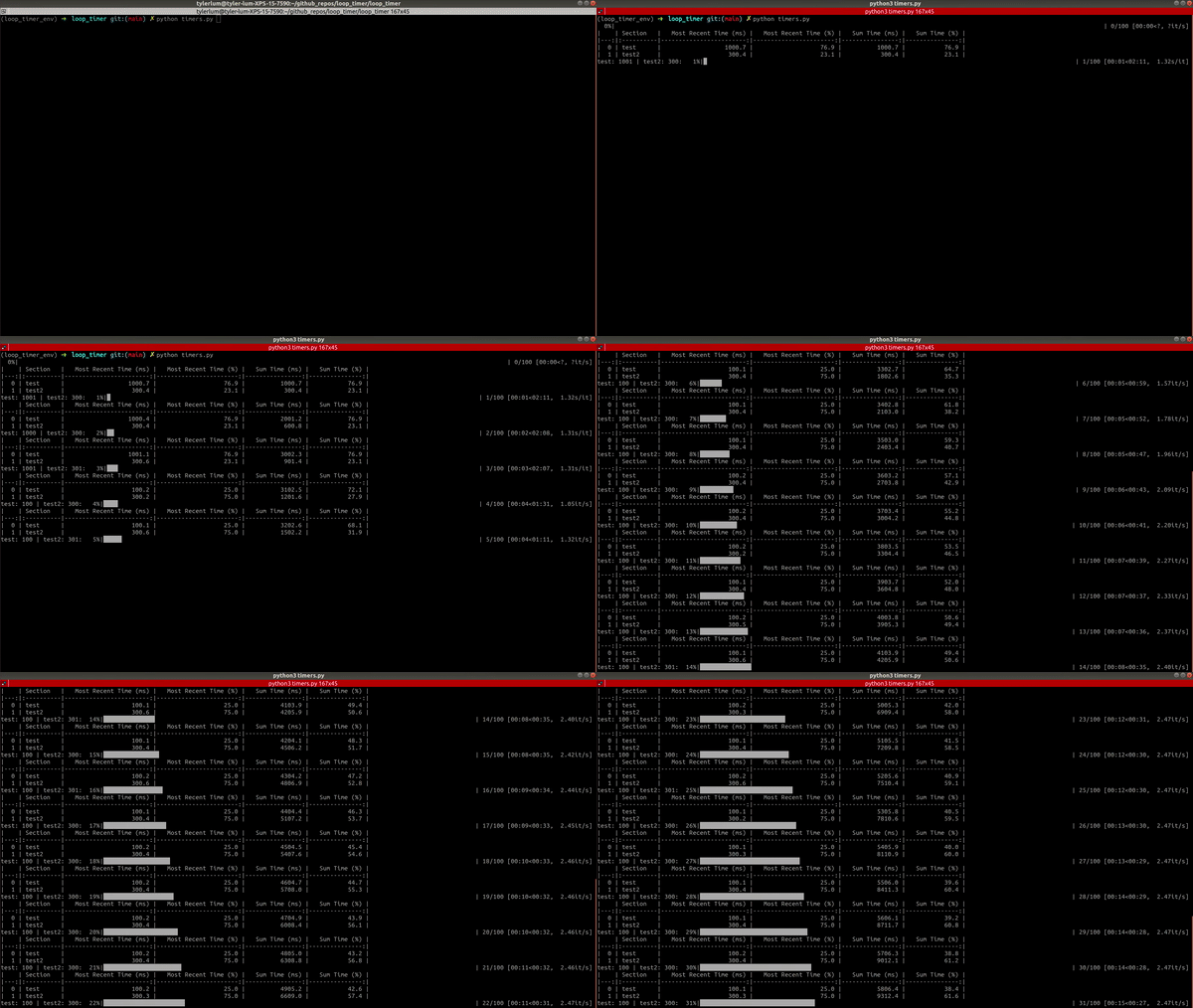
In this library, we have SectionTimer and LoopTimer. SectionTimer measures the time it takes to run a section of code using a with statement. LoopTimer uses multiple SectionTimer objects to measure multiple sections within a loop, aggregates the results, and prints out the results in a useful format. In particular, it prints out the timing both in absolute time and fraction of the total time. It also prints out both the time to run the section of code in the most recent loop, as well as aggregates the timing of the same section over multiple loops. This is very useful for situations in which a section of code is very slow on first run but is cached in subsequent runs, so we want to see both the most recent time and the aggregated time.
Example:
python timers.py
Full example:
import time

from clean_loop_timer import LoopTimer

loop_timer = LoopTimer()
for i in range(100):
    with loop_timer.add_section_timer("test"):
        if i < 3:
            time.sleep(1.0)
        else:
            time.sleep(0.1)

    with loop_timer.add_section_timer("test2"):
        time.sleep(0.3)

    loop_timer.pretty_print_section_times()
Full example with global loop timer:
import time

from clean_loop_timer import get_loop_timer_instance

for i in range(100):
    with get_loop_timer_instance().add_section_timer("test"):
        if i < 3:
            time.sleep(1.0)
        else:
            time.sleep(0.1)

    with get_loop_timer_instance().add_section_timer("test2"):
        time.sleep(0.3)

    get_loop_timer_instance().pretty_print_section_times()
Example output:
|    | Section   |   Most Recent Time (ms) |   Most Recent Time (%) |   Sum Time (ms) |   Sum Time (%) |
|---:|:----------|------------------------:|-----------------------:|----------------:|---------------:|
|  0 | test      |                  1001.1 |                   76.9 |          1001.1 |           76.9 |
|  1 | test2     |                   300.4 |                   23.1 |           300.4 |           23.1 |
|    | Section   |   Most Recent Time (ms) |   Most Recent Time (%) |   Sum Time (ms) |   Sum Time (%) |
|---:|:----------|------------------------:|-----------------------:|----------------:|---------------:|
|  0 | test      |                  1001.1 |                   76.9 |          2002.2 |           76.9 |
|  1 | test2     |                   300.4 |                   23.1 |           600.8 |           23.1 |
|    | Section   |   Most Recent Time (ms) |   Most Recent Time (%) |   Sum Time (ms) |   Sum Time (%) |
|---:|:----------|------------------------:|-----------------------:|----------------:|---------------:|
|  0 | test      |                  1000.4 |                   76.9 |          3002.6 |           76.9 |
|  1 | test2     |                   300.4 |                   23.1 |           901.2 |           23.1 |
|    | Section   |   Most Recent Time (ms) |   Most Recent Time (%) |   Sum Time (ms) |   Sum Time (%) |
|---:|:----------|------------------------:|-----------------------:|----------------:|---------------:|
|  0 | test      |                   100.2 |                   25.0 |          3102.8 |           72.1 |
|  1 | test2     |                   300.4 |                   75.0 |          1201.6 |           27.9 |
|    | Section   |   Most Recent Time (ms) |   Most Recent Time (%) |   Sum Time (ms) |   Sum Time (%) |
|---:|:----------|------------------------:|-----------------------:|----------------:|---------------:|
|  0 | test      |                   100.2 |                   25.0 |          3202.9 |           68.1 |
|  1 | test2     |                   300.4 |                   75.0 |          1502.0 |           31.9 |
|    | Section   |   Most Recent Time (ms) |   Most Recent Time (%) |   Sum Time (ms) |   Sum Time (%) |
|---:|:----------|------------------------:|-----------------------:|----------------:|---------------:|
|  0 | test      |                   100.2 |                   25.0 |          3303.1 |           64.7 |
|  1 | test2     |                   300.4 |                   75.0 |          1802.4 |           35.3 |
|    | Section   |   Most Recent Time (ms) |   Most Recent Time (%) |   Sum Time (ms) |   Sum Time (%) |
|---:|:----------|------------------------:|-----------------------:|----------------:|---------------:|
|  0 | test      |                   100.2 |                   25.0 |          3403.3 |           61.8 |
|  1 | test2     |                   300.4 |                   75.0 |          2102.8 |           38.2 |
|    | Section   |   Most Recent Time (ms) |   Most Recent Time (%) |   Sum Time (ms) |   Sum Time (%) |
|---:|:----------|------------------------:|-----------------------:|----------------:|---------------:|
|  0 | test      |                   100.2 |                   25.0 |          3503.5 |           59.3 |
|  1 | test2     |                   300.3 |                   75.0 |          2403.1 |           40.7 |
Improvements Over Alternatives
Alterative 1: Manually adding timing code
We could produce similar behavior by adding start_time = time.time() and end_time = time.time() around the relevant section, and print(f"<section name> took {(end_time - start_time) * 1000} ms") afterwards. This is how I used to profile code, but this has issues:
-
There will be many lines of code dedicated to these new variables and prints, which can make it hard to read the code
-
When timing multple sections of code, we often need to either use new variable names for each timing or do the print before the next timing. Both of these solutions are not great because it is easy to make a mistake with variable names or the prints will be scattered
-
This method does not aggregate across loops. Even more variables would be needed to aggregate each sections times and print them.
Alternative 2: Other timing libraries
Most other timing libraries either require the section of code to be measured to be put in a function (can take time to do this and is error prone since it requires a lot of code change) or is not flexible (can't control frequency of prints, prints right away on completion of each section, no aggregation)
Notes
-
TODO: Add in something like
get_instance()function so that all the code can share a singleLoopTimerinstance so that we don't need to pass around aloop_timervariable all over the place -
In many neural network training situations, the data loading is an important part of the training that needs to be profiled. However, this is not done in an explicit section, so it cannot be easily wrapped in a
withstatement. Below is an example of how to handle this.
Complex Example
Original data load code:
for batch_idx, batch_data in tqdm(enumerate(dataloader), total=len(dataloader)):
    # Forward pass
    output = model(batch_data.input)

    # Loss
    loss = loss_fn(output, batch_data.output)

    # Backward pass
    optimizer.zero_grad()
    loss.backward()
    optimizer.step()

    # Log
    wandb.log({"loss": loss.item()})
Manual profiling (ugly)
total_time_aggregate = 0
data_time_aggregate = 0
forward_time_aggregate = 0
loss_time_aggregate = 0
backward_time_aggregate = 0
log_time_aggregate = 0

t0 = time.time()
for batch_idx, batch_data in tqdm(enumerate(dataloader), total=len(dataloader)):
    t1 = time.time()

    # Forward pass
    output = model(batch_data.input)
    t2 = time.time()

    # Loss
    loss = loss_fn(output, batch_data.output)
    t3 = time.time()

    # Backward pass
    optimizer.zero_grad()
    loss.backward()
    optimizer.step()
    t4 = time.time()

    # Log
    wandb.log({"loss": loss.item()})
    t5 = time.time()

    total_time = t5 - t0
    data_time = t1 - t0
    forward_time = t2 - t1
    loss_time = t3 - t2
    backward_time = t4 - t3
    log_time = t5 - t4
    total_time_aggregate += total_time
    data_time_aggregate += data_time
    forward_time_aggregate += forward_time
    loss_time_aggregate += loss_time
    backward_time_aggregate += backward_time
    log_time_aggregate += log_time
    print("MOST RECENT")
    print(f"Total: {total_time:.2f} | ")
    print(f"Data: {data_time:.2f} {data_time / total_time * 100:.2f}%")
    print(f"Forward: {forward_time:.2f} {forward_time / total_time * 100:.2f}%")
    print(f"Loss: {loss_time:.2f} {loss_time / total_time * 100:.2f}%")
    print(f"Backward: {backward_time:.2f} {backward_time / total_time * 100:.2f}%")
    print(f"Log: {log_time:.2f} {log_time / total_time * 100:.2f}%")
    print()
    print("AGGREGATE")
    print(f"Total: {total_time_aggregate:.2f} | ")
    print(f"Data: {data_time_aggregate:.2f} {data_time_aggregate / total_time_aggregate * 100:.2f}%")
    print(f"Forward: {forward_time_aggregate:.2f} {forward_time_aggregate / total_time_aggregate * 100:.2f}%")
    print(f"Loss: {loss_time_aggregate:.2f} {loss_time_aggregate / total_time_aggregate * 100:.2f}%")
    print(f"Backward: {backward_time_aggregate:.2f} {backward_time_aggregate / total_time_aggregate * 100:.2f}%")
    print(f"Log: {log_time_aggregate:.2f} {log_time_aggregate / total_time_aggregate * 100:.2f}%")
    print()
    print()
    t0 = time.time()
Loop timer profiling (nice)
loop_timer = LoopTimer()

dataload_section_timer = loop_timer.add_section_timer("Data").start()  # Workaround for dataload

for batch_idx, batch_data in tqdm(enumerate(dataloader), total=len(dataloader)):
    dataload_section_timer.stop()

    with loop_timer.add_section_timer("Forward"):
        output = model(batch_data.input)

    with loop_timer.add_section_timer("Loss"):
        loss = loss_fn(output, batch_data.output)

    with loop_timer.add_section_timer("Backward"):
        optimizer.zero_grad()
        loss.backward()
        optimizer.step()

    with loop_timer.add_section_timer("Log"):
        wandb.log({"loss": loss.item()})

    loop_timer.pretty_print_section_times()

    if batch_idx < len(dataloader) - 1:  # Avoid starting timer at end of last batch
        dataload_section_timer = loop_timer.add_section_timer("Data").start()
Note how the manual timing results in many error-prone variables and messy print statements, but the loop timer results in clean uses of with statements that act as section comments.
1 maintainer

Metadata
1 maintainer
Release files for clean-loop-timer 0.2.0
For a detailed explanation of source distributions (sdists) and built distributions (wheels), please see the package formats documentation.
Source distribution (sdist)
| File | Size | Uploaded | Provenance | |
|---|---|---|---|---|
| clean_loop_timer-0.2.0.tar.gz | 5.7 kB | Without provenance | Details |
Built distribution (wheel)
| File | Interpreter | ABI | Platform | Reset |
|---|---|---|---|---|
| clean_loop_timer-0.2.0-py3-none-any.whl | Python 3 | none | any | Details |
Total release size: 11.9 kB
Release files / clean_loop_timer-0.2.0.tar.gz
| Download URL | clean_loop_timer-0.2.0.tar.gz |
|---|---|
| Size | 5.7 kB |
| Tags | Source |
|
SHA-256 checksum How to use checksums |
18ac624e40c8a4dd90516af098c2ddd077e7a94debccec9c1a74b64667f77fa6
|
|
BLAKE2b-256 checksum How to use checksums |
74ef5aae4ac513b70ff8ab88293637cbc5faf9201aedc9924f1a65eecdfc0ffb
|
| Upload date | |
|
Uploaded using Trusted Publishing? What is trusted publishing? |
No |
| Uploaded via |
twine/4.0.2 CPython/3.7.12
|
Release files / clean_loop_timer-0.2.0-py3-none-any.whl
| Download URL | clean_loop_timer-0.2.0-py3-none-any.whl |
|---|---|
| Size | 6.2 kB |
| Tags | Python 3 |
|
SHA-256 checksum How to use checksums |
0aec7f05c30da54c5e645bdb0b3aefd4cc96c3ff531ced60b04ee0daa21adbd1
|
|
BLAKE2b-256 checksum How to use checksums |
272db9958d4ae2f233a56e0f6fd0547bad16f22b5b9e641dd708df83545556c6
|
| Upload date | |
|
Uploaded using Trusted Publishing? What is trusted publishing? |
No |
| Uploaded via |
twine/4.0.2 CPython/3.7.12
|
Security for clean-loop-timer 0.2.0
Provenance
Provenance describes where a file came from. On PyPI, provenance is shared via attestations, which provide a verifiable record of the build or publishing details. View details, limitations and caveats.
No provenance found
None of the files in this release were uploaded with provenance metadata.
A note on package security
PyPI is a repository for distributing packages, not a service for auditing them. While third-party security researchers and our staff do their best to detect and remove malicious packages, PyPI cannot guarantee the quality, security or suitability of any given package.
To learn more about protecting yourself from malicious actors, visit our package security documentation.














