
An open-source multi-purpose de-identification library with special support for healthcare applications. Provides robust tools to de-identify multi-table, multimodal datasets while maintaining clinical integrity and research utility.

Project description
Cleared

Share data for scientific research confidently.
🩺 Overview
Cleared is an open-source multi-purpose de-identification library with special support for healthcare applications. It provides robust tools to de-identify multi-table, multimodal datasets while maintaining clinical integrity and research utility.
- Support for multiple identifiers (SSN, Encounter Id, MRN, FIN, etc) in the same tables
- Time-field de-identification
- Patient-aware deidentification across multiple encounters (visits)
- Date and time de-identification both at column-level and row value level.
- Support for time-series data such as multi-variate sparsely sampled data types and high-frequencyt waveforms
- Predefined configurations for standard schemas such as OMOP CDM.
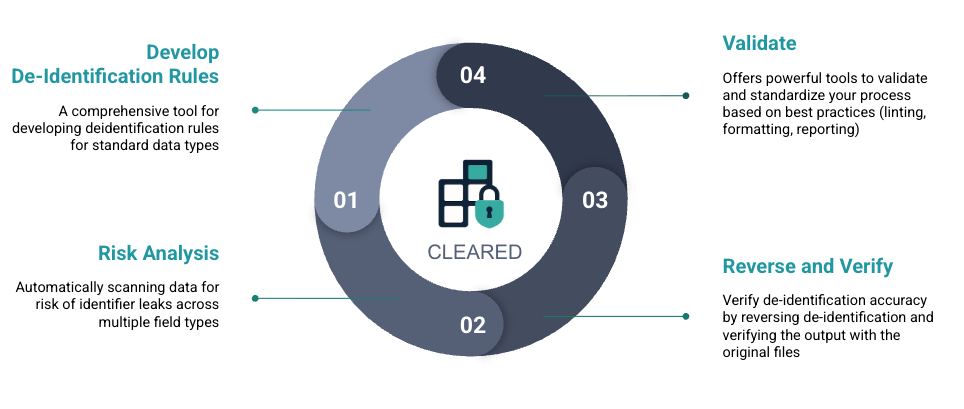
🧩 Features
| Feature | Description |
|---|---|
| ✅ Multi-table Support | Consistent ID mapping across EHR tables (e.g. patients, encounters, labs) |
| ✅ Multi-ID Support | Consistent ID mapping across multiple identifiers |
| ⏳ Data Risk Analysis and Reporting | Analyzes datasets for possible identfier risk and providers comprehensive report to verify de-id plans and configurations |
| ✅ ID Grouping Support | Supports de-identification of group-level identifiers such as Patient/Person ID or MRN that will be common across multiple unique patient visits or encounters |
| ✅ Date & Time Shifting | De-identify temporal data while preserving clinical event intervals |
| ✅ Schema-aware Configs | Built-in support for HL7, OMOP, and FHIR-like schemas |
| ✅ Concept ID Filtering | Create deidentification rules in values based on concept_id filters |
| ✅ Conditional De-identification | Ability to only apply de-identification rules |
| ✅ Pseudonymization Engine | Deterministic, reversible pseudonyms for longitudinal tracking |
| ✅ Reverse De-identification | Restore original values from de-identified data using reference mappings |
| ✅ Verify De-identification | Verify that reversed data matches original data with comprehensive comparison and HTML reporting |
| ✅ Custom Transformers PLugins | Supports implementation of plugins for custom de-identification filters and methods |
| ✅ Healthcare-Ready Defaults | Includes mappings for demographics, identifiers, and care events |
| ✅ Configuration Reusability | Leverages the well-known hydra configuration yaml file to facilitate reusability of existing configs, partial configuration imoporting, configuration inheritencfe and customizations |
⚖️ Compliance
Cleared is designed to assist with developing de-identification pipelines to reach compliance under the following frameworks and standards:
- HIPAA (Safe Harbor & Expert Determination)
- GDPR (Anonymization & Pseudonymization)
- 21 CFR Part 11 (Audit Trails)
⚠️ Note: Cleared is a toolkit — not a certification engine.
Regulatory compliance remains user-dependent and must be validated within your organization’s governance and compliance framework.
📚 Programming And Commandline Interface
Cleared can be used in two ways: as a Python programming framework using its standard Python API, or through its powerful command-line interface (CLI). Both approaches provide full access to all de-identification capabilities.
Python API
Use Cleared programmatically in your Python code:
import cleared as clr
from cleared.cli.utils import load_config_from_file

# Load configuration
config = load_config_from_file("config.yaml")

# Create engine and run de-identification
engine = clr.ClearedEngine.from_config(config)
results = engine.run()
Command-Line Interface
Use Cleared from the terminal with powerful CLI commands:
# Run de-identification
cleared run config.yaml

# Generate configuration report
cleared describe config.yaml

# Test configuration with sample data
cleared test config.yaml --rows 50

# Verify de-identification results
cleared verify config.yaml ./reversed -o verify-results.json

# Generate HTML verification report
cleared report-verify verify-results.json -o verification-report.html
Visual HTML Reports
Cleared generates comprehensive HTML reports that make it easy to review configurations and verification results. These visual reports provide detailed insights into your de-identification pipeline:
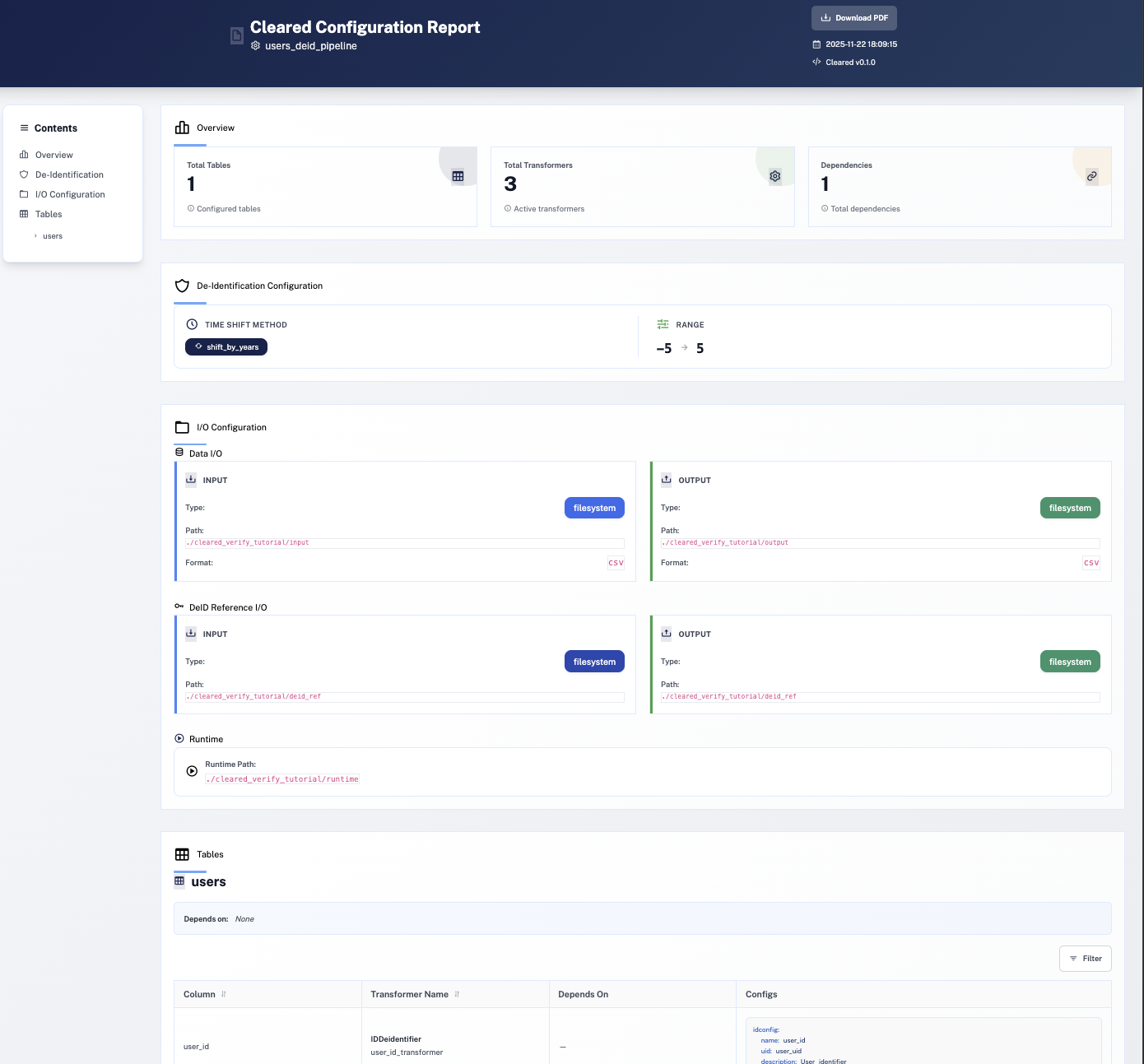
The HTML reports include:
- Configuration Reports - Visualize your entire de-identification setup with
cleared describe - Verification Reports - Review verification results with detailed comparison statistics
- Interactive Navigation - Easy-to-navigate sections for tables, transformers, and settings
📚 Documentation
Visit Documentation - Comprehensive Documentation
🛣 Roadmap
| Milestone | Status |
|---|---|
| Multi-table, Multi-id de-ID | ✅ Completed |
| Concept based filtering | ✅ Completed |
| OMOP schema defaults | ✅ Completed |
| Date/time & age shifting | ✅ Completed |
| LLM PHI scanner | ⏳ Planned |
| Audit Logs | ⏳ Planned |
| Synthetic patient generator | ⏳ Planned |
| Integration with MIMIC-IV & PhysioNet | ⏳ Planned |
| Support for waveform & image metadata | ⏳ Planned |
| Cloud-native deployment (GCP/AWS) | ⏳ Planned |
🤝 Contributing
We welcome contributions from healthcare AI developers, informaticians, and data engineers.
Please see CONTRIBUTING.md for contribution guidelines.
Areas you can help with:
- ⏳ Contribute to the planned features
- 🧩 Writing new transformers
- ⛁ Implementing storage type support for Postgres/MySQL/Iceberg/etc.
- 🧰 Adding new schema built-in supports for EPIC/Cerner/etc.
- 🤖 Integrating model-based PHI detectors
- 🧪 Improving testing infrastructure and synthetic data coverage
📜 License and Disclaimer
This project is licensed under the Apache License 2.0 with Commons Clause restriction.
The Software is provided under the Apache License 2.0, with an additional restriction that prohibits:
- Selling the Software (including licensing, distributing for a fee, or deriving commercial advantage)
- Offering the Software as a Service (SaaS) (including hosted, cloud, or web-based services where the Software is the primary function)
This restriction does not apply to:
- Internal use within your organization
- Research, educational, or non-commercial purposes
- Contributing modifications back to the Software
- Integrating the Software into commercial products where it's not the primary value proposition
For full license terms, see LICENSE. For commercial licensing options, please contact the copyright holder.
⚠️ Disclaimer: This library is provided "as is" without warranty of any kind. It is not a certified compliance tool. You are responsible for validating its use in regulated or clinical environments.
Read detailed disclaimers here
🌐 Links


Download files
Download the file for your platform. If you're not sure which to choose, learn more about installing packages.
Source Distribution
Built Distribution
Filter files by name, interpreter, ABI, and platform.
If you're not sure about the file name format, learn more about wheel file names.
Copy a direct link to the current filters
File details
Details for the file cleared-0.4.8.tar.gz.
File metadata
- Download URL: cleared-0.4.8.tar.gz
- Upload date:
- Size: 101.7 kB
- Tags: Source
- Uploaded using Trusted Publishing? No
- Uploaded via: twine/6.2.0 CPython/3.11.14
File hashes
| Algorithm | Hash digest | |
|---|---|---|
| SHA256 |
470d1e3ce0dbd6029c73d10cf970d5cc076bd7a0c560bc883f98b0d17f6991e4
|
|
| MD5 |
363442efaee16784cc0dd5c2428e57b4
|
|
| BLAKE2b-256 |
f467a528252114e58f16ac733a0425126610c849b5ffaf6233dfbc07e378863a
|
File details
Details for the file cleared-0.4.8-py3-none-any.whl.
File metadata
- Download URL: cleared-0.4.8-py3-none-any.whl
- Upload date:
- Size: 128.1 kB
- Tags: Python 3
- Uploaded using Trusted Publishing? No
- Uploaded via: twine/6.2.0 CPython/3.11.14
File hashes
| Algorithm | Hash digest | |
|---|---|---|
| SHA256 |
60fb1cd5629add427c3b39d111fef1ef2198fdc3335b19ea85120bca4f01150c
|
|
| MD5 |
965aba47bdd16f6db2274fc10cc5151f
|
|
| BLAKE2b-256 |
969fb617375fab36aec7adf80f6ae083cc4c07822b226dd139edf2842787da7b
|






