
clearml-serving - Model-Serving Orchestration and Repository Solution


Project description

ClearML Serving - ML-Ops made easy
clearml-serving
Model-Serving Orchestration and Repository Solution





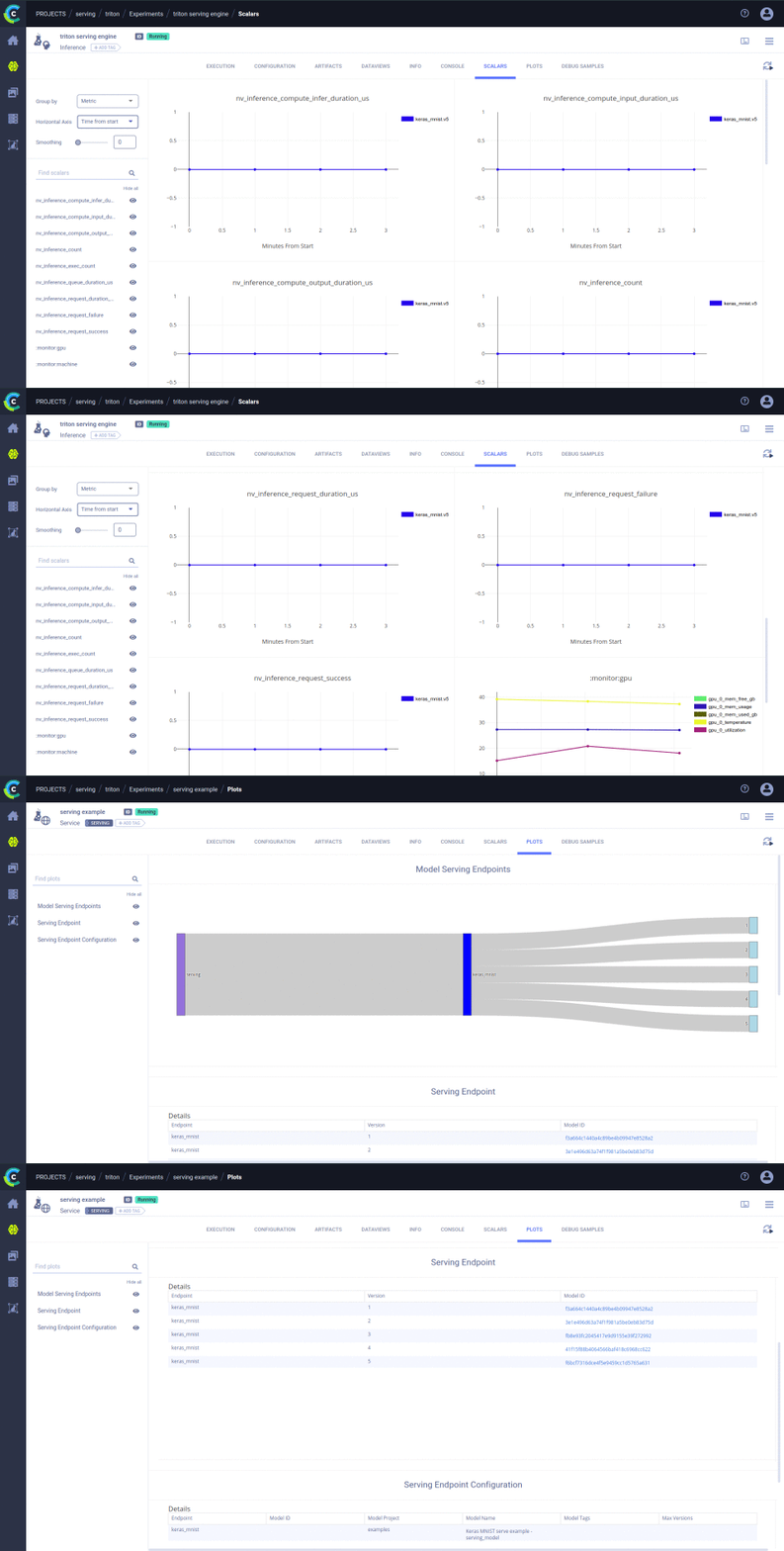
clearml-serving is a command line utility for the flexible orchestration of your model deployment.
clearml-serving can make use of a variety of serving engines (Nvidia Triton, OpenVino Model Serving, KFServing)
setting them up for serving wherever you designate a ClearML Agent or on your ClearML Kubernetes cluster
Features:
- Spin serving engines on your Kubernetes cluster or ClearML Agent machine from CLI
- Full usage & performance metrics integrated with ClearML UI
- Multi-model support in a single serving engine container
- Automatically deploy new model versions
- Support Canary model releases
- Integrates to ClearML Model Repository
- Deploy & upgrade endpoints directly from ClearML UI
- Programmatic interface for endpoint/versions/metric control
Installing ClearML Serving
- Setup your ClearML Server or use the Free tier Hosting
- Connect your ClearML Worker(s) to your ClearML Server (see ClearML Agent / Kubernetes integration)
- Install
clearml-serving(Note:clearml-servingis merely a control utility, it does not require any resources for actual serving)
pip install clearml-serving
Using ClearML Serving
Clearml-Serving will automatically serve published models from your ClearML model repository, so the first step is getting a model into your ClearML model repository.
Background: When using clearml in your training code, any model stored by your python code is automatically registered (and, optionally, uploaded) to the model repository. This auto-magic logging is key for continuous model deployment.
To learn more on training models and the ClearML model repository, see the ClearML documentation
Training a toy model with Keras (about 2 minutes on a laptop)
The main goal of clearml-serving is to seamlessly integrate with the development process and the model repository.
This is achieved by combining ClearML's auto-magic logging which creates and uploads models directly from
the python training code, with accessing these models as they are automatically added into the model repository using the ClearML Server's REST API and its pythonic interface.
Let's demonstrate this seamless integration by training a toy Keras model to classify images based on the MNIST dataset.
Once we have a trained model in the model repository we will serve it using clearml-serving.
We'll also see how we can retrain another version of the model, and have the model serving engine automatically upgrade to the new model version.
Keras mnist toy train example (single epoch mock training):
-
install
tensorflow(and of coursecleamrl)pip install "tensorflow>2" clearml
-
Execute the training code
cd examples/keras
python keras_mnist.py
Notice: The only required integration code with
clearmlare the following two lines:from clearml import Task task = Task.init(project_name="examples", task_name="Keras MNIST serve example", output_uri=True)
This call will make sure all outputs are automatically logged to the ClearML Server, this includes: console, Tensorboard, cmdline arguments, git repo etc.
It also means any model stored by the code will be automatically uploaded and logged in the ClearML model repository. -
Review the models in the ClearML web UI:
Go to the "Projects" section of your ClearML server (free hosted or self-deployed).
in the "examples" project, go to the Models tab (model repository).
We should have a model named "Keras MNIST serve example - serving_model".
Once a model-serving service is available, Right-clicking on the model and selecting "Publish" will trigger upgrading the model on the serving engine container.
Next we will spin the Serving Service and the serving-engine
Serving your models
In order to serve your models, clearml-serving will spawn a serving service which stores multiple endpoints and their configuration,
collects metric reports, and updates models when new versions are published in the model repository.
In addition, a serving engine is launched, which is the container actually running the inference engine.
(Currently supported engines are Nvidia-Triton, coming soon are Intel OpenVIno serving-engine and KFServing)
Now that we have a published model in the ClearML model repository, we can spin a serving service and a serving engine.
Starting a Serving Service:
- Create a new serving instance.
This is the control plane Task, we will see all its configuration logs and metrics in the "serving" project. We can have multiple serving services running in the same system.
In this example we will make use of Nvidia-Triton engines.
clearml-serving triton --project "serving" --name "serving example"
- Add models to the serving engine with specific endpoints.
Reminder: to view your model repository, login to your ClearML account, go to "examples" project and review the "Models" Tab
clearml-serving triton --endpoint "keras_mnist" --model-project "examples" --model-name "Keras MNIST serve example - serving_model"
- Launch the serving service.
The service will be launched on your "services" queue, which by default runs services on the ClearML server machine.
(Read more on services queue here)
We set our serving-engine to launch on the "default" queue,
clearml-serving launch --queue default
- Optional: If you do not have a machine connected to your ClearML cluster, either read more on our Kubernetes integration, or spin a bare-metal worker and connect it with your ClearML Server.
clearml-servingis leveraging the orchestration capabilities ofClearMLto launch the serving engine on the cluster.
Read more on the ClearML Agent orchestration module here
If you have not yet setup a ClearML worker connected to yourclearmlaccount, you can do this now using:pip install clearml-agent clearml-agent daemon --docker --queue default --detached
We are done!
To test the new served model, you can curl to the new endpoint:
curl <serving-engine-ip>:8000/v2/models/keras_mnist/versions/1
Notice: If we re-run our keras training example and publish a new model in the repository, the engine will automatically update to the new model.
Further reading on advanced topics here
Release history Release notifications | RSS feed


Download files
Download the file for your platform. If you're not sure which to choose, learn more about installing packages.
Source Distributions
Built Distribution
Filter files by name, interpreter, ABI, and platform.
If you're not sure about the file name format, learn more about wheel file names.
Copy a direct link to the current filters
File details
Details for the file clearml_serving-0.3.2-py3-none-any.whl.
File metadata
- Download URL: clearml_serving-0.3.2-py3-none-any.whl
- Upload date:
- Size: 16.6 kB
- Tags: Python 3
- Uploaded using Trusted Publishing? No
- Uploaded via: twine/1.13.0 pkginfo/1.5.0.1 requests/2.20.1 setuptools/41.0.1 requests-toolbelt/0.8.0 tqdm/4.23.4 CPython/3.5.2
File hashes
| Algorithm | Hash digest | |
|---|---|---|
| SHA256 |
35bbadb65f658facd3fc8126422cbe5ae2b20176c365483fbb916017ce86c363
|
|
| MD5 |
bf861b38080414a61febe233ba3d3835
|
|
| BLAKE2b-256 |
ec8ee8ce80941c2e50e1e13a35043888b920d0807a95965f15c43523e07b7f93
|






