
CLA



The CLA Command Line interface Automation is an Async Typer Python-based application designed to automate infrastructure directly from the command line. With CLA,
there is no need to write a single line of code, users simply follow the options presented in the help menu. When I thought about building CLA, I considered those
network engineers who have not yet acquired the necessary software knowledge, so CLA was specifically designed to enable engineers who have not yet acquired software knowledge to progress in the practice of automation. CLA lets you both extract configurations and set up networking devices. You can enter
connection and configuration parameters either via the command line or using JSON files. Another reason I decided to develop CLA is to enable its commands to be invoked
from any programming language, once again, without requiring a single line of code for automation. CLA version 1.X.X focuses exclusively on Network Automation, while version
2.X.X will introduce Cloud Automation capabilities.
Supported devices:
- Cisco IOS
- Cisco XR
- Cisco XE
- Cisco NXOS
- Juniper
- Arista
- Huawei
- Extreme
- Alcatel
- Vyos
- Generic Telnet
Instalation:
Since CLA generates working files, it is recommended to create a virtual environment (to avoid potential conflicts between Python libraries) and install it there. Alternatively, if you prefer a global installation, you only need to create a working directory. Once installed, it is advisable to run the cla --install-completion command so that the TAB key helps navigate the options menu.
Additionally, while typing a command, the --help parameter can be used anywhere to obtain context-based assistance.
From PyPY:

$ pip install cli-automation
Usage:
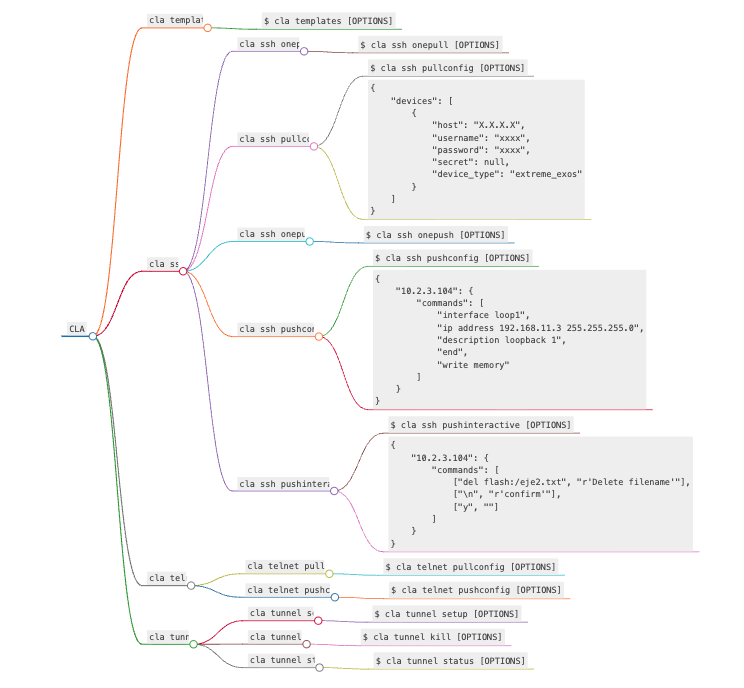
$ cla [OPTIONS] COMMAND [ARGS]...
Options:
-V, --version--install-completion: install completion for the current shell.--show-completion: show completion for the current shell, to copy it or customize the installation.--help: show this message and exit.
Commands:
templates: Create examples of configuration fileslogs: Read logs filessh: Accesses devices via the SSH protocoltelnet: Accesses devices via the Telnet protocoltunnel: Manage tunnel with Bastion Host
cla templates
The cla templates command generates example files, which can be used to create working files, both for connection parameters and for device configuration commands
Usage:
$ cla templates [OPTIONS]
Options:
-v, --verbose: verbose level [default: 1; 0<=x<=2]--help: show this message and exit.
cla ssh
The cla ssh command allows access to devices via the SSH protocol. The command can be used to pull or push configurations to devices.
To structure the output data when retrieving configurations, the cla ssh pullconfig command uses TextFSM templates. If the query
command is included in the templates, the output will be in JSON format; otherwise, the output will be in TXT format. The cla ssh interactive
command allows automating interactive CLI workflows which are often challenging. Confirmations, prompts, and unexpected inputs can easily break a script.
Usage:
$ cla ssh [OPTIONS] COMMAND [ARGS]...
Options:
--help: Show this message and exit.
Commands:
onepull: Pull config from a single hostpullconfig: Pull config from multiple hostsonepush: Push config to a single hostpushconfig: Push config to multiple hostspushinteractive: Push interactive commands to single/multiple hosts
cla ssh onepull
Pull config from a single host
Usage:
$ cla ssh onepull [OPTIONS]
Options:
-h, --host TEXT: host name or ip address [required]-u, --user TEXT: username [required]-c, --cmd Multiple -c parameter: commands to execute on the device [required]-t, --type [cisco_ios|cisco_xr|cisco_xe|cisco_nxos|juniper|juniper_junos|arista_eos|huawei|huawei_vrp|alcatel_sros|vyos|vyatta_vyos|extreme_exos|extreme]: device type [required]-p, --port INTEGER: port [default: 22]-v, --verbose: verbose level [default: 0; 0<=x<=2]-o, --output FILENAME Json file: output file [default: output.json]-d, --delay FLOAT RANGE: global delay [default: 0.1; 0.1<=x<=4]-s, --cfg TEXT: ssh config file--help: Show this message and exit.
cla ssh pullconfig
the commands can be entered via the command line or through a JSON file
Usage:
$ cla ssh pullconfig [OPTIONS]
Options:
-h, --hosts FILENAME Json file: group of hosts [required]-c, --cmd Multiple -c parameter: commands to execute on the device. Overrides FILENAME Json file-f, --cmdf FILENAME Json file: commands to execute on the device-v, --verbose: verbose level [default: 0; 0<=x<=2]-o, --output FILENAME Json file: output file [default: output.json]--help: show this message and exit.
{
    "devices": [
        {
            "host": "X.X.X.X",
            "username": "xxxx",
            "password": "xxxx",
            "secret": null,
            "device_type": "extreme_exos"
        }
    ]
}
cla ssh onepush
the commands can be entered via the command line or through a JSON file
Usage:
$ cla ssh onepush [OPTIONS]
Options:
-h, --host TEXT: host name or ip address [required]-u, --user TEXT: username [required]-t, --type [cisco_ios|cisco_xr|cisco_xe|cisco_nxos|juniper|juniper_junos|arista_eos|huawei|huawei_vrp|alcatel_sros|vyos|vyatta_vyos|extreme_exos|extreme]: device type [required]-c, --cmd Multiple -c parameter: commands to configure the device. Overrides FILENAME Json file-f, --cmdf FILENAME Json file: commands to configure the device-p, --port INTEGER: port [default: 22]-v, --verbose: verbose level [default: 0; 0<=x<=2]-o, --output FILENAME Json file: output file [default: output.json]-d, --delay FLOAT RANGE: global delay factor [default: 0.1; 0.1<=x<=4]-s, --cfg TEXT: ssh config file--help: show this message and exit.
cla ssh pushconfig
the commands must be provided through a JSON file
Usage:
$ cla ssh pushconfig [OPTIONS]
Options:
-h, --hosts FILENAME Json file: group of hosts [required]-f, --cmd FILENAME Json file: commands to configure the device [required]-v, --verbose: verbose level [default: 0; 0<=x<=2]-o, --output FILENAME Json file: output file [default: output.json]--help: show this message and exit.
{
    "10.2.3.104": {
        "commands": [
            "interface loop1",
            "ip address 192.168.11.3 255.255.255.0",
            "description loopback 1",
            "end",
            "write memory"
        ]
    }
}
cla ssh pushinteractive
Automating interactive CLI workflows is often challenging — confirmations, prompts, and unexpected inputs can easily break a script. The commands and patterns must be provided through a cmd JSON file
Usage:
$ cla ssh pushinteractive [OPTIONS]
Options:
-h, --hosts FILENAME Json file: group of hosts [required]-f, --cmd FILENAME Json file: commands and patterns to execute on the device [required]-v, --verbose: verbose level [default: 0; 0<=x<=2]-o, --output FILENAME Json file: output file [default: output.json]--help: show this message and exit.
{
    "10.2.3.104": {
        "commands": [
            ["del flash:/file2.txt", "Delete filename"],
            ["\n", "confirm"],
            ["y", ""]
        ]
    }
}
cla telnet
Telnet was added to CLA to access older devices that, for some reason, do not support SSH. Telnet operates in a generic way,
and configuration commands must follow the structure explained in the telnet_commands_structure.json file, file generated by the cla templates command.
However, whenever possible, SSH remains the preferred protocol.
Usage:
$ cla telnet [OPTIONS] COMMAND [ARGS]...
Options:
--help: show this message and exit.
Commands:
pullconfig: Pull config from multiple hostspushconfig: Push config file to multiple hosts
cla telnet pullconfig
Pull config from multiple hosts
Usage:
$ cla telnet pullconfig [OPTIONS]
Options:
-h, --hosts FILENAME Json file: group of hosts [required]-c, --cmd Single -c parameter: command to execute on the device [required]-v, --verbose: verbose level [default: 0; 0<=x<=2]-o, --output FILENAME text file: output file [default: output.txt]--help: show this message and exit.
cla telnet pushconfig
Push config file to multiple hosts
Usage:
$ cla telnet pushconfig [OPTIONS]
Options:
-h, --hosts FILENAME Json file: group of hosts [required]-f, --cmdf FILENAME Json file: commands to configure on the device [required]-v, --verbose: verbose level [default: 0; 0<=x<=2]-o, --output FILENAME text file: output file [default: output.txt]--help: show this message and exit.
cla tunnel
Sometimes, the machine running CLA doesn’t have direct access to the devices and must go through a Bastion Host or Jump Host. To connect via a Bastion Host,
you can either configure SSH specifically or set up a tunnel (CLA supports both modes of operation). Personally, I think creating a tunnel is more efficient since it avoids SSH configuration,
specially when using Telnet commands.
Using cla tunnel, you can create or remove a SOCKS5 tunnel. For cla tunnel to function properly, the host running CLA must have easy access to the
Bastion Host (it should be listed in the Bastion Host's known_hosts file). CLA constantly monitors the tunnel’s status, but you can also manually check it using
the Linux command lsof -i:{local_port}.
Usage:
$ cla tunnel [OPTIONS] COMMAND [ARGS]...
Options:
--help: show this message and exit.
Commands:
setup: Setup a tunnel to the Bastion Hostkill: Kill the tunnel to the bastion Hoststatus: Check the tunnel status
cla tunnel setup
Usage:
$ cla tunnel setup [OPTIONS]
Options:
-u, --user TEXT: bastion host username [required]-b, --bastion TEXT: bastion name or ip address [required]-p, --port INTEGER RANGE: local port [default: 1080; 1000<=x<=1100]-t, --timeout INTEGER RANGE: timeout in seconds for the tunnel startup [default: 10; 3<=x<=25]-v, --verbose: verbose level [default: 1; 0<=x<=2]--help: show this message and exit.
cla tunnel kill
Usage:
$ cla tunnel kill [OPTIONS]
Options:
-v, --verbose: verbose level [default: 1; 0<=x<=2]--help: show this message and exit.
cla tunnel status
Usage:
$ cla tunnel status [OPTIONS]
Options:
-p, --port INTEGER RANGE: local port [default: 1080; 1000<=x<=1100]-t, --timeout INTEGER RANGE: timeout in seconds for the tunnel return its status [default: 10; 3<=x<=20]-r, --test INTEGER: remote port for testing the tunnel [default: 22]-v, --verbose: verbose level [default: 1; 0<=x<=2]--help: show this message and exit.
Logging:
CLA includes an efficient logging system that allows you to view INFO, DEBUG, CRITICAL, and ERROR details for each operation performed by CLA. The logging system implements time-based log rotation, specifically by day. Each time the day changes, a new log file is automatically created.
1 maintainer

Metadata
1 maintainer
Release files for cli-automation 1.8.4
For a detailed explanation of source distributions (sdists) and built distributions (wheels), please see the package formats documentation.
Source distribution (sdist)
| File | Size | Uploaded | |
|---|---|---|---|
| cli_automation-1.8.4.tar.gz | 233.1 kB | Details |
Built distribution (wheel)
| File | Interpreter | ABI | Platform | Reset |
|---|---|---|---|---|
| cli_automation-1.8.4-py3-none-any.whl | Python 3 | none | any | Details |
Total release size: 470.2 kB
Release files / cli_automation-1.8.4.tar.gz
| Download URL | cli_automation-1.8.4.tar.gz |
|---|---|
| Size | 233.1 kB |
| Tags | Source |
|
SHA-256 checksum How to use checksums |
689e104274d8a876415085aec1781739cde58eb7904910bf1a15c7180bcce590
|
|
BLAKE2b-256 checksum How to use checksums |
e779f14f8a229f266634330b2a9c9b620721770ad66040e37427cd11e6c0063d
|
| Upload date | |
|
Uploaded using Trusted Publishing? What is trusted publishing? |
No |
| Uploaded via |
poetry/2.1.1 CPython/3.12.9 Darwin/24.6.0
|
Release files / cli_automation-1.8.4-py3-none-any.whl
| Download URL | cli_automation-1.8.4-py3-none-any.whl |
|---|---|
| Size | 237.2 kB |
| Tags | Python 3 |
|
SHA-256 checksum How to use checksums |
4fcb13a7d9aefbe0b35d9f5504c846b7dc11f19e116fda019b20fd96e0814180
|
|
BLAKE2b-256 checksum How to use checksums |
dbb6e6704463ce7d3fe532ae8b6bbea14aaf2f2101d9d3c850226891675afb14
|
| Upload date | |
|
Uploaded using Trusted Publishing? What is trusted publishing? |
No |
| Uploaded via |
poetry/2.1.1 CPython/3.12.9 Darwin/24.6.0
|














