
CLI-board-manager
CLI-board-manager is a clipboard manager for the terminal written in Python with the ✨awesome✨ Textual framework.
Features
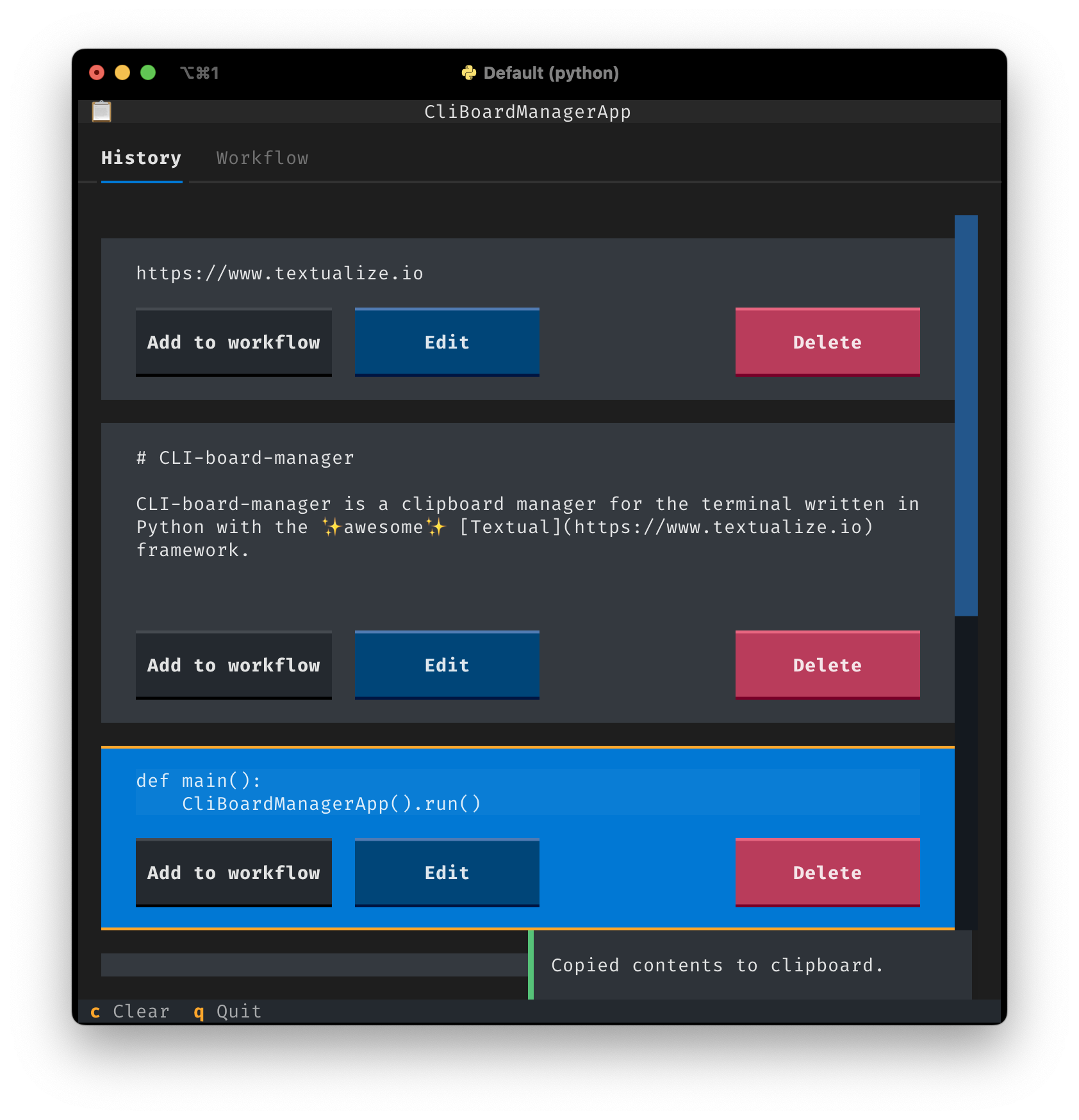
Keeping track of clipboard history
CLI-board-manager keeps track of all items you place on the clipboard using the normal copy action. If you accidentally copy sensitive information, press the Delete button for that item to remove it from the interface and the clipboard.
Create copy/paste workflows
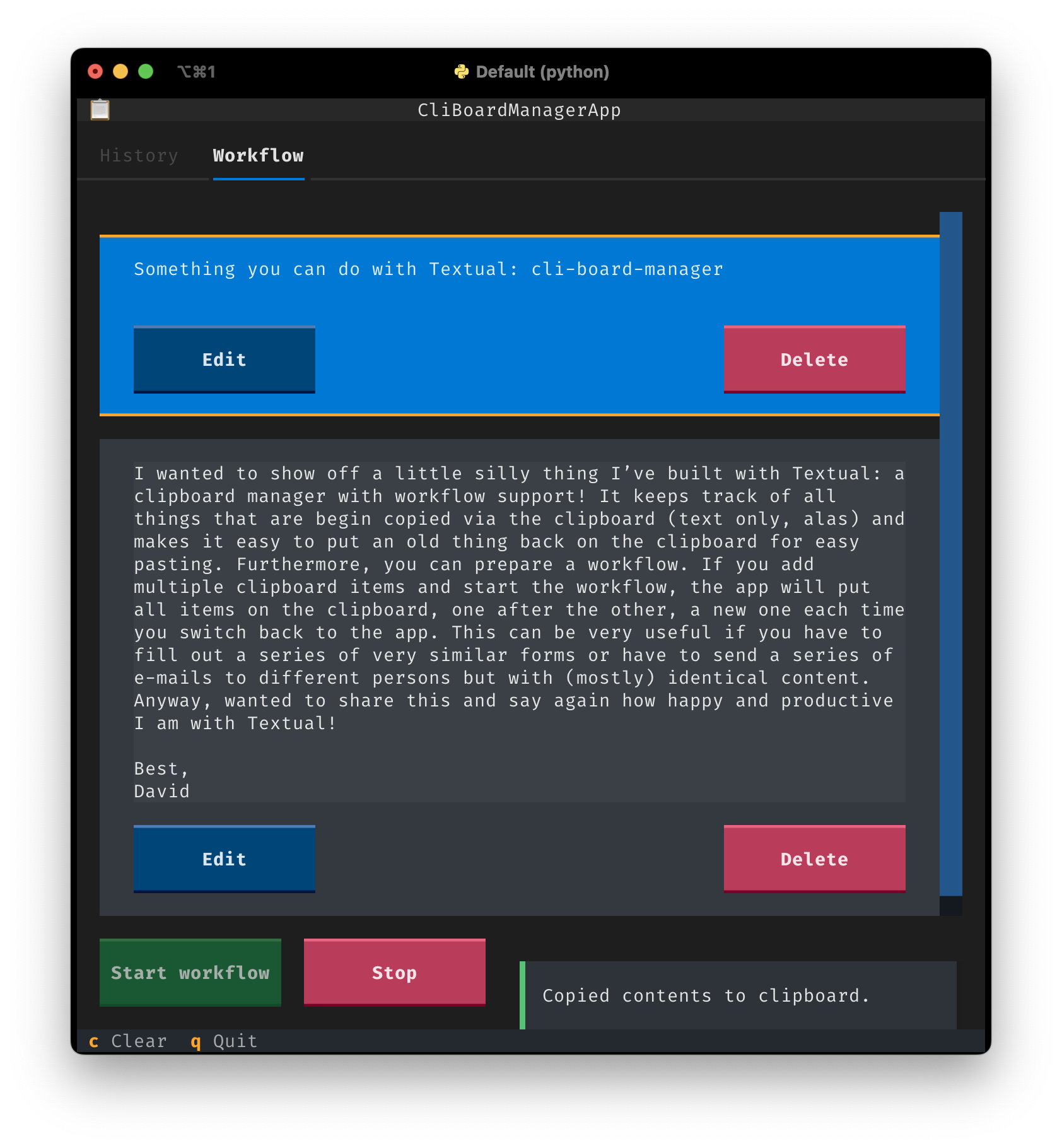
Filling out a series of web forms or sending messages with a subject field and a body can be tiresome if you don't have a clipboard manager. With CLI-board-manager workflows you can select clipboard items and add them to the workflow tab. If you start a workflow the first item is put on the clipboard, e.g. the subject field. You can then paste that field and switch back to the app. The moment the app becomes active, it automatically puts the next item on the clipboard, e.g. the body of your message. Switch back to your message and paste the body. If you reach the end of your workflow, CLI-board-manager will automatically loop back to the first item, until you stop the workflow.
If you make a mistake and need to move to another item in the workflow, just select that item and the workflow will continue there.
Usage
Run the cbm command from the terminal, after installation. Use your mouse to navigate the interface or use a combination of the Tab and arrow keys along with any keyboard shortcuts indicated in the footer. Click on old items to copy them to the clipboard or press enter after selecting with the arrow keys.
Installation
This is a Python app and currently not distributed stand-alone using a nice installer. So you'll need to have Python installed and some basic knowledge about installing Python packages. uv is, in most cases, the preferred method of installation.
Using uv / uvx
Just run (without installing)
uvx cli-board-manager
or install with
uv tool install cli-board-manager
after which cli-board-manager and its alias cbm are available as commands in your terminal.
Using pip
Preferably in a new virtual environment, run
pip install cli-board-manager
From source, using uv
Clone the repository, cd into the repository's main directory and run
uv sync
Copyright and License
Copyright (C) 2024-2025 David Fokkema
This program is free software: you can redistribute it and/or modify it under the terms of the GNU General Public License as published by the Free Software Foundation, either version 3 of the License, or (at your option) any later version.
This program is distributed in the hope that it will be useful, but WITHOUT ANY WARRANTY; without even the implied warranty of MERCHANTABILITY or FITNESS FOR A PARTICULAR PURPOSE. See the GNU General Public License for more details.
1 maintainer

Metadata
1 maintainer
Release files for cli-board-manager 1.1.0
For a detailed explanation of source distributions (sdists) and built distributions (wheels), please see the package formats documentation.
Source distribution (sdist)
| File | Size | Uploaded | Provenance | |
|---|---|---|---|---|
| cli_board_manager-1.1.0.tar.gz | 4.9 kB | Without provenance | Details |
Built distribution (wheel)
| File | Interpreter | ABI | Platform | Reset |
|---|---|---|---|---|
| cli_board_manager-1.1.0-py3-none-any.whl | Python 3 | none | any | Details |
Total release size: 11.1 kB
Release files / cli_board_manager-1.1.0.tar.gz
| Download URL | cli_board_manager-1.1.0.tar.gz |
|---|---|
| Size | 4.9 kB |
| Tags | Source |
|
SHA-256 checksum How to use checksums |
5d926621adecbcda38ab7ef5cee593bbc4535a634dab2b20582ed3e0fd82253b
|
|
BLAKE2b-256 checksum How to use checksums |
01813febe2ec4f5f2ca003806c3df15b5d5afe74c3f1fbf8970b13f9a63e8fb7
|
| Upload date | |
|
Uploaded using Trusted Publishing? What is trusted publishing? |
No |
| Uploaded via |
uv/0.9.0
|
Release files / cli_board_manager-1.1.0-py3-none-any.whl
| Download URL | cli_board_manager-1.1.0-py3-none-any.whl |
|---|---|
| Size | 6.2 kB |
| Tags | Python 3 |
|
SHA-256 checksum How to use checksums |
4b526bd0a0383ddd851e6f502f0fa8960500acc821009922458f5532b011020a
|
|
BLAKE2b-256 checksum How to use checksums |
1dcfe67a7d0c82a8db63a6c9a4d70c3500122db88af7f078112aa9488983d2f9
|
| Upload date | |
|
Uploaded using Trusted Publishing? What is trusted publishing? |
No |
| Uploaded via |
uv/0.9.0
|
Security for cli-board-manager 1.1.0
Provenance
Provenance describes where a file came from. On PyPI, provenance is shared via attestations, which provide a verifiable record of the build or publishing details. View details, limitations and caveats.
No provenance found
None of the files in this release were uploaded with provenance metadata.
A note on package security
PyPI is a repository for distributing packages, not a service for auditing them. While third-party security researchers and our staff do their best to detect and remove malicious packages, PyPI cannot guarantee the quality, security or suitability of any given package.














