
cli-bob
cli-bob uses AI to generate command line code in case you can't remember the exact syntax.
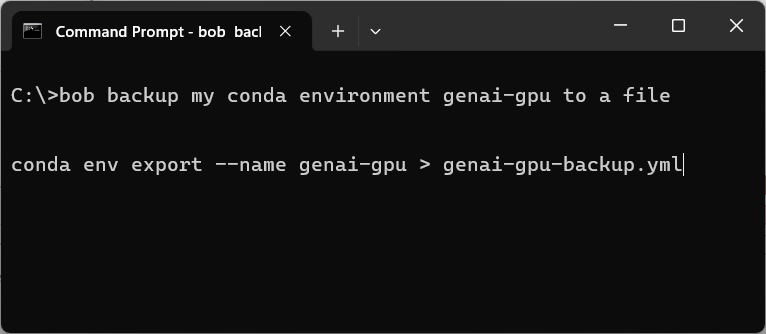
Under the hood, it uses the Large Language Models (LLMs) to generate commands.
Disclaimer
cli-bob is a research project aiming at streamlining command line interaction. Under the hood it uses
artificial intelligence / large language models to generate terminal commands fulfilling the user's requests.
Users are responsible to verify the generated commands before executing them.
When using cli-bob you configure it to use an API key to access the AI models.
You have to pay for the usage and must be careful in using the generated commands.
Do not use this technology if you are not aware of the costs and consequences.
[!CAUTION] When using the Anthropic, OpenAI, DeepSeek or any other endpoint via cli-bob, you are bound to the terms of service of the respective companies or organizations. The text you enter is transferred to their servers and may be processed and stored there. Make sure to not submit any sensitive, confidential or personal data. Also using these services may cost money.
Installation
pip install cli-bob
Configuring which LLM to use
cli-bob uses the claude LLM for generating commands per default. You can configure other LLM-service providers by setting the environment variable CLI_BOB_LLM_NAME.
Additionally, you need to set the respective API key for the LLM-service provider.
| Model name | API key |
|---|---|
anthropic:claude-3-5-sonnet-20241022 |
ANTHROPIC_API_KEY (get here) |
openai:gpt-4o-2024-08-06 |
OPENAI_API_KEY (get here) |
github_models:gpt-4o (openai-compatible models only) |
GH_MODELS_API_KEY (get here) |
deepseek:deepseek-chat |
DEEPSEEK_API_KEY (get here) |
kisski:codestral-22b |
KISSKI_API_KEY (get here) |
blablador:alias-code |
BLABLADOR_API_KEY (get here) |
ollama:deepseek-coder-v2 |
no API key required, but model downloaded ) |
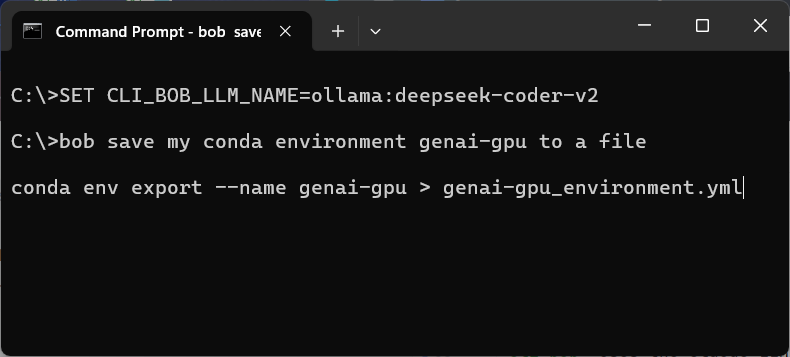
For quickly testing the models, you can set an environment variable in your terminal on Windows like this:
Usage
On the terminal start typing bob and afterwards specify what you want to do.
cli-bob will then generate a command proposal for you and you can hit ENTER to run it.
You can also modify the command before running it.
Hit ESC to cancel execution.
Debugging
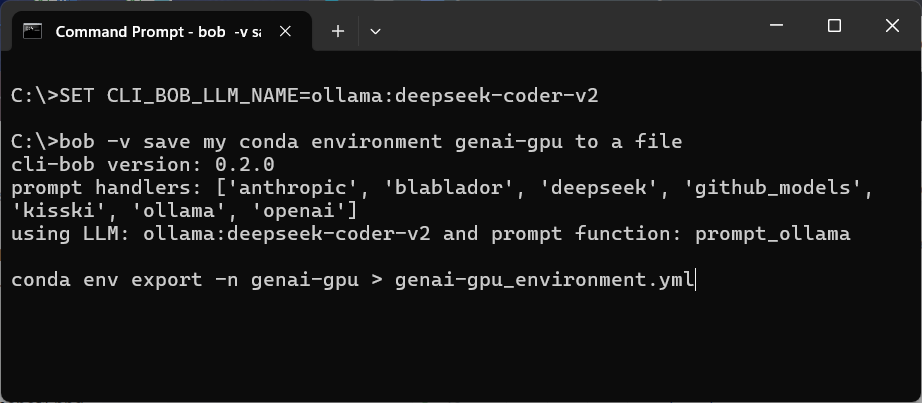
To make sure cli-bob uses the right LLM, you can activate the verbose mode by calling bob -v <your prompt>.
It will then print its version, available prompt-handlers and the chosen prompt handler.
Acknowledgements
We acknowledge the financial support by the Federal Ministry of Education and Research of Germany and by Sächsische Staatsministerium für Wissenschaft, Kultur und Tourismus in the programme Center of Excellence for AI-research „Center for Scalable Data Analytics and Artificial Intelligence Dresden/Leipzig", project identification number: ScaDS.AI
1 maintainer

Metadata
1 maintainer
Release files for cli-bob 0.2.1
For a detailed explanation of source distributions (sdists) and built distributions (wheels), please see the package formats documentation.
Source distribution (sdist)
| File | Size | Uploaded | |
|---|---|---|---|
| cli_bob-0.2.1.tar.gz | 9.9 kB | Details |
Built distribution (wheel)
| File | Interpreter | ABI | Platform | Reset |
|---|---|---|---|---|
| cli_bob-0.2.1-py3-none-any.whl | Python 3 | none | any | Details |
Total release size: 18.2 kB
Release files / cli_bob-0.2.1.tar.gz
| Download URL | cli_bob-0.2.1.tar.gz |
|---|---|
| Size | 9.9 kB |
| Tags | Source |
|
SHA-256 checksum How to use checksums |
8946b4dabf7196d1972ee4f617f70335554f90ce4f9dc0f9a889f1c1988ef7e2
|
|
BLAKE2b-256 checksum How to use checksums |
659fb4d82688e84348dca8040faebc70daf92c86104c4bbefae6944293ca3bf2
|
| Upload date | |
|
Uploaded using Trusted Publishing? What is trusted publishing? |
No |
| Uploaded via |
twine/6.1.0 CPython/3.13.2
|
Release files / cli_bob-0.2.1-py3-none-any.whl
| Download URL | cli_bob-0.2.1-py3-none-any.whl |
|---|---|
| Size | 8.3 kB |
| Tags | Python 3 |
|
SHA-256 checksum How to use checksums |
fcc49c20f50038b2a9025dde38db608609edba9e5700c9b702e9348202b8b9fb
|
|
BLAKE2b-256 checksum How to use checksums |
8095b5b129e374bf310015c73702914e0cc69a22a47fa49a1ec77cfcf9ff78dc
|
| Upload date | |
|
Uploaded using Trusted Publishing? What is trusted publishing? |
No |
| Uploaded via |
twine/6.1.0 CPython/3.13.2
|














