
CLI Consumption
CLI Consumption turns local AI coding CLI metadata into one private, self-contained view of models, tokens, tools, conversations, turns, context pressure, and workflow health. It can consolidate trusted offline copies from several machines or send metadata-only snapshots to a central collector.
It never stores prompts, responses, tool arguments, credentials, or raw provider events. Local token counters are usage metadata, not billing records. Read the privacy boundary before sharing a database or report.
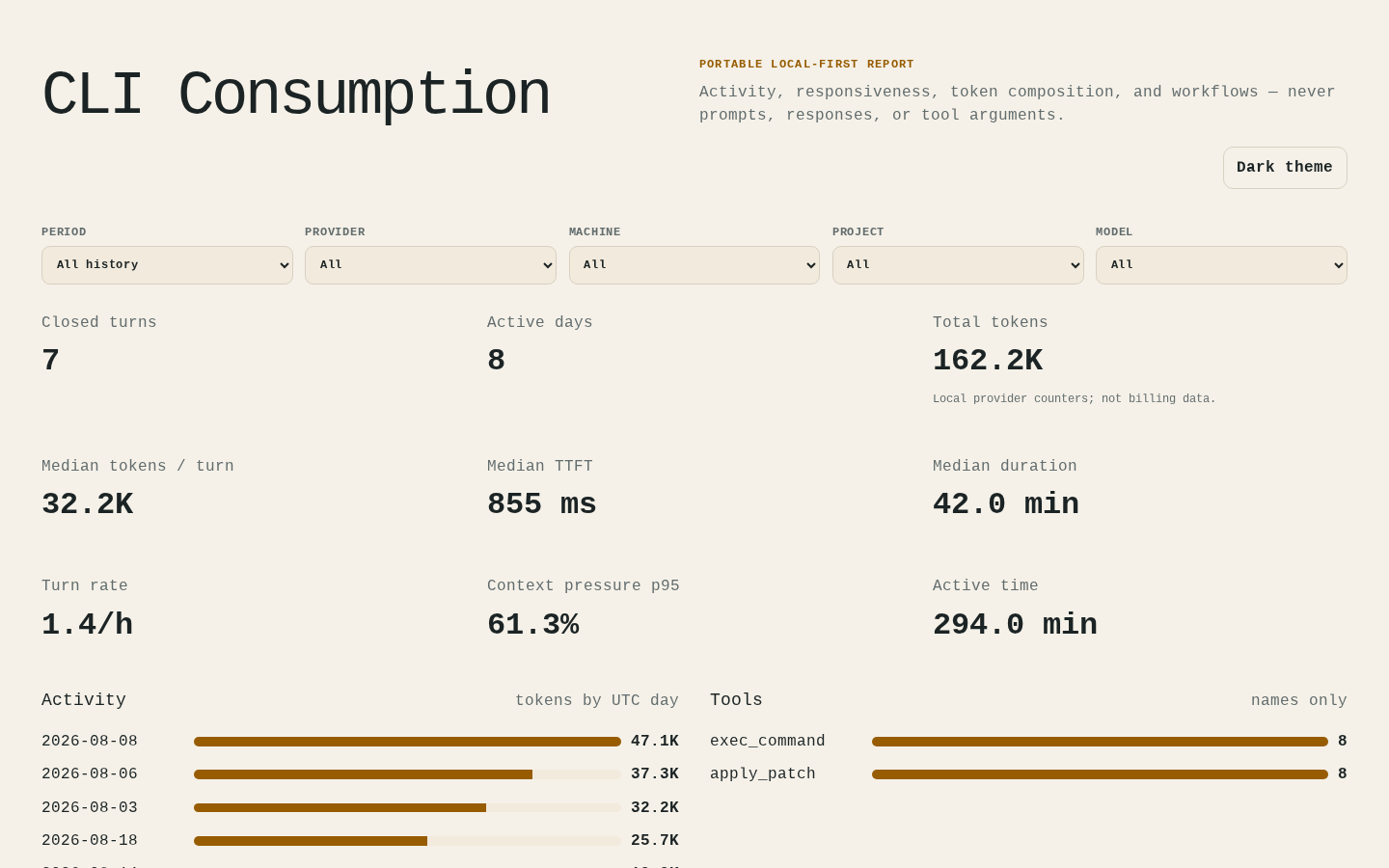
The preview and self-contained demo dashboard contain only deterministic synthetic records. Rebuild the HTML with:
uv run python docs/demo/generate.py
The generator never reads provider directories and creates its temporary SQLite database outside the repository. The demo HTML, image, documentation, tests, and other repository assets are excluded from Python distribution artifacts.
Installation
CLI Consumption requires Python 3.11 or newer. Run it directly from PyPI with uv:
uv tool run cli-consumption providers
The default package covers local collection, SQLite storage, and exports. Install only the optional runtime capabilities you use:
cli-consumption[sync]for the sync client;cli-consumption[server]for the collector service;cli-consumption[postgres]for PostgreSQL;cli-consumption[snapshots]for signed, compressed offline snapshot files.
Extras can be combined, for example cli-consumption[server,postgres] on a central
collector.
Quick start
From a checkout, detect supported local CLIs, collect their metadata, and create an offline dashboard:
uv sync --all-extras
uv run cli-consumption collect --provider all
uv run cli-consumption export --output reports
Open reports/dashboard.html locally. It makes no network requests. Detailed CSV
tables are generated only when --csv is passed.
Dashboard development lives in the locked npm workspace under packages/. It builds
provider-neutral ESM analytics, shared React presentation primitives, and deterministic
React/Tailwind browser assets that Python embeds in the wheel. The React runtime is the
only offline renderer; installing or using the Python CLI does not require Node.js.
The authenticated persistent dashboard lives in apps/web/. It reads the same
minimized reporting contract through a server-side Next.js BFF: the browser never
receives a collector credential or a database connection string. Its Export
offline action downloads the exact visible selection as a self-contained detailed or
share-safe HTML file. For a production
setup, required environment variables, reverse-proxy constraints, and startup commands
are documented in the
deployment guide.
To collect one provider or select another database:
uv run cli-consumption collect --provider codex --database usage.sqlite
For a Codex store that exceeds aggregate collection limits, add --incremental.
The command automatically writes bounded, restart-safe batches to the same database;
individual file and line safety limits remain enforced.
Use --source [LABEL=]PATH for trusted offline copies and repeated
--project NAME=PATH_PREFIX mappings for stable project labels. See the
usage and operations guide
for signed offline transfers, multi-machine collection, reporting,
PostgreSQL, retention, synchronization, readiness, and automation.
Supported CLIs
The current registry supports Aider, Amazon Q Developer CLI, Amp, Claude Code, Cline, Codex, Continue, Crush, Cursor CLI, Gemini CLI, GitHub Copilot CLI, Goose, Grok Build, Kilo Code, Kimi Code CLI, Mistral Vibe CLI, OpenCode, OpenHands CLI, Pi, Plandex, and Qwen Code.
Provider formats are internal and can change without notice. Exact source locations, token semantics, extraction limits, synthetic qualification fixtures, provenance, and known gaps live in the provider support ledger. Inspect the local registry without exposing paths or content:
uv run cli-consumption providers --json
Essential limits
- Provider files are untrusted. Collection enforces discovery, file, line, SQLite row, structured-field, and total normalized-record limits; direct provider-file symlinks are refused. Opt-in Codex incremental collection resets only aggregate per-batch limits and keeps a separate hard batch-count ceiling.
collect --strictandsync --strictrefuse a batch when any provider skipped malformed records. Collection distinguishesprovider_limit_exceeded,provider_format_incompatible,invalid_snapshot, and the unexpected-failure fallbackprovider_collection_failed; machine-readable results use these fixed codes without paths, payloads, response bodies, tokens, or exception text.- Dashboards are self-contained and network-free. Share-safe mode pseudonymizes labels, groups tools, rounds timestamps, and hides small cohorts, but still exposes aggregate work patterns.
- CSV and normalized databases remain detailed private operational data. Never treat a technically completed turn as a measure of quality or productivity.
- Central collection requires TLS, token rotation, backups, limits, monitoring, and a reverse proxy. The application does not replace those operator controls.
See Privacy for the exact data boundary and Architecture for ingestion, idempotency, migrations, report limits, and collector behavior.
Commands
| Command | Purpose |
|---|---|
collect |
Collect local or copied provider data into SQL. |
snapshot |
Create or ingest signed, compressed offline snapshot files. |
sync |
Collect and send metadata-only snapshots to a central API. |
upload-db |
Upload validated snapshots reconstructed from a local collect database. |
serve |
Run the scoped central ingestion, reporting, and export API. |
export |
Write the HTML dashboard and optional CSV tables. |
providers |
List provider names and compatibility status. |
retention |
Preview or apply deletion outside a retention window. |
Run uv run cli-consumption COMMAND --help for every option. The
usage guide
contains copy-ready examples.
Documentation
- Usage and operations
- Production deployment
- Provider support and qualification
- Privacy boundary
- Architecture
- Roadmap
- Contributing
- Security policy
Development
uv sync --all-extras --all-groups
uv run pre-commit install
uv run pre-commit run --all-files
uv run ruff format --check .
uv run ruff check .
uv run ty check
uv run pytest --cov --cov-report=term-missing
uv build
npm ci
npm run verify
npm audit --audit-level=high
npm run build:web
npm run test:e2e
Development uses short-lived branches and squash-merged pull requests into protected
main. Read
CONTRIBUTING.md
and AGENTS.md
before changing the project.
License
Licensed under the Apache License 2.0.
1 maintainer

Metadata
1 maintainer
Release files for cli-consumption 0.4.4
For a detailed explanation of source distributions (sdists) and built distributions (wheels), please see the package formats documentation.
Source distribution (sdist)
| File | Size | Uploaded | |
|---|---|---|---|
| cli_consumption-0.4.4.tar.gz | 425.7 kB | Details |
Built distribution (wheel)
| File | Interpreter | ABI | Platform | Reset |
|---|---|---|---|---|
| cli_consumption-0.4.4-py3-none-any.whl | Python 3 | none | any | Details |
Total release size: 896.9 kB
Release files / cli_consumption-0.4.4.tar.gz
| Download URL | cli_consumption-0.4.4.tar.gz |
|---|---|
| Size | 425.7 kB |
| Tags | Source |
|
SHA-256 checksum How to use checksums |
efc7b7b6c0c3ec300c6c9c8546875a2756cfa1292d11d585c6d5471e5eec4922
|
|
BLAKE2b-256 checksum How to use checksums |
7222c169e0b1e91ebe967b111827a5fdb7589070e597d3642e8f8ab87ffafd11
|
| Upload date | |
|
Uploaded using Trusted Publishing? What is trusted publishing? |
Yes |
| Uploaded via |
twine/7.0.0 CPython/3.13.14
|
Provenance
Provenance describes where a file came from. On PyPI, provenance is shared via attestations, which provide a verifiable record of the build or publishing details. View details, limitations and caveats.


PyPI Publish Attestation
PyPI verified that this artifact, at this checksum, originated from the publisher listed below.
Signed by GitHub Actions, verified by PyPI on Sep 8, 2026.
Transparency logRelease files / cli_consumption-0.4.4-py3-none-any.whl
| Download URL | cli_consumption-0.4.4-py3-none-any.whl |
|---|---|
| Size | 471.2 kB |
| Tags | Python 3 |
|
SHA-256 checksum How to use checksums |
89625715f8de5c96f393ceed4fe5ca41740944684e937698af02a1cc02046acc
|
|
BLAKE2b-256 checksum How to use checksums |
c08adf6032e4990bf160db6bef13b18d4cc3fcc82164f6b0bdd8c6a8ea593024
|
| Upload date | |
|
Uploaded using Trusted Publishing? What is trusted publishing? |
Yes |
| Uploaded via |
twine/7.0.0 CPython/3.13.14
|
Provenance
Provenance describes where a file came from. On PyPI, provenance is shared via attestations, which provide a verifiable record of the build or publishing details. View details, limitations and caveats.
PyPI Publish Attestation
PyPI verified that this artifact, at this checksum, originated from the publisher listed below.
Signed by GitHub Actions, verified by PyPI on Sep 8, 2026.
Transparency log













