
cli-fragments

Awesome terminal input and output functions for python scripts.

Icon by by Pop Vectors - Flaticon
Why this name?
I like to consider the command-line interface as if it were a graphical interface. In the development of graphical interfaces, 'components' are usually used to facilitate maintainability and design consistency. In my opinion, the word 'fragments' is a correct synonym to describe the same approach, but for command-line interfaces.
Fragments
error: a red message having[✕]as prefixsuccess: a green message having[✓]as prefixwarning: a yellow message having[!]as prefixtext: a standard text in terminal having the proper paddingdebug: a default color message having[#]as prefixnotice: a blue message having[~]as prefixask: a qustion to the user having[?]as prefix. The input value can be optionally validated passing avalidatorcallback
Screenshot
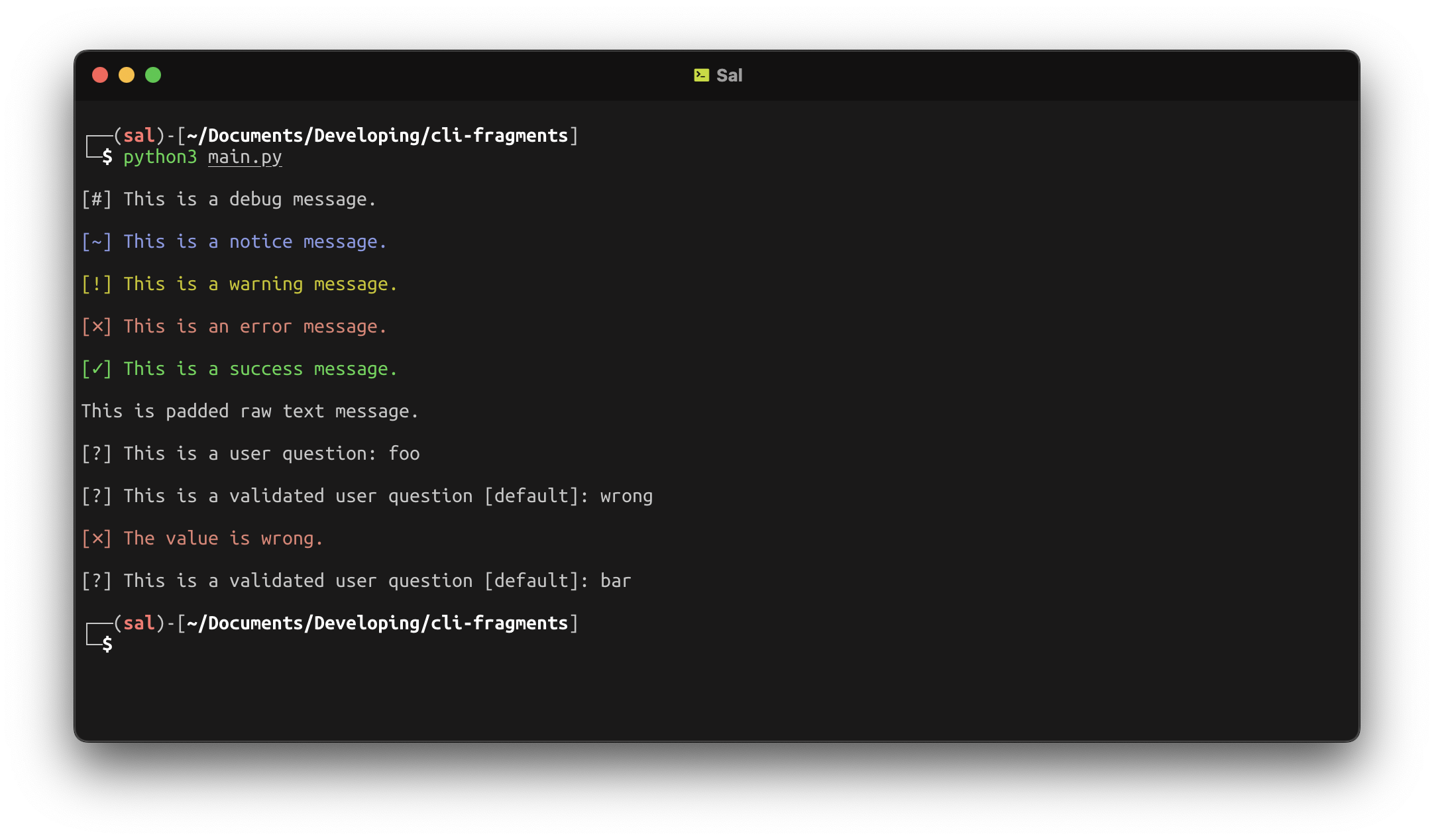
Usage
First of all, you have to install the library using pip.
pip install cli-fragments
Then import the library in your script and use it as follows.
from cli_fragments import CliFragments

# Custom validators function.
# They must accept an str parameter and must raise ValueError on validation failure.
def validator_function(value: str):
    if value == "wrong":
        raise ValueError

# Instantiate the main class
io = CliFragments()

# Use the output methods as shown
io.debug("This is a debug message.")
io.notice("This is a notice message.")
io.warning("This is a warning message.")
io.error("This is an error message.")
io.success("This is a success message.")
io.text("This is padded raw text message.")

# The default and the validator parameters are optional in the ask method.
# You can pass None to avoid using them.
io.ask("This is a user question.", None, None)

# This is a validated ask method call having a default value.
io.ask("This is a user question.", "default", validator_function)
1 maintainer

Metadata
1 maintainer
Release files for cli-fragments 1.2.0
For a detailed explanation of source distributions (sdists) and built distributions (wheels), please see the package formats documentation.
Source distribution (sdist)
| File | Size | Uploaded | Provenance | |
|---|---|---|---|---|
| cli_fragments-1.2.0.tar.gz | 15.1 kB | Without provenance | Details |
Built distribution (wheel)
| File | Interpreter | ABI | Platform | Reset |
|---|---|---|---|---|
| cli_fragments-1.2.0-py3-none-any.whl | Python 3 | none | any | Details |
Total release size: 30.5 kB
Release files / cli_fragments-1.2.0.tar.gz
| Download URL | cli_fragments-1.2.0.tar.gz |
|---|---|
| Size | 15.1 kB |
| Tags | Source |
|
SHA-256 checksum How to use checksums |
cbce69173e3a58885dbb0d398d636e5e73d3ef2a6e62e121c549d536551126b8
|
|
BLAKE2b-256 checksum How to use checksums |
347acb8746366276c078a88a3c226b3a4c18e00ae7e409d04b1bfb1b34267b66
|
| Upload date | |
|
Uploaded using Trusted Publishing? What is trusted publishing? |
No |
| Uploaded via |
twine/5.0.0 CPython/3.12.3
|
Release files / cli_fragments-1.2.0-py3-none-any.whl
| Download URL | cli_fragments-1.2.0-py3-none-any.whl |
|---|---|
| Size | 15.4 kB |
| Tags | Python 3 |
|
SHA-256 checksum How to use checksums |
2b3ff23f9631def40c568f11f1fdf43f6dd27a27e4435d225a411ee0d6502795
|
|
BLAKE2b-256 checksum How to use checksums |
31f12919afa366a87aa6251dcd32595ccaad762d1b65909d5532d1a96782179a
|
| Upload date | |
|
Uploaded using Trusted Publishing? What is trusted publishing? |
No |
| Uploaded via |
twine/5.0.0 CPython/3.12.3
|
Security for cli-fragments 1.2.0
Provenance
Provenance describes where a file came from. On PyPI, provenance is shared via attestations, which provide a verifiable record of the build or publishing details. View details, limitations and caveats.
No provenance found
None of the files in this release were uploaded with provenance metadata.
A note on package security
PyPI is a repository for distributing packages, not a service for auditing them. While third-party security researchers and our staff do their best to detect and remove malicious packages, PyPI cannot guarantee the quality, security or suitability of any given package.
To learn more about protecting yourself from malicious actors, visit our package security documentation.














