
CLI Pets



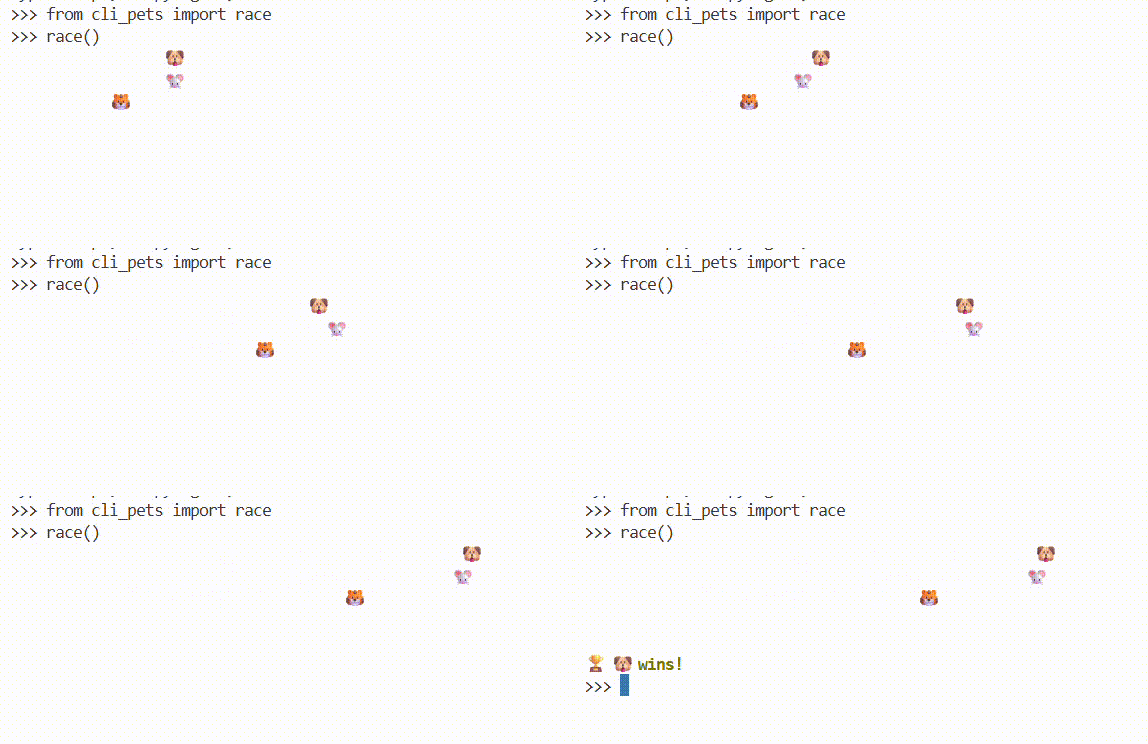
Interactive CLI pets with animated emoji characters for your terminal. Watch cute pets walk, race, and greet you right in your command line!
Features
- Walking Animations: Watch your favorite emoji pets walk across the terminal
- Pet Racing: Race multiple pets against each other with live updates
- Random Greetings: Get friendly greetings from random pets
- Rich Terminal Output: Colorful and smooth animations using Rich library
- Customizable: Choose your pet, adjust speed, and control animation parameters
Installation
Install from PyPI using pip:
pip install cli-pets
Or using uv:
uv pip install cli-pets
Quick Start
Walk a Pet
from cli_pets import walk

# Walk a cat across the terminal
walk(steps=30, speed=0.1)

# Walk with more steps
walk(steps=50, speed=0.05)
Race Pets
from cli_pets import race

# Race 3 random pets
race(distance=50, racers=3)

# Race with custom settings
race(distance=40, racers=2, speed=0.1)
Greet
from cli_pets import greet

# Get a friendly greeting from a random pet
greet()
Available Pets
The package includes 10 adorable animal emoji pets that are randomly selected for racing and greetings.
API Reference
walk(pet, steps, speed)
Animate a pet walking across the terminal.
Parameters:
pet(str): Emoji character to display (default: cat emoji)steps(int): Number of steps to take (default: 30)speed(float): Seconds between steps (default: 0.1)
race(distance, racers, pets, speed, show_winner)
Race multiple pets across the terminal.
Parameters:
distance(int): Length of the race track (default: 50)racers(int): Number of racing pets (default: 3)pets(list[str] | None): Specific pets to race; if None, random pets are chosen (default: None)speed(float): Seconds between updates (default: 0.1)show_winner(bool): Whether to announce the winner (default: True)
greet()
Print a friendly greeting with a random pet.
Returns: None (prints directly to console)
Examples
Custom Walking Animation
from cli_pets import walk

# Slow walking
walk(steps=20, speed=0.2)

# Fast walking
walk(steps=60, speed=0.03)
Epic Pet Race
from cli_pets import race

# Long distance race with 5 pets
race(distance=100, racers=5, speed=0.05)

# Quick sprint
race(distance=20, racers=2, speed=0.05)
Requirements
- Python 3.12+
- rich >= 14.2.0
Development
Clone the repository:
git clone https://github.com/ran-codes/cli-pets.git
cd cli-pets
Install dependencies with uv:
uv sync
Run examples:
uv run python -c "from cli_pets import walk; walk(steps=20, speed=0.05)"
License
This project is licensed under the MIT License - see the LICENSE file for details.
Contributing
Contributions are welcome! Feel free to open issues or submit pull requests on GitHub.
Author
Created by rl627
Changelog
v0.1.1 (2025-10-15)
Fixed release with proper metadata and documentation!
Fixed:
- Added complete README with examples and documentation
- Added proper package description for PyPI
- Added demo GIF showcase
- Updated package metadata and classifiers
v0.1.0 (2025-10-15)
Initial release of CLI Pets! (incomplete metadata)
Features:
- Walk animation for pets across the terminal
- Racing functionality with multiple pets
- Random pet greetings
- Rich terminal output with smooth animations
- Support for 10 different animal emoji pets
- Customizable speed and distance parameters
Made with love and code
1 maintainer

Metadata
1 maintainer
Release files for cli-pets 0.1.1
For a detailed explanation of source distributions (sdists) and built distributions (wheels), please see the package formats documentation.
Source distribution (sdist)
| File | Size | Uploaded | Provenance | |
|---|---|---|---|---|
| cli_pets-0.1.1.tar.gz | 3.9 kB | Without provenance | Details |
Built distribution (wheel)
| File | Interpreter | ABI | Platform | Reset |
|---|---|---|---|---|
| cli_pets-0.1.1-py3-none-any.whl | Python 3 | none | any | Details |
Total release size: 9.4 kB
Release files / cli_pets-0.1.1.tar.gz
| Download URL | cli_pets-0.1.1.tar.gz |
|---|---|
| Size | 3.9 kB |
| Tags | Source |
|
SHA-256 checksum How to use checksums |
d6ada1a118ae7d7892e2d941f5d956ad581600c3105d7c5fd96cc1c58938eb17
|
|
BLAKE2b-256 checksum How to use checksums |
c9f1aba7ccd1061611748ed871a970710a44f1835f22b839204b0fc57afc61fb
|
| Upload date | |
|
Uploaded using Trusted Publishing? What is trusted publishing? |
No |
| Uploaded via |
uv/0.8.22
|
Release files / cli_pets-0.1.1-py3-none-any.whl
| Download URL | cli_pets-0.1.1-py3-none-any.whl |
|---|---|
| Size | 5.6 kB |
| Tags | Python 3 |
|
SHA-256 checksum How to use checksums |
cadab9c65d75ce15a95e695b2f2fbbef6a81b0d2a4adf269ac43cb65d4cae0d6
|
|
BLAKE2b-256 checksum How to use checksums |
dfc41e4d0e56d46497546bbeae7c10cc9005053946569f125ba8b12df0766d98
|
| Upload date | |
|
Uploaded using Trusted Publishing? What is trusted publishing? |
No |
| Uploaded via |
uv/0.8.22
|
Security for cli-pets 0.1.1
Provenance
Provenance describes where a file came from. On PyPI, provenance is shared via attestations, which provide a verifiable record of the build or publishing details. View details, limitations and caveats.
No provenance found
None of the files in this release were uploaded with provenance metadata.
A note on package security
PyPI is a repository for distributing packages, not a service for auditing them. While third-party security researchers and our staff do their best to detect and remove malicious packages, PyPI cannot guarantee the quality, security or suitability of any given package.














