
Have a nice looking, simple cli in seconds

Project description
cliasi (cli easy)
Output pretty command line text without hassle.
This is mostly a collection of pretty print commands
By using colorama, the text you see below is colored nicely.
Basic Usage
from cliasi import cli

cli.success("It works!")
# > ✔ [CLI] | It works!

cli.oneline = True
# The next few lines will get overwritten
cli.info("blah")
cli.warn("doing something dangerous")
# > ! [CLI] | doing something dangerous

# You can even ask for input and the input will disappear
cli.log("Got input: " + cli.ask("Give input: "))
# > LOG [CLI] | Got input: test
Prefix and Cliasi instances
Sometimes you might want to indicate different parts of your program working.
You can do that by having another instance of Cliasi with another prefix
from cliasi import cli, Cliasi  # Default shared Cliasi instance

cli.update_prefix("MANAGE")
cli.fail("Management failed")
# > X [MANAGE] | Management failed

def calculate():
    # Another part of your program could have its own instance
    clisi = Cliasi("CALC", use_oneline=True)
    clisi.info("Calculating...")
    # > i [CALC] | Calculating...
    # Although it might be better to use other methods for waiting
Animations
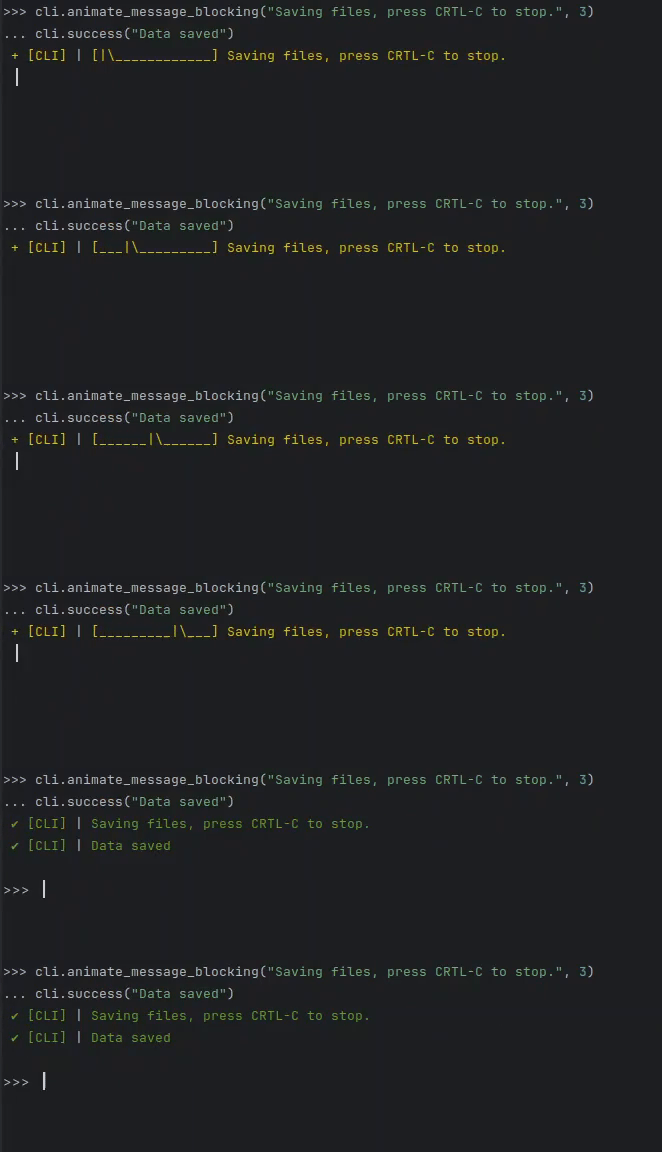
Some processes might take a few seconds to complete and you dont know how much the process is done (you cant use a progress bar)
In that case you can use either a blocking or non blocking animate method.
from cliasi import cli

# This will wait for three seconds and display an animation
cli.animate_message_blocking("Saving files, press CRTL-C to stop", 3)
save_data()

# But if you want to wait for something to finish and display something nice in the meantime
task = cli.animate_message_non_blocking("Waiting for a process to quit")
# Put your processing logic here
do_stuff_that_takes_time()
task.stop()  # Stop the animation
cli.success("Process quit")
Progress Bars
You can also have a progress bar which adapts to the size of your terminal
This is the "static" version which you just call whenever you get an update.
from cliasi import cli

processed, total = 0, len(calculate_queue)
while not calculate_queue.is_empty():
    cli.progressbar("Calculating items...", processed / total)
    calculate_next_item()
    processed += 1

cli.success("Calculation complete")
# This will show a progress bar that will only update when a calculation has finished.
# Potentially bad if it gets stuck on a calculation
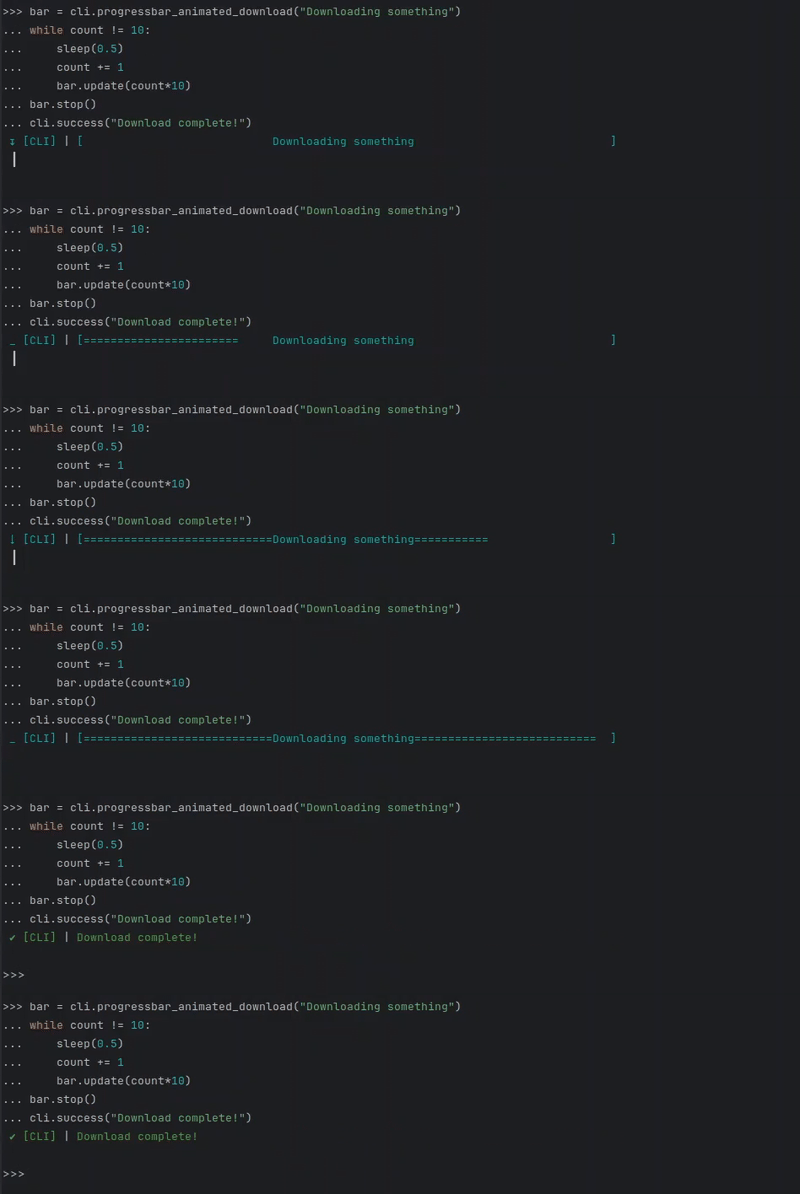
Or if you want to have the bar be animated while waiting for progress
from cliasi import cli

task = cli.progressbar_animated_download("Downloading files.")
download()
task.update(10)
# You can also change the message while in the process
task.message = "Extracting"
extract()
task.update(40)
extract_again()

task.stop()
Release history Release notifications | RSS feed


Download files
Download the file for your platform. If you're not sure which to choose, learn more about installing packages.
Source Distribution
Built Distribution
Filter files by name, interpreter, ABI, and platform.
If you're not sure about the file name format, learn more about wheel file names.
Copy a direct link to the current filters
File details
Details for the file cliasi-0.1.1.tar.gz.
File metadata
- Download URL: cliasi-0.1.1.tar.gz
- Upload date:
- Size: 22.7 kB
- Tags: Source
- Uploaded using Trusted Publishing? No
- Uploaded via: twine/6.2.0 CPython/3.9.25
File hashes
| Algorithm | Hash digest | |
|---|---|---|
| SHA256 |
fa849d52605a479a6c2d4dac699ce0a1893fcee31f8615c505f14098ff93e7a5
|
|
| MD5 |
e83e347cc37b7167ef636f3a655fbd73
|
|
| BLAKE2b-256 |
57c2b4aed576ee71d05f0fa5a2953c103ffa9a785d2145918fee6817bf8c18d1
|
File details
Details for the file cliasi-0.1.1-py3-none-any.whl.
File metadata
- Download URL: cliasi-0.1.1-py3-none-any.whl
- Upload date:
- Size: 20.4 kB
- Tags: Python 3
- Uploaded using Trusted Publishing? No
- Uploaded via: twine/6.2.0 CPython/3.9.25
File hashes
| Algorithm | Hash digest | |
|---|---|---|
| SHA256 |
d4f077d24b21b11a18a8c1764d6d04d2f03ed0aebd24e46bbb9370faaf64aad1
|
|
| MD5 |
f22e7bb97a78f953fbbb7460af351cd7
|
|
| BLAKE2b-256 |
ac09c12e4c159457eaa30361049d654597b36f3d31894dc374666606f23f0c63
|






