
clibridge
Run unmodified OpenAI, Anthropic, LangChain and LiteLLM code on your local Claude Code, Codex or OpenCode.
Set the model to claude-code, codex or opencode. No import, no proxy, no API key.
pip install "clibridge[all]"
from openai import OpenAI

reply = OpenAI().chat.completions.create(
    model="claude-code",                      # 👈 the only change
    messages=[{"role": "user", "content": "Hello!"}],
)
print(reply.choices[0].message.content)
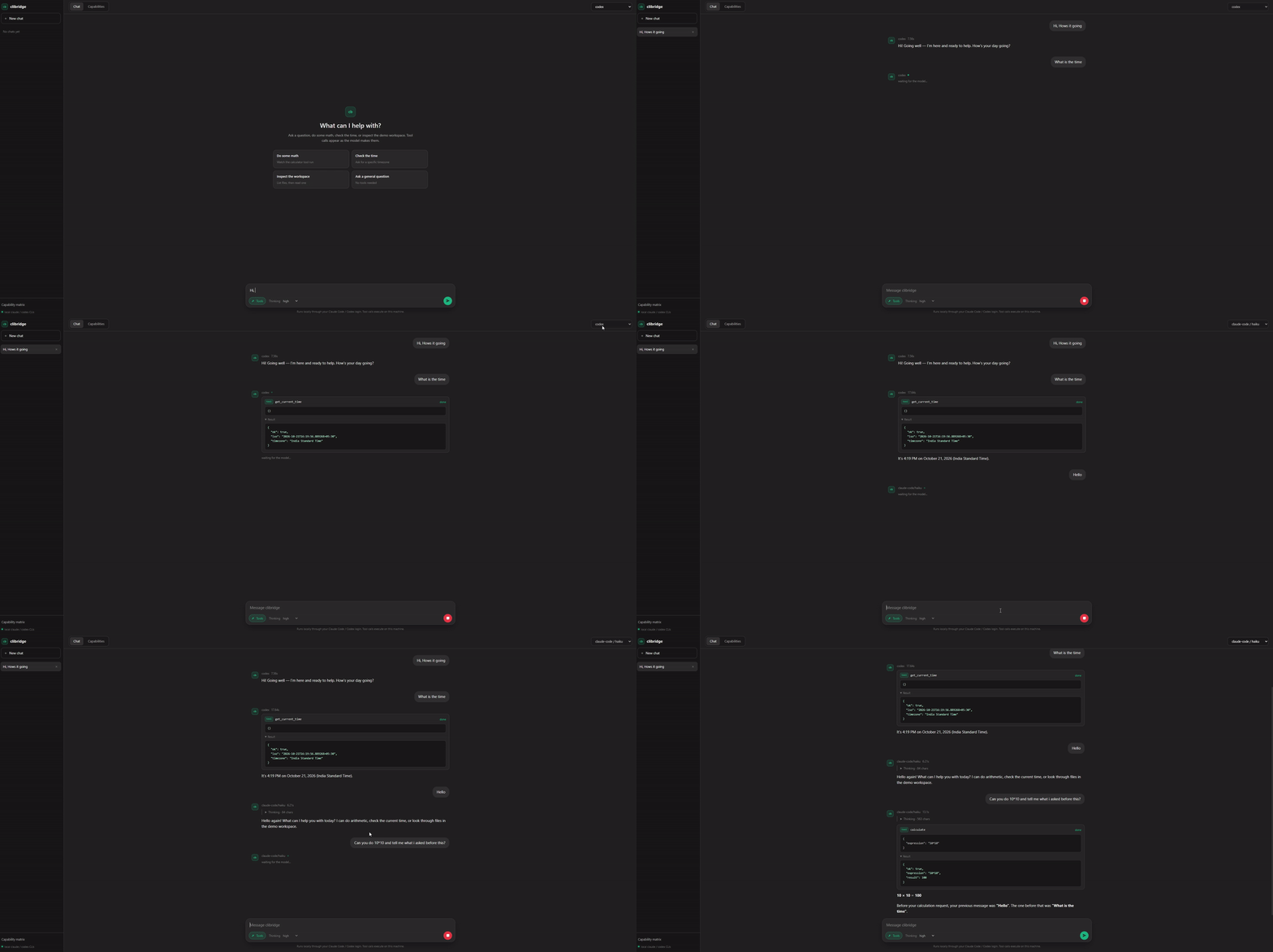
Behind the scenes, clibridge runs the claude, codex or opencode command on your computer, so the request
uses your existing login instead of an API key. Good for demos, testing and side projects. The chat UI above is in
examples/chat.
Setup (once)
1. Install and log in to at least one CLI:
| CLI | Install | Log in |
|---|---|---|
| Claude Code | npm i -g @anthropic-ai/claude-code |
run claude once |
| Codex | npm i -g @openai/codex |
codex login |
| OpenCode | see opencode.ai/install | opencode auth login |
2. Install clibridge into the same Python environment as your code:
pip install "clibridge[all]"
3. Check it works:
clibridge doctor --ping
Or check your CLIs without installing anything: uvx clibridge doctor --ping.
That's it. No import, no server, no API key.
Model names
| Model name | What runs |
|---|---|
claude-code |
Claude Code with your default model |
claude-code/fable |
Latest Fable |
claude-code/opus |
Latest Opus |
claude-code/sonnet |
Latest Sonnet |
claude-code/haiku |
Latest Haiku (fastest) |
claude-code/<model id> |
A specific version, e.g. claude-code/claude-opus-5-5 |
codex |
Codex with your default model |
codex/<model> |
A specific Codex model, e.g. codex/gpt-5.5 (type /model in Codex to see yours) |
opencode |
OpenCode with the model from its own configuration |
opencode/<provider>/<model> |
A specific OpenCode model, e.g. opencode/anthropic/claude-sonnet-4 |
claude-code-agent, codex-agent, opencode-agent |
Agent mode (see below). Works with a model too: claude-code-agent/opus |
Which models you can use depends on your plan. Every other model name (gpt-4o, claude-sonnet-4-5, ...) still goes
to the real API with your real key, as before.
Examples
OpenAI SDK
from openai import OpenAI

OpenAI().chat.completions.create(model="claude-code", messages=[{"role": "user", "content": "Hi"}])
LiteLLM
import litellm

litellm.completion(model="claude-code", messages=[{"role": "user", "content": "Hi"}])
LangChain / LangGraph
from langchain_openai import ChatOpenAI

ChatOpenAI(model="claude-code").invoke("Hi")
Anthropic SDK
from anthropic import Anthropic

Anthropic().messages.create(model="claude-code", max_tokens=1024, messages=[{"role": "user", "content": "Hi"}])
OpenAI Agents SDK
from agents import Agent, Runner

print(Runner.run_sync(Agent(name="Helper", model="claude-code"), "Hi").final_output)
Streaming, tool calling, structured output (JSON / Pydantic), images and async all work.
Runnable versions are in examples/.
Thinking
Set it the way your library normally does. If you don't set it, the CLI's default is used.
| Library | How |
|---|---|
| OpenAI SDK, LiteLLM | reasoning_effort="high" |
| OpenAI Responses | reasoning={"effort": "high"} |
| OpenAI Agents SDK | model_settings=ModelSettings(reasoning=Reasoning(effort="high")) |
| Anthropic SDK, LiteLLM | thinking={"type": "enabled", "budget_tokens": 10000} or {"type": "disabled"} |
Levels: none, minimal, low, medium, high, xhigh, max. Each is passed to the CLI as its nearest
equivalent; none turns Claude's thinking off. OpenCode has no effort setting, so any level other than none
turns its thinking summaries on; none hides them.
The thinking comes back where your library expects it:
| Library | Where |
|---|---|
| OpenAI SDK, LiteLLM | reply.choices[0].message.reasoning_content |
| Anthropic SDK | thinking blocks (when you turned thinking on) |
| OpenAI Responses / Agents SDK | a reasoning item (when you set an effort) |
It's a short summary, not the full thoughts, and the model decides when to think. Easy questions often come back without any.
What's ignored
Anything the CLIs don't support is ignored, so your code still runs:
max_tokens, temperature, top_p, stop, n, seed, logprobs.
Not available at all: embeddings, audio, image generation.
Agent mode (optional)
Normally the CLI acts as a plain AI model: no tools, run from an empty folder.
With claude-code-agent, codex-agent or opencode-agent, it works like a coding agent inside a folder, using
its own tools to read files, search and run commands. It's read-only unless you allow more:
export CLIBRIDGE_WORKDIR=/path/to/project       # folder to work in (default: current folder)
export CLIBRIDGE_PERMISSION_MODE=acceptEdits    # let Claude edit files
export CLIBRIDGE_SANDBOX=workspace-write        # let Codex edit files
export CLIBRIDGE_OPENCODE_AUTO=1                # let OpenCode edit files and run commands
Not using Python? Run the server
For JavaScript, curl, or code on another machine:
clibridge serve
export OPENAI_BASE_URL=http://localhost:8787/v1      # OpenAI-style clients
export ANTHROPIC_BASE_URL=http://localhost:8787      # Anthropic-style clients
export OPENAI_API_KEY=anything                       # any value works
Handy commands
clibridge ask "What is a monad?"              # quick test
clibridge ask -m codex "Write a regex for emails"
clibridge ask -m opencode/anthropic/claude-sonnet-4 "Explain this error"
clibridge ask -e high -t "Is 391 prime?"      # think hard and show the thinking
clibridge doctor --ping                       # are the CLIs installed and logged in?
Good to know
- Each call starts a CLI process, which adds a few seconds.
- Every call counts against your plan's limits, and your plan's terms still apply.
ANTHROPIC_API_KEYandOPENAI_API_KEYare kept away from the CLIs, so they always use your existing login.- OpenCode's
runcommand is always an agent. A plainopencodecall runs in an empty temporary folder with project instructions and skills switched off and is told not to use tools; useopencode-agentto work in a folder. - OpenCode's JSON output does not report token usage for the last step, so
usagecan be zero or partial foropencodecalls. - At most 4 calls run at once (
CLIBRIDGE_MAX_CONCURRENCY). Calls stop after 600 seconds (CLIBRIDGE_TIMEOUT). CLIBRIDGE_AUTOLOAD=0turns the automatic mode off.
Troubleshooting
| You see | Fix |
|---|---|
Missing credentials / api_key must be set |
clibridge isn't installed in this Python. Run clibridge doctor with the same Python |
Could not find the claude CLI |
Install it, or set CLIBRIDGE_CLAUDE_BIN=/path/to/claude |
Could not find the opencode CLI |
Install it, or set CLIBRIDGE_OPENCODE_BIN=/path/to/opencode |
Invalid API key · Please run /login |
Run claude and log in |
codex: ... usage limit |
You hit your plan's limit; wait for it to reset |
opencode: Model unavailable |
Run opencode models, then use a real opencode/<provider>/<model> |
How it works
When Python starts, clibridge adds a tiny hook (about 0.3 ms). When your code calls a claude-code, codex or
opencode model, the request is turned into a prompt, run through claude -p, codex exec or opencode run, and
the answer is turned back into the format your library expects.
Running the tests
The tests use fake claude / codex / opencode scripts, so they need no login and use no quota.
git clone https://github.com/rumbleroii/clibridge.git
cd clibridge
pip install -e ".[dev]"
pytest
1 maintainer

Metadata
1 maintainer
Release files for clibridge 0.1.0
For a detailed explanation of source distributions (sdists) and built distributions (wheels), please see the package formats documentation.
Source distribution (sdist)
| File | Size | Uploaded | Provenance | Actions |
|---|---|---|---|---|
| clibridge-0.1.0.tar.gz | 79.2 kB | Without provenance | Details for clibridge-0.1.0.tar.gz |
Built distribution (wheel)
| File | Interpreter | ABI | Platform | Actions Reset |
|---|---|---|---|---|
| clibridge-0.1.0-py3-none-any.whl | Python 3 | none | any | Details for clibridge-0.1.0-py3-none-any.whl |
Total release size: 129.4 kB
Release files / clibridge-0.1.0.tar.gz
| Download URL | clibridge-0.1.0.tar.gz |
|---|---|
| Size | 79.2 kB |
| Tags | Source |
|
SHA-256 checksum How to use checksums |
1c375b979fcccaeb6d70ed2126dec192b977fe120f1554a693c2603574153179
|
|
BLAKE2b-256 checksum How to use checksums |
e5286939abe0bbb523dcbcc6016b131b3a30929885d48dfd4969c48bee19d940
|
| Upload date | |
|
Uploaded using Trusted Publishing? What is trusted publishing? |
No |
| Uploaded via |
twine/7.0.0 CPython/3.14.10
|
Release files / clibridge-0.1.0-py3-none-any.whl
| Download URL | clibridge-0.1.0-py3-none-any.whl |
|---|---|
| Size | 50.3 kB |
| Tags | Python 3 |
|
SHA-256 checksum How to use checksums |
e2a9d89cad2e66da55bd5e9522d3e8c5e0ce187bf6416905a5dd69467c356771
|
|
BLAKE2b-256 checksum How to use checksums |
c269cf468e744136f78490eb895e89a7f1992906fe1468be02d35792a175f637
|
| Upload date | |
|
Uploaded using Trusted Publishing? What is trusted publishing? |
No |
| Uploaded via |
twine/7.0.0 CPython/3.14.10
|
Security for clibridge 0.1.0
Provenance
Provenance describes where a file came from. On PyPI, provenance is shared via attestations, which provide a verifiable record of the build or publishing details. View details, limitations and caveats.
No provenance found
None of the files in this release were uploaded with provenance metadata.
A note on package security
PyPI is a repository for distributing packages, not a service for auditing them. While third-party security researchers and our staff do their best to detect and remove malicious packages, PyPI cannot guarantee the quality, security or suitability of any given package.
To learn more about protecting yourself from malicious actors, visit our package security documentation.














