
clice
This is a packaging of clice, a C/C++ language server built on LLVM/Clang, for PyPI. The wheels carry the binaries and resource directory clice's own CI built and tested; this repository only packages them, and is not the upstream project.
pip install clice puts the program in the environment's bin and its clang
resource directory (lib/clang/<major>) in the environment prefix, where clice
looks for it beside the directory holding its program.
Wheels: Linux x86_64 and aarch64 (glibc 2.17 or newer), macOS 13 or newer (x86_64, arm64), Windows (x86_64, arm64). Source: clice-io/clice, Apache-2.0.
The rest of this page is the upstream README.

clice





A C/C++ language server written in modern C++, and more than a language server. Like clangd and ccls it is built on LLVM/Clang, but it is redesigned from the ground up to solve the problems their architecture has left unsolved for years. See What is clice?
Language Server
-
Multi-process compilation — Compiles run in a pool of isolated worker processes, as in a modern browser. A compile that crashes or leaks on a corner case or on half-typed code costs one worker, not the server: navigation and highlighting keep working, and memory and compile priorities are managed across the pool.
-
Modules and a shared cache — Full C++20 named module support from a
compile_commands.jsonlisting the module files: clice scans the dependencies and builds the modules needed on demand, whatever the build system or compiler, with completion, highlighting, navigation and hover on modules. PCHs and PCMs are cached on disk and reused across sessions. -
Compilation contexts — Non-self-contained files work out of the box: a header compiles in the context of a file including it, detected when it is opened, and you can pick another, or another compile command for a source. Build configurations group compiles, for example to switch between debug and release.
-
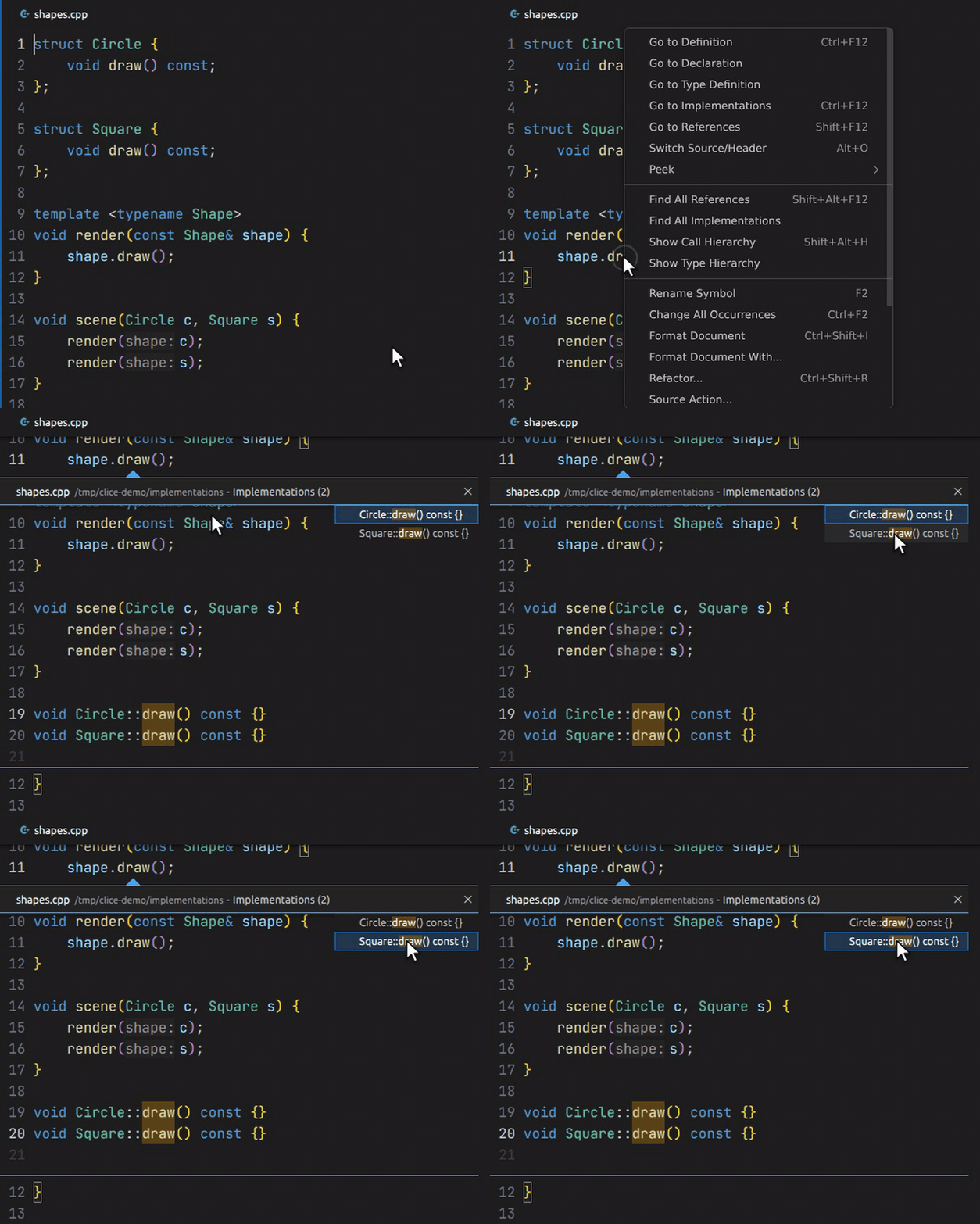
Better template support — A pseudo-instantiator works out what dependent names refer to without concrete arguments, and a template instantiated once also answers through that instantiation, such as the
autoparameter of a lambda passed to arangescall. A template is a duck-typed interface and each instantiation one of its implementations: go to implementation, references and the call hierarchy on a dependent call list what each instantiation calls. -
Works out of the box — Most projects need nothing but a
compile_commands.json: clice detects the environment of 50+ toolchains, nvcc, MSYS2, Cygwin and zig cc among them, and reconciles the compiler actually used with Clang, with no flags to add by hand.
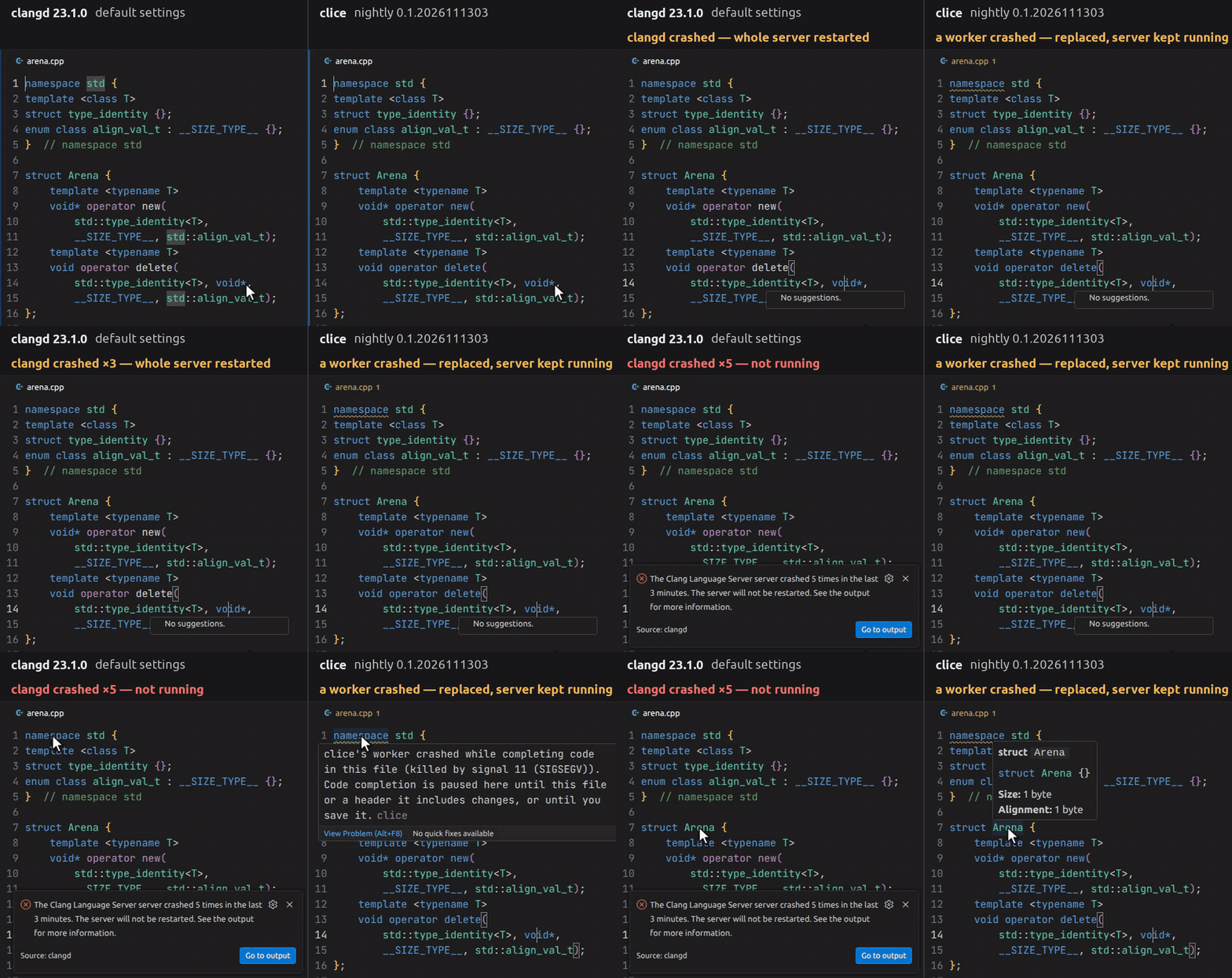
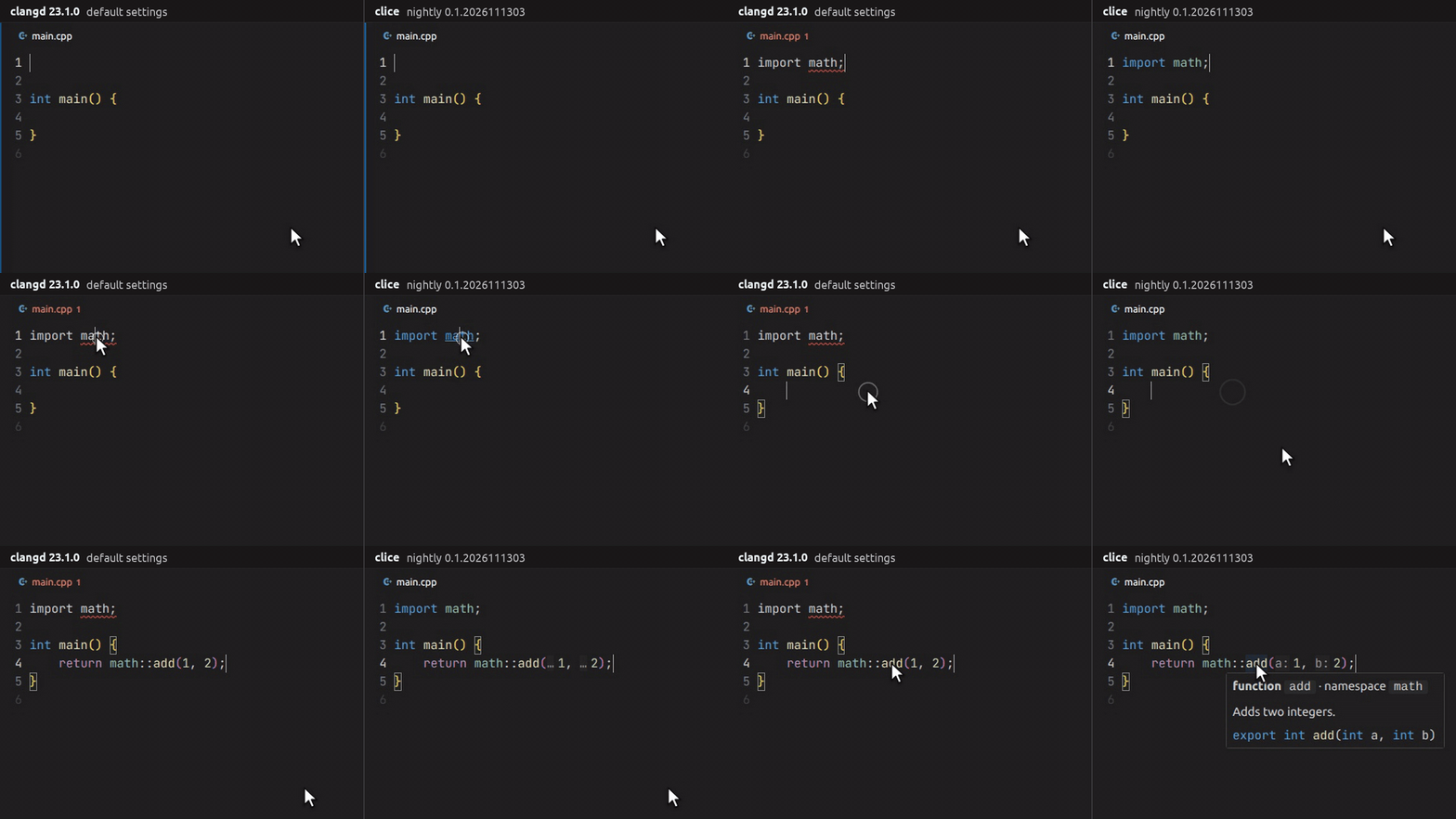
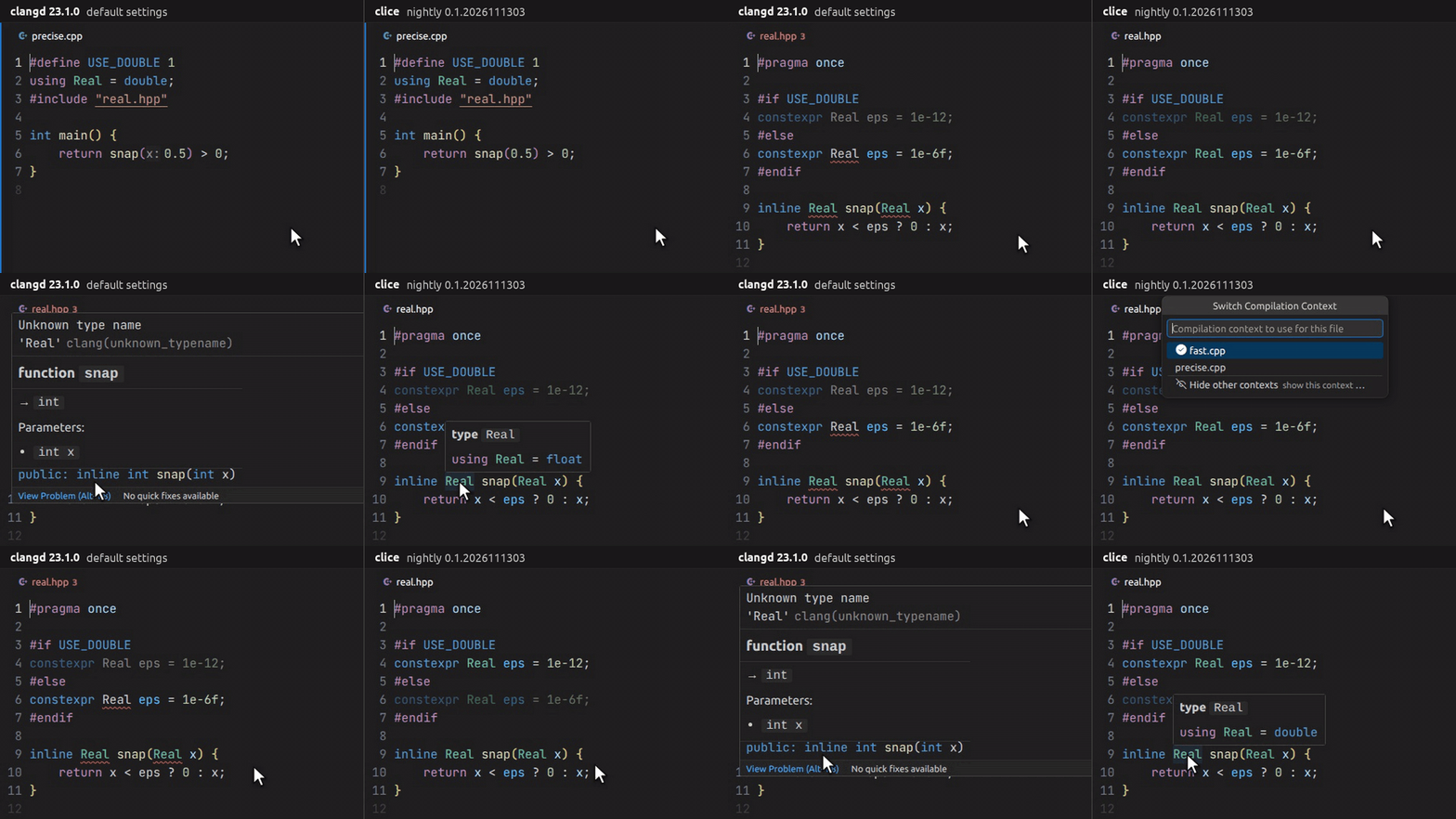
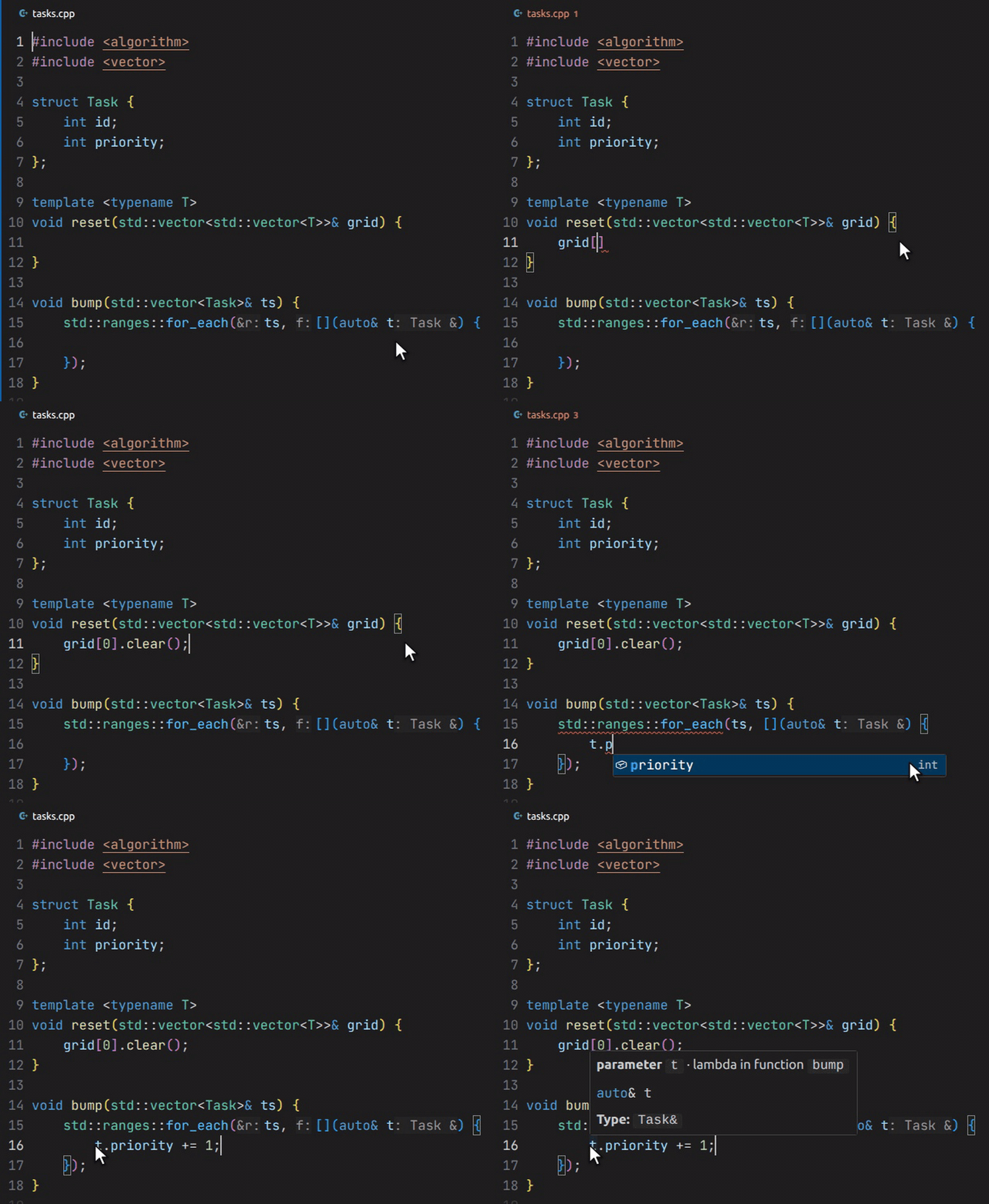
Command Line
The same engine answers from the command line:
clice indexbuilds the project's persisted index ahead of time, resumably, so an editor starts warm.clice lintruns clang-tidy over the project's units in a process pool and reports a shared header's findings once; with--indexthe same parse builds the index.clice formatformats the files the configuration and the compilation database name, in parallel, with clang-format.clice commandshows the command a file actually compiles with after the rules and the toolchain query, or converts acompile_commands.jsoninto resolved-cc1commands for other Clang tools.clice queryreads the index on disk, no server needed, and answers in JSON: definitions, references, call graphs, type hierarchies, file dependencies.clice refactorrewrites the sources from the persisted index without compiling: symbol and macro renames over the whole project, or a batch of them with--spec.clice analyzereports the project's structure as JSON from the index, such asanalyze modules: the module dependencies and cycles between directories, and the code standing in the way of modules.clice modularizewraps the third-party libraries a project uses as C++20 modules without touching a source file, or rewrites the project's own code into module units alonganalyze's split: headers become partitions,#includes becomeimports. clice's own modules were made with it.
Built with Modern C++
- C++20 coroutines throughout, on a structured-concurrency async library built on libuv: an event loop on the main thread, over many processes and threads.
- C++20 named modules and C++23
import std, self-hosted:clice modularizegenerates the module wrappers of the third-party libraries, and clice serves its own codebase. - Static reflection on templates and C++20 concepts for toml, json, bincode, blob and the command line, declared by annotations, with no boilerplate.
- Data-oriented, with almost no virtual functions beyond Clang's callback interfaces, on
std::format,std::expected,std::rangesandstd::views. - A hermetic, reproducible Bazel build on the xclang toolchain, cross-compiling to every platform, ThinLTO-optimized, depending on nothing but the system libraries.
Getting Started
Install
Download the latest binary from the releases page, or build from source.
Platforms: Linux (x64, ARM64), macOS (x64, ARM64), Windows (x64, ARM64)
Release channels:
| Channel | Version | Where to get it |
|---|---|---|
| Stable | even minor, e.g. v1.0.0 |
releases page + VS Code Marketplace + Open VSX |
| Nightly | odd minor, e.g. v1.1.2026112002 |
GitHub pre-releases + Marketplace and Open VSX pre-release channel (Switch to Pre-Release Version on the extension page) |
| Per-commit | untagged | artifacts on the latest green main CI runs |
The versioning rule is the VS Code Marketplace convention: even minor = stable, odd minor = pre-release. Nightly patch numbers encode the UTC build time as YYYYMMDDHH (year, month, day, hour — e.g. 2026071902 is 2026-07-19 02:00 UTC), so newer is always higher; a nightly is published only when main gained commits, and only the newest 25 nightlies, none older than 30 days, are kept, besides the one Neovim's Mason registry installs. Every published binary is the exact one that passed the full test suites — releases promote CI builds rather than rebuilding.
For the freshest bits, every green main CI run attaches installable artifacts (binaries and platform vsix) to its run page, so a fix can be tried the moment it merges (GitHub login required for artifact downloads).
Each release also ships *.symbols packages: if clice crashes, attach the newest server log to an issue and the matching symbols let us reconstruct the exact stack. The log location is printed at startup in your editor's clice output panel (Session log directory: — by default under <workspace>/.clice/logs/).
Editor Setup
| Editor | Setup |
|---|---|
| VS Code | Install the clice extension from the Marketplace |
| Cursor, VSCodium, Windsurf | Install the clice extension from Open VSX |
| Neovim | With nvim-lspconfig on Neovim 0.11 or later: vim.lsp.enable('clice') |
| Zed | Load editors/zed as a local extension |
| Other | Any LSP client works — point it at clice serve |
Project Setup
clice reads a compilation database to understand your project. For CMake:
cmake -B build -DCMAKE_EXPORT_COMPILE_COMMANDS=ON
By default clice loads every compile_commands.json in the project root and its immediate subdirectories (e.g. build/). See project setup for other build systems, and the configuration guide for databases elsewhere and files without one.
Documentation
Full docs at docs.clice.io/clice: the guide and configuration, every language feature and command, and the design.
Contributing
See building from source or join our Discord.
bazel build //:dist   # clice and the unit tests
pixi run test         # the unit tests and the cases
1 maintainer

Metadata
1 maintainer
Release files for clice 1.0.0.2
For a detailed explanation of source distributions (sdists) and built distributions (wheels), please see the package formats documentation.
Built distributions (wheels)
| File | Actions Reset | |||
|---|---|---|---|---|
| clice-1.0.0.2-py3-none-win_arm64.whl | Python 3 | none | Windows ARM64 | Details for clice-1.0.0.2-py3-none-win_arm64.whl |
| clice-1.0.0.2-py3-none-win_amd64.whl | Python 3 | none | Windows x86-64 | Details for clice-1.0.0.2-py3-none-win_amd64.whl |
| clice-1.0.0.2-py3-none-manylinux_2_17_x86_64.whl | Python 3 | none | Linux glibc 2.17+ x86-64 | Details for clice-1.0.0.2-py3-none-manylinux_2_17_x86_64.whl |
| clice-1.0.0.2-py3-none-manylinux_2_17_aarch64.whl | Python 3 | none | Linux glibc 2.17+ ARM64 | Details for clice-1.0.0.2-py3-none-manylinux_2_17_aarch64.whl |
| clice-1.0.0.2-py3-none-macosx_13_0_x86_64.whl | Python 3 | none | macOS 13.0+ x86-64 | Details for clice-1.0.0.2-py3-none-macosx_13_0_x86_64.whl |
| clice-1.0.0.2-py3-none-macosx_13_0_arm64.whl | Python 3 | none | macOS 13.0+ ARM64 | Details for clice-1.0.0.2-py3-none-macosx_13_0_arm64.whl |
Total release size: 160.5 MB
Release files / clice-1.0.0.2-py3-none-win_arm64.whl
| Download URL | clice-1.0.0.2-py3-none-win_arm64.whl |
|---|---|
| Size | 26.8 MB |
| Tags | Python 3 Windows ARM64 |
|
SHA-256 checksum How to use checksums |
5c1f68e702b5825bb5a0e6956a4717438574f207d6272e4c069d3ff875081194
|
|
BLAKE2b-256 checksum How to use checksums |
3af354dca9ebe20ecb42dfc4d21284a23bd505a19b66b4da192839f542b1a7dd
|
| Upload date | |
|
Uploaded using Trusted Publishing? What is trusted publishing? |
Yes |
| Uploaded via |
uv/0.13.10 {"installer":{"name":"uv","version":"0.13.10","subcommand":["publish"]},"python":null,"implementation":{"name":null,"version":null},"distro":{"name":"Ubuntu","version":"24.04","id":"noble","libc":null},"system":{"name":null,"release":null},"cpu":null,"openssl_version":null,"setuptools_version":null,"rustc_version":null,"ci":true}
|
Release files / clice-1.0.0.2-py3-none-win_amd64.whl
| Download URL | clice-1.0.0.2-py3-none-win_amd64.whl |
|---|---|
| Size | 28.5 MB |
| Tags | Python 3 Windows x86-64 |
|
SHA-256 checksum How to use checksums |
9da7623dbd817ff14ea132c0bd7df0041511e3de45612c938b3200f2f6f89e6e
|
|
BLAKE2b-256 checksum How to use checksums |
a0e7df13cd596abeb9713941c09d94b0ea5a275672a79a68a4d18e812dcf2010
|
| Upload date | |
|
Uploaded using Trusted Publishing? What is trusted publishing? |
Yes |
| Uploaded via |
uv/0.13.10 {"installer":{"name":"uv","version":"0.13.10","subcommand":["publish"]},"python":null,"implementation":{"name":null,"version":null},"distro":{"name":"Ubuntu","version":"24.04","id":"noble","libc":null},"system":{"name":null,"release":null},"cpu":null,"openssl_version":null,"setuptools_version":null,"rustc_version":null,"ci":true}
|
Release files / clice-1.0.0.2-py3-none-manylinux_2_17_x86_64.whl
| Download URL | clice-1.0.0.2-py3-none-manylinux_2_17_x86_64.whl |
|---|---|
| Size | 27.2 MB |
| Tags | Linux glibc 2.17+ x86-64 Python 3 |
|
SHA-256 checksum How to use checksums |
dec73409f68660a289770f57672d07f91a12df5975c10abca18376ca78b61bc3
|
|
BLAKE2b-256 checksum How to use checksums |
82f00f7ea53de6c976aab2472bfb249860d4ca2b3507c6e5ae6d9205f8e4bae2
|
| Upload date | |
|
Uploaded using Trusted Publishing? What is trusted publishing? |
Yes |
| Uploaded via |
uv/0.13.10 {"installer":{"name":"uv","version":"0.13.10","subcommand":["publish"]},"python":null,"implementation":{"name":null,"version":null},"distro":{"name":"Ubuntu","version":"24.04","id":"noble","libc":null},"system":{"name":null,"release":null},"cpu":null,"openssl_version":null,"setuptools_version":null,"rustc_version":null,"ci":true}
|
Release files / clice-1.0.0.2-py3-none-manylinux_2_17_aarch64.whl
| Download URL | clice-1.0.0.2-py3-none-manylinux_2_17_aarch64.whl |
|---|---|
| Size | 26.0 MB |
| Tags | Linux glibc 2.17+ ARM64 Python 3 |
|
SHA-256 checksum How to use checksums |
72039e60c3fa2c624428cf9c8a1df930a15e108366dc14dd63b35dcb8cd9df6a
|
|
BLAKE2b-256 checksum How to use checksums |
97ebc692e816d464ca4490a16bce1eb3497756a6d6dfd1b491618f4be36aa140
|
| Upload date | |
|
Uploaded using Trusted Publishing? What is trusted publishing? |
Yes |
| Uploaded via |
uv/0.13.10 {"installer":{"name":"uv","version":"0.13.10","subcommand":["publish"]},"python":null,"implementation":{"name":null,"version":null},"distro":{"name":"Ubuntu","version":"24.04","id":"noble","libc":null},"system":{"name":null,"release":null},"cpu":null,"openssl_version":null,"setuptools_version":null,"rustc_version":null,"ci":true}
|
Release files / clice-1.0.0.2-py3-none-macosx_13_0_x86_64.whl
| Download URL | clice-1.0.0.2-py3-none-macosx_13_0_x86_64.whl |
|---|---|
| Size | 26.9 MB |
| Tags | Python 3 macOS 13.0+ x86-64 |
|
SHA-256 checksum How to use checksums |
a1e6eab7adb1ad9b13b3325d8de52c0428cf1890c6ea500bf4d2d7441aed38b0
|
|
BLAKE2b-256 checksum How to use checksums |
59fadeca5277cfab473492314d2b0f3e015f64ce0aad9f63b824c5599347a002
|
| Upload date | |
|
Uploaded using Trusted Publishing? What is trusted publishing? |
Yes |
| Uploaded via |
uv/0.13.10 {"installer":{"name":"uv","version":"0.13.10","subcommand":["publish"]},"python":null,"implementation":{"name":null,"version":null},"distro":{"name":"Ubuntu","version":"24.04","id":"noble","libc":null},"system":{"name":null,"release":null},"cpu":null,"openssl_version":null,"setuptools_version":null,"rustc_version":null,"ci":true}
|
Release files / clice-1.0.0.2-py3-none-macosx_13_0_arm64.whl
| Download URL | clice-1.0.0.2-py3-none-macosx_13_0_arm64.whl |
|---|---|
| Size | 25.2 MB |
| Tags | Python 3 macOS 13.0+ ARM64 |
|
SHA-256 checksum How to use checksums |
8a8a4c82d95ff31102d2bc81dd6ab88ee18f16e8b056147aa46cf4012399c383
|
|
BLAKE2b-256 checksum How to use checksums |
ea19b0114843754837c07e6306b1477202f08ea78885b7c7f72a9346eb4ccdb4
|
| Upload date | |
|
Uploaded using Trusted Publishing? What is trusted publishing? |
Yes |
| Uploaded via |
uv/0.13.10 {"installer":{"name":"uv","version":"0.13.10","subcommand":["publish"]},"python":null,"implementation":{"name":null,"version":null},"distro":{"name":"Ubuntu","version":"24.04","id":"noble","libc":null},"system":{"name":null,"release":null},"cpu":null,"openssl_version":null,"setuptools_version":null,"rustc_version":null,"ci":true}
|
Security for clice 1.0.0.2
Provenance
Provenance describes where a file came from. On PyPI, provenance is shared via attestations, which provide a verifiable record of the build or publishing details. View details, limitations and caveats.
No provenance found
None of the files in this release were uploaded with provenance metadata.
A note on package security
PyPI is a repository for distributing packages, not a service for auditing them. While third-party security researchers and our staff do their best to detect and remove malicious packages, PyPI cannot guarantee the quality, security or suitability of any given package.
To learn more about protecting yourself from malicious actors, visit our package security documentation.














