
Fast CLI generator

Project description

cliche
Turn any Python function into a CLI in one line. Decorate, install, run.
# calc.py
from cliche import cli

@cli
def add(a: int, b: int):
    print(a + b)
cliche install calc      # one-time
calc add 2 3                 # → 5
That's the whole surface of the library. It does a lot more under the hood — AST-based scanning, mtime caching, lazy imports, type coercion, enum / pydantic handling, shell autocomplete, zombie-entry cleanup, parallel e2e testing — all of it is on by default. You don't need to know any of it to use it. Everything below is reference material for when you want to know about specific features.
0.20.0 status note. This release is a significant refactor that has been in the making for a long time, fixing a range of issues the earlier versions carried. A v1 release is slated for June 2026 — the current work is the runway to that. Expect the public surface above to stay stable through the v1 cut.
Why it exists
click / typer ask you to restructure code around decorators and argument
definitions. argparse works but is verbose. fire is fast but guesses too
much. cliche takes a different route: your function signature is your
CLI. Type annotations become argparse types. Defaults become flags.
Docstrings become --help text. No re-declaration.
- Sub-80 ms startup even in large packages — feels instant. AST-only scanning + per-file mtime cache, and lazy-import of the module for the invoked command only.
- No imports at scan time —
@cliis detected from source text, so scanning doesn't execute your code. 100 files with heavy top-level imports still launches instantly. - LLM-friendly from day one — every installed CLI ships with a
--llm-helpflag that dumps a compact spec of commands, signatures, defaults, and enum values.
30-second quickstart
pip install cliche                      # or: uv tool install cliche

mkdir my_tool && cd my_tool
cat > ops.py <<'EOF'
from cliche import cli

@cli
def greet(name: str, loud: bool = False):
    """Say hi to someone.

    :param name: the person to greet
    :param loud: uppercase the output
    """
    msg = f"hello {name}"
    print(msg.upper() if loud else msg)
EOF

cliche install mytool     # generates pyproject.toml + pip install -e .
mytool greet world            # → hello world
mytool greet world --loud     # → HELLO WORLD
mytool --help                 # standard argparse help
mytool --llm-help                  # LLM-readable doc
Editing source takes effect immediately (editable install). No reinstall when you add/rename functions.
The whole API
One decorator. @cli marks a function as a command. @cli("name") nests
it under a subcommand group.
from cliche import cli

@cli
def hello(): ...              # top-level: mytool hello

@cli("db")
def migrate(): ...            # grouped:   mytool db migrate

@cli("db")
def seed(): ...               # sibling:   mytool db seed
@cli is a no-op at runtime — detection is purely textual (AST). Aliased
decorators (c = cli; @c def ...) won't be detected. Stick to literal @cli
or @cli("group").
One install command. cliche install <binary> reads the current
dir, creates (or amends) pyproject.toml, generates _cliche.py (the entry
point), and runs pip install -e . — or, with --tool, uv tool install
into an isolated venv.
One uninstall command. cliche uninstall <binary> removes the
binary, entry point, generated _cliche.py, the cache — and leaves your code
alone.
One list command. cliche ls shows every CLI installed via
cliche in the current Python env (plus uv tool-installed ones) —
binary name, import name, version, install mode, command count, and whether
another package is masking the same binary.
Types it understands
Your function body stays clean. No int(x), Path(x), Mode(x) calls
at the top — values arrive coerced to the type you annotated, so you start
work immediately. Invalid input (bad date, non-int, unknown enum member) is
rejected at the CLI boundary with a clear error, not deep inside your code.
| You write | CLI form | Arrives as |
|---|---|---|
x: str / x: int / x: float |
positional | matching type |
x: str = "a" |
--x VALUE |
str |
flag: bool = False |
--flag (store_true) |
bool |
flag: bool = True |
--no-flag (store_false) |
bool |
p: Path |
positional | pathlib.Path |
p: Path | None = None |
--p VALUE |
Path or None |
d: date |
positional, YYYY-MM-DD |
datetime.date |
t: datetime |
positional, ISO-8601 | datetime.datetime |
items: list[int] |
positional, cmd 1 2 3 |
list[int] |
items: tuple[int, ...] = () |
--items 1 2 3 (optional flag) |
tuple[int, ...] |
paths: tuple[Path, ...] |
positional, nargs='+' | tuple[Path, ...] |
tags: dict[str, int] = {} |
--tags a=1 b=2 |
dict[str, int] |
m: MyEnum |
positional, choices | enum member |
m: MyProtoEnum (from *_pb2.py) |
positional, choices | protobuf enum int value |
cfg: MyBaseModel |
each field → --field flag |
pydantic model |
p: MyCallable (user-defined) |
positional, passed through type= |
return value of MyCallable(s) |
async def … |
awaited via asyncio.run |
— |
Defaults work for free. Write def cmd(host: str = "localhost", port: int = 8080, tags: tuple[str, ...] = (), mode: Mode = Mode.FAST) — all four
defaults flow through to --help and to the invocation when the flag is
omitted. That covers the vast majority of real CLIs. For computed defaults
(Path.home(), os.getenv(...)) use a sentinel and resolve inside the
function — they're stored verbatim because cliche reads source text,
never executes it at scan time (that's how startup stays fast).
Fresh date/time defaults. For today / now defaults that must re-evaluate
per invocation (not at scan time), use the built-in lazy classes:
from datetime import date, datetime
from cliche import cli, DateUtcArg, DateTimeUtcArg  # or DateArg/DateTimeArg for local clock

@cli
def report(day: date = DateUtcArg("today"), when: datetime = DateTimeUtcArg("now")):
    ...
Accepted: "today", "yesterday", "tomorrow", "+Nd"/"-Nd", "+Nh"/"-Nh",
"+Nm"/"-Nm" (last three: datetime only), YYYY-MM-DD, YYYYMMDD, ISO-8601
datetime. *UtcArg variants use UTC; bare DateArg/DateTimeArg use local clock.
For variadic collection parameters, prefer tuple[T, ...] = () over
list[T] = []. Both work identically on the CLI (each invocation is a
fresh process, so Python's mutable-default footgun doesn't cross
invocations), but the tuple form sidesteps the class of bug where the
function gets called a second time from non-CLI Python code, signals
read-only intent, and keeps linters (ruff B006) quiet. Use list[T] = []
only when the body really needs to mutate the collection and you're sure
the function is CLI-only.
Enums catch typos before your code runs. Python Enum classes and
protobuf _pb2.py enums are auto-discovered; their values populate argparse
choices. An invalid value exits with a full list of what IS valid — so
users fix the typo once, not after staring at a traceback. Inside your
function the argument is a real enum member, so match and type checks work.
Pydantic models are first-class. Annotate a parameter with a BaseModel
subclass and each field becomes its own flag. Pydantic runs full validation
at construction time, so bad input exits 2 with a clear message before your
code runs — you get free validation on CLI inputs without writing anything.
Works with v1 and v2.
Custom type callables for escape-hatch validation. When primitives
aren't enough (range checks, non-empty strings, URL / semver parsing),
annotate with a (str) -> T callable defined in the same module.
cliche hands it to argparse as type= and argparse calls it per
token, wrapping any ValueError / ArgumentTypeError into a clean
argument <name>: <message> error before your function runs:
import argparse
from cliche import cli

def Port(s: str) -> int:
    n = int(s)
    if not (1 <= n <= 65535):
        raise argparse.ArgumentTypeError(f"port out of range: {n}")
    return n

def NonEmpty(s: str) -> str:
    if not s:
        raise ValueError("must be non-empty")
    return s

@cli
def serve(port: Port, host: NonEmpty = "localhost"):
    print(f"{host}:{port}")

# mytool serve 70000         → argument port: port out of range: 70000
# mytool serve 80 --host ""  → argument --host: invalid NonEmpty value: ''
# mytool serve 443           → localhost:443
Use this for single-field validation; reach for a pydantic BaseModel when
you want a cluster of related fields with cross-field constraints.
Note: this shorthand puts a callable where a type annotation is expected,
so mypy / pyright will flag port: Port as "not valid as a type". Runtime
behaviour is unaffected. If you lint with a strict type checker, either
ignore the specific line or prefer a pydantic model.
Bool flags stay unambiguous. You only ever type the form that changes
behavior — never redundant: verbose: bool = False → --verbose turns it
on. use_cache: bool = True → --no-use-cache turns it off. --help always
describes the flag as the user sees it ("Default: False" = the flag is off
by default), not the underlying param.
Examples by feature
Subcommand groups
@cli("math")
def add(a: int, b: int): print(a + b)

@cli("math")
def mul(a: int, b: int): print(a * b)

@cli("text")
def upper(s: str): print(s.upper())
mytool math add 2 3        → 5
mytool text upper hello    → HELLO
Enums
from enum import Enum
class Mode(Enum):
    FAST = "fast"
    SAFE = "safe"

@cli
def run(mode: Mode = Mode.SAFE):
    print(mode.value)
mytool run                 → safe
mytool run --mode FAST     → fast
mytool run --mode INVALID  → argparse error with valid choices
Dict parameters
A realistic use case: an HTTP request with headers (strings) and numeric paging params (ints) — the value type in the annotation drives coercion.
import urllib.parse, urllib.request

@cli
def fetch(
    url: str,
    headers: dict[str, str] = {},
    paging:  dict[str, int] = {},
):
    """GET a URL with extra headers and numeric paging params.

    :param url: base URL
    :param headers: request headers, e.g. Authorization=Bearer\\ xyz
    :param paging: numeric query params (values coerced to int)
    """
    if paging:
        url = f"{url}?{urllib.parse.urlencode(paging)}"
    req = urllib.request.Request(url, headers=headers)
    print(urllib.request.urlopen(req).read().decode())
mytool fetch https://api.example.com/v1/users \
    --headers Authorization="Bearer eyJhbGci..." Accept=application/json \
    --paging  page=1 limit=50
# headers → {'Authorization': 'Bearer eyJhbGci...', 'Accept': 'application/json'}
# paging  → {'page': 1, 'limit': 50}         # ints, not strings
# → GET https://api.example.com/v1/users?page=1&limit=50

mytool fetch ... --paging page=two   # argparse error: invalid int value: 'two'
Values are coerced per the annotation (dict[str, int] → ints,
dict[str, float] → floats, etc.), and bad input is rejected at the CLI
boundary. The first = per pair is the split point, so values containing
= pass through unchanged: --headers Cookie=session=abc123 is one entry
keyed Cookie with value session=abc123. Repeating the flag accumulates
entries.
Pydantic models as parameters
from pydantic import BaseModel

class Config(BaseModel):
    host: str = "localhost"
    port: int = 8080
    tls: bool = False

@cli
def serve(cfg: Config):
    print(f"{cfg.host}:{cfg.port} tls={cfg.tls}")
mytool serve                                      → localhost:8080 tls=False
mytool serve --host acme.local --port 9000 --tls  → acme.local:9000 tls=True
Pydantic runs full validation when the model is constructed; bad types exit 2 with a clear message.
Async
@cli
async def fetch(url: str):
    await asyncio.sleep(0.1)
    print(f"got {url}")
Just async def — cliche wraps the call in asyncio.run.
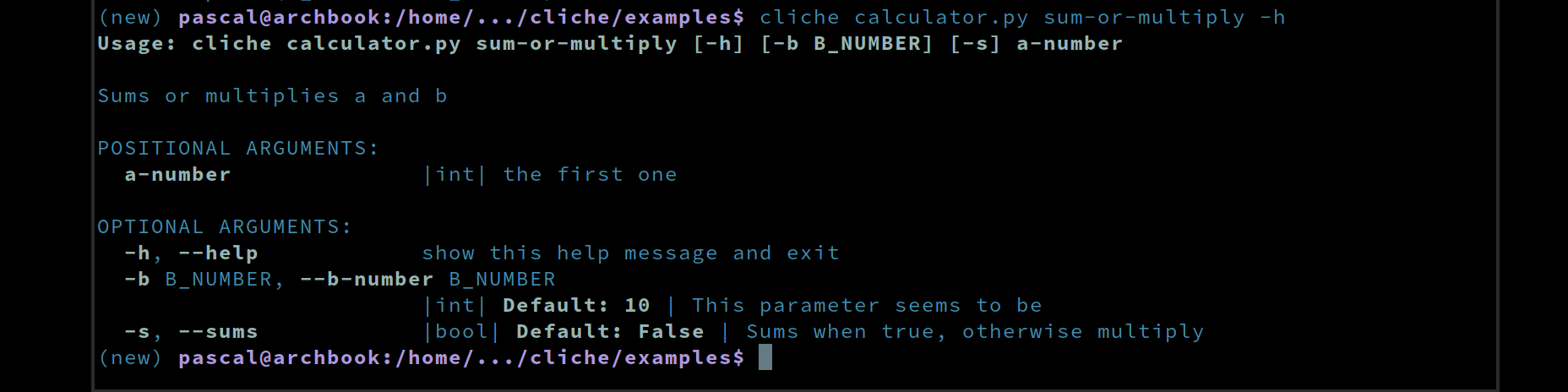
Docstrings become help
@cli
def deploy(env: str, dry_run: bool = False):
    """Deploy the service.

    :param env: target environment (prod/stage)
    :param dry_run: skip actual deploy
    """
Your docstring IS the help text. First line → command summary; each
:param name: line → per-arg help. Nothing to keep in sync: update the
docstring, --help updates on next run. --help renders with color, short-
flag hints, type markers, and defaults so users can scan it fast:
Returning vs printing
- Non-
Nonereturn → auto-printed asjson.dumps(result, indent=2). With--raw, plainprint(result)instead (good for| jq,| awk). print()inside the function works too — don't do both, it duplicates.
Install modes
cliche install mytool              # editable install into current Python env
cliche install mytool --tool       # isolated uv-tool venv (requires uv)
cliche install mytool --force      # replace an existing binary of the same name
cliche install mytool -p my_pkg    # import name differs from binary name
cliche install mytool --no-autocomplete   # skip shell rc registration
Use --tool to keep your project envs clean. Each CLI lives in its own
isolated venv under ~/.local/share/uv/tools/, so installing a new CLI
can't break dependency resolution in the Python env you're actively
developing against. Skip --tool when you're actively iterating on the CLI
itself — editable installs in the current env give you tighter feedback.
Binary name vs import name. The positional arg is the shell name.
Python's import name defaults to the directory basename (not always a valid
identifier — my-project doesn't work). Use -p <import_name> when they
differ:
# dir = claude_compress/, want a short binary
cliche install clompress -p claude_compress
#  → shell: `clompress …`   python: `from claude_compress... import ...`
Listing installed CLIs: cliche ls
┌────────┬─────────┬────────┬─────────┬──────┬────────┬─────────────────────────┐
│ BINARY │ IMPORT  │ VER    │ MODE    │ CMDS │ STATUS │ PATH                    │
├────────┼─────────┼────────┼─────────┼──────┼────────┼─────────────────────────┤
│ bty    │ brighty │ 0.2.11 │ edit    │    6 │ LIVE   │ /home/.../brighty       │
│ bty    │ sysdm   │ 0.8.67 │ edit    │   13 │ MASKED │ /home/.../sysdm         │
│ mytool │ my_tool │ 0.1.0  │ edit    │    3 │ ok     │ /home/.../my_tool       │
│ foo    │ foo     │ 0.1.0  │ uv-tool │    2 │ ok     │ /tmp/foo                │
└────────┴─────────┴────────┴─────────┴──────┴────────┴─────────────────────────┘
- MODE —
edit(editable),site(non-editable),uv-tool(isolated). - STATUS —
ok(unique),LIVE(multiple packages declare this binary; this one wins),MASKED(someone else won; typing the binary runs the other package's code). - CMDS —
@clifunction count from the runtime cache.
Uninstall
cliche uninstall mytool                # straightforward case
cliche uninstall bty --pkg sysdm       # disambiguate when two dists claim 'bty'
Cleans up everything cliche created: the pip package, _cliche.py,
generated __init__.py (only if it still matches the marker), runtime cache,
*.egg-info, empty [project.scripts], autocomplete hook in ~/.bashrc /
~/.zshrc / ~/.config/fish/config.fish. User-written code is never
touched.
You never end up with zombie binaries or "still registered but can't
uninstall" errors: when two packages share a binary, cliche refuses to
guess and shows both options with paste-ready commands; when pip/uv says "not
installed" but the shim is still on PATH, it surgically strips the stale
entry_points.txt entry; and it refuses to uninstall cliche itself so
you can't accidentally pave over the tool with the tool.
Built-in global flags
Every installed CLI gets these for free:
| Flag | What it does |
|---|---|
-h, --help |
Standard help |
--cli |
CLI + Python version info, autocomplete status, cache location |
--llm-help |
Compact LLM-friendly help: every command, signature, enum, default |
--raw |
Plain print() of the return value — good for pipes |
--notraceback |
On error, print only ExcName: message |
--pdb |
Post-mortem on exception (prefers ipdb via [debug] extra) |
--pip [args] |
Run pip in this CLI's Python env: mytool --pip list |
--pyspy N |
Profile for N seconds, write speedscope JSON |
--timing |
Detailed startup + import + invoke timing to stderr |
--skip-gen |
Skip cache regeneration for this invocation |
--llm-help is the canonical way for an LLM or script to enumerate your tool.
Benchmark (scripts/bench_llm_parsing.py) shows Claude/Gemini/Codex generate
100% valid commands from it.
Shell autocomplete
Turned on automatically at install time. Supports bash, zsh, and fish. Only touches rc files that already exist. The registered lines are hardened:
command -v register-python-argcomplete >/dev/null && \
  eval "$(register-python-argcomplete mytool 2>/dev/null)"
Your shells stay quiet even if argcomplete later breaks (stale shebang,
moved Python, uninstalled package) — the guarded form silently no-ops instead
of spewing error text on every new terminal. Uninstall removes the hook
automatically. Pass --no-autocomplete at install to skip the write.
Layouts supported
# flat — the directory IS the package
my_project/
├── __init__.py
├── ops.py            # @cli funcs here
└── pyproject.toml

# subdir — a subdirectory with matching name
my_project/
├── my_project/
│   ├── __init__.py
│   └── ops.py
└── pyproject.toml

# src
my_project/
├── src/my_project/
│   ├── __init__.py
│   └── ops.py
└── pyproject.toml
You don't think about layout. install detects which shape your project
is in and does the right thing — including promoting an almost-a-package
subdir (has .py files but missing __init__.py) to a real package so the
install doesn't silently fail at import time. If nothing matches a package
shape, it stays flat.
Files are scanned recursively, so your @cli functions can live in any module
of the package. Noise dirs are skipped automatically: .git, __pycache__,
venv/.venv, env/.env, node_modules, and any dotfile dir.
Caching internals
You never regenerate anything manually. Edit a file, add a function,
rename one — the next CLI invocation picks it up automatically. Behind the
scenes, parsed signatures live in $XDG_CACHE_HOME/cliche/<pkg>_<hash>.json
(default ~/.cache/cliche/); a per-file mtime check re-parses only
what changed, renames/adds/deletes are caught via directory mtime bumps, and
big changes fan out across CPUs. If a cache ever gets weird, nuke it and it
rebuilds on the next run:
rm ~/.cache/cliche/<pkg>_*.json
Testing the CLI you built
Tests come cheap for your own CLI. Because @cli is a no-op at runtime,
you can unit-test your @cli functions directly as plain Python — no
framework mocks, no fake argparse, nothing to stub. For end-to-end coverage,
subprocess.run([your_binary, ...]) and assert on stdout/stderr.
A pattern worth copying (this is how cliche's own test suite is
structured — see tests/conftest.py in this repo as a reference you can
lift for your own project): a session-scoped pytest fixture pre-runs every
subprocess invocation concurrently in a ThreadPoolExecutor at collection
time, then each individual test just looks up the pre-computed result. That's
how the 75-case e2e matrix here lands in ~1.2 s — fast enough to run on
every save.
Integration with LLMs
Every CLI gets --llm-help for free:
mytool --llm-help > spec.txt
# pass spec.txt as context to a model:
# "Given this CLI spec, write 5 commands to accomplish <goal>."
Two benchmarks in scripts/ measure round-trip quality:
bench_llm_parsing.py— do models correctly consume--llm-helpand emit valid argv for the described CLI?bench_llm_library_gen.py— given thecliche --llm-helpguide, can models generate working library source that installs and runs?
Both support --models claude,gemini,codex,qwen (qwen via
opencode with a local llama.cpp backend).
Gotchas (bite-order)
from cliche import cliis required at runtime (not for AST scanning, but so Python doesn'tNameErroron the decorator).bool = Truebecomes--no-flag, not--flag. True is already the default; there's no way to "set True" on the CLI.- List/tuple positionals consume the rest of argv (
nargs='+'/'*'). Put them last in the signature. - Pick
returnORprint(...), not both — a non-None return is auto-JSON-printed;print()on top duplicates output. - Functions named
helpshadow--help. Rename or wrap in a group. - Computed defaults (
os.getenv(...),Path.home()) silently become strings. Use a sentinel and resolve inside the function:def cmd(db: str = ""): db = db or os.getenv("DB", "default.db")
- Aliased imports aren't resolved for Path / enum / pydantic detection.
Write
from pathlib import Path+x: Path, notimport pathlib as p; x: p.Path. self-methods:clicheinstantiates the class with zero args. If__init__needs args, use a plain function.
Everything else should just work.
When to use it
Good fits:
- A script/library with top-level functions you want as CLI commands without wrapper code.
- Fast-startup CLIs (shell prompts, tight loops, test harnesses).
- Tools that LLMs will discover and drive.
- Shipping a CLI without a framework dep in your library runtime (
@cliis a no-op; thecliimport is the only runtime dep).
Bad fits (for now):
- Highly customised UX (rich formatting, interactive prompts, built-in
progress bars) — pair with
richortyper. - argparse features not translated (custom actions, exotic validators, explicitly-declared mutually-exclusive groups).
Meta entry point
cliche install <binary>    Install a CLI
cliche uninstall <binary>  Uninstall (supports --pkg for disambiguation)
cliche ls                  List every @cli CLI in this env
cliche --llm-help               Print the full guide (for LLM consumption)
Philosophy
The smaller the API, the less there is to learn and the less there is to
break. @cli + cliche install + rich type coercion covers ~95% of the
CLIs people actually build. The remaining 5% aren't blocked — they're just
written the old way, alongside @cli functions in the same project.
License
MIT.
Release history Release notifications | RSS feed


Download files
Download the file for your platform. If you're not sure which to choose, learn more about installing packages.
Source Distribution
Built Distribution
Filter files by name, interpreter, ABI, and platform.
If you're not sure about the file name format, learn more about wheel file names.
Copy a direct link to the current filters
File details
Details for the file cliche-0.20.1.tar.gz.
File metadata
- Download URL: cliche-0.20.1.tar.gz
- Upload date:
- Size: 213.4 kB
- Tags: Source
- Uploaded using Trusted Publishing? No
- Uploaded via: uv/0.10.4 {"installer":{"name":"uv","version":"0.10.4","subcommand":["publish"]},"python":null,"implementation":{"name":null,"version":null},"distro":{"name":"Arch Linux","version":null,"id":null,"libc":null},"system":{"name":null,"release":null},"cpu":null,"openssl_version":null,"setuptools_version":null,"rustc_version":null,"ci":null}
File hashes
| Algorithm | Hash digest | |
|---|---|---|
| SHA256 |
b6ab82b6229ea43a6746f19aea40ad0344ee3c2ac60592c442794b6beeb3c2f3
|
|
| MD5 |
d490c3047f3ee67c48aee8d4af0ef212
|
|
| BLAKE2b-256 |
8afb50d755f0bd5663717c28c03a84b4653ad7afa6814b1422b4f5430e4af5f8
|
File details
Details for the file cliche-0.20.1-py3-none-any.whl.
File metadata
- Download URL: cliche-0.20.1-py3-none-any.whl
- Upload date:
- Size: 80.2 kB
- Tags: Python 3
- Uploaded using Trusted Publishing? No
- Uploaded via: uv/0.10.4 {"installer":{"name":"uv","version":"0.10.4","subcommand":["publish"]},"python":null,"implementation":{"name":null,"version":null},"distro":{"name":"Arch Linux","version":null,"id":null,"libc":null},"system":{"name":null,"release":null},"cpu":null,"openssl_version":null,"setuptools_version":null,"rustc_version":null,"ci":null}
File hashes
| Algorithm | Hash digest | |
|---|---|---|
| SHA256 |
b621024e0ddaf4e06e5866315a2985efc681e6d17394cd10cdb384fcc59f7f90
|
|
| MD5 |
0cc5ee545cead9dcd1baa9ca48a62e85
|
|
| BLAKE2b-256 |
66ec3fb4e3f3478656876ae6c6c5749d05c1aad60cc278509f50529874ee947f
|






