
🌈 Drop-in replacement for Click to make user-friendly and colorful CLI
Verified details
These details have been verified by PyPIProject links
GitHub Statistics
Maintainers

Project description







What is Click Extra?
It should be easy to write a good CLI in Python. Click makes it so. But there is still hundrends of tweaks to implement by yourself to have a user-friendly CLI.
Click Extra is a ready-to-use wrapper around Click to make your CLI look good and behave well. It is a drop-in replacement with good defaults that saves lots of boilerplate code and frustration by making all parts working together.
It also comes with workarounds and patches that have not reached upstream yet (or are unlikely to).
Who is this for?
Anyone building a CLI who doesn't have time to assemble the pieces from scratch:
- You use Click and want professional defaults without the boilerplate.
- You're a security researcher turning a proof-of-concept into a presentable tool to hand off, demo, or attach to an advisory.
- You're a DevOps engineer or sysadmin whose one-off script grew into a team tool and needs
--help,--verbose,--config, and colored output.
Click Extra's defaults-first design means one decorator gets you there. See the 30-second quick start.
Demo
You can try Click Extra right now in your terminal, without installing any dependency or virtual env thanks to uvx:
$ uvx click-extra
This is a great way to play with Click Extra and check that it runs fine on your system, and renders properly in your terminal.
Example
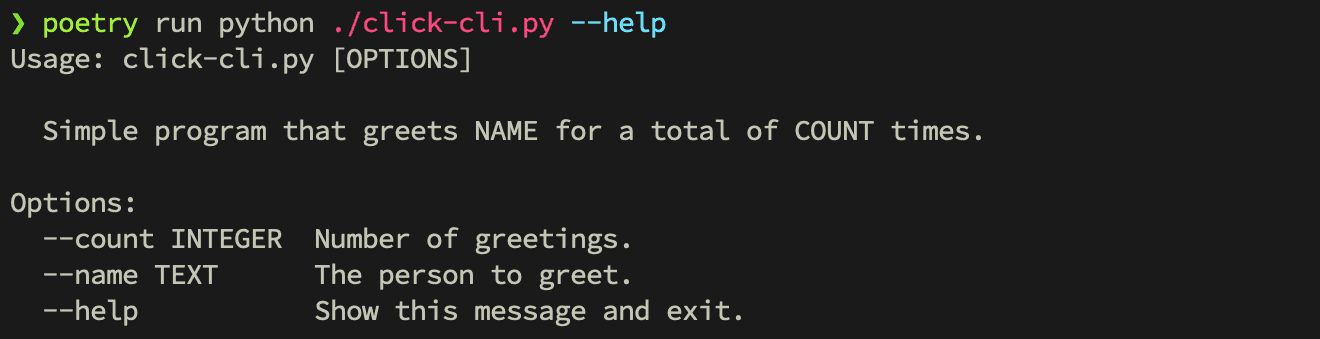
It transforms this vanilla click CLI:
Into this:
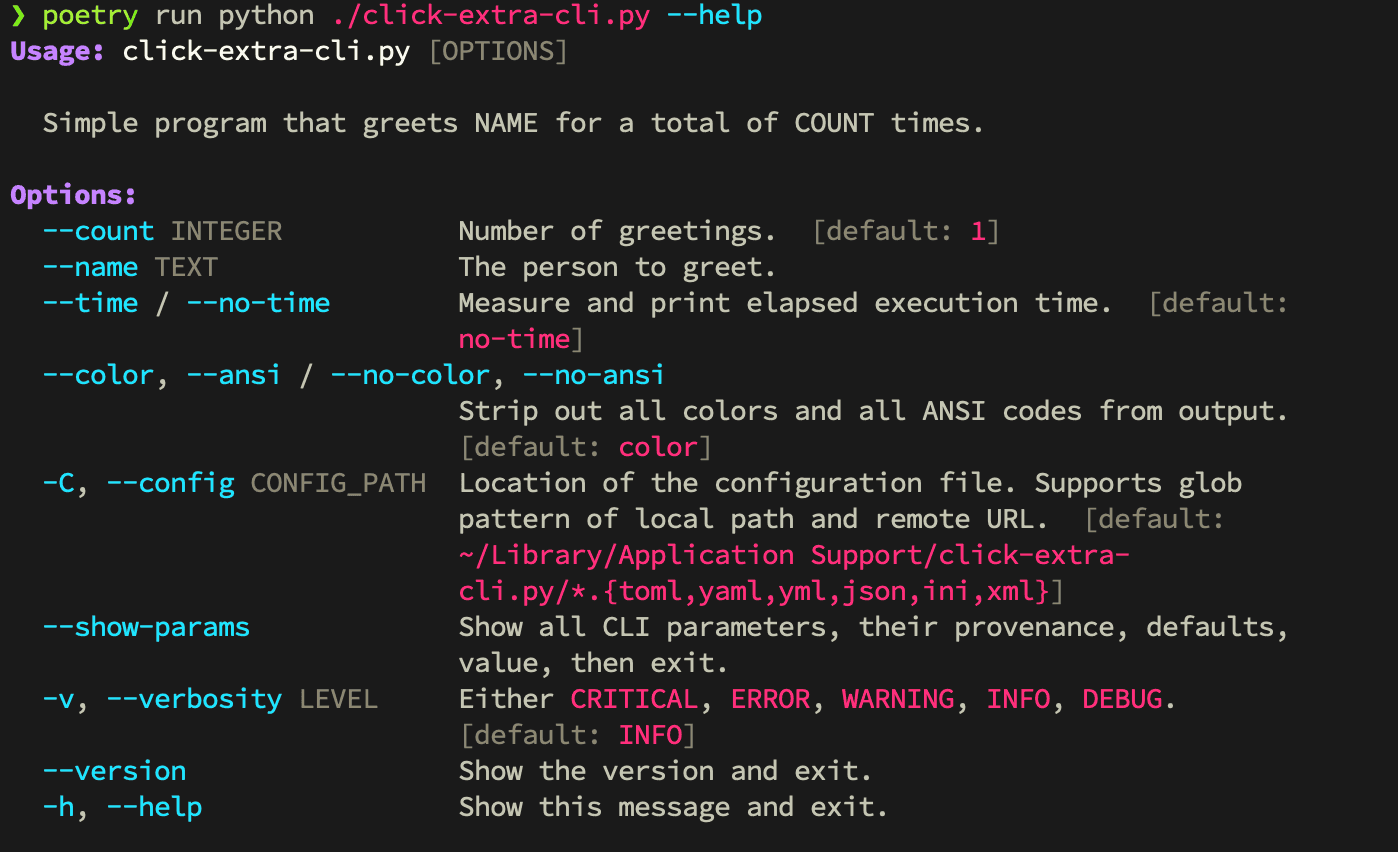
To understand how we ended up with the result above, go read the tutorial.
Features
Configuration
- Multi-format configuration file loader for:
TOMLYAMLJSON,JSON5,JSONCandHJSONINI, with extended interpolation, multi-level sections and non-native types (list,set, …)XML
- Automatic
pyproject.tomlintegration: the CLI reads its[tool.<cli>]section from the user's project file, including a CWD-aware walk that skips unrelatedpyproject.tomlfiles - Inference of the configuration file structure from your CLI's options, with optional dataclass schema typing so values arrive parsed and validated
- Remote loading of configuration from URLs
- Optional strict validation of configuration with
--validate-config - Extension hook (
ConfigValidator) for user-defined sub-trees whose keys are data rather than CLI flags (per-plugin overrides, matrix axes, user-defined IDs), with rootedValidationErrorreporting - Respect the default application path on each platform (XDG spec. on Linux)
- Glob search patterns for configuration files
- A
--no-configoption to disable configuration file loading - Respect of
Prompt>CLI>Environment>Config>Defaultsprecedence
Help screens and theming
- Colorized help screens: options, choices, metavars, arguments, defaults, ranges, required labels, environment variables, subcommands and aliases all get distinct styles. Option names referenced in descriptions and docstrings are highlighted automatically
- Theme system with seven built-in themes (
dark,light,dracula,monokai,nord,solarized_dark, and a monochromemanpage) - User-defined themes and partial overrides loaded from the CLI's
--configfile ([tool.<cli>.themes.<name>]), scoped per invocation so concurrent runs don't bleed into each other --themeflag on every command, with case-insensitive validation against the live registry-h/--helpoption names (see rant on other inconsistencies)- Built-in
helpsubcommand with a--searchmode for groups
Standard options on every CLI
- Colored
--versionwith template variables for git metadata (branch, hash, date, tag) and pre-baking for compiled binaries (Nuitka, PyInstaller) - Colored
--verbosityLEVEL and logs, plus-v/--verboserepetition for incremental bumping --show-paramsto debug parameter defaults, values, environment variables and provenance--time/--no-timeto measure command execution duration--table-formatto switch between 40+ table-rendering styles (usesprint_table()andserialize_data())--jobsfor parallel-execution worker counts--telemetry/--no-telemetryflag to opt-in/out of tracking code--color/--no-coloroption flag, with recognition ofNO_COLOR(no-color.org),FORCE_COLOR,CLICOLOR, andLLMenvironment variables- Recognition of
DO_NOT_TRACKfrom consoledonottrack.com for telemetry - Global
show_envvaroption to display all environment variables in help screens - Global
show_choicesto activate selection of choices on user input prompts - Auto-generation and normalization of environment variables for all options
Types and parameters
EnumChoice—click.Choicesubclass with properEnumrendering, case-insensitive matching, alias support, and pluggable choice sources- Click parameter introspection and a shared parameter structure used by both
--show-paramsand the config loader
CLI wrapper
- CLI wrapper (
click-extra wrap) applies help colorization, themes, and config loading to any Click CLI without modifying its source code show-paramssubcommand to introspect any external Click CLI's parameters- User-defined themes via
--configwork transparently through the wrapper, so users can theme third-party CLIs from their ownpyproject.toml
Performance and structure
- Lazy-loading of subcommands from module paths to speed up CLI startup time
- Composition with third-party Click CLIs (
wrap_other_commands)
Documentation tooling
click:sourceandclick:runSphinx directives in MyST Markdown and reStructuredText to document CLI source code and their executionpython:source,python:run,python:render,python:render-myst,python:render-rst— the same machinery for arbitrary Python, with arender*family that parses the captured output as live document content (replaces thedocs_update.py+ marker-region pattern)- Inline testing of CLI examples in documentation: every
click:runblock runs at build time and assertions fail the build - Render GitHub alerts into MyST admonitions in both Sphinx and MkDocs
- ANSI-capable Pygments lexers for shell session and console output, with 24-bit true-color rendering on by default
AnsiHtmlFormatterfor HTML output of ANSI-colored text- MkDocs plugin for ANSI color rendering in code blocks
Testing
ExtraCliRunner—click.testing.CliRunnersubclass that capturesstdoutandstderrseparately and preserves ANSI codes for assertion against colored output- pytest fixtures (
invoke,extra_runner,create_config) and ready-made regex helpers (default_options_uncolored_help,default_debug_*) for click-extra-aware test suites
Upstream
- Fixes 100+ bugs and addresses missing features across Click, Cloup, Pygments, tabulate, MyST-Parser, Furo, and unmaintained
click-contribpackages - Drop-in replacement for Click and Cloup: every
from click_extra import …and@click_extra.commandworks as a transparent superset. Cloup provides option groups, constraints, subcommand sections, aliases, andDid you mean <subcommand>?suggestions; click-extra adds everything above on top.
Used in
Check these projects to get real-life examples of click-extra usage:
Meta Package Manager - A unifying CLI for multiple package managers.
Mail Deduplicate - A CLI to deduplicate similar emails.
fireproxng - A rewrite of the fireprox tool.
agent-catalog - Couchbase agent catalog.
badger-proxy - An mDNS-based reverse proxy for naming services on a local network.
Feel free to send a PR to add your project in this list if you are relying on Click Extra in any way.
Project details
Verified details
These details have been verified by PyPIProject links
GitHub Statistics
Maintainers
Release history Release notifications | RSS feed


Download files
Download the file for your platform. If you're not sure which to choose, learn more about installing packages.
Source Distribution
Built Distribution
Filter files by name, interpreter, ABI, and platform.
If you're not sure about the file name format, learn more about wheel file names.
Copy a direct link to the current filters
File details
Details for the file click_extra-7.17.2.tar.gz.
File metadata
- Download URL: click_extra-7.17.2.tar.gz
- Upload date:
- Size: 190.9 kB
- Tags: Source
- Uploaded using Trusted Publishing? Yes
- Uploaded via: uv/0.11.16 {"installer":{"name":"uv","version":"0.11.16","subcommand":["publish"]},"python":null,"implementation":{"name":null,"version":null},"distro":{"name":"Ubuntu","version":"24.04","id":"noble","libc":null},"system":{"name":null,"release":null},"cpu":null,"openssl_version":null,"setuptools_version":null,"rustc_version":null,"ci":true}
File hashes
| Algorithm | Hash digest | |
|---|---|---|
| SHA256 |
38509f5bd1facedb7f51b90e71154090690861af45c1ae069eb787641e0530c4
|
|
| MD5 |
eecc93bbbf5f98b3c38656f133adf155
|
|
| BLAKE2b-256 |
129c4719d921be14f58653a28314c3f7dc2869e621510b608430404a3293ffac
|
Provenance
The following attestation bundles were made for click_extra-7.17.2.tar.gz:
Publisher:
release.yaml on kdeldycke/click-extra
-
Statement:
-
Statement type:
https://in-toto.io/Statement/v1 -
Predicate type:
https://docs.pypi.org/attestations/publish/v1 -
Subject name:
click_extra-7.17.2.tar.gz -
Subject digest:
38509f5bd1facedb7f51b90e71154090690861af45c1ae069eb787641e0530c4 - Sigstore transparency entry: 1631552657
- Sigstore integration time:
-
Permalink:
kdeldycke/click-extra@f981f38d6babaa33801a3346577bec70c070c6b1 -
Branch / Tag:
refs/heads/main - Owner: https://github.com/kdeldycke
-
Access:
public
-
Token Issuer:
https://token.actions.githubusercontent.com -
Runner Environment:
github-hosted -
Publication workflow:
release.yaml@f981f38d6babaa33801a3346577bec70c070c6b1 -
Trigger Event:
push
-
Statement type:
File details
Details for the file click_extra-7.17.2-py3-none-any.whl.
File metadata
- Download URL: click_extra-7.17.2-py3-none-any.whl
- Upload date:
- Size: 208.4 kB
- Tags: Python 3
- Uploaded using Trusted Publishing? Yes
- Uploaded via: uv/0.11.16 {"installer":{"name":"uv","version":"0.11.16","subcommand":["publish"]},"python":null,"implementation":{"name":null,"version":null},"distro":{"name":"Ubuntu","version":"24.04","id":"noble","libc":null},"system":{"name":null,"release":null},"cpu":null,"openssl_version":null,"setuptools_version":null,"rustc_version":null,"ci":true}
File hashes
| Algorithm | Hash digest | |
|---|---|---|
| SHA256 |
827e33213d5b731b093ed08649e9715952e2050629a35533b6130cbbcefe5b0b
|
|
| MD5 |
eae9dabed933f7578f0f203f7f996bda
|
|
| BLAKE2b-256 |
25cd4d5ad32063a581f3f70132754ae397564e5114062ef809e4bd1c78044029
|
Provenance
The following attestation bundles were made for click_extra-7.17.2-py3-none-any.whl:
Publisher:
release.yaml on kdeldycke/click-extra
-
Statement:
-
Statement type:
https://in-toto.io/Statement/v1 -
Predicate type:
https://docs.pypi.org/attestations/publish/v1 -
Subject name:
click_extra-7.17.2-py3-none-any.whl -
Subject digest:
827e33213d5b731b093ed08649e9715952e2050629a35533b6130cbbcefe5b0b - Sigstore transparency entry: 1631552652
- Sigstore integration time:
-
Permalink:
kdeldycke/click-extra@f981f38d6babaa33801a3346577bec70c070c6b1 -
Branch / Tag:
refs/heads/main - Owner: https://github.com/kdeldycke
-
Access:
public
-
Token Issuer:
https://token.actions.githubusercontent.com -
Runner Environment:
github-hosted -
Publication workflow:
release.yaml@f981f38d6babaa33801a3346577bec70c070c6b1 -
Trigger Event:
push
-
Statement type:






