
A Python CLI framework built on Click, with self-spacing components and Rich theming

Project description
Clicycle





Component-based CLI rendering with automatic spacing and Rich styling
Clicycle makes beautiful CLIs easy by treating terminal output as composable components.
Installation
pip install clicycle
Quick Start
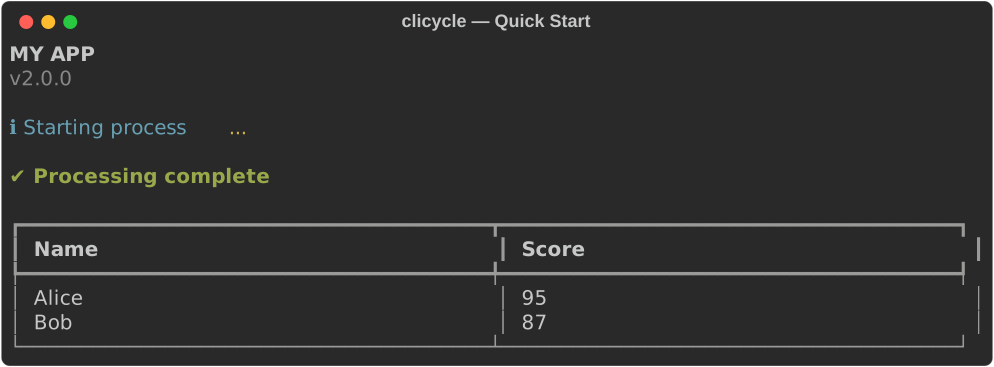
import clicycle as cc
import time

# Display header
cc.header("My App", "v2.0.0")

# Show messages
cc.info("Starting process...")

# Use a spinner
with cc.spinner("Processing..."):
    time.sleep(2)

cc.success("Complete!")
API Reference
Display Functions
# Text messages
cc.info("Information message")
cc.success("Operation successful")
cc.error("Something went wrong")
cc.warning("Be careful")
cc.text("Plain text without icon")
cc.list_item("Bullet point")
Plain Text
Use cc.text() when you need styled text without a status icon. This is useful for labels, headers within sections, or any text that doesn't indicate a status. It uses the same styling as cc.info() but without the icon prefix.
# Label tables or data sections
cc.text("Remote")
cc.table(remote_data)
cc.text("Local")
cc.table(local_data)

# Display paragraphs or descriptive text
cc.text("This command will sync your local configuration with the remote server. Any changes made locally will be uploaded, and any remote changes will be pulled down. Make sure you have saved your work before proceeding.")
# Structure
cc.header("Title", "Subtitle", "App Name")
cc.section("Section Name")

# Data display
cc.table([{"Name": "Alice", "Age": 30}], title="Users")
cc.table(data, column_widths={"ID": 40, "Name": 20}, wrap_text=False)
cc.code("print('hello')", language="python", title="Example")
cc.json({"key": "value"}, title="Config")

# Progress indicators (context managers)
with cc.spinner("Loading..."):
    # Your code here
    pass

# Transient spinner (disappears when done, regardless of theme)
with cc.spinner("Temporary...", transient=True):
    pass

with cc.progress("Processing") as prog:
    for i in range(100):
        prog.update(i, f"Item {i}")

# Multi-task progress tracking
with cc.multi_progress("Processing tasks") as progress:
    task1 = progress.add_task("Download", total=100)
    task2 = progress.add_task("Process", total=100)

    for i in range(100):
        progress.update(task1, advance=1)
        progress.update(task2, advance=1)

# Interactive components (with automatic fallback)
selected = cc.select("Choose an option", ["Option 1", "Option 2", "Option 3"])
selected_many = cc.multi_select("Select features", ["Auth", "API", "Cache", "Queue"])

# Group components without spacing
with cc.group():
    cc.info("These lines")
    cc.success("appear together")
    cc.warning("without spacing")
Table Options
The table function supports advanced formatting options:
# Basic table
cc.table([{"Name": "Alice", "Age": 30}])

# Table with title
cc.table(data, title="User List")

# Table with custom column widths (in characters)
cc.table(data, column_widths={"ID": 40, "Name": 20, "Description": 60})

# Table with text wrapping control
cc.table(data, wrap_text=True)   # Allow text wrapping (default)
cc.table(data, wrap_text=False)  # Use ellipsis for long text

# Combined options
cc.table(
    data,
    title="Project Status",
    column_widths={"Project ID": 40, "Status": 15},
    wrap_text=False
)
Structural Components
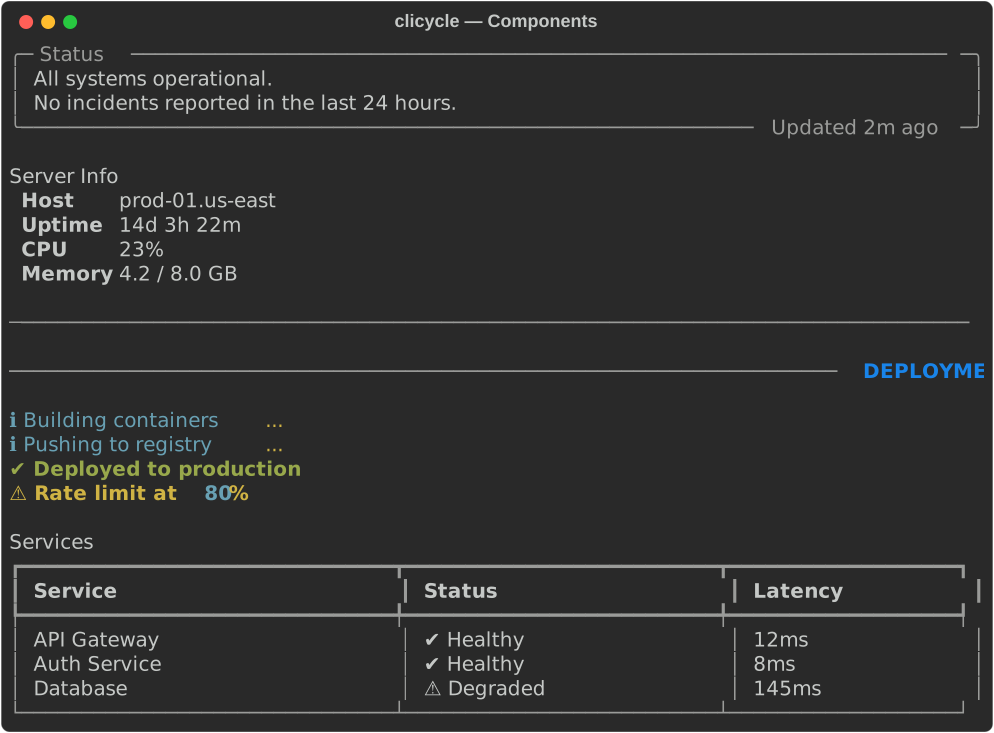
# Panel — bordered content box
cc.panel("All systems operational.", title="Status")
cc.panel("Rate limit at 80%", title="Warning", subtitle="Updated 2m ago")

# Key-value pairs — aligned label:value display
cc.key_value({"Host": "prod-01", "Uptime": "14d 3h", "CPU": "23%"})
cc.key_value([("Region", "us-east"), ("Zone", "a")], title="Server")

# Divider — subtle horizontal rule
cc.divider()

# Spacer — explicit blank lines (bypasses automatic spacing)
cc.spacer()      # 1 blank line
cc.spacer(3)     # 3 blank lines
Layout Configuration
Control alignment, borders, and expansion through Layout:
from clicycle import Theme, Layout

theme = Theme(
    layout=Layout(
        title_align="left",           # "left", "center", "right"
        table_expand=True,            # Tables fill available width
        panel_box=rich_box.ROUNDED,   # Panel border style
        panel_border_style="cyan",    # Panel border color
        panel_expand=True,            # Panels fill available width
        divider_style="bright_black", # Divider color
    )
)
cc.configure(theme=theme)
Configuration
# Configure the default instance
cc.configure(
    width=100,
    theme=cc.Theme(
        disappearing_spinners=True,  # Spinners vanish when done
        spinner_type="dots2"         # Rich spinner style
    ),
    app_name="MyApp"
)

# Direct access
cc.console.print("Rich console access")
cc.theme.icons.success = "✅"
cc.clear()  # Clear screen
Debug Messages and Logging
For debug messages, use Python's standard logging module:
import logging

# Configure logging level based on command line flag
if '--debug' in sys.argv:
    logging.basicConfig(level=logging.DEBUG)
else:
    logging.basicConfig(level=logging.INFO)

logger = logging.getLogger(__name__)

# Use standard logging for debug messages
logger.debug("This only appears when logging level is DEBUG")
cc.info("This always appears")
Themes
Create custom themes to control appearance:
from clicycle import Theme, Icons, Typography

theme = Theme(
    # Custom icons
    icons=Icons(
        success="✅",
        error="❌",
        warning="⚠️",
        info="ℹ️",
    ),

    # Custom styles (Rich format)
    typography=Typography(
        header_style="bold cyan",
        success_style="bold green",
        error_style="bold red",
    ),

    # Spinner configuration
    disappearing_spinners=True,
    spinner_type="dots2"  # dots, line, star, etc.
)

cc.configure(theme=theme)
Component Architecture
For advanced use cases, work directly with components:
from clicycle import Clicycle
from clicycle.components.header import Header
from clicycle.components.spinner import Spinner

# Create instance
cli = Clicycle()

# Render components
cli.stream.render(Header(cli.theme, "Title"))

# Components manage their own spacing
spinner = Spinner(cli.theme, "Loading...", cli.console)
cli.stream.render(spinner)
with spinner:
    # Your code
    pass
Key Features
- Automatic Spacing: Components intelligently manage spacing based on context
- Disappearing Spinners: Spinners that completely vanish after completion
- Interactive Components: Arrow-key navigation with automatic fallback
- Rich Integration: Full support for Rich styling and formatting
- Component Discovery: Convenience API automatically discovers all components
- Type Safe: Full type hints for IDE support
Interactive Components
Clicycle provides smooth, responsive interactive components with vertical arrow-key navigation:
Select Menu
# Simple selection
choice = cc.select("Choose a framework:", ["React", "Vue", "Angular"])

# With descriptions and values
options = [
    {"label": "React", "value": "react", "description": "A JavaScript library"},
    {"label": "Vue", "value": "vue", "description": "The Progressive JavaScript Framework"},
    {"label": "Angular", "value": "angular", "description": "Platform for building mobile and desktop apps"}
]
choice = cc.select("Choose a framework:", options)
Multi-Select Menu
# Multiple selections with constraints
choices = cc.multi_select(
    "Select features to enable:",
    ["Authentication", "Database", "Caching", "Queue", "Monitoring"],
    min_selection=1,
    max_selection=3
)
Navigation:
- ↑/↓: Navigate options
- Enter: Select/Submit
- Space: Toggle (multi-select only)
- q/Ctrl+C: Cancel
Features:
- Clean vertical navigation without screen clearing
- Automatic fallback to numbered input on non-interactive terminals
- Real-time visual feedback
- Proper cleanup - no leftover display artifacts
Examples
Run the interactive example menu:
python examples/menu.py
Or explore individual examples:
basics/hello_world.py— Simple introductionbasics/all_components.py— Tour of all componentsfeatures/interactive.py— Arrow-key selection and checkboxesfeatures/spinners.py— Disappearing spinner functionalityfeatures/themes.py— Custom themes (emoji, minimal, matrix)features/groups.py— Grouping components without spacingadvanced/full_app.py— Complete application showcase
Bundling with PyInstaller
See docs/PYINSTALLER.md for instructions on bundling Clicycle apps with PyInstaller.
License
MIT License - see LICENSE file for details.
Release history Release notifications | RSS feed


Download files
Download the file for your platform. If you're not sure which to choose, learn more about installing packages.
Source Distribution
Built Distribution
Filter files by name, interpreter, ABI, and platform.
If you're not sure about the file name format, learn more about wheel file names.
Copy a direct link to the current filters
File details
Details for the file clicycle-3.4.2.tar.gz.
File metadata
- Download URL: clicycle-3.4.2.tar.gz
- Upload date:
- Size: 62.3 kB
- Tags: Source
- Uploaded using Trusted Publishing? No
- Uploaded via: twine/6.1.0 CPython/3.12.10
File hashes
| Algorithm | Hash digest | |
|---|---|---|
| SHA256 |
177c4381aad66405f68c66f2cacde7d0e47807f4b296ea78bad2df2745412d2e
|
|
| MD5 |
91a413794045b46412dbec194485535c
|
|
| BLAKE2b-256 |
ed7bcf38d19d8a38abb95599c5dadee4349da090727fd2739ff08393323860f6
|
File details
Details for the file clicycle-3.4.2-py3-none-any.whl.
File metadata
- Download URL: clicycle-3.4.2-py3-none-any.whl
- Upload date:
- Size: 35.5 kB
- Tags: Python 3
- Uploaded using Trusted Publishing? No
- Uploaded via: twine/6.1.0 CPython/3.12.10
File hashes
| Algorithm | Hash digest | |
|---|---|---|
| SHA256 |
e921139938bececc6b8dbce91055305aad1002af10f0fd58185a165f79aa54b5
|
|
| MD5 |
73167309416d9134c3b7b14cd37f4a69
|
|
| BLAKE2b-256 |
7272f86004cb39fd63a3d83443a2f3ac241d4f87a89d4ad4718c24112ea26b80
|






