
Command line interface for basic file system operations.
Verified details
These details have been verified by PyPIProject links
GitHub Statistics
Maintainers

Project description


clifs
Multi-platform command line interface for file system operations.
For installation run:
pip install clifs
After installation all functionality can be accessed typing clifs in the command line, which alone will show a list of installed plugins.
To implement your own plugin best inherit from the clifs.ClifsPlugin class.
Plugins installed by default:
Rename (ren)
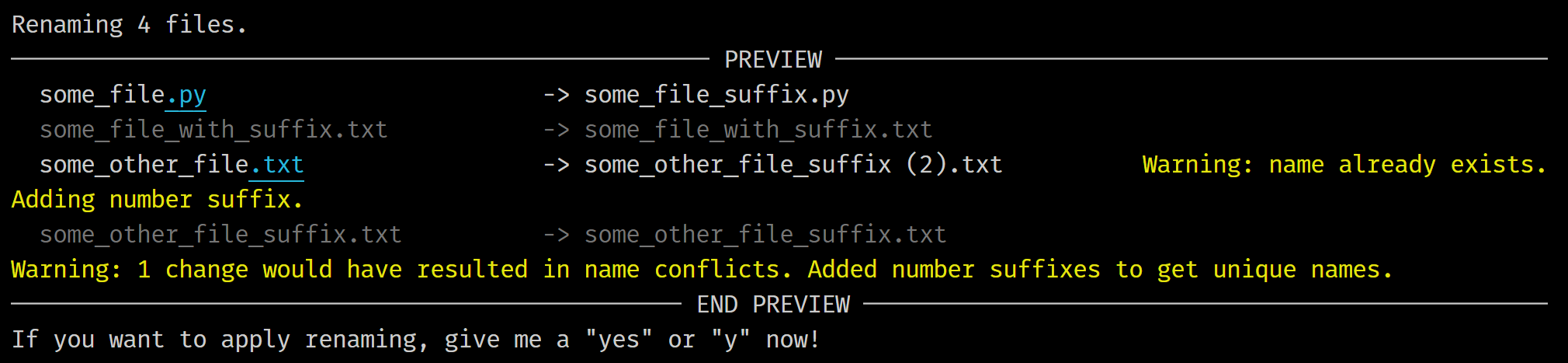
Rename files or directories using regular expressions. Supports options such as selecting files and folders by sub-string filter, time of the last modification or creation/change, or by list. Type clifs ren --help for a list of options. By default a preview mode is running to prevent unpleasant surprises.
Example:
Command:
clifs ren ".\some_dir" --recursive --pattern "(?<!_suffix)\.(.*)" --replacement "_suffix.\1"
Output:
Disc Usage (du)
Show disc usage for one or more directories.
Example:
Command:
clifs du "some\dir\on\some_drive" "some\other\dir\on\some_other_drive" "some\other\dir\on\yet_another_drive"
Output:

Directory Tree (tree)
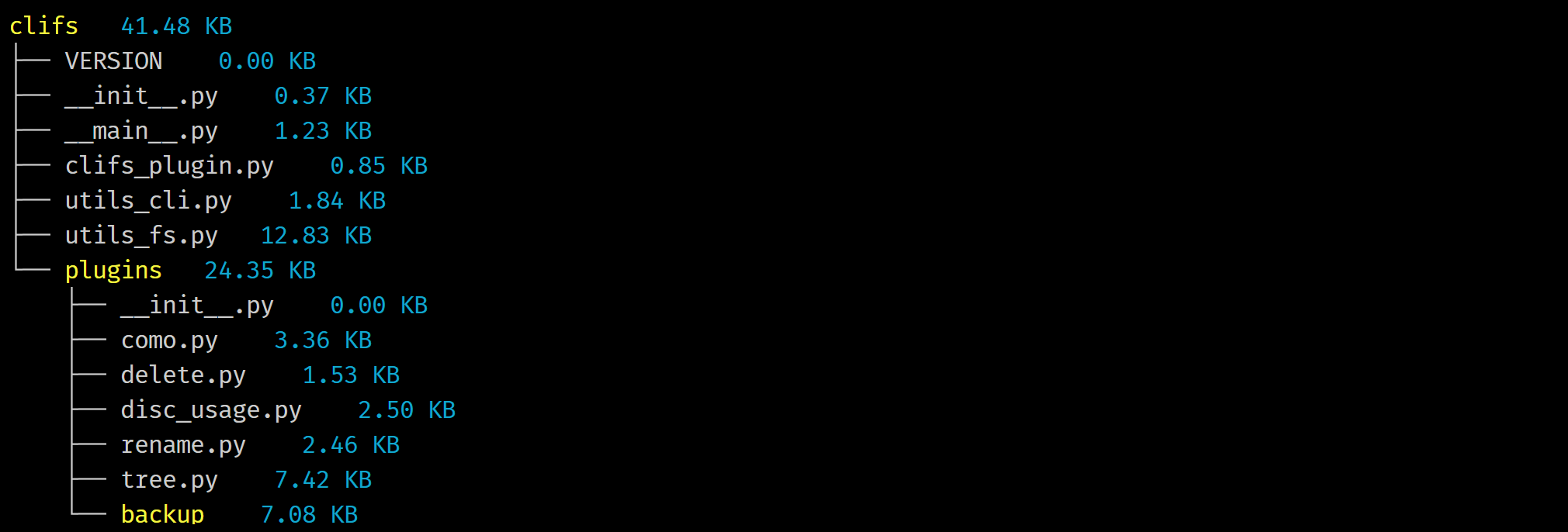
Show a directory tree including sizes of folders and files. Supports options such as controlling the tree depth or showing folders only. Type clifs tree --help for a list of options.
Example:
Command:
clifs tree .\clifs --depth 2
Output:
Streaming Editor (sed)
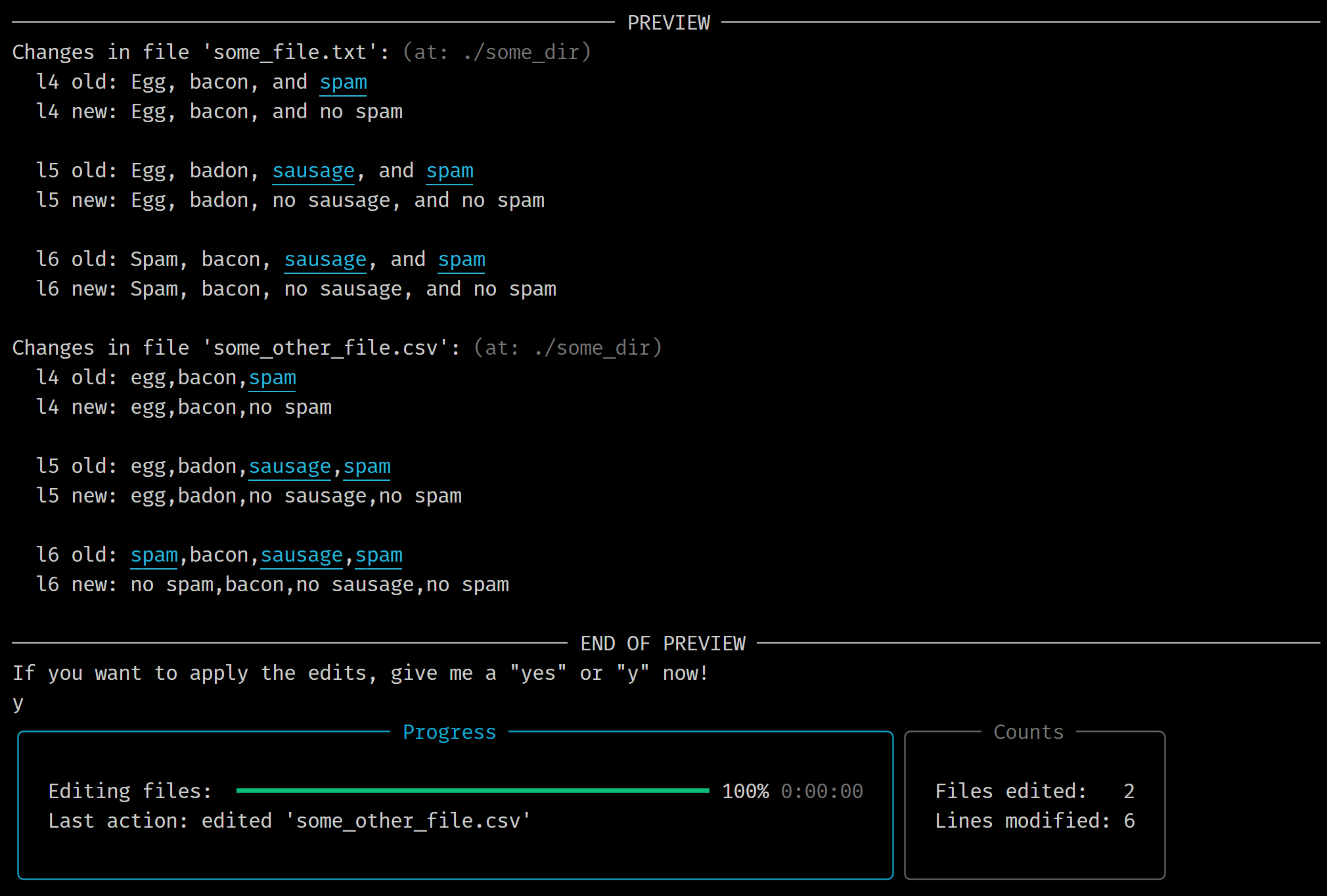
Edit text files using regular expressions. Runs line by line and gives a preview of the changes by default. Supports options such as picking lines by number, selection of files by sub-string filter, time of the last modification or creation/change, or by list. Type clifs sed --help for a list of options.
You can e.g. remove specific lines choosing -pt ".*[\r\n]+" -l 5 or add lines in specific locations using -pt "[\r\n]+" -rp "\nadded line\n" -l 3,4".
Example:
clifs sed ".\some\place" --pattern "(s\w*)" --replacement "no \1" --lines 4-6 --recursive
Output:
Copy (cp)
Copy files from one location to the other.
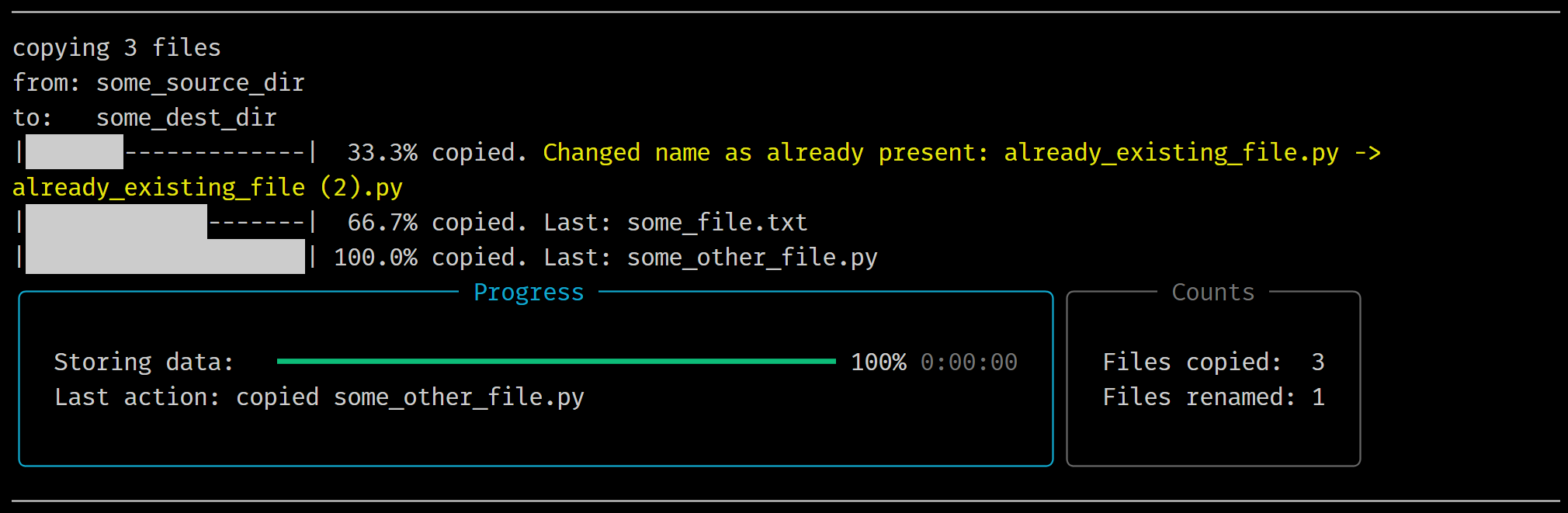
Supports selection of files and folders by sub-string filter, time of the last modification or creation/change, or by list. Also supports flattening the folder hierarchy. Type clifs cp --help for a full list of options.
Example:
Command:
clifs cp ".\some_source_dir" ".\some_dest_dir" --recursive --flatten --keep_all
Output:
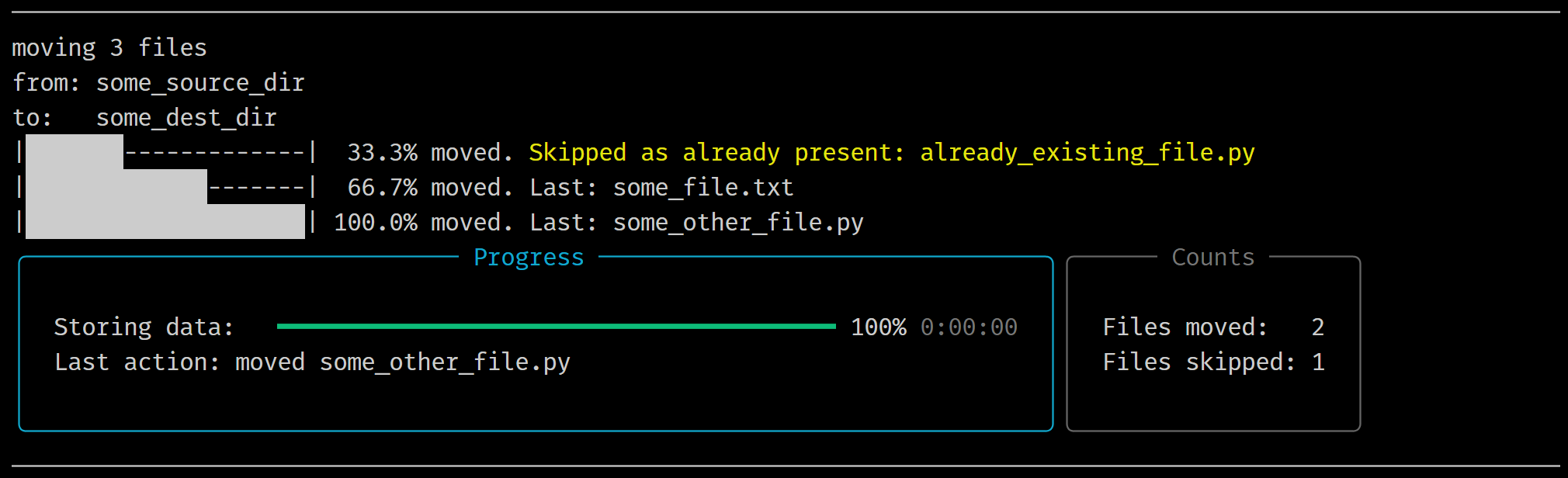
Move (mv)
Move files from one location to the other.
Supports selection of files and folders by sub-string filter, time of the last modification or creation/change, or by list. Also supports flattening the folder hierarchy. Type clifs mv --help for a full list of options.
Example:
Command:
clifs mv ".\some_source_dir" ".\some_dest_dir" --recursive --skip_existing
Output:
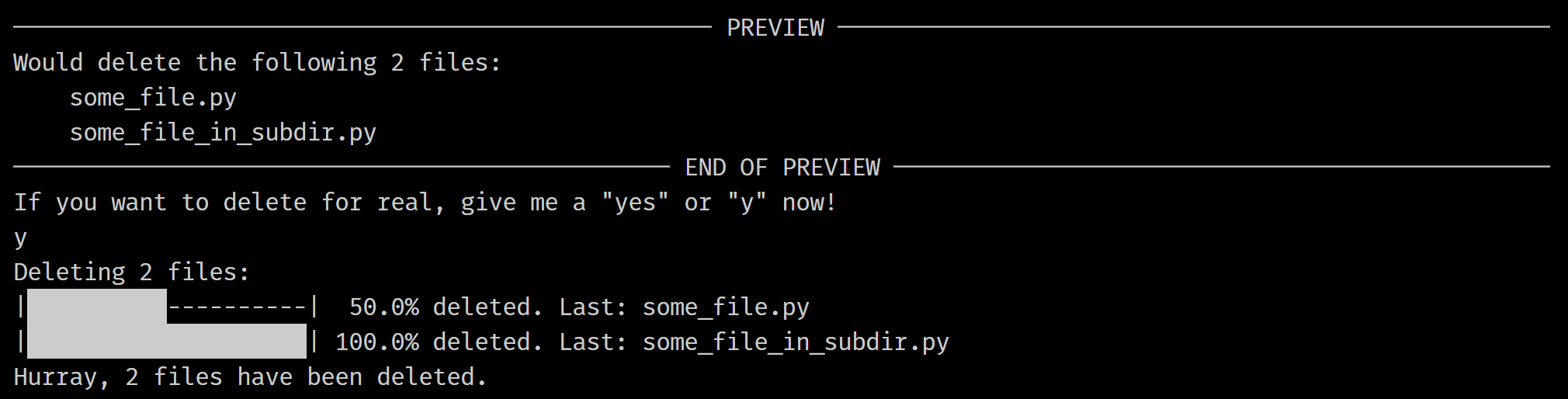
Delete (del)
Delete files from the drive.
Supports options such as selecting files and folders by sub-string filter, time of the last modification or creation/change, or by list. Type clifs del --help for a full list of options.
Example:
Command:
clifs del ".\some_dir" --recursive --filterstring ".py"
Output:
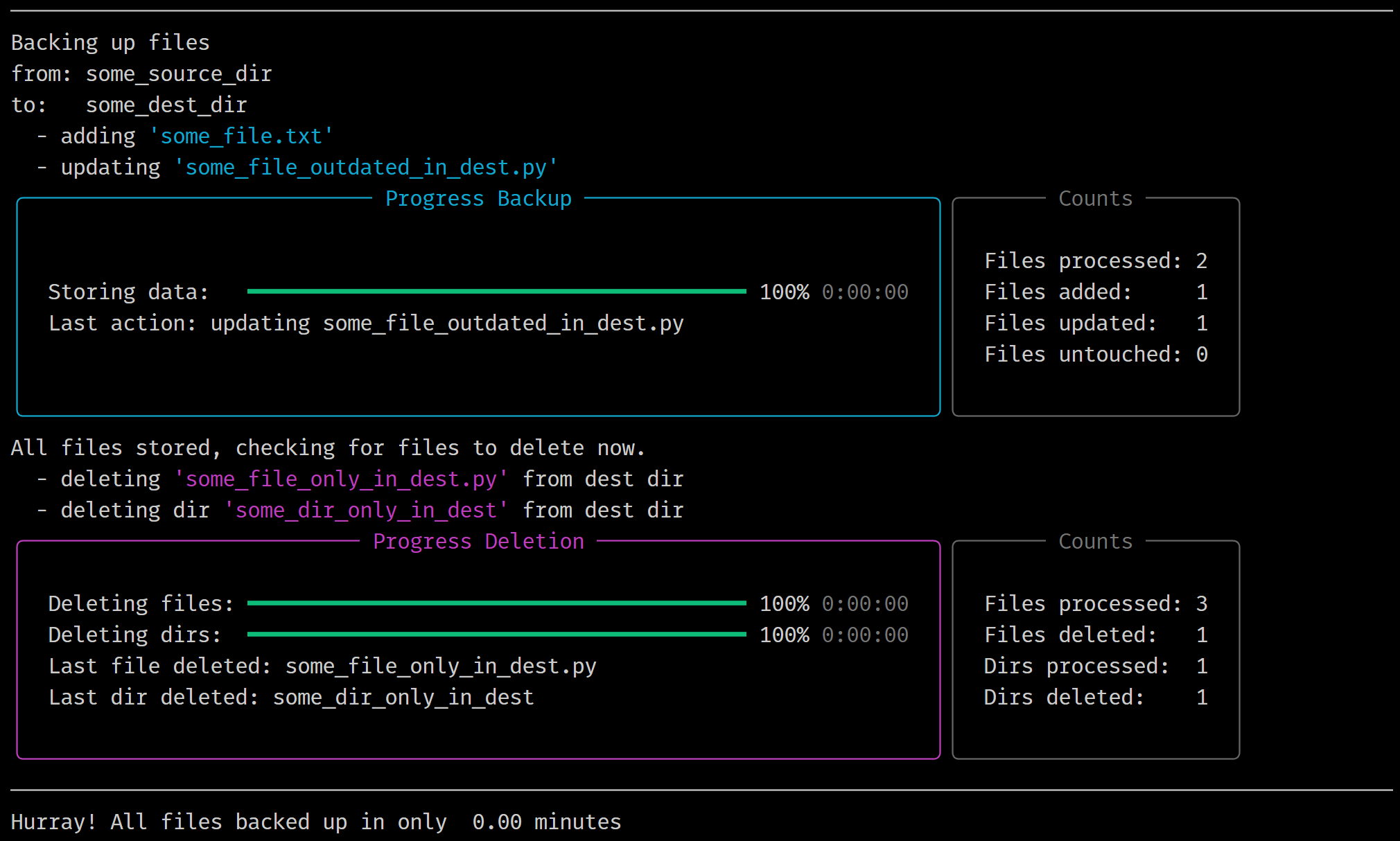
Backup (backup)
Back up files and folders. Supports backing up via a config file giving multiple source/target pairs and the option to delete files which are not present in the source directory from the corresponding target directory.
Type clifs backup --help for a full list of options.
Example:
Command:
clifs backup --dir_source ".\some_source_dir" --dir_dest ".\some_dest_dir" --delete --verbose
Output:
Project details
Verified details
These details have been verified by PyPIProject links
GitHub Statistics
Maintainers
Release history Release notifications | RSS feed


Download files
Download the file for your platform. If you're not sure which to choose, learn more about installing packages.
Source Distribution
Built Distribution
Filter files by name, interpreter, ABI, and platform.
If you're not sure about the file name format, learn more about wheel file names.
Copy a direct link to the current filters
File details
Details for the file clifs-2.0.0.tar.gz.
File metadata
- Download URL: clifs-2.0.0.tar.gz
- Upload date:
- Size: 33.8 kB
- Tags: Source
- Uploaded using Trusted Publishing? Yes
- Uploaded via: twine/6.1.0 CPython/3.13.7
File hashes
| Algorithm | Hash digest | |
|---|---|---|
| SHA256 |
905c6c22b3ef3046a8f6c47c8a9ac2b591ee24dbba852e5297856fcecb472a15
|
|
| MD5 |
70c5582407ca687128e9c461741f77fd
|
|
| BLAKE2b-256 |
6d09517d9c920fd336f166359228bf8939137958af1ecc884ab81d47b158c344
|
Provenance
The following attestation bundles were made for clifs-2.0.0.tar.gz:
Publisher:
build_and_publish.yml on Don-Felice/clifs
-
Statement:
-
Statement type:
https://in-toto.io/Statement/v1 -
Predicate type:
https://docs.pypi.org/attestations/publish/v1 -
Subject name:
clifs-2.0.0.tar.gz -
Subject digest:
905c6c22b3ef3046a8f6c47c8a9ac2b591ee24dbba852e5297856fcecb472a15 - Sigstore transparency entry: 813645764
- Sigstore integration time:
-
Permalink:
Don-Felice/clifs@8c4f8e562b01570b15c6925051a6d276f72cd4f8 -
Branch / Tag:
refs/heads/main - Owner: https://github.com/Don-Felice
-
Access:
public
-
Token Issuer:
https://token.actions.githubusercontent.com -
Runner Environment:
github-hosted -
Publication workflow:
build_and_publish.yml@8c4f8e562b01570b15c6925051a6d276f72cd4f8 -
Trigger Event:
workflow_run
-
Statement type:
File details
Details for the file clifs-2.0.0-py3-none-any.whl.
File metadata
- Download URL: clifs-2.0.0-py3-none-any.whl
- Upload date:
- Size: 40.0 kB
- Tags: Python 3
- Uploaded using Trusted Publishing? Yes
- Uploaded via: twine/6.1.0 CPython/3.13.7
File hashes
| Algorithm | Hash digest | |
|---|---|---|
| SHA256 |
498c26b4e67e92e34d01c9957e4d7a9f8a7bbb5bd2facb1ed001e390746ad2d8
|
|
| MD5 |
111533ce4daa4036103de356f532e51e
|
|
| BLAKE2b-256 |
57becbbd0d8dd861cad5f5fcf4479d54de0bcceaa966ff7685574f0a55d6ca5c
|
Provenance
The following attestation bundles were made for clifs-2.0.0-py3-none-any.whl:
Publisher:
build_and_publish.yml on Don-Felice/clifs
-
Statement:
-
Statement type:
https://in-toto.io/Statement/v1 -
Predicate type:
https://docs.pypi.org/attestations/publish/v1 -
Subject name:
clifs-2.0.0-py3-none-any.whl -
Subject digest:
498c26b4e67e92e34d01c9957e4d7a9f8a7bbb5bd2facb1ed001e390746ad2d8 - Sigstore transparency entry: 813645767
- Sigstore integration time:
-
Permalink:
Don-Felice/clifs@8c4f8e562b01570b15c6925051a6d276f72cd4f8 -
Branch / Tag:
refs/heads/main - Owner: https://github.com/Don-Felice
-
Access:
public
-
Token Issuer:
https://token.actions.githubusercontent.com -
Runner Environment:
github-hosted -
Publication workflow:
build_and_publish.yml@8c4f8e562b01570b15c6925051a6d276f72cd4f8 -
Trigger Event:
workflow_run
-
Statement type:






