
cliify
A flexible Python package for building command-line interfaces with object hierarchies, auto-completion, and dynamic parameter validation.
Features
Object-oriented command structure
Nested command hierarchies using subparsers
Type hints and automatic type conversion
Dynamic command completion
Parameter validation and auto-completion
Caching for improved performance
Expression evaluation support
Installation
pip install cliifyDemo
The project includes a demo app showing some of the features
cliify-demo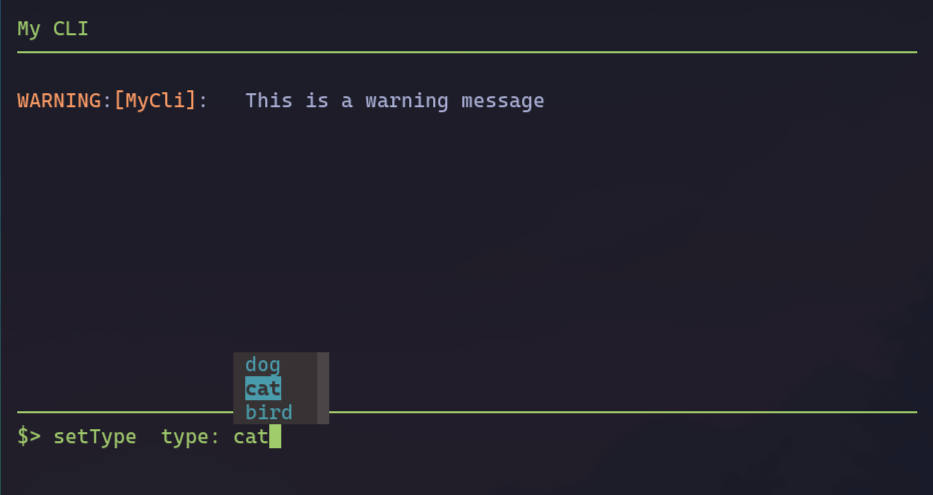
Quick Start
Here’s a simple example showing the command parsing:
from cliify import command, commandParser

@commandParser
class Calculator:
    def getValidOperations(self):
        return ['+', '-', '*', '/']

    @command(completions={'operation': lambda self: self.getValidOperations()})
    def calculate(self, a: int, operation: str, b: int):
        """
        Calculate the result of an operation

        Args:
            a: First operand
            operation: Operation to perform
            b: Second operand

        """

        if operation == '+':
            return a + b
        elif operation == '-':
            return a - b
        elif operation == '*':
            return a * b
        elif operation == '/':
            return a / b

calc = Calculator()
#can use positional or named arguments
result = calc.parseCommand("calculate 5 , + , 3")  # Returns 8
result = calc.parseCommand("calculate a: 5, operation: + , b: 3")  # Returns 8
help = calc.getHelp("calculate")   # Return help message from docstring
Nested Commands
You can create hierarchical command structures with subparserss (supports single object or a dictionary of objects):
@commandParser()
class Device:
    def __init__(self, name):
        self.name = name
        self.value = 0

    @command(completions={'value': [0, 1, 2, 3, 4, 5]})
    def setValue(self, value: int):
        self.value = value


@commandParser(subparsers=['devices'])
class Controller:
    def __init__(self):

        self.devices = {}

        self.singleDevice = Device("singleDevice")

    @command(help="Add a new device")               #help message can also be explicitly set
    def addDevice(self, name: str):
        self.devices[name] = Device(name)

    # Devices can have their own commands
    class DeviceCommands:
        @command(help="Set device value", completions={'value': [0, 1, 2, 3, 4, 5]})
        def setValue(self, value: int):
            self.value = value


controller = Controller()

result = controller.parseCommand("addDevice device1")
result = controller.parseCommand("device1.setValue 3")
result = controller.parseCommand("singleDevice.setValue 3")
Dynamic Completions
The package supports various ways to define completions:
Static Lists:
class myController:

    self.mode = None
    self.min_value = 0
    self.max_value = 10

    #static list of values
    @command(completions={'mode': ['auto', 'manual', 'hybrid']})
    def setMode(self, mode: str):
        self.mode = mode

    def getAvailablePorts(self):
        return ['COM1', 'COM2', 'COM3']

    #method reference
    @command(completions={'port': 'getAvailablePorts'})
    def connect(self, port: str):
        self.port = port

    #lambda function
    @command(completions={'value': lambda self: range(self.min_value, self.max_value + 1)})
    def setValue(self, value: int):
        self.value = value


controller = myController()

completions = controller.getCompletions("setMode ")  # Returns ['mode']
completions = controller.getCompletions("setMode mode: ")  # Returns ['auto', 'manual', 'hybrid']
Caching and Performance
The completion tree can be cached for better performance:
controller = Controller()

# First call builds the tree
completions = controller.getCompletions("set", use_cache=True)

# Subsequent calls use cached tree
completions = controller.getCompletions("get", use_cache=True)
Use the @invalidatesTree decorator for methods that modify the command structure:
@invalidatesTree
def addCommand(self, name: str, command: Callable):
    self.commands[name] = command
Type Conversion
The parser automatically converts string inputs to the correct Python types based on type hints:
@command(help="Configure sensor")
def configureSensor(self,
                   id: int,           # Converts to integer
                   name: str,         # Handles quoted strings
                   active: bool,      # Converts to boolean
                   gains: List[float] # Converts to list of floats
                   ):
    pass
Bytes handling
bytes type arguments can handle multiple methods of input:
@command(help="Send data")
def sendData(self, data: bytes):
    pass

# Hexadecimal string
result = controller.parseCommand("sendData 0xdeadbeef")
result = controller.parseCommand("sendData 0x00 0x01 0x02")

# Base64 encoded string
result = controller.parseCommand("sendData ZGVhZGJlZWY=")

# Raw bytes
result = controller.parseCommand("sendData b'hello world'")
Expression Evaluation
Enable expression evaluation for dynamic values:
@commandParser(allow_eval=True)
class Calculator:
    @command(help="Calculate result")
    def calculate(self, value: int):
        return value

calc = Calculator()
result = calc.parseCommand("calculate $(2 * 3)")  # Evaluates expression
Out-of-the-Box UI
This package contains some out of the box support for a command line interface using prompt_toolkit. The CommandCompleter class can be used with prompt_toolkit to provide a command line interface with auto-completion and history. There are also ready-to-use UI classes for a simple command line interface and a more advanced command line interface with a command history.
The below example will create a split console app (a console with a command line interface on the bottom and a log on the top) with auto-completion and history. By default logs and print statements will be redirected to the log console.
from cliify import command, commandParser
from cliify.ui.prompt_toolkit import SplitConsole

from logging import getLogger

log = getLogger("App")


@commandParser()
class Device:
    def __init__(self, name):
        self.name = name
        self.value = 0

    @command(completions={'value': [0, 1, 2, 3, 4, 5]})
    def setValue(self, value: int):
        log.info(f"Setting value of {self.name} to {value}.")
        self.value = value


@commandParser(subparsers=['devices'])
class Controller:
    def __init__(self):

        self.devices = {}

        self.singleDevice = Device("singleDevice")

    @command(help="Add a new device")               #help message can also be explicitly set
    def addDevice(self, name: str):

        if name in self.devices:
            #print(f"Device {name} already exists.")
            log.warning(f"Device {name} already exists.")
        else:
            log.info(f"Adding device {name}.")
            # Create a new device and add it to the devices dictionary

        self.devices[name] = Device(name)


controller = Controller()
app = SplitConsole(controller,"My CLI App")
app.start()
Flat Command Structure
The commandParser can also be set to flat which effectively makes all commands of subparsers available at the top level. This is useful for base classes that can be extended with plugins
@commandParser
class pluginA:

    @command
    def hello(self):
        print("Hello from plugin A!")

@commandParser
class pluginB:

    @command
    def goodbye(self):
        print("Goodbye from plugin B!")

@commandParser( subparsers=['plugins'], flat=True)
class CoreApp:
    def __init__(self):
        self.plugins = {}

    @command
    def start(self):
        self.plugins['pluginA'] = pluginA()
        self.plugins['pluginB'] = pluginB()
        print("Starting CoreApp...")

core = CoreApp()
core.parseCommand("start")
core.parseCommand("hello")
core.parseCommand("goodbye")
Advanced Features
Custom Type Conversion: - Override _convert_type for custom type handling - Support for bytes, hex strings, and more
Error Handling: - Type conversion errors - Missing required arguments - Invalid commands or paths
Command Help: - Auto-generated help from docstrings - Custom help messages per command
Contributing
Contributions are welcome! Please feel free to submit a Pull Request.
License
MIT License
1 maintainer

Metadata
1 maintainer
Release files for cliify 0.3.7
For a detailed explanation of source distributions (sdists) and built distributions (wheels), please see the package formats documentation.
Source distribution (sdist)
| File | Size | Uploaded | Provenance | Actions |
|---|---|---|---|---|
| cliify-0.3.7.tar.gz | 26.3 kB | Without provenance | Details for cliify-0.3.7.tar.gz |
Built distribution (wheel)
| File | Interpreter | ABI | Platform | Actions Reset |
|---|---|---|---|---|
| cliify-0.3.7-py3-none-any.whl | Python 3 | none | any | Details for cliify-0.3.7-py3-none-any.whl |
Total release size: 59.5 kB
Release files / cliify-0.3.7.tar.gz
| Download URL | cliify-0.3.7.tar.gz |
|---|---|
| Size | 26.3 kB |
| Tags | Source |
|
SHA-256 checksum How to use checksums |
9b769a2e6f0e98491d97e581daa4b8047a385850a38d70ba0af96f307836e15f
|
|
BLAKE2b-256 checksum How to use checksums |
141a44c613fad1ca01868ee20f7d40140cabab3b62320fda2a575d2cf95e44ab
|
| Upload date | |
|
Uploaded using Trusted Publishing? What is trusted publishing? |
No |
| Uploaded via |
twine/6.2.0 CPython/3.13.7
|
Release files / cliify-0.3.7-py3-none-any.whl
| Download URL | cliify-0.3.7-py3-none-any.whl |
|---|---|
| Size | 33.2 kB |
| Tags | Python 3 |
|
SHA-256 checksum How to use checksums |
5356f49bb9a8b3930cca277658e3c4f69383f5c59b33f8df72f6e97171985763
|
|
BLAKE2b-256 checksum How to use checksums |
80793baa55c18444028e54e2b5e38ad1efe8b72179e97ee5b45ad4859f3c815b
|
| Upload date | |
|
Uploaded using Trusted Publishing? What is trusted publishing? |
No |
| Uploaded via |
twine/6.2.0 CPython/3.13.7
|
Security for cliify 0.3.7
Provenance
Provenance describes where a file came from. On PyPI, provenance is shared via attestations, which provide a verifiable record of the build or publishing details. View details, limitations and caveats.
No provenance found
None of the files in this release were uploaded with provenance metadata.
A note on package security
PyPI is a repository for distributing packages, not a service for auditing them. While third-party security researchers and our staff do their best to detect and remove malicious packages, PyPI cannot guarantee the quality, security or suitability of any given package.
To learn more about protecting yourself from malicious actors, visit our package security documentation.














