
clinlog


Package to easily log styled messages on console using colorama
Basic usage
Create a Logger object and use his convenient methods to print styled messages in console. You can define a default tag for each kind of message on the Logger instance.
Print style methods
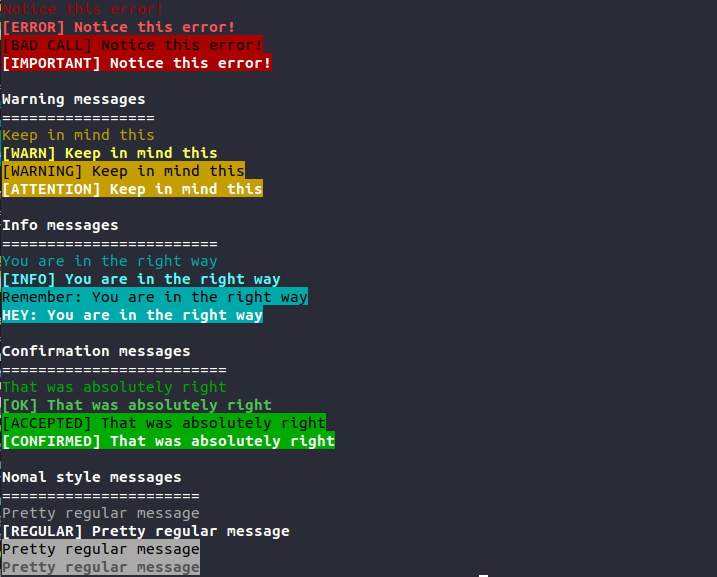
confirm()error()warning()info()debug()print()
The signature for all print methods are the same:
- message (str): Message to print.
- tag (str): (Optional) Prefix tag to print with the message. If
Nonethe default tag for this kind of messages is used. An empty string will remove the tag for this print. - bold (bool): (Optional)
Trueto use bright style to print the message (kind of bold font). By defaultFalse. - highlight (bool):
Trueto use the color on the background and a high contrast color for the message text. - invert_color (bool):
Trueto invert font color when highlight flag is on, this will switch between black and white. By defaultFalse.
Default print tag attributes
When a Logger object is created all default tags are an empty string (no tag)
confirm_tagerror_tagwarn_taginfo_tagprint_tag
Log level param
You can provide a log level parameter to control the verbosity of the logger, this parameter can be provided during construction or via setter method. By default Logger class takes max verbosity level (debug)
from clinlog import Logger

# Creating a Logger with warining log level
log = Logger(log_level='warning')

# Updating log level via setter
log.log_level = 'debug'
Code Sample
from clinlog import Logger

# Create the logger
log = Logger()

# Set default error tag
log.error_tag = '[ERROR]: '

# Print error styled message
log.error('Unable to access config file', bold=True)

# Print warning highlighted and bold
log.warning('The execution will continue with default configuration', None, True, True)

# Confirmation log with provided tag
log.confirm('Execution completed', '[SUCCESS]')

# Debug log with provided tag
log.debug('DB returned 8 entries for the user', '[DEBUG] ')
Output

Different styes sample
1 maintainer

Metadata
1 maintainer
Release files for clinlog 0.1.1
For a detailed explanation of source distributions (sdists) and built distributions (wheels), please see the package formats documentation.
Source distribution (sdist)
| File | Size | Uploaded | Provenance | Actions |
|---|---|---|---|---|
| clinlog-0.1.1.tar.gz | 3.7 kB | Without provenance | Details for clinlog-0.1.1.tar.gz |
Built distribution (wheel)
| File | Interpreter | ABI | Platform | Actions Reset |
|---|---|---|---|---|
| clinlog-0.1.1-py3-none-any.whl | Python 3 | none | any | Details for clinlog-0.1.1-py3-none-any.whl |
Total release size: 8.5 kB
Release files / clinlog-0.1.1.tar.gz
| Download URL | clinlog-0.1.1.tar.gz |
|---|---|
| Size | 3.7 kB |
| Tags | Source |
|
SHA-256 checksum How to use checksums |
25733bfcc28b66291c3d99c72a8737172324b251eae42967a71e9201c2721182
|
|
BLAKE2b-256 checksum How to use checksums |
2e48f5293cd6daf1884561d832c1d45081be58138a0b91916f7ea93ab6510500
|
| Upload date | |
|
Uploaded using Trusted Publishing? What is trusted publishing? |
No |
| Uploaded via |
twine/1.13.0 pkginfo/1.5.0.1 requests/2.21.0 setuptools/41.0.1 requests-toolbelt/0.9.1 tqdm/4.31.1 CPython/3.7.1
|
Release files / clinlog-0.1.1-py3-none-any.whl
| Download URL | clinlog-0.1.1-py3-none-any.whl |
|---|---|
| Size | 4.8 kB |
| Tags | Python 3 |
|
SHA-256 checksum How to use checksums |
dab09519210cd7ae864bccebcc9bd5aea200d1d16fef090c6677ecaa4f49ea9f
|
|
BLAKE2b-256 checksum How to use checksums |
9d557409774b276720cf5a5403beb5782d8d575acceecf87bfba02c0e8ad8801
|
| Upload date | |
|
Uploaded using Trusted Publishing? What is trusted publishing? |
No |
| Uploaded via |
twine/1.13.0 pkginfo/1.5.0.1 requests/2.21.0 setuptools/41.0.1 requests-toolbelt/0.9.1 tqdm/4.31.1 CPython/3.7.1
|
Security for clinlog 0.1.1
Provenance
Provenance describes where a file came from. On PyPI, provenance is shared via attestations, which provide a verifiable record of the build or publishing details. View details, limitations and caveats.
No provenance found
None of the files in this release were uploaded with provenance metadata.
A note on package security
PyPI is a repository for distributing packages, not a service for auditing them. While third-party security researchers and our staff do their best to detect and remove malicious packages, PyPI cannot guarantee the quality, security or suitability of any given package.
To learn more about protecting yourself from malicious actors, visit our package security documentation.














