
clip_cam
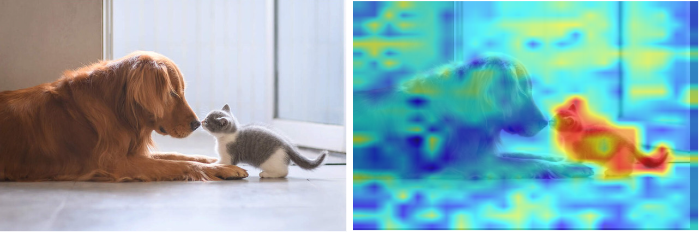
clip_cam is a Python package for visualizing the image-prompt feature matching in ViT-based CLIP models, highlighting the alignment between image features and textual prompts. It allows you to visualize how CLIP interprets the relationship between an image and a text description, providing insights into its attention patterns.
🚀 Features
- Generate Grad-CAM-style heatmaps for image-text matching.
- Support for Vision Transformer (ViT) architectures.
- Easy integration with existing CLIP implementations.
- Custom checkpoint support for fine-tuned models.
📦 Installation
You can install clip_cam via pip:
pip install clip_cam
🔥 Usage
Run the following command to generate a visualization:
python clip_cam.py --model_name "ViT-B/16" --image_path "path/to/image.jpg" --text "your text prompt"
Arguments:
--image_path: Path to the input image.--text: Text input/prompt.--model_name: CLIP model name (default:ViT-B/16).--checkpoint: (Optional) Path to a fine-tuned CLIP model checkpoint.
Example:
python clip_cam.py --model_name "ViT-B/16" --image_path "cat.jpg" --text "a cute kitten"
🛠️ How It Works
- Model Loading: Uses the specified CLIP model with optional fine-tuned checkpoint.
- Feature Extraction:
- Extracts dense visual features from the image.
- Encodes the text prompt and normalizes the embeddings.
- Matching & Visualization:
- Computes image-text matching scores.
- Resizes the matching map using bilinear interpolation.
- Visualizes the results generating a heatmap of image-text matching.
🔥 Example Visualization
📜 License
This project is licensed under the MIT License. See the LICENSE file for details.
1 maintainer

Metadata
1 maintainer
Release files for clip-cam 0.1.5
For a detailed explanation of source distributions (sdists) and built distributions (wheels), please see the package formats documentation.
Source distribution (sdist)
| File | Size | Uploaded | Provenance | Actions |
|---|---|---|---|---|
| clip_cam-0.1.5.tar.gz | 14.0 kB | Without provenance | Details for clip_cam-0.1.5.tar.gz |
Built distribution (wheel)
| File | Interpreter | ABI | Platform | Actions Reset |
|---|---|---|---|---|
| clip_cam-0.1.5-py3-none-any.whl | Python 3 | none | any | Details for clip_cam-0.1.5-py3-none-any.whl |
Total release size: 28.0 kB
Release files / clip_cam-0.1.5.tar.gz
| Download URL | clip_cam-0.1.5.tar.gz |
|---|---|
| Size | 14.0 kB |
| Tags | Source |
|
SHA-256 checksum How to use checksums |
98a014ccd6139353d82350853599901895cde1c2d716e196921551dc7564a36c
|
|
BLAKE2b-256 checksum How to use checksums |
4aff8099e0e3709ec5fc7d000dbb7805bbed03fedfac08ac232dc5888e4e492c
|
| Upload date | |
|
Uploaded using Trusted Publishing? What is trusted publishing? |
No |
| Uploaded via |
twine/6.1.0 CPython/3.8.18
|
Release files / clip_cam-0.1.5-py3-none-any.whl
| Download URL | clip_cam-0.1.5-py3-none-any.whl |
|---|---|
| Size | 14.0 kB |
| Tags | Python 3 |
|
SHA-256 checksum How to use checksums |
d2acbf23d782f597d983fab25256329bd9282395664b0f39a1a79c29d00b7cf2
|
|
BLAKE2b-256 checksum How to use checksums |
a37b9470ef7cdb9bce9e9ec7cdebe8e9418076f8c3dfc6738bbf92b5baaf6d64
|
| Upload date | |
|
Uploaded using Trusted Publishing? What is trusted publishing? |
No |
| Uploaded via |
twine/6.1.0 CPython/3.8.18
|
Security for clip-cam 0.1.5
Provenance
Provenance describes where a file came from. On PyPI, provenance is shared via attestations, which provide a verifiable record of the build or publishing details. View details, limitations and caveats.
No provenance found
None of the files in this release were uploaded with provenance metadata.
A note on package security
PyPI is a repository for distributing packages, not a service for auditing them. While third-party security researchers and our staff do their best to detect and remove malicious packages, PyPI cannot guarantee the quality, security or suitability of any given package.
To learn more about protecting yourself from malicious actors, visit our package security documentation.













