
clipassgen (Console Smart Password Generator CLI) - Command-line smart password generator for deterministic password generation - same secret always produces the same password.

Project description
clipassgen (Console Smart Password Generator CLI) v2.0.0
Command-line smart password generator for deterministic password generation - same secret always produces the same password.








🖥️ Console Smart Password Generator
Cross-platform command-line utility for generating deterministic passwords and verification keys.
Powered by smartpasslib v2.0.0 - The core library for deterministic password generation
⚠️ BREAKING CHANGES in v2.0.0
WARNING: This version introduces breaking changes:
- Login parameter removed - now uses only secret phrase
- All passwords generated with v1.x are now INVALID
- Simplified API - single type of smart password generation
- New cryptographic algorithm - different from v1.x
📦 Installation
Standard Installation
pip install clipassgen
For Systems with Package Conflicts
pip install clipassgen --break-system-packages
Manual Installation
# Clone and install from source
git clone https://github.com/smartlegionlab/clipassgen.git
cd clipassgen
pip install -e .
🚀 Quick Start
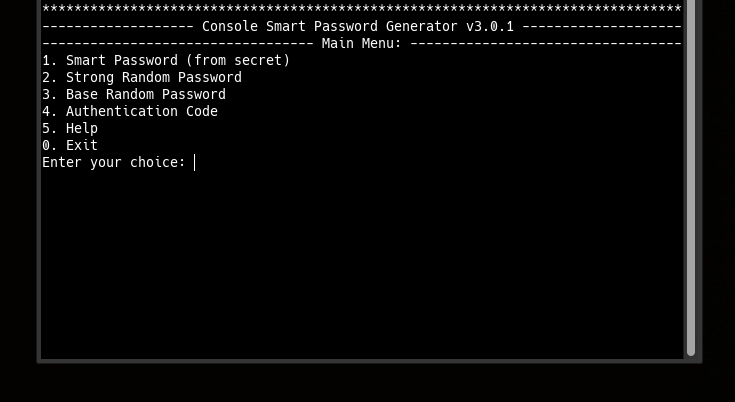
Interactive Mode
clipassgen
Launches interactive terminal with menu selection.
Generate Smart Password (CLI)
# Generate password from secret phrase
clipassgen --smart -s "your_secret_phrase" -l 16

# Generate strong random password
clipassgen --strong -l 20

# Generate authentication code
clipassgen --code -l 8
🎯 Key Features
Deterministic Generation
- Same secret + same length = same password - every time
- Mathematical certainty - passwords are calculated from your secret
- No storage required - passwords exist only when generated
Multiple Generation Types
- Smart Passwords - Deterministic from secret phrase
- Strong Passwords - Cryptographically secure random
- Base Passwords - Simple random passwords
- Authentication Codes - Secure codes with character diversity
Security by Design
- No password storage - eliminates breach risk
- Local processing - all operations on your machine
- Public key verification - verify secrets without revealing them
- Case-sensitive secrets - enhanced security
⚙️ How It Works
Smart Password Generation
- Input: Secret phrase + Length
- Process: Cryptographic hashing and deterministic seeding
- Output: Identical password for identical inputs
Public Key Generation
- Input: Secret phrase
- Process: SHA3-512 hashing with iterative key derivation
- Output: Verification key (safe to store/share)
Verification
- Public key can verify secret knowledge without revealing secret
- Same secret always produces same public key
- No way to derive secret from public key
💻 Usage Examples
Basic Generation
# Generate smart password (14 characters)
clipassgen --smart -s "myStrongSecret123" -l 14

# Generate strong password (16 characters)
clipassgen --strong -l 16

# Generate authentication code (6 characters)
clipassgen --code -l 6
Advanced Usage
# Generate multiple passwords
clipassgen --smart -s "githubSecret" -l 20
clipassgen --smart -s "emailSecret" -l 18
clipassgen --smart -s "bankSecret" -l 22
🔄 Smart Password Ecosystem
This generator is part of a comprehensive suite of applications built on deterministic password technology:
🛠️ Console Applications
- CLI Smart Password Generator (this tool) - Password generation
- CLI Smart Password Manager - Smart Password Manager CLI
🖥️ Desktop Applications
- Desktop Smart Password Manager - Graphical interface
🌐 Web Applications
- Web Smart Password Manager - Browser-based interface
💡 Core Technology
- SmartPassLib v2.0.0 - Core password generation library
🛡️ Security Features
What Makes It Secure:
- Zero Password Storage - Passwords exist only in memory
- Deterministic Generation - Reproducible without being predictable
- Cryptographic Foundation - SHA3-512 with iterative key derivation
- Local Execution - No data transmission or cloud dependency
Protection Against:
- Database Breaches - No password database to steal
- Keyloggers - Interactive mode hides secret input
- Shoulder Surfing - Hidden input for sensitive operations
- Memory Scraping - Passwords exist briefly in memory
📋 Migration from v1.x
Critical Information:
- v2.0.0 is NOT compatible with v1.x passwords
- All v1.x passwords are invalid in v2.0.0
- New passwords required for all services
Migration Process:
- Identify services using v1.x passwords
- Recover passwords using v1.x if needed
- Generate new passwords with v2.0.0
- Update service credentials
- Securely delete old password records
Why These Changes?
- Simplified API - Single secret parameter
- Enhanced Security - Improved cryptographic algorithms
- Better UX - Clearer interface and error messages
- Future-proof - Clean architecture for development
🐛 Troubleshooting
Common Issues:
"Module not found" errors:
# Reinstall package
pip install --force-reinstall clipassgen

# Verify Python version (requires 3.7+)
python --version
Password generation errors:
- Verify secret phrase is correct (case-sensitive)
- Check password length (4-1000 characters)
- Ensure proper terminal encoding
Interactive mode issues:
# Clear terminal and retry
clear && clipassgen  # Linux/macOS
Getting Help:
- Check GitHub Issues
- Review smartpasslib documentation
- Submit new issue with detailed error information
📜 License
BSD 3-Clause License
Copyright (c) 2025, Alexander Suvorov
THIS SOFTWARE IS PROVIDED BY THE COPYRIGHT HOLDERS AND CONTRIBUTORS "AS IS"
AND ANY EXPRESS OR IMPLIED WARRANTIES, INCLUDING, BUT NOT LIMITED TO, THE
IMPLIED WARRANTIES OF MERCHANTABILITY AND FITNESS FOR A PARTICULAR PURPOSE ARE
DISCLAIMED. IN NO EVENT SHALL THE COPYRIGHT HOLDER OR CONTRIBUTORS BE LIABLE
FOR ANY DIRECT, INDIRECT, INCIDENTAL, SPECIAL, EXEMPLARY, OR CONSEQUENTIAL
DAMAGES (INCLUDING, BUT NOT LIMITED TO, PROCUREMENT OF SUBSTITUTE GOODS OR
SERVICES; LOSS OF USE, DATA, OR PROFITS; OR BUSINESS INTERRUPTION) HOWEVER
CAUSED AND ON ANY THEORY OF LIABILITY, WHETHER IN CONTRACT, STRICT LIABILITY,
OR TORT (INCLUDING NEGLIGENCE OR OTHERWISE) ARISING IN ANY WAY OUT OF THE USE
OF THIS SOFTWARE, EVEN IF ADVISED OF THE POSSIBILITY OF SUCH DAMAGE.
🔗 Links & Resources
- GitHub Repository: clipassgen
- Core Library: smartpasslib
- Issues & Support: GitHub Issues
- PyPI Package: clipassgen on PyPI
- Academic Research: Pointer-Based Security Paradigm
- Extended Research: Local Data Regeneration Paradigm
⚠️ Important Notes
Secret Phrase Security:
- Your secret phrase is never stored by the system
- Memorize it securely - it cannot be recovered if lost
- Use different secrets for different security levels
- Consider using passphrase techniques for better memorability
Password Management:
- clipassgen is a generator, not a password manager
- For password management, use clipassman
- Always test passwords before relying on them
- Keep backup access methods for critical accounts
Legal Disclaimer: The security of generated passwords depends on proper usage, including secret phrase strength and operational security practices. The developers assume no liability for password security breaches resulting from improper use.
Release history Release notifications | RSS feed


Download files
Download the file for your platform. If you're not sure which to choose, learn more about installing packages.
Source Distribution
Built Distribution
Filter files by name, interpreter, ABI, and platform.
If you're not sure about the file name format, learn more about wheel file names.
Copy a direct link to the current filters
File details
Details for the file clipassgen-2.0.0.tar.gz.
File metadata
- Download URL: clipassgen-2.0.0.tar.gz
- Upload date:
- Size: 15.7 kB
- Tags: Source
- Uploaded using Trusted Publishing? No
- Uploaded via: twine/6.2.0 CPython/3.14.0
File hashes
| Algorithm | Hash digest | |
|---|---|---|
| SHA256 |
67251e09ec598f8d8e3430b0fc2ea5c82b673a162a5cfd47c905fc7b50b04932
|
|
| MD5 |
22c39885d7ad87bfc69960effe19263d
|
|
| BLAKE2b-256 |
ffb63f165979220c16b8d0aa4659d102237eb3ae2084f5249becf26450751fab
|
File details
Details for the file clipassgen-2.0.0-py3-none-any.whl.
File metadata
- Download URL: clipassgen-2.0.0-py3-none-any.whl
- Upload date:
- Size: 20.1 kB
- Tags: Python 3
- Uploaded using Trusted Publishing? No
- Uploaded via: twine/6.2.0 CPython/3.14.0
File hashes
| Algorithm | Hash digest | |
|---|---|---|
| SHA256 |
92e4cf4ea90bfac5686589cb457fcebb723a3685c781df28d0dc09c8333b7132
|
|
| MD5 |
6b343a862ba905a47d1ac0ef171b6f10
|
|
| BLAKE2b-256 |
8de708546133292fc31ae0f1ba60f8e2cc853bdd14d991d09981e465200e52ef
|






