
Program that collects text from the clipboard and improves text writing

Project description
clipboard-text-correction
Program that improves text writing.

1. Dependencies
This program requires meld to be installed on your system to function correctly. meld is a graphical tool for comparing files and directories. How to install meld:
- Install on Ubuntu:
sudo apt-get install meld
- Install on Windows: You can download the Meld installer at https://meldmerge.org.
2. Installing
2.1. Install from PyPI
To install the package from PyPI, follow the instructions below:
pip install --upgrade clipboard-text-correction
Execute which clipboard-text-correction-indicator to see where it was installed, probably in /home/USERNAME/.local/bin/clipboard-text-correction-indicator.
Using
If the program was not added to the Linux start session, then to start, use the command below:
clipboard-text-correction-indicator
2.2. Install from PyPI and add to Linux start session
Install clipboard-text-correction from pypi and add the program to the bar indicator on Linux startup session.
curl -fsSL https://raw.githubusercontent.com/trucomanx/ClipboardTextCorrection/main/install_linux_indicator_session.sh | sh
3. LLM
The program needs an API_KEY to be used. This can be obtained from
https://deepinfra.com/dash/api_keys
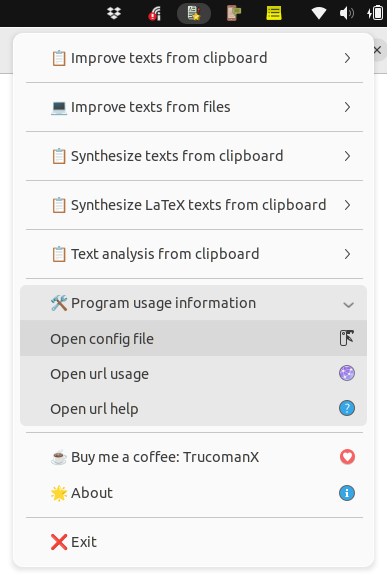
Place the obtained API_KEY in the clipboard-text-correction-indicator program under menu Program usage information >> Open config file.
4. Buy me a coffee
If you find this tool useful and would like to support its development, you can buy me a coffee!
Your donations help keep the project running and improve future updates.
5. License
This project is licensed under the GPL license. See the LICENSE file for more details.
Release history Release notifications | RSS feed


Download files
Download the file for your platform. If you're not sure which to choose, learn more about installing packages.
Source Distribution
Built Distribution
Filter files by name, interpreter, ABI, and platform.
If you're not sure about the file name format, learn more about wheel file names.
Copy a direct link to the current filters
File details
Details for the file clipboard_text_correction-0.2.11.tar.gz.
File metadata
- Download URL: clipboard_text_correction-0.2.11.tar.gz
- Upload date:
- Size: 59.9 kB
- Tags: Source
- Uploaded using Trusted Publishing? No
- Uploaded via: twine/5.1.1 CPython/3.10.12
File hashes
| Algorithm | Hash digest | |
|---|---|---|
| SHA256 |
fdc9d9b4dc5c717c96b62df66f79c57edfd23cfdc94c279ae5e15e050158e5b9
|
|
| MD5 |
9391ac95ff567674fdd3c70fff57893c
|
|
| BLAKE2b-256 |
de8fda2d91d00062955c159451db7f886ab5c29b3ec09bd8a5b6e80e96dc6528
|
File details
Details for the file clipboard_text_correction-0.2.11-py3-none-any.whl.
File metadata
- Download URL: clipboard_text_correction-0.2.11-py3-none-any.whl
- Upload date:
- Size: 59.6 kB
- Tags: Python 3
- Uploaded using Trusted Publishing? No
- Uploaded via: twine/5.1.1 CPython/3.10.12
File hashes
| Algorithm | Hash digest | |
|---|---|---|
| SHA256 |
71bd92446ed1c6e17b62388e6962eff3424b6a0de33ca155bbe03ace1ffe33db
|
|
| MD5 |
b4561dc96b93ec4192fc280e814241d7
|
|
| BLAKE2b-256 |
557120f1cf13707218d857bae586d54946a6bf54d0c9b1a8b2149c426e9e0168
|






