
Clipit
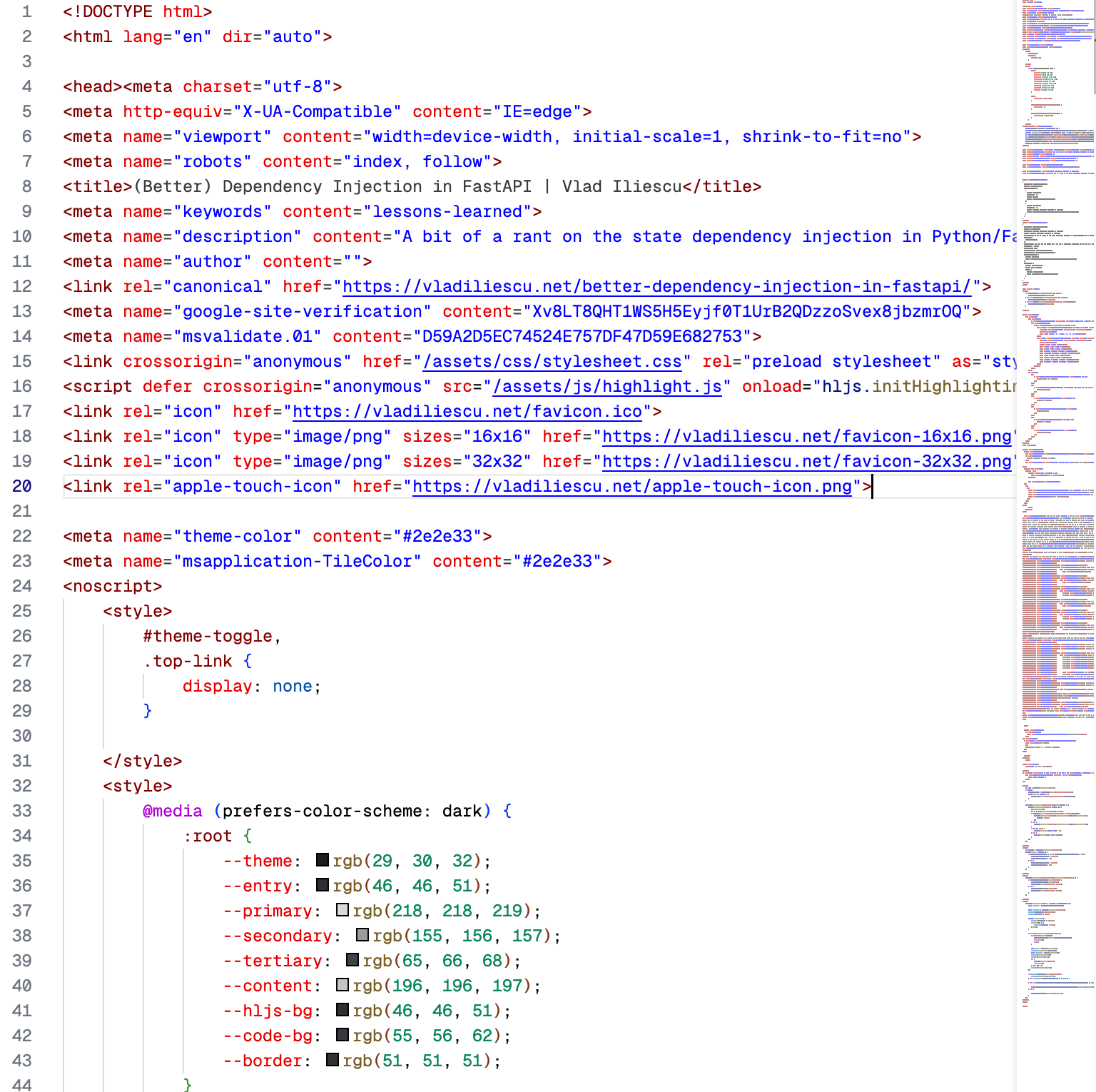
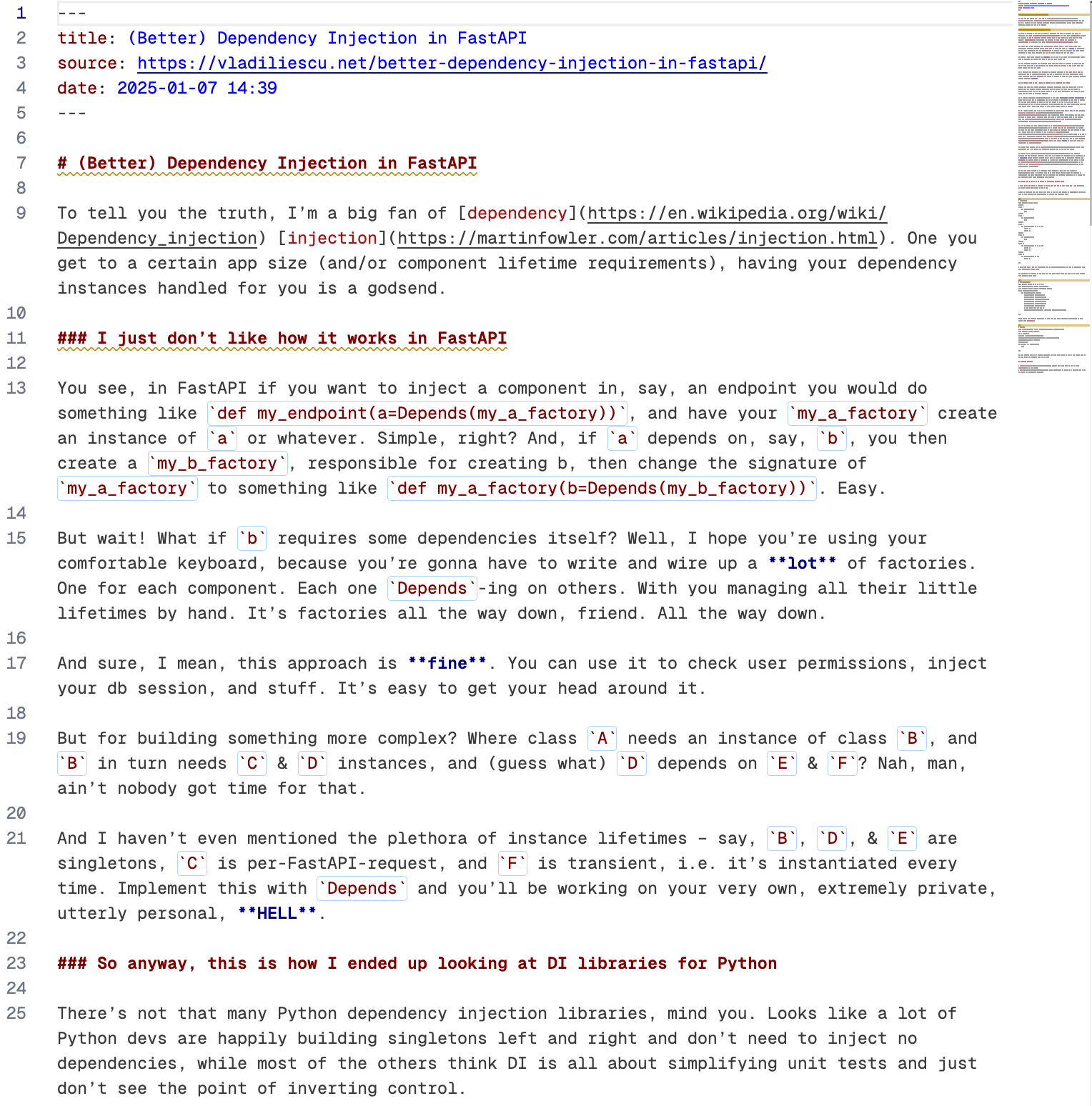
Clipit (previously named Grabit) is a command-line tool that allows you to download web pages, extract their readable content, convert it to Markdown, and save it locally.
It's ideal for archiving articles, blog posts, or any web content you may want to save forever and ever. It works well for feeding web content into LLMs too.
I'm using it to save bookmarks in Obsidian, so you'll see a lot of focus in this area (the YAML front matter, the domain subdirectory, etc.). But it's flexible enough to be used in other contexts as well.
| It gets you from this | to this |
|---|---|
 |
 |
Features
- Download and convert web pages to Markdown: Fetches the content from a URL and converts it into clean Markdown format
- Supports multiple output formats: Save content as Markdown, readable or raw HTML, or just send it to stdout so you can pipe it into another app
- Customizable output: Include YAML front matter, page titles, source links, and control the output directory structure. This is especially useful for integrating with knowledge management systems such as Obsidian
- Uses Readability.js: Extracts the main content from web pages for cleaner outputs (requires Node.js to be installed)
- Supports Reddit posts: Clipit now handles Reddit (both text & link) posts (including comments)
Installation
- Ensure uv is installed
- Ensure Node.js is installed (optional, required for Readability.js, see below for options)
- Install clipit as a global uv tool (recommended, see below for an alternative)
uv tool install clipit
- Run clipit as any other CLI app
clipit -f stdout.md https://vladiliescu.net
Alternatively, if you don't want to install it, you can just run it with uvx: uvx clipit -f stdout.md https://vladiliescu.net. Keep in mind that this will cause uv to check for dependency updates every time you run it, causing you to lose 1-2 precious seconds every time you save something 🥶.
Usage
clipit [OPTIONS] URL
Options
--yaml-frontmatter / --no-yaml-frontmatter: Include YAML front matter with metadata, useful for saving & viewing content in Obsidian (default:enabled).--include-title / --no-include-title: Include the page title as an H1 heading. A bit redundant when rendering the YAML frontmatter, but I like it anyway (default:enabled).--include-source / --no-include-source: Include the page source URL at the top of the document. Also a bit redundant when rendering the YAML frontmatter, but this one I don't like so much (default:disabled).--user-agent TEXT: Set a custom User-Agent to be used for retrieving web pages (default:Clipit/<version>).--fallback-title TEXT: Fallback title if no title is found. Use{date}for the current date (default:Untitled {date}).--bookmark-on-failure: Save a Markdown bookmark if downloading fails, without asking for confirmation. Without this option, interactive terminals offer a bookmark prompt and noninteractive commands exit with the download error.--title TEXT: Title for the bookmark fallback. Prompts in interactive terminals when omitted; otherwise uses the URL hostname.--notes TEXT: Markdown notes for the bookmark fallback. Prompts in interactive terminals when omitted; otherwise leaves notes empty.--use-readability-js / --no-use-readability-js: Use Readability.js for processing pages. Disabling it will result in some processing courtesy of ReadabiliPy, but it doesn't look so great to be honest (requires Node.js, default:enabled).--create-domain-subdir / --no-create-domain-subdir: Save the resulting files in a subdirectory named after the domain. Useful when saving a lot of bookmarks in the same Obsidian vault (default:enabled).--overwrite / --no-overwrite: Overwrite existing files (default:disabled).--download-images / --no-download-images: Download article images and use local references in Markdown and readable HTML (default:disabled). Images are stored in a directory named after the article, beside the saved document.--download-folder TEXT: Set an image-directory template when downloading images. Relative paths start at the working directory;${domain}is the page's domain and${file_name}is the sanitized article filename without its extension. Markdown and readable HTML use paths relative to the saved document. The library'sclip()andclip_and_save()methods accept the same template asdownload_folder;clip()uses the working directory as its document directory unlessoutput_diris supplied.-f, --format [md|stdout.md|html|raw.html]: Output format(s) to save the content in. Most useful aremd, which saves the content to a Markdown file, andstdout.mdwhich simply outputs the raw content so you can pipe it to something else, like the clipboard or Simon Willison's llm cli. Can be specified multiple times (default:md).
Examples
- Save article images in a separate attachments directory:
clipit --download-images --download-folder './attachments/${domain}/${file_name}' https://example.com/article
Use single quotes so the shell passes the template unchanged. This saves the document under example.com/ and its images under attachments/example.com/<article title>/. Omit --download-folder to keep images beside the document in its article directory. Existing archives are not moved; use --overwrite to update an existing note's image references. Files no longer referenced by a note are not deleted.
- Fall back to a bookmark when a page cannot be downloaded:
clipit https://example.com/article --bookmark-on-failure
- Supply bookmark details without prompts, including in scripts:
clipit https://example.com/article --bookmark-on-failure --title "Reading list" --notes "Read this later."
The normal download is always attempted first. Title and notes apply only to the bookmark fallback. Bookmarks follow the existing metadata, directory, and overwrite options. If YAML front matter is disabled, the bookmark includes a source link so the URL is preserved. File output falls back to .md, including when HTML was requested; -f stdout.md prints the bookmark instead. Prompts and download diagnostics go to stderr. Only download failures trigger the fallback; extraction and file-writing errors still fail normally.
- Save a web page as Markdown with the default options:
clipit https://example.com/article
- Save as both Markdown and readable HTML:
clipit -f md -f html https://example.com/article
- Set a custom User-Agent:
clipit --user-agent "MyCustomAgent/1.0" https://example.com/article
- Output markdown content to stdout:
clipit -f stdout.md https://example.com/article
- Output markdown content to clipboard (MacOS):
clipit -f stdout.md https://example.com/article | pbcopy
- Disable YAML front matter and include source URL:
clipit --no-yaml-frontmatter --include-source https://example.com/article
- Save files in the working directory, without creating a domain subdirectory:
clipit --no-create-domain-subdir https://example.com/article
Requirements
License
Clipit, a tool for archiving web content, copyright (C) 2025 Vlad Iliescu
This program is free software: you can redistribute it and/or modify it under the terms of the GNU General Public License as published by the Free Software Foundation, either version 3 of the License, or (at your option) any later version. See the LICENSE for details.
1 maintainer

Download files
Download the file for your platform. If you're not sure which to choose, learn more about installing packages.
Source Distribution
Built Distribution
Filter files by name, interpreter, ABI, and platform.
If you're not sure about the file name format, learn more about wheel file names.
Copy a direct link to the current filters
File details
Details for the file clipit-1.1.0.tar.gz.
File metadata
- Download URL: clipit-1.1.0.tar.gz
- Upload date:
- Size: 121.9 kB
- Tags: Source
- Uploaded using Trusted Publishing? No
- Uploaded via:
twine/7.0.0 CPython/3.13.14
File hashes
| Algorithm | Hash digest | |
|---|---|---|
| SHA256 |
1ec3bd224eb273329de3cd0640b06a5426c2918fa4b99b68cb8ce09f5a3130ab
|
|
| MD5 |
a331bf1ccdd55e7c49c95b835726b986
|
|
| BLAKE2b-256 |
22bdf7ca0f9fed03a6553895a094cd08c173720cb842a5b599bb427656fdd2f3
|
File details
Details for the file clipit-1.1.0-py3-none-any.whl.
File metadata
- Download URL: clipit-1.1.0-py3-none-any.whl
- Upload date:
- Size: 22.2 kB
- Tags: Python 3
- Uploaded using Trusted Publishing? No
- Uploaded via:
twine/7.0.0 CPython/3.13.14
File hashes
| Algorithm | Hash digest | |
|---|---|---|
| SHA256 |
c69d0874daa70763dfc83ce597671e0ee6bee80d97fae2a72b55a5829e339d4c
|
|
| MD5 |
cafca687af9a22d5db9297ac2c32a278
|
|
| BLAKE2b-256 |
1e5a9009419cfb8dc05f6b1f6aa491587ae9e68e7931b20c097839fc27b1acaa
|














