
Clipper
Clipper is a native Windows app that scans a folder of gameplay, finds the loud reactions and sudden motion, merges nearby moments, and cuts ready-to-post clips with FFmpeg. Everything runs locally. No accounts, no uploads, no browser.
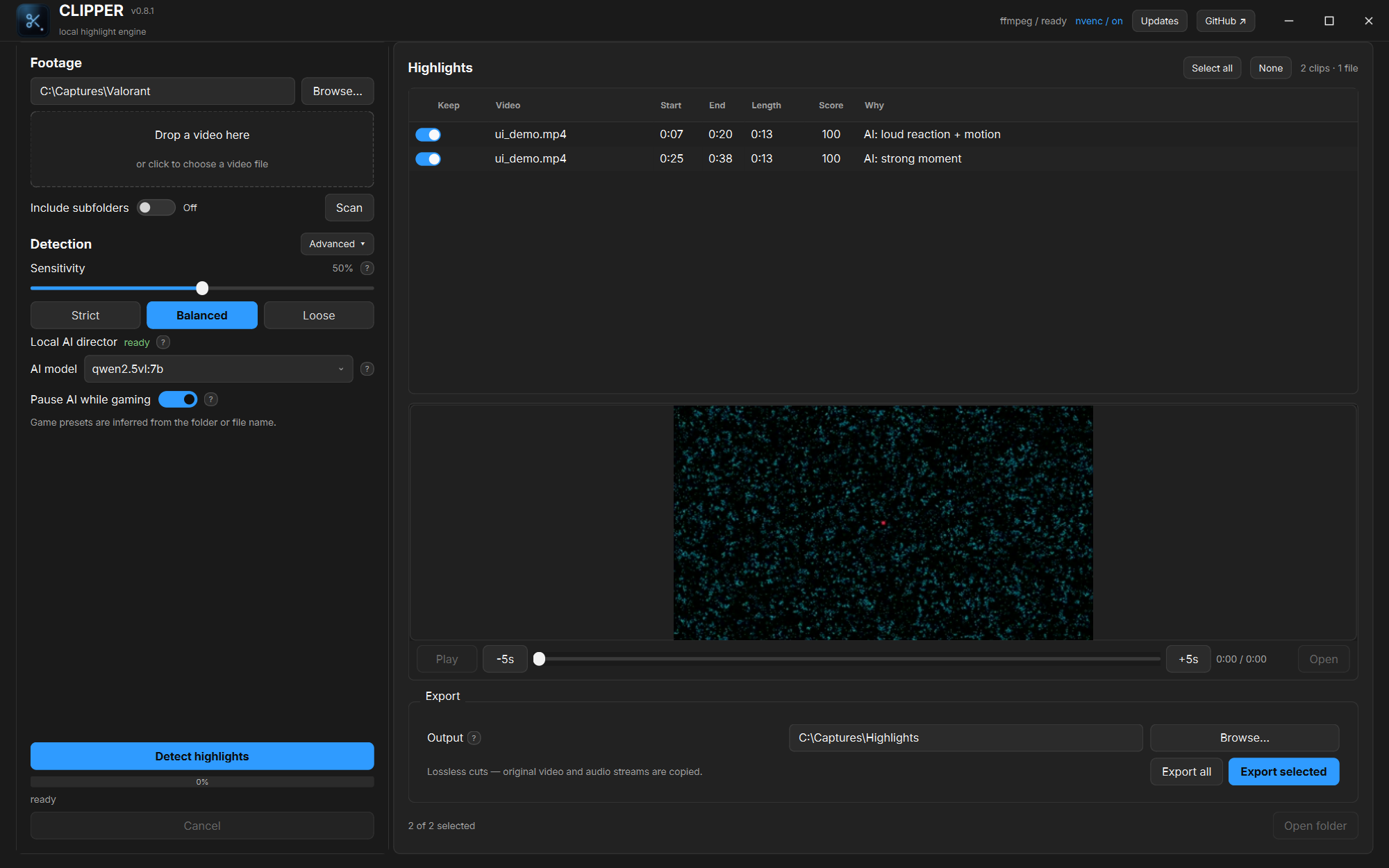
Website: hatermedia.github.io/clipper · Release: v0.8.1
Install
Windows 10/11 installer (recommended): Download ClipperSetup-0.8.1.exe (~365 MB)
- Per-user install, no admin prompt
- Installs to
%LOCALAPPDATA%\Programs\Clipper - Desktop and Start Menu shortcuts
- Built-in SHA-256 verified updates
- Uninstall removes the app and settings, not your footage or caches
The installer includes FFmpeg, Whisper base.en, RapidOCR, YAMNet, and the
runtime they need. A multi-gigabyte vision model is not bundled. The AI
Director can install Ollama from inside the app, and then download a model only
when you ask for it.
Prefer a portable copy? Download the native zip
and run Clipper.exe.
What it does
- Smart padding and merging — every detected peak gets 8 seconds before and 5 seconds after. Windows merge when they overlap or are less than a second apart, keeping the stronger peak. A fight stays one clip instead of six fragments.
- Flat highlight list — every clip is one row with its source video, time range, score, and grounded reason. No nested video groups.
- Inline preview player — selecting a row shows its peak frame and stays paused. Play, pause, seek, and -5s/+5s controls are in the preview panel. A single click never starts playback; double-click is a shortcut to play.
- Local AI only — every scan is reviewed by the local vision director. There is no heuristic-only highlighting mode.
- Game Guard — pauses AI and frees VRAM while a game is running, then resumes automatically. It uses a large title map, Unreal Engine process detection, and major game-library paths.
- Lossless cuts — stream copy keeps the original video and audio and exports almost instantly.
- GPU + CPU controls — real NVENC test, balanced thread cap, and a low-power preset.
First run and local AI
Clipper is AI-first. Every scan is reviewed by a local vision director that watches the full clip in short windows, transcribes the audio with Whisper, and uses HUD/audio signals to find the story beats. There is no heuristic-only highlighting fallback.
The AI model is required, but it is not bundled. To set it up:
- Open Clipper and click Install Ollama in the AI setup panel. Clipper downloads the official installer, verifies its SHA-256 and Authenticode signature, installs it for the current user, and starts it. No browser trip.
- Click Install model to download
gemma3:4borqwen2.5vl:7bthrough Ollama, with progress shown in the panel. - On 6 GB cards use
gemma3:4b(tested). On 8 GB+ useqwen2.5vl:7b.
Game presets are inferred from each file's folder or name; there is no game
dropdown to maintain. The model picker lists only the supported local vision
families: gemma3, qwen2.5vl, and qwen3-vl. If AI is not ready, Detect
highlights stays disabled until setup finishes.
Low-power mode
Low-power mode is a performance preset, not a separate product:
- 2 CPU threads
- 256 px wide, 2 fps analysis proxy
- Below-normal process priority
The local AI director still runs. Low-power mode only trades speed for lower resource use; it never turns highlighting off.
Game Guard
Game Guard looks at local processes and paths. It covers a large built-in title
list, generic Unreal Engine shipping
processes, and games installed through Steam, Epic, GOG, Riot, EA, Ubisoft, and
Xbox paths. You can add private or missed titles in
%LOCALAPPDATA%\Clipper\games.json:
{
  "mygame.exe": "My Game"
}
Privacy
Footage never leaves the machine. Analysis, OCR, transcription, and export are local. Clipper has no accounts and no telemetry. Network access is limited to the optional GitHub update check and, only when you click them, the one-click Ollama install and model download. Release downloads are HTTPS and SHA-256 verified.
Build from source
For development only:
git clone https://github.com/hatermedia/clipper.git
cd clipper
py -m venv .venv
.\.venv\Scripts\pip install -e ".[desktop]"
.\.venv\Scripts\python -m clipper.desktop
Packaging scripts and checksums live in packaging/. Third-party notices and
license texts are in THIRD_PARTY_NOTICES.txt, packaging/FFMPEG_NOTICE.txt,
and packaging/licenses/.
License
MIT. See LICENSE. You are responsible for the rights to the footage you process.
1 maintainer

Metadata
1 maintainer
Release files for clipper-gg 0.8.1
For a detailed explanation of source distributions (sdists) and built distributions (wheels), please see the package formats documentation.
Source distribution (sdist)
| File | Size | Uploaded | Provenance | Actions |
|---|---|---|---|---|
| clipper_gg-0.8.1.tar.gz | 15.0 MB | Without provenance | Details for clipper_gg-0.8.1.tar.gz |
Built distribution (wheel)
| File | Interpreter | ABI | Platform | Actions Reset |
|---|---|---|---|---|
| clipper_gg-0.8.1-py3-none-any.whl | Python 3 | none | any | Details for clipper_gg-0.8.1-py3-none-any.whl |
Total release size: 30.0 MB
Release files / clipper_gg-0.8.1.tar.gz
| Download URL | clipper_gg-0.8.1.tar.gz |
|---|---|
| Size | 15.0 MB |
| Tags | Source |
|
SHA-256 checksum How to use checksums |
e5a226f7853dd7c1ce05e40986b07ac98b0c5b8c2b1a6169e0f62245eabb6c2b
|
|
BLAKE2b-256 checksum How to use checksums |
07da718d844157aef64e55f61d09a465b842dbfafbfa05846cc27cdd6d76400e
|
| Upload date | |
|
Uploaded using Trusted Publishing? What is trusted publishing? |
No |
| Uploaded via |
twine/7.0.0 CPython/3.13.7
|
Release files / clipper_gg-0.8.1-py3-none-any.whl
| Download URL | clipper_gg-0.8.1-py3-none-any.whl |
|---|---|
| Size | 15.0 MB |
| Tags | Python 3 |
|
SHA-256 checksum How to use checksums |
8c9b2251133f84aa7bed6e12b1b00b4fb54260579726a55ca51c7dbfe4ea90a9
|
|
BLAKE2b-256 checksum How to use checksums |
48d6c3a72a2f64468976ebf0e505807fc6eb2f4fe34f4c5a75b57945ca1a4bf9
|
| Upload date | |
|
Uploaded using Trusted Publishing? What is trusted publishing? |
No |
| Uploaded via |
twine/7.0.0 CPython/3.13.7
|
Security for clipper-gg 0.8.1
Provenance
Provenance describes where a file came from. On PyPI, provenance is shared via attestations, which provide a verifiable record of the build or publishing details. View details, limitations and caveats.
No provenance found
None of the files in this release were uploaded with provenance metadata.
A note on package security
PyPI is a repository for distributing packages, not a service for auditing them. While third-party security researchers and our staff do their best to detect and remove malicious packages, PyPI cannot guarantee the quality, security or suitability of any given package.
To learn more about protecting yourself from malicious actors, visit our package security documentation.














