
Call Windows prompt for credentials with Python through PowerShell command Get-Credential.

Project description
clixmlcreds


Simple solution to call Windows prompt for credentials through PowerShell command Get-Credential. Result of command above will be exported in xml using Windows Data Protection API (Export-Clixml PowerShell command).
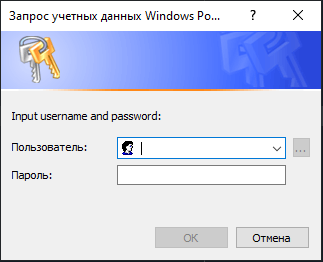
You can store your credentials and reuse it in scripts by CredentialManager.read(...).
Very handy when you just need to store credentials for different services and call them based on different <cred_name>.
Usage
from clixmlcreds import Credential, CredentialManager


cred_name: str = 'Name_of_secret_xml_file'  # cred name without file extension


if not Credential.exists(name=cred_name):
    CredentialManager.write(
        cred_name=cred_name,
        username='Your_username',
        prompt_message='Input username and password:'
    )
cred = CredentialManager.read(cred_name=cred_name)
username = cred.username
password = cred.get_password()  # return unsecure password string
Secrets storage
The default secrets storage is the corresponding folder inside the package. All credentials are hashed and stored in this folder as a <cred_name>.xml file.
You can change this behavior using:
from pathlib import Path
from clixmlcreds import CredentialManager


CredentialManager.path = Path('your_own_secrets_storage_folder')
Release history Release notifications | RSS feed

Download files
Download the file for your platform. If you're not sure which to choose, learn more about installing packages.
Source Distribution
Built Distribution
Filter files by name, interpreter, ABI, and platform.
If you're not sure about the file name format, learn more about wheel file names.
Copy a direct link to the current filters
File details
Details for the file clixmlcreds-1.0.post1.tar.gz.
File metadata
- Download URL: clixmlcreds-1.0.post1.tar.gz
- Upload date:
- Size: 7.9 kB
- Tags: Source
- Uploaded using Trusted Publishing? No
- Uploaded via: twine/6.1.0 CPython/3.8.19
File hashes
| Algorithm | Hash digest | |
|---|---|---|
| SHA256 |
79fdce6dda75c01f7a16732d94c140f31316c6f9e627695af726ac7e98c3e42a
|
|
| MD5 |
23b0487a217006fcb9632acbfab6b5b7
|
|
| BLAKE2b-256 |
2a82fa604442ea7e7bce9237c87f83ef7a18eae7de2c1147bfdc6ae1ca83966b
|
File details
Details for the file clixmlcreds-1.0.post1-py3-none-any.whl.
File metadata
- Download URL: clixmlcreds-1.0.post1-py3-none-any.whl
- Upload date:
- Size: 7.0 kB
- Tags: Python 3
- Uploaded using Trusted Publishing? No
- Uploaded via: twine/6.1.0 CPython/3.8.19
File hashes
| Algorithm | Hash digest | |
|---|---|---|
| SHA256 |
41c9704675e57be1fa77921971fb563143a483388b03508e601e0eb93e7b33a4
|
|
| MD5 |
fb7f815a73563e0bbad8f4b69bab69e0
|
|
| BLAKE2b-256 |
10683933ae0633373a3cf15f7259bb464e58ad98543e35234e1a0cf1c5fe4f80
|






