

clocky
CLI for tracking hours worked
This was the first "installable" package I ever made. The code is very messy. It was originally used with easy install and I have used it for work every day since its conception. This is a great little program for keeping record of your punches in the event your company's system fails or you forget to punch-out at the end of the day. I have decided to publish the code and refactor it to be installable with pip.
Install
Requires Python >= 3.8
pip install clocky-cli
Features
- clocking in and out
- break timer that auto clocks back in
- output punches from timelog (similar to
tailon Linux) - output timecard for a given week
- various charts
- edit dates if you forget a punch
- configurable settings (stored at
~/.config/clocky/clocky.ini)
Usage
usage: clocky [-?] [-d] [-v | -i | -o | -t | -b [M] | -l [N] | -s [N] | -g [N] | -c [N] | -gc [N] | -h
              I [N ...] | --edit [D]]

Clocky: A timecard program! Arguments are mutually exclusive. (Except --debug)

options:
  -?, --help                Show this help message and exit.
  -d, --debug               Print debug information.
  -v, --version             show program's version number and exit
  -i, --in                  Clock in.
  -o, --out                 Clock out.
  -t, --toggle              Clock in if out, clock out if in.
  -b [M], --break [M]       Clock out for [M] minutes and clock back in. (default: 30)
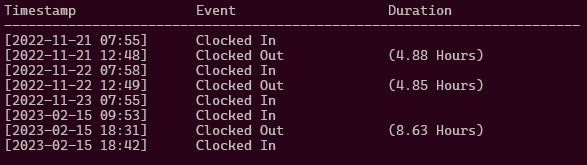
  -l [N], --log [N]         Print log for last [N] days. (default: 7)
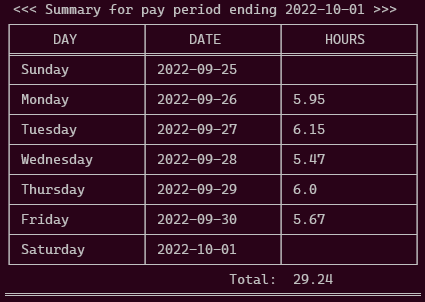
  -s [N], --sum [N]         Print summary for [N]th week ago. (default: 0)
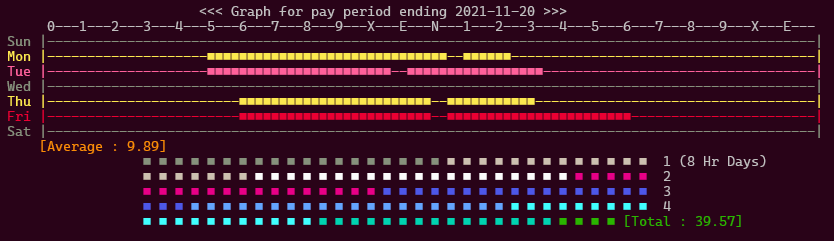
  -g [N], --graph [N]       Print graphical summary for [N]th week ago. (default: 0)
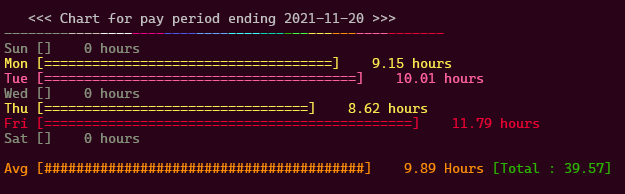
  -c [N], --chart [N]       Print chart summary for [N]th week ago. (default: 0)
  -gc [N], -cg [N]          Combines graph and chart for [N]th week ago. (default: 0)
  -h I [N], --hist I [N]    Chart history for last [N] [I]ntervals. (D=days W=weeks)  ← Not yet implemented
  --edit [D]                Edit timecard for [D]ate. (YYYY-MM-DD)

Try 'clocky --demo' for demonstrations.
Example Images

Issues
-
Be very careful about adding a
clocky -ito your shell's profile. Sometimes shell profiles are reloaded which will cause unwanted punches. I experienced this firsthand in PowerShell: Took me way too long to debug. It's better to addclocky -ito a startup script that you run manually. -
If you are using Nerd Fonts or other fonts that support ligatures, you may experience rendering issues with some of the charts. (See Issue #13)
Author
1 maintainer

Metadata
1 maintainer
Release files for clocky-cli 2.2
For a detailed explanation of source distributions (sdists) and built distributions (wheels), please see the package formats documentation.
Source distribution (sdist)
| File | Size | Uploaded | Provenance | Actions |
|---|---|---|---|---|
| clocky-cli-2.2.tar.gz | 15.9 kB | Without provenance | Details for clocky-cli-2.2.tar.gz |
Built distribution (wheel)
| File | Interpreter | ABI | Platform | Actions Reset |
|---|---|---|---|---|
| clocky_cli-2.2-py3-none-any.whl | Python 3 | none | any | Details for clocky_cli-2.2-py3-none-any.whl |
Total release size: 30.3 kB
Release files / clocky-cli-2.2.tar.gz
| Download URL | clocky-cli-2.2.tar.gz |
|---|---|
| Size | 15.9 kB |
| Tags | Source |
|
SHA-256 checksum How to use checksums |
0d4c758df129741044905d199e13df77bbb8c86ac4022386e4da97b07385eb40
|
|
BLAKE2b-256 checksum How to use checksums |
057554f596426476b9516c83e39380c8c6e148d090b9e4eafa03c839bfd6c177
|
| Upload date | |
|
Uploaded using Trusted Publishing? What is trusted publishing? |
No |
| Uploaded via |
twine/4.0.2 CPython/3.11.0
|
Release files / clocky_cli-2.2-py3-none-any.whl
| Download URL | clocky_cli-2.2-py3-none-any.whl |
|---|---|
| Size | 14.5 kB |
| Tags | Python 3 |
|
SHA-256 checksum How to use checksums |
a9090f6dd5bbb40a40174b25dcde08abd085c1fc6934f3aa3ed0718d98d49376
|
|
BLAKE2b-256 checksum How to use checksums |
14304dc5b2406ac32ee29296b27ef1bf626364a8a2c0645735709afc50580cbe
|
| Upload date | |
|
Uploaded using Trusted Publishing? What is trusted publishing? |
No |
| Uploaded via |
twine/4.0.2 CPython/3.11.0
|
Security for clocky-cli 2.2
Provenance
Provenance describes where a file came from. On PyPI, provenance is shared via attestations, which provide a verifiable record of the build or publishing details. View details, limitations and caveats.
No provenance found
None of the files in this release were uploaded with provenance metadata.
A note on package security
PyPI is a repository for distributing packages, not a service for auditing them. While third-party security researchers and our staff do their best to detect and remove malicious packages, PyPI cannot guarantee the quality, security or suitability of any given package.
To learn more about protecting yourself from malicious actors, visit our package security documentation.














