
ClonePulse
Your GitHub clone stats, visualized and celebrated.
Track weekly trends, highlight milestones, and share visual dashboards—all automatically.


Add Badges to Your README
ClonePulse can generate badges you can embed in your repo:
A click on a badge takes you to the dashboard.
Clone data summary and outlier handling
clonepulse/fetch_clones.json starts with a summary object containing filtered
lifetime totals, raw clone totals, 7-day and 30-day totals and daily averages,
and a snapshot of the totals at the last refresh. Rolling periods end on the
newest stored day; days_included and days_discarded make each average's
denominator explicit.
ClonePulse marks a day as abnormal when its clone-to-unique-cloner ratio is
greater than 25. A positive clone count with zero unique cloners is also
abnormal. These days remain in daily with their raw values and are described
in discard, but they do not contribute to summaries, badges, milestones, or
the daily-max annotation. The dashboard replaces an abnormal clone count with
the rounded average of up to seven preceding normal days.
{
  "summary": {
    "total_clones": 4437,
    "unique_clones": 2934,
    "total_clones_raw": 4437,
    "last_7_days": {
      "total_clones": 37,
      "unique_clones": 29,
      "average_daily_clones": 5.29,
      "average_daily_unique_clones": 4.14,
      "days_included": 7,
      "days_discarded": 0
    },
    "last_30_days": {
      "total_clones": 197,
      "unique_clones": 143,
      "average_daily_clones": 6.57,
      "average_daily_unique_clones": 4.77,
      "days_included": 30,
      "days_discarded": 0
    },
    "last_refresh": {
      "timestamp": "2026-08-29T02:29:25Z",
      "total_clones": 4437,
      "unique_clones": 2934
    }
  },
  "annotations": [],
  "discard": [],
  "daily": []
}
Example dashboards
Weekly dashboard (default)
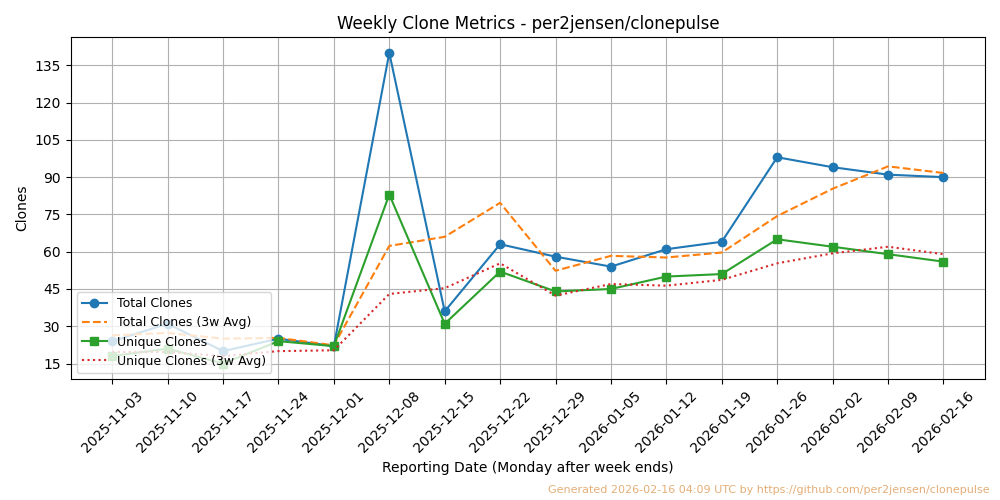
A weekly clone activity chart is automatically updated and saved in clonepulse/weekly_clones.png.
- Runs every Monday morning
- Discards partial weeks
- Shows only complete Monday–Sunday periods

python src/clonepulse/generate_clone_dashboard.py --user per2jensen --repo clonepulse
Reproducible window (--start + --weeks)
Command: python src/clonepulse/generate_clone_dashboard.py --start 2025-09-01 --weeks 8 --user per2jensen --repo clonepulse

Calendar year (--year)
Command: python src/clonepulse/generate_clone_dashboard.py --year 2025 --user per2jensen --repo clonepulse

Quick Setup
-
Create a GitHub Token
See 🔐 Token Setup below. -
Drop essentials into your repo
Copyclonepulse/,src/clonepulse/,pyproject.toml, and the workflows in.github/workflows/. If the destination already has apyproject.toml, add ClonePulse's runtime dependencies and ensure its build configuration includes thesrc/clonepulse/package. -
Add badges to your README
Replaceyour-username/your-repo:[](https://github.com/your-username/your-repo/blob/main/clonepulse/weekly_clones.png) [](https://github.com/your-username/your-repo/blob/main/clonepulse/weekly_clones.png)
-
Configure the workflow
Updatefetch_clones.ymlwith your--userand--repo.- name: Run fetch_clones.py env: TOKEN: ${{ secrets.CLONEPULSE_METRICS }} run: | python -m clonepulse.fetch_clones \ --user <your GitHub login> \ --repo <your repo>
-
Generate the dashboard in your workflow
Default (last 12 weeks):
- name: Render dashboard
  run: python -m clonepulse.generate_clone_dashboard
Reproducible window:
- name: Render dashboard
  run: |
    python -m clonepulse.generate_clone_dashboard \
      --start 2025-06-02 --weeks 8
Dashboard title & repo label
- Banner title always says “Weekly Clone Metrics”.
- If you provide
--userand--repo, the banner also showsuser/repo. - If only one is provided, that single value is shown.
- If neither flag is passed, the script falls back to env vars
GITHUB_USER/GITHUB_REPOfor the label.
Additional CLI options (can also be used locally):
PYTHONPATH=src python src/clonepulse/generate_clone_dashboard.py \
  [--user your-username] \
  [--repo your-repo] \
  [--start YYYY-MM-DD --weeks N] \
  [--year YYYY]
Token Setup
ClonePulse fetches traffic stats from the GitHub API. This requires a Personal Access Token (PAT).
Permissions
For public repos:
- Administration: Read-only
- Metadata: Read-only
For private repos:
- Administration: Read-only
- Metadata: Read-only
- Contents: Read-only
- Traffic: Read-only
How to Create the Token
-
Visit https://github.com/settings/tokens
Click Generate new token → Fine-grained token -
Configure:
- Name: e.g.
your-repo_ClonePulse - Expiration: e.g. 90 days
- Resource owner: Your user or organization
- Repository access: select your repo
- Permissions: set as above
- Name: e.g.
-
Generate and copy the token. (You only see it once.)
Add Token to Secrets
-
Go to your GitHub repository:
Settings → Secrets and variables → Actions → New repository secret -
Name the secret:
CLONEPULSE_METRICS -
Paste the token and save.
Use in Workflow
- name: Run fetch_clones.py
  env:
    TOKEN: ${{ secrets.CLONEPULSE_METRICS }}
  run: python -m clonepulse.fetch_clones
Contributing
Found a bug or want to suggest a feature?
Open an issue or send a PR.
License
ClonePulse is licensed under MIT.
1 maintainer

Download files
Download the file for your platform. If you're not sure which to choose, learn more about installing packages.
Source Distribution
Built Distribution
Filter files by name, interpreter, ABI, and platform.
If you're not sure about the file name format, learn more about wheel file names.
Copy a direct link to the current filters
File details
Details for the file clonepulse-1.0.6.tar.gz.
File metadata
- Download URL: clonepulse-1.0.6.tar.gz
- Upload date:
- Size: 124.6 kB
- Tags: Source
- Uploaded using Trusted Publishing? No
- Uploaded via:
twine/7.0.0 CPython/3.12.3
File hashes
| Algorithm | Hash digest | |
|---|---|---|
| SHA256 |
e77b00e3dba86b4e0ab30ef8f0fb01199419248b616a3e50097d0f5ede9b975e
|
|
| MD5 |
0ed9dacbb227211ec620e3031224db39
|
|
| BLAKE2b-256 |
c71d64b921212c4ca9253a19a0d90a8b078771d51a3120c81f77a3b31e76934f
|
File details
Details for the file clonepulse-1.0.6-py3-none-any.whl.
File metadata
- Download URL: clonepulse-1.0.6-py3-none-any.whl
- Upload date:
- Size: 18.4 kB
- Tags: Python 3
- Uploaded using Trusted Publishing? No
- Uploaded via:
twine/7.0.0 CPython/3.12.3
File hashes
| Algorithm | Hash digest | |
|---|---|---|
| SHA256 |
022b7df200b66b40df488577e56b4d3ac3c66791342ef52fc5df62898033be80
|
|
| MD5 |
98c077b0bad8fb5f398ee7eccd3d6e8f
|
|
| BLAKE2b-256 |
ee9dbd89666c48060850700385e7401b081aab1817d10c89da41d6aa2c5d014e
|














