
closed-circuit-ai
Summary
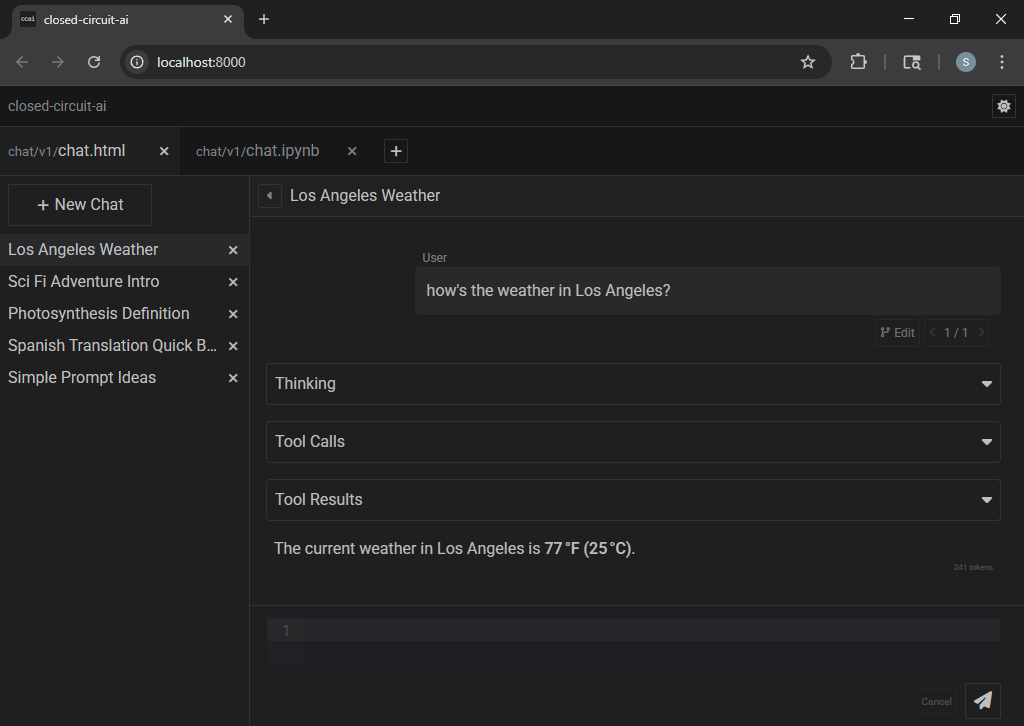
- closed-circuit-ai itself is a workspace-driven server for local apps
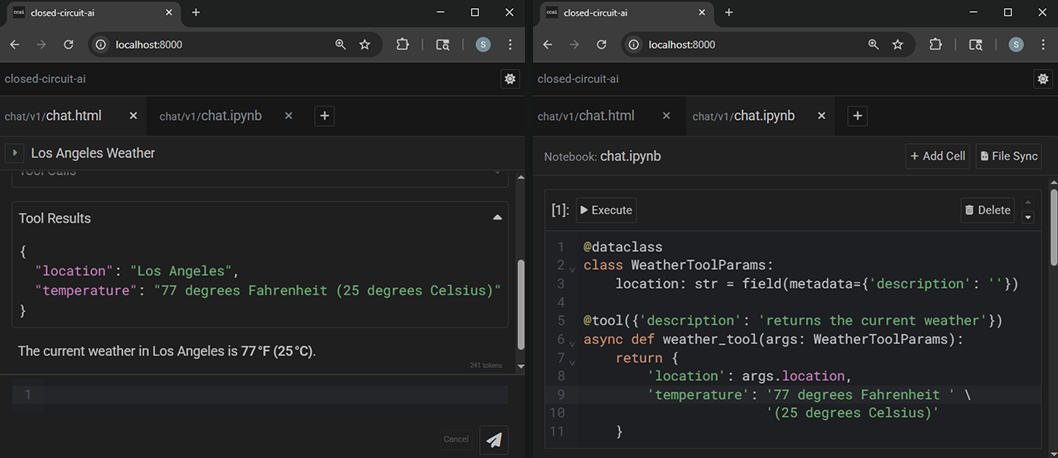
- it serves local web app front-ends alongside their jupyter notebook back-ends
- closed-circuit-ai comes bundled with one native app: chat - for working with LLMs
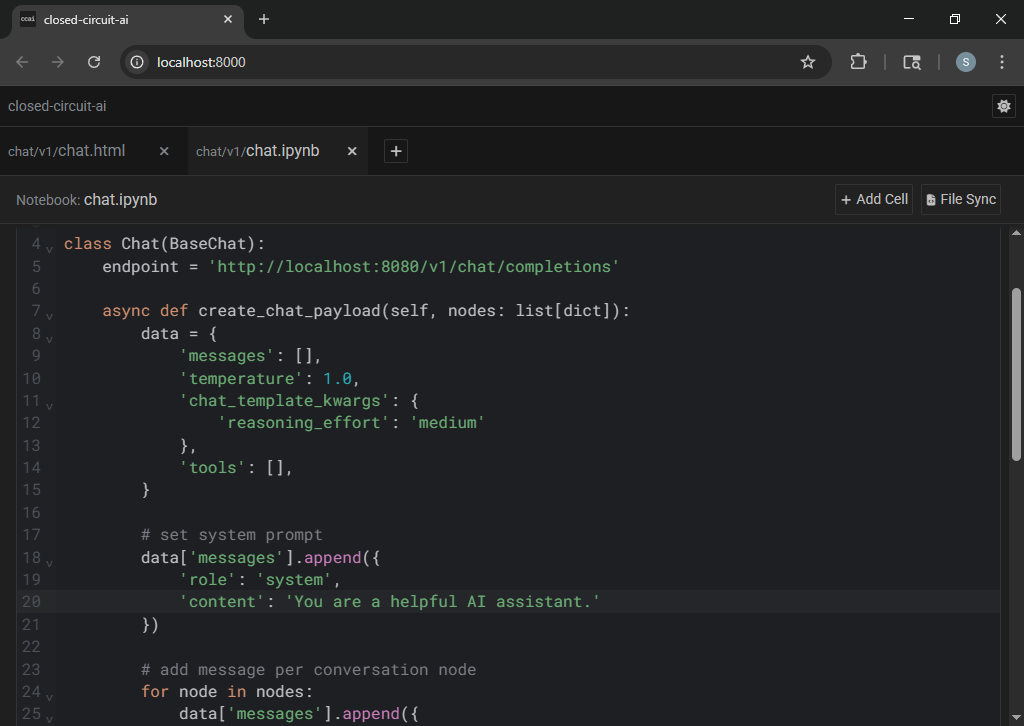
- its notebook (
chat.ipynb) facilitates user-defined tools and prompt orchestration
- ccai and its chat app both utilize conflict-free replicated data types (CRDTs)
- CRDTs offer reliable distributed bidirectional messaging with eventual consistency (partition tolerance)
- thus all fields feature real-time collaborative editing across clients, and offline changes persist
Prerequisites
- Python (version ≥ 3.10)
- an OpenAI-compatible chat completions endpoint (aka
/v1/chat/completions)
Installation
Notes
- the total installation size is ~150MB
- the server and the web app combined use ~0.2GB RAM
Windows (global environment)
pip install closed-circuit-ai
ccai
Windows (virtual environment)
cd C:\
python -m venv ccai_env
C:\ccai_env\Scripts\pip install closed-circuit-ai
C:\ccai_env\Scripts\ccai
Linux (virtual environment)
cd ~
python3 -m venv ccai_env
~/ccai_env/bin/pip install closed-circuit-ai
~/ccai_env/bin/ccai
Usage
> ccai --help
usage: ccai [PATH]
            [--host HOST]
            [--port PORT]
            [--expose]
            [--ssl-keyfile SSL_KEYFILE]
            [--ssl-certfile SSL_CERTFILE]
            [--overwrite-workspace]
            [--dont-open-browser]
            [--dont-reset-cells]
            [--kernel-connection-file KERNEL_CONNECTION_FILE]
            [--kernel-api-host KERNEL_API_HOST]
            [--kernel-api-port KERNEL_API_PORT]
            [--kernel-api-ssl-keyfile KERNEL_API_SSL_KEYFILE]
            [--kernel-api-ssl-certfile KERNEL_API_SSL_CERTFILE]
| options: | |
|---|---|
[PATH] |
specify the workspace directory - default is <user-data>/closed-circuit-ai/ |
--host |
server listen address - default is localhost (aka same-device only) |
--port |
server listen port - default is 8000 |
--expose |
forces --host 0.0.0.0 (aka accept connections from other devices) |
--ssl-keyfile |
path to SSL private key |
--ssl-certfile |
path to SSL public certificate |
--overwrite-workspace |
overwrite existing workspace files during resource unpacking |
--dont-open-browser |
don't automatically open web browser during startup |
--dont-reset-cells |
don't automatically clear stale cell execution data (execution_count & outputs) |
--kernel-connection-file |
specify a kernel connection file (to connect to an already-running kernel) |
--kernel-api-host |
kernel server listen address - default is localhost |
--kernel-api-port |
kernel server listen port - default is 8100 |
--kernel-api-ssl-keyfile |
path to SSL private key |
--kernel-api-ssl-certfile |
path to SSL public certificate |
FAQ
Q: how do I connect to ccai from other devices?
launch ccai with the --expose flag to accept inbound traffic:
ccai --expose
also, configure your operating system's firewall to allow inbound traffic on your chosen port (default is 8000)
Q: how can I automatically generate tool definitions for my python functions?
tool definition format varies by model; a default create_tool_definition is provided in chat.py for gpt-oss
here is an example chat.ipynb using dynamic tool registration and execution:
async def create_chat_payload(self, nodes: list[dict]):
    # ...

    # add @tool definitions
    for attr_name in dir(self):
        attr = getattr(self, attr_name)
        if callable(attr) and hasattr(attr, '_metadata'):
            data['tools'].append(self.create_tool_definition(attr))

    return data

async def handle_tool_call(self, tool_call: dict):
    return await self.execute_tool(tool_call)

@dataclass
class WeatherToolParams:
    location: str = field(metadata={'description': 'a location'})

@tool({'description': 'gets the current weather in a given location'})
async def weather_tool(self, args: WeatherToolParams):
    return {
        'location': args.location,
        'temperature': f'77 degrees Fahrenheit (25 degrees Celsius)',
    }
Q: how do I set up an OpenAI-compatible chat completions endpoint?
llama.cpp is recommended; you can find their precompiled releases here: llama.cpp/releases
for example, a Windows user with an nvidia gpu would download and extract llama-b7000-bin-win-cuda-12.4-x64.zip
(and: if you don't already have CUDA installed, you should download and extract the .dll files from cudart-llama-bin-win-cuda-12.4-x64.zip to be adjacent to your llama-server.exe)
then run llama-server.exe with a configuration appropriate for your hardware and model, for example:
llama-server.exe --model C:\Users\Sky\Downloads\gpt-oss-20b-F16.gguf --host localhost --port 8080 --threads 6 --ctx-size 32768 --flash-attn on --jinja --n-gpu-layers 24 --n-cpu-moe 24 --ubatch-size 2048 --batch-size 2048 --temp 1.0 --min-p 0.0 --top-p 1.0 --top-k 0.0 --no-mmap --mlock --no-webui
Q: does this support Ollama or other providers?
The official /v1/chat/completions spec does not support reasoning models, so providers like llama.cpp and Ollama have deviated from the official spec in order to force support, and these deviations are provider-specific. At the time of this writing, Ollama's implementation conflicts with llama.cpp's implementation, so Ollama will not work correctly out-of-the-box. Other providers may have similar incompatibilities. But, it is fairly easy to modify chat.py and chat.ipynb to support any provider/spec if you are so inclined.
1 maintainer

Metadata
1 maintainer
Release files for closed-circuit-ai 1.0.1
For a detailed explanation of source distributions (sdists) and built distributions (wheels), please see the package formats documentation.
Source distribution (sdist)
| File | Size | Uploaded | |
|---|---|---|---|
| closed_circuit_ai-1.0.1.tar.gz | 1.7 MB | Details |
Built distribution (wheel)
| File | Interpreter | ABI | Platform | Reset |
|---|---|---|---|---|
| closed_circuit_ai-1.0.1-py3-none-any.whl | Python 3 | none | any | Details |
Total release size: 3.4 MB
Release files / closed_circuit_ai-1.0.1.tar.gz
| Download URL | closed_circuit_ai-1.0.1.tar.gz |
|---|---|
| Size | 1.7 MB |
| Tags | Source |
|
SHA-256 checksum How to use checksums |
c022ac7e627846c665f7f9b66a5fd7111fbfc3941aa5f257054007e3fa2ec305
|
|
BLAKE2b-256 checksum How to use checksums |
9306012de8d4b91a83d6f75d460efcc49cad9a8bad3f54f1db353c76e6d0532d
|
| Upload date | |
|
Uploaded using Trusted Publishing? What is trusted publishing? |
No |
| Uploaded via |
twine/6.2.0 CPython/3.11.9
|
Release files / closed_circuit_ai-1.0.1-py3-none-any.whl
| Download URL | closed_circuit_ai-1.0.1-py3-none-any.whl |
|---|---|
| Size | 1.7 MB |
| Tags | Python 3 |
|
SHA-256 checksum How to use checksums |
dd2e4314e06bf9dcf09dc67b77494cd2dfa0dcabf03ae21929e3b315fbd7c7c5
|
|
BLAKE2b-256 checksum How to use checksums |
1967a1ec4f963e3383d2f776b8cb41796f4506661560457f07b7f7e684b27f1b
|
| Upload date | |
|
Uploaded using Trusted Publishing? What is trusted publishing? |
No |
| Uploaded via |
twine/6.2.0 CPython/3.11.9
|














