
cloud-drift-report
Open-source Terraform drift detection, and a maintained alternative to driftctl. It finds resources that someone changed or deleted outside your Terraform, OpenTofu or CloudFormation code, and resources that exist in your account but no state file or stack knows about. It only reads, ranks findings by severity and explains each one in plain English.
| AWS | Azure, GCP, OCI | |
|---|---|---|
| Terraform / OpenTofu drift | ✅ | ✅ (any provider plan -refresh-only can refresh) |
| CloudFormation drift | ✅ | — |
| Resources not in any IaC | ✅ | planned |
It ships four ways, from the same code:
- a command-line tool (
cloud-drift-report) - a Claude skill (Claude Code, Claude desktop and claude.ai)
- a Cursor skill, plus a Cursor rule for older versions
- a GitHub Action (
orchesterra/cloud-drift-report@v0)
It never writes to AWS or to Terraform state, sends no telemetry and needs no account.
Built by OrchesTerra. This free tool is a one-off check from your laptop or CI. OrchesTerra is the cloud platform that runs it continuously across all your AWS accounts and fixes what it finds, with approvals. Try the live demo (no sign-up) or see what it does.
What it checks
| Source | How |
|---|---|
| Terraform / OpenTofu | Runs plan -refresh-only -lock=false into a temporary plan file and reads it with show -json, or reads a plan JSON you already have. |
| CloudFormation | Runs drift detection on the stacks you name (or every stack in a region), waits for it, then reads the resource drifts. |
| Not in IaC | Lists the account (about 170 resource types, mostly through the AWS Cloud Control API) and compares it with your Terraform state files and CloudFormation stacks. Anything neither lists is reported. |
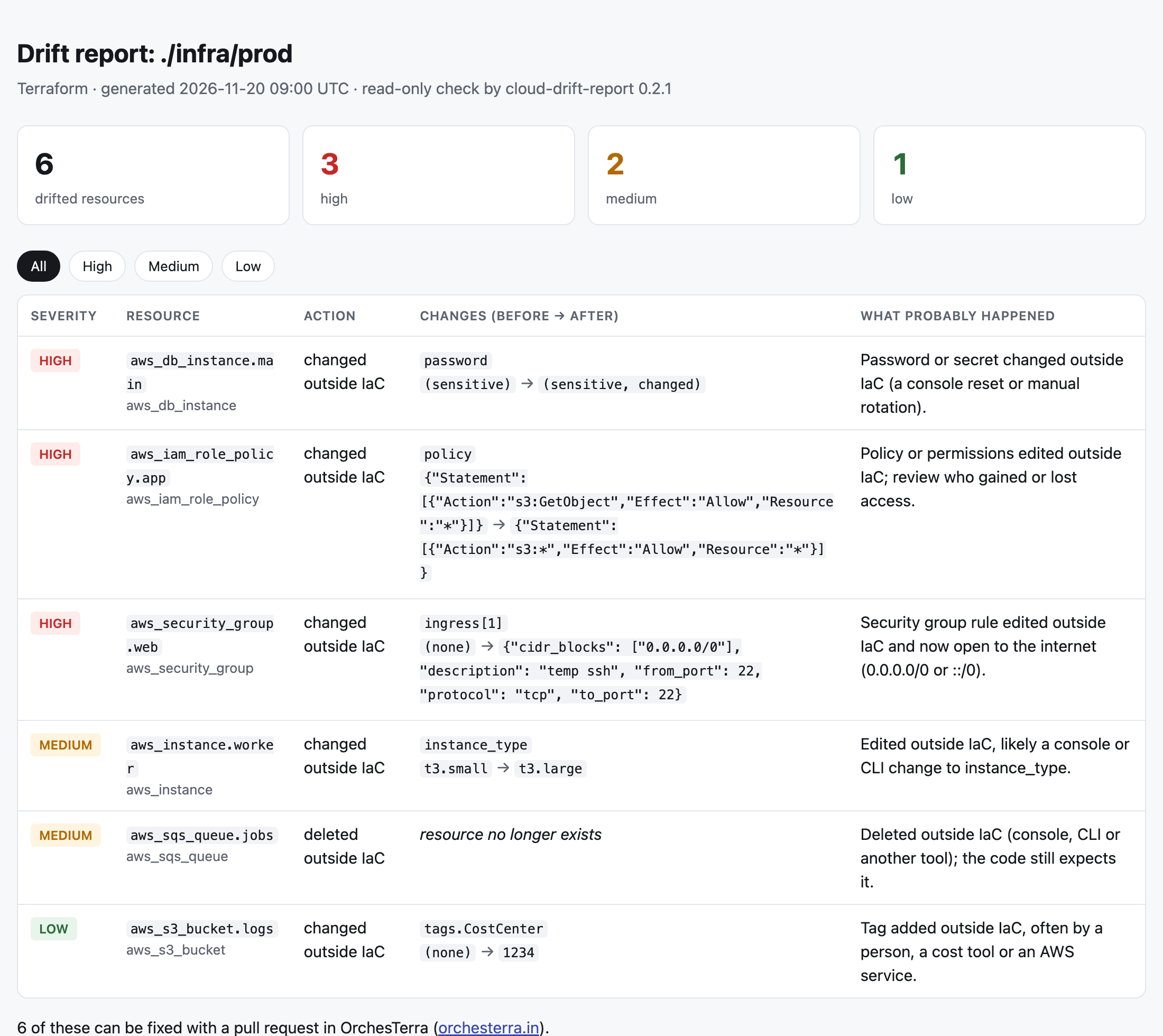
For each drifted resource you get the address, type, action (changed or deleted outside IaC), each changed attribute (before → after), a severity, and a short "what probably happened". For each resource not in IaC you get its name, region, type, ID or ARN and a severity.
The not-in-IaC scan skips what AWS creates itself: default VPCs and their subnets, route tables and security
groups, service-linked roles, AWS-managed keys and policies, resources another AWS service owns (an EKS
cluster security group, an RDS-managed secret, instances launched by an Auto Scaling group), and what AWS
Organizations, Control Tower and StackSets put in member accounts (OrganizationAccountAccessRole,
AWSControlTower* and aws-controltower-*, stacksets-exec-*). They are counted in the report's coverage line
but not listed as findings; --strict lists them too, as low severity with the reason. Types it could not list
(access denied, or the type needs a parent resource) are named in the JSON output, so you know what was not
checked. When anything couldn't be read (resource types, CloudFormation stacks, the account ID), the report
starts with an "Incomplete scan" warning that says what was missed; the JSON has the same as incomplete.
The coverage line starts with the share of listed resources that are in IaC ("87% in IaC"), and the JSON has the same per resource type. If one cloud resource sits at two Terraform addresses (imported twice), the scan warns and names both, because two applies would fight over it.
The scan also flags what costs money while doing nothing: a NAT gateway that no route table sends traffic to
(about $33 a month idle in us-east-1, plus $3.65 for each public IPv4 address on it) and an Elastic IP
attached to nothing (about $3.65 a month). A NAT gateway that routes do point at, but that moved under
1 GB in the last 14 days (CloudWatch BytesOutToDestination plus BytesInFromDestination), is flagged as
nearly unused, at medium severity since it may be a standby; gateways younger than 14 days aren't judged.
It also flags an EBS volume attached to nothing (priced per GB for its volume type), a load balancer with no
registered targets (medium when it has listeners, since it may only redirect) or a Classic Load Balancer with
no instances, and EBS snapshots that look abandoned: older than 90 days, their volume gone, no AMI of yours
using them, and not made by AWS Backup or Data Lifecycle Manager (medium; snapshots are only listed when they
look like this). Volumes and load balancers younger than 7 days aren't judged.
Costs use that region's on-demand rates from the AWS Price List API
(pricing:GetProducts); if it can't be read, the us-east-1 list price is used and the finding says so. One
that is also not in IaC is reported at high severity with the cost in its explanation; ones your Terraform
does manage are named in the coverage line ("Idle and still billing: ...") and in the JSON's idle list,
since being in code doesn't make them free. Each of those says which state file and module manages it
(state_source, address, module), or which stack.
When a resource you expect to be in IaC is reported anyway, --explain TEXT says, for each listed resource
whose ID, name or ARN contains TEXT, what it matched or why it didn't: no state entry of that type, an entry
recorded for another region, or the values it looked for.
Severity
- High: security relevant. Security groups and rules, NACLs, IAM, bucket policies, public access, ACLs, encryption, KMS, resource policies, passwords.
- Medium: any other change that alters behaviour, deleted resources, and most resources not in IaC.
- Low: tags only, and log groups an AWS service created for one of your resources.
Where a finding lives. Every Terraform finding says which state it came from and which module declares
it, for example "in state: s3://acme-tf-state/env:/prod/terraform.tfstate, module.network". The state is the
backend of the --dir checked, in its current workspace: an S3 key, a local path, or an HCP Terraform
host/organization/workspace (a --plan-json run knows only the module). The JSON has the same as
state_source and module ("" for the root module), and the CSV has both columns. Rows for resources not in
IaC have neither, since no state has them.
Formats: Markdown (default), CSV, JSON, a self-contained HTML page (no external assets, light and dark mode, severity filter) and SARIF 2.1.0 for GitHub code scanning (see GitHub code scanning).
Install
You need Python 3.10+. The CloudFormation and not-in-IaC modes also need boto3; Terraform mode needs tofu
or terraform on PATH.
Command-line tool
pip install cloud-drift-report
Or the latest code from GitHub: pip install git+https://github.com/orchesterra/cloud-drift-report.
Or run the script directly with no install:
python3 skills/cloud-drift-report/scripts/drift_report.py --help
Claude Code plugin
/plugin install cloud-drift-report --marketplace orchesterra/cloud-drift-report
On Claude Code older than 2.1.275, run /plugin marketplace add orchesterra/cloud-drift-report, then
/plugin install cloud-drift-report@orchesterra. In Claude desktop or claude.ai, go to Customize → Plugins →
Add marketplace and enter orchesterra/cloud-drift-report.
Claude skill (without the plugin)
Copy the skill folder into your Claude skills directory:
cp -r skills/cloud-drift-report ~/.claude/skills/
Then ask Claude: "check drift in ./infra", "make a drift report for my CloudFormation stacks in us-east-1", "what changed outside Terraform?" or "what in this account isn't in Terraform?"
Cursor skill
Cursor versions with Agent Skills read the same folder:
mkdir -p ~/.cursor/skills && cp -r skills/cloud-drift-report ~/.cursor/skills/
For older Cursor versions, copy the rule into your project instead:
mkdir -p .cursor/rules && cp cursor/rules/cloud-drift-report.mdc .cursor/rules/
Credentials
The tool never asks for, stores or sends credentials. It uses whatever is already set up on the machine, through the standard AWS credential chain (the same one the AWS CLI uses):
| How you sign in | How to run it |
|---|---|
| SSO (IAM Identity Center), recommended | aws sso login --profile prod, then --profile prod |
Assume-role profile (role_arn + source_profile in ~/.aws/config) |
--profile <name> |
Access keys in ~/.aws/credentials |
--profile <name>, or nothing for default |
Environment variables (AWS_ACCESS_KEY_ID, AWS_PROFILE, ...) |
no flag needed |
| CI with OIDC (GitHub Actions, GitLab), or an EC2/ECS/Lambda role | no flag needed |
Terraform/OpenTofu mode runs tofu or terraform, so the provider reads its own credentials: --profile
there sets AWS_PROFILE for the AWS provider; Azure, GCP and OCI providers use their usual environment
variables or CLI login (az login, gcloud auth application-default login, ~/.oci/config).
Prefer SSO or a role over long-lived access keys. The AWS managed ReadOnlyAccess policy covers everything
the tool reads; see Safety for the exact calls.
Another account: --role-arn
cloudformation and unmanaged can assume a role first, so one set of credentials checks any account that
trusts it:
cloud-drift-report unmanaged --region us-east-1 \
  --role-arn arn:aws:iam::222222222222:role/drift-report-readonly --external-id "$EXTERNAL_ID" \
  --state s3://acme-tf-state/prod/
The role needs ReadOnlyAccess (or less; see Safety) and a trust policy for your caller.
--external-id is optional; --role-session-name (default cloud-drift-report) is what the target
account's CloudTrail shows. Credentials renew during long scans. An s3:// state is read with your own
credentials first, since state usually lives in a central account, and then as the role. Terraform/OpenTofu
mode leaves roles to your provider configuration.
In GitHub Actions
Use the action. It posts the report on the run's summary page, keeps the HTML, Markdown, JSON and SARIF reports as an artifact, and fails the job when something drifted or is not in IaC. With GitHub's OIDC and a read-only role, no keys are stored:
name: drift-report
on:
  schedule: [{ cron: "0 6 * * 1-5" }]   # weekdays 06:00 UTC
  workflow_dispatch:
permissions:
  id-token: write   # for OIDC
  contents: read
jobs:
  drift:
    runs-on: ubuntu-latest
    steps:
      - uses: actions/checkout@v4
      - uses: aws-actions/configure-aws-credentials@v4
        with:
          role-to-assume: arn:aws:iam::123456789012:role/drift-report-readonly
          aws-region: us-east-1
      - uses: orchesterra/cloud-drift-report@v0
        with:
          mode: unmanaged
          args: --region us-east-1 --state s3://acme-tf-state/prod/
To check several accounts from one CI role, add --role-arn arn:aws:iam::<account>:role/drift-report-readonly
to args, one job per account (a matrix works well).
Terraform/OpenTofu drift: add hashicorp/setup-terraform or opentofu/setup-opentofu and run init, then use
mode: terraform with args: --dir ./infra. CloudFormation: mode: cloudformation with
args: --region us-east-1.
| Input | Default | |
|---|---|---|
mode |
(required) | terraform, cloudformation or unmanaged |
args |
the mode's flags, as on the command line | |
fail-on-drift |
true |
fail the step when anything is found |
upload-report |
true |
keep the reports as a workflow artifact |
report-name |
cloud-drift-report |
the artifact's name |
Outputs: findings (count), high (high-severity count), report-dir (folder with report.html,
report.md, report.json and report.sarif) and sarif-file, for example to post to Slack only when high
is not 0.
GitHub code scanning (SARIF)
-f sarif (or any -o file ending in .sarif) writes SARIF 2.1.0,
so findings show up as code scanning alerts on the repository and on pull requests. Upload the action's
sarif-file with github/codeql-action/upload-sarif:
    permissions:
      id-token: write         # for configure-aws-credentials
      contents: read
      security-events: write  # for upload-sarif
    steps:
      # ... checkout, credentials, terraform init ...
      - uses: orchesterra/cloud-drift-report@v0
        id: drift
        with:
          mode: terraform
          args: --dir ./infra
          fail-on-drift: "false"  # let code scanning decide what blocks a PR
      - uses: github/codeql-action/upload-sarif@v4
        if: always()
        with:
          sarif_file: ${{ steps.drift.outputs.sarif-file }}
          category: drift-infra   # one category per directory, account or mode you check
Without the action: cloud-drift-report terraform --dir ./infra -o drift.sarif, then upload drift.sarif.
Each kind of finding is its own rule (drift/changed-outside-iac, drift/deleted-outside-iac,
drift/not-in-iac, drift/idle-not-in-iac, drift/aws-created, drift/idle-in-iac); the alert level follows
severity (high = error, medium = warning, low = note) and the message is the Markdown report's text. A
Terraform finding points at the .tf file and line with its resource "type" "name" block when one is found
under --dir (resources in modules are looked up through .terraform/modules/modules.json, written by
init), else at the local state file or the directory checked. Resources with no file in the repository
(CloudFormation, not in IaC) get a stable path such as aws/us-east-1/aws_s3_bucket plus a logical location
with the address or ARN. Every result has a partialFingerprints hash of its rule, type, address and
state (or ID and region), so an alert stays the same alert from run to run and closes when the drift is fixed.
Run the tool from the repository root so file paths match the checkout.
Without the action: pip install cloud-drift-report, then run the CLI with -o report.html -o report.md
(each file takes the format of its extension) and --fail-on-drift. The action reads a .driftignore in the
working directory; add --ignore path/to/file to args for another location.
Examples
# Terraform/OpenTofu directory (must already be initialised), Markdown to the terminal
AWS_PROFILE=prod cloud-drift-report terraform --dir ./infra

# An existing plan file
tofu plan -refresh-only -out=plan.out && tofu show -json plan.out > plan.json
cloud-drift-report terraform --plan-json plan.json --format html -o drift.html

# CloudFormation: two stacks, or every stack in a region
cloud-drift-report cloudformation --profile prod --region us-east-1 --stack payments-api --stack network
cloud-drift-report cloudformation --profile prod --region us-east-1 --format csv -o drift.csv

# Not in IaC: compare us-east-1 with every state file under an S3 prefix and all CloudFormation stacks
cloud-drift-report unmanaged --profile prod --region us-east-1 --state s3://acme-tf-state/prod/

# Not in IaC across every enabled region, several state sources, HTML report
cloud-drift-report unmanaged --profile prod --all-regions \
  --state s3://acme-tf-state/ --state ./legacy/terraform.tfstate --format html -o not-in-iac.html

# CI: exit code 2 when drift (or a resource not in IaC) is found
cloud-drift-report terraform --dir ./infra --fail-on-drift
Exit codes: 0 ok, 1 error, 2 drift or a resource not in IaC found with --fail-on-drift.
--state takes a local .tfstate file, s3://bucket/key.tfstate, s3://bucket/prefix/ (every .tfstate
under it), a Terraform directory or a folder of .tfstate files. For a Terraform directory the backend is
read from the code (or from .terraform/ after terraform init), and every workspace's state is read: an S3
backend's default key and its env:/<workspace>/ keys, local state and terraform.tfstate.d/, or each HCP
Terraform / Terraform Enterprise workspace a cloud block or remote backend names (token from
TF_TOKEN_app_terraform_io or terraform login). Other backends are read with state pull. With no --state,
a Terraform directory you run it from is used. It may repeat. A source or file that can't be read is named in the incomplete-scan warning and the others still count;
the run stops only when no --state can be read. Without --state and outside Terraform code, only
CloudFormation stacks count as IaC.
Settings file: .driftreport.yml
Instead of repeating flags, put them in .driftreport.yml in the current directory (or in --dir for
Terraform mode). Keys are the long flag names. Top-level keys apply to every mode, and a terraform:,
cloudformation: or unmanaged: section applies to that mode only:
format: html
output: [drift.html, drift.json]
fail-on-drift: true
unmanaged:
  state: [s3://my-tf-state/prod/]
  region: [us-east-1, eu-west-1]
  role-arn: arn:aws:iam::123456789012:role/drift-read
cloudformation:
  stack: [web, api]
Flags on the command line win; a repeatable flag such as --region given there replaces the file's list.
Relative paths are read from the file's folder. --config FILE reads another file, and --no-config skips it.
A misspelt key is an error that names it.
Bringing resources into Terraform: import blocks
Write the not-in-IaC findings as Terraform import {} blocks, then let Terraform write the code:
cloud-drift-report unmanaged --state s3://my-tf-state/prod/ -o imports.tf
terraform plan -generate-config-out=generated.tf
A .tf output file always gets import blocks (or pass -f imports). Each block uses the resource's
Terraform import ID, in the format the resource's Import section in the Terraform AWS provider docs gives
(composite IDs such as WAFv2's ID/NAME/SCOPE are converted); where it still isn't known, the block is written
commented out with a note, so you can fix the ID from the provider docs. Terraform's generated code is
experimental and often needs small fixes before the plan passes (it can write zero values such as
volume_initialization_rate = 0 or two arguments that conflict); the errors name the line. Review
generated.tf, delete the blocks you don't want to manage, then apply. The JSON report has the same IDs as import_id.
Ignoring findings: .driftignore
Put a .driftignore in the Terraform directory or the folder you run from (or pass --ignore FILE). The
syntax is driftctl's, so an existing driftctl file works as it is:
# whole resources: <type>.<id>, where * and ? are wildcards; a bare type means every resource of that type
aws_s3_bucket.cloudtrail-logs-*
aws_iam_role.*
AWS::SQS::Queue.*DLQ
# one attribute (Terraform and CloudFormation drift): <type>.<id>.<attribute path>
aws_instance.i-0abc123.tags.LastPatched
aws_security_group.*.ingress
# a dot that is part of the id needs a backslash when an attribute follows
aws_s3_bucket.logs\.example\.com.tags
# any resource with a tag (tag:Key matches any value)
tag:ManagedBy=karpenter
# exceptions: later lines win, as in .gitignore
!aws_iam_role.prod-admin
<id> can be the AWS id, the ARN or its last part, the Terraform resource name or address, or the
CloudFormation logical id. Ignored findings leave the totals and don't fail --fail-on-drift, but every report
says how many were ignored and the JSON lists each one with the rule that matched. --no-ignore shows
everything. A line that isn't a valid rule prints a warning with its line number and is skipped.
Resources that controllers and AWS services create for you are the usual noise in the not-in-IaC scan:
# AWS Load Balancer Controller (EKS ingresses and services): load balancers, target groups, security groups
tag:elbv2.k8s.aws/cluster
# EC2 nodes Karpenter launches
tag:karpenter.sh/nodepool
# log groups Lambda creates on first run (they carry no tags)
aws_cloudwatch_log_group./aws/lambda/*
Resources in CloudFormation stacks already count as IaC, because the scan reads your stacks; add
tag:aws:cloudformation:stack-name only for stacks in regions you don't scan, or with --no-cloudformation.
To accept what exists today and report only what's new from now on, write a baseline:
cloud-drift-report unmanaged --region us-east-1 --state s3://acme-tf-state/prod/ -f driftignore -o .driftignore
Each line has a comment above it saying what was found; delete a line to report that resource again. Rules already in the file are kept at the top, so running it again only adds what's new.
Sample output
# Drift report: ./infra/prod

**6 drifted resources** · high: 3 · medium: 2 · low: 1

| Severity | Resource                   | Action              | Changes (before → after)                                   | What probably happened |
|----------|----------------------------|---------------------|------------------------------------------------------------|------------------------|
| HIGH     | aws_security_group.web     | changed outside IaC | ingress[1]: (none) → {"cidr_blocks": ["0.0.0.0/0"], ... 22} | Security group rule edited outside IaC and now open to the internet. |
| HIGH     | aws_iam_role_policy.app    | changed outside IaC | policy: s3:GetObject → s3:*                                 | Policy or permissions edited outside IaC; review who gained or lost access. |
| MEDIUM   | aws_instance.worker        | changed outside IaC | instance_type: t3.small → t3.large                          | Edited outside IaC, likely a console or CLI change to instance_type. |
| MEDIUM   | aws_sqs_queue.jobs         | deleted outside IaC | resource no longer exists                                   | Deleted outside IaC; the code still expects it. |
| LOW      | aws_s3_bucket.logs         | changed outside IaC | tags.CostCenter: (none) → 1234                              | Tag added outside IaC. |
Full samples in every format are in examples/: Terraform
(md, csv, json,
html) and CloudFormation
(md, csv,
json, html) and not in IaC
(md, csv, json,
html).
Regenerate them with python3 examples/generate.py.
Safety
- Terraform: only
plan -refresh-only -lock=falseandshow -json(plus a read-onlystate pullwhen the not-in-IaC scan's--stateis a directory). Noapply,import,refreshor state-changingstatecommands. The plan file goes to a temporary folder and is deleted. Sensitive values are masked. - CloudFormation:
DetectStackDrift,DescribeStackDriftDetectionStatus,DescribeStackResourceDriftsandListStacks. Drift detection records a check on the stack; nothing else changes. - Not in IaC: only List, Describe and Get calls (Cloud Control
ListResources, plus a few service list calls such asec2:DescribeVpcsandiam:ListRoles),cloudformation:ListStackResources, and reads of the state files you name. When something idle is found,pricing:GetProductsreads its region's price.cloudwatch:GetMetricDatareads routed NAT gateways' traffic. State files are read in memory and never printed or saved. - Uses your own credentials (see Credentials). The AWS managed
ReadOnlyAccesspolicy is enough, pluscloudformation:DetectStackDriftfor CloudFormation drift and whatever read permissions your Terraform provider needs to refresh.
See a report in OrchesTerra
Save the report as JSON (-f json -o report.json) and drop the file on OrchesTerra's
import page
(free 14-day trial). It shows as a read-only snapshot, and you can connect the account to keep it up to date and
fix findings from there. The CLI never uploads anything itself: when it writes a JSON report it prints the link,
and --share prints the same instructions.
Why we built it
driftctl used to be the go-to free drift checker, but it is no longer
actively maintained. Terraform and OpenTofu can now detect drift themselves with plan -refresh-only, and
CloudFormation has drift detection built in, but both print raw output that is hard to triage, and neither
tells you about resources your code never knew about. This tool turns the first into a short, ranked report,
finds the second by listing the account, and lets Claude or Cursor explain both.
The account listing and the rules for what AWS owns come from OrchesTerra's own drift scanner, simplified to run as a single command.
OrchesTerra: the full platform
This tool tells you what has drifted and what is not in code, once. OrchesTerra is a hosted platform for AWS that keeps doing it, fixes what it finds, and runs the rest of your infrastructure workflow in one place.
| cloud-drift-report (free) | OrchesTerra (paid, cloud) | |
|---|---|---|
| Drift in Terraform/OpenTofu and CloudFormation | ✅ one run | ✅ scheduled scans, history and trends |
| Resources not in any IaC | ✅ one run | ✅ continuous, every AWS service |
| Accounts and regions | one per run | many accounts and regions in one view |
| Alerts | — | Slack and email |
| Fix drift | — | restore to code, or accept the change into code |
| Bring unmanaged resources into code | — | adopt into Terraform or a CloudFormation stack, with the import done for you |
| Approvals and safety | — | approvals for risky changes, critical resources protected |
| Team access | — | workspaces, roles and an audit log |
What else OrchesTerra does
- Drift and adoption: scans Terraform and CloudFormation on a schedule, and restores, accepts or adopts each finding with one click and an approval step.
- Provisioning: AWS service forms and a visual designer that produce reviewed Terraform, with plan previews, cost estimates and quota checks before anything is applied.
- Pull request checks: the plan and its cost impact posted on GitHub, GitLab and Bitbucket pull requests.
- Policy and compliance: a policy catalog with guardrails mapped to common frameworks, custom rules, exceptions, and checks on existing infrastructure.
- Cost control: budgets with alerts, cost estimates on every change, and auto-destroy for temporary environments.
- Disaster recovery: a readiness score per application and scheduled DR drills.
- Platform tools: a private Terraform module registry, shared variable sets, scheduled runs, and an MCP server so Claude and other AI tools can read your estate.
Start with a 14-day free trial; paid plans start at $99 a month. See pricing, or open the live demo to look around a sample workspace without signing up.
Development
pip install -e '.[test]'
pytest
The tests use a fake refresh-only plan, a fake CloudFormation client and a fake AWS session, so they need no AWS access.
Licence
Apache-2.0. See LICENSE.
1 maintainer

Metadata
1 maintainer
Release files for cloud-drift-report 0.9.0
For a detailed explanation of source distributions (sdists) and built distributions (wheels), please see the package formats documentation.
Source distribution (sdist)
| File | Size | Uploaded | Provenance | Actions |
|---|---|---|---|---|
| cloud_drift_report-0.9.0.tar.gz | 104.5 kB | With provenance | Details for cloud_drift_report-0.9.0.tar.gz |
Built distribution (wheel)
| File | Interpreter | ABI | Platform | Actions Reset |
|---|---|---|---|---|
| cloud_drift_report-0.9.0-py3-none-any.whl | Python 3 | none | any | Details for cloud_drift_report-0.9.0-py3-none-any.whl |
Total release size: 175.3 kB
Release files / cloud_drift_report-0.9.0.tar.gz
| Download URL | cloud_drift_report-0.9.0.tar.gz |
|---|---|
| Size | 104.5 kB |
| Tags | Source |
|
SHA-256 checksum How to use checksums |
3a8d1984b31be6a02c93bd4e7ad97722268ca36e7f96df89d9a495590a621433
|
|
BLAKE2b-256 checksum How to use checksums |
6d20714bfbce4f9f20dab52d6043ed31109c122013ec4e91166d31a52bc43b06
|
| Upload date | |
|
Uploaded using Trusted Publishing? What is trusted publishing? |
Yes |
| Uploaded via |
twine/7.0.0 CPython/3.13.16
|
Provenance
Provenance describes where a file came from. On PyPI, provenance is shared via attestations, which provide a verifiable record of the build or publishing details. View details, limitations and caveats.


PyPI Publish Attestation
PyPI verified that this artifact, at this checksum, originated from the publisher listed below.
Signed by GitHub Actions, verified by PyPI on Nov 26, 2026.
Transparency logRelease files / cloud_drift_report-0.9.0-py3-none-any.whl
| Download URL | cloud_drift_report-0.9.0-py3-none-any.whl |
|---|---|
| Size | 70.8 kB |
| Tags | Python 3 |
|
SHA-256 checksum How to use checksums |
f5246a155a0fec34972e05def76510f262f70d7a07d076f7175c7b4979b5e9fb
|
|
BLAKE2b-256 checksum How to use checksums |
5781e2c548fb64fd8772adc143193fe1cb9d71e9ec6456f7ce33807e4e144947
|
| Upload date | |
|
Uploaded using Trusted Publishing? What is trusted publishing? |
Yes |
| Uploaded via |
twine/7.0.0 CPython/3.13.16
|
Provenance
Provenance describes where a file came from. On PyPI, provenance is shared via attestations, which provide a verifiable record of the build or publishing details. View details, limitations and caveats.
PyPI Publish Attestation
PyPI verified that this artifact, at this checksum, originated from the publisher listed below.
Signed by GitHub Actions, verified by PyPI on Nov 26, 2026.
Transparency logSecurity for cloud-drift-report 0.9.0
Provenance
Provenance describes where a file came from. On PyPI, provenance is shared via attestations, which provide a verifiable record of the build or publishing details. View details, limitations and caveats.
Full provenance
Both files in this release have been uploaded with provenance metadata.
Attestation for cloud_drift_report-0.9.0.tar.gz
PyPI Publish Attestation
PyPI verified that this artifact, at this checksum, originated from the publisher listed below.
Signed by GitHub Actions, verified by PyPI on Nov 26, 2026.
Transparency logA note on package security
PyPI is a repository for distributing packages, not a service for auditing them. While third-party security researchers and our staff do their best to detect and remove malicious packages, PyPI cannot guarantee the quality, security or suitability of any given package.
To learn more about protecting yourself from malicious actors, visit our package security documentation.














