
cloud fusion
Unified CLI tool for streamlined cloud operations, enhancing developer productivity


Formerly
aws-fusion. See Migrating from aws-fusion below.
Installation
Install via pip install
pip install cloud-fusion
Command line tool
To invoke the cli, there are 2 option
- Directly use
cloud-fusioncommand - Use it via aws cli alias with
aws fusion
Usage
usage: cloud-fusion [<flags>] <command> ...

Unified CLI tool for streamlined cloud operations, enhancing developer productivity

Flags:
  -h, --help    show this help message and exit
  -v, --version Display the version of this tool
  --debug       Turn on debug logging

Command:
  aws [<flags>] <sub-command>
    AWS authentication and convenience commands.

  gcp [<flags>] <sub-command>
    GCP convenience commands.
aws sub-commands
usage: cloud-fusion aws [<flags>] <sub-command> ...

AWS authentication and convenience commands.

Command:
  init [<flags>]
    Initialize fusion app with creation of aws fusion alias.

  open-browser [<flags>] [<args>]
    Open a web browser for graphical access to the AWS Console.

    -p, --profile PROFILE The AWS profile to create the pre-signed URL with
    -r, --region REGION   The AWS Region to send the request to
        --no-logout       Skip logging out of the existing AWS console session before signing in (needed for AWS multi-session)
        --clip            Don't open the web browser, but copy the signin URL to clipboard
        --stdout          Don't open the web browser, but echo the signin URL to stdout

  iam-user-credentials [<flags>] <sub-command>
    IAM User credential helper.

  iam-user-credentials get [<flags>] [<args>]
    Retrieve IAM user credentials for AWS CLI profiles or application authentication.

        --access-key ACCESS_KEY AWS access key
        --account-id ACCOUNT_ID AWS Account ID for the name
        --username USERNAME     Username of a AWS user associated with the access key for the name
        --credential-process    Output the credential in AWS credential process syntax

  iam-user-credentials store [<flags>] [<args>]
    Store IAM user access key and secret key securely for streamlined authentication.

        --access-key ACCESS_KEY AWS access key
        --account-id ACCOUNT_ID AWS Account ID for the name
        --username USERNAME     Username of a AWS user associated with the access key for the name
        --secret-key SECRET_KEY AWS secret key

  config-switch [<flags>] <sub-command>
    Switching between AWS config.

  config-switch profile [<flags>]
    Switch between available aws profile.

  config-switch region [<flags>]
    Switch between available aws region.
gcp sub-commands
usage: cloud-fusion gcp [<flags>] <sub-command> ...

GCP convenience commands.

Command:
  config-switch [<flags>] <sub-command>
    Switching between GCP config.

  config-switch configuration [<flags>]
    Switch between available gcloud configuration.

        --skip-quota-project Skip updating the application-default credentials quota project after switching

  config-switch region [<flags>]
    Switch between available gcloud compute region.
Use case of open-browser
This only works with assume-role and federated-login, doesn't work with IAM user or user session.
IAM assume role
Profiles that use IAM roles pull credentials from another profile, and then apply IAM role permissions.
In the following examples, iam-user is the source profile for credentials and iam-assume-role borrows the same credentials then assumes a new role.
Credentials file
[profile iam-user]
aws_access_key_id=AKIAIOSFODNN7EXAMPLE
aws_secret_access_key=wJalrXUtnFEMI/K7MDENG/bPxRfiCYEXAMPLEKEY
Config file
[profile iam-user]
region = us-east-1
output = json

[profile iam-assume-role]
source_profile = iam-user
role_arn = arn:aws:iam::777788889999:role/user-role
role_session_name = my-session
region = ap-south-1
output = json
Federated login
Using IAM Identity Center, you can log in to Active Directory, a built-in IAM Identity Center directory, or another IdP connected to IAM Identity Center. You can map these credentials to an AWS Identity and Access Management (IAM) role for you to run AWS CLI commands.
In the following examples, using aws-sso profile assumes sso-read-only-role on 111122223333 account.
Config file
[profile aws-sso]
sso_session = my-sso-session
sso_account_id = 111122223333
sso_role_name = sso-read-only-role
role_session_name = my-session
region = us-east-1
output = json

[sso-session my-sso-session]
sso_region = us-east-2
sso_start_url = https://my-sso-portal.awsapps.com/start
sso_registration_scopes = sso:account:access
Refer
The docs
- https://docs.aws.amazon.com/IAM/latest/UserGuide/id_roles_providers_enable-console-custom-url.html
- https://docs.aws.amazon.com/cli/latest/userguide/cli-configure-files.html
Usa case of iam-user-credentials store
To store IAM user credential in the system credential store for best security rather than plain text ~/.aws/credentials file.
Manually the save the credential in the store using
cloud-fusion aws iam-user-credentials store \
    --access-key 'AKIAIOSFODNN7EXAMPLE' \
    --secret-key 'wJalrXUtnFEMI/K7MDENG/bPxRfiCYEXAMPLEKEY' \
    --account-id '123456789012' \
    --username 'my-iam-user'
Use case of iam-user-credentials get
Configure aws config file to use credential process
Config file
[profile iam-user]
region = us-east-1
output = json
credential_process = cloud-fusion aws iam-user-credentials get --account-id 123456789012 --username 'my-iam-user' --access-key 'AKIAIOSFODNN7EXAMPLE' --credential-process
Refer
The docs
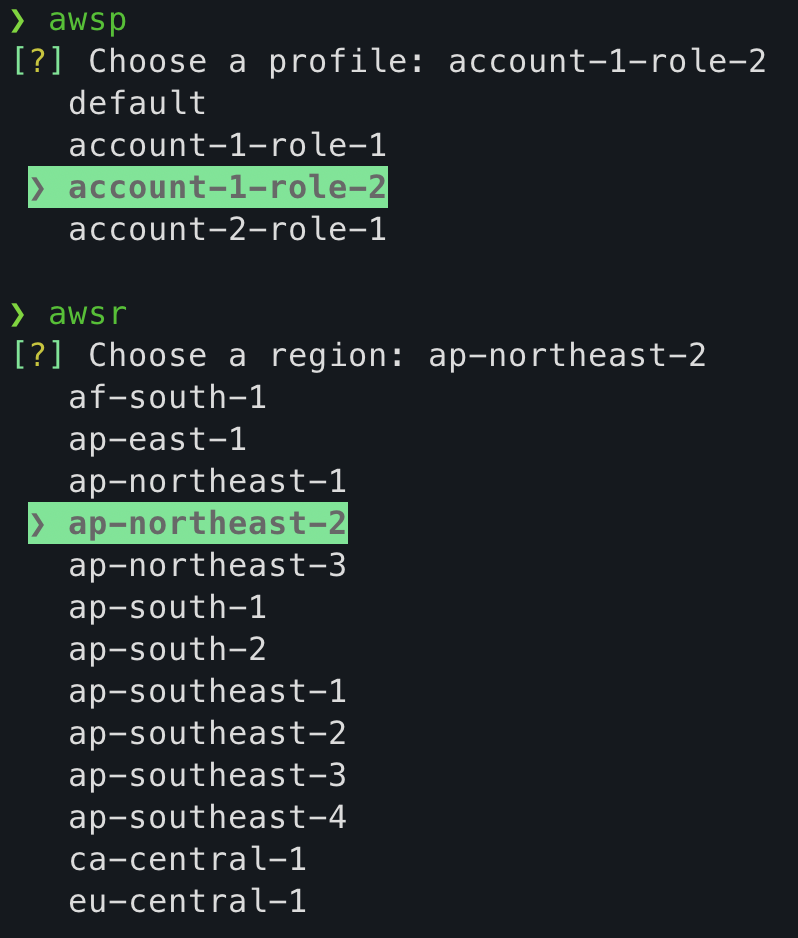
Use case of aws config-switch
A special of utility script to help easily switch profile and region
For Linux & Darwin (MacOS)
This works with 2 bash script, namely _awsp and _awsr
Post installing the app, create 2 aliases in .bashrc or .zshrc file.
## cloud fusion setup
alias awsp="source _awsp"
alias awsr="source _awsr"
Using the command without the aliases will have no effect
For Windows
This works with 2 powershell script, namely _awsp.ps1 and _awsr.ps1
Post installing the app, create 2 aliases in $PROFILE (i.e. $HOME\Documents\PowerShell\Microsoft.PowerShell_profile.ps1) file.
## cloud fusion setup
Set-Alias awsp "_awsp.ps1"
Set-Alias awsr "_awsr.ps1"
Use case of gcp config-switch
Switches between gcloud configurations and compute/region, similar in spirit to aws config-switch.
Unlike the AWS version, this applies the change directly and globally via gcloud config configurations activate / gcloud config set compute/region rather than exporting env vars into the calling shell. That means the two aliases below are a convenience, not a requirement — running the commands directly also works — but also that there's no per-shell isolation: the change is visible to every shell and every tool that reads gcloud config (Terraform, Docker, other terminals, etc.).
Requires the gcloud CLI on PATH and an authenticated account.
cloud-fusion gcp config-switch configuration
cloud-fusion gcp config-switch region
configurationalso updates the application-default credentials quota project (gcloud auth application-default set-quota-project) to match the chosen configuration's project. Pass--skip-quota-projectto skip this.regionlists regions via the Compute Engine API, so it needs a project set on the active configuration with that API enabled.
For Linux & Darwin (MacOS)
This works with 2 bash script, namely _gcpc and _gcpr
Post installing the app, create 2 aliases in .bashrc or .zshrc file.
## cloud fusion setup
alias gcpc="source _gcpc"
alias gcpr="source _gcpr"
For Windows
This works with 2 powershell script, namely _gcpc.ps1 and _gcpr.ps1
Post installing the app, create 2 aliases in $PROFILE (i.e. $HOME\Documents\PowerShell\Microsoft.PowerShell_profile.ps1) file.
## cloud fusion setup
Set-Alias gcpc "_gcpc.ps1"
Set-Alias gcpr "_gcpr.ps1"
Migrating from aws-fusion
aws-fusion has been renamed to cloud-fusion to make room for other cloud providers alongside AWS. AWS commands now live under an aws sub-command:
pip uninstall aws-fusion
pip install cloud-fusion
| Before | After |
|---|---|
aws-fusion init |
cloud-fusion aws init |
aws-fusion open-browser |
cloud-fusion aws open-browser |
aws-fusion iam-user-credentials |
cloud-fusion aws iam-user-credentials |
aws-fusion config-switch |
cloud-fusion aws config-switch |
If you use the aws fusion alias or any credential_process line in ~/.aws/config, re-run cloud-fusion aws init and update the credential_process commands above.
License
This project is licensed under the Mozilla Public License 2.0 - see the LICENSE file for details.
1 maintainer

Metadata
1 maintainer
Release files for cloud-fusion 2.3.3
For a detailed explanation of source distributions (sdists) and built distributions (wheels), please see the package formats documentation.
Source distribution (sdist)
| File | Size | Uploaded | |
|---|---|---|---|
| cloud_fusion-2.3.3.tar.gz | 18.1 kB | Details |
Built distribution (wheel)
| File | Interpreter | ABI | Platform | Reset |
|---|---|---|---|---|
| cloud_fusion-2.3.3-py3-none-any.whl | Python 3 | none | any | Details |
Total release size: 42.3 kB
Release files / cloud_fusion-2.3.3.tar.gz
| Download URL | cloud_fusion-2.3.3.tar.gz |
|---|---|
| Size | 18.1 kB |
| Tags | Source |
|
SHA-256 checksum How to use checksums |
0f95e7a3845a9497c9b2eb7ca2e3a6656e769cf305d9cc5920fc6616a34024e6
|
|
BLAKE2b-256 checksum How to use checksums |
a6d3f3dba99812488fed125975e41cfe73be4644a164b6548b77ee26fc6ef86b
|
| Upload date | |
|
Uploaded using Trusted Publishing? What is trusted publishing? |
Yes |
| Uploaded via |
twine/7.0.0 CPython/3.13.14
|
Provenance
Provenance describes where a file came from. On PyPI, provenance is shared via attestations, which provide a verifiable record of the build or publishing details. View details, limitations and caveats.


PyPI Publish Attestation
PyPI verified that this artifact, at this checksum, originated from the publisher listed below.
Signed by GitHub Actions, verified by PyPI on Aug 13, 2026.
Transparency logRelease files / cloud_fusion-2.3.3-py3-none-any.whl
| Download URL | cloud_fusion-2.3.3-py3-none-any.whl |
|---|---|
| Size | 24.2 kB |
| Tags | Python 3 |
|
SHA-256 checksum How to use checksums |
e56b0b0877d1e502d353858515dbde42cdeeed2518c2f1f6145c06e4f82bc413
|
|
BLAKE2b-256 checksum How to use checksums |
8cf949299a6c13ecade675c9b78c56854c39e606728954f19327e08c8543764b
|
| Upload date | |
|
Uploaded using Trusted Publishing? What is trusted publishing? |
Yes |
| Uploaded via |
twine/7.0.0 CPython/3.13.14
|
Provenance
Provenance describes where a file came from. On PyPI, provenance is shared via attestations, which provide a verifiable record of the build or publishing details. View details, limitations and caveats.
PyPI Publish Attestation
PyPI verified that this artifact, at this checksum, originated from the publisher listed below.
Signed by GitHub Actions, verified by PyPI on Aug 13, 2026.
Transparency log













